
Brolly Academy | Embedded Systems
RTOS in Embedded Systems
What It Is, Types, Core Concepts and a FreeRTOS Example (2026)
A plain-English guide to the real time operating system for embedded systems: what an RTOS is, hard, firm and soft real time, how it compares with Linux and a bare-metal loop, the core concepts every interviewer asks about, the popular RTOS options in 2026, and your first two-task FreeRTOS program.
What an RTOS is in embedded systems: hard vs soft real time, tasks, scheduler, semaphores, queues, priority inversion, FreeRTOS and Zephyr, with examples.
By Brolly Academy Team · Brolly Academy · Updated 24 October 2026
Table of Contents
1. What is an RTOS in embedded systems?
2. Hard, firm and soft real time: the types of RTOS
3. RTOS vs general-purpose OS vs bare-metal superloop
4. Core RTOS concepts you must know
5. RTOS scheduling methods: priority, round robin, RMS and EDF
6. Popular RTOS examples in 2026
7. Applications of RTOS by industry
8. Advantages and disadvantages of an RTOS
9. When should you use an RTOS?
10. A simple FreeRTOS example: two tasks
11. Common RTOS mistakes beginners make
Quick answer
An RTOS (real time operating system) is a small operating system that runs on a microcontroller and makes sure the most important job always runs on time, every time. It splits your firmware into separate tasks, gives each task a priority, and uses a scheduler to switch between them in a predictable way. That predictability, called determinism, is the main reason engineers use an RTOS in products such as motor controllers, medical devices, car electronics and IoT sensors.
- What it is: a tiny, predictable OS kernel for microcontrollers and small processors
- What it gives you: tasks, priorities, preemption, timing, and safe ways for tasks to share data
- Popular examples: FreeRTOS, Zephyr, Eclipse ThreadX, VxWorks and QNX
- When you need one: several jobs with different deadlines running on one chip
- When you do not: a simple device with one main job and loose timing
Key takeaways
- "Real time" means predictable timing, not maximum speed. A late answer counts as a wrong answer in a hard real-time system.
- Real-time systems are usually grouped as hard, firm and soft, based on what happens when a deadline is missed.
- The RTOS ideas you must know are tasks, the scheduler, priorities, preemption, context switching, the tick, semaphores, mutexes, queues and priority inversion.
- FreeRTOS is MIT licensed and maintained by AWS, and its latest LTS release listed on the official site is 202604.00-LTS (FreeRTOS, October 2026).
- Learn the RTOS only after your embedded C basics are solid, then practise on a real board with two or three tasks.
1. What is an RTOS in embedded systems?
Short answer: An RTOS is an operating system built for timing guarantees. It runs on a microcontroller, divides the firmware into tasks, and always runs the highest-priority task that is ready, so time-critical work is never delayed by less important work.
Let us start with three words you will see again and again.
- Microcontroller (MCU): a single chip with a processor, memory and peripherals such as timers and serial ports. Arm describes its Cortex-M family as "optimized for cost and energy-efficient microcontrollers" built for low-latency, deterministic operation (Arm M-profile architecture page, October 2026).
- Firmware: the software stored in the chip's flash memory that controls the device.
- RTOS: a real time operating system. It is the part of the firmware that decides which piece of code runs next and when.
If you are new to embedded systems as a whole, read our pillar guide on what embedded systems are first. It covers the definition, components and types, so this article can focus only on the RTOS.
The official FreeRTOS site describes FreeRTOS as a "real-time operating system for microcontrollers and small microprocessors" (FreeRTOS, October 2026). An RTOS is not a smaller Windows. It has no desktop and no file explorer. It is a kernel, the core scheduling code, plus services your own code calls.
What "real time" actually means
Many beginners think "real time" means "very fast". It does not. Real time means the system responds within a known, fixed time limit, called a deadline. A system that answers in 2 ms every single time is more "real time" than one that answers in 0.5 ms most of the time but sometimes takes 50 ms.
This property is called determinism. A deterministic system behaves the same way, with the same timing, every time the same event happens. An RTOS is designed so that you can calculate the worst case and trust it.
2. Hard, firm and soft real time: the types of RTOS
Short answer: Real-time systems are grouped by what happens when a deadline is missed. In hard real time, a missed deadline is a system failure. In firm real time, a late result is useless but the system survives. In soft real time, a late result is still useful but quality drops.
When people search for "types of RTOS", this is usually what they mean. Strictly, these are types of real-time requirements: the same kernel can run a hard, firm or soft real-time product.
In a hard real-time system, the answer must arrive before the deadline every time, under the worst possible load. An airbag that fires too late has failed, even if the calculation was correct. Such systems are tested against safety standards. Wind River, for example, lists DO-178C (avionics), IEC 61508 (industrial), IEC 62304 (medical) and ISO 26262 (automotive) among the standards VxWorks supports (Wind River, October 2026).
A firm system survives an occasional miss, but the late result is worthless: a video frame that misses its slot is simply skipped. A soft system still uses the late result, just with lower quality, like a smartwatch screen that updates a little late. Many consumer IoT products fall here.
You may also see RTOSes grouped by licence (open source or commercial), by kernel design (microkernel or monolithic) and by size. A microkernel keeps only the bare minimum inside the kernel and runs drivers as separate processes, which helps isolate faults.
3. RTOS vs general-purpose OS vs bare-metal superloop
Short answer: A bare-metal superloop is one endless loop with no OS. A general-purpose OS such as Linux or Windows is built for throughput and features. An RTOS sits in between: small like bare metal, but with tasks and priorities, and built for predictable timing rather than average speed.
"Bare metal" means your code runs directly on the hardware with no operating system at all. The classic bare-metal design is the superloop: main() sets up the hardware and then runs a while(1) loop that checks and handles each job in turn. Urgent events are handled by an ISR (interrupt service routine), a short function the hardware calls instantly when something happens, such as a byte arriving on the serial port.
A general-purpose OS (GPOS) such as Linux, Windows or Android is built for throughput, fairness and features, but it does not promise that a task will run within a fixed time.
RTOS vs embedded Linux
Embedded Linux is Linux trimmed and built for a specific board, often using tools such as the Yocto Project or Buildroot. It gives you networking, file systems, displays and huge open-source libraries. But it needs a processor with a memory management unit and much more RAM than a typical microcontroller has. Many real products use both: an RTOS on a microcontroller for the time-critical control loop, and Linux on a bigger processor for the user interface and cloud connection.
4. Core RTOS concepts you must know
Short answer: Every RTOS is built from the same ideas: tasks, a scheduler, priorities, preemption, context switching, a system tick, and tools for safe communication (semaphores, mutexes and queues). Priority inversion and priority inheritance are the most common interview topics.
These concepts are the same in FreeRTOS, Zephyr, ThreadX and commercial RTOSes. The function names change; the ideas do not.
Tasks (threads)
A task is an independent function that runs as if it had the CPU to itself. It usually has an endless loop inside it. Each task gets its own stack, a small area of RAM that holds its local variables and return addresses. Zephyr calls them threads; FreeRTOS calls them tasks. They mean the same thing here.
A task is always in one of a few states:
- Running: it is using the CPU right now (one task per core).
- Ready: it can run, but a higher or equal priority task is using the CPU.
- Blocked: it is waiting for something, such as a delay, a message or a semaphore.
- Suspended: it has been paused on purpose and will not run until resumed.
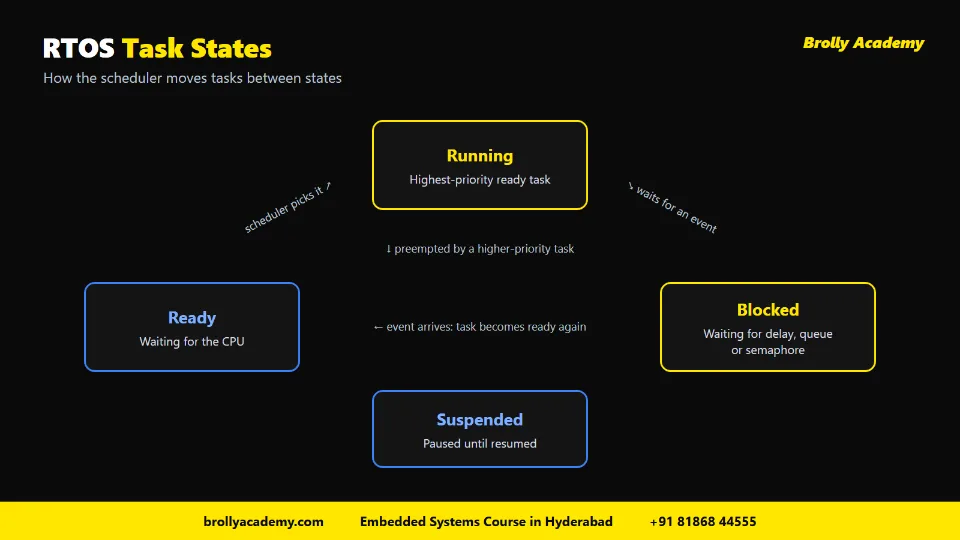
RTOS task states: the scheduler moves each task between running, ready, blocked and suspended.
The scheduler
The scheduler is the part of the kernel that picks which ready task runs next. Most RTOSes use a fixed-priority preemptive scheduler: the highest-priority ready task always runs. If two tasks share the same priority, many RTOSes take turns between them, which is called round robin or time slicing.
The scheduling methods section below compares the main algorithms, including rate monotonic and earliest deadline first.
Priorities and preemption
Each task gets a priority number when you create it. Preemption means that if a higher-priority task becomes ready (for example, because a sensor interrupt gave it data), the RTOS stops the lower-priority task immediately and runs the higher one. The lower task continues later from exactly where it stopped. This is the heart of real-time behaviour.
Context switching
A context switch is what happens when the RTOS moves the CPU from one task to another. It saves the current task's CPU registers and stack pointer, then loads the saved registers of the next task. Context switches are fast but not free, so avoid switching more often than needed.
The system tick
Most RTOSes use a hardware timer that interrupts the CPU at a fixed rate, for example every 1 ms. Each interrupt is a tick. The kernel uses ticks to count time, wake up tasks whose delay has ended and handle time slicing. In FreeRTOS, the tick rate is set by configTICK_RATE_HZ, and the macro pdMS_TO_TICKS converts milliseconds into ticks (FreeRTOS kernel source, projdefs.h, October 2026).
Interrupts and ISRs inside an RTOS
ISRs still exist when you use an RTOS. Keep them short: read the hardware, hand the data to a task through a queue or semaphore, and leave. Most RTOSes give special "from ISR" versions of their functions that are safe inside an interrupt.
Semaphores
A semaphore is a signal. A binary semaphore has two states, available or taken, and is often used by an ISR to say "data is ready" to a waiting task. A counting semaphore counts events or free resources, such as how many buffer slots are empty.
Mutexes
A mutex (mutual exclusion) is a lock that protects a shared resource, such as a UART port or a global data structure. A task takes the mutex, uses the resource, and gives it back. Only the task that took the mutex should give it back. The key difference from a binary semaphore is ownership, and, in many RTOSes, priority inheritance. In the FreeRTOS kernel source, the binary and counting semaphore functions are documented as not using priority inheritance, and the documentation points you to xSemaphoreCreateMutex() for an object that does (FreeRTOS kernel source, semphr.h, October 2026).
Queues
A queue is a safe, first-in-first-out mailbox for passing data between tasks, or from an ISR to a task. Instead of sharing a global variable, the sensor task sends a reading into the queue and the display task receives it. The receiving task can block on the queue, so it uses no CPU until data arrives. Queues are the cleanest way to share data in an RTOS design.
Priority inversion and priority inheritance
Priority inversion is a classic bug. Imagine three tasks:
- A low-priority task takes a mutex to use the SPI bus.
- A high-priority task wakes up and also needs the SPI bus, so it blocks, waiting for the mutex.
- A medium-priority task, which does not need the bus at all, becomes ready and preempts the low-priority task.
Now the high-priority task is stuck behind the medium-priority one, because the low task cannot run to release the mutex. The priorities are effectively upside down.
Priority inheritance fixes this. While the low-priority task holds a mutex that a higher-priority task wants, the RTOS temporarily raises the low task to the high task's priority. It finishes quickly, releases the mutex and drops back to its normal priority. This is why you use a mutex, not a plain binary semaphore, to protect shared resources.
5. RTOS scheduling methods: priority, round robin, RMS and EDF
Short answer: Most RTOSes use preemptive priority scheduling, with round robin among tasks that share a priority. Rate monotonic scheduling (RMS) and earliest deadline first (EDF) are two classic ways to decide priorities so every deadline is met. Latency and jitter tell you how well the timing actually holds up.
A scheduling method is the rule the scheduler uses to pick the next task. Here are the four you will hear about most, in an exam hall and in an interview.
Preemptive priority and round robin
Preemptive priority scheduling is what the core concepts section described: the most urgent ready task always gets the CPU. Round robin only decides between tasks of equal priority. The Zephyr documentation, for example, explains that its scheduler divides time into slices measured in system clock ticks, with a configurable slice size, and that at the end of each slice a preemptible thread yields to another ready thread of the same priority (Zephyr Project scheduling documentation, October 2026).
Rate monotonic scheduling
RMS is a simple rule for setting fixed priorities on periodic tasks. Suppose a motor loop runs every 1 ms, a sensor task every 10 ms and a display task every 100 ms. Under RMS the motor loop gets the highest priority and the display the lowest. Engineers like RMS because it fits a normal fixed-priority RTOS and because the worst case can be checked on paper before any code runs.
Earliest deadline first
EDF changes priorities while the system runs: whichever task has the nearest deadline goes first. In theory it can keep the CPU busier than fixed priorities and still meet deadlines, but behaviour under overload is harder to predict, so most microcontroller products stay with fixed priorities. Zephyr shows a practical middle path: with CONFIG_SCHED_DEADLINE enabled, a thread with an earlier deadline wins among threads of equal static priority (Zephyr Project scheduling documentation, October 2026).
Latency and jitter
These two words measure how "real time" your design really is.
- Latency: the time between an event, such as an interrupt, and the start of the response. Interrupt latency and task response time are both forms of it.
- Jitter: the variation in that timing from one run to the next. A task meant to start every 1 ms that sometimes starts a little early and sometimes a little late has jitter.
To keep jitter low, give time-critical tasks a high priority, keep ISRs and critical sections (code that runs with interrupts disabled) short, and use xTaskDelayUntil() rather than vTaskDelay() for periodic FreeRTOS tasks.
For more detail on preemptive vs cooperative scheduling, fixed vs dynamic priority and each algorithm, read our guide to task scheduling in embedded systems.
6. Popular RTOS examples in 2026
Short answer: The RTOS names you will meet most often are FreeRTOS, Zephyr and Eclipse ThreadX (open source), and VxWorks and QNX (commercial). Each has a different owner, licence and sweet spot.
Here is a summary based on each project's official page, checked in October 2026.
FreeRTOS
FreeRTOS is the RTOS most students learn first. The official site says it is "maintained by AWS for the benefit of the FreeRTOS community", is released under the MIT licence, and lists 202604.00-LTS as its latest long-term support release (FreeRTOS, October 2026). LTS means a version that receives fixes for a longer period, which matters for products that ship for years.
Zephyr
The Zephyr documentation describes it as a "small-footprint kernel designed for use on resource-constrained and embedded systems", released under Apache 2.0, with support for architectures including Arm Cortex-M, Cortex-A and Cortex-R, x86, RISC-V, Xtensa and ARC (Zephyr Project documentation, October 2026). Zephyr feels more like a full platform than a bare kernel, with its own build system and drivers, so the learning curve is steeper than FreeRTOS.
Eclipse ThreadX
Microsoft contributed Azure RTOS to the Eclipse Foundation, where it became Eclipse ThreadX. Its site calls it "The First Open Source RTOS Certified for Safety-Critical Applications" and notes that the ThreadX Alliance launched on 8 October 2024 (Eclipse ThreadX, October 2026). The code is MIT licensed on the eclipse-threadx GitHub repository.
VxWorks and QNX
VxWorks from Wind River is a commercial RTOS. Wind River calls it "The World's #1 Real-Time Operating System", a vendor claim, and says it has been used in "600+" safety programmes. QNX, a division of BlackBerry Limited, describes its product as a "safety-ready microkernel RTOS platform" and claims use in "275+ Million vehicles", again a vendor claim (QNX, October 2026).
Which RTOS should you learn first?
Start with FreeRTOS. It is small, free, well documented and runs on cheap boards, and the concepts carry straight over to every other RTOS. Then try Zephyr to see a fuller platform. Learn VxWorks or QNX on the job if your employer uses them, since commercial licences make personal practice harder.
7. Applications of RTOS by industry
Short answer: RTOSes run inside cars, medical devices, factory machines, aircraft, drones, wearables and IoT products. The common thread is a device that must react within a fixed time while doing several other jobs at once.
The standards in the table are the same ones Wind River lists for VxWorks, which is why safety-critical industries often choose RTOSes with certification evidence. QNX, for example, claims its RTOS platform is used in "275+ Million vehicles", a vendor claim covered in the examples section above.
Two patterns repeat across almost every industry:
- Control on an RTOS, features on Linux. The time-critical loop runs on a microcontroller with an RTOS, while a bigger processor running Linux handles the screen, apps and cloud link.
- Many small RTOS nodes. A modern car or factory line has many separate controllers, each running its own small firmware and talking over a bus such as CAN.
Want to see these ideas in real devices? Our list of embedded systems examples walks through 25 everyday products and marks which ones are real time.
8. Advantages and disadvantages of an RTOS
Short answer: An RTOS gives you predictable timing, clean task-based code, efficient CPU use and ready-made services. The price is extra memory, some switching overhead, harder debugging and new kinds of bugs. Weigh both before you decide.
Advantages of an RTOS
Disadvantages of an RTOS
Security and safety
An RTOS does not make a device secure on its own. Good practice includes turning on stack overflow checks, using the memory protection unit (MPU, hardware that stops one task writing into another task's memory) where the chip has one, and shipping only signed firmware updates. On newer Cortex-M chips, Armv8-M adds TrustZone to separate secure and non-secure code (Arm M-profile architecture page, October 2026). For safety products, teams pick an RTOS with certification evidence, such as Eclipse ThreadX, which its site describes as certified for safety-critical applications.
9. When should you use an RTOS?
Short answer: Use an RTOS when your device has several jobs with different timing needs, when one job must never be delayed by another, or when your connectivity stack expects one. Skip it for small, single-purpose devices where a simple loop is easier to test.
Use this checklist. If you tick three or more, an RTOS is probably worth it.
- Your device runs three or more independent activities, such as sensing, control, display and communication.
- At least one activity has a strict deadline that must be met while others are busy.
- You use Wi-Fi, Bluetooth, TCP/IP or USB stacks, which are often written to run on top of an RTOS.
- Several engineers work on the same firmware and need clean boundaries between modules.
- The product will grow with new features over the years.
- You need power saving that sleeps the CPU whenever no task is ready.
Stay with bare metal when the device does one simple job, such as a basic timer or LED controller, or when the microcontroller has very little RAM, because each task needs its own stack. Remember that an RTOS also adds context-switch overhead and new bug types, such as race conditions, deadlocks and stack overflows. Make the trade on purpose.
10. A simple FreeRTOS example: two tasks
Short answer: In FreeRTOS you write each task as a function with an endless loop, create it with xTaskCreate(), give it a priority, and start the scheduler with vTaskStartScheduler(). vTaskDelay() blocks a task for a number of ticks so other tasks can run.
Here is a minimal example with two tasks: one blinks an LED every 500 ms, and one reads a sensor every 100 ms. It targets the FreeRTOS kernel API, which needs a FreeRTOSConfig.h and a port for your chip. The LED and sensor lines are comments, because those calls depend on your board's HAL (hardware abstraction layer, the vendor library that wraps the chip's registers).
#include "FreeRTOS.h"
#include "task.h"
static void vLedTask(void *pvParameters)
{
(void)pvParameters;
for (;;) {
/* Toggle the LED using your board's HAL here. */
vTaskDelay(pdMS_TO_TICKS(500));
}
}
static void vSensorTask(void *pvParameters)
{
(void)pvParameters;
for (;;) {
/* Read the sensor using your board's HAL here. */
vTaskDelay(pdMS_TO_TICKS(100));
}
}
int main(void)
{
xTaskCreate(vLedTask, "LED", configMINIMAL_STACK_SIZE, NULL, tskIDLE_PRIORITY + 1, NULL);
xTaskCreate(vSensorTask, "Sensor", configMINIMAL_STACK_SIZE, NULL, tskIDLE_PRIORITY + 2, NULL);
vTaskStartScheduler();
for (;;) { }
}
What each part does
- The task functions take a void pointer and never return. Each has its own endless loop.
- xTaskCreate() takes the task function, a name for debugging, the stack depth, a parameter, the priority and an optional handle, and returns pdPASS on success (FreeRTOS kernel source, task.h, October 2026).
- Priorities: tskIDLE_PRIORITY is the lowest. The sensor task has a higher priority, so if both are ready together, it runs first.
- vTaskDelay(pdMS_TO_TICKS(500)) blocks the LED task for about 500 ms. A blocked task uses no CPU.
- vTaskStartScheduler() hands control to the RTOS and normally never returns. The loop after it runs only if the scheduler could not start, usually for lack of heap memory.
In real projects, check the return value of xTaskCreate(), and use xTaskDelayUntil() for tasks that must run at an exact period. vTaskDelay() counts from the moment it is called, so the task's own work time adds drift.
If the C syntax here feels new, start with our guide to embedded C programming. It covers volatile, pointers to registers, bit manipulation and ISRs, which you need before an RTOS makes sense.
11. Common RTOS mistakes beginners make
Short answer: The most common mistakes are stacks that are too small, too many tasks, doing heavy work inside ISRs, sharing global variables without protection, using a semaphore where a mutex is needed, and busy-waiting instead of blocking.
- Stack too small. An overflow silently corrupts memory. Turn on stack overflow checking during development and measure real stack use.
- Too many tasks. Each task costs RAM and adds context switches. Group related work into one task.
- Busy-waiting. A loop that waits for a flag burns CPU and starves lower-priority tasks. Block on a semaphore, queue or delay instead.
- Heavy work in an ISR. Capture the data, signal a task, return. Use only the ISR-safe versions of RTOS calls inside interrupts.
- Unprotected shared data. Two tasks writing the same global variable will eventually corrupt it. Use a queue or a mutex.
- Semaphore instead of mutex. For protecting a resource, use a mutex so you get ownership and priority inheritance.
- Wrong priorities. If every task is high priority, none is. Rank tasks by deadline: the shorter the deadline, the higher the priority.
- No timeouts. Waiting forever on a queue or mutex hides bugs, including deadlocks, where two tasks each wait for a lock the other holds. Use sensible timeouts.
12. How to learn RTOS step by step
Short answer: Get comfortable with embedded C and interrupts, learn the concepts on paper, then build small FreeRTOS projects on a real Cortex-M board, adding one concept at a time: tasks, delays, queues, semaphores, mutexes and finally a small multi-task project.
- Embedded C and bare metal first. Blink an LED, read a button, use a timer interrupt and send text over UART (a simple two-wire serial port). You need to understand ISRs and volatile before tasks make sense.
- Read the concepts. Learn task states, preemption, priorities, tick, semaphores, mutexes and queues from the official FreeRTOS documentation.
- Two tasks. Build the example above on your board and watch the LED and sensor timing.
- Add a queue. Send sensor readings from one task to another that prints them over UART.
- Add an ISR. Let a button interrupt give a semaphore that wakes a task.
- Share a resource. Protect the UART with a mutex so two tasks can print without mixing their output.
- Break it on purpose. Shrink a stack until it overflows, or create a priority inversion, then fix it. This teaches more than any book.
- Build a project. A data logger, a small motor controller or an IoT sensor node with three or four tasks is a strong portfolio piece.
Boards to practise on
Any Arm Cortex-M board with a FreeRTOS port is fine. The Raspberry Pi RP2350 chip has dual Cortex-M33 or Hazard3 cores at 150 MHz with 520 kB of on-chip SRAM (Raspberry Pi datasheet, October 2026), and the Arduino UNO R4 Minima uses a Renesas RA4M1 Cortex-M4 at 48 MHz with 32 kB RAM (Arduino, October 2026). More RAM means room for more task stacks.
RTOS in interviews
Expect questions such as "what is priority inversion", "mutex vs semaphore" and "how do you share data between an ISR and a task". We collect these, with model answers, in our list of embedded systems interview questions.
13. How Brolly Academy helps
Short answer: Brolly Academy's Embedded Systems course covers RTOS as part of a 3-month, 80+ hour programme, alongside embedded C, ARM, communication protocols and IoT, with live projects and placement assistance.
The Embedded Systems Course in Hyderabad at Brolly Academy is built around the path described in this article. According to the course page (checked October 2026):
- Duration and structure: 3 months and "80+ hours of expert-led training". Month 1 covers microcontrollers and embedded C; Month 2 covers RTOS, IoT, I2C, CAN, SPI and UART; Month 3 covers automotive embedded and a capstone project.
- Syllabus: 31 modules, including a dedicated RTOS module, ARM architecture and peripherals, Linux kernel and device drivers, and testing and debugging.
- Hands-on work: projects include an IoT automation system using I2C, SPI, UART and RTOS, plus an embedded Linux device driver and an automotive embedded controller. Tools listed include Keil µVision, PlatformIO and Zephyr OS.
- Hardware: ARM Cortex, STM32, Arduino and Raspberry Pi.
- Modes: classroom and online, with weekday and weekend batches, and free 3-day demo classes before you enrol.
- Fees: Video Recording ₹15,000, Online Course ₹40,000 and Classroom Training ₹45,000, with EMI available.
- Career support: placement assistance, resume and LinkedIn help, and mock interviews.
The course is taught by Mr. Vamsi Raju, who the page describes as an "Embedded Systems Specialist & Hardware Architect" with "15+ years in embedded systems". C is taught from the basics, so beginners can join.
Learn RTOS on real hardware, not just slides
Brolly Academy's Embedded Systems course takes you from embedded C to multi-task RTOS projects on ARM boards in 3 months, with live classes, labs and placement support. Book a free 3-day demo class and see how tasks, queues and mutexes work on a real board before you enrol.
Frequently asked questions
What is RTOS in embedded systems?
An RTOS in embedded systems is a small operating system that runs on a microcontroller and guarantees predictable timing. It splits firmware into tasks, gives each task a priority, and its scheduler always runs the highest-priority ready task. This ensures time-critical work, such as a control loop or a safety check, is never delayed by less important work like logging or display updates.
What is the full form of RTOS?
RTOS stands for real time operating system. "Real time" here means the system responds within a known, fixed deadline every time, not that it is simply fast. An RTOS is designed for determinism, so engineers can calculate the worst-case response time of each task and trust that the device will meet it under full load.
What are the types of RTOS?
RTOS types are usually described as hard, firm and soft real time, based on what a missed deadline means. In hard real time a miss is a failure, in firm real time the late result is discarded, and in soft real time the late result is still used but quality drops. RTOSes can also be grouped by licence, kernel design or size.
What is the difference between hard and soft real-time systems?
In a hard real-time system, missing a deadline is a system failure that can cause damage or injury, as in an airbag controller. In a soft real-time system, a late result is still useful and only quality suffers, as in audio streaming or a smartwatch screen. Hard real-time systems need much stricter design, worst-case analysis and testing.
What are some examples of RTOS?
Popular RTOS examples in 2026 are FreeRTOS, Zephyr and Eclipse ThreadX, which are open source, and VxWorks and QNX, which are commercial. FreeRTOS is MIT licensed and maintained by AWS, Zephyr uses Apache 2.0, ThreadX is now under the Eclipse Foundation, VxWorks comes from Wind River, and QNX is a division of BlackBerry.
What is the difference between RTOS and a general-purpose OS?
A general-purpose OS such as Linux or Windows is built for throughput, fairness and rich features, but it does not promise that a task will run within a fixed time. An RTOS is built for deterministic, priority-based timing and uses far less memory. A GPOS suits gateways and screens, while an RTOS suits motor control, medical and automotive controllers.
What is the difference between RTOS and bare metal?
Bare metal means your code runs directly on the hardware with no operating system, usually as one endless superloop plus interrupt service routines. An RTOS adds tasks, priorities and a scheduler on top. Bare metal is simpler and smaller for single-purpose devices, while an RTOS is easier to manage when several jobs with different deadlines share one chip.
Is RTOS better than embedded Linux?
Neither is better; they solve different problems. An RTOS runs on small microcontrollers with kilobytes of RAM and gives predictable timing. Embedded Linux needs a bigger processor with a memory management unit and much more RAM, but offers networking, file systems and large libraries. Many products use both, with an RTOS for real-time control and Linux for the user interface.
Is FreeRTOS open source and free?
Yes. FreeRTOS is released under the MIT licence, which lets you use it in personal and commercial products. The official site says it is maintained by AWS for the benefit of the FreeRTOS community and lists 202604.00-LTS as its latest long-term support release as of October 2026. Long-term support releases get fixes for a longer period.
What is Zephyr RTOS?
Zephyr is an open-source RTOS that its documentation describes as a small-footprint kernel for resource-constrained and embedded systems. It is released under the Apache 2.0 licence and supports many architectures, including Arm Cortex-M, Cortex-A and Cortex-R, x86, RISC-V, Xtensa and ARC. It comes with its own build system and drivers, so it feels like a full platform, and its learning curve is steeper than FreeRTOS.
What is a task in RTOS?
A task is an independent function, usually with an endless loop, that runs as if it had the CPU to itself. Each task has its own stack and a priority. A task is always in one state: running, ready, blocked or suspended. Zephyr calls tasks threads, but the idea is the same across every RTOS.
What is a scheduler in RTOS?
The scheduler is the part of the RTOS kernel that decides which ready task runs next. Most RTOSes use a fixed-priority preemptive scheduler, which always runs the highest-priority ready task. When two tasks share the same priority, many RTOSes take turns between them, which is called round robin or time slicing.
What is context switching in RTOS?
A context switch is how the RTOS moves the CPU from one task to another. It saves the current task's CPU registers and stack pointer, then restores the saved registers of the next task so it continues where it left off. Context switches are fast but not free, so a good design avoids switching far more often than needed.
What is the difference between mutex and semaphore in RTOS?
A semaphore is a signal, often given by an interrupt to wake a waiting task, or a counter of events or free resources. A mutex is a lock that protects a shared resource and has an owner, so only the task that took it should release it. In many RTOSes, including FreeRTOS, mutexes also use priority inheritance while plain semaphores do not.
What is priority inversion in RTOS?
Priority inversion happens when a high-priority task waits for a resource held by a low-priority task, and a medium-priority task keeps preempting the low one. The high-priority task ends up stuck behind the medium one, so priorities are effectively upside down. The usual fix is priority inheritance: the RTOS temporarily raises the low task to the waiting task's priority, so it finishes and releases the mutex quickly.
What scheduling algorithms are used in RTOS?
Most RTOSes use preemptive priority scheduling, where the highest-priority ready task always runs, plus round robin time slicing among tasks of equal priority. Rate monotonic scheduling is a fixed-priority method that gives higher priority to tasks with shorter periods. Earliest deadline first is a dynamic method that runs the task whose deadline is nearest. Zephyr, for example, offers an optional earliest-deadline-first mode for threads of equal priority.
What is jitter in RTOS?
Jitter is the variation in timing from one run of a task to the next. If a task should start every 1 ms but sometimes starts a little early and sometimes a little late, that spread is jitter. Latency is the time between an event and the start of the response. You reduce jitter with correct priorities, short ISRs and critical sections, and xTaskDelayUntil() for periodic tasks.
What is a queue in RTOS?
A queue is a safe, first-in-first-out mailbox for passing data between tasks, or from an interrupt to a task. One task sends a value into the queue and another receives it, so you avoid sharing unprotected global variables. A task waiting on an empty queue is blocked and uses no CPU until data arrives.
Why is RTOS used in embedded systems?
RTOS is used in embedded systems to meet deadlines reliably when several jobs share one microcontroller. It lets you write each job as a separate task, rank tasks by urgency, and share data safely through queues and mutexes. It also suits Wi-Fi, Bluetooth and TCP/IP stacks, keeps large firmware organised, and can save power by sleeping when no task is ready.
What are the advantages of RTOS?
The main advantages of an RTOS are deterministic timing, priority-based response to urgent events and modular firmware split into separate tasks. Tasks block instead of busy-waiting, so the CPU is used efficiently and can sleep when nothing is ready. You also get ready-made queues, semaphores, mutexes and software timers, support for Wi-Fi, Bluetooth and TCP/IP stacks, and task code that is easier to port to a new chip.
What are the disadvantages of RTOS?
An RTOS uses extra flash and RAM, because the kernel needs space and every task needs its own stack. Context switches add some CPU overhead, and multitasking brings new bugs such as race conditions, deadlocks, priority inversion and stack overflows that are harder to debug. There is also a learning curve, and commercial or safety-certified RTOSes add licence and certification costs.
What are the applications of RTOS?
RTOSes are used wherever a device must react on time while doing other work. Common applications include automotive ECUs for braking, airbags and battery management, medical devices such as infusion pumps and patient monitors, industrial PLCs, motor drives and robots, avionics, drones, smartwatches and fitness bands, and IoT sensor nodes and smart home devices that run Wi-Fi or Bluetooth stacks.
When should you not use an RTOS?
You should skip an RTOS when your device does one simple job with loose timing, such as a basic timer or LED controller. You should also avoid it on microcontrollers with very little RAM, because every task needs its own stack. In these cases a bare-metal superloop with interrupts is smaller, simpler and easier to test.
Which RTOS should a beginner learn first?
A beginner should usually learn FreeRTOS first. It is small, free under the MIT licence, well documented and runs on low-cost Arm Cortex-M boards. The concepts of tasks, priorities, queues, semaphores and mutexes carry over directly to Zephyr, ThreadX and commercial RTOSes. After FreeRTOS, Zephyr is a good next step to see a fuller platform.
Does Brolly Academy's embedded course teach RTOS?
Yes. Brolly Academy's 3-month Embedded Systems course in Hyderabad covers RTOS in Month 2, alongside IoT and protocols such as I2C, CAN, SPI and UART. The 31-module syllabus includes a dedicated RTOS module, and one listed project is an IoT automation system using I2C, SPI, UART and RTOS. Free 3-day demo classes are available before you enrol.
Learn with Brolly Academy
Review the syllabus, practical projects and batch timings, and book a free demo before you enrol.
Related Articles
Continue Your Learning
Embedded Systems Course in Hyderabad
3 months and 80+ hours of hands-on training in embedded C, ARM Cortex, STM32, RTOS, communication protocols and IoT, with capstone projects.
View CourseIoT Training in Hyderabad
Build connected devices: sensors, microcontrollers, wireless protocols and cloud dashboards for real Internet of Things projects.
View CourseVLSI Training in Hyderabad
Learn digital design and chip design flows for VLSI careers, a natural next step for ECE students interested in hardware.
View Course