
Brolly Academy | Embedded Systems
Embedded C Programming
A Beginner Guide to Embedded Systems with C: Registers, Bits, volatile and Interrupts (2026)
A plain-English beginner tutorial on embedded systems with C: how embedded C differs from the C you learnt in college, the toolchain, fixed-width types, bit manipulation, volatile, registers, interrupts, your first LED blink program, MISRA C, and how to practise on a real board.
Learn embedded C programming step by step: how it differs from normal C, toolchain, stdint types, bit manipulation, volatile, registers and interrupts.
By Brolly Academy Team · Brolly Academy · Updated 24 October 2026
Table of Contents
1. What is embedded C programming?
2. Embedded C vs normal C: the key differences
3. Structure of an embedded C program
4. Why C still dominates firmware
5. Advantages and limitations of embedded C
6. The embedded C toolchain: from code to chip
7. Data types and fixed-width integers (stdint.h)
8. Bit manipulation: set, clear, toggle and test
9. volatile, const and memory-mapped registers
10. 8051 vs ARM Cortex-M: the same idea in two styles
12. Your first program: LED blink at register level and HAL level
13. MISRA C and good coding practice
14. Common mistakes beginners make in embedded C
15. How to practise embedded C: boards, tools and a 6-week plan
16. Six embedded C practice exercises with expected outcomes
Quick answer
Embedded C programming means using the C language to write firmware that runs directly on a microcontroller and controls real hardware such as LEDs, sensors, motors and communication ports. It is the same C you already know, used with extra habits: fixed-width types, bit operations on registers, the volatile keyword, interrupt handlers and a cross compiler. Learning it is the first real step into embedded systems.
- Language: standard C plus vendor headers, with no operating system underneath in most small projects
- Core skills: stdint.h types, bit masks, pointers to registers, volatile, interrupts
- Toolchain: cross compiler, linker script, startup code, flashing and debugging through a probe
- Good practice: a coding standard such as MISRA C, careful testing on real hardware
- Practice kit: a low-cost board such as an Arduino UNO R4 Minima or a Raspberry Pi Pico 2
Key takeaways
- Embedded C is standard C used under tight memory, timing and hardware limits. WG14 lists C23 as the current C standard and also publishes a technical report called "Embedded C" (TR 18037) (WG14, October 2026).
- Every embedded C program follows the same skeleton: includes, configuration, initialisation, an endless super loop and interrupt handlers.
- Fixed-width types, bit manipulation, volatile registers and interrupts separate firmware from desktop code.
- MISRA C:2025, published in March 2025, is the current version of the best-known safety coding guideline for C (MISRA, October 2026).
- Learn by doing: blink an LED at register level, read a button with an interrupt, then send data over UART on a real board.
1. What is embedded C programming?
Short answer: Embedded C programming is writing C code for an embedded system, a computer built into a product to do one job, so that the code can read inputs, make decisions and drive outputs on a microcontroller.
An embedded system is a small computer hidden inside a bigger product, such as a washing machine, a car's airbag controller or a fitness band. For definitions, types and examples, read our pillar guide on what embedded systems are. Here we focus on the code.
At the heart of most embedded systems is a microcontroller. A microcontroller is a single chip that holds a processor, flash memory for the program, RAM for data and peripherals such as timers, ADCs and communication ports. The program stored in that flash is called firmware. Firmware is software that lives permanently inside a device and starts running the moment power comes on.
Embedded C is the most common way to write that firmware. Instead of printing to a screen or opening files, your code switches pins to light an LED, reads sensors, reacts to a button press within microseconds, talks over UART, SPI or I2C, and runs forever in a loop, because a device has no "exit" button.
Embedded C is not a different language. WG14, the ISO working group that maintains C, states that C23 is the current C standard, adopted by ISO and IEC in 2024, and it lists a separate technical report, TR 18037, titled Embedded C (WG14, October 2026). In daily work, though, "embedded C" simply means standard C written for microcontrollers, plus the chip vendor's header files and libraries.
2. Embedded C vs normal C: the key differences
Short answer: The syntax is the same, but embedded C runs on a tiny chip with no operating system, very little memory and real hardware attached, so the way you write and test code changes completely.
College C programs use scanf, printf and return 0. On a microcontroller almost all of that changes.
In practice, printf and malloc are often avoided, a wrong register bit fails silently, and you debug with a probe or logic analyser rather than print statements.
Bare-metal programming means your code runs directly on the chip with no operating system, usually as one big super loop. The other style uses an RTOS (real-time operating system), a small operating system that runs several tasks and helps them meet their deadlines. Beginners should start bare-metal, as this tutorial does.
3. Structure of an embedded C program
Short answer: Most embedded C programs follow one layout: header includes, configuration macros, global and volatile variables, function prototypes, initialisation code, a main function with an endless super loop, and interrupt service routines that run when hardware events happen.
Once you know this skeleton, any vendor example or lab program becomes easy to read. This is the usual order in a main.c file.
A super loop is the endless loop inside main that checks each input and runs each task in turn, over and over. Here is what happens from power-on:
- The CPU resets and runs the startup code listed in the vector table (section 6 explains both).
- The startup code sets up the stack, prepares RAM and calls main.
- main runs the initialisation functions once.
- main enters the super loop and repeats its tasks forever.
- When an interrupt fires, the CPU jumps to its ISR, then returns to the exact point in the loop.
Bigger projects split this into main.c, one .c and .h pair per driver (such as uart.c and uart.h) and a config header. The ISR flag example in section 11 and the LED blink in section 12 both follow this layout in miniature.
4. Why C still dominates firmware
Short answer: C gives you direct access to memory and hardware, produces small and fast code, has a compiler for almost every chip, and has decades of tools, libraries and trained engineers behind it.
New languages arrive every year, yet C is still the default language for firmware. Here is why.
- Close to the hardware. Pointers let C read and write the fixed addresses where hardware registers live.
- Small, predictable output. Compact machine code with no hidden runtime.
- A compiler for every chip. From old 8-bit 8051 parts to 32-bit Arm Cortex-M chips, vendors ship C compilers, headers and example code.
- Safety standards. Automotive, medical and aerospace teams have mature C guidelines such as MISRA C (section 13).
The chips themselves are built for this kind of code. Arm describes its M-profile architecture as targeting deeply embedded systems that need low-latency, highly deterministic operation, and says its Cortex-M processors are optimised for cost and energy-efficient microcontrollers (Arm, October 2026). Cortex-M chips are what you will find on most modern beginner boards.
C++, Rust and MicroPython are worth learning later, but for a fresher in India strong C remains the safest foundation, because vendor examples and embedded interviews are built around it.
5. Advantages and limitations of embedded C
Short answer: Embedded C is fast, compact and supported on almost every microcontroller, but it gives you no memory safety, lets undefined behaviour slip through, and ties register-level code to one chip family.
Compiler-specific keywords, such as the 8051 extensions in section 10, also reduce portability. Teams manage these limits with MISRA C, static analysis, strict compiler warnings and testing on real hardware.
6. The embedded C toolchain: from code to chip
Short answer: You write C on your laptop, a cross compiler turns it into machine code for the target chip, a linker places that code in the chip's memory using a linker script and startup code, and a flashing tool or debug probe loads it into the microcontroller.
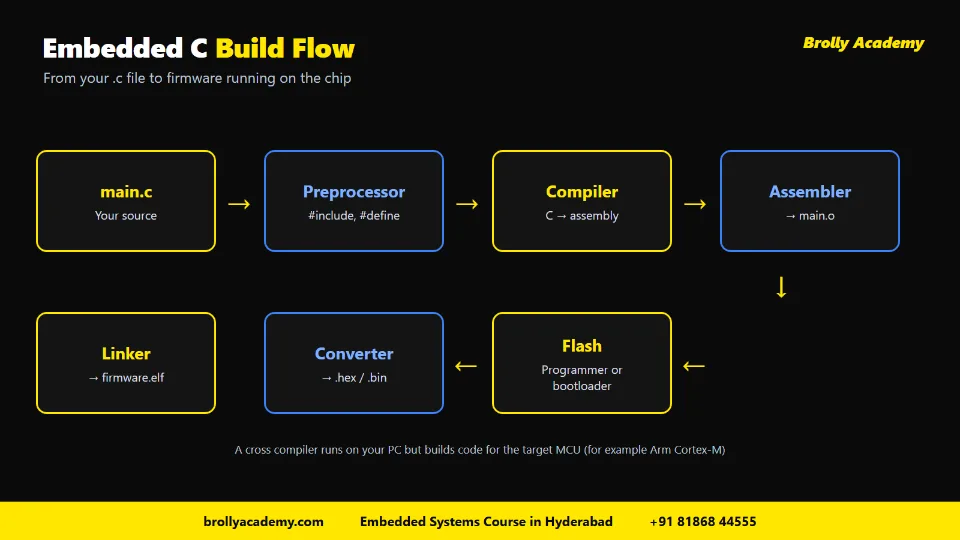
The embedded C build flow: main.c goes through the preprocessor, compiler, assembler and linker, then becomes a .hex or .bin file that is flashed to the chip.
- Cross compiler: runs on your laptop but produces code for another processor, such as an Arm Cortex-M.
- Startup code: vendor code that runs before main and fills the vector table, the list of addresses the CPU jumps to on reset or an interrupt.
- Debug probe: a USB device, such as a SEGGER J-Link, that connects your laptop to the chip's debug pins.
Common tools include Keil MDK, the Arduino IDE, PlatformIO and VS Code. For a wider view of the development process and tools, see our guide to embedded software development process and tools.
From .c file to .hex file: what the build produces
When you press "Build", your source passes through these stages, and each leaves a file behind:
- Preprocessor: expands every #include and #define, giving one combined source file per .c file.
- Compiler: turns that source into assembly code for the target CPU.
- Assembler: turns the assembly into an object file (.o or .obj) of machine code that is not yet placed at fixed addresses.
- Linker: joins all object files, libraries and the startup code, and uses the linker script to place everything in flash and RAM. The result is an executable file, often a .elf, which also holds debug information.
- Converter: strips the executable down to a .hex file (text records with addresses) or a .bin file (a raw image) for flashing.
- Flash: a debug probe or a programmer writes the image through the chip's programming pins, or a bootloader already on the chip receives it over USB or UART.
A programmer is external hardware that can write flash even on a blank chip. A bootloader is a small program already on the chip that receives new firmware and writes it into flash, so it needs no extra hardware. Arduino boards typically rely on a bootloader, which is why a plain USB cable is enough to upload code from the Arduino IDE.
7. Data types and fixed-width integers (stdint.h)
Short answer: In embedded C you use fixed-width integer types such as uint8_t, uint16_t and uint32_t from stdint.h, so every variable has the exact size the hardware expects on every chip.
A register might be exactly 32 bits wide, and plain int can be 16 or 32 bits depending on the chip. The standard header stdint.h gives you types whose size is fixed, whatever the chip:
Rules of thumb for embedded data types:
- Use unsigned types for registers, bit masks and raw data.
- Use the smallest type that safely fits when RAM is tight.
- Use bool from stdbool.h for flags.
- Avoid float on chips without a floating-point unit; store 25.37 °C as the integer 2537 instead.
- Watch integer promotion: maths on two uint8_t values happens in int, so cast the result back.
8. Bit manipulation: set, clear, toggle and test
Short answer: You change single bits in a register with bitwise operators: OR with a mask to set a bit, AND with the inverted mask to clear it, XOR to toggle it and AND to test it.
Registers pack many settings into one word, so you change one bit without disturbing the others. You use OR (|), AND (&), NOT (~), XOR (^) and left shift (<<) to build a mask. Most teams wrap them in small macros:
#include <stdint.h>
#define BIT(n) (1UL << (n))
#define SET_BIT(reg, n) ((reg) |= BIT(n))
#define CLEAR_BIT(reg, n) ((reg) &= ~BIT(n))
#define TOGGLE_BIT(reg, n) ((reg) ^= BIT(n))
#define TEST_BIT(reg, n) (((reg) & BIT(n)) != 0UL)
uint32_t status = 0UL;
void bit_demo(void)
{
SET_BIT(status, 3); /* status is now 0x08 */
TOGGLE_BIT(status, 0); /* status is now 0x09 */
CLEAR_BIT(status, 3); /* status is now 0x01 */
if (TEST_BIT(status, 0)) {
/* bit 0 is set */
}
}
Notice the 1UL. It makes the 1 an unsigned long, so shifting it by up to 31 places is safe. Writing plain 1 and shifting it by 31 is a classic bug, because 1 is a signed int.
To write a multi-bit field, such as a 2-bit mode, clear the field with a mask first, then OR in the new value shifted into place. Interviewers often ask this.
9. volatile, const and memory-mapped registers
Short answer: Peripherals appear at fixed memory addresses, so you control them through pointers to those addresses, marked volatile so the compiler always reads and writes the real hardware instead of a cached copy.
Peripherals such as GPIO ports, timers and UARTs are controlled through registers at fixed addresses in the chip's memory map. This is memory-mapped I/O: writing to such an address does not store data in RAM, it changes a pin or starts a timer.
In C you reach those addresses with a pointer:
#include <stdint.h>
/* Placeholder address. Take the real one from your chip's reference manual. */
#define GPIO_OUT_ADDR 0x40000000UL
#define GPIO_OUT (*(volatile uint32_t *)GPIO_OUT_ADDR)
void led_on(void)
{
GPIO_OUT |= (1UL << 5); /* drive pin 5 high */
}
void led_off(void)
{
GPIO_OUT &= ~(1UL << 5); /* drive pin 5 low */
}
In real projects the vendor's header defines every register and its real address for you.
Why volatile matters. The optimiser may read a variable once and reuse the value. That is wrong for hardware, because a status register can change on its own. The volatile keyword tells the compiler to read and write the real memory every time. Use it for hardware registers and for variables shared between an interrupt handler and the main loop.
Why const matters. The const keyword marks data your code must not change, so on many microcontrollers lookup tables and fixed strings can stay in flash instead of scarce RAM. A read-only status register is often declared const volatile: your code must not write it, but the hardware may change it.
Pointers in general. Embedded C uses pointers for registers, driver buffers and callback tables. If pointers felt shaky in college, spend extra time here; interviewers test them heavily.
10. 8051 vs ARM Cortex-M: the same idea in two styles
Short answer: On the 8051, compilers add special keywords to name hardware registers and single port pins, while on ARM Cortex-M chips you reach registers through volatile pointers and structures from the vendor's header file; the bit logic underneath is the same.
Many Indian university labs and placement tests still start with the 8051, an old 8-bit microcontroller family. Microchip's AT89C2051, for example, is an 8-bit part compatible with the MCS-51 instruction set, with 2K bytes of flash and 128 bytes of RAM (Microchip AT89C2051 datasheet, revision 6/08, checked October 2026). Compare that with the 256 kB of flash and 32 kB of RAM on the Arduino UNO R4 Minima in section 15.
Bit masks, volatile, interrupts and the super loop carry over unchanged. Learn the 8051 keywords for exams and viva, but build new projects on a 32-bit board like the ones in section 15, so your skills match modern parts.
11. Interrupts and ISRs
Short answer: An interrupt is a hardware signal that pauses your main code and runs a special function called an ISR (interrupt service routine); keep ISRs short, set a volatile flag and do the heavy work back in the main loop.
Without interrupts, your code must keep checking a button (called polling) and may miss a quick press. With an interrupt, the hardware tells the CPU at once. Timers and UART can raise interrupts too.
When an interrupt fires, the CPU:
- Finishes the current instruction and saves where it was
- Looks up the handler's address in the vector table
- Runs the ISR (interrupt service routine), the function you wrote for that event
- Returns to exactly where the main code left off
The safest beginner pattern is the flag pattern: the ISR sets a flag, and the main loop does the slow work.
#include <stdbool.h>
static volatile bool button_pressed = false;
/* The vector table links this handler to the button interrupt.
The exact handler name depends on your chip's startup file. */
void Button_IRQHandler(void)
{
/* clear the peripheral's interrupt flag here */
button_pressed = true; /* keep the ISR short */
}
int main(void)
{
/* set up the pin and enable its interrupt here */
for (;;) {
if (button_pressed) {
button_pressed = false;
/* do the slow work here, outside the ISR */
}
}
}
Rules for writing good ISRs:
- Keep them short and avoid printf and delays inside them.
- Mark shared variables volatile.
- Clear the interrupt flag, or the ISR fires again and again.
- Protect shared multi-byte data, for example by briefly disabling interrupts while the main loop reads it.
12. Your first program: LED blink at register level and HAL level
Short answer: Blinking an LED is the "hello world" of embedded systems; at register level you set the pin as an output and toggle its bit in a loop, and at HAL level you call ready-made driver functions that do the same thing.
GPIO (general-purpose input/output) pins are the simplest peripheral: each pin can read a switch or drive an LED. To blink an LED you usually:
- Turn on the clock for the GPIO port (many chips keep peripherals switched off to save power)
- Set the LED pin's direction to output
- Toggle the pin's output bit
- Wait, then repeat forever
Register level. This compiles in standard C, but the address is a placeholder: take the real addresses and the clock and direction setup from your chip's reference manual.
#include <stdint.h>
#define GPIO_OUT_ADDR 0x40000000UL /* placeholder: use your reference manual */
#define GPIO_OUT (*(volatile uint32_t *)GPIO_OUT_ADDR)
#define LED_PIN 5U
static void delay(volatile uint32_t count)
{
while (count > 0U) {
count--;
}
}
int main(void)
{
/* clock enable and pin-direction setup for your chip go here */
for (;;) {
GPIO_OUT ^= (1UL << LED_PIN); /* toggle the LED */
delay(500000U); /* crude busy-wait delay */
}
}
The busy-wait delay wastes CPU time and changes with clock speed, so replace it with a timer interrupt next.
HAL level. A HAL (hardware abstraction layer) is a vendor library of functions that hide the register details, such as "set this pin as output" and "toggle this pin". On Arduino boards, the same idea appears as pinMode, digitalWrite and delay. HAL code is quicker to write and easier to move between chips in one family. Register-level code is smaller, faster and teaches you how the chip really works.
Write the blink both ways on the same board: first with the HAL, so you know the hardware works, then at register level. That second version is what interviewers mean by "register-level experience". Later you will add UART (a simple two-wire serial link to your laptop), I2C (a two-wire bus for many slow devices) and SPI (a faster four-wire bus for displays, flash and sensors).
13. MISRA C and good coding practice
Short answer: MISRA C is a set of guidelines that restricts risky parts of C so code is safer and easier to check; MISRA C:2025 is the current version, and even if your project does not need it, its habits make you a better firmware engineer.
C's freedom lets undefined behaviour and pointer mistakes hide for months, which is not acceptable in cars or medical devices. MISRA C is published by The MISRA Consortium, which describes it as the de facto standard for developing software in C where safety, security and code quality are important. MISRA's FAQ says MISRA C:2025 was published to coincide with the Embedded World Conference in Nuremberg in March 2025 and is the current version (MISRA, October 2026). Companies usually check MISRA compliance with static analysis tools.
As a fresher, know what MISRA C is and follow habits that match its spirit:
- Use fixed-width types and add U to unsigned constants, such as 5U and 0xFFUL.
- Avoid dynamic memory (malloc and free) and recursion in firmware that must run for years.
- Always use braces and give every switch a default case.
- Check every return value from drivers and functions that can fail.
- Turn on all compiler warnings and treat them as errors.
- Keep functions short, clearly named and in Git from day one.
14. Common mistakes beginners make in embedded C
Short answer: The most common mistakes are forgetting volatile, using the wrong integer type, writing long ISRs, forgetting to enable a peripheral clock, and assuming the code works because it compiled.
Using malloc in long-running code and ignoring warnings belong on this list too (see section 13), as does skipping the datasheet and reference manual, the final truth for your exact chip.
15. How to practise embedded C: boards, tools and a 6-week plan
Short answer: Buy one low-cost board, install its vendor IDE, and work through a fixed sequence of exercises: LED, button, timer, interrupt, UART, then a sensor over I2C or SPI, pushing each one to GitHub.
You need a board on your desk. Good beginner choices:
- Arduino UNO R4 Minima. It uses a Renesas RA4M1 chip with an Arm Cortex-M4 core at 48 MHz, 256 kB of flash and 32 kB of RAM, and the official Arduino Store lists it at €22,00 including VAT (Arduino Store, October 2026). Start with the Arduino IDE, then move to register-level code on the same board.
- Raspberry Pi Pico 2. The official product brief says the Pico 2 series starts at $5 and uses the RP2350 chip with Arm Cortex-M33 or RISC-V Hazard3 cores, and the Pico 2 W adds 2.4GHz Wi-Fi and Bluetooth 5.2 (Raspberry Pi product brief, March 2026). Indian prices vary by seller, so compare a few authorised resellers.
- An STM32 board with an on-board debug probe, or an ESP32 board from Espressif for wireless IoT projects.
Add a breadboard, LEDs, resistors, buttons, a USB-serial adapter, an I2C sensor and, later, a cheap logic analyser. Then follow this 6-week plan at about one hour a day:
Push every exercise to GitHub with a short README and a wiring photo. Then move to mini projects: our list of embedded systems projects groups ideas from beginner to advanced, with the components and skills each one teaches.
16. Six embedded C practice exercises with expected outcomes
Short answer: Work through six exercises in order, from pure bit logic on your laptop to a sensor logger on a real board, and check each one against a clear expected outcome before you move on.
These follow the 6-week plan above, one per week. Each builds on the last.
Check timing with a logic analyser where you can, because "looks about right" hides bugs. Leave exercise 6 running for an hour: slow failures such as stack overflow and counter wrap-around only show up over time.
17. Where embedded C leads next
Short answer: After bare-metal C, the usual next steps are an RTOS, communication protocols in depth, embedded Linux and a specialisation such as automotive or IoT.
As projects grow, a single superloop gets hard to manage. An RTOS splits firmware into prioritised tasks and handles timing for you. Our guide to RTOS in embedded systems explains tasks, schedulers, semaphores and popular options such as FreeRTOS and Zephyr in simple terms.
For the full path from C and digital electronics to RTOS, embedded Linux and job preparation, follow our embedded systems roadmap.
18. How Brolly Academy helps
Short answer: Brolly Academy's Embedded Systems course in Hyderabad teaches embedded C from the basics on real boards, then builds up to ARM, RTOS, protocols and projects, with placement support.
If you prefer a guided path with a trainer and hardware labs, our Embedded Systems Course in Hyderabad is built around the topics in this article. Here is what the course page lists (Brolly Academy, October 2026):
- Duration: 3 months with 80+ hours of expert-led training: microcontrollers and embedded C in month 1, RTOS, IoT and protocols in month 2, then automotive embedded, VLSI basics and a capstone project in month 3.
- C from the basics: 12 of the 31 syllabus modules cover C, from data types to pointers, structures, bit-fields and the preprocessor, before ARM architecture, peripherals and RTOS.
- Hardware and projects: ARM Cortex, STM32, Arduino and Raspberry Pi with Keil µVision, Arduino IDE and PlatformIO, including an embedded C sensor control project on STM32 or Arduino.
- Trainer: Mr. Vamsi Raju, Embedded Systems Specialist and Hardware Architect, with 15+ years in embedded systems.
- Modes and fees: Video Recording ₹15,000, Online Course ₹40,000 and Classroom Training ₹45,000, with easy EMI available. Classroom and online batches run on weekday and weekend schedules.
- Career support: placement assistance, resume and LinkedIn help and mock interviews. You receive a Brolly Academy course completion certificate.
The next batch starts on Monday, 2 November 2026, and the page offers free 3-day demo classes before you enrol. Beginners from ECE, EEE, CSE, mechanical and related branches can join.
Write your first register-level firmware with a trainer beside you
Reading about volatile and interrupts is a start, but firmware clicks when you see your own code drive a real board. Join Brolly Academy's free 3-day demo classes for the Embedded Systems Course in Hyderabad, try embedded C on STM32 and Arduino hardware, and decide if the 3-month programme is right for you. Classroom and online batches are open, and the next batch starts on 2 November 2026.
Frequently asked questions
What is embedded C programming?
Embedded C programming is using the C language to write firmware that runs on a microcontroller and controls hardware such as LEDs, sensors, motors and serial ports. The language is standard C, but you write it with fixed-width types, bit operations, volatile registers and interrupt handlers. The code is built with a cross compiler and flashed into the chip, where it usually runs in an endless loop from power-on.
What is the difference between C and embedded C?
C and embedded C share the same syntax, but embedded C runs on a microcontroller with very little memory and often no operating system. Instead of screens and files, your code works with pins, timers and serial buses. You use a cross compiler, avoid heavy library functions like printf and malloc, rely on stdint.h types, and your main function never returns because the device loops forever.
Is embedded C a separate programming language?
No, embedded C is not a separate language in everyday use. It is standard C used for microcontrollers, together with the chip vendor's header files and libraries. WG14, the ISO C committee, lists C23 as the current C standard and separately publishes a technical report called Embedded C, TR 18037, but most firmware engineers simply write standard C for their target chip.
Why is C used for embedded systems?
C is used for embedded systems because it gives direct access to memory and hardware registers through pointers, produces small and fast machine code with no hidden runtime, and has a compiler for almost every microcontroller. Chip vendors publish their register definitions and example code in C, and safety-focused industries have mature C guidelines such as MISRA C, so C remains the standard choice.
Is embedded C hard to learn?
Embedded C is not hard if your basic C is solid. The new parts are bit manipulation, pointers to registers, the volatile keyword, interrupts and reading a datasheet. Pointers and register-level work usually need the most practice. Practising on a real board every day, starting with an LED and moving to timers, interrupts and UART, makes these ideas feel natural within a few weeks.
How long does it take to learn embedded C?
If you already know basic C, a focused learner can cover the core of embedded C in about six weeks at roughly one hour a day: a C refresh, GPIO, timers, interrupts, UART and one I2C or SPI sensor. Becoming job-ready takes longer, because you also need projects, an RTOS, protocol depth and debugging practice on real hardware.
What should I learn before embedded C?
Learn standard C well first: variables, loops, functions, arrays, strings, pointers, structures and bitwise operators. Basic digital electronics also helps, such as voltage levels, resistors, LEDs and how a switch works. You do not need to know any operating system internals to start. With C and simple electronics in place, you can begin blinking LEDs on a low-cost board.
What is the structure of an embedded C program?
An embedded C program usually has seven parts in this order: header includes, configuration macros for pins and clocks, global variables marked volatile when an ISR uses them, function prototypes, initialisation code, a main function with an endless super loop, and interrupt service routines. At power-on, startup code prepares the stack and RAM and calls main, which runs the initialisation once and then repeats its tasks forever.
What is the difference between 8051 and ARM embedded C?
The logic is the same, but the style differs. 8051 compilers add keywords such as sfr and sbit, so you can name a register or a single port pin and assign it 1 or 0. On ARM Cortex-M chips you use standard C: the vendor header defines registers as volatile locations, and you set or clear bits with masks. The 8051 is an 8-bit family, while Cortex-M chips are 32-bit.
Why is volatile used in embedded C?
The volatile keyword tells the compiler that a variable can change outside the normal flow of the program, so it must be read from and written to memory every time. You use it for hardware registers and for variables shared between an interrupt service routine and the main loop. Without volatile, the compiler may cache a value and your code may never see the change.
What are the advantages and disadvantages of embedded C?
Embedded C produces small, fast code, gives direct access to registers through pointers, has compilers for almost every microcontroller and offers predictable memory use and timing. Its disadvantages are no bounds checking, undefined behaviour that can compile cleanly but fail on hardware, register-level code that must be rewritten for a new chip family, and no built-in tasks or exceptions. Coding standards, static analysis and testing on real hardware manage most of these risks.
What is an ISR in embedded C?
An ISR, or interrupt service routine, is a function that the CPU runs automatically when a hardware event happens, such as a button press, a timer overflow or a byte arriving on UART. The CPU pauses the main code, runs the ISR and then returns. Good ISRs are short: they clear the interrupt flag, set a volatile flag and leave slow work to the main loop.
How do you set, clear and toggle a bit in C?
To set a bit, OR the register with a mask that has a 1 in that position. To clear a bit, AND the register with the inverted mask. To toggle a bit, XOR the register with the mask. To test a bit, AND the register with the mask and check whether the result is non-zero. Build masks with an unsigned 1 shifted left, such as 1UL.
What is stdint.h and why does it matter?
The standard stdint.h header defines fixed-width integer types such as uint8_t, uint16_t and uint32_t. Their sizes stay the same on every chip, unlike plain int, which can be 16 or 32 bits depending on the microcontroller. Embedded code uses them for registers, protocol fields and sensor data so that values never get cut off or overflow unexpectedly.
What is memory-mapped I/O?
Memory-mapped I/O means a microcontroller's peripherals, such as GPIO ports, timers and UARTs, are controlled through registers that sit at fixed addresses in the memory map. Writing a value to one of those addresses changes the hardware, for example driving a pin high. In C you access these registers through volatile pointers, using addresses from the chip's reference manual or vendor header files.
How is an embedded C program converted into a hex file?
A cross compiler on your laptop builds the code for the target chip in stages. The preprocessor expands includes and macros, the compiler produces assembly, and the assembler creates object files. The linker joins them with the startup code and uses the linker script to place code in flash and data in RAM, giving an executable such as a .elf file. A converter then produces the .hex or .bin file that you flash into the chip.
What is the difference between bare-metal and RTOS programming?
Bare-metal programming means your firmware runs directly on the microcontroller with no operating system, usually as one superloop plus interrupts. RTOS programming adds a small real-time operating system that splits the work into tasks with priorities and handles timing. Beginners should learn bare-metal first, because it teaches registers, interrupts and timing, then move to an RTOS for larger projects.
What are some embedded C programming examples for beginners?
Good beginner examples are a set of bit macros tested on your laptop, an LED blink written at register level, a debounced push button that toggles the LED, a timer interrupt that replaces the busy-wait delay, a UART echo to a serial terminal, and a sensor logger that reads an I2C or SPI sensor every second. Each one has a clear expected outcome, so you know exactly when it works.
What is MISRA C?
MISRA C is a set of coding guidelines that restricts risky features of C so that code is safer, more secure and easier to check. It is published by The MISRA Consortium and is widely used in automotive, medical and aerospace firmware. The current version is MISRA C:2025, published in March 2025. Teams usually check compliance with static analysis tools.
Which board is best for learning embedded C?
Choose one low-cost board and stick with it. The Arduino UNO R4 Minima uses an Arm Cortex-M4 based Renesas chip and is easy for beginners. The Raspberry Pi Pico 2 uses the RP2350 chip and has a very low starting price. STM32 boards with an on-board debug probe are widely used in industry, and ESP32 boards suit wireless IoT projects.
Can I learn embedded C with Arduino?
Yes, Arduino is a good starting point for embedded C. Arduino functions like pinMode, digitalWrite and delay act as a simple hardware abstraction layer. Once you are comfortable, write the same programs at register level on the same board by reading the reference manual. That step turns Arduino practice into real embedded C skill.
What is the first program in embedded C?
The first program in embedded C is usually an LED blink, the hardware version of hello world. You enable the clock for the GPIO port, set the LED pin as an output, then toggle its output bit and wait in an endless loop. Write it once with the vendor's HAL and once at register level to understand what the library does underneath.
What are common mistakes in embedded C?
Common mistakes include forgetting volatile on shared variables, using plain int for registers, shifting a signed 1 by 31 places, writing long ISRs, not clearing interrupt flags, forgetting to enable a peripheral clock, overusing busy-wait delays, placing large arrays on a small stack and using malloc in long-running firmware. Turning on all compiler warnings and reading the reference manual prevents many of them.
Is embedded C enough to get an embedded systems job?
Strong embedded C is the most important single skill, but it is rarely enough on its own. Employers also look for microcontroller and peripheral knowledge, communication protocols like UART, SPI and I2C, an RTOS, debugging with real tools and a few working projects on GitHub. Structured training such as Brolly Academy's 3-month Embedded Systems course covers these together with placement assistance.
Does Brolly Academy teach embedded C from scratch?
Yes. Brolly Academy's Embedded Systems Course in Hyderabad teaches C from the basics, with 12 of its 31 modules focused on C, before moving to ARM, STM32, Arduino, RTOS and communication protocols. The 3-month course offers classroom, online and recorded options, and free 3-day demo classes are available before you enrol. Beginners from ECE, EEE, CSE and related branches can join.
Learn with Brolly Academy
Review the syllabus, practical projects and batch timings, and book a free demo before you enrol.
Related Articles
Continue Your Learning
Embedded Systems Course in Hyderabad
3 months and 80+ hours of hands-on training in embedded C, ARM Cortex, STM32, RTOS, communication protocols and IoT, with capstone projects.
View CourseIoT Training in Hyderabad
Build connected devices: sensors, microcontrollers, wireless protocols and cloud dashboards for real Internet of Things projects.
View CourseVLSI Training in Hyderabad
Learn digital design and chip design flows for VLSI careers, a natural next step for ECE students interested in hardware.
View Course