
M365 COPILOT · COPILOT STUDIO
Microsoft Copilot Training in Hyderabad
Learn Microsoft 365 Copilot, Copilot Chat, Copilot Studio agents, prompt writing, knowledge sources, connectors, Power Automate workflows and responsible AI in a 2–3 month program with 7 portfolio projects and placement assistance. Classroom and online batches, easy EMI and a free demo class.
★ 4+ Google rating from 100+ reviews · 9,000+ students trained · 523+ batches completed · Teaching since 2021
Next batch: Monday, 2 November 2026
Trainer: Mr. Dinesh, Microsoft Copilot Specialist & Cloud Architect (12+ years) · Updated September 2026
TrainerMr. Dinesh · 12+ years
Duration2–3 months
FeesFrom ₹14,999 · EMI
ModesClassroom + online
Microsoft Copilot Course in Hyderabad
Brolly Academy's Microsoft Copilot Training in Hyderabad is a 2–3 month, hands-on program in practical workplace AI, covering Microsoft 365 Copilot in Word, Excel, PowerPoint, Outlook and Teams, Copilot Chat, prompt writing, Copilot Studio agents, knowledge sources and SharePoint, actions, connectors and Power Automate, evaluation and governance. Plans start at ₹14,999, classes run in the classroom or live online, and every student gets a course completion certificate and placement assistance.
The course suits students, freshers, working professionals, Microsoft 365 users and business teams in HR, sales, support and operations. You practise real Copilot use cases for emails, meetings, reports, presentations and internal knowledge assistants, build 7 portfolio projects, and get resume, LinkedIn and mock interview support for Copilot, automation and AI productivity roles in Hitech City, Madhapur and Kukatpally.
Why choose Brolly Academy for Microsoft Copilot training?
Training and support✓ Microsoft Copilot curriculum designed for jobs
✓ Trainers with AI, Microsoft 365 and automation experience
✓ Projects on prompts, Copilot Studio, agents and knowledge
✓ Real use cases for HR, support, sales and operations
✓ 7 portfolio projects on Copilot workflows
✓ One-to-one mentorship and career guidance
✓ Resume, LinkedIn and mock interview preparation
✓ Placement assistance
Flexibility and value✓ Classroom and live online batches
✓ Weekday and weekend batch options
✓ Free demo class before you enrol
✓ Affordable fees with easy EMI
✓ Content updated for 2026
✓ WhatsApp and Discord community
✓ Brolly Academy course completion certificate
✓ 4+ Google rating from 100+ reviews
Microsoft Copilot Course Syllabus (16 Modules)
Our Microsoft Copilot course in Hyderabad follows a 16-module syllabus that starts with Copilot basics and prompt writing, moves through Microsoft 365 productivity, Copilot Studio, knowledge sources, generative orchestration, actions and connectors, and finishes with governance, evaluation, production readiness and enterprise adoption.
Module 1: Microsoft Copilot and Industry Applications
Introduction to Microsoft Copilot and the Microsoft 365 AI ecosystem, Copilot use cases for students, professionals and businesses, Microsoft 365 Copilot vs general AI assistants, responsible AI basics and safe usage, and career paths for Copilot learners in 2026.
Module 2: Copilot Prompt Writing
Goal, context, source and expectation-based prompts, prompt patterns for Word, Excel, PowerPoint, Outlook and Teams, reusable prompt libraries for business teams, prompt iteration and review, and prompts for reliable workplace outputs.
Module 3: Microsoft 365 Copilot Productivity
Copilot Chat basics, Word drafting and document summarisation, Excel analysis workflows, PowerPoint outline and deck support, and Outlook and Teams meeting productivity.
Module 4: Copilot Studio Fundamentals
What Copilot Studio is, creating agents with natural language, agent instructions and behaviour design, testing and improving agent responses, and publishing concepts and channel planning.
Module 5: Knowledge Sources and SharePoint
Connecting approved knowledge, SharePoint, OneDrive and website knowledge patterns, knowledge quality and source control, reducing wrong answers with better content, and reviewing answers and citations.
Module 6: Generative Answers and AI Prompts
Generative answer concepts, prompt libraries inside Copilot Studio, structured output ideas, and human review steps for business answers.
Module 7: Generative Orchestration
How orchestration plans responses, topics, actions and knowledge working together, multi-step Copilot interactions, and testing and tuning orchestrated agents.
Module 8: Actions, Connectors and Tools
Using actions to extend agents, Power Automate and connector basics, MCP and tool concepts, and when to automate and when to keep human approval.
Module 9: Copilot Agents for Business Teams
An HR policy assistant, a sales enablement assistant, a support knowledge assistant, an operations SOP assistant and an education and training assistant.
Module 10: Microsoft 365 Copilot Extensibility
Agents overview, declarative agent concepts, connectors and organisational knowledge, and where agents appear inside Microsoft 365.
Module 11: Governance, Security and Compliance
Data permissions basics, responsible AI review, admin and access considerations, privacy-aware workflows and safe rollout planning.
Module 12: Copilot for Developers and Makers
The Copilot Studio maker workflow, Power Platform integration concepts, GitHub Copilot awareness, documentation and testing support, and developer workflow examples.
Module 13: Copilot Evaluation
Accuracy and usefulness checks, rubrics for business outputs, human review workflows, safety and privacy checks, and tracking prompt and agent improvements.
Module 14: Production Readiness
Deployment planning, monitoring Copilot workflows, cost and licensing awareness, security and data governance, and documentation for maintainable Copilot adoption.
Module 15: Enterprise Adoption and Change Management
Copilot adoption planning, department-wise use cases, training champions, measuring productivity impact and continuous improvement.
Module 16: Microsoft Copilot Tools
Microsoft 365 Copilot, Copilot Chat, Copilot Studio, Teams, Word, Excel, PowerPoint, Outlook, SharePoint, Power Automate, connectors and evaluation checklists.
Get the full Microsoft Copilot syllabus and fee details on WhatsApp
Send us a message and we will share the complete module list, fee plans, EMI options and the next batch dates. New batches start every week, and a free demo class is available.
Microsoft Copilot Training Roadmap – Beginner to Advanced in 2–3 Months
Our Microsoft Copilot classes in Hyderabad follow a practical roadmap across 2–3 months, in the classroom or live online. You start with Copilot fundamentals and prompt writing, move into Microsoft 365 productivity, Copilot Studio agents and workflow automation, and finish with projects, portfolio preparation and placement support.
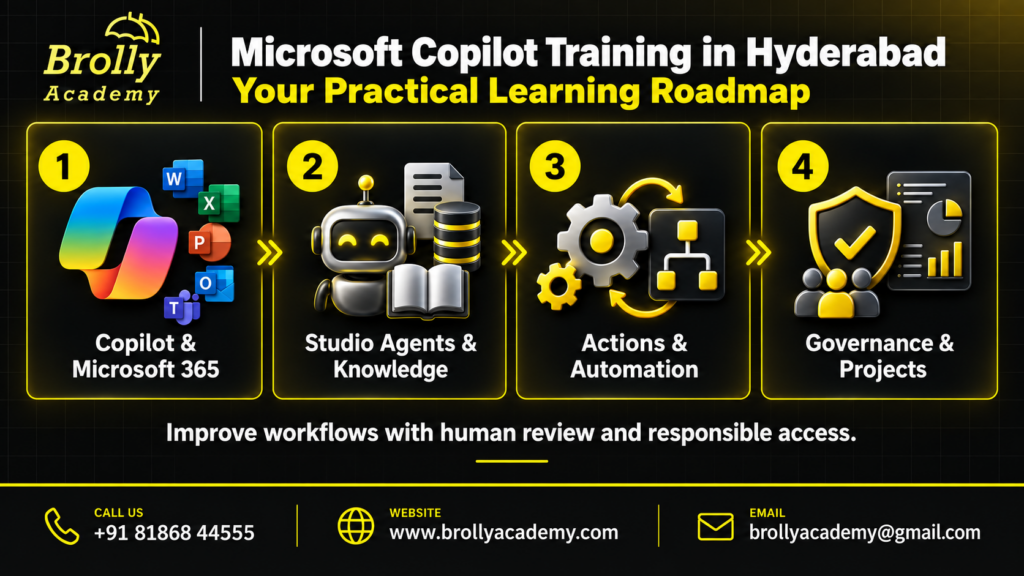
Month 1Copilot fundamentals, prompting & Microsoft 365Copilot basics, prompt structure, Word, Excel, PowerPoint, Outlook and Teams, and reusable prompt libraries for emails, meetings, reports and summaries.
Month 2Copilot Studio, agents & knowledgeCopilot Studio concepts, agents, knowledge sources, SharePoint content and generative answers for support, onboarding and documentation.
Month 2Actions, connectors & automationActions, connectors and Power Automate workflows for sales enablement, HR and internal operations.
Month 3Governance, projects & placementMulti-step agents with governance, review steps and evaluation rubrics, portfolio projects, resume, LinkedIn and interview preparation.
What is Microsoft Copilot and Why Is It Important?
Microsoft Copilot is Microsoft's AI assistant experience across Copilot Chat, Microsoft 365 apps and business workflows. It helps people draft documents, analyse spreadsheets, prepare presentations and summarise emails and meetings, and Copilot Studio lets teams build agents that answer questions from approved company knowledge and complete tasks.
AI assistant by MicrosoftHelps users work across Microsoft 365 apps, chat, data and business workflows.
Works inside Microsoft 365Word, Excel, PowerPoint, Outlook, Teams and Copilot Chat, depending on licence and setup.
Uses organisational contextWorks with permitted emails, meetings, documents and SharePoint knowledge.
Supports agentsCopilot Studio helps makers build agents that answer questions and complete tasks.
Builds workflowsSupports HR, sales, support, operations, education and internal knowledge tasks.
Connects toolsExtend Copilot with actions, connectors, Power Automate and Microsoft 365 agents.
Works with contextBetter results when prompts include goals, sources, audience and expected output.
Needs responsible useGood workflows include permissions, privacy, review, evaluation and governance.
Used across teamsIT helpdesks, HR self-service, sales follow-ups, support tickets and finance reports.
Benefits of the Microsoft Copilot Course in Hyderabad
Choose classroom or live online Microsoft Copilot training at Brolly Academy and get the same trainers, practical projects and placement support in either mode.
01Learn from experienced trainersStep-by-step teaching with easy examples, guided by AI professionals.
02Master Copilot toolsHands-on practice with Microsoft 365 Copilot, Copilot Chat, Copilot Studio and Power Automate.
03Work on real projectsMeeting trackers, HR and support assistants and business automation workflows.
04Understand AI assistantsHow assistants use context, prompts, knowledge sources and evaluation.
05Get job supportResume preparation, project explanation practice and mock interviews.
06Earn a course certificateA Brolly Academy certificate that shows the skills you trained in.
07Industry-relevant skillsUseful in IT, HR, sales, support, operations, finance and admin teams.
08Learn your wayClassroom or live online batches with flexible timings and easy EMI.
09Join a communityNetwork with peers, alumni and mentors for continuous growth.
Thinking of Microsoft Copilot Training in Hyderabad?
Here is how hands-on training at Brolly Academy compares with a traditional class.
Traditional training✗ Mostly generic AI theory with little Copilot practice
✗ Old slides and broad GenAI examples
✗ Little or no Copilot Studio, agents or knowledge sources
✗ Limited Word, Excel, PowerPoint, Outlook and Teams practice
✗ Basic exercises, not portfolio-ready projects
✗ Minimal focus on permissions, privacy and governance
✗ Placement help stops at resume tips
✗ Same plan for every type of learner
Brolly Academy training✓ Copilot workflows from day one
✓ Microsoft 365 Copilot, Copilot Chat and Copilot Studio
✓ Agents, knowledge, actions and Power Automate
✓ Lessons based on Microsoft Learn references
✓ 7 portfolio projects, including HR and support assistants
✓ Use cases for HR, support, sales and operations
✓ Resume, LinkedIn and project explanation practice
✓ Mentorship for freshers, professionals and non-IT learners
Meet Your Microsoft Copilot Trainer
INSTRUCTOR
Mr. Dinesh
Microsoft Copilot Specialist & Cloud Architect · 12+ years in AI and ML
Mr. Dinesh is an AI specialist and cloud architect with 12+ years in AI and machine learning. His expertise covers LLMs, AI agents, MLOps, NLP, deep learning and AWS, and he has worked on RAG-based AI content systems, AI chatbots, fraud detection models and predictive analytics for healthcare and manufacturing. He simplifies complex AI into practical lessons with hands-on work and job-focused training, helping learners apply AI assistants and agents to real business tasks.
Skills You’ll Gain from the Microsoft Copilot Training
Copilot workflows and agentsBuild Copilot workflows and agents for real-world tasks.
Microsoft 365 productivityUse Copilot in Word, Excel, PowerPoint, Outlook, Teams and SharePoint.
Prompt writingWrite prompts that give reliable Copilot outputs for business use cases.
Prompt librariesCreate reusable Copilot prompt libraries for teams.
Knowledge-based agentsBuild agents on approved sources with review steps.
Context and permissionsManage knowledge sources, permissions and context for accurate answers.
Evaluation and reviewApply evaluation and human review for safer Copilot workflows.
Actions and automationDeploy workflows with agents, actions, connectors and Power Automate.
Responsible AIPrivacy, governance and reliability checks for workplace AI.
Microsoft Copilot Capstone Projects
Our Microsoft Copilot course in Hyderabad is built around 7 practical projects, so you can show real Copilot skills in interviews and explain how you built assistants and workflows for business teams.
Project 1Copilot prompt libraryReusable prompts for everyday productivity in Word, Excel, PowerPoint, Outlook and Teams.
Project 2Meeting notes and action trackerCopilot workflows for Teams meetings, summaries, decisions and follow-up tasks.
Project 3HR policy knowledge assistantA source-grounded assistant that answers from selected HR and policy documents.
Project 4Sales follow-up assistantCopilot support for research, proposals and client follow-ups.
Project 5Support knowledge-base agentA grounded support assistant in Copilot Studio built on approved business information.
Projects 6–7Copilot Studio and automation workflowsCreate and test a Copilot Studio agent workflow and a business automation workflow.
Tools you use: Microsoft 365 Copilot · Copilot Chat · Copilot Studio · Teams · Word · Excel · PowerPoint · Outlook · SharePoint · Power Automate · Connectors · Evaluation checklists
Microsoft Copilot Course Fee & Offerings in Hyderabad
Choose the plan that suits how you learn. Every plan covers basic to advanced Microsoft Copilot with project work and resume and interview support, and the Classroom and Online plans come with easy EMI.
Video Recording₹14,999Was ₹19,999
Lifetime video access
Basic to advanced modules: prompts, Microsoft 365 apps, Copilot Studio and agents
80+ recorded classes
1 capstone project included
Resume and interview support
Placement assistance
WhatsApp group access
Most popularClassroom Training₹40,000Was ₹55,000
2–3 months structured classroom training
Microsoft Copilot trainers who are working professionals
Real-time projects: Copilot agents, knowledge assistants and automation
One-on-one mentorship and lab support
Monthly mock interviews
Resume building and interview guidance
Soft skills and aptitude training
Dedicated placement officer
Commute support for offline batches
WhatsApp support and group access
Online Course₹35,000Was ₹40,000
Live interactive classes, flexible timings
2–3 months duration
Daily recorded sessions for revision
Real-time project environment from day 1
Weekly mock interviews
Doubt-clearing sessions
50+ sample resumes
WhatsApp group access
Easy EMI is available on the Classroom and Online plans. Ask about the current batch offer when you book your free demo class.
Placement Program for Microsoft Copilot Training in Hyderabad
Our placement support helps you learn Microsoft Copilot, explain your projects confidently to recruiters and apply for Copilot, automation and AI productivity roles in Hyderabad.
Resume buildingATS-friendly resumes tailored for Copilot, prompt writing and AI automation roles.
Placement trainingHow to apply, target openings and handle company-specific hiring processes.
Interview questionsMicrosoft Copilot, Copilot Studio and prompt writing interview questions.
Internships under expertsHands-on internship opportunities that add real projects to your profile.
Real-time projectsShow practical work with Copilot agents, knowledge assistants and automation.
Aptitude preparationLogical reasoning, problem-solving and technical test skills.
Personality developmentCommunication, presentation and confidence for client interactions.
Mock interviewsTechnical and HR practice rounds to build confidence.
Interview schedulingWe connect you with hiring companies and schedule interviews.
Student community
Learning & collaborationWork with fellow students on Copilot projects, prompt libraries and workflow challenges.
Resources and toolsRecorded sessions, prompt templates and practice material to keep learning anytime.
NetworkingConnect with trainers, industry mentors and recruiters in Hyderabad.
MentorshipGuidance from AI professionals on projects and careers.
Career developmentUpdates on job postings, internship leads, freelance projects and placement assistance.
Pre-requisites & Eligibility
Our Microsoft Copilot course in Hyderabad is open to beginners as well as technical learners. No advanced prerequisite is required: basic computer knowledge and Microsoft 365 awareness are enough for the beginner modules, coding is not mandatory, and Copilot Studio and agent concepts are explained step by step.
Basic computer knowledgeEnough to start; no advanced prerequisite is required.
Microsoft 365 awarenessHelpful for app workflows; beginners start with prompts and business use cases.
Students and graduatesAnyone pursuing or holding a degree can join.
IT and non-IT professionalsSoftware, business, HR, sales, support and finance backgrounds are all welcome.
No coding neededCoding is not mandatory for the beginner and business modules.
Curiosity about AIAI and LLM basics help but are not mandatory; essentials are explained first.
Who Should Join Microsoft Copilot Training in Hyderabad?
Freshers & studentsStart a career in AI tools, office productivity or automation.
Working professionalsUse Copilot in Word, Excel, PowerPoint, Outlook and Teams.
Business teamsHR, sales, support and operations teams that want faster everyday work.
Business analysts & managersUse Copilot for summaries, insights, reporting and knowledge assistants.
Business owners & entrepreneursAdopt Copilot-powered tools to scale operations.
Freelancers & consultantsAdd Copilot automation and prompt services to your portfolio.
Microsoft Copilot Career Opportunities in Hyderabad
Microsoft Copilot specialistCreates Copilot workflows for content, support, research and automation.
Copilot Studio makerBuilds agents, knowledge assistants and workflow automations.
AI automation specialistBuilds AI workflows for business productivity.
Microsoft 365 productivity consultantHelps teams adopt Copilot across work apps.
Business analyst with AI skillsUses Copilot for reports, insights and documentation.
Prompt engineerDesigns reliable prompts and reusable templates.
Knowledge managerStructures SharePoint and internal content for better AI answers.
Support automation specialistBuilds support and helpdesk agents.
Sales enablement specialistUses Copilot for research, proposals and follow-ups.
Microsoft Copilot professional salary in Hyderabad – 2026
Freshers (Copilot and AI productivity roles)₹5–8 LPADepends on skills and projects
Mid-level (Copilot and AI productivity roles)₹10–18 LPAExperienced professionals earn more with Copilot Studio, automation and enterprise AI experience
AI engineer (related path)₹6–25 LPAFreshers ₹6–12 LPA · 2–5 years ₹12–25 LPA · senior ₹25 LPA+
Hiring companiesWhere students applyGoogle · Microsoft · TCS · Infosys · Wipro · HCLTech · Tech Mahindra · Capgemini · Accenture · Deloitte · IBM · Cognizant
Microsoft Copilot Certification You Will Receive
After completing the training and projects you receive a Brolly Academy Microsoft Copilot course completion certificate that highlights your skills in Copilot prompt writing, Microsoft 365 Copilot workflows, Copilot Studio agents, knowledge sources, automation and responsible AI. Together with your 7 portfolio projects, it strengthens your resume for Copilot, automation and AI productivity roles.
About Microsoft certifications: this course certificate is issued by Brolly Academy, not by Microsoft. Microsoft's own certifications are issued and examined by Microsoft, and any Microsoft exam fees are separate from the course fee.
Market trends for Microsoft Copilot in Hyderabad
Copilot adoptionAI workflow skills are becoming a core career driver as Copilot use grows in India.
Hyderabad demandStrong demand for Microsoft 365, automation and Copilot-ready professionals.
Rising training demandInterest in Copilot training grows with enterprise adoption of AI assistants.
Startups and IT teamsT-Hub startups and IT teams are creating Copilot adoption and automation roles.
Large employersMicrosoft, Deloitte, Accenture and IT services firms are expanding AI productivity initiatives.
Governance skillsTeams value people who handle permissions, privacy and review in AI workflows.
Microsoft Copilot Training in Kukatpally, Hyderabad
Our centre is at Metro Pillar No. A689, Dr Atmaram Estates, 3rd Floor, Nizampet X Roads, near JNTU Metro Station, Hyderabad 500072. Students join from Kukatpally, KPHB Colony, JNTU, Nizampet, Miyapur, Hitech City, Madhapur and Ameerpet (a short metro ride). Can’t make it to class? Join the same course live online.
Other relevant courses
ChatGPTPractical ChatGPT skills for work and productivity.
Prompt EngineeringWrite clear, reliable prompts for AI tools.
Generative AIBuild with large language models and AI apps.
LLM TrainingHow large language models work and are applied.
AI TestingTest AI apps and chatbots, and use AI for QA work.
Gemini AIPractical workflows with Google's Gemini AI tools.
Microsoft Copilot Training in Hyderabad – FAQs
1. What is the fee for the Microsoft Copilot course in Hyderabad?
At Brolly Academy, the Microsoft Copilot course fee is ₹14,999 for the video recording plan, ₹35,000 for live online classes and ₹40,000 for classroom training. Every plan covers basic to advanced Copilot with project work and resume and interview support, and easy EMI is available on the classroom and online plans.
2. How long is the Microsoft Copilot course in Hyderabad?
The Microsoft Copilot course at Brolly Academy runs for 2 to 3 months, depending on batch mode, practice time and project completion. Month 1 covers Copilot fundamentals, prompting and Microsoft 365 productivity, month 2 covers Copilot Studio, agents, knowledge and automation, and month 3 covers governance, projects and placement preparation.
3. Which is the best institute for Microsoft Copilot training in Hyderabad?
Brolly Academy is a strong choice for Microsoft Copilot training in Hyderabad. You get a 16-module syllabus covering Microsoft 365 Copilot, Copilot Chat and Copilot Studio, hands-on agents and automation, 7 portfolio projects, classroom and online batches, easy EMI, placement assistance and a free demo class before you enrol.
4. What is covered in the Microsoft Copilot course syllabus?
The syllabus covers Copilot basics and prompt writing, Microsoft 365 Copilot in Word, Excel, PowerPoint, Outlook and Teams, Copilot Studio agents, knowledge sources and SharePoint, generative answers and orchestration, actions, connectors and Power Automate, extensibility, governance and security, evaluation, production readiness and enterprise adoption.
5. What are the prerequisites for learning Microsoft Copilot?
No advanced prerequisite is required. Basic computer knowledge and Microsoft 365 awareness are enough for the beginner modules, and the course explains Copilot Studio and agent concepts step by step. Knowing AI or LLM basics gives you a head start, but it is not mandatory, and coding is not required for the beginner and business modules.
6. Can freshers and non-IT learners learn Microsoft Copilot?
Yes. Freshers can join, because the curriculum starts with Copilot fundamentals and moves gradually into Microsoft 365 workflows, Copilot Studio, agents and career preparation. Learners from HR, sales, support, finance and other non-IT backgrounds can start with prompt writing and business use cases, since coding is not mandatory for these modules.
7. What is the salary for Microsoft Copilot professionals in Hyderabad?
Freshers in Copilot and AI productivity roles in Hyderabad typically earn about ₹5–8 LPA, depending on skills and projects, and mid-level professionals about ₹10–18 LPA. Experienced professionals earn higher packages with Copilot Studio, automation and enterprise AI experience. Actual pay depends on your skills, portfolio and employer.
8. Will I get placement support after the Microsoft Copilot course?
Yes. You get placement assistance with ATS-friendly resume building, LinkedIn profile support, placement training, Copilot interview questions, project explanation practice, aptitude preparation, mock interviews and interview scheduling with hiring companies. The classroom plan also includes a dedicated placement officer and monthly mock interviews.
9. Will I get a certificate after the Microsoft Copilot course?
Yes. After completing the training and projects you receive a Brolly Academy Microsoft Copilot course completion certificate that highlights your Copilot, Copilot Studio and automation skills. It is a Brolly Academy certificate, not a Microsoft certification; Microsoft's own certifications are issued and examined by Microsoft, with separate exam fees.
10. Is classroom or online Microsoft Copilot training better?
Both follow the same syllabus and project approach. Classroom training at our centre near JNTU Metro Station gives you lab support and one-on-one mentorship, while live online classes offer flexible timings and daily recorded sessions for revision. A video recording plan is also available if you prefer to learn at your own pace.
11. Which tools are taught in the Microsoft Copilot course?
You work with Microsoft 365 Copilot and Copilot Chat in Word, Excel, PowerPoint, Outlook and Teams, Copilot Studio for agents, SharePoint for knowledge sources, and Power Automate, actions and connectors for workflow automation. You also use prompt frameworks and evaluation checklists to review Copilot outputs for accuracy and safety.
12. What is the difference between Microsoft Copilot training and AI/ML courses?
AI and machine learning courses focus on building predictive models from datasets and algorithms. Microsoft Copilot training focuses on practical workplace AI: Microsoft 365 productivity, prompt writing, Copilot Studio agents, knowledge sources, governance and business automation. It suits learners who want to use AI at work rather than build models.
13. What projects are included in the Microsoft Copilot course?
You complete 7 portfolio projects: a Copilot prompt library for productivity, a meeting notes and action tracker, an HR policy assistant, a sales follow-up assistant, a support knowledge-base agent, a Copilot Studio workflow and a business automation workflow, so you can show recruiters real Copilot use cases.
14. What career opportunities are available after Microsoft Copilot training?
You can apply for roles such as Microsoft Copilot specialist, Copilot Studio maker, AI automation specialist, Microsoft 365 productivity consultant, business analyst with AI skills, prompt engineer, knowledge manager, support automation specialist and sales enablement specialist. Professionals from IT and non-IT backgrounds can also use these skills to move into AI-enabled roles.
15. Where can I find Microsoft Copilot training near me in Hyderabad?
Brolly Academy's centre is at Nizampet X Roads, near JNTU Metro Station, Hyderabad 500072. It is easy to reach from Kukatpally, KPHB Colony, JNTU, Nizampet, Miyapur, Hitech City, Madhapur and Ameerpet. If travelling is difficult, you can join the same Microsoft Copilot course live online or choose the video recording plan.
Got more questions? Talk to our team directly
Contact us and our academic counsellor will get in touch with you shortly. A free demo class is available before you enrol.