
PREMIERE PRO · AFTER EFFECTS
Video Editing Course in Hyderabad
Learn Adobe Premiere Pro, After Effects, Photoshop, CorelDraw and DaVinci Resolve in a 4-month program with real-time projects, a showreel and placement assistance. Go from basic cuts to colour grading and motion graphics in classroom or live online batches.
★ 4+ Google rating from 100+ reviews · 9,000+ students trained · 523+ batches completed · Teaching since 2021
Next batch: Monday, 2 November 2026
Trainer: Sudheer N, Video Editing and VFX Trainer (15+ years) · Updated September 2026
TrainerSudheer N · 15+ years
Duration4 months
FeesFrom ₹9,999 · EMI
ModesClassroom + online
Video Editing Training in Hyderabad
Brolly Academy's Video Editing Course in Hyderabad is a 4-month, hands-on program in Adobe Premiere Pro, After Effects, Photoshop, CorelDraw and DaVinci Resolve, taught by Sudheer N (15+ years in video editing, VFX and graphic design). Plans start at ₹9,999, classes run in the classroom or live online, and every student gets a course completion certificate and placement assistance.
The course is built for beginners, content creators, working professionals and freelancers. With 100+ hours of practical sessions, you edit short films, wedding highlights, ads, reels and YouTube content, and finish with a professional showreel, a portfolio and interview practice for video editor, motion graphics and content roles with studios, agencies and production houses in Hyderabad.
Why choose Brolly Academy for video editing training?
Training and support✓ Trainer with 15+ years of real-time editing experience
✓ Training on Premiere Pro, After Effects and DaVinci Resolve
✓ Practical, project-based video editing
✓ One-to-one mentorship and doubt solving
✓ Portfolio and showreel development
✓ Film, YouTube and motion graphics career paths
✓ Freelancing guidance for Fiverr and Upwork
✓ Internship and job referral support
Flexibility and value✓ Classroom and live online batches
✓ Weekend and fast-track batch options
✓ Beginner-friendly, no prior experience needed
✓ Free demo class before you enrol
✓ Affordable fees with EMI options
✓ Class recordings and practice files
✓ Brolly Academy course completion certificate
✓ 4+ Google rating from 100+ reviews
Video Editing Course Syllabus (16 Modules)
Our video editing course in Hyderabad follows a 16-module syllabus across four tools: Adobe Premiere Pro for editing, After Effects for motion graphics and VFX, Photoshop for images and thumbnails, and CorelDraw for graphics and layouts, finishing with real-time projects.
Module 1: Premiere Pro: Industry Use & NLE Workflow
Editing for movies, YouTube, TV, weddings, events and corporate videos, AI tools alongside Premiere Pro, non-linear editing concepts and the digital video workflow.
Module 2: Premiere Pro: Project Setup & Basic Editing
Project and sequence settings, preferences, importing and managing media in bins, rough cuts with a storyboard, Timeline editing, trimming, ripple edits and the Source Monitor.
Module 3: Premiere Pro: Specialised Edits, Transitions & Speed
Rolling, slide and slip edits, lift and extract, replace clip, sync and track lock, video and audio transitions, slow motion, reverse motion, Rate Stretch and time remapping.
Module 4: Premiere Pro: Audio Editing & Mixing
Voice recording and narration, audio levels and gain, J-cuts and L-cuts, audio effects and keyframing, the Audio Mixer, submixes, voice-over, 5.1 surround mixes and cleaning noisy audio.
Module 5: Premiere Pro: Titles, Compositing & Colour
Title design, text on a path, rolls and crawls, opacity and blend modes, green-screen keying with Ultra Key, track mattes, speech-to-text, and colour correction and grading.
Module 6: Premiere Pro: Formats, Nesting & Export
P2, XDCAM, AVCHD and DSLR formats, the Media Browser, nested sequences, export settings, Adobe Media Encoder, EDLs and project management.
Module 7: After Effects: Real-World Uses & Video Basics
Ready-made and custom templates, title and logo animations for TV, YouTube and films, AI tools in After Effects, frame rate, resolution and defining motion graphics.
Module 8: After Effects: Interface, Media, Layers & Precomps
Project, Composition and Timeline windows, previews, importing PSD and AI files, interpreting footage, layer types, solids, time stretch, frame blending and precomps.
Module 9: After Effects: Keyframes, Text, Masks & Effects
Animating layer properties, parenting, motion paths, easing, text animation with keyframes and presets, masks, track mattes and animating effects over time.
Module 10: After Effects: 3D, Keying & Rendering
3D layers, multiple viewports, 3D transforms and lights, green and blue screen keying, colour grading in After Effects, the render queue, render settings and templates.
Module 11: Photoshop: AI Features & Creative Outcomes
Generative Fill and AI retouching, background removal, YouTube, Instagram and Facebook thumbnails, flyers, business cards, logo design and Telugu typing without Anu Script.
Module 12: Photoshop: Selections, Corrections & Layers
The workspace, selection tools, adjustment layers, blur, sharpen, dodge and burn, cropping, colour cast removal, healing and Content-Aware Fill, layers and layer styles.
Module 13: Photoshop: Masks, Camera RAW, Type & Compositing
Gradients and masks, the Camera RAW workflow, photo enhancements, type and typography, pen tools, Smart Objects, animated GIFs and advanced compositing.
Module 14: CorelDraw: Interface, Objects & Transformations
Screen layout, page setup, workspaces and shortcuts, drawing and shaping tools, selecting, sizing, mirroring, rotating and skewing objects.
Module 15: CorelDraw: Fills, Layers & Special Effects
Outlines and fills, arranging and grouping objects, weld, intersect and trim, the Object Manager, envelopes, extrude, blend, PowerClip, contours and transparencies.
Module 16: CorelDraw: Text, Colour, Printing & Tracing
Artistic and paragraph text, advanced text effects, colour palettes, symbols and bitmaps, layouts, printing and export, styles and templates, and Corel Trace vectorisation.
Get the full video editing syllabus and fee details on WhatsApp
Send us a message and we will share the complete module list, fee plans, EMI options and the next batch dates. New batches start every week, and a free demo class is available.
Video Editing Course Roadmap – Beginner to Professional Editor in 4 Months
Our video editing course is designed as a step-by-step roadmap in 4 practical stages over 4 months, in the classroom or live online, with hands-on editing at every step.
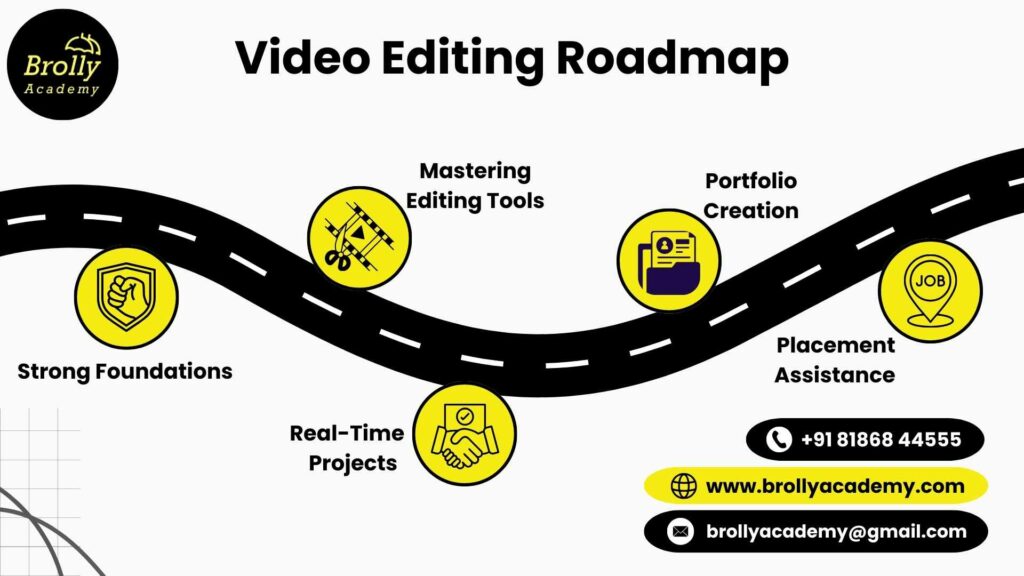
Stage 1Strong foundationsThe basics of video editing: timelines, cuts, transitions and visual storytelling.
Stage 2Mastering editing toolsHands-on training with Premiere Pro, After Effects, Photoshop, CorelDraw and DaVinci Resolve, the tools used in studios and production houses.
Stage 3Real-time projectsEdit ads, short films, wedding videos, YouTube content and social media videos to build confidence.
Stage 4Portfolio & placementBuild your showreel and portfolio, then get resume building, interview practice, job referrals and placement assistance.
What is Video Editing and Why Is It Important?
Video editing is the art of refining raw footage into meaningful, engaging videos. Editors arrange and improve clips with sound, effects, graphics and colour to tell a clear story. It is used in films, television, social media, advertising, weddings, e-learning and OTT platforms, and every business and creator now depends on video to reach audiences.
Engages audiencesGrabs attention and keeps viewers watching until the end.
Builds brand identityMakes businesses and creators look professional and trustworthy.
Tells better storiesClear structure, pacing and emotion turn footage into a story.
Adds creative valueMotion graphics, VFX and colour turn ideas into visuals.
Saves time and costSmart editing avoids re-shoots and cuts production costs.
Improves communicationDelivers messages clearly in tutorials, training videos and online courses.
Grows social mediaShort, well-edited videos help personal and business brands grow.
Opens career optionsJobs with studios, media houses, agencies and e-learning companies.
A lasting skillAs video content grows, editing keeps growing in importance.
Benefits of the Video Editing Course in Hyderabad
Choose classroom or live online training at Brolly Academy and get the same experienced trainer, real-time projects and placement support in either mode.
01Learn from experienced editorsTraining from editors who have worked on movies, ads, weddings and digital content.
02Build a portfolio and showreelFinish with a professional showreel to show employers, clients and freelance platforms.
03Work on real projectsEdit YouTube videos, weddings, corporate promos and reels for real-world experience.
04Flexible learning optionsClassroom training in Hyderabad or live online sessions from home.
05Practise with professional toolsPremiere Pro, After Effects, Photoshop, CorelDraw and DaVinci Resolve.
06Career and placement supportResume support, mock interviews and connections to studios, agencies and production houses.
07Freelance opportunitiesGuidance on Fiverr and Upwork to find clients in India and abroad.
08Affordable trainingExpert guidance, resources and career support at a budget-friendly fee with EMI.
09Future-ready creative skillsVideo editing is in demand across films, marketing, education and business.
Thinking of Video Editing Training in Hyderabad?
Here is how hands-on training at Brolly Academy compares with a traditional class.
Traditional training✗ Basic software usage without industry context
✗ Mostly theory, with little practical exposure
✗ The same teaching style for every learner
✗ Little attention to portfolio building
✗ No clear placement support after the course
✗ No flexibility in learning options
✗ Little focus on freelancing
✗ Support ends with the course
Brolly Academy training✓ Premiere Pro, After Effects, Photoshop and CorelDraw with real-world uses
✓ Hands-on projects: ads, films, social media and corporate videos
✓ Personal mentorship and one-to-one guidance
✓ A strong portfolio and demo reel for employers
✓ Placement assistance with resume prep and interview practice
✓ Online, classroom and weekend batches
✓ Guidance on freelancing platforms
✓ Class recordings and study material for revision
Meet Your Video Editing Trainer
INSTRUCTOR
Sudheer N
Video Editing, VFX & Graphic Design Trainer · 15+ years in video editing, VFX and graphic design
Sudheer N brings 15+ years of experience in video editing, VFX and graphic design, and has worked with studios such as RVML Animation Studio and Fantasy Creative Studios as well as animation training institutes. At Brolly Academy he keeps learning practical and career-oriented, drawing on Premiere Pro, After Effects, Photoshop, CorelDraw, DaVinci Resolve and advanced VFX tools. His teaching style is simple, supportive and interactive, and he has trained hundreds of students and worked on live projects himself.
Skills You’ll Gain from the Video Editing Course
Professional video editingCut, trim and sequence videos in Premiere Pro for films, YouTube, ads and social media.
Motion graphics & animationDesign intros, text animations and visual effects in After Effects.
Colour correction & gradingBalance tones and give videos a cinematic look with DaVinci Resolve.
Graphic design basicsPosters, thumbnails and layouts in Photoshop and CorelDraw.
Audio editing & sound syncEdit voice-overs, clean audio and sync background music.
Storytelling through editingArrange clips, pace scenes and create flow that keeps viewers engaged.
Social media videoShort, impactful edits for Instagram Reels, YouTube Shorts and Facebook ads.
Project managementManage multiple edits, organise media files and deliver on time.
Freelancing readinessPitch and deliver editing services on Upwork, Fiverr and other platforms.
Video Editing Capstone Projects
You apply your skills on real-time projects that build a professional portfolio and the confidence to work in the media and digital industry.
Project 1Short film editingTurn unedited footage into a complete short film with pacing, transitions and sound sync.
Project 2Social media promo videoQuick promos for Facebook, Instagram and YouTube with text overlays and multi-format exports.
Project 3Wedding highlight videoSelect the best clips, add music and colour grading, and deliver a cinematic highlight.
Project 4Corporate brand adA business advertisement with voice-overs, product shots and motion graphics.
Project 5Music video editingSync music with visuals, apply effects and create stylish cuts.
Project 6YouTube channel contentEdit vlogs and tutorials with thumbnails, intros, outros and a consistent look.
Tools you use: Adobe Premiere Pro · Adobe After Effects · Adobe Photoshop · CorelDraw · DaVinci Resolve · Adobe Media Encoder
Video Editing Course Fee & Offerings in Hyderabad
Choose the plan that suits how you learn. Every plan covers basic to advanced video editing with project work, and the Classroom and Online plans come with easy EMI.
Video Recording₹9,999Was ₹15,000
Lifetime video access
Basic to advanced level training
80+ recorded classes
Capstone project
Resume and interview support
Placement assistance
WhatsApp group access
Most popularClassroom Training₹29,999Was ₹35,000
4-month structured training
Working-professional video editing faculty
Real-time projects
One-on-one mentorship
Monthly mock interviews
Resume and interview guidance
Soft skills training
Dedicated placement officer
Commute support (offline batches)
WhatsApp support and group access
Online Course₹24,999Was ₹30,000
Live interactive classes, flexible timings
4-month duration
Daily recorded sessions for revision
Project environment from day 1
Weekly mock interviews
Doubt-clearing sessions
50+ sample resumes
WhatsApp group access
Easy EMI is available on the Classroom and Online plans. Ask about the current batch offer when you book your free demo class.
Placement Program for Video Editing Training in Hyderabad
Our placement program makes you job-ready with the right skills, confidence and support, whether you want to work with studios, agencies and production houses or start freelancing.
Resume & portfolio buildingA strong resume and an editing portfolio that shows your best work.
Mock interviewsPractice interviews and editing tests with feedback.
Career mentorshipOne-to-one guidance on media, corporate or freelance paths.
Job assistanceOpenings with film studios, digital marketing agencies and creative companies in Hyderabad.
Freelance supportStart taking projects on platforms like Fiverr and Upwork.
Soft skills trainingCommunication and client-handling skills for every workplace.
Internship guidancePractical exposure through internships that strengthen your profile.
Industry referralsOur network of media and creative professionals for new opportunities.
Continued guidanceSupport after training while you apply for editing roles.
What Our Students Say About Video Editing Training in Hyderabad
"I joined Brolly Academy to learn video editing and it was the best decision. Premiere Pro and After Effects were explained well. I also created my first professional portfolio here, which helped me crack an interview."Rahul
"The course was very practical. Instead of just theory, we worked on real-time projects like social media promos and wedding videos. Now I feel confident editing content for my YouTube channel and applying for jobs in Hyderabad."Sravani
"I had zero editing background, but the way the faculty taught step by step made it easy to follow. The placement team also helped me build my resume, and I’m now working as a junior video editor in a digital marketing agency."Irfan
"What I liked most about this training was the personal mentorship. Whenever I had doubts in Photoshop or CorelDraw, the trainer gave me one-on-one support."Priya
"After completing this video editing course, I was able to freelance on Fiverr and Upwork. The guidance on portfolio and freelancing really worked. I finished three paid projects in the first month after training."Venkatesh
"The placement program is genuine. I got support for interviews and editing tests, and finally secured a role in a Hyderabad-based production house. I gained both skills and a career."Anjali
Student community
Learning & collaborationWork with peers, share feedback and collaborate on editing projects.
Resources and toolsClass recordings, practice files and study material to learn at your own pace.
NetworkingConnect with alumni, creative professionals and industry contacts in Hyderabad.
MentorshipGuidance from trainers on tools like Premiere Pro and feedback on your portfolio.
Career developmentUpdates on internships, freelance projects and job opportunities.
Pre-requisites & Eligibility
You don’t need to be a professional editor to start. Our video editing course in Hyderabad is designed for beginners as well as those who want to sharpen their skills. There is no age or background restriction; anyone with curiosity and an interest in visuals can join.
Basic computer knowledgeIf you can save files and use applications, you’re ready to begin.
No prior experienceNever edited a video? We start from the basics and move to advanced techniques.
Creative interestAn interest in visuals, music and storytelling is all it takes.
Regular practiceYou don’t need long hours daily, but consistent practice builds confidence.
Open to all backgroundsStudents, graduates, working professionals and freelancers are all welcome.
A suitable laptopA laptop with 8GB RAM is enough; we guide you on settings.
Who Should Learn the Video Editing Course?
Students & fresh graduatesStart a creative career in media, digital marketing and production houses.
Working professionalsMove into creative roles or add editing skills to your profile.
Content creators & YouTubersEdit your own videos, create thumbnails and make your channel stand out.
Freelancers & entrepreneursOffer editing as a service or create promo videos for your business.
Wedding & event editorsBuild skills in wedding highlights, event coverage and storytelling edits.
Aspiring filmmakersBring short films, documentaries and music videos to life.
Video Editing Career Opportunities in Hyderabad
Junior video editorAssist senior editors on ads, films and corporate videos.
Assistant video editorHandle raw footage, syncing and first edits for projects.
Graphic & video editing executiveManage social media creatives, posters and short video edits.
Motion graphics traineeCreate text animations, logos and explainer visuals.
Social media video editorEdit reels, YouTube Shorts and promo content for brands.
Wedding & event editing assistantWork on cinematic highlights and event montages.
Content editing internEntry-level roles in agencies, YouTube channels and e-learning companies.
VFX & compositing artistCombine footage, keying and effects for film and ads.
Post-production assistantSupport editors with media management, exports and delivery.
Video editor salary in Hyderabad – 2026
Video editor₹18,000–40,000+ a monthEntry ₹18,000–25,000 · mid-level ₹26,000–35,000 · pro ₹40,000+
Motion graphics designer₹20,000–50,000+ a monthEntry ₹20,000–28,000 · mid-level ₹30,000–40,000 · pro ₹50,000+
Film / TV editor₹22,000–60,000+ a monthEntry ₹22,000–30,000 · mid-level ₹35,000–45,000 · pro ₹60,000+
VFX / compositing artist₹22,000–55,000+ a monthEntry ₹22,000–30,000 · mid-level ₹35,000–45,000 · pro ₹55,000+
Social media video editor₹18,000–40,000+ a monthEntry ₹18,000–22,000 · mid-level ₹25,000–35,000 · pro ₹40,000+
Hiring companiesWhere students applyPinnacle · Zucol · Denary · Google · Amazon · Flipkart · Infosys · Capgemini
Video Editing Certification You Will Receive
After completing the course you receive a Brolly Academy Video Editing course completion certificate that shows your hands-on skills in Adobe Premiere Pro, After Effects, Photoshop, CorelDraw and DaVinci Resolve. Together with your showreel and portfolio, it strengthens your profile for video editing jobs, client pitches and freelance work.
Global certifications to aim for next: the course prepares you for vendor exams such as Adobe Certified Professional in Premiere Pro, After Effects and Photoshop, and the Blackmagic Design DaVinci Resolve certification. These are issued and examined by Adobe and Blackmagic Design, and any exam fees are separate from the course fee.
Market trends for video editing in Hyderabad
Growing demand for editorsYouTube, Instagram Reels and OTT platforms keep companies and creators hiring editors.
Social-first editingBrands focus on short reels and shorts, creating steady work for editors.
Corporate & e-learning videoStartups and corporates need training videos, explainers and product demos.
Weddings & eventsCinematic wedding highlights and event films remain in steady demand.
Freelance & global workFiverr and Upwork give Hyderabad editors access to global clients.
Multi-tool expertiseEmployers prefer editors skilled in Premiere Pro, After Effects, Photoshop and DaVinci Resolve.
Video Editing Course in Kukatpally, Hyderabad
Our centre is at Metro Pillar No. A689, Dr Atmaram Estates, 3rd Floor, Nizampet X Roads, near JNTU Metro Station, Hyderabad 500072. Students join from Kukatpally, KPHB Colony, JNTU, Nizampet, Miyapur, Madhapur and Ameerpet (a short metro ride). Can’t make it to class? Join the same course live online.
Other relevant courses
PhotoshopImage editing, retouching and design for creative work.
Digital Video ProductionPlan, shoot and produce professional videos.
3D AnimationModel, animate and render 3D characters and scenes.
Visual EffectsCompositing, keying and VFX for film and advertising.
Interior DesignDesign residential and commercial interiors.
AutoCAD2D and 3D drafting for design and engineering.
Video Editing Course in Hyderabad – FAQs
1. What is the fee for the Video Editing course in Hyderabad?
Brolly Academy offers three plans: Video Recording at ₹9,999 (was ₹15,000), Online Course at ₹24,999 (was ₹30,000) and Classroom Training at ₹29,999 (was ₹35,000). Every plan covers basic to advanced video editing with project work, and easy EMI is available on the Classroom and Online plans. Ask about the current offer at your free demo.
2. How long is the Video Editing course at Brolly Academy?
The Video Editing course runs for 4 months. You move from editing basics to Premiere Pro, After Effects, Photoshop, CorelDraw and DaVinci Resolve, then real-time projects, your showreel and placement preparation. Weekday, weekend and fast-track batches are available in the classroom and live online, and new batches start every week.
3. Which is the best video editing institute in Hyderabad?
Brolly Academy is a strong choice for video editing training in Hyderabad. You learn from Sudheer N, who has 15+ years in video editing, VFX and graphic design, work on short films, wedding highlights, ads and YouTube projects, build a professional showreel and get placement and freelancing support, in the classroom near JNTU or online.
4. What is covered in the Video Editing course syllabus?
The syllabus covers Premiere Pro editing, transitions, speed changes, audio mixing, titles, keying, colour correction and export; After Effects motion graphics, keyframes, text animation, masks, 3D and rendering; Photoshop thumbnails, retouching, layers, Camera RAW and compositing; and CorelDraw graphics, text effects and layouts. It finishes with real-time projects and a showreel.
5. Do I need prior experience to join the Video Editing course?
No. The course is beginner-friendly, and basic computer skills are enough to start. If you can save files and use applications, you are ready. We teach every tool step by step, from basic cuts to advanced colour grading, motion graphics and VFX basics, and there is no age or educational background restriction.
6. Can freshers and non-IT students become video editors?
Yes. Video editing is a creative skill, so students, graduates from any stream, working professionals and content creators can all learn it. What matters is an interest in visuals, music and storytelling and regular practice. Freshers usually start as junior or assistant video editors, social media video editors or motion graphics trainees.
7. What is the salary of a video editor in Hyderabad?
Entry-level video editors in Hyderabad typically earn around ₹18,000–25,000 a month, mid-level editors ₹26,000–35,000, and experienced editors ₹40,000 or more. Motion graphics designers, film and TV editors and VFX artists can earn more, with senior creative leads earning ₹80,000+ a month. Pay depends on your portfolio, skills and employer.
8. Does Brolly Academy provide placement support for video editing students?
Yes. Brolly Academy provides placement assistance with resume and portfolio building, mock interviews and editing tests, career mentorship, internship guidance, soft skills training and referrals to studios, digital marketing agencies and production houses in Hyderabad. We also guide you on starting freelance work on Fiverr and Upwork, and guidance continues after training.
9. Will I get a certificate after the Video Editing course?
Yes. You receive a Brolly Academy Video Editing course completion certificate, which is included in the course fee. The course also prepares you for Adobe Certified Professional exams in Premiere Pro, After Effects and Photoshop and the DaVinci Resolve certification. Those are issued by Adobe and Blackmagic Design, and any exam fees are separate.
10. Is the Video Editing course available online?
Yes. You can join classroom training at our centre near JNTU Metro Station in Hyderabad or live online classes from home. The trainer, syllabus, projects and placement support are the same in both modes. You also get class recordings and practice material, so you can catch up if you miss a class.
11. What tools will I learn in the Video Editing course?
You train on Adobe Premiere Pro for editing, Adobe After Effects for motion graphics and VFX, Adobe Photoshop for thumbnails and image work, CorelDraw for graphics and layouts, and DaVinci Resolve for colour grading. You also learn Adobe Media Encoder for exports and how AI tools fit into an editing workflow.
12. Premiere Pro vs After Effects: which should I learn first?
Start with Premiere Pro. It is the editing tool you use to cut, trim, sequence, add transitions, mix audio and export videos. After Effects is used for motion graphics, title animations, compositing and visual effects on top of an edit. Our course teaches Premiere Pro first and then After Effects, so you learn both in order.
13. What projects will I work on in the Video Editing course?
You work on six capstone projects: short film editing, a social media promo video, a wedding highlight video, a corporate brand ad, a music video and YouTube channel content with thumbnails, intros and outros. These projects form your showreel and portfolio, which you use when applying for jobs or pitching to freelance clients.
14. Can I start freelancing after the Video Editing course?
Yes. By the end of the training you will have a portfolio and showreel that make it easier to start freelancing on platforms like Fiverr and Upwork. The course includes guidance on pitching and delivering editing services, and editors can grow into motion graphics, film editing or creative lead roles as their experience builds.
15. Is there a video editing course near me in Kukatpally or JNTU?
Yes. Brolly Academy is at Metro Pillar No. A689, Dr Atmaram Estates, 3rd Floor, Nizampet X Roads, near JNTU Metro Station, Hyderabad 500072. Students join from Kukatpally, KPHB Colony, Nizampet, Miyapur, Madhapur and Ameerpet. If travel is difficult, you can join the same video editing course live online.
Got more questions? Talk to our team directly
Contact us and our academic counsellor will get in touch with you shortly. A free demo class is available before you enrol.