
Brolly Academy | Embedded Systems
Embedded Systems Roadmap
A 9-Stage Path From C to Your First Embedded Job, With Weeks per Stage (2026)
A clear, step-by-step embedded systems roadmap for 2026: nine stages from C programming to your first embedded job, with weeks per stage, free official resources, milestones you can prove, and separate plans for ECE students, CSE students and working engineers.
Embedded systems roadmap for 2026: 9 stages from C and electronics to MCUs, protocols, debugging, RTOS, embedded Linux and a portfolio, with weekly goals.
By Brolly Academy Team · Brolly Academy · Updated 24 October 2026
Table of Contents
1. Embedded systems roadmap at a glance
2. What is an embedded systems roadmap?
3. The 9 stages with weeks and milestones
4. Stage 1: Learn C for embedded (6 weeks)
5. Stage 2: Digital electronics basics (3 weeks)
6. Stage 3: Microcontroller basics (4 weeks)
7. Stage 4: Peripherals and communication protocols (6 weeks)
8. Stage 5: Debugging tools (2 weeks)
10. Stage 7: Embedded Linux (6 weeks)
11. Stage 8: Choose a specialisation (5 weeks)
12. Stage 9: Portfolio and job preparation (4 weeks)
13. Free resources for each stage
14. Beyond the core: hardware, C++, Rust, RISC-V and soft skills
15. Roadmap variants: ECE, CSE and working professionals
Quick answer
To become an embedded engineer, learn C first, then digital electronics, then one microcontroller, its peripherals and protocols, debugging tools, an RTOS, embedded Linux basics and one specialisation, and finish with a portfolio of hardware projects. If you study 10 to 15 hours a week, this path takes about 9 to 10 months for most beginners. ECE and EEE students can move faster through the electronics stages. CSE students usually move faster through C and Linux. At every stage, build something small on a real board, because employers hire embedded engineers for what they have built, not for what they have watched.
- Foundation (stages 1 to 3): C, digital electronics, one microcontroller
- Core skills (stages 4 to 6): peripherals, UART, SPI, I2C, debugging, RTOS
- Growth (stages 7 to 8): embedded Linux and one specialisation
- Job stage (stage 9): GitHub portfolio, resume, interviews
- Total time: about 36 to 42 weeks part time
Key takeaways
- Follow the stages in order. Each one depends on the one before it, and skipping C or electronics causes most beginner struggles.
- Arm says its Cortex-M processors are optimised for cost and energy-efficient microcontrollers, so one Cortex-M board is a strong first platform (Arm, October 2026).
- Every stage ends with a milestone you can show: a program, a working circuit, a logic analyser capture or a GitHub repository.
- Free official resources, such as NPTEL lectures, vendor documentation and the FreeRTOS website, cover most of this roadmap.
- Your portfolio of three to five well-documented projects matters more than any certificate when you apply for embedded jobs.
1. Embedded systems roadmap at a glance
Short answer: Read the roadmap as nine steps in a row; each step gives you a few key skills and one output you can show, and that output becomes the input for the next step.
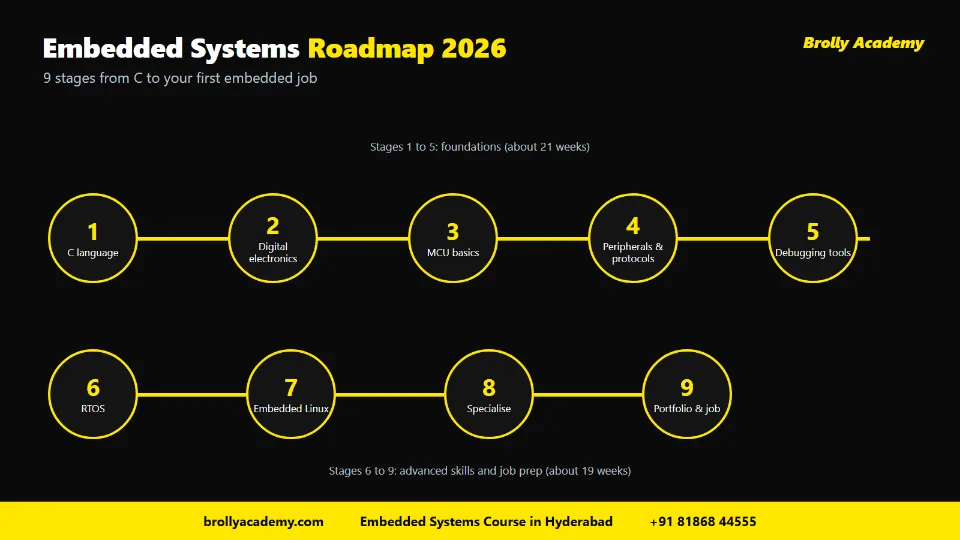
The embedded systems roadmap at a glance: 9 stages, from C and electronics to RTOS, embedded Linux and your first job.
Use this flow as your map. Each line reads stage → key skills → output.
- C programming → pointers, bitwise operators, structs, volatile → a tested bit-manipulation library on GitHub
- Digital electronics → voltage, current, logic levels, schematics, multimeter → a breadboard circuit you can explain
- Microcontroller basics → architecture, memory map, clocks, GPIO, flashing → a register-level LED blink and button read
- Peripherals and protocols → timers, interrupts, ADC, PWM, UART, SPI, I2C → sensor data sent to your PC over UART
- Debugging tools → debug probe, breakpoints, logic analyser, oscilloscope → a decoded I2C capture in your README
- RTOS → tasks, priorities, queues, semaphores, mutexes → a three-task data logger
- Embedded Linux → shell, cross-compiling, device tree, kernel modules → a custom image and a small GPIO driver
- Specialisation → automotive, IoT, Linux BSP, firmware or validation → one serious domain project
- Portfolio and jobs → GitHub, resume, interview practice, applications → three to five documented projects and ten applications sent
If you want something to stick on your wall, jump to the printable one-page checklist near the end of this guide.
2. What is an embedded systems roadmap?
Short answer: An embedded systems roadmap is an ordered learning plan that takes you from zero to job-ready in embedded development, with clear stages, time estimates and milestones so you always know what to learn next.
An embedded system is a computer built into a larger product to do one dedicated job. A washing machine controller, a car's airbag unit and a smartwatch are all embedded systems. If you want the full definition, types and examples first, read our pillar guide on what embedded systems are.
Embedded work sits where hardware and software meet. That is why beginners feel lost. A web developer can ignore the hardware. You cannot. You need to understand C, voltages, registers, timing and tools all at once. A roadmap solves this by breaking the field into nine stages that build on each other.
A few words you will see throughout this guide:
- Microcontroller (MCU): a small chip that holds a processor, memory and input/output pins on one piece of silicon
- Firmware: the software that runs directly on the microcontroller and controls the hardware
- RTOS: a real-time operating system, a small OS that runs several tasks and meets strict timing deadlines
- Embedded Linux: a full Linux system trimmed and built for a specific board or product
3. The 9 stages with weeks and milestones
Short answer: The nine stages are C, digital electronics, microcontroller basics, peripherals and protocols, debugging tools, RTOS, embedded Linux, a specialisation, and portfolio plus job preparation, adding up to about 36 to 42 weeks at 10 to 15 hours a week.
Here is the full plan in one table. The weeks assume a beginner studying part time. You can overlap stages a little, for example by learning debugging tools while you work on peripherals.
That totals 40 weeks. Some people finish faster because they already know C or electronics. Others take a year because they study fewer hours. Speed matters less than finishing each milestone properly.
Want the topic-by-topic content of a full course instead of a learning path? Our embedded systems syllabus lists modules, topics and outcomes in detail.
4. Stage 1: Learn C for embedded (6 weeks)
Short answer: Start with C because most firmware is written in it; focus on pointers, bitwise operators, data types, structs and how memory works, not on desktop features such as file handling.
C is close to the hardware. It lets you read and write exact memory addresses, which is how firmware controls a chip. It also produces small, fast programs, which matters when your chip has only kilobytes of memory. Learn standard C first, not compiler-specific tricks, so your skills carry over to any microcontroller.
Focus your six weeks like this:
- Weeks 1 and 2: variables, data types, operators, loops, functions, arrays and strings
- Weeks 3 and 4: pointers, pointer arithmetic, structs, unions, enums and fixed-width types such as uint8_t and uint32_t
- Week 5: bitwise operators (AND, OR, XOR, NOT, shifts) and how to set, clear, toggle and test a single bit
- Week 6: the volatile and const keywords, the stack and the heap, the preprocessor and splitting code into .c and .h files
Practise on your laptop with GCC. You do not need a board yet. Write small programs that pack and unpack bits, because you will do this every day in firmware.
Milestone: a small library of bit-manipulation functions with test cases that you push to GitHub.
Our detailed guide on embedded C programming explains volatile, memory-mapped registers, interrupts and common mistakes with short code examples. Use it alongside this stage.
5. Stage 2: Digital electronics basics (3 weeks)
Short answer: Learn enough electronics to read a schematic, understand voltage, current and logic levels, and wire a simple circuit without damaging your board.
You do not need an electronics degree to write firmware. But you must know what happens when your code drives a pin. If you connect an LED without a resistor, or connect a 5 V sensor to a 3.3 V pin, you can destroy hardware.
Cover these topics:
- Basics: voltage, current, resistance, Ohm's law and power
- Components: resistors, capacitors, diodes, LEDs, transistors used as switches, pull-up and pull-down resistors
- Digital logic: binary and hexadecimal, logic gates, flip-flops, logic high and logic low voltages
- Reading schematics and datasheets: pin diagrams, absolute maximum ratings and electrical characteristics
- Tools: a breadboard, jumper wires and a basic multimeter
ECE and EEE students already know most of this from college. Use these weeks as a quick revision and move on.
Milestone: a breadboard circuit with a switch, a transistor and an LED, plus a hand-drawn schematic you can explain.
6. Stage 3: Microcontroller basics (4 weeks)
Short answer: Pick one microcontroller family, learn its architecture, memory map, clock and GPIO, and write programs at the register level before you lean on libraries.
A microcontroller combines a CPU, flash memory for code, RAM for data and peripherals on one chip. Many modern MCUs use Arm Cortex-M cores. Arm describes its M-profile as targeting "deeply embedded systems" and says Cortex-M is optimised for cost and energy-efficient microcontrollers (Arm, October 2026). That is why a Cortex-M board is a sensible first choice.
Good beginner boards include an STM32 development board, a Raspberry Pi Pico, an Arduino UNO R4 or an ESP32 board. Pick one and stay with it until stage 6. Switching boards every week is one of the biggest time-wasters.
Microcontroller vs microprocessor
Beginners often mix up these two words, and interviewers like to ask about them. A microcontroller (MCU) puts the CPU, flash, RAM and peripherals on one chip and usually runs bare-metal firmware or an RTOS. A microprocessor (MPU) is mainly the processing core; it depends on external RAM and storage and usually runs a full operating system such as Linux.
Stages 3 to 6 of this roadmap use an MCU. Stage 7 moves you to an MPU-based Linux board. For memory types, buses, clocks and power design in more depth, read our guide to the hardware architecture of an embedded system.
Choosing your first board
Raspberry Pi's product brief says the Pico 2 series starts at $5 and that the Pico 2 W adds 2.4GHz Wi-Fi and Bluetooth 5.2 (Raspberry Pi, March 2026). The Arduino store lists the UNO R4 Minima at €22.00 including VAT, with a Renesas RA4M1 Cortex-M4 running at 48 MHz (Arduino, October 2026). These are overseas list prices; Indian prices vary by seller and import costs, so compare a few local shops before you buy.
Learn these ideas in order:
- Architecture: CPU, flash, RAM, buses and the memory map
- GPIO: general-purpose input/output pins that your code can set high, set low or read
- Clocks and reset: where the chip's timing comes from and what happens at power-on
- Startup and the bootloader: a bootloader is a small program that runs first and loads or updates your firmware
- Registers vs HAL: a HAL (hardware abstraction layer) is a vendor library that hides register details behind functions; learn registers first so you understand what the HAL does
- Toolchain and flashing: the cross compiler that builds code for the target chip, and how the binary gets onto the board
Milestone: blink an LED and read a push button by writing to registers directly, then do the same with the vendor HAL and compare the two.
7. Stage 4: Peripherals and communication protocols (6 weeks)
Short answer: Learn timers, interrupts, ADC and PWM, then the three serial protocols every embedded job asks about: UART, SPI and I2C.
This is the longest hands-on stage, and it is where you start to feel like an embedded engineer. Peripherals are the hardware blocks inside the MCU that do specific jobs, such as counting time or converting voltages into numbers.
Timers, interrupts, ADC and PWM
- Timers: count clock ticks to create delays, measure time or trigger events
- Interrupts and ISRs: an interrupt makes the CPU pause its work and run a short function called an interrupt service routine (ISR) when an event happens, such as a button press
- ADC: the analogue-to-digital converter turns a sensor voltage into a number
- PWM: pulse width modulation switches a pin on and off quickly to dim an LED or control motor speed
UART, SPI and I2C
- UART: a simple two-device serial link with a transmit line and a receive line, used for debug messages and modules such as GPS
- SPI: a fast bus with a clock, two data lines and a chip-select line per device, used for displays, flash memory and fast sensors
- I2C: a two-wire bus where many devices share the same lines
TI's application note on the I2C bus explains that a controller and target devices share the bus over only two wires, SCL (clock) and SDA (data), using open-drain outputs (Texas Instruments, October 2026). Read it once you have wired your first I2C sensor. It will make much more sense with hardware in front of you.
After these three, learn about CAN if you are interested in automotive work. You will meet it again in stage 8.
Milestone: read a temperature or motion sensor over I2C or SPI, use a timer interrupt to sample it at a fixed rate, and print readings to your PC over UART.
8. Stage 5: Debugging tools (2 weeks)
Short answer: Learn to use a hardware debugger, a logic analyser and a basic oscilloscope, because most of your working time in embedded jobs goes into finding why the hardware and software disagree.
Printing messages is not enough in embedded work. Timing bugs, wrong register settings and electrical problems need real tools.
- Debug probe and debugger: connect to the chip, pause code, set breakpoints, step line by line and watch registers and variables
- IDE debugging: most vendor IDEs and editors such as VS Code with debug extensions can drive a probe through tools such as OpenOCD
- Logic analyser: records digital signals over time and decodes protocols such as UART, SPI and I2C so you can see exactly what was sent
- Oscilloscope: shows real voltage waveforms, so you can spot noise, slow edges or wrong voltage levels
- Multimeter: checks power rails, continuity and shorts
A low-cost logic analyser with open-source software is enough to start. Add an oscilloscope later, or use one in your college lab.
Milestone: capture your stage 4 I2C transaction on a logic analyser, decode it, and explain each byte in your project README.
9. Stage 6: RTOS (4 weeks)
Short answer: Learn a real-time operating system so you can run several tasks with predictable timing; FreeRTOS is the easiest starting point for most learners.
Simple firmware runs one big loop, often called a superloop. As projects grow, that loop becomes hard to manage. An RTOS lets you split work into separate tasks with priorities, and a scheduler decides which task runs.
FreeRTOS describes itself as a real-time operating system for microcontrollers and small microprocessors. Its website says it is maintained by AWS for the benefit of the FreeRTOS community, uses the MIT licence, and lists 202604.00-LTS as its latest long-term support release (FreeRTOS, October 2026). Zephyr is another popular open-source RTOS worth exploring after FreeRTOS.
Learn these concepts:
- Tasks and priorities: independent functions that the scheduler runs
- Scheduling and preemption: how a higher-priority task can interrupt a lower one
- Ticks and delays: how an RTOS measures time and puts tasks to sleep
- Queues: safe ways to pass data between tasks and from ISRs to tasks
- Semaphores and mutexes: tools to signal events and protect shared resources
- Priority inversion: a classic bug where a low-priority task blocks a high-priority one
Milestone: a data logger with three tasks: one reads a sensor, one processes the data and one sends it over UART, connected with queues.
For a deeper explanation of scheduling methods, read our guide on task scheduling in embedded systems.
10. Stage 7: Embedded Linux (6 weeks)
Short answer: Learn Linux on the command line, then cross-compiling, the boot process, device trees and simple kernel drivers on a Linux-capable board such as a Raspberry Pi.
Many products, such as routers, smart displays and industrial gateways, run Linux rather than an RTOS. Embedded Linux roles are a large part of the job market, so even microcontroller engineers benefit from knowing the basics.
Work through this order:
- Weeks 1 and 2: shell commands, file permissions, processes, shell scripting, Git and building C programs with make
- Week 3: cross-compiling on your PC for an Arm board, and the boot flow from bootloader to kernel to root filesystem
- Week 4: device trees, which describe the board's hardware to the Linux kernel
- Week 5: writing a simple kernel module and a character device driver
- Week 6: building a custom Linux image with a build system
Two common build systems are Buildroot and the Yocto Project. The Yocto Project describes itself as an open-source collaboration project for building custom Linux systems for any hardware, and it announced its 6.0 "Wrynose" release on 13 May 2026 (Yocto Project, October 2026). Buildroot is simpler, so many learners start there and move to Yocto later.
Milestone: a custom Linux image on a board, plus a small character driver that toggles a GPIO pin from user space.
11. Stage 8: Choose a specialisation (5 weeks)
Short answer: After the core stages, pick one area that matches your interests and local job market, and build one serious project in it.
Embedded is a wide field. Recruiters prefer someone with a clear direction over someone who knows a little of everything. Here are the main tracks:
Milestone: one domain project, for example a CAN-based dashboard for automotive, or a battery-powered sensor node that publishes data over MQTT for IoT.
12. Stage 9: Portfolio and job preparation (4 weeks)
Short answer: Turn your milestones into three to five polished GitHub projects, write a skills-based resume, practise interview questions and start applying.
By now you have a milestone from every stage. Pick your best three to five and make them easy for a recruiter to understand.
For each project, include:
- A README with the goal, hardware used, block diagram, wiring photo and how to build and flash it
- Clean code split into modules, with comments that explain why, not what
- Proof it works: a short demo video, logic analyser captures or serial output
- What you learned: the hardest bug and how you fixed it
Then prepare for jobs:
- Resume: list projects first, with the MCU, protocols and tools you used in each
- Interview practice: C pointers, bit manipulation, volatile, interrupts, protocols and RTOS questions come up again and again
- Applications: use company careers pages, LinkedIn, campus placement cells and referrals
Need project ideas at three levels? Our list of embedded systems projects gives components and skills for each one.
Milestone: a pinned GitHub profile with three to five documented projects, a one-page resume and at least ten applications sent.
13. Free resources for each stage
Short answer: You can learn most of this roadmap from free official sources: NPTEL lectures, vendor datasheets and reference manuals, application notes, and the official documentation of tools such as FreeRTOS, Zephyr, Buildroot and Yocto.
Start with official sources, because blog posts and videos can be outdated.
NPTEL for embedded beginners
NPTEL is an Indian online learning platform that publishes full video lecture courses in engineering, taught by professors from leading institutes. One useful example is "Introduction to Embedded System Design" by Prof. Dhananjay V. Gadre and Prof. Badri N Subudhi of Netaji Subhas University of Technology and IIT Jammu. Its course page lists lectures on microcontroller ecosystems, power supplies for embedded systems, the TI MSP430 architecture, digital I/O, interrupts, timers, PWM, serial communication, Git and embedded C (NPTEL, October 2026). It fits stages 2 to 4 of this roadmap well. Check the course page for current run dates and any exam or certificate details before you register.
A certificate from a course like this is a nice bonus, but it does not replace projects. Our guide to embedded systems certification explains which certificates employers notice and how to show them on a resume.
Books worth reading
Pick one book per phase instead of buying a shelf. These are widely recommended (title and author):
- For C: "The C Programming Language" by Brian Kernighan and Dennis Ritchie
- For microcontrollers: "Embedded Systems: Introduction to ARM Cortex-M Microcontrollers" by Jonathan Valvano
- For design thinking: "Making Embedded Systems" by Elecia White
- For software quality: "Better Embedded System Software" by Philip Koopman
- For RTOS: "Mastering the FreeRTOS Real Time Kernel" by Richard Barry
14. Beyond the core: hardware, C++, Rust, RISC-V and soft skills
Short answer: Once the nine stages feel comfortable, widen your profile with basic PCB design, a second language such as C++ or Rust, some RISC-V exposure and the soft skills that help you work in a team.
Most roadmaps stop at software. Real products also need boards, newer languages and people who can explain their work. You do not need all of this to land your first job, but each item below makes your profile stronger.
Hardware track: PCB basics
Learn to turn a breadboard circuit into a simple printed circuit board (PCB). Start with schematic capture, footprints, a two-layer layout and design rule checks. KiCad is a free, open-source PCB design suite that is good enough for student boards. A small custom board for your stage 8 project stands out in interviews, because it shows you understand the hardware your firmware runs on.
C++, Rust and RISC-V
- C++: many firmware teams use a careful subset of C++ for classes and templates; learn it after C, not instead of C
- Rust: Rust is gaining interest for memory-safe firmware; try it on a board you already know once your C is solid
- RISC-V: an open instruction set architecture; the Raspberry Pi Pico 2 lets you run code on either Arm Cortex-M33 or RISC-V Hazard3 cores, so you can compare them on one board
Treat these as stage 8 or later topics. C is still the language most embedded interviews test first.
Soft skills
- Writing: clear READMEs, bug reports and short design notes
- Reading: datasheets, reference manuals and other people's code
- Communication: explaining a hardware bug to a software colleague, and the reverse
- Teamwork tools: Git branches, pull requests and code reviews
- Estimation: saying honestly how long a driver or bring-up task will take
15. Roadmap variants: ECE, CSE and working professionals
Short answer: The nine stages are the same for everyone, but the time you spend on each one changes with your background; ECE students go faster on electronics, CSE students on C and Linux, and working professionals need a slower weekly pace with sharper focus.
For ECE and EEE students
You already know digital electronics, and many of you studied microcontrollers in college. Your weak spots are usually C depth, software practices and Linux.
- Shorten: stage 2 to one week of revision
- Extend: stage 1 to eight weeks and stage 7 to eight weeks
- Start early: begin in your second or third year, so your final-year project becomes a strong portfolio piece
- Best tracks: automotive embedded, firmware and RTOS, validation
For CSE and IT students
You know programming, data structures and maybe Linux. Your weak spots are electronics, datasheets and timing.
- Shorten: stage 1 to three weeks, focusing only on bits, pointers to registers and volatile
- Extend: stage 2 to five weeks and stage 3 to six weeks
- Watch out: do not skip the multimeter and breadboard work; it builds the hardware sense you lack
- Best tracks: embedded Linux and BSP, IoT
For working professionals and career switchers
You have limited time, so you need a weekly routine and a clear target role.
- Pace: 8 to 10 hours a week, which stretches the plan to about 12 to 14 months
- Weekday evenings: one hour of theory or reading
- Weekends: three to four hours of hands-on board work
- Use your domain: if you work in testing, start with the validation track; if you work in IT support, embedded Linux may be the shortest bridge
- Target: move internally first if your company has an embedded or IoT team
16. Common mistakes to avoid
Short answer: The biggest mistakes are skipping C and electronics, collecting boards instead of finishing projects, relying only on Arduino libraries, avoiding datasheets and not documenting your work.
- Jumping to IoT or AI first: without C, interrupts and protocols, you will copy code you cannot debug
- Collecting boards: buying five boards and finishing nothing; master one first
- Living inside libraries: Arduino and HAL libraries are great, but interviewers will ask what happens at the register level
- Fearing the datasheet: every embedded job involves reading datasheets; start with small sections
- Tutorial loops: watching video after video without building anything
- Ignoring debugging tools: guessing instead of measuring wastes days
- No version control: use Git from your very first project
- Undocumented projects: a project without a README, diagram and demo looks unfinished to a recruiter
- Chasing certificates over skills: certificates help only when backed by projects you can explain
17. Printable one-page roadmap checklist
Short answer: Print this table or save the page as a PDF from your browser, and tick off each stage only when you have the proof listed in the last column.
Revisit the checklist every two weeks. If a row is still empty after the planned weeks, spend one more week on that stage before you move on.
18. How Brolly Academy helps
Short answer: Brolly Academy's Embedded Systems course in Hyderabad follows a similar path in 3 months, with hands-on boards, live projects, mock interviews and placement assistance.
If you prefer a guided version of this roadmap with a trainer and lab hardware, here is what the Brolly Academy Embedded Systems course in Hyderabad offers, as stated on the course page (Brolly Academy, October 2026):
- Duration: 3 months with 80+ hours of expert-led training. Month 1 covers microcontrollers and embedded C (ARM Cortex, STM32, Arduino, timers, interrupts). Month 2 covers RTOS, IoT and the I2C, CAN, SPI and UART protocols. Month 3 covers automotive embedded, VLSI basics and a capstone project, followed by career preparation.
- Syllabus: 31 modules, from C programming and system programming to Linux kernel and device drivers, ARM architecture, RTOS, and testing and debugging.
- Hardware and tools: ARM Cortex, STM32, Arduino and Raspberry Pi, with tools such as Keil µVision, PlatformIO, Zephyr OS, Wireshark and CANalyzer.
- Projects: an embedded Linux device driver, an embedded C sensor control system, an IoT automation system, an automotive embedded controller and an industrial automation PLC interface.
- Modes and fees: Video Recording ₹15,000, Online Course ₹40,000 and Classroom Training ₹45,000, with easy EMI available. Weekday and weekend batches run, and free 3-day demo classes are offered before you enrol.
- Trainer: Mr. Vamsi Raju, an Embedded Systems Specialist and Hardware Architect with 15+ years in embedded systems.
- Career support: placement assistance, resume and LinkedIn help, and mock interviews. The certificate is a Brolly Academy course completion certificate, not a vendor certification.
The next batch listed on the page starts on Monday, 2 November 2026.
Follow this roadmap with a mentor and real hardware
Learning alone works, but it is slow when you get stuck on a register setting or a silent I2C bus. Brolly Academy's Embedded Systems course in Hyderabad covers embedded C, ARM, RTOS, protocols and embedded Linux drivers in 3 months, in classroom or online mode, with hands-on projects and mock interviews. Attend the free 3-day demo classes to see if the pace suits you before you enrol.
Frequently asked questions
What is the best roadmap to learn embedded systems?
The best roadmap moves through nine stages in order: C programming, digital electronics, microcontroller basics, peripherals and protocols, debugging tools, RTOS, embedded Linux, one specialisation, and portfolio plus job preparation. Each stage ends with a small milestone on real hardware. Following the order matters, because every stage depends on the skills from the one before it.
How long does it take to learn embedded systems?
Most beginners need about 9 to 10 months if they study 10 to 15 hours a week. The plan in this guide adds up to about 40 weeks. Working professionals studying 8 to 10 hours a week may need 12 to 14 months. ECE students who already know electronics, or CSE students who know C well, can finish sooner.
How do I become an embedded engineer?
Learn C, basic electronics and one microcontroller, then master peripherals, UART, SPI and I2C, debugging tools and an RTOS. Add embedded Linux basics and one specialisation such as automotive or IoT. Finally, build three to five documented projects on GitHub, write a project-first resume, practise common interview questions and apply through careers pages, LinkedIn and campus placements.
Can I learn embedded systems on my own?
Yes, you can learn embedded systems on your own if you are disciplined and buy at least one development board. Free resources such as NPTEL lectures, datasheets, application notes and official RTOS and Linux documentation cover most topics. The hard part is getting unstuck on hardware bugs, so a mentor, study group or structured course can save you time.
Which programming language should I learn first for embedded systems?
Learn C first. Most firmware is written in C because it gives direct access to memory and hardware registers. Focus on pointers, bitwise operators, fixed-width data types, structs and the volatile keyword. Later, Python helps with test scripts and validation work, and shell scripting helps with embedded Linux, but C remains the foundation for firmware.
Do I need an ECE degree to learn embedded systems?
No, you do not need an ECE degree. CSE, IT, EEE and other engineering students can learn embedded systems too. CSE students should spend extra weeks on digital electronics, reading schematics and datasheets, and hands-on breadboard work. ECE and EEE students usually move faster through the electronics stages but need more time on C and Linux.
Which microcontroller should a beginner start with?
Start with one board and stay with it until you reach the RTOS stage. An STM32 board, Raspberry Pi Pico, Arduino UNO R4 or ESP32 board are all good choices. Many modern microcontrollers use Arm Cortex-M cores, which Arm describes as optimised for cost and energy-efficient microcontrollers, so a Cortex-M board is a sensible first platform.
Is Arduino enough to learn embedded systems?
Arduino is a great way to start, but it is not enough on its own. Its libraries hide the register-level details that interviewers ask about. Use Arduino to get quick wins, then write the same programs at the register level or with a vendor HAL. Understanding what happens underneath the library is what makes you an embedded engineer.
What is the difference between a microcontroller and a microprocessor?
A microcontroller puts the CPU, flash, RAM and peripherals on one chip and usually runs bare-metal firmware or an RTOS at low power and low cost. A microprocessor is mainly the processing core, depends on external memory and usually runs a full operating system such as Linux. In this roadmap, stages 3 to 6 use a microcontroller and stage 7 moves to a Linux board.
Should I learn C++ or Rust for embedded systems?
Learn C first, because it is still the language most embedded interviews test. After that, C++ is useful because many firmware teams use a careful subset of it. Rust is gaining interest for memory-safe firmware, so try it on a board you already know once your C is solid. Treat both as stage 8 or later topics, not as a replacement for C.
Is there a printable embedded systems roadmap?
Yes. This guide includes a one-page checklist table that lists every stage, the skills you should be able to show and the proof to keep, such as a GitHub repository or a decoded logic analyser capture. Print it or save the page as a PDF from your browser, and tick off a stage only when you have the proof in hand.
Which books help you learn embedded systems?
Pick one book per phase. "The C Programming Language" by Brian Kernighan and Dennis Ritchie covers C. Jonathan Valvano's book on ARM Cortex-M microcontrollers covers hardware basics. "Making Embedded Systems" by Elecia White and "Better Embedded System Software" by Philip Koopman teach design and quality, and Richard Barry's FreeRTOS book covers RTOS concepts.
Which RTOS should I learn first?
FreeRTOS is the easiest starting point for most learners. It is a real-time operating system for microcontrollers and small microprocessors, maintained by AWS for the FreeRTOS community and released under the MIT licence. After FreeRTOS, you can explore Zephyr, another popular open-source RTOS, to broaden your skills and understand a different design approach.
Do embedded engineers need to learn Linux?
Yes, most embedded engineers benefit from Linux skills. Many products such as routers, smart displays and industrial gateways run embedded Linux. Even microcontroller engineers use Linux for build tools, scripting and Git. Learn shell commands first, then cross-compiling, the boot process, device trees and simple kernel drivers, and finally build a custom image with Buildroot or Yocto.
What debugging tools does an embedded engineer use?
Embedded engineers use a hardware debug probe with a debugger to pause code, set breakpoints and inspect registers. They use a logic analyser to capture and decode signals such as UART, SPI and I2C, and an oscilloscope to see real voltage waveforms. A multimeter checks power rails and connections. Open-source tools such as OpenOCD and sigrok are good starting points.
Are NPTEL courses useful for embedded systems?
Yes, NPTEL courses are a useful free resource for the early stages. For example, "Introduction to Embedded System Design" by Prof. Dhananjay V. Gadre and Prof. Badri N Subudhi covers microcontroller basics, the TI MSP430, digital I/O, interrupts, timers, PWM, serial communication and embedded C. Pair each lecture with hands-on practice on your own board for the best results.
Can I learn embedded systems online for free?
Yes, you can learn most embedded topics online for free. Use NPTEL lectures, your chip's datasheet and reference manual, vendor application notes, and the official documentation of FreeRTOS, Zephyr, OpenOCD, sigrok, Buildroot and Yocto. You will still need to spend money on a development board, a breadboard, components and ideally a low-cost logic analyser.
What projects should I build while learning embedded systems?
Build one project per stage. Start with a register-level LED blink and button read, then a sensor read over I2C or SPI sent to your PC through UART. Next, build a multi-task RTOS data logger and a small Linux GPIO driver. Finish with one domain project, such as a CAN dashboard or an MQTT sensor node.
Which embedded specialisation is best for freshers?
The best specialisation depends on your interests and background. ECE and EEE students often do well in automotive embedded, firmware and RTOS, or validation. CSE students often prefer embedded Linux and BSP or IoT. Pick one track after the core stages and build one serious project in it, because recruiters value a clear direction.
Is embedded systems hard to learn?
Embedded systems is challenging but very learnable if you follow a step-by-step order. It feels hard because you must understand software and hardware together, including C, voltages, registers and timing. Breaking it into nine stages, using one board and finishing a small milestone at each stage makes the learning curve much gentler.
How can CSE students learn embedded systems?
CSE students should keep stage 1 short, focusing on bit manipulation, pointers to registers and volatile. Then spend extra time on digital electronics, schematics, datasheets and microcontroller basics, around five to six weeks each. Hands-on breadboard and multimeter work is essential. Embedded Linux, BSP and IoT are natural specialisations because they build on existing software skills.
How can working professionals switch to embedded systems?
Working professionals should study 8 to 10 hours a week, with short weekday reading sessions and longer weekend board sessions. At that pace the roadmap takes about 12 to 14 months. Choose a target role early, use your current domain, for example moving from testing into validation, and try an internal move if your company has an embedded team.
Is a certificate needed to get an embedded job?
A certificate is not required to get an embedded job. Employers mainly look at the projects you have built and how well you explain them in interviews. A certificate from NPTEL or a training course is a helpful bonus on your resume, but only when it is backed by real projects you can demonstrate and discuss in detail.
What common mistakes do embedded beginners make?
Common mistakes include skipping C and electronics, buying many boards and finishing nothing, relying only on Arduino or HAL libraries, avoiding datasheets, watching tutorials without building anything and guessing instead of using debugging tools. Many beginners also forget Git and documentation, so their projects look unfinished to recruiters even when the code works.
Does Brolly Academy offer an embedded systems course that follows this roadmap?
Yes. Brolly Academy offers a 3-month Embedded Systems course in Hyderabad with 80+ hours of training covering microcontrollers, embedded C, RTOS, protocols such as I2C, CAN, SPI and UART, automotive embedded and a capstone project. It is available as classroom training, live online classes or video recordings, and free 3-day demo classes are offered before you enrol.
Learn with Brolly Academy
Review the syllabus, practical projects and batch timings, and book a free demo before you enrol.
Related Articles
Continue Your Learning
Embedded Systems Course in Hyderabad
3 months and 80+ hours of hands-on training in embedded C, ARM Cortex, STM32, RTOS, communication protocols and IoT, with capstone projects.
View CourseIoT Training in Hyderabad
Build connected devices: sensors, microcontrollers, wireless protocols and cloud dashboards for real Internet of Things projects.
View CourseVLSI Training in Hyderabad
Learn digital design and chip design flows for VLSI careers, a natural next step for ECE students interested in hardware.
View Course