SEO Interview Questions and Answers
- SEO Interview Questions and Answers is a collection of commonly asked interview questions with clear, simple, and practical answers.
- It helps beginners, students, job seekers, and digital marketing professionals prepare for SEO interviews by covering important topics such as keyword research, on-page SEO, off-page SEO, technical SEO, link building, content optimization, search intent, Google Search Console, Google Analytics, Core Web Vitals, local SEO, and AI-powered SEO trends.
- Learning these questions and answers improves your understanding of SEO concepts, boosts interview confidence, and helps you explain SEO strategies in an easy-to-understand way during interviews.

Share
Table of Contents
Free SEO Interview Questions and Answers PDF
- Covers SEO fundamentals and practical concepts
- Includes Keyword Research, On-Page SEO, Off-Page SEO & Technical SEO
- Covers Link Building, Google Search Console & Google Analytics
- Helpful for Freshers, Students & Working Professionals
- Useful for quick interview revision
- Includes commonly asked SEO interview questions
- Helps improve SEO knowledge and interview confidence
- Easy to download, save and revise anytime
- Download the free PDF below and start preparing for your SEO interview
Listen to SEO Interview Questions & Answers – Audio Note
- Prefer listening instead of reading? Use this SEO Interview Questions and Answers Audio Note.
- Listen to important SEO concepts and interview questions in an easy-to-understand format.
- Useful for quick revision before an SEO interview.
- Ideal for freshers, students, and digital marketing professionals.
- Learn and revise SEO concepts anytime, even while travelling.
- Covers key SEO topics in a simple and practical way.
- Play the audio below and start your SEO interview preparation.
SEO Interview Questions and Answers – SEO Fundamentals
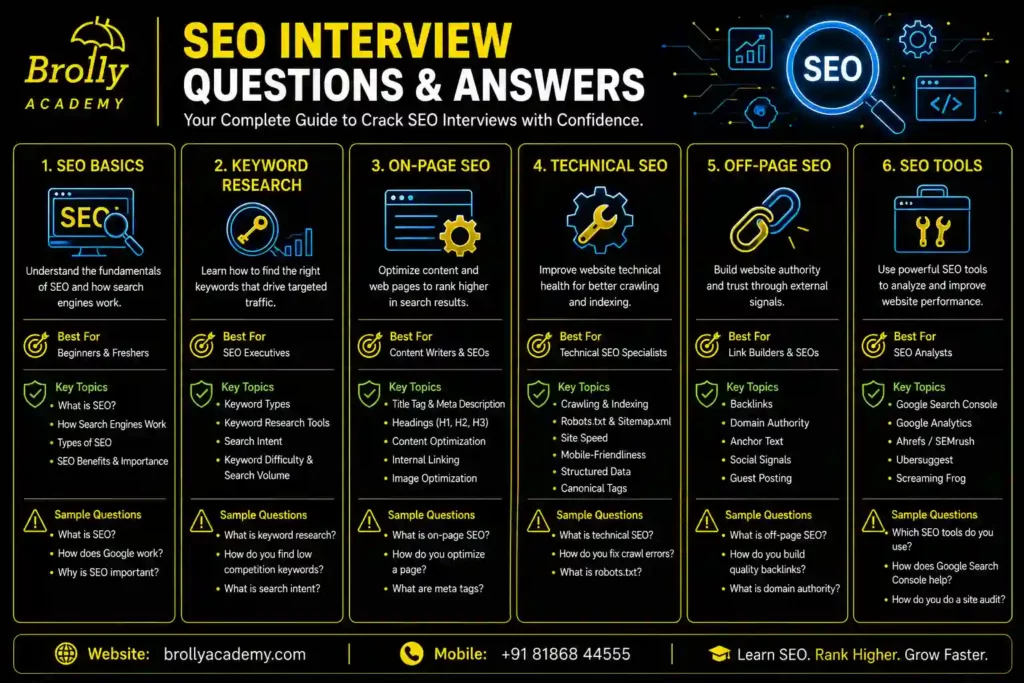
1. What is SEO?
Simple Answer
SEO (Search Engine Optimization) is the process of improving a website so it appears higher in search engine results when people search for relevant information, products, or services.
The main goal of SEO is to attract visitors without paying for advertisements. This is called organic traffic.
Detailed Explanation
- Imagine the internet as a huge city with millions of shops.
- Your website is one shop.
- Google is like a smart guide who recommends the best shops based on what people are looking for.
If someone searches:
“Best Digital Marketing Course”
Google compares thousands of websites.
It considers questions like:
- Does this page answer the user’s question?
- Is the information accurate?
- Is the website trustworthy?
- Does the page load quickly?
- Does it work well on mobile devices?
- Do other trusted websites refer to it?
SEO improves these aspects so your website is more likely to appear higher in search results.
Real-Life Example
- Without SEO:
A bakery owns a website, but very few people are aware of it.
- With SEO:
Someone searches:
“Best Birthday Cake in Hyderabad”
The bakery appears on the first page and receives orders.
Interview Answer
SEO is a method of optimizing a website to increase its chances of appearing prominently in search engine results without using paid advertisements.It includes keyword research, content enhancement, technical optimization, user experience improvements, and authority building to help search engines better understand, evaluate, and recommend the website.
Common Mistakes
- Thinking SEO is only about adding keywords.
- Ignoring user experience.
- Expecting instant results.
- Publishing low-quality content.
- Forgetting mobile optimization.
Quick Revision
SEO = Better Visibility → More Organic Traffic → More Leads → More Sales
2. Why is SEO Important?
Simple Answer
SEO makes it easier for people to discover your website when they look for information, products, or services through search engines.
A website that ranks on the first page of search engine results has a better chance of attracting visitors because it is easier for users to find.
Detailed Explanation
Websites displayed in the top search positions generally receive the highest number of clicks from users. Websites that appear on later pages receive much less traffic.
Good SEO can help you:
- Increase website visitors.
- Build trust and credibility.
- Generate leads.
- Increase sales.
- Reduce dependence on paid advertising.
Real-Life Example
Two online clothing stores sell similar products.
Store A focuses on SEO strategies, allowing it to achieve a top position in search results for the keyword “cotton sarees online.”
Store B does not optimize its website.
Because Store A is easier to discover on Google, more people searching for its products visit the website, resulting in higher customer inquiries and increased sales opportunities.
Interview Answer
SEO is important because it improves a website’s visibility in search engines, helping businesses attract relevant visitors, build trust, and achieve long-term growth without relying solely on paid advertising.
Common Mistakes
- Expecting immediate results.
- Giving higher priority to improving search rankings while overlooking the importance of delivering valuable and relevant content to users.
- Ignoring content quality.
Quick Revision
SEO provides long-term visibility, credibility, and sustainable traffic.
3. What is the History of SEO?
Simple Answer
SEO began in the mid-1990s as website owners tried to make their sites easier for early search engines to find and rank.
Detailed Explanation
- 1990s: Search engines like AltaVista and Yahoo! gained popularity.
- 1998: Google launched with a stronger ranking approach based on relevance and links.
- 2000s: Keyword optimization became common.
- 2010s: Google emphasized quality content, mobile usability, and user experience.
- 2020s: AI, machine learning, semantic understanding, and conversational search became major influences.
Interview Answer
SEO has evolved from simple keyword optimization to a comprehensive discipline focused on helpful content, technical excellence, user experience, and adapting to AI-powered search.
4. What are the Types of SEO?
Simple Answer
SEO can be divided into several major areas:
- On-Page SEO
- Off-Page SEO
- Technical SEO
- Local SEO
- E-commerce SEO
- International SEO
On-Page SEO
- Optimizing elements within your website, such as content, headings, keywords, images, and internal links.
Off-Page SEO
- Increasing your website’s trust and authority with quality backlinks, online mentions, customer reviews, and a strong brand presence.
Technical SEO
- Improving technical aspects such as website speed, mobile friendliness, structured data, XML sitemaps, and crawlability.
Local SEO
- Helping businesses appear in location-based searches, such as “coffee shop near me.”
E-commerce SEO
Enhancing product pages, category pages, and the overall online shopping experience to improve search visibility and increase sales.
International SEO
Helping websites serve users in multiple countries and languages.
Interview Answer
SEO includes on-page optimization, off-page authority building, technical improvements, local visibility, e-commerce optimization, and international strategies, each contributing to better search performance.
White Hat SEO
Applies approved SEO practices that align with search engine guidelines and promote sustainable long-term results.
Examples:
- Helpful content.
- Fast website.
- Natural backlinks.
- Good user experience.
Result: Sustainable, long-term growth.
Black Hat SEO
Uses manipulative techniques to try to improve rankings quickly.
Examples:
- Keyword stuffing.
- Hidden text.
- Buying spammy backlinks.
- Cloaking.
Cloaking means a website shows one version of a webpage to search engines and a different version to human visitors.
Result: Risk of penalties or removal from search results.
Grey Hat SEO
Uses tactics that are not clearly prohibited but may carry some risk.
Examples:
- Excessive link exchanges.
- Aggressive automation.
- Over-optimized anchor text.
Result: Short-term gains but potential long-term issues.
Interview Answer
White Hat SEO follows search engine guidelines, Black Hat SEO violates them through manipulative tactics, and Grey Hat SEO falls somewhere in between. Ethical, user-focused practices are recommended for sustainable success.
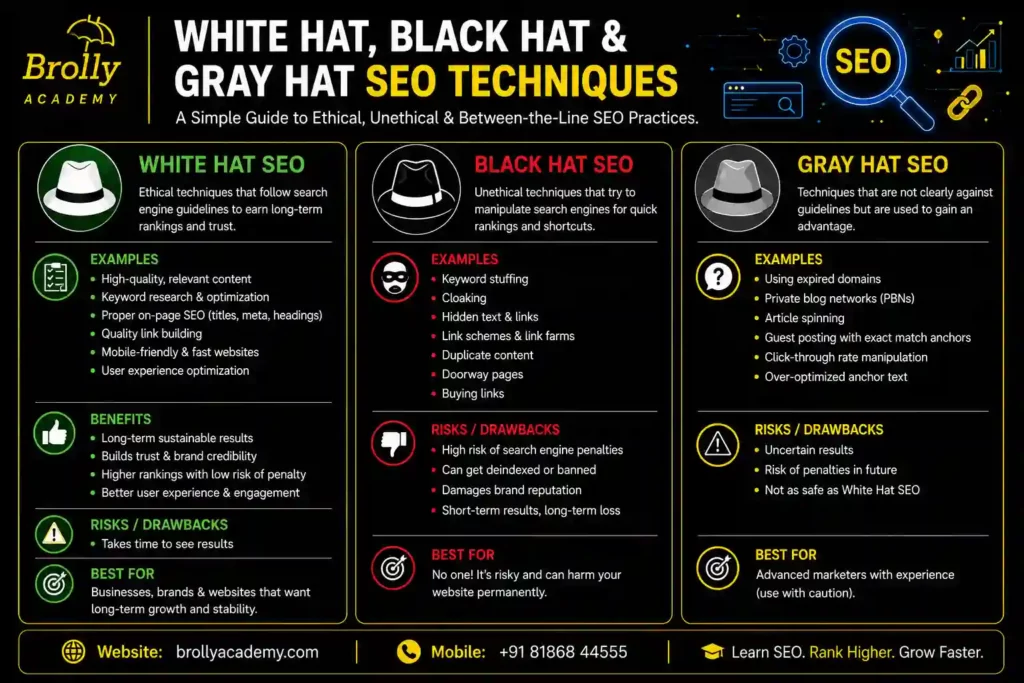
5.What is White Hat, Black Hat, and Grey Hat SEO?
6. How Do Search Engines Work?
Simple Answer
- A search engine is an online software tool that enables users to locate relevant information, websites, images, videos, and other content available on the internet.
- When you type a query into Google, Bing, or another search engine, it searches billions of web pages and displays the most relevant results in a fraction of a second.
- Search engines work in three main stages:
- Crawling
- Indexing
- Ranking
Detailed Explanation
Imagine Google is a giant digital library.
- Websites are books.
- Search engine bots are librarians.
- Users ask questions.
- Google finds the best “book” (website) that answers the question.
Step 1: Crawling
Google uses automated programs called Googlebots (also known as crawlers or spiders) to discover new and updated web pages.
The crawler moves from one page to another by following links.
Example:
Website A links to Website B.
Googlebot follows the link and discovers Website B.
Step 2: Indexing
Once Google discovers a webpage, it examines and understands the content before deciding whether to include it in its search index.
It checks:
- Title
- Headings
- Images
- Videos
- Keywords
- Structured data
- Content quality
If the page meets Google’s requirements, it is stored in Google’s database called the Index.
Think of the index as a massive catalog of websites.
Step 3: Ranking
When someone searches:
“Best SEO Course”
Google looks through its index and compares millions of relevant pages.
It considers many ranking factors, such as:
- Relevance to the search
- Content quality
- User experience
- Website speed
- Mobile friendliness
- Backlinks
- Trustworthiness
- Search intent.
The pages most likely to satisfy the user’s query appear first.
Real-Life Example
Imagine you are searching for:
“Best Digital Marketing Institute in Hyderabad.”
Google:
- Finds websites in its index.
- Evaluates which pages best answer the query.
- Displays the most useful and relevant pages first.
Interview Answer
Search engines identify, organize, and display web pages through a three-step process: crawling, indexing, and ranking. Crawlers discover web pages, indexing stores and organizes them, and ranking determines the order in which pages appear based on relevance, quality, authority, technical performance, and user experience.
Common Mistakes
- Thinking Google searches the internet in real time for every query.
- Assuming every website is automatically indexed.
- Believing keywords alone determine rankings.
Quick Revision
7. What is the Difference Between Organic Traffic and Paid Traffic?
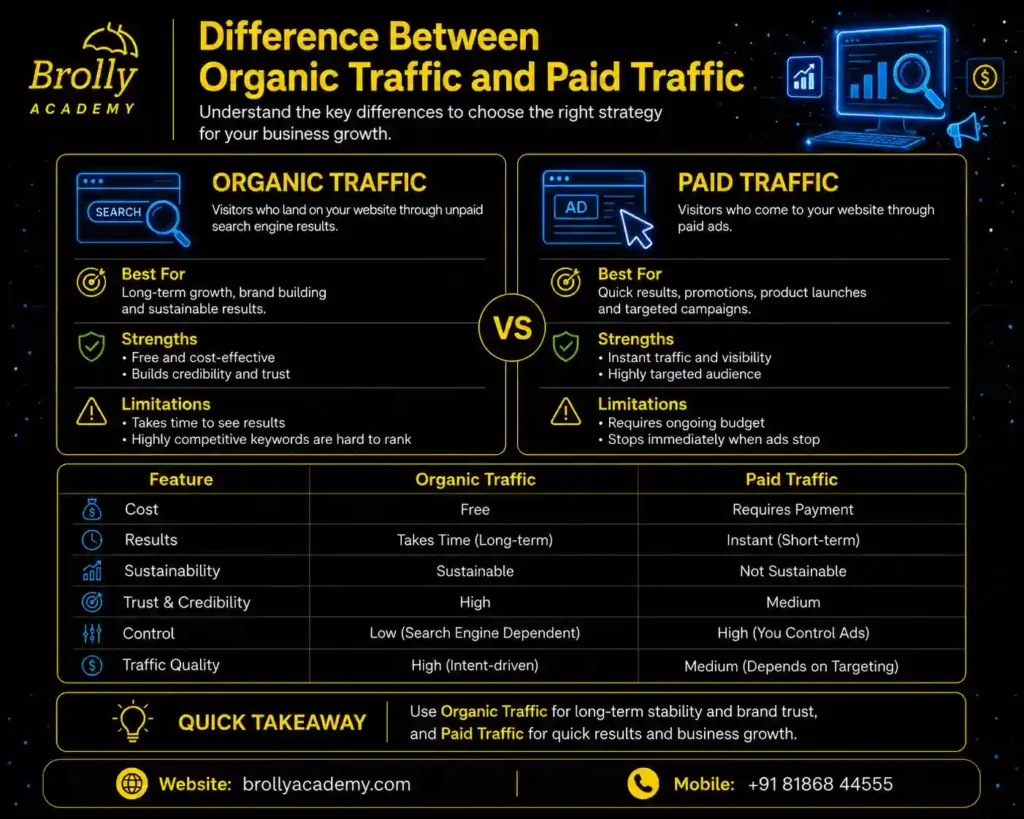
Simple Answer
- Traffic refers to the total number of people who visit your website over a specific period of time.
There are two main ways visitors arrive:
- Organic Traffic (free)
- Paid Traffic (through advertisements)
Organic Traffic
Organic traffic comes from unpaid search results.
Example:
A user searches:
“What is SEO?”
They click your website because it appears naturally in search results.
You do not pay Google for this click.
Paid Traffic
Paid traffic comes from advertisements.
Example:
You run a Google Ads campaign.
When someone clicks your ad, you pay Google.
Comparison Table
Feature | Organic Traffic | Paid Traffic | |||
|---|---|---|---|---|---|
Cost per click | Free | Paid | |||
Source | SEO | Ads | |||
Long-term value | High | Depends on budget | |||
Speed | Slower to build | Immediate | |||
Trust | Often higher | Can vary |
Real-Life Example
A clothing store launches a new website.
- It invests in SEO to earn organic traffic over time.
- It also runs Google Ads for immediate visibility during a sale.
Both strategies can work together.
Interview Answer
Organic traffic is the unpaid traffic a website receives through search engine results, while paid traffic comes from advertisements where businesses pay for user clicks or impressions.
Common Mistakes
- Thinking SEO is completely free (it requires time and effort).
- Expecting paid ads to improve organic rankings directly.
- Depending solely on paid advertising while neglecting long-term SEO strategies for sustainable organic growth.
Quick Revision
Organic = Earned through SEO
Paid = Purchased through advertising
8. What are the Benefits of SEO?
Simple Answer
SEO helps businesses attract more visitors, build trust, generate leads, and grow online without relying only on paid advertisements.
Detailed Explanation
1. Increases Website Traffic
Higher rankings generally lead to more visitors from search engines.
2. Builds Brand Trust
People often trust websites that appear prominently in search results because they perceive them as more authoritative.
3. Generates Qualified Leads
SEO helps bring visitors to your website who are actively looking for related information, products, or services through search engines.
4. Cost-Effective Marketing
Unlike paid ads, organic visibility can continue bringing traffic even after content is published and optimized.
5. Better User Experience
Good SEO encourages:
- Fast-loading pages
- Mobile-friendly design
- Clear navigation
- Helpful content
6. Long-Term Results
High-quality SEO efforts can continue generating traffic for months or years with regular maintenance.
7. Competitive Advantage
Businesses with strong SEO often outperform competitors who have weak online visibility.
8. Better Conversion Opportunities
When the right audience finds relevant content, they are more likely to become customers.
Real-Life Example
- A bakery writes articles about cake designs, birthday cakes, and wedding cakes. People searching for these topics discover the bakery’s website, leading to more inquiries and orders.
Interview Answer
SEO increases visibility, attracts qualified traffic, improves user experience, builds trust, supports lead generation, and delivers sustainable long-term growth.
Common Mistakes
- Expecting instant rankings.
- Publishing low-quality content.
- Ignoring technical SEO.
- Neglecting user intent.
Quick Revision
SEO Benefits:
- More visitors
- Better rankings
- More leads
- Stronger brand
- Improved user experience
- Long-term growth
9. What are the Limitations of SEO?
Simple Answer
- Although SEO is highly valuable, it is not a quick or guaranteed solution.
- Results take time and depend on many factors, including competition, website quality, and search engine algorithms.
Detailed Explanation
1. Results Take Time
SEO is a long-term strategy.
New websites often need several months before seeing meaningful organic growth.
2. High Competition
Popular keywords may have many well-established competitors.
Ranking for these terms requires consistent effort.
3. Algorithm Changes
Search engines regularly update their ranking systems.
Websites must adapt to maintain performance.
4. No Guaranteed Rankings
No one can guarantee a #1 position because search engines consider many dynamic factors.
5. Continuous Work
SEO requires ongoing:
- Content updates
- Technical improvements
- Monitoring
- Optimization
6. Requires Expertise
Successful SEO involves understanding content, technical issues, user behavior, analytics, and evolving search trends.
Real-Life Example
A new online store may publish excellent content but still take months to compete with established brands in search results.
Interview Answer
SEO is a long-term investment. It requires continuous optimization, adaptation to algorithm changes, and consistent effort. While it offers sustainable benefits, rankings cannot be guaranteed.
Common Mistakes
- Expecting overnight success.
- Stopping SEO after initial improvements.
- Ignoring analytics and performance data.
Quick Revision
SEO Limitations:
- Takes time
- Competitive
- Constant updates
- Ongoing effort
- No guaranteed rankings
10. What is the Future of SEO?
Simple Answer
SEO is evolving from optimizing only for traditional search engines to optimizing for AI-powered search experiences as well.
Future SEO focuses on creating helpful, trustworthy, and well-structured content that serves both people and AI systems.
Detailed Explanation
The future of SEO is influenced by artificial intelligence, natural language processing, and changing user behavior.
Instead of relying mainly on keywords, search systems increasingly evaluate:
- Search intent
- Content quality
- Expertise
- Experience
- Authority
- Trustworthiness
- Context
- Entities
- User satisfaction
Major Future SEO Trends
1. AI-Powered Search
AI-generated answers are becoming more common, requiring content that is clear, factual, and well-structured.
2. Generative Engine Optimization (GEO)
Optimizing content so AI-powered search experiences can understand, summarize, and reference it effectively.
3. Answer Engine Optimization (AEO)
Creating concise, direct answers that can be surfaced in answer-focused search experiences and voice assistants.
4. Semantic SEO
Focusing on topics and concepts rather than repeating exact keywords.
5. Entity SEO
Helping search systems understand people, organizations, places, products, and relationships between them.
6. Voice Search
People increasingly use conversational queries such as:
“Which SEO course is most suitable for someone who is just getting started?”
Content should naturally answer such questions.
7. Video and Image SEO
Visual content continues to grow in importance as search engines better understand multimedia.
8. User Experience
Fast, secure, mobile-friendly websites remain essential for long-term success.
Real-Life Example
Instead of writing only:
A modern page explains:
- What SEO is
- Why it matters
- How it works
- Who should learn it
- Frequently asked questions
- Related concepts
This comprehensive approach helps both users and AI systems understand the topic.
Interview Answer
The future of SEO lies in combining technical excellence with high-quality, user-focused content. AI-powered search, semantic understanding, structured data, and topical authority are becoming increasingly important. SEO professionals must optimize for both traditional search engines and AI-driven search experiences.
Common Mistakes
- Believing AI will replace SEO entirely.
- Focusing only on keywords.
- Publishing AI-generated content without human review.
- Ignoring user experience and credibility.
Quick Revision
Future SEO focuses on:
- AI-powered search
- GEO
- AEO
- Semantic SEO
- Entity SEO
- Helpful content
- User experience
- Topical authority
- Trust and expertise
11. What is a Search Engine?
Simple Answer
A Search Engine is a software system that helps users find information on the internet by searching billions of web pages and displaying the most relevant results based on the user’s query.
In simple words, a search engine acts like a digital librarian. Instead of searching through books, it searches websites and web pages.
Popular search engines include Google, Bing, Yahoo, DuckDuckGo, Brave Search, and Baidu.
Detailed Explanation
- Imagine you enter a library containing millions of books. Instead of manually checking every book, you ask the librarian:
“I need a book about Digital Marketing.”
Within seconds, the librarian finds the most relevant books.
- A search engine operates in much the same way, helping users locate the most relevant information based on their search queries.
When a user searches for:
“Best SEO Course for Beginners”
- The search engine:
- Searches its database (called the index)
- Finds relevant pages
- Evaluates page quality
- Displays the best results
Search engines do not scan the entire internet each time a user performs a search. Instead, they retrieve information from their previously built index of web pages. Instead, they search their pre-built index of web pages.
Main Functions of a Search Engine
- Discover websites (Crawling)
- Store web pages (Indexing)
- Rank pages based on relevance
- Display search results (SERP)
- Continuously update its database
Real-Life Example
Suppose you search:
“How to lose weight naturally”
The search engine may display:
- Health articles
- YouTube videos
- Images
- FAQs
- AI-generated summaries (on supported platforms)
It selects results that are most likely to answer your question
Interview Answer
A search engine is a software application that helps users find information on the internet. It discovers web pages through crawling, stores them through indexing, and ranks them based on relevance, quality, authority, and user intent before displaying them in search results.
Common Mistakes
- Thinking Google searches the internet in real time.
- Assuming every website automatically appears in search results.
- Believing search engines rank pages using keywords alone.
Quick Revision
Search Engine = Crawling + Indexing + Ranking + Displaying Results
12. What are Examples of Search Engines?
Simple Answer
A search engine is an online tool that enables users to quickly discover relevant information, websites, images, videos, and other content available on the internet.
Different search engines have different algorithms, features, and market shares.
Popular Search Engines
1. Google
The world’s most widely used search engine.
Features:
- AI-powered search experiences
- Images
- Videos
- Maps
- News
- Shopping
- Voice Search
2.Microsoft Bing
Owned by Microsoft.
Features:
- AI-assisted search
- Image search
- Rewards program
- Integration with Microsoft products
3.Yahoo
Yahoo Search still exists but uses Bing’s search technology for many of its web search results.
4.DuckDuckGo
Focused on user privacy.
Features:
- Does not track users.
- Minimal personalized search.
- Privacy-first approach.
5.Brave Search
Created by Brave Software.
Features:
- Independent search index.
- Strong privacy focus.
- AI-assisted search features.
6.Baidu
The leading search engine in China.
7.Yandex
Popular in Russia and nearby regions.
Comparison Table
Search Engine | Country | Main Feature |
USA | Largest search engine | |
Bing | USA | Microsoft ecosystem |
Yahoo | USA | Web portal with search |
DuckDuckGo | USA | Privacy-focused |
Brave Search | USA | Independent index & privacy |
Baidu | China | Chinese market |
Yandex | Russia | Russian-language search |
Real-Life Example
If someone searches:
“Best Laptop”
Different search engines may show different results because each uses its own ranking systems and data sources.
Interview Answer
Some popular search engines are Google, Bing, Yahoo, DuckDuckGo, Brave Search, Baidu, and Yandex. Each uses its own technology and ranking methods to provide search results.
Common Mistakes
- Thinking Google is the only search engine.
- Assuming all search engines show identical results.
Quick Revision
Remember the major search engines:
Google • Bing • Yahoo • DuckDuckGo • Brave Search • Baidu • Yandex
13. What is Google Search Market Share?
Simple Answer
Market share is the percentage of people using a particular search engine compared to others.
Google has the largest share of the global search engine market, making it the primary focus for most SEO strategies.
Detailed Explanation
- Millions of searches happen every day across different search engines.
- Google consistently handles the majority of these searches worldwide, while Bing, Yahoo, DuckDuckGo, Brave Search, Baidu, and Yandex account for smaller shares depending on the country and user preferences.
- Because Google serves such a large audience, SEO professionals usually optimize websites according to Google’s quality guidelines while ensuring compatibility with other search engines.
Why Does Google Have the Largest Market Share?
- Fast search results
- Relevant rankings
- Advanced AI systems
- Large search index
- Mobile integration
- Maps, Images, Shopping, News, and other connected services
Why Should SEO Professionals Care?
- Because most users search using Google, improving visibility there can significantly increase a website’s organic traffic. However, websites should also remain accessible and useful across other search engines.
Interview Answer
Google has the largest share of the global search market, making it the primary search engine for SEO optimization. However, SEO best practices should generally benefit visibility across multiple search engines.
Common Mistakes
- Optimizing only for Google while ignoring other search engines.
- Focusing only on rankings instead of user experience.
Quick Revision
- Largest Search Engine → Google
- SEO should work across multiple search engines.
14. What are the Components of a Search Engine?
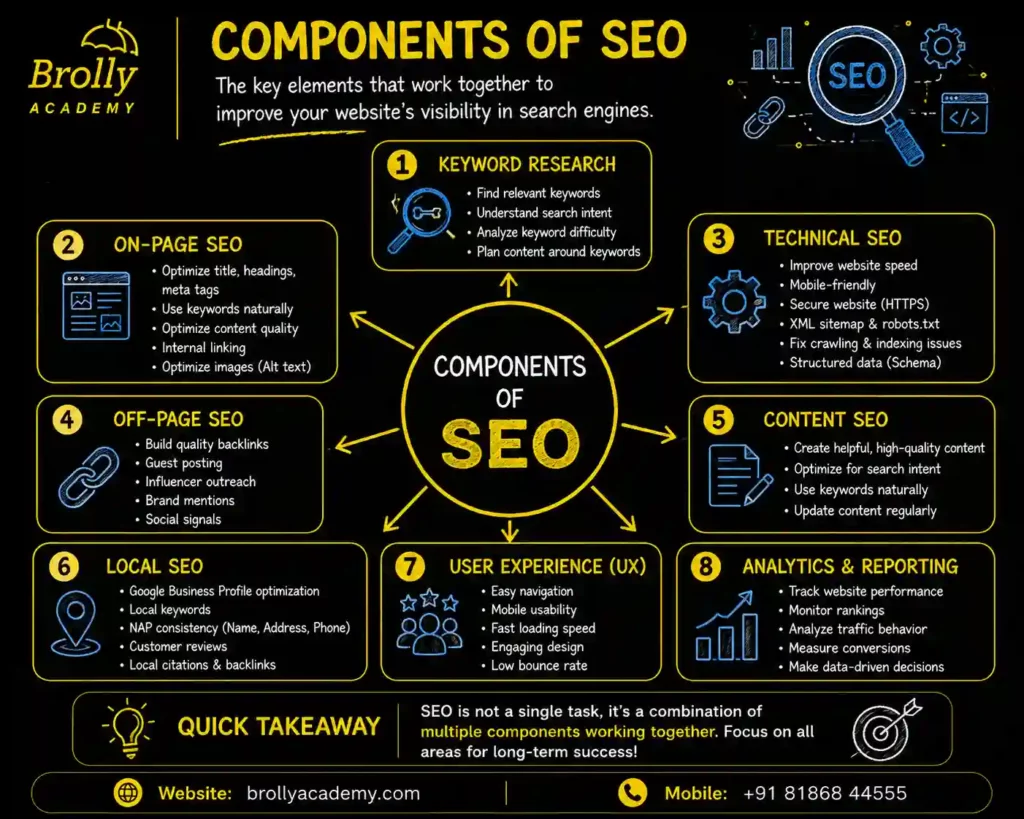
Simple Answer
- A search engine has several important components that work together to find, organize, and display web pages.
The five major components are:
- Crawler
- Index
- Ranking Algorithm
- Query Processor
- Search Results (SERP)
Detailed Explanation
1. Crawler (Spider/Bot)
A crawler automatically visits websites and discovers new or updated pages.
Example:
Google uses Googlebot.
2.Index
The index is a massive database where discovered web pages are stored after analysis.
Think of it as a digital library catalog.
3.Ranking Algorithm
The ranking algorithm decides which pages should appear first for a search query.
It considers many signals, including:
- Relevance
- Content quality
- User experience
- Website authority
- Page speed
- Mobile friendliness
4.Query Processor
When a user types a search, the query processor interprets the request.
It tries to understand:
- The meaning of the words
- User intent
- Spelling corrections
- Synonyms
- Context
5.Search Engine Results Page (SERP)
Finally, the search engine displays the results.
These may include:
- Organic listings
- Paid advertisements
- Images
- Videos
- News
- Local results
- Featured snippets
- AI-powered summaries (where available)
Real-Life Example
You search:
“Best SEO Interview Questions”
The search engine:
- Understands your query.
- Searches its index.
- Ranks relevant pages.
- Displays the most useful results.
Interview Answer
The main components of a search engine include the crawler, index, ranking algorithm, query processor, and the search engine results page (SERP). Together they discover, organize, evaluate, and present information to users.
Common Mistakes
- Confusing crawling with indexing.
- Thinking the crawler ranks websites.
- Assuming the index and ranking algorithm are the same.
Quick Revision
Crawler → Index → Ranking Algorithm → Query Processor → SERP
15. What is Crawling?
Simple Answer
- Crawling is the process by which a search engine discovers new and updated web pages.
- Search engines use automated software programs called crawlers, bots, or spiders to visit websites and follow links from one page to another.
Detailed Explanation
Imagine a postman delivering letters.
The postman travels from one house to another.
Similarly, a search engine crawler travels from one webpage to another through links.
During crawling, the bot collects information such as:
- Page URL
- Titles
- Headings
- Content
- Images
- Videos
- Internal links
- External links
- Structured data
This information is then sent for indexing.
How Crawling Works
- A crawler starts with a known webpage.
- It reads the page.
- It follows links on that page.
- It discovers new pages.
- The discovered pages are analyzed and may be added to the search engine’s index.
Example
Suppose your website has these pages:
- Home
- About
- Services
- Blog
- Contact
The crawler visits the Home page first.
It then follows internal links to the About, Services, Blog, and Contact pages.
If a page has no links pointing to it, it may be difficult for the crawler to discover it.
Why is Crawling Important?
Without crawling:
- Search engines cannot discover your pages.
- Your content cannot be indexed.
- Your pages are unlikely to appear in search results.
Interview Answer
Crawling is the process in which search engine bots automatically discover new and updated web pages by following links. The information collected during crawling is used for indexing and may later influence search rankings.
Common Mistakes
- Believing crawling means a page is automatically indexed.
- Blocking important pages using robots.txt.
- Creating orphan pages with no internal links.
Quick Revision
- Crawling = Discovering Web Pages
- Crawler → Visits Website → Follows Links → Collects Information → Sends for Indexing
16. What are Crawlers (Web Crawlers)?
Simple Answer
A Crawler (also called a Web Crawler, Spider, or Bot) is an automated software program used by search engines to discover websites and web pages on the internet.
Its main job is to visit websites, read their content, follow links, and collect information so that search engines can understand what each page is about.
Think of a crawler as an explorer who travels across the internet collecting information.
Detailed Explanation
- The internet contains billions of web pages. It would be impossible for humans to manually find and organize them all.
Instead, search engines use crawlers to do this automatically.
A crawler:
- Visits a webpage
- Reads its HTML code
- Identifies text, images, and videos
- Follows internal and external links
- Discovers new pages
- Sends collected information for indexing
Crawlers continuously revisit websites because content changes over time.
How Does a Crawler Work?
Suppose your website contains:
- Home
- About
- Services
- Blog
- Contact
The crawler first visits the Home page.
It then follows the links to discover the other pages.
This process continues across millions of websites.
Types of Crawlers
1. Search Engine Crawlers
Used by search engines.
Examples:
- Googlebot
- Bingbot
2.SEO Tool Crawlers
Used for website audits.
Examples:
- Screaming Frog
- Ahrefs Site Audit
- Semrush Site Audit
These tools help identify technical SEO issues.
- Why are Crawlers Important?
Without crawlers:
- Search engines cannot discover your website.
- New pages remain invisible.
- Updated content may not appear in search results.
Interview Answer
A crawler is an automated program that visits websites, follows links, collects information, and sends it to the search engine for indexing. Crawlers help search engines discover and update web content efficiently.
Common Mistakes
- Thinking crawlers rank websites.
- Assuming every crawled page is indexed.
- Blocking important pages from crawlers.
Quick Revision
Crawler = Discovers Pages.
Crawler → Reads Website → Follows Links → Sends Data for Indexing
17. What is Googlebot?
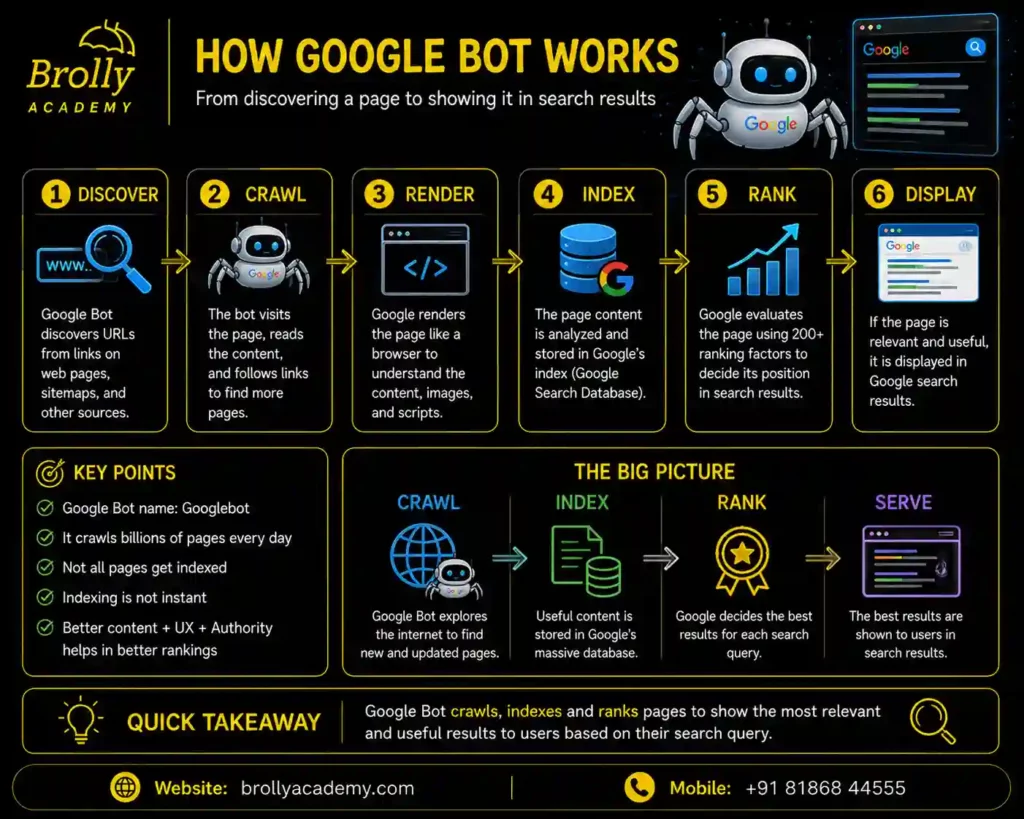
Simple Answer
- Googlebot is Google’s official web crawler.
- It automatically visits websites to discover new pages and check whether existing pages have changed.
- Googlebot is essential because it helps Google keep its search index updated.
Detailed Explanation
Googlebot works continuously.
Its responsibilities include:
- Finding new websites
- Discovering newly published pages
- Checking updated pages
- Following internal links
- Reading structured data
- Understanding page content
Googlebot does not immediately rank a website.
Instead, it collects information that may later be used during indexing and ranking.
Types of Googlebot:
- Googlebot Desktop
Simulates how pages appear on desktop devices.
- Googlebot Smartphone
Simulates how pages appear on mobile devices.
Because Google primarily uses mobile-first indexing, the smartphone crawler is especially important.
How Googlebot Finds Websites
Googlebot discovers pages through:
- Internal links
- Backlinks from other websites
- XML sitemaps
- Previously indexed pages
- URL submissions in Google Search Console
Real-Life Example
Suppose you publish a new blog today.
Googlebot visits your sitemap, discovers the new page, reads it, and sends the information for indexing.
Interview Answer
Googlebot is Google’s automated crawler that discovers and revisits web pages. It collects information about website content, links, and structure so Google can index and potentially rank those pages.
Common Mistakes
- Thinking Googlebot instantly indexes every page.
- Assuming Googlebot visits every page at the same frequency.
- Blocking Googlebot unintentionally.
Quick Revision
Googlebot = Google’s Web Crawler
18. What is Indexing?
Simple Answer
Indexing is the process of storing and organizing a webpage in a search engine’s database after it has been crawled.
In most cases, only webpages that have been indexed by search engines are eligible to appear in search results.
Detailed Explanation
After crawling a webpage, the search engine analyzes it.
It examines:
- Content quality
- Titles
- Headings
- Images
- Internal links
- Structured data
- Duplicate content
- Technical issues
If the page meets the search engine’s requirements, it is added to the search engine’s index.
Example
Imagine a library.
When a new book arrives:
The librarian:
- Reads its details
- Assigns categories
- Places it on the shelf
Now visitors can find it.
Similarly, indexing stores web pages so users can discover them through search.
Why Might a Page Not Be Indexed?
Common reasons include:
- Noindex directive
- Duplicate content
- Poor-quality content
- Crawl errors
- Server issues
- Blocked resources
Interview Answer
Indexing is the process by which search engines analyze and store web pages in their database after crawling them. Once a webpage is indexed, it becomes eligible to be displayed in search engine results when it matches a user’s search query.
Common Mistakes
- Confusing crawling with indexing.
- Believing every crawled page is indexed.
- Ignoring index coverage issues.
Quick Revision
Crawled → Analyzed → Indexed
19. What is an Index?
Simple Answer
An Index is the search engine’s database where information about crawled web pages is stored.
Think of it as a giant digital library that helps search engines quickly find relevant pages when users perform searches.
Detailed Explanation
The internet contains billions of pages.
Instead of searching every website in real time, search engines search their index.
The index stores information such as:
- Page titles
- Content
- Images
- Keywords
- Structured data
- Internal links
- Page quality signals
This makes search results much faster.
Real-Life Example
- Imagine Google as a library.
- The index is the library catalog.
When someone asks for:
“Best SEO Course”
- Google searches its catalog first, not the entire internet.
Why is the Index Important?
- If a page is not in the index, it generally cannot appear in search results.
Interview Answer
The index is a search engine’s organized database that stores and categorizes information collected from crawled web pages, making it easier to retrieve relevant results for users. It allows search engines to retrieve relevant information quickly when users perform searches.
Common Mistakes
- Thinking the internet itself is Google’s database.
- Assuming indexing guarantees high rankings.
Quick Revision
Index = Search Engine Database
20. What is Ranking?
Simple Answer
Ranking is the process of deciding the order in which indexed web pages appear in search results.
The page considered most helpful and relevant for a search query is more likely to appear higher.
Detailed Explanation
After pages are indexed, search engines compare them whenever a user performs a search.
For example, if someone searches:
“Best SEO Interview Questions”
There may be thousands of relevant pages.
The search engine evaluates many factors, including:
- Relevance to the query
- Search intent
- Content quality
- Expertise and trustworthiness
- Website authority
- Page speed
- Mobile friendliness
- User experience
- Internal linking
- Structured data
The pages that best satisfy the user’s needs appear higher.
- Important Note
Search engines use many ranking signals, and these systems evolve over time. There is no fixed number of ranking factors, and no one outside the search engine knows the exact weighting of each signal.
Real-Life Example
Three websites publish articles on SEO interview questions.
- Website A has comprehensive, well-organized, up-to-date content with excellent user experience.
- Website B has brief, outdated content.
- Website C has duplicate content.
Website A is more likely to rank higher because it better satisfies user needs.
Interview Answer
Ranking is the process by which search engines order indexed pages based on their relevance and usefulness for a user’s query. Ranking considers multiple signals, including content quality, user intent, technical performance, authority, and overall user experience.
Common Mistakes
- Believing ranking depends only on keywords.
- Expecting new pages to rank immediately.
- Ignoring content quality and technical SEO.
Quick Revision
Search Process
Website
↓
Crawling
↓
Indexing
↓
Ranking
↓
Search Results
21. What are Search Results?
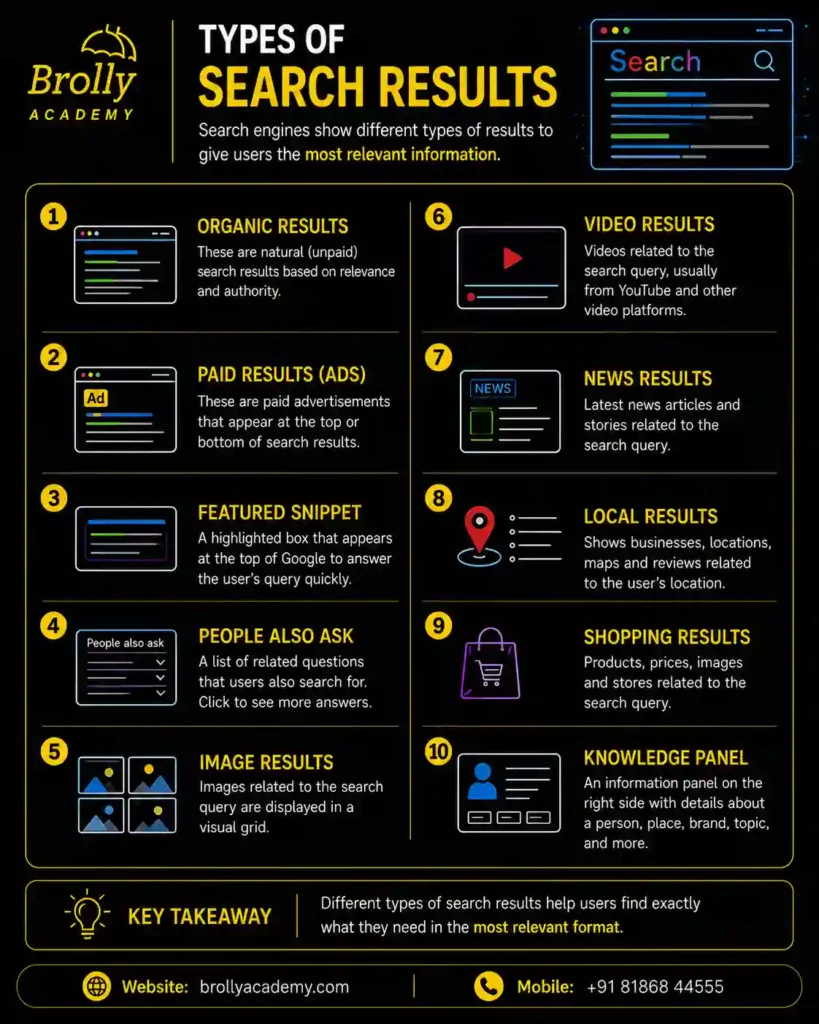
Simple Answer
- Search Results are the web pages, images, videos, maps, news articles, and other information displayed by a search engine after a user enters a search query.
- For example, if you search:
“Best SEO Interview Questions”
The list of pages that appears is called the search results.
Detailed Explanation
- When a user enters a query, the search engine searches its index (database) to find the most relevant information.
- The search engine presents the most relevant type of results based on what the user is trying to find or accomplish through their search query.
Search results may include:
- Organic Results
- Paid Advertisements
- AI-generated summaries (where available)
- Featured Snippets
- Images
- Videos
- News Articles
- Local Business Listings
- Shopping Results
- FAQs (People Also Ask)
- Knowledge Panels
The goal is to provide the most helpful answer as quickly as possible.
Types of Search Results
1. Organic Results
These are unpaid results that rank based on SEO.
Example:
A blog appearing naturally on Google’s first page.
2.Paid Results
These are advertisements shown above or below organic results.
Businesses pay when users click these ads.
3.Rich Results
Enhanced search listings that may include:
- Star ratings
- Product prices
- FAQs
- Recipes
- Events
These often use structured data (Schema Markup).
4.AI-Powered Results
Modern search experiences may generate AI-assisted summaries using information from multiple sources.
Real-Life Example
Search:
“Best Mobile Phones Under ₹20,000”
The results may include:
- Sponsored Ads
- AI-generated summary (where available)
- Product reviews
- Shopping listings
- Videos
- Images
- Organic articles
Three websites publish articles on SEO interview questions.
- Website A has comprehensive, well-organized, up-to-date content with excellent user experience.
- Website B has brief, outdated content.
- Website C has duplicate content.
Website A is more likely to rank higher because it better satisfies user needs.
Interview Answer
Search results are the pages and information displayed by a search engine after processing a user’s query. They can include organic listings, paid ads, rich results, local listings, multimedia, and AI-powered features.
Common Mistakes
- Thinking search results only contain websites.
- Believing every result is organic.
- Ignoring rich results and AI-powered search features.
Quick Revision
Search Results = Everything displayed after a search.
22. What is SERP (Search Engine Results Page)?
Simple Answer
- SERP stands for Search Engine Results Page.
- It is the page displayed by a search engine after a user enters a search query.
- In simple terms, the SERP is the page where users see all the search results.
Detailed Explanation
When you search:
“Digital Marketing Course”
Google displays a page containing different types of results.
This page is called the SERP.
A modern SERP can contain:
- Paid Ads
- Organic Results
- AI-generated summaries
- Featured Snippets
- Images
- Videos
- Local Maps
- People Also Ask
- Knowledge Panels
- Shopping Results
The layout of the SERP changes depending on the user’s search intent.
Components of a SERP
1.Organic Listings
Results earned through SEO.
2.Paid Ads
Sponsored results shown for advertising campaigns.
3.Featured Snippet
A highlighted answer displayed above many organic results.
4.AI Overview
An AI-generated summary for eligible searches.
5.People Also Ask (PAA)
A section with related questions users frequently ask.
6.Local Pack
Shows nearby businesses with maps, ratings, and contact details.
7.Image Results
Relevant images for the search.
8.Video Results
Relevant videos from platforms such as YouTube.
Why is SERP Important?
SEO professionals analyze the SERP to understand:
- Search intent
- Competitors
- Ranking opportunities
- Content formats preferred by search engines
Interview Answer
SERP stands for Search Engine Results Page. It is the page displayed after a user performs a search and includes organic results, advertisements, rich results, AI-powered features, and other search elements.
Common Mistakes
- Assuming every SERP looks the same.
- Ignoring SERP features beyond organic listings.
Quick Revision
SERP = The page that displays search results.
23. What is a Featured Snippet?
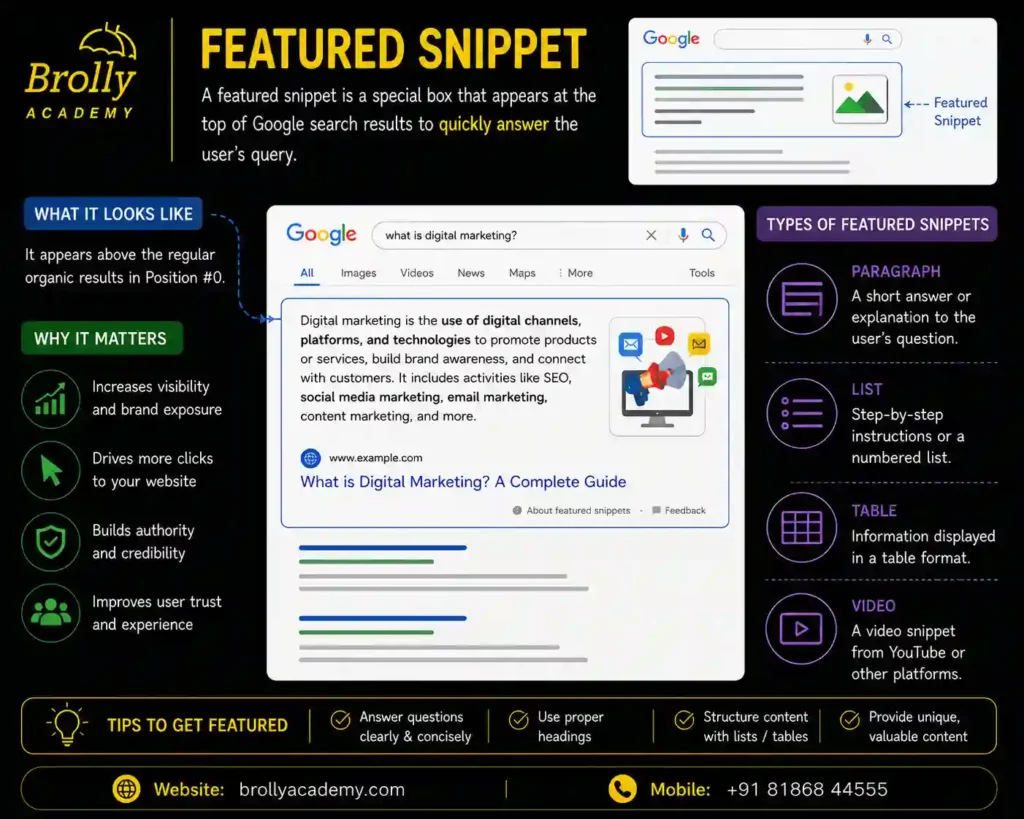
Simple Answer
A Featured Snippet is a highlighted answer that appears near the top of search results to quickly answer a user’s question.
It is often called Position Zero because it appears before many traditional organic listings.
Detailed Explanation
- Suppose someone searches:
“What is SEO?”
- Google may display a short paragraph explaining SEO before the regular search results.
- This highlighted section is called a Featured Snippet.
- Its purpose is to help users find answers quickly.
Types of Featured Snippets
Paragraph Snippet
Provides a short explanation.
Example:
“What is Digital Marketing?”
List Snippet
Displays steps or bullet points.
Example:
“How to Bake a Cake”
Table Snippet
Displays information in a table.
Example:
“Comparison of SEO Tools”
Video Snippet
Shows a relevant video segment that answers the query.
Benefits of Featured Snippets
- Higher visibility
- Increased credibility
- More clicks for some queries
- Greater brand awareness
How to Optimize for Featured Snippets
- Answer questions clearly.
- Use simple language.
- Add headings.
- Use bullet points and numbered lists where appropriate.
- Structure content logically.
Interview Answer
A Featured Snippet is a highlighted search result that provides a concise answer to a user’s question. It is designed to answer queries quickly and often appears above standard organic results.
Common Mistakes
- Stuffing keywords.
- Writing long, confusing answers.
- Ignoring question-based headings.
Quick Revision
Featured Snippet = Quick Answer at the Top of Search Results
24. What is an AI Overview?
Simple Answer
An AI Overview is an AI-generated summary that appears for certain searches and combines information to help answer a user’s question directly.
Its purpose is to provide a quick overview before users explore individual websites.
Detailed Explanation
- Modern search engines increasingly use artificial intelligence to understand questions and summarize information.
For some searches, an AI Overview may:
- Summarize key points.
- Provide a concise explanation.
- Highlight different perspectives.
- Link to supporting websites for further reading.
- The availability and appearance of AI Overviews can vary by country, language, user settings, and search query.
Example
Search:
“How does SEO work?”
An AI Overview might summarize:
- Crawling
- Indexing
- Ranking
and then provide links to relevant websites.
Why is AI Overview Important for SEO?
Content that is:
- Accurate
- Well-structured
- Helpful
- Trustworthy
- Comprehensive
has a better chance of being useful for AI-powered search experiences.
Interview Answer
An AI Overview is an AI-generated summary shown for some search queries. It aims to provide quick, useful information while directing users to supporting web pages for additional details.
Common Mistakes
- Assuming AI Overviews replace websites entirely.
- Believing AI Overviews appear for every search.
- Ignoring content quality and credibility.
Quick Revision
AI Overview = AI-generated summary + supporting web sources
25. What is a Knowledge Panel?
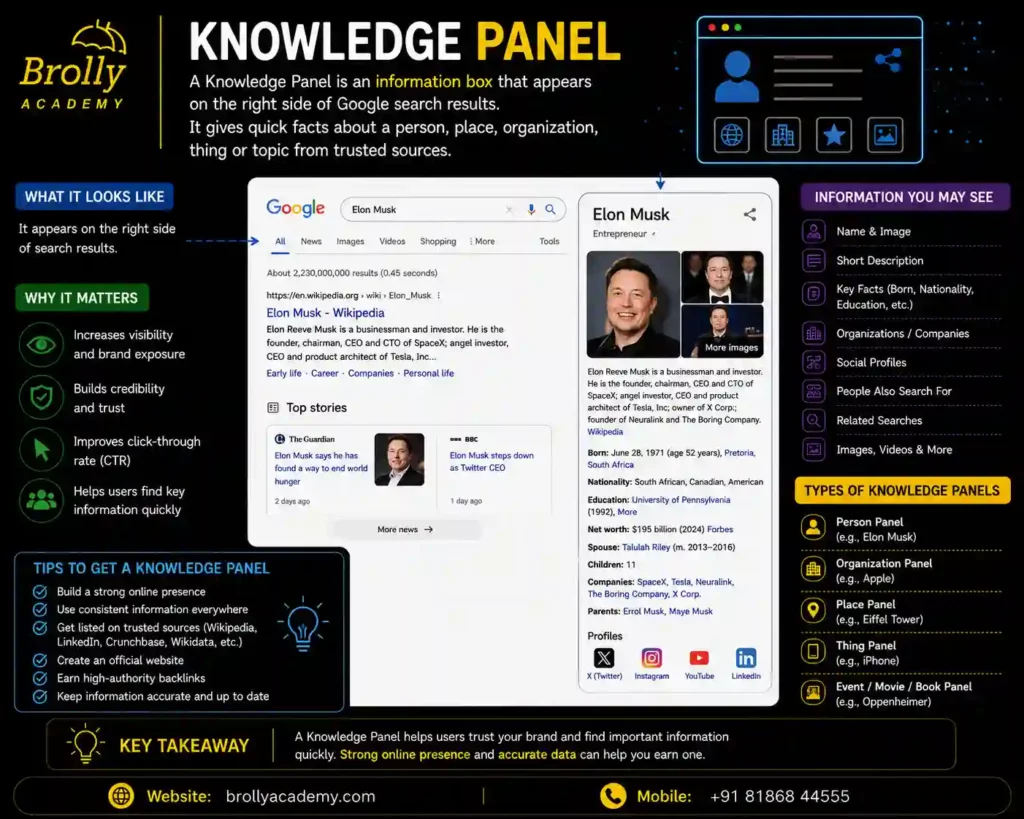
Simple Answer
A Knowledge Panel is an information box that appears on the search results page for well-known people, companies, organizations, places, books, movies, and other recognized entities.
It provides quick facts without requiring users to visit another website.
Detailed Explanation
- When someone searches for a famous person or organization, the search engine may display a Knowledge Panel containing key information.
For instance, when you search for a popular company, the search engine may display the following information:
- Company name
- Logo
- Description
- Founder
- Headquarters
- Website
- Social profiles
- Products or services
This information comes from trusted sources and the search engine’s understanding of entities.
Examples
Searching for a famous actor may show:
- Photograph
- Date of birth
- Movies
- Awards
- Occupation
Searching for a business may show:
- Address
- Phone number
- Reviews
- Opening hours
- Website
Why is a Knowledge Panel Important?
Benefits include:
- Builds credibility
- Improves brand visibility
- Helps users quickly verify information
- Enhances trust
Can Businesses Get a Knowledge Panel?
Yes.
Businesses can improve their chances by:
- Maintaining accurate business information.
- Using structured data.
- Building a strong online presence.
- Being mentioned by trusted websites.
- Keeping business profiles updated.
Interview Answer
A Knowledge Panel is an information box displayed on the search results page that provides verified details about recognized entities such as people, organizations, businesses, and places.
It enables users to find essential information quickly and conveniently without spending much time searching.
Common Mistakes
- Confusing a Knowledge Panel with a Featured Snippet.
- Assuming every website automatically receives a Knowledge Panel.
- Providing inconsistent business information across the web.
Quick Revision
Knowledge Panel = Verified information about a recognized entity displayed directly in search results.
26. How Does Google Discover Web Pages?
Simple Answer
Google discovers web pages using its web crawler called Googlebot.
Googlebot finds new pages by following links from other web pages, reading XML sitemaps, and revisiting websites that it has previously crawled.
If Google cannot discover a page, it usually cannot index or rank it.
Detailed Explanation
Imagine Googlebot as a traveler exploring a city.
It starts at one location (a webpage) and follows roads (links) to reach other places (webpages).
Google discovers pages in several ways:
1. Internal Links
Internal links connect pages within the same website.
Example:
Home Page → Blog → SEO Guide
Googlebot follows these links to discover more content.
2.Backlinks (External Links)
A backlink is a hyperlink placed on another website that directs users to a page on your website.
If a trusted website links to your page, Googlebot may discover it through that link.
3.XML Sitemap
An XML sitemap is a file that lists important pages on your website.
It acts like a roadmap, helping Googlebot find content more efficiently.
4.Previously Crawled Pages
Googlebot regularly revisits websites it already knows about to check for updates or new content.
5.URL Submission
Website owners can submit important URLs using Google Search Console to help Google discover new or updated pages more quickly.
Real-Life Example
Suppose you publish a new blog post:
“Top 50 SEO Interview Questions.”
Google may discover it because:
- It’s linked from your homepage.
- It’s listed in your XML sitemap.
- Another website links to it.
- You submitted the URL in Google Search Console.
Interview Answer
- Google discovers web pages through internal links, backlinks, XML sitemaps, previously crawled pages, and URL submissions.
- Googlebot continuously explores the web to identify new and updated content.
Common Mistakes
- Publishing pages without linking to them.
- Forgetting to update the XML sitemap.
- Blocking important pages in robots.txt.
Quick Revision
Google Discovers Pages Through:
- Internal Links
- External Links
- XML Sitemap
- Previous Crawls
- Google Search Console
27. What is an XML Sitemap?
Simple Answer
An XML Sitemap is a special file that lists the important pages of a website to help search engines discover and crawl them.
You can think of it as a guide that helps search engines navigate and understand your website more efficiently.
Detailed Explanation
- Many large websites contain hundreds or even thousands of individual web pages.
- Some pages may not be easy to discover through links alone.
An XML sitemap tells search engines:
- Which pages exist
- When they were last updated
- Which pages are most important
This improves crawl efficiency but does not guarantee indexing.
Example
- A sitemap may include:
<url>
<loc>https://example.com/seo-guide</loc>
<lastmod>2026-08-01</lastmod>
</url>
Why is an XML Sitemap Important?
It helps search engines:
- Discover new pages.
- Find updated content.
- Crawl large websites more efficiently.
It is especially useful for:
- Large websites
- New websites
- Websites with limited internal linking
Where is the Sitemap Located?
Common URLs:
https://example.com/sitemap.xml
or
https://example.com/sitemap_index.xml
Interview Answer
An XML sitemap is a machine-readable file that lists important URLs on a website. It helps search engines discover and prioritize pages for crawling, although inclusion in a sitemap does not guarantee indexing.
Common Mistakes
- Including broken URLs.
- Listing pages blocked by robots.txt.
- Forgetting to update the sitemap after adding new pages.
Quick Revision
XML Sitemap = Roadmap for Search Engines
28. What are Internal Links?
Simple Answer
Internal links are links that connect one page of a website to another page on the same website.
They help users navigate the site and help search engines discover and understand relationships between pages.
Detailed Explanation
Suppose your website has these pages:
- Home
- SEO Course
- SEO Interview Questions
- Contact
If the SEO Course page links to the SEO Interview Questions page, that is an internal link.
Internal links help:
- Users find related content.
- Googlebot discover new pages.
- Distribute authority throughout the website.
- Show which pages are most important.
Benefits of Internal Linking
Better Crawling
Googlebot follows internal links to discover pages.
Improved User Experience
Visitors can easily move between related topics.
Better SEO
Strong internal linking helps search engines understand the structure and hierarchy of your website.
Real-Life Example
On a Digital Marketing website:
Blog:
“What is SEO?”
Links to:
- On-Page SEO
- Technical SEO
- Keyword Research
- SEO Interview Questions
This creates a logical content structure.
Interview Answer
Internal links connect pages within the same website. They improve navigation, help search engines discover content, and strengthen the site’s overall structure.
Common Mistakes
- Creating orphan pages with no internal links.
- Using unclear anchor text such as “Click Here”.
- Linking excessively without purpose.
Quick Revision
- Internal Links = Connect pages within the same website
29. What are External Links?
Simple Answer
- External links are hyperlinks that connect your website to pages on other websites or direct users from one website to another.
- They connect your content with other websites on the internet.
Detailed Explanation
- If your article links to a government website, an educational institution, or another trusted resource, that is an external link.
- External links help users access additional information and can increase the credibility of your content when used appropriately.
Types of External Links
Outbound Links
Links from your website to another website.
Example:
Your SEO article links to Google’s documentation.
Backlinks (Inbound Links)
Links from another website to your website.
Backlinks are an important off-page SEO signal because they can indicate that other sites find your content valuable.
Why are External Links Important?
- Provide supporting information.
- Improve user experience.
- Build trust when linking to reliable sources.
- Help search engines understand the context of your content.
Real-Life Example
An article about SEO links to:
- Google’s official SEO documentation.
- Industry research reports.
- Trusted educational resources.
This helps readers learn more.
Interview Answer
External links connect one website to another. Outbound links help users access additional resources, while backlinks are links from other websites that can strengthen a website’s authority.
Common Mistakes
- Linking to low-quality or spam websites.
- Using too many unnecessary external links.
- Never checking whether linked pages still exist.
Quick Revision
- External Links = Connect different websites
30. What is Robots.txt?
Simple Answer
Robots.txt is a text file placed in the root directory of a website that gives instructions to search engine crawlers about which parts of the website they may or may not crawl.
It helps manage crawler access but does not prevent pages from appearing in search results by itself.
Detailed Explanation
- When a crawler visits a website, one of the first files it checks is:
https://example.com/robots.txt
This file contains instructions such as:
- Allow crawling
- Disallow crawling
- Specify sitemap location
Example
User-agent: *
Disallow: /admin/
Allow: /blog/
Sitemap: https://example.com/sitemap.xml
Explanation:
- User-agent: * applies the rules to all crawlers.
- Disallow: /admin/ asks crawlers not to crawl the admin section.
- Allow: /blog/ allows crawling of the blog.
- Sitemap: Specifies the location of the XML sitemap, allowing search engine crawlers to find and crawl your website’s pages more efficiently.
Why is Robots.txt Important?
It can help:
- Reduce unnecessary crawling.
- Prevent crawlers from accessing certain sections.
- Improve crawl efficiency on larger websites.
However, robots.txt is not a security feature. Sensitive pages should be protected with proper authentication and access controls.
Real-Life Example
An e-commerce website may block:
- Shopping cart pages
- Internal search results
- Admin dashboard
while allowing product pages to be crawled.
Interview Answer
Robots.txt is a text file that provides crawling instructions to search engine bots. It helps manage crawler access to different parts of a website but does not guarantee that a page will be excluded from search results.
Common Mistakes
- Blocking the entire website by accident:
- User-agent: *
- Disallow: /
- Blocking important pages needed for SEO.
- Assuming robots.txt completely hides confidential content.
Quick Revision
- Robots.txt = Instructions for Crawlers
- Purpose: Manage crawling, not security.
31. What is a Canonical URL?
Simple Answer
A Canonical URL is the preferred version of a webpage when multiple URLs contain the same or very similar content.
It tells search engines:
“This is the main version of the page.”
Detailed Explanation
Sometimes the same content is available through different URLs.
- Example:
https://example.com/shoes
https://www.example.com/shoes
https://example.com/shoes?color=black
https://example.com/shoes?ref=facebook
Although these URLs may display similar content, search engines could treat them as separate pages.
A canonical tag helps identify the preferred URL.
Canonical Tag Example
<link rel=”canonical” href=”https://example.com/shoes”>
This tells search engines which version should be treated as the primary page.
Why is Canonicalization Important?
It helps:
- Reduce duplicate content issues.
- Consolidate ranking signals.
- Improve crawl efficiency.
- Make indexing clearer.
Real-Life Example
An online store has one product that can be filtered by:
- Color
- Size
- Price
Instead of treating every filtered URL as a separate page, the store uses a canonical tag to point to the main product page.
Interview Answer
A canonical URL is the preferred version of a webpage specified using a canonical tag. It helps search engines understand which URL should be considered the primary version when similar or duplicate pages exist.
Common Mistakes
- Canonicalizing unrelated pages.
- Missing self-referencing canonicals where appropriate.
- Confusing canonical tags with redirects.
Quick Revision
- canonical URL means Preferred Version of a Page.
32. What is Duplicate Content?
Simple Answer
Duplicate Content is content that is identical or very similar and appears on more than one URL.
Duplicate content can make it harder for search engines to determine which version should be shown in search results.
Detailed Explanation
Duplicate content may occur:
- Within the Same Website
Example:
example.com/blog/seo
and
example.com/blog/seo?source=homepage
Both display the same article.
- Across Different Websites
If one website copies another website’s article without adding original value, the same content appears on multiple sites.
Common Causes
- Printer-friendly pages.
- HTTP and HTTPS versions.
- WWW and non-WWW versions.
- URL parameters.
- Session IDs.
- Product filters.
- Copied content.
Why is Duplicate Content a Problem?
It can:
- Confuse search engines.
- Split ranking signals across multiple URLs.
- Waste crawl resources.
- Make it harder to determine the preferred page.
Duplicate content does not automatically result in a penalty, but it can reduce SEO effectiveness if not managed properly.
How to Prevent Duplicate Content
✔ Use canonical tags.
✔ Redirect duplicate URLs where appropriate.
✔ Write original content.
✔ Maintain consistent URL structures.
Interview Answer
Duplicate content refers to substantially similar content appearing on multiple URLs. It can make it difficult for search engines to identify the preferred version, so techniques such as canonicalization and redirects are used to manage it.
Common Mistakes
- Publishing copied content.
- Ignoring duplicate product pages.
- Creating multiple URLs for the same content without canonicalization.
Quick Revision
- Duplicate Content = Same or Similar Content on Multiple URLs
33. What is a Noindex Tag?
Simple Answer
A Noindex Tag tells search engines:
“Do not include this page in your search index.”
Search engines may still crawl the page (unless crawling is also restricted), but they are instructed not to show it in search results.
Detailed Explanation
Some pages should not appear in search results.
Examples include:
- Thank-you pages
- Login pages
- Internal search results
- Duplicate pages
- Test pages
For these pages, a noindex directive can be used.
Example
<meta name=”robots” content=”noindex”>
This tells compliant search engines not to index the page.
Why Use Noindex?
- It helps keep search results focused on valuable content.
Real-Life Example
- After purchasing a product, users are redirected to:
example.com/thank-you
- This page is useful for customers but not for search results, so it can be marked as noindex.
Interview Answer
A noindex tag instructs search engines not to include a page in their search index. It is commonly used for pages that provide little value in search results, such as login pages or thank-you pages.
Common Mistakes
- Accidentally adding noindex to important pages.
- Assuming noindex prevents crawling in all cases.
- Forgetting to remove noindex after launching a new page.
Quick Revision
- Noindex = Do Not Show This Page in Search Results
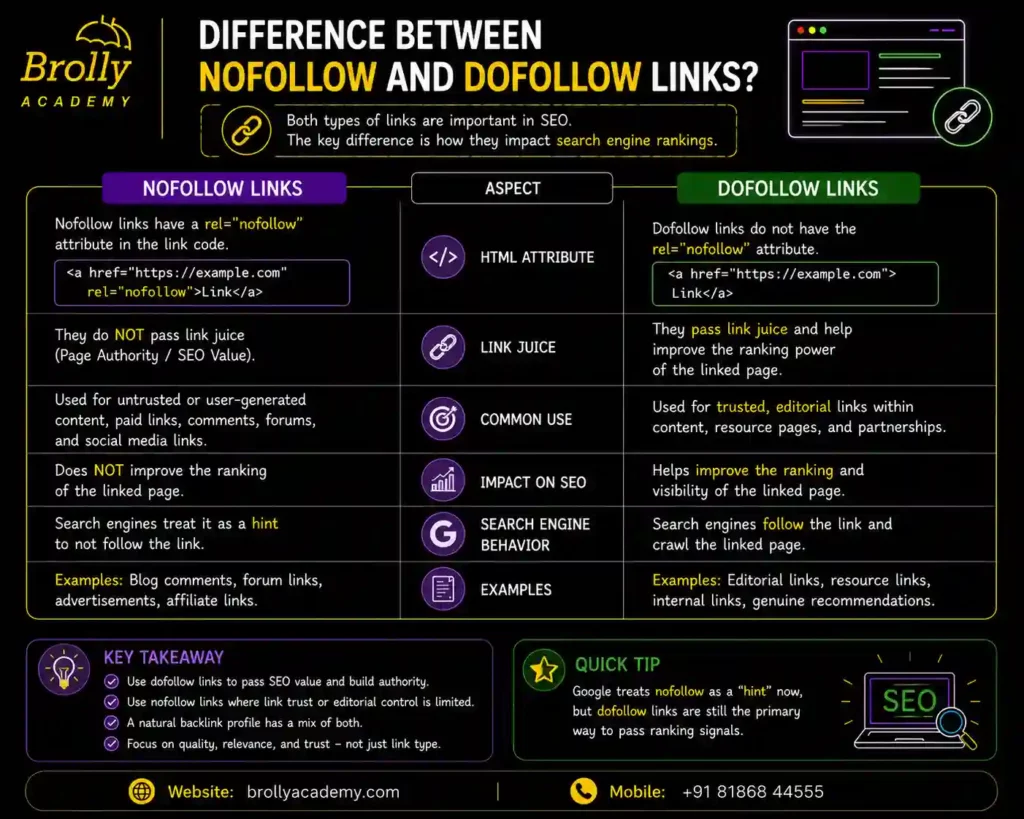
34. What is the Difference Between Nofollow and Dofollow Links?
Simple Answer
Dofollow and Nofollow describe how links communicate with search engines.
- Dofollow links allow search engines to follow the link and may pass ranking signals.
- Nofollow links tell search engines that the link should generally not be treated as an endorsement for ranking purposes.
“Dofollow” is the default behavior for normal HTML links; there is no special dofollow attribute.
Detailed Explanation
Dofollow Link
Example:
<a href=”https://example.com”>Visit Website</a>
This is a normal link. Search engines may crawl it and use it as one of many signals when evaluating pages.
Nofollow Link
Example:
<a href=”https://example.com” rel=”nofollow”>Visit Website</a>
The nofollow attribute tells search engines not to treat the link as a standard editorial endorsement.
- Search engines may still choose to crawl or consider the URL in some situations.
Comparison Table
Dofollow | Nofollow |
Default link behavior | Uses rel=”nofollow” |
Can pass ranking signals | Indicates the link should generally not pass endorsement signals |
Used for editorial links | Often used for user-generated or sponsored content when appropriate |
When Should Nofollow Be Used?
Common situations include:
- User-generated comments.
- Links you don’t want to endorse.
- Certain sponsored or paid links (though rel=”sponsored” is more specific for paid links).
Real-Life Example
A blog owner allows visitors to post comments.
To reduce spam risks, links in comments may use the nofollow attribute.
Interview Answer
Dofollow links are standard links that search engines may use to discover pages and evaluate ranking signals. Nofollow links include rel=”nofollow” to indicate that the link should generally not be treated as an editorial endorsement.
They are commonly used for user-generated content or links the site owner does not wish to endorse.
Common Mistakes
- Thinking all backlinks should be nofollow.
- Assuming nofollow links have no value at all—they can still drive referral traffic and increase visibility.
- Confusing nofollow with robots.txt or noindex.
Quick Revision
- Dofollow = Standard link that may pass ranking signals
- Nofollow = Link marked with rel=”nofollow” to indicate it should generally not pass endorsement signals
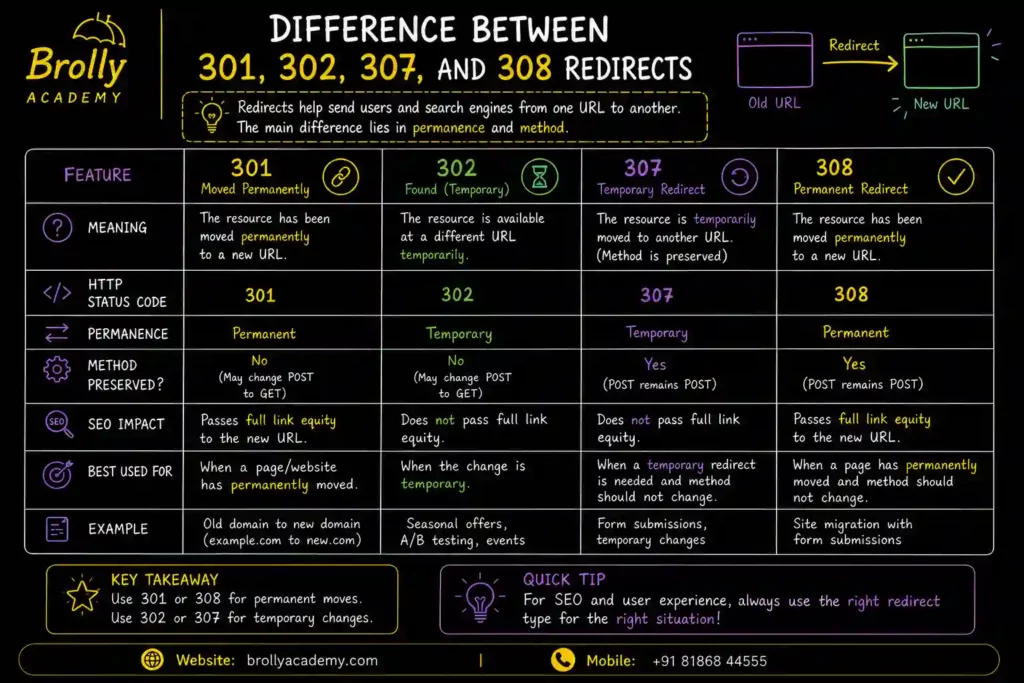
35. What are Redirects? Explain the Difference Between 301, 302, 307, and 308 Redirects.
Simple Answer
A redirect automatically sends users and search engines from one URL to another.
Redirects are useful when:
- A page has moved.
- A website changes its URL structure.
- A page is deleted and replaced.
- A domain is migrated.
- Multiple URLs need to point to one page.
Instead of showing an error, the visitor is automatically taken to the correct page.
Detailed Explanation
- Imagine you move to a new house.The postal department forwards your letters to your new address.
A redirect works in the same way.
- Old URL:
example.com/old-seo-course
- New URL:
example.com/seo-course
Anyone visiting the old URL is automatically taken to the new one.
Types of Redirects
1. 301 Redirect (Permanent Redirect)
A 301 redirect tells search engines that the page has permanently moved to a new location.
Best Used For
- Website migration
- Domain change
- URL changes
- HTTPS migration
- Permanent page updates
SEO Impact
- Helps transfer most ranking signals from the old URL to the new one.
- Encourages search engines to replace the old URL with the new one over time.
2. 302 Redirect (Temporary Redirect)
A 302 redirect indicates that the move is temporary.
Best Used For
- Temporary landing pages
- A/B testing
- Short-term promotions
- Maintenance
Search engines generally continue treating the original URL as the primary version.
3. 307 Redirect (Temporary Redirect – HTTP/1.1)
A 307 redirect is also temporary but explicitly tells browsers to keep the original HTTP request method (such as POST).
It is mainly a technical HTTP status code.
4. 308 Redirect (Permanent Redirect – HTTP/1.1)
A 308 redirect is the permanent counterpart to the 307 redirect.
Like a 301, it indicates a permanent move while preserving the original HTTP request method.
Comparison Table
Redirect | Permanent | Preserves HTTP Method | Common SEO Use |
301 | ✅ Yes | No (may change in some cases) | Permanent URL changes |
302 | ❌ No | No (may change in some cases) | Temporary changes |
307 | ❌ No | ✅ Yes | Temporary technical redirects |
308 | ✅ Yes | ✅ Yes | Permanent technical redirects |
Real-Life Example
- Old blog URL:
example.com/seo-2025
- New blog URL:
example.com/seo-guide
- Use a 301 redirect because the move is permanent.
Interview Answer
Redirects automatically send users and search engines from one URL to another.
A 301 redirect is used for permanent moves, while a 302 redirect is for temporary moves.
The HTTP/1.1 status codes 307 and 308 are similar to 302 and 301 respectively but preserve the original HTTP request method.
Common Mistakes
- Using 302 instead of 301 for permanent URL changes.
- Creating long redirect chains.
- Redirecting every deleted page to the homepage.
Quick Revision
- 301 → Permanent
- 302 → Temporary
- 307 → Temporary (preserves request method)
- 308 → Permanent (preserves request method)
36. What is URL Structure?
Simple Answer
- URL Structure refers to the format and organization of website URLs.
- A clean and descriptive URL helps both users and search engines understand what a page is about.
Detailed Explanation
A URL is the address of a webpage.
- Good URL:
https://example.com/seo/interview-questions
- Poor URL:
https://example.com/page?id=12345&ref=xyz
The first URL is easier for users to read and gives search engines context.
Characteristics of an SEO-Friendly URL
✔ Short and descriptive.
✔ Includes relevant keywords naturally.
✔ Uses hyphens (–) instead of underscores (_).
✔ Avoids unnecessary numbers and symbols.
✔ Uses lowercase letters.
✔ Reflects the site’s logical structure.
Best Practices
- Keep URLs readable.
- Avoid changing URLs without a reason.
- Use HTTPS.
- Remove unnecessary parameters where possible.
Real-Life Example
Instead of:
example.com/page123
Use:
example.com/technical-seo-guide
Interview Answer
URL structure is the format of a webpage’s address. A well-structured URL is short, descriptive, easy to read, and helps users and search engines understand the page’s topic.
Common Mistakes
- Long URLs.
- Random characters.
- Multiple duplicate URLs.
- Frequent URL changes without redirects.
Quick Revision
Good URL = Short + Readable + Descriptive
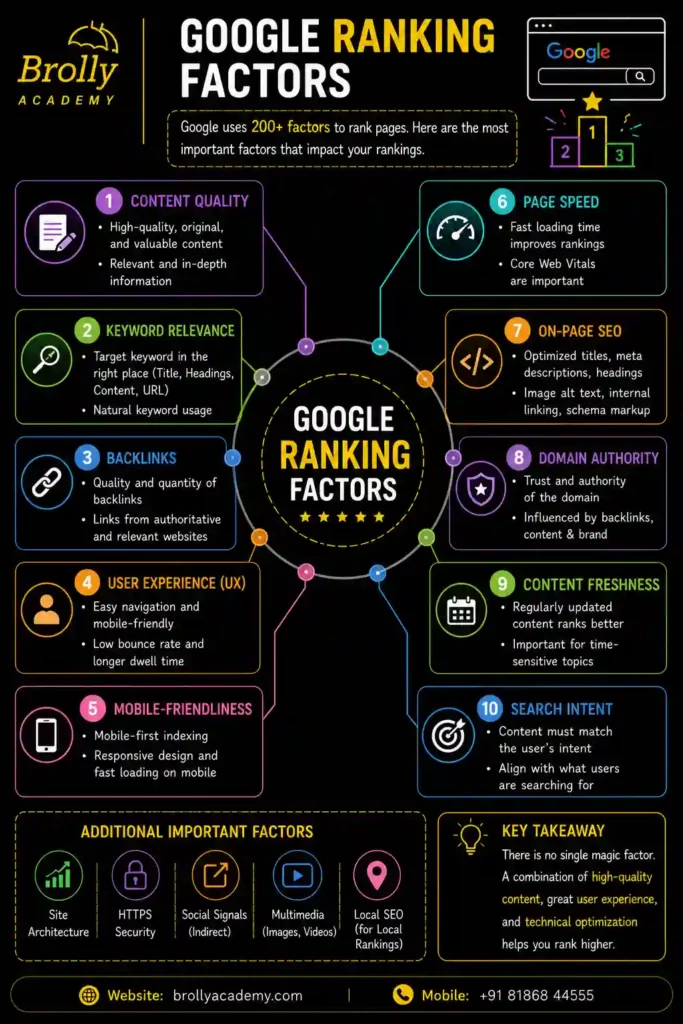
37. What are Google Ranking Factors?
Simple Answer
Google Ranking Factors are the signals Google uses to determine which pages should appear higher in search results.
Google evaluates many signals together rather than relying on a single factor.
Detailed Explanation
- Google aims to show the most helpful and relevant content for every search.
Some important ranking considerations include:
1.High-Quality Content
Content should be original, accurate, useful, and satisfy user intent.
2.Relevance
The content of the page should accurately meet the user’s search intent and provide the information they are looking for.
3.User Experience
Google values pages that are:
- Fast
- Mobile-friendly
- Easy to navigate
- Secure (HTTPS)
4.Backlinks
Links from reputable websites can help demonstrate authority.
Quality is generally more important than quantity.
5.Technical SEO
Proper crawling, indexing, structured data, internal linking, and clean site architecture help search engines understand your website.
6.Search Intent
Google tries to determine whether the user wants information, to buy something, compare options, or perform another task.
7.Experience, Expertise, Authoritativeness, and Trustworthiness (E-E-A-T)
For many topics, especially those affecting health, finance, or safety, Google looks for signals that content is created by knowledgeable and trustworthy sources.
8.Freshness
For time-sensitive topics, recently updated content may be favored.
Real-Life Example
- Search:“Best AI SEO Tools 2026“
- A webpage that offers up-to-date information, delivers a positive user experience, and includes reliable sources has a better chance of achieving higher search rankings than outdated content.
Interview Answer
Google uses many ranking signals, including content quality, relevance, user intent, backlinks, technical SEO, page experience, and trustworthiness.
These signals work together to determine the most helpful results for each search.
Common Mistakes
- Believing keywords alone determine rankings.
- Buying low-quality backlinks.
- Ignoring user experience.
Quick Revision
Content + User Intent + Technical SEO + Authority + UX = Better Rankings
38. What are Google Algorithms?
Simple Answer
Google Algorithms are the systems and processes Google uses to evaluate web pages and determine which results to show for a search query.
They analyze many signals to identify the most relevant and useful content.
Detailed Explanation
Whenever someone performs a search, Google’s algorithms analyze:
- Search intent
- Content relevance
- Website quality
- User experience
- Freshness (when appropriate)
- Spam signals
- Technical quality
The algorithms are updated regularly to improve search quality.
Well-Known Google Algorithm Updates
Panda
Focused on reducing the visibility of low-quality or thin content.
Penguin
Targeted manipulative link-building practices and spammy backlinks.
Hummingbird
Improved Google’s understanding of the meaning behind search queries.
RankBrain
Introduced machine learning to better interpret unfamiliar or complex searches.
BERT
Improved understanding of natural language and context in searches.
Helpful Content System
Rewards content created primarily to help people rather than to manipulate search rankings.
Spam Updates
Designed to reduce spam and improve the quality of search results.
Why Are Algorithms Updated?
To:
- Improve relevance.
- Reduce spam.
- Better understand language.
- Adapt to changing user behavior.
- Deliver more helpful search experiences.
Interview Answer
Google algorithms are the systems that evaluate and rank web pages.
They consider many signals, including relevance, quality, user intent, technical performance, and trustworthiness. Google regularly updates these systems to improve search results.
Common Mistakes
- Chasing algorithm updates instead of creating helpful content.
- Using outdated SEO techniques.
- Ignoring Google’s quality guidelines.
Quick Revision
Google Algorithms = Systems that decide which pages appear in search results.
39. What is Keyword Stuffing?
Simple Answer
Keyword Stuffing is the practice of repeatedly using the same keyword unnaturally in a webpage in an attempt to manipulate search engine rankings.
In the early days of SEO, some websites repeated keywords excessively because they believed it would improve rankings. Today, search engines recognize this as a poor practice.
Detailed Explanation
- Imagine someone giving a speech:
“SEO is the best SEO because SEO helps SEO users learn SEO through SEO.”
- The sentence sounds unnatural and is difficult to read.
- Search engines aim to reward content written for people, not content overloaded with repeated keywords.
Example
- Bad Example (Keyword Stuffing)
Looking for the best SEO course? Our SEO course is the best SEO course because this SEO course teaches SEO better than any SEO course.
- Good Example
Our SEO course helps beginners and professionals learn search engine optimization through practical projects, real-world examples, and expert guidance.
The second example is easier to read and provides useful information.
Why is Keyword Stuffing Bad?
It can:
- Make content difficult to read.
- Create a poor user experience.
- Reduce trust.
- Signal low-quality content to search engines.
How to Avoid Keyword Stuffing
✔ Write naturally.
✔ Focus on answering the user’s question.
✔ Use related words and phrases instead of repeating the same keyword.
✔ Organize content with proper headings.
✔ Prioritize readability.
Interview Answer
Keyword stuffing is the excessive and unnatural repetition of keywords in a webpage in an attempt to influence search rankings.
Modern SEO discourages this practice because it reduces content quality and user experience.
Common Mistakes
- Repeating the same keyword in every sentence.
- Adding keywords where they don’t fit naturally.
- Creating content primarily to satisfy search engine algorithms instead of providing genuine value to users.
Quick Revision
- Keyword Stuffing = Excessive Keyword Repetition (Avoid It)
40. What is Keyword Density?
Simple Answer
Keyword Density is the percentage of times a keyword appears in a piece of content compared to the total number of words.
In modern SEO, keyword density is not a target metric. What matters more is writing naturally and covering the topic comprehensively.
Detailed Explanation
Modern SEO Approach
For example:
- Article length: 1,000 words
- Keyword appears: 10 times
Keyword Density = 1%
- Years ago, many SEO professionals focused on maintaining a specific keyword density.
- Today, search engines understand context, synonyms, and related concepts, so there is no ideal keyword density percentage recommended by Google.
Example
Topic:
Instead of repeating that exact phrase many times, also use related terms such as:
- Search engine optimization interview
- Technical SEO questions
- On-page SEO
- SEO guide
- Search rankings
This creates more natural and comprehensive content.
Instead of focusing on keyword density:
✔ Write naturally.
✔ Cover the topic in depth.
✔ Include related terms where appropriate.
✔ Answer user questions clearly.
Interview Answer
Keyword density indicates the frequency with which a keyword appears in relation to the total number of words on a webpage.
While it was once considered important, modern SEO focuses more on relevance, search intent, and content quality than on maintaining a specific keyword percentage.
Common Mistakes
- Trying to achieve a fixed keyword density.
- Repeating keywords unnecessarily.
- Ignoring topic coverage.
Quick Revision
- Keyword Density = Keyword Frequency ÷ Total Words
- Modern SEO focuses on quality, not percentages.
41. What is Search Intent?
Simple Answer
Search Intent is the reason behind a user’s search.
It answers the question:
“What does the user actually want?”
Understanding search intent is one of the most important aspects of modern SEO.
Detailed Explanation
- When someone searches, they usually have a goal.
- Google tries to understand that goal and show the most relevant results.
For example:
Search:
“How to learn SEO”
- The user wants information, not necessarily to buy a product.
Search:
“Buy iPhone 17”
- The user wants to purchase a product.
- The search results will be very different because the intent is different.
Four Main Types of Search Intent
1. Informational Intent
The user wants to learn something.
Examples:
- What is SEO?
How does Google work?
What is Digital Marketing
2. Navigational Intent
The user is looking to access a particular website or a specific webpage directly through the search results.
Examples:
- OpenAI
YouTube
Gmail Login
3. Commercial Investigation
The user is evaluating different choices to determine which option best meets their needs before making a final decision.
Examples:
- Best SEO Course
Ahrefs vs Semrush
Best laptops under ₹50,000
4. Transactional Intent
The user is ready to take action, such as buying or signing up.
Examples:
- Buy SEO Book
- Enroll in Digital Marketing Course
- Download SEO Checklist
Why is Search Intent Important?
Matching content to user intent can:
- Improve rankings.
- Increase user satisfaction.
- Reduce bounce rates.
- Improve conversions.
Interview Answer
Search intent is the purpose behind a user’s search query. It can be informational, navigational, commercial, or transactional.
Effective SEO is built on developing content that aligns with the user’s search intent and provides the information they are looking for.
Common Mistakes
- Targeting informational keywords with sales pages.
- Ignoring what users actually need.
- Optimizing only for keywords instead of intent.
Quick Revision
- Search Intent = Why the User Is Searching
Types:
- Informational
- Navigational
- Commercial
- Transactional
42. What is Content Optimization?
Simple Answer
Content Optimization is the process of improving content so it is more useful for users and easier for search engines to understand.
The goal is not just to rank higher but also to provide valuable information that satisfies user needs.
Detailed Explanation
Content optimization involves improving:
- Accuracy
- Clarity
- Structure
- Readability
- Relevance
- Freshness
- Internal linking
- Multimedia (images, videos)
- User experience
Modern content optimization also considers AI-powered search by making content well-structured and easy to interpret.
Steps for Content Optimization
✔ Understand search intent.
✔ Use clear headings.
✔ Write original content.
✔ Add relevant examples.
✔ Update outdated information.
✔ Add relevant images, charts, or videos whenever they enhance understanding and improve the user experience.
✔ Link to related pages within your website.
✔ Use descriptive title tags and meta descriptions.
Real-Life Example
Instead of writing a short 300-word article on SEO, create a comprehensive guide with:
- Definitions
- Examples
- FAQs
- Images
- Internal links
- Practical tips
This provides greater value to users.
Interview Answer
Content optimization is the process of improving content so it better satisfies user intent and is easier for search engines to understand.
It includes improving quality, structure, relevance, readability, and freshness.
Common Mistakes
- Publishing thin content.
- Never updating old articles.
- Ignoring readability.
- Writing only for search engines.
Quick Revision
- Content Optimization = Improve Quality + Relevance + User Experience
43. What is E-E-A-T (Experience, Expertise, Authoritativeness, and Trustworthiness)?
Simple Answer
E-E-A-T stands for:
- Experience
- Expertise
- Authoritativeness
- Trustworthiness
- These are concepts Google uses in its Search Quality Evaluator Guidelines to describe characteristics of high-quality content, especially for topics that can significantly impact people’s health, finances, safety, or well-being.
Detailed Explanation
1. Experience
Does the content creator have first-hand experience with the topic?
Example:
A person who has actually used an SEO tool can write a practical review.
2.Expertise
Does the author have relevant knowledge or skills?
Example:
An experienced SEO professional explaining technical SEO concepts.
3.Authoritativeness
Is the author or website recognized as a reliable source in the industry?
Authority can be strengthened through:
- High-quality content.
- Mentions by trusted websites.
- Positive reputation.
4.Trustworthiness
Can users trust the information?
Trust is built through:
- Accurate content.
- Transparent author information.
- Secure website (HTTPS).
- Honest citations and references.
- Clear contact information for businesses.
Among the four, Trustworthiness is considered foundational because even experienced or authoritative sources must also be trustworthy.
Why is E-E-A-T Important?
Strong E-E-A-T can help demonstrate content quality, particularly for topics where accuracy is critical.
It encourages websites to:
- Publish reliable information.
- Show author credentials when appropriate.
- Keep content updated.
- Build credibility with users.
Real-Life Example
Two websites publish an article about SEO.
Website A
- Experienced author.
- Updated information.
- Practical examples.
- Clear author bio.
- Trusted reputation.
Website B
- Anonymous author.
- Outdated content.
- No references.
- Poor website security.
Website A is more likely to be viewed as a higher-quality source.
Interview Answer
E-E-A-T is a Google quality framework that evaluates content based on four key factors: Experience, Expertise, Authoritativeness, and Trustworthiness.
These concepts help evaluate the quality and credibility of content. Websites that demonstrate real experience, subject knowledge, authority, and trust are more likely to provide valuable information to users.
Common Mistakes
- Thinking E-E-A-T is a single ranking factor.
- Publishing content without demonstrating expertise.
- Hiding author information for topics where credibility matters.
- Ignoring content updates.
Quick Revision
E-E-A-T
- E → Experience
- E → Expertise
- A → Authoritativeness
- T → Trustworthiness
Remember: Trustworthiness is the foundation of high-quality content.
Off-Page SEO Interview Questions and Answers
44. What is Off-Page SEO?
Simple Answer
Off-Page SEO is the process of improving a website’s reputation, authority, and trustworthiness through activities that happen outside your website.
Unlike On-Page SEO, where you optimize your own web pages, Off-Page SEO focuses on how other websites and people interact with your site.
The main goal is to build trust so search engines see your website as valuable and reliable.
Detailed Explanation
Imagine you are looking for the best doctor in your city.
Would you trust a doctor who only says, “I’m the best”?
Or
would you trust the doctor who has hundreds of positive reviews, recommendations, and awards?
Most people choose the second doctor.
Search engines work in a similar way.
Even if your website has excellent content, search engines also look for signs that other trusted websites recommend or reference your content.
These recommendations usually come in the form of backlinks.
The more high-quality, relevant websites that link to your content naturally, the stronger your website’s authority becomes.
Off-Page SEO includes activities such as:
- Earning backlinks
- Digital PR
- Brand mentions
- Guest posting
- Influencer outreach
- Local citations
- Online reviews
- Social media promotion (indirect SEO benefits)
Real-Life Example
Suppose two websites publish an article on “SEO Tips for Beginners.”
- Website A has no backlinks.
- Website B is referenced by well-known marketing blogs and educational websites.
Search engines are more likely to trust Website B because respected websites have effectively recommended it.
Why is Off-Page SEO Important?
Off-Page SEO helps:
- Build website authority
- Increase trust
- Improve keyword rankings
- Drive referral traffic
- Increase brand awareness
- Improve visibility in search results
Best Practices
- Create high-quality, original content.
- Earn backlinks naturally.
- Build relationships with reputable websites.
- Focus on relevance rather than quantity.
- Monitor your backlink profile regularly.
Interview Answer
- Off-Page SEO refers to optimization activities performed outside a website to improve its authority, trustworthiness, and search engine rankings.
- It primarily includes earning quality backlinks, brand mentions, digital PR, and other signals that demonstrate credibility.
Common Mistakes
- Buying backlinks
- Joining link farms
- Using automated link-building tools
- Getting links from irrelevant websites
- Focusing only on the number of backlinks instead of their quality
Quick Revision
Off-Page SEO = Building your website’s reputation outside your website.
45. Why is Off-Page SEO Important?
Simple Answer
Off-Page SEO is important because it helps search engines determine whether your website is trustworthy and authoritative.
High-quality backlinks and brand mentions act like recommendations, increasing the likelihood that your pages will rank well.
Detailed Explanation
Think of a job interview.
- A strong resume is important, but references from respected employers can strengthen your credibility.
Similarly:
- On-Page SEO = Your resume
- Off-Page SEO = Your professional references
Search engines consider both.
Even excellent content may struggle to rank if it lacks authority signals.
Benefits of Off-Page SEO
- Higher search rankings
- Greater website authority
- More referral traffic
- Improved brand recognition
- Increased trust
- Better long-term SEO performance
Real-Life Example
Imagine two websites selling laptops.
Both have similar content.
One website has links from respected technology publications.
The other has none.
The first website is generally viewed as more trustworthy.
Interview Answer
Off-Page SEO is important because it builds authority, trust, and credibility through external signals such as quality backlinks and brand mentions, helping search engines evaluate the reliability of a website.
Common Mistakes
- Believing more backlinks always mean better rankings
- Ignoring backlink quality
- Using spammy directories
- Buying links
Quick Revision
Trust + Authority = Better Rankings
46. Why are Backlinks Important for SEO?
Simple Answer
- Backlinks are important because they help search engines understand that other websites trust and recommend your content.
- When high-quality websites link to your pages, it can improve your website’s authority, visibility, and chances of ranking higher in search results.
- Think of a backlink as a vote of confidence from another website.
Detailed Explanation
- Imagine you are choosing a college.
- If many teachers recommend one college, you are more likely to trust it.
- Search engines work in a similar way.
- When trusted websites link to your webpage, search engines receive a signal that your content is useful and reliable.
- However, not all backlinks are equal. A backlink from a respected, relevant website usually provides more value than many links from low-quality or unrelated websites.
- Today, search engines also evaluate:
- Website authority
- Relevance
- Content quality
- Natural linking patterns
- User value
Benefits of Backlinks
- Improve website authority
- Increase organic rankings
- Help search engines discover new pages
- Bring referral traffic
- Build brand credibility
- Increase visibility in AI-powered search systems
Real-Life Example
A respected technology blog writes an article about SEO tools and links to your “SEO Interview Questions” page.
Because the blog is trusted and relevant, that backlink can help search engines better recognize the value of your content.
Best Practices
- Create helpful, original content.
- Earn backlinks naturally.
- Build relationships with reputable websites.
- Focus on relevance and quality.
Interview Answer
Backlinks are important because they act as trust signals from other websites. High-quality and relevant backlinks help improve a website’s authority, visibility, and organic search performance.
Common Mistakes
- Buying backlinks
- Using link farms
- Getting links from unrelated websites
- Focusing only on the number of backlinks
Quick Revision
- Quality backlinks build trust, authority, and visibility.
47. What is the Difference Between a Dofollow and Nofollow Backlink?
Simple Answer
A dofollow backlink allows search engines to follow the link and pass authority to the linked page.
A nofollow backlink tells search engines that the linking site does not want to pass authority through that link.
Detailed Explanation
Imagine someone recommends a restaurant.
Dofollow
They confidently say,
“I highly recommend this restaurant.”
This recommendation can strengthen the restaurant’s reputation.
Nofollow
They simply mention,
“Here’s the restaurant’s website.”
They are sharing the link without necessarily endorsing it.
- Similarly, dofollow links can pass ranking signals, while nofollow links generally indicate that the linking site is not passing those signals.
- Even so, nofollow links can still bring visitors, increase brand awareness, and contribute to a natural backlink profile.
Comparison Table
Dofollow | Nofollow |
Search engines can follow the link | Indicates the linking site doesn’t want to pass ranking signals |
Can contribute to authority | May not pass authority in the same way |
Useful for SEO | Useful for traffic and brand exposure |
Common in editorial links | Common in comments, forums, and sponsored content |
Real-Life Example
A news website links to your article with a standard editorial link (dofollow).
A social media platform links to your page but marks links as nofollow.
Both links can send visitors, but they serve different purposes.
Best Practices
- Earn natural dofollow links from reputable websites.
- Don’t ignore nofollow links—they can still be valuable.
- Maintain a balanced and natural backlink profile.
Common Mistakes
- Believing only dofollow links matter.
- Trying to convert every nofollow link into a dofollow link.
- Building unnatural backlink patterns.
Interview Answer
Dofollow backlinks allow search engines to follow the link and pass authority, while nofollow backlinks indicate that the linking site is not passing those ranking signals. Both types can be useful depending on the context.
- Buying backlinks
- Using link farms
- Getting links from unrelated websites
- Focusing only on the number of backlinks
Quick Revision
- Dofollow = Authority + Discovery
- Nofollow = Traffic + Natural Link Profile
48. What is Link Equity (Link Juice)?
Simple Answer
Link equity, commonly called link juice, is the value or authority that one webpage can pass to another through a hyperlink.
When a trusted webpage links to another page, it may help strengthen the linked page’s authority.
Detailed Explanation
- Imagine your teacher introduces you to a company.
- Because the teacher is respected, the company is more likely to trust you.
- Similarly, when an authoritative website links to your content, it may pass some of its credibility through that link.
The amount of value passed depends on factors such as:
- Authority of the linking page
- Relevance
- Link placement
- Number of outgoing links
- Overall page quality
Real-Life Example
A university website links to your SEO guide.
Because university websites often have strong credibility, that link may carry more value than a link from a newly created website.
Best Practices
- Earn links from trusted websites.
- Build internal links wisely.
- Keep important pages easily accessible.
Common Mistakes
- Assuming every backlink passes the same value.
- Ignoring internal linking.
- Buying links to artificially increase authority.
Interview Answer
- Link equity is the value or authority that one webpage can pass to another through a hyperlink.
- Its value depends on factors such as the authority of the linking website, the relevance of the content, and the overall quality of the page providing the link.
Quick Revision
- Link Equity = Authority passed through links.
49. What is Anchor Text?
Simple Answer
Anchor text is the clickable text in a hyperlink.
It tells users and search engines what the linked page is about.
Detailed Explanation
- Instead of showing a long web address, websites often display descriptive text.
For example:
- Learn SEO Interview Questions
- The words SEO Interview Questions are the anchor text.
- Good anchor text helps users understand where the link will take them.
Why is Anchor Text Important?
It helps:
- Improve navigation
- Provide context
- Help search engines understand linked content
- Improve user experience
Good Example
Learn more about Technical SEO
Poor Example
Click here
The first example clearly explains what users can expect after clicking.
Best Practices
- Make anchor text descriptive.
- Keep it relevant.
- Use natural language.
- Avoid overusing the same keyword.
Common Mistakes
- Using “Click Here” everywhere.
- Stuffing keywords into every anchor.
- Linking unrelated pages.
Interview Answer
Anchor text is the clickable text in a hyperlink that provides context about the destination page for both users and search engines.
Quick Revision
- Anchor text refers to the visible and clickable words in a hyperlink that guide users to another webpage or online resource.
50. What are the Different Types of Anchor Text?
Simple Answer
Anchor text can be written in different ways depending on the purpose of the link.
Using a variety of natural anchor text types helps create a healthy linking profile.
Types of Anchor Text
1. Exact Match
Uses the exact target keyword.
Example:
SEO Interview Questions
2.Partial Match
Includes part of the keyword.
Example:
Best SEO Interview Guide
3.Branded
Uses the brand name.
Example:
ABC Digital Academy
4.Naked URL
Displays the web address itself.
Example:
https://example.com
5.Generic
Uses general words.
Example:
- Click Here
- Read More
- Learn More
6.Image Anchor
The image itself acts as the clickable link. In this case, descriptive alt text helps search engines understand the image.
Best Practices
- Use descriptive and relevant anchor text.
- Mix different anchor text types naturally.
- Focus on user understanding rather than forcing keywords.
Interview Answer
Anchor text can be exact match, partial match, branded, naked URL, generic, or image-based. A natural mix of anchor text types supports usability and helps avoid over-optimization.
Quick Revision
- Natural variety is better than repeating the same keyword.
51. What is Natural Link Building?
Simple Answer
Natural link building means earning backlinks because people genuinely find your content useful and choose to link to it without being forced or paid.
Detailed Explanation
- The best backlinks are earned, not manufactured.
- If your content provides unique research, practical guides, helpful tools, or original insights, other websites may naturally reference it.
- Search engines value these links because they reflect genuine recommendations.
Real-Life Example
- You publish a detailed guide on SEO interview questions.
- A marketing blogger finds it valuable and links to it in an article.
- You didn’t ask for the link—it was earned naturally.
How to Earn Natural Links
- Publish original content.
- Create helpful guides.
- Share research and data.
- Develop useful tools or templates.
- Build a trustworthy brand.
Common Mistakes
- Buying backlinks.
- Using automated link-building software.
- Exchanging links excessively.
- Creating low-quality content just to get links.
Interview Answer
Natural link building is the process of earning backlinks because other websites voluntarily choose to reference valuable, relevant, and trustworthy content.
Quick Revision
- Natural Link Building = Earn links through value, not manipulation.
52. What is Broken Link Building?
Simple Answer
Broken link building is an SEO strategy where you find broken (non-working) links on other websites and suggest your own relevant content as a replacement.
This helps the website owner fix a problem while giving you an opportunity to earn a quality backlink.
Detailed Explanation
Sometimes websites contain links that lead to pages that no longer exist, resulting in errors such as 404 – Page Not Found.
Broken link building involves:
- Finding these broken links.
- Creating or identifying relevant replacement content.
- Contacting the website owner.
- Politely suggesting your content as an alternative.
This approach creates value for both parties.
Real-Life Example
- A marketing blog links to an outdated SEO guide that no longer exists.
- You have an updated, comprehensive guide covering the same topic.
- You inform the website owner about the broken link and suggest your guide as a replacement.
- If they update the link, users benefit from working content and you gain a relevant backlink.
Best Practices
- Recommend only highly relevant content.
- Personalize your outreach email.
- Focus on helping the website owner first.
- Ensure your replacement content is high quality.
Common Mistakes
- Sending generic outreach emails.
- Suggesting unrelated content.
- Contacting websites with poor quality or spammy content.
Interview Answer
Broken link building is a white-hat SEO technique in which you identify broken links on other websites and recommend your own relevant content as a replacement, creating value for both the website owner and your site.
Quick Revision
- Broken Link Building = Find broken links → Offer better content → Earn a quality backlink.
53. What are High-Quality Backlinks?
Simple Answer
High-quality backlinks are links that come from trusted, relevant, and authoritative websites. These backlinks carry more value and can positively influence your website’s SEO.
Detailed Explanation
Not every backlink is equally valuable. A backlink from a well-known and trusted website is usually more beneficial than many links from low-quality websites. Search engines consider factors such as relevance, authority, and trust when evaluating backlinks.
Real-Life Example
A backlink from a respected technology news website to your SEO article is considered high quality because the website is trusted and relevant.
Common Mistakes
- Buying backlinks.
- Getting links from unrelated websites.
- Using link farms.
- Ignoring backlink quality.
Interview Answer
High-quality backlinks are links from authoritative, trustworthy, and relevant websites that help improve a website’s credibility and organic search performance.
Quick Revision
- High-Quality Backlinks = Relevant + Trusted + Authoritative Links.
54. What are Toxic Backlinks?
Simple Answer
Toxic backlinks are links from spammy, low-quality, or suspicious websites that may negatively affect your website’s reputation.
Detailed Explanation
- Some backlinks come from websites that use unethical SEO practices or publish poor-quality content.
- These links can make your backlink profile appear unnatural. It is important to monitor your backlinks regularly and address harmful links when necessary.
Real-Life Example
If hundreds of backlinks suddenly appear from unrelated gambling or spam websites, they may be considered toxic backlinks.
Common Mistakes
- Buying backlinks.
- Ignoring spam backlinks.
- Using private blog networks (PBNs).
- Participating in link schemes.
Interview Answer
Toxic backlinks are low-quality or spammy backlinks that may harm a website’s credibility and should be monitored and managed appropriately.
Quick Revision
- Toxic Backlinks = Harmful links from spam or low-quality websites.
55. What is Domain Rating (DR)?
Simple Answer
Domain Rating (DR) is a score developed by Ahrefs that measures the strength of a website’s backlink profile.
Detailed Explanation
DR is based mainly on the quality and quantity of backlinks pointing to a website. Like DA, it uses a scale of 1 to 100 and is a third-party metric, not a Google ranking factor.
Real-Life Example
A website with many high-quality backlinks from trusted websites is likely to have a higher DR.
Common Mistakes
- Confusing DR with DA.
- Believing DR directly affects Google rankings.
- Ignoring backlink relevance.
Interview Answer
Domain Rating is an Ahrefs metric that measures the strength of a website’s backlink profile using a 1–100 scale.
Quick Revision
- DR = Ahrefs’ score for backlink strength.
56. What is PageRank?
Simple Answer
PageRank is an algorithm developed by Google to measure the importance of webpages based on the quality and quantity of links pointing to them.
Detailed Explanation
PageRank was one of Google’s earliest ranking systems. It viewed backlinks as votes of confidence. Pages with more valuable backlinks were considered more important. Today, PageRank is still part of Google’s ranking systems, but it works alongside many other ranking signals.
Real-Life Example
If many respected websites link to your SEO guide, Google may consider the page more important than a page with no quality backlinks.
Common Mistakes
- Believing PageRank is the only ranking factor.
- Buying backlinks to manipulate rankings.
- Ignoring content quality.
Interview Answer
PageRank is Google’s link analysis algorithm that evaluates the importance of webpages based on the quality and quantity of incoming links.
Quick Revision
- PageRank = Google’s algorithm for evaluating webpage importance through links.
57. What is Guest Posting?
Simple Answer
Guest posting is the practice of writing and publishing an article on another website to share knowledge, reach a new audience, and potentially earn a relevant backlink.
Detailed Explanation
Guest posting helps build authority, increase brand awareness, and attract referral traffic. The article should provide genuine value to readers rather than being written only to obtain backlinks.
Real-Life Example
You write an article titled “10 SEO Tips for Beginners” on a popular digital marketing blog. In your author bio, a link points to your own website.
Interview Answer
- Guest posting is an Off-Page SEO strategy in which a person publishes valuable content on another relevant website to build authority, increase visibility, and earn quality backlinks.
Common Mistakes
- Publishing on spam websites.
- Writing only for backlinks.
- Using duplicate content.
- Adding excessive promotional links.
Quick Revision
- Guest Posting = Writing quality articles on other websites to build authority and visibility.
58. What is Digital PR?
Simple Answer
Digital PR is an SEO strategy that focuses on earning online media coverage, brand mentions, and backlinks from trusted websites.
Detailed Explanation
Digital PR combines public relations with SEO. Businesses create newsworthy stories, research, reports, or campaigns that journalists, bloggers, and publishers may share online.
Real-Life Example
A company publishes a survey about AI in SEO. News websites report on the survey and link back to the company’s website.
Interview Answer
Digital PR is an Off-Page SEO strategy that earns online publicity, authoritative backlinks, and brand recognition through digital media and online publications.
Common Mistakes
- Sending irrelevant press releases.
- Targeting unrelated websites.
- Publishing overly promotional content.
Quick Revision
- Digital PR = Online publicity that earns quality backlinks and brand exposure.
59. What is Influencer Outreach?
Simple Answer
Influencer outreach is the process of collaborating with industry experts, bloggers, or content creators to promote your content, products, or services.
Detailed Explanation
Influencers have audiences that trust their recommendations. Working with relevant influencers can increase brand awareness, generate referral traffic, and sometimes lead to natural backlinks.
Real-Life Example
A popular SEO YouTuber reviews your SEO Interview Guide and shares it with their audience, helping more people discover your website.
Interview Answer
Influencer outreach is the process of building relationships with relevant influencers to expand content reach, improve brand awareness, and increase website visibility.
Common Mistakes
- Contacting irrelevant influencers.
- Sending generic outreach messages.
- Expecting immediate results.
Quick Revision
- Influencer Outreach = Partnering with trusted creators to grow your online presence.
60. What is Social Bookmarking?
Simple Answer
Social bookmarking is an Off-Page SEO technique where you save and share your website or webpage on online bookmarking platforms. It helps users discover useful content and can increase website visibility and referral traffic.
Detailed Explanation
Social bookmarking websites allow users to save, organize, and share web pages with others. When you submit a valuable webpage to these platforms, other users can find, read, and share your content.
Although social bookmarking is no longer a major ranking factor, it is still useful for increasing content visibility, driving referral traffic, and helping search engines discover new pages faster.
The key is to share only useful and relevant content on trusted bookmarking websites.
Real-Life Example
Suppose you publish a blog titled “Top 100 SEO Interview Questions.” You share the article on a social bookmarking website. Users interested in SEO discover your article and visit your website.
Interview Answer
Social bookmarking is an Off-Page SEO technique where webpages are submitted to bookmarking platforms to improve content visibility, increase referral traffic, and help users discover useful information.
Common Mistakes
- Sharing low-quality or duplicate content.
- Using spammy bookmarking websites.
- Posting the same link repeatedly.
- Expecting immediate ranking improvements.
Quick Revision
- Social Bookmarking = Sharing useful webpages on bookmarking websites to increase visibility and referral traffic.
61. What is Business Directory Submission?
Simple Answer
Business directory submission is the process of listing your business information on trusted online directories. It helps improve your online presence, Local SEO, and makes it easier for customers to find your business.
Detailed Explanation
Business directories are websites that organize business information by category, location, or industry. A business listing usually includes:
- Business Name
- Address
- Phone Number (NAP)
- Website
- Business Description
- Business Hours
- Category
Submitting your business to reputable directories helps search engines verify your business information and improves your local online visibility.
- Consistency of your Name, Address, and Phone Number (NAP) across all directories is very important.
Real-Life Example
A bakery in Hyderabad lists its business on Google Business Profile, Justdial, and IndiaMART with the same address and phone number. Customers searching for nearby bakeries can easily find the business.
Interview Answer
Business directory submission is an Off-Page SEO technique in which a business is listed on trusted online directories to improve local visibility, brand awareness, and business credibility.
Common Mistakes
- Submitting to low-quality directories.
- Using inconsistent business information.
- Creating duplicate listings.
- Not updating business details.
Quick Revision
- Business Directory Submission = Listing your business in trusted online directories to improve Local SEO and online visibility.
62. What is the Google Disavow Tool?
Simple Answer
The Google Disavow Tool is a tool provided by Google that allows website owners to ask Google to ignore specific backlinks that may be harmful to their website.
It should be used only when you believe there are unnatural or spammy backlinks that cannot be removed manually.
Detailed Explanation
- Sometimes websites receive backlinks from spammy or low-quality websites without their permission. If these links are part of manipulative link schemes and cannot be removed, you can use the Google Disavow Tool to tell Google not to consider those links when evaluating your website.
- Google recommends using this tool carefully because disavowing good backlinks by mistake may reduce your website’s authority.
- The Disavow Tool should be considered a last resort, not a routine SEO task.
Real-Life Example
Your website receives hundreds of spam backlinks from unrelated gambling websites. After trying to contact the website owners without success, you use the Google Disavow Tool to ask Google to ignore those links.
Interview Answer
The Google Disavow Tool allows website owners to request that Google ignore specific harmful backlinks when assessing their website.
It should only be used for spammy or unnatural backlinks that cannot be removed manually.
Common Mistakes
- Disavowing good-quality backlinks.
- Using the tool without proper backlink analysis.
- Treating it as a regular SEO practice.
- Ignoring manual link removal before disavowing.
Quick Revision
- Google Disavow Tool = A tool used to ask Google to ignore harmful backlinks that cannot be removed manually.
63. How Do You Evaluate Backlink Quality?
Simple Answer
Backlink quality is evaluated by checking whether a backlink comes from a trusted, relevant, and authoritative website.
High-quality backlinks are more valuable than a large number of low-quality backlinks.
Detailed Explanation
Not every backlink helps your website equally. Search engines look at several factors to determine the quality of a backlink.
Some important factors include:
- Website Authority: Is the linking website trustworthy?
- Relevance: Is the website related to your industry or topic?
- Content Quality: Does the linking page contain useful and original content?
- Anchor Text: Is the anchor text natural and relevant?
- Link Placement: Links placed naturally within the main content are generally more valuable than links in footers or sidebars.
- Traffic: Does the linking website receive genuine visitors?
- Spam Score: Is the website free from spam or manipulative SEO practices?
A few high-quality backlinks are usually more beneficial than many low-quality backlinks.
Real-Life Example
Your SEO blog receives one backlink from a respected digital marketing website and another from a spam website with unrelated content.
The backlink from the trusted marketing website is much more valuable because it is relevant and authoritative.
Interview Answer
Backlink quality is evaluated by analyzing the authority, relevance, trustworthiness, content quality, anchor text, link placement, traffic, and spam score of the linking website.
High-quality backlinks are links earned from trustworthy, authoritative, and topically relevant websites that add credibility to your site.
Common Mistakes
- Focusing only on the number of backlinks.
- Buying backlinks.
- Ignoring backlink relevance.
- Getting links from spam or unrelated websites.
- Using over-optimized anchor text.
Quick Revision
- High-Quality Backlink = Relevant + Authoritative + Trustworthy + Natural + Valuable.
64. What is a Backlink?
Simple Answer
A backlink is a hyperlink on one website that directs users to a page on another website.
It is also called:
- Inbound Link
- Incoming Link
When another website links to your content, that link is called a backlink.
Detailed Explanation
Imagine a teacher recommends a student.
That recommendation increases the student’s credibility.
Similarly, when a trusted website links to your website, it can signal that your content is valuable.
For example:
Website A writes:
“Read this excellent SEO guide.”
- The link points to your website.
- That is a backlink.
Example
Website:
digitalmarketingblog.com
links to
yourwebsite.com
- This creates one backlink for your website.
Why are Backlinks Important?
Quality backlinks can:
- Increase authority.
- Improve trust.
- Help search engines discover pages.
- Drive referral traffic.
However, relevance and quality matter more than the number of backlinks.
Types of Backlinks
Natural Backlinks
Earned because others genuinely find your content valuable.
Manual Backlinks
Obtained through outreach or partnerships.
Self-Created Backlinks
Created by adding your own links in places like forums or profiles.
These generally provide less SEO value and can become spammy if overused.
Interview Answer
A backlink is a hyperlink placed on another website that leads visitors to a page on your website.
High-quality and relevant backlinks can improve a website’s authority, visibility, and referral traffic.
Common Mistakes
- Buying backlinks.
- Creating backlinks from irrelevant websites.
- Focusing only on quantity.
Quick Revision
- Backlink = Another Website Linking to Your Website
65. What is Link Building?
Simple Answer
- Link Building is the process of earning backlinks from other websites to improve your website’s authority and visibility.
- The goal is to earn links naturally by providing valuable content and building relationships.
Detailed Explanation
- Think of backlinks as recommendations.
- The more trusted websites recommend your content, the more credible your website may appear.
- Modern link building focuses on creating content that people genuinely want to reference.
Common Link Building Methods
High-Quality Content
Publishing original and helpful articles that others naturally link to.
- Guest Blogging
Writing valuable content for another website and receiving a backlink where appropriate.
- Digital PR
Creating newsworthy content that attracts media coverage and links.
- Resource Pages
Getting your content included in curated lists of useful resources.
- Broken Link Building
Finding broken links on other websites and suggesting your relevant content as a replacement.
What Should You Avoid?
- Buying links.
- Link farms.
- Private Blog Networks (PBNs).
- Spam comments.
- Automated link creation.
Interview Answer
- Link building is the process of earning high-quality backlinks from relevant websites.
- Modern link building focuses on creating valuable content, building relationships, and earning links naturally rather than manipulating search rankings.
Common Mistakes
- Quantity over quality.
- Using black-hat SEO techniques.
- Ignoring relevance.
Quick Revision
- Link Building = Earning Valuable Backlinks
66. What is Domain Authority (DA)?
Simple Answer
- Domain Authority (DA) is a score developed by Moz that predicts how likely a website is to rank in search engines compared with other websites.
- The score ranges from 1 to 100.
Important: Domain Authority is not a Google ranking factor. It is a third-party metric used as a comparative indicator.
Detailed Explanation
- A higher DA generally suggests that a website has stronger backlink profiles and other characteristics associated with ranking potential.
- Example:
Website A
DA: 80
Website B
DA: 20
- Website A may have a stronger backlink profile and greater authority, but DA alone does not determine rankings.
- Google does not use Domain Authority in its ranking systems.
Factors That Can Influence DA
- Quality backlinks.
- Number of referring domains.
- Website authority.
- Link profile quality.
How to Improve DA
✔ Publish valuable content.
✔ Earn quality backlinks.
✔ Remove harmful backlinks when appropriate.
✔ Improve internal linking.
✔ Build long-term authority.
Interview Answer
Domain Authority is a metric created by Moz that estimates a website’s ranking potential on a scale from 1 to 100.
Although widely used for comparison, it is not a ranking factor used by Google.
Common Mistakes
- Thinking Google uses DA.
- Buying backlinks to increase DA.
- Comparing websites from unrelated industries solely by DA.
Quick Revision
- DA = Moz Metric (Not Google’s Metric)
67. What is Page Authority (PA)?
Simple Answer
Page Authority (PA) is another metric developed by Moz.
Unlike Domain Authority, which measures the strength of an entire website, Page Authority measures the ranking potential of a single webpage.
The score ranges from 1 to 100.
Detailed Explanation
- Example:
Website:
example.com
One page:
example.com/seo-guide
- may have a higher Page Authority than another page:
example.com/contact
- because the SEO guide has earned more quality backlinks and engagement.
Difference Between DA and PA
Domain Authority (DA) | Page Authority (PA) |
Measures the entire website | Measures one webpage |
Moz metric | Moz metric |
Scale: 1–100 | Scale: 1–100 |
Not used directly by Google | Not used directly by Google |
How to Improve Page Authority
✔ Create high-quality content.
✔ Earn relevant backlinks to that page.
✔ Strengthen internal links pointing to the page.
✔ Keep the page updated.
Interview Answer
Page Authority is a Moz metric that estimates the ranking potential of an individual webpage on a scale from 1 to 100. It is useful for comparison but is not a direct Google ranking factor.
Common Mistakes
- Confusing PA with DA.
- Assuming a high PA guarantees high rankings.
- Focusing only on increasing scores instead of creating useful content.
Quick Revision
- PA = Strength of One Page
- DA = Strength of the Entire Website
On-Page SEO Interview Questions and Answers
68. What is On-Page SEO?
Simple Answer
- On-Page SEO is the process of optimizing the content and elements within a webpage to help search engines understand the page and improve its ranking in search results.
- It includes optimizing the title tag, headings, content, images, URLs, internal links, and meta description.
Detailed Explanation
- Imagine your website is a classroom. To help students learn easily, you arrange desks neatly, write clearly on the board, and organize the lessons.
- Similarly, On-Page SEO organizes your webpage so that both users and search engines can easily understand it.
- On-Page SEO focuses on improving elements that you can control, such as:
- Title Tags
- Meta Descriptions
- Headings (H1–H6)
- Keywords
- Content Quality
- Images
- Internal Links
- URLs
- A well-optimized webpage provides a better user experience and has a higher chance of ranking in search results.
Real-Life Example
Suppose you have a webpage about “Digital Marketing Course in Hyderabad.” You optimize the title, headings, images, and content with relevant keywords.
This helps Google understand the topic and show your page to users searching for digital marketing courses.
Interview Answer
On-Page SEO is the practice of optimizing individual webpages by improving their content, HTML elements, and user experience to help search engines understand the page and improve its visibility in organic search results.
Common Mistakes
- Using too many keywords.
- Ignoring heading structure.
- Publishing thin or duplicate content.
- Forgetting image optimization.
- Using poor URL structures.
Quick Revision
- On-Page SEO = Optimizing everything inside your webpage to improve rankings and user experience.
69. Why is On-Page SEO Important?
Simple Answer
On-Page SEO is important because it helps search engines understand your content and improves the user experience, increasing the chances of ranking higher in search results.
Detailed Explanation
Even high-quality content may not rank well if it is not properly optimized.
On-Page SEO helps by:
- Making content easier to understand.
- Improving website structure.
- Helping search engines identify the page topic.
- Enhancing user experience.
- Increasing organic traffic.
A well-optimized webpage is easier to crawl, index, and rank.
Real-Life Example
- Two websites publish articles about SEO.
- One uses proper headings, optimized images, and relevant keywords.
- The other has poor formatting and no optimization.
- The first website has a greater chance of achieving higher search rankings because it offers valuable content, a better user experience, and follows search engine best practices.
Interview Answer
On-Page SEO is important because it improves a webpage’s relevance, usability, and structure, helping search engines understand the content while providing a better experience for users.
Common Mistakes
- Ignoring user intent.
- Overusing keywords.
- Publishing outdated content.
- Not optimizing for mobile users.
Quick Revision
- Better On-Page SEO = Better Rankings + Better User Experience + More Organic Traffic.
70. What is the Difference Between On-Page SEO and Off-Page SEO?
Simple Answer
The main difference is where the optimization takes place.
- On-Page SEO focuses on improving elements within your website.
- Off-Page SEO focuses on activities outside your website that improve its authority and reputation.
Detailed Explanation
- On-Page SEO includes optimizing content, headings, images, URLs, and internal links.
- Off-Page SEO includes building backlinks, digital PR, guest posting, and other activities that increase your website’s credibility.
- Both are essential for achieving better search engine rankings.
Real-Life Example
Think of a restaurant.
- Keeping the restaurant clean, serving quality food, and having a clear menu is On-Page SEO.
- Getting positive reviews and recommendations from customers is Off-Page SEO.
A successful restaurant needs both.
Interview Answer
On-Page SEO involves optimizing elements within a website, while Off-Page SEO focuses on external activities like earning backlinks and building authority to improve search rankings.
Common Mistakes
- Focusing only on backlinks.
- Ignoring content quality.
- Believing one type of SEO is enough.
Quick Revision
- On-Page SEO = Website Optimization
- Off-Page SEO = Website Reputation
71. What are Title Tags?
Simple Answer
- A Title Tag is an HTML element that specifies the title of a webpage. It appears as the clickable headline in search engine results and in the browser tab.
Detailed Explanation
The title tag tells users and search engines what a webpage is about.
A good title tag should:
- Clearly describe the page.
- Include the primary keyword naturally.
- Be unique for every page.
- Encourage users to click.
Title tags play an important role in improving click-through rates and helping search engines understand page content.
Real-Life Example
Good Title Tag
Best SEO Interview Questions and Answers | ABC Digital Academy
Poor Title Tag
Home
The first title clearly explains the page, while the second provides no useful information.
Interview Answer
A title tag is an HTML element that defines the title of a webpage. It helps search engines understand the page topic and encourages users to click on the page in search results.
Common Mistakes
- Using duplicate titles.
- Writing very long titles.
- Stuffing keywords.
- Using generic titles like “Home.”
Quick Revision
- Title Tag = The webpage’s headline shown in search results and browser tabs.
72. What is the Ideal Length of a Title Tag?
Simple Answer
- The ideal length of a title tag is around 50–60 characters. This helps ensure that the full title is more likely to appear in search results without being cut off.
Detailed Explanation
Google displays title tags based on available display space rather than a fixed character limit. Very long titles may be shortened, making them less effective.
A good title tag should:
- Be clear and descriptive.
- Include the primary keyword naturally.
- Be unique for every page.
- Encourage users to click.
Real-Life Example
Good Title
SEO Interview Questions for Beginners (2026 Guide)
Poor Title
SEO SEO SEO Questions Interview SEO Training SEO Guide SEO Tutorial
- The first title is clear and useful, while the second is difficult to read because of excessive keyword repetition.
Interview Answer
Although there is no strict character limit, title tags are generally most effective when they are around 50–60 characters and clearly describe the webpage.
Common Mistakes
- Writing overly long titles.
- Repeating keywords.
- Using the same title for multiple pages.
Quick Revision
- Ideal Title Tag = Around 50–60 characters, clear, unique, and keyword-focused.
73. What is a Meta Description?
Simple Answer
- A Meta Description is a short summary of a webpage that appears below the title in search engine results. It helps users understand what the page is about before they click.
Detailed Explanation
A meta description does not appear on the webpage itself. Instead, it is written in the HTML code and is often displayed on the Search Engine Results Page (SERP).
A good meta description should:
- Clearly summarize the page.
- Include the main keyword naturally.
- Encourage users to click.
- Be unique for every page.
Real-Life Example
Title:
Best Digital Marketing Course in Hyderabad
Meta Description:
Learn Digital Marketing with practical training, live projects, and placement assistance. Enroll today!
This description tells users exactly what they can expect.
Interview Answer
A meta description is an HTML element that provides a brief summary of a webpage. It helps users understand the page content and can improve click-through rates in search results.
Common Mistakes
- Using duplicate descriptions.
- Writing descriptions that are too long.
- Stuffing keywords.
- Leaving the meta description empty.
Quick Revision
- Meta Description = A short summary that encourages users to click your webpage.
74. What are Heading Tags (H1–H6)?
Simple Answer
- Heading Tags (H1–H6) are HTML tags used to organize and structure the content of a webpage. They help users and search engines understand the hierarchy and importance of different sections.
Detailed Explanation
Heading tags make content easier to read.
- H1 – Main heading of the page.
- H2 – Main section headings.
- H3 – Subheadings under H2.
- H4–H6 – Additional levels for detailed organization.
Using headings correctly improves readability, accessibility, and SEO.
Real-Life Example
H1: SEO Interview Questions
H2: On-Page SEO
H3: Title Tags
H3: Meta Description
This structure helps readers navigate the content easily.
Interview Answer
Heading tags are HTML elements used to organize webpage content into a clear hierarchy. They improve readability and help search engines understand the structure of a page.
Common Mistakes
- Using multiple H1 tags unnecessarily.
- Skipping heading levels without a logical structure.
- Using headings only for styling instead of organization.
Quick Revision
- Heading Tags = Organize content and improve readability for users and search engines.
75. Why is the H1 Tag Important?
Simple Answer
- The H1 tag is the main heading of a webpage. It tells users and search engines what the page is primarily about.
Detailed Explanation
Detailed Explanation
The H1 tag is usually the first heading users see when they visit a page.
A good H1 should:
- Clearly describe the topic.
- Include the primary keyword naturally.
- Match the content of the page.
- Be unique for each webpage.
It helps search engines quickly identify the page’s main subject.
Real-Life Example
- For a page about SEO basics:
H1: Complete SEO Guide for Beginners
This clearly tells users and search engines what the page covers.
Interview Answer
The H1 tag is the primary heading of a webpage that defines its main topic. It improves content structure, user experience, and helps search engines understand the page.
Common Mistakes
- Using multiple H1 tags without purpose.
- Creating vague H1 headings.
- Stuffing keywords into the H1.
Quick Revision
- H1 = The main heading that defines your webpage’s primary topic.
76. What is SEO-Friendly Content?
Simple Answer
SEO-friendly content is content that is valuable, relevant, well-organized, and optimized so that both users and search engines can easily understand it.
Detailed Explanation
SEO-friendly content focuses on solving the user’s problem rather than simply adding keywords.
Good SEO-friendly content should:
- Answer the user’s search intent.
- Be easy to read.
- Include relevant keywords naturally.
- Use clear headings and subheadings.
- Contain original and accurate information.
- Be updated regularly when needed.
High-quality content is more likely to attract visitors, backlinks, and better search visibility.
Real-Life Example
- A blog titled “How to Learn SEO in 30 Days” explains each step clearly, uses headings, includes practical examples, and answers common questions. This is an example of SEO-friendly content.
Interview Answer
SEO-friendly content is high-quality, user-focused content that is well-structured, relevant, and optimized to help search engines understand it while satisfying user intent.
Common Mistakes
- Writing only for search engines.
- Overusing keywords.
- Publishing duplicate content.
- Ignoring readability and user intent.
Quick Revision
- SEO-Friendly Content = Helpful + Relevant + Well-Structured + User-Focused.
77. What is Keyword Optimization?
Simple Answer
Keyword optimization is the process of using relevant keywords naturally in your webpage so that search engines can understand the topic and show it to the right audience.
Detailed Explanation
- Keywords are the terms or phrases that users enter into search engines to find information, products, services, or answers to their questions. Keyword optimization helps search engines understand what your content is about.
A well-optimized page includes keywords naturally in:
- Title Tag
- Meta Description
- H1 and H2 Headings
- URL
- First paragraph
- Image Alt Text
- Throughout the content where relevant
The goal is to make the content useful and easy to understand, not to repeat keywords unnecessarily.
Real-Life Example
If your keyword is “SEO Interview Questions”, you can include it naturally in the title, headings, and content without forcing it into every sentence.
Interview Answer
Keyword optimization is the practice of strategically placing relevant keywords throughout a webpage to improve its relevance, visibility, and chances of ranking in search engine results.
Common Mistakes
- Repeating keywords too often.
- Using irrelevant keywords.
- Ignoring search intent.
- Writing only for search engines.
Quick Revision
- Keyword Optimization = Using relevant keywords naturally in the right places.
78. What is Content Readability?
Simple Answer
Content readability refers to how easy it is for users to read, understand, and navigate your content.
Detailed Explanation
Readable content keeps visitors engaged and helps them find information quickly.
Good readability includes:
- Short paragraphs
- Simple language
- Clear headings
- Bullet points
- Proper spacing
- Correct grammar and punctuation
Search engines give preference to content that delivers a positive, helpful, and user-friendly experience.
Real-Life Example
A blog that uses simple language, headings, and bullet points is easier to understand than a page filled with long, unbroken paragraphs.
Interview Answer
Content readability is the measure of how easily users can read and understand webpage content through clear language, proper formatting, and logical structure.
Common Mistakes
- Writing long paragraphs.
- Using difficult vocabulary unnecessarily.
- Ignoring formatting.
- Poor grammar and spelling.
Quick Revision
- Content Readability = Easy to Read + Easy to Understand.
79. What is Internal Anchor Text?
Simple Answer
Internal anchor text is the clickable text used in a hyperlink that connects one page of your website to another page on the same website.
Detailed Explanation
- Anchor text helps users understand what they will find after clicking the link. It also helps search engines understand the relationship between different pages.
Good anchor text should:
- Clearly describe the linked page.
- Be natural and relevant.
- Improve website navigation.
Real-Life Example
- Instead of writing:
Click Here
Write:
Learn more about Technical SEO
- The second example clearly explains where the link leads.
Interview Answer
Internal anchor text is the clickable text used in internal links that helps users and search engines understand the destination page.
Common Mistakes
- Using “Click Here” everywhere.
- Stuffing keywords.
- Using misleading anchor text.
Quick Revision
- Internal Anchor Text = Descriptive clickable text linking pages within the same website.
80. What are Breadcrumb Links?
Simple Answer
Breadcrumb links are navigation links that show users where they are on a website and help them move back to previous pages easily.
Detailed Explanation
- Breadcrumbs display the path from the homepage to the current page.
For example:
Home > SEO > On-Page SEO > Title Tags
Benefits:
- Improve website navigation.
- Enhance user experience.
- Help search engines understand website structure.
- May appear in search results.
Real-Life Example
An online shopping website may display:
Home > Electronics > Mobile Phones > Samsung Galaxy S25
This helps users quickly return to previous categories.
Interview Answer
Breadcrumb links are navigational links that display a webpage’s location within a website hierarchy, improving usability and helping search engines understand site structure.
Common Mistakes
- Using incorrect hierarchy.
- Missing breadcrumb navigation on large websites.
- Creating confusing navigation paths.
Quick Revision
- Breadcrumbs = Navigation path showing users where they are on a website.
81. What is Image SEO?
Simple Answer
- Image SEO is the process of optimizing images so that search engines can understand them and users can access them quickly.
Properly optimized images can improve:
- Website rankings
- User experience
- Page loading speed
- Image search visibility
- Accessibility
Detailed Explanation
Search engines cannot “see” images the way humans do. They rely on information such as:
- File name
- Alt text
- Surrounding content
- Captions
- Structured data (where applicable)
Image SEO helps search engines understand what an image represents.
- For example, instead of uploading:
IMG_4589.jpg
Use:
seo-interview-guide.jpg
- The second filename clearly describes the image.
Best Practices for Image SEO
✔ Use descriptive file names.
✔ Compress images to reduce file size.
✔ Write meaningful alt text.
✔ Use responsive images for different devices.
✔ Choose appropriate formats (such as WebP, AVIF, JPEG, or PNG depending on the use case).
✔ Add captions only when they provide value.
✔ Avoid uploading unnecessarily large images.
Real-Life Example
- An online clothing store uploads a product image.
Instead of:
DSC001.jpg
Use:
blue-cotton-men-shirt.webp
- This helps search engines understand the image and may improve visibility in image search.
Interview Answer
Image SEO is the process of optimizing images by using descriptive filenames, meaningful alt text, appropriate formats, compression, and responsive sizing so that search engines and users can access and understand them efficiently.
Common Mistakes
- Uploading large image files.
- Missing alt text.
- Using meaningless filenames.
- Using decorative images without optimization.
Quick Revision
- Image SEO = Optimize Images for Search Engines and Users
82. Why is Image Optimization Important?
Simple Answer
Image optimization improves image quality while reducing file size, helping webpages load faster and provide a better user experience.
Detailed Explanation
- Large images can slow down a website. Optimized images improve page speed, mobile performance, and overall user satisfaction.
Image optimization includes:
- Compressing images.
- Choosing the correct file format (JPEG, PNG, WebP, etc.).
- Adding descriptive file names.
- Writing meaningful Alt Tags.
- Using responsive image sizes.
Real-Life Example
A website reduces image sizes without affecting quality. As a result, pages load faster, and visitors stay on the website longer.
Interview Answer
Image optimization is the process of improving images by reducing file size, maintaining quality, and adding SEO-friendly elements such as descriptive filenames and alt text.
Common Mistakes
- Uploading very large images.
- Ignoring Alt Tags.
- Using generic file names.
- Choosing the wrong image format.
Quick Revision
- Image Optimization = Faster website + Better user experience + Better SEO.
83. What is Alt Text?
Simple Answer
Alt Text (Alternative Text) is a written description added to an image in HTML.
Its primary purpose is to help people who use screen readers understand images.
It also helps search engines interpret image content.
Detailed Explanation
- Imagine a visually impaired user visits your website.
- A screen reader reads the alt text aloud, describing the image.
- For example:
Image:
A person learning SEO on a laptop.
Alt Text:
“Student learning SEO on a laptop during an online digital marketing course.”
- This provides meaningful context.
HTML Example
<img src=”seo-course.jpg” alt=”Student learning SEO on a laptop”>
Why is Alt Text Important?
It helps:
- Improve accessibility.
- Help search engines understand images.
- Provide context if an image cannot be displayed.
Best Practices
✔ Describe the image accurately.
✔ Keep it concise.
✔ Use keywords naturally when relevant.
✔ Avoid starting with “Image of…” unless necessary.
✔ Leave decorative images with empty alt (alt=””) when appropriate.
Interview Answer
Alt text is a descriptive attribute added to images that improves accessibility and helps search engines understand image content.
It should provide a clear and natural description of the image so that both search engines and users can easily understand its content.
Common Mistakes
- Keyword stuffing.
- Missing alt attributes.
- Writing descriptions unrelated to the image.
Quick Revision
- Alt Text = Description of an Image
84. What are Internal Linking Best Practices?
Simple Answer
- Internal linking is the process of connecting pages within the same website.
A good internal linking strategy helps:
- Users navigate easily.
- Search engines discover pages.
- Build topical relationships.
- Distribute authority across the website.
Detailed Explanation
- Imagine your website as a city.
- Roads connect different places.
- Internal links connect different webpages.
- Without roads, people cannot travel.
- Without internal links, search engines may struggle to discover important pages.
Best Practices
1. Link Related Pages
Example:
SEO Basics →
Technical SEO →
On-Page SEO →
Keyword Research
- Use Descriptive Anchor Text
Good:
- Technical SEO Checklist
Poor:
- Click Here
- Avoid Orphan Pages
Each important webpage should be connected through at least one internal link so that users and search engines can easily discover and access it.
- Build a Logical Site Structure
Use categories and subcategories so related content is grouped together.
- Prioritize Important Pages
Link frequently to pages that are valuable for users and your business.
Benefits
✔ Better crawling.
✔ Better indexing.
✔ Improved user experience.
✔ Stronger topical authority.
✔ Easier navigation.
Interview Answer
Internal linking best practices include connecting related pages, using descriptive anchor text, avoiding orphan pages, maintaining a logical site structure, and helping both users and search engines navigate the website efficiently.
Common Mistakes
- Broken internal links.
- Too many unnecessary links.
- Poor anchor text.
- Leaving important pages unlinked.
Quick Revision
- Good Internal Linking = Logical + Helpful + Relevant
85. What is URL Optimization?
Simple Answer
- URL Optimization is the process of creating clean, readable, and descriptive URLs that are easy for both users and search engines to understand.
- An optimized URL gives a clear indication of what the page is about.
Detailed Explanation
Compare these two URLs:
Poor URL
https://example.com/page?id=45789
Optimized URL
https://example.com/seo-interview-questions
The second URL is easier to understand and remember.
Best Practices
✔ Keep URLs short.
✔ Use descriptive words.
✔ Include the primary keyword naturally.
✔ Use hyphens (-) to separate words.
✔ Use lowercase letters.
✔ Avoid unnecessary numbers or symbols.
✔ Keep URLs consistent.
Benefits
- Easier for users to read.
- Better sharing experience.
- Helps search engines understand page topics.
- Supports good website organization.
Real-Life Example
Instead of:
example.com/post123
Use:
example.com/google-search-algorithms
Interview Answer
URL optimization is the practice of creating clean, descriptive, and user-friendly URLs that clearly represent a page’s content.
Well-optimized URLs improve usability and help search engines understand the page topic.
Common Mistakes
- Long URLs.
- Random characters.
- Frequent URL changes without proper redirects.
- Using underscores instead of hyphens.
Quick Revision
Good URL Checklist
✅ Short
✅ Descriptive
✅ Keyword included naturally
✅ Lowercase
✅ Hyphens
✅ Easy to read
Technical SEO Interview Questions and Answers
86. What is Technical SEO?
Simple Answer
Technical SEO is the process of improving a website’s technical structure so search engines can easily discover, understand, index, and rank its pages.
Think of Technical SEO as building a strong foundation for a house. Even if your content is excellent, poor technical setup can prevent it from performing well in search.
Detailed Explanation
Technical SEO focuses on the “behind-the-scenes” elements of a website rather than the visible content. It ensures that:
- Search engines can crawl your pages.
- Important pages are indexed.
- The website loads quickly.
- The site works well on mobile devices.
- Duplicate content is minimized.
- URLs are organized.
- Security (HTTPS) is enabled.
- Structured data helps search engines understand your content.
Without Technical SEO, even high-quality content may not achieve good visibility.
Real-Life Example
- Imagine writing an excellent book but locking it inside a room that no one can enter.People cannot read it.
- Similarly, if search engines cannot crawl or index your pages, your content is unlikely to appear in search results.
Interview Answer
Technical SEO is the optimization of a website’s infrastructure to improve crawling, indexing, rendering, performance, security, and overall search engine accessibility. It provides the technical foundation that supports successful SEO.
Common Mistakes
- Blocking important pages in robots.txt.
- Forgetting XML sitemaps.
- Slow-loading pages.
- Broken internal links.
- Duplicate URLs.
Quick Revision
- Technical SEO = Make your website easy for search engines to crawl, understand, and index.
87. Why is Technical SEO Important?
Simple Answer
Technical SEO ensures search engines can access and understand your website. Without it, your pages may not appear in search results, even if the content is valuable.
Detailed Explanation
- Faster crawling.
- Better indexing.
- Improved rankings.
- Better user experience.
- Faster website performance.
- Higher mobile usability.
- Stronger website security.
Example
Website A:
- Loads in 2 seconds.
- Mobile-friendly.
- HTTPS enabled.
- Valid XML sitemap.
Website B:
- Loads in 12 seconds.
- Broken links.
- Crawl errors.
- No sitemap.
Website A is generally more likely to perform well in search.
Interview Answer
Technical SEO helps search engines efficiently crawl and index a website while improving user experience through better speed, security, and site architecture.
Common Mistakes
- Blocking important pages in robots.txt.
- Forgetting XML sitemaps.
- Slow-loading pages.
- Broken internal links.
- Duplicate URLs.
Quick Revision
- Technical SEO = Make your website easy for search engines to crawl, understand, and index.
88. Difference Between Technical SEO and On-Page SEO
Answer
Technical SEO | On-Page SEO |
Focuses on website infrastructure | Focuses on content optimization |
XML Sitemap | Keywords |
Robots.txt | Title Tags |
Canonical Tags | Meta Descriptions |
Website Speed | Heading Tags |
HTTPS | Internal Linking |
Structured Data | Content Quality |
Interview Answer
- Technical SEO optimizes the website’s infrastructure for search engines, while On-Page SEO focuses on optimizing individual pages and content for users and search engines.
89. Difference Between Technical SEO and Off-Page SEO
Answer
Technical SEO | Off-Page SEO |
Website structure | Website authority |
Crawlability | Backlinks |
Indexing | Brand mentions |
Speed | Social signals |
Mobile usability | Reviews |
Interview Answer
Technical SEO improves a website internally to help search engines access it efficiently, whereas Off-Page SEO builds trust and authority through external signals like backlinks and brand mentions.
90. Components of Technical SEO
Answer
Technical SEO includes several interconnected areas:
1. Crawling
Ensuring search engines can discover your pages.
2. Indexing
Making sure important pages are stored in the search engine’s index.
3. Rendering
Helping search engines correctly process HTML, CSS, and JavaScript to understand page content.
4. Website Speed
Improving loading times for users and search engines.
5. Mobile Friendliness
Ensuring the website works well across different screen sizes.
6. HTTPS
Providing secure connections to protect user data.
7. Structured Data
Using Schema.org markup to help search engines interpret content.
8. Internal Linking
Connecting related pages to improve navigation and distribute authority.
9. XML Sitemap
Providing a list of important URLs to assist discovery.
10. Robots.txt
Controlling which areas of the site search engine crawlers can access.
11. Canonicalization
Indicating the preferred version of duplicate or similar pages.
12. Redirect Management
Using appropriate redirects (such as 301 redirects) to preserve rankings and user experience when URLs change.
91. What are Core Web Vitals?
Simple Answer
Core Web Vitals are a set of Google metrics that measure a webpage’s loading speed, responsiveness, and visual stability to evaluate user experience.
Detailed Explanation
Detailed Explanation
Google uses Core Web Vitals to understand how users experience a webpage.
The three Core Web Vitals are:
- Largest Contentful Paint (LCP): Evaluates how quickly the main content of a webpage becomes visible to users.
- Interaction to Next Paint (INP): Measures how fast a webpage responds after a user clicks, taps, or interacts with it.
- Cumulative Layout Shift (CLS): Assesses how stable a webpage remains by measuring unexpected movement of page elements during loading.
Good Core Web Vitals improve user satisfaction and can support better SEO performance.
Real-Life Example
Real-Life Example
When you open a website:
- The page loads quickly.
- Buttons respond immediately.
- Nothing unexpectedly moves on the screen.
This indicates good Core Web Vitals.
Interview Answer
Core Web Vitals are Google’s user experience metrics that measure page loading speed, interaction responsiveness, and visual stability.
Common Mistakes
- Uploading large images.
- Using slow hosting.
- Blocking page rendering with heavy scripts.
- Ignoring layout shifts.
Quick Revision
- Core Web Vitals = LCP + INP + CLS.
92. What is Largest Contentful Paint (LCP)?
Simple Answer
Largest Contentful Paint (LCP) measures the time it takes for the main and largest visible element of a webpage to fully appear on the user’s screen.
Detailed Explanation
The largest visible content may be:
- A large image.
- A banner.
- A video thumbnail.
- A large block of text.
Google recommends an LCP of 2.5 seconds or less for a good user experience.
A faster LCP means users can see the main content quickly.
Real-Life Example
- A webpage displays its main banner image within 2 seconds after opening.
- This indicates good LCP performance.
Interview Answer
Largest Contentful Paint (LCP) is a Core Web Vitals metric that measures the time taken for the largest visible element on a webpage to load.
Common Mistakes
- Using oversized images.
- Slow web hosting.
- Excessive JavaScript.
- Poor server response time.
Quick Revision
- LCP = Measures how quickly the main content loads.
93. What is Interaction to Next Paint (INP)?
Simple Answer
Interaction to Next Paint (INP) measures how quickly a webpage responds after a user interacts with it, such as clicking a button or typing into a form.
Detailed Explanation
- A responsive website should react quickly to user actions.
- INP measures the delay between a user’s interaction and the visual response on the screen.
- For an optimal user experience, Google recommends keeping the Interaction to Next Paint (INP) value below 200 milliseconds.
- A lower INP means users experience smoother interactions.
Real-Life Example
- A visitor clicks the “Buy Now” button, and the page responds immediately without delay.
- This indicates a good INP score.
Interview Answer
Interaction to Next Paint (INP) is a Core Web Vitals metric that measures how quickly a webpage responds to user interactions.
Common Mistakes
- Heavy JavaScript.
- Slow browser processing.
- Too many background scripts.
- Poor website optimization.
Quick Revision
- INP = Measures webpage responsiveness after user interaction.
94. What is Cumulative Layout Shift (CLS)?
Simple Answer
Cumulative Layout Shift (CLS) measures how much a webpage’s content unexpectedly moves while it is loading.
Detailed Explanation
Unexpected layout shifts can frustrate users.
For example:
- A button suddenly moves while you are about to click it.
- Text jumps because an image loads late.
Google recommends a CLS score below 0.1 for a stable user experience.
Real-Life Example
- You try to click “Read More,” but an advertisement loads and pushes the button downward.
- This is an example of poor CLS.
Interview Answer
Cumulative Layout Shift (CLS) is a Core Web Vitals metric that measures the visual stability of a webpage by tracking unexpected layout movements during loading.
Common Mistakes
- Images without defined dimensions.
- Late-loading advertisements.
- Dynamic content inserted unexpectedly.
Quick Revision
- CLS = Measures how stable a webpage remains while loading.
95. What is HTTPS?
Simple Answer
When you visit an online shopping website and see https:// with a padlock, your connection is secure.
Detailed Explanation
HTTPS protects sensitive information such as:
- Passwords.
- Credit card details.
- Personal information.
It uses an SSL/TLS certificate to encrypt communication, making it difficult for attackers to intercept data.
Secure websites display a padlock icon in the browser.
Real-Life Example
- When you visit an online shopping website and see https:// with a padlock, your connection is secure.
Interview Answer
HTTPS is a secure communication protocol that encrypts data between a user’s browser and a website, improving security, user trust, and SEO.
Common Mistakes
- Using HTTP instead of HTTPS.
- Expired security certificates.
- Mixed content issues (loading insecure resources on a secure page).
Quick Revision
- HTTPS = Secure and encrypted website connection.
96. What is SSL?
Simple Answer
- SSL (Secure Sockets Layer) is a security technology that encrypts data transferred between a user’s browser and a website. Today, modern websites mainly use its successor, TLS (Transport Layer Security), although the term “SSL certificate” is still commonly used.
When you visit an online shopping website and see https:// with a padlock, your connection is secure.
Detailed Explanation
- An SSL/TLS certificate protects user information by encrypting communication between the browser and the server.
Benefits include:
- Data security.
- User trust.
- HTTPS activation.
- Protection against data interception.
Without a valid certificate, browsers may display a warning that the website is not secure.
Real-Life Example
- An online banking website uses an SSL/TLS certificate so customers can safely log in and perform transactions.
Interview Answer
SSL is a security technology that encrypts communication between a browser and a web server. Modern websites typically use TLS, but the term SSL certificate is still widely used to describe this protection.
Common Mistakes
- Not renewing certificates.
- Using invalid certificates.
- Assuming SSL alone guarantees complete website security.
Quick Revision
- SSL/TLS = Encrypts website data and enables HTTPS.
97. What is Mobile-First Indexing?
Simple Answer
Mobile-first indexing means Google primarily uses the mobile version of a website to crawl, index, and rank its content.
Detailed Explanation
- Since most users browse the internet on mobile devices, Google now evaluates websites based on their mobile version instead of the desktop version.
A mobile-friendly website should:
- Load quickly.
- Display properly on small screens.
- Have readable text.
- Be easy to navigate.
- Provide the same important content as the desktop version.
Real-Life Example
- A website works perfectly on desktop but is difficult to use on mobile.
- Google may rank it lower because mobile usability is poor.
Interview Answer
- Mobile-first indexing is Google’s approach of using the mobile version of a website as the primary version for crawling, indexing, and ranking.
Common Mistakes
- Hiding important content on mobile.
- Small text.
- Poor mobile navigation.
- Slow mobile loading speed.
Quick Revision
- Mobile-First Indexing = Google primarily evaluates your mobile website.
98. What is Schema Markup?
Simple Answer
Schema Markup is code added to a webpage using structured data vocabulary to help search engines understand the content more accurately.
Detailed Explanation
Schema Markup provides additional context about a webpage.
It can describe:
- Products
- Articles
- Organizations
- FAQs
- Breadcrumbs
- Reviews
- Events
- Recipes
By implementing the appropriate schema, websites help search engines interpret content more effectively and improve their eligibility for enhanced search result displays.
Real-Life Example
A recipe website uses Recipe Schema to describe ingredients, cooking time, and ratings. Search engines can better understand the page and may display richer search information.
Interview Answer
Schema Markup is structured data code that helps search engines understand webpage content more accurately and increases eligibility for enhanced search result features.
Common Mistakes
- Using the wrong schema type.
- Adding schema that doesn’t match visible content.
- Not validating schema after implementation.
Quick Revision
- Schema Markup = Code that gives search engines detailed information about your webpage.
99. What are the Different Types of Schema?
Simple Answer
Schema types are different categories of structured data used to help search engines understand specific types of content on a webpage.
Detailed Explanation
Schema Markup can describe many types of content. Some of the most commonly used schema types in SEO are:
- Organization Schema – Information about a company or business.
- Product Schema – Details about products such as price, availability, and reviews.
- FAQ Schema – Frequently Asked Questions and their answers.
- Breadcrumb Schema – Shows the navigation path of a webpage.
- Article Schema – designed for blog posts, news stories, and other editorial content, helping search engines better understand and present the content in search results.
- Local Business Schema – Information about local businesses.
- Review Schema – Displays ratings and reviews.
- Event Schema – Information about events.
- Recipe Schema – Used for cooking recipes.
- Video Schema – Provides details about videos.
Using the correct schema type helps search engines better understand your content.
Real-Life Example
An e-commerce website uses Product Schema to display the product price, rating, and availability in search results.
Interview Answer
Schema types are predefined structured data categories that help search engines understand different types of webpage content, such as products, organizations, FAQs, articles, and events.
Common Mistakes
- Using the wrong schema type.
- Adding multiple conflicting schemas.
- Forgetting to update schema when content changes.
Quick Revision
- Schema types are specialized structured data formats designed to describe different kinds of webpage content, helping search engines understand and display it more effectively.
100. What is FAQ Schema?
Simple Answer
FAQ Schema is a type of structured data used to identify a list of frequently asked questions and their answers on a webpage.
Detailed Explanation
FAQ Schema helps search engines understand that a page contains questions and answers.
It is commonly used on:
- FAQ pages.
- Product pages.
- Service pages.
- Educational websites.
The questions and answers included in the schema should also be visible to users on the webpage.
Real-Life Example
A Digital Marketing Course page contains questions like:
What is SEO?
How long does the course take?
Adding FAQ Schema helps search engines understand these questions and answers.
Interview Answer
FAQ Schema is structured data that identifies frequently asked questions and their answers, helping search engines better understand FAQ content.
Common Mistakes
- Adding questions that are not visible on the page.
- Using duplicate FAQs across multiple pages.
- Providing inaccurate answers.
Quick Revision
- FAQ Schema = Structured data for Frequently Asked Questions.
101. What is Breadcrumb Schema?
Simple Answer
Breadcrumb Schema is structured data that tells search engines the navigation path of a webpage within a website.
Detailed Explanation
- Breadcrumb Schema enables search engines to recognize your website’s page structure and understand how individual pages are connected within the site’s hierarchy.
Example:
Home → SEO → Technical SEO → Schema Markup
- It also improves navigation by showing users where the current page is located within the website.
Real-Life Example
An online store displays:
Home → Electronics → Laptops → Gaming Laptop
This makes navigation easier for users.
Interview Answer
Breadcrumb Schema is structured data that defines the hierarchical navigation path of webpages, improving website structure and search engine understanding.
Common Mistakes
- Incorrect breadcrumb hierarchy.
- Missing breadcrumb navigation.
- Breadcrumbs that don’t match the website structure.
Quick Revision
- Breadcrumb Schema = Shows the page’s location within the website hierarchy.
102. What is Product Schema?
Simple Answer
Product Schema is structured data that provides detailed information about a product, helping search engines understand product pages.
Detailed Explanation
Product Schema can include information such as:
- Product name
- Price
- Availability
- Brand
- Product image
- Customer ratings
- Reviews
This structured information allows search engines to interpret the product page more accurately and display relevant details in search results.
Real-Life Example
A mobile phone product page includes structured information about its price, stock status, and customer ratings using Product Schema.
Interview Answer
Product Schema is a type of structured data that helps e-commerce websites provide detailed product information—such as price, stock availability, customer ratings, and brand—to search engines.
Common Mistakes
- Incorrect pricing information.
- Outdated availability status.
- Missing required product details.
Quick Revision
- Product Schema = Structured data that describes product information.
103. What is Organization Schema?
Simple Answer
Organization Schema is structured data that provides information about a company or organization to search engines.
Detailed Explanation
Organization Schema typically includes:
- Business name
- Logo
- Website
- Contact details
- Social media profiles
- Address
This helps search engines identify the business and understand its online presence.
Real-Life Example
A digital marketing company adds Organization Schema containing its logo, contact number, website, and official social media profiles.
Interview Answer
Organization Schema is structured data that helps search engines understand important information about a business or organization.
Common Mistakes
- Using outdated contact information.
- Missing official logo.
- Adding incorrect business details.
Quick Revision
- Organization Schema = Structured data describing a business or organization.
104. What is hreflang?
Simple Answer
hreflang is an HTML attribute that tells search engines which language and regional version of a webpage should be shown to users.
Detailed Explanation
- If a website has content in multiple languages or serves different countries, hreflang helps search engines display the correct version.
For example:
- English (United States)
- English (United Kingdom)
- French (France)
- Hindi (India)
This improves user experience by directing visitors to content in their preferred language or region
Real-Life Example
A website has:
- English version for the USA.
- English version for the UK.
Using hreflang helps search engines show the appropriate version based on the user’s location or language settings.
Interview Answer
hreflang is an HTML attribute that specifies the language and regional targeting of webpages, helping search engines display the most appropriate version to users.
Common Mistakes
- Incorrect language codes.
- Missing reciprocal hreflang tags.
- Pointing to the wrong language version.
Quick Revision
- hreflang = Helps search engines serve the correct language or regional webpage.
105. What is Lazy Loading?
Simple Answer
Lazy loading is a technique that delays loading images, videos, or other resources until they are needed, usually when users scroll to that part of the page.
Detailed Explanation
Instead of loading every image at once, lazy loading loads only the content currently visible on the screen.
Benefits include:
- Faster page loading.
- Reduced bandwidth usage.
- Improved user experience.
- Better website performance.
Real-Life Example
A blog contains 50 images.
Initially, only the images visible on the screen are loaded.
The remaining images load automatically as the user scrolls down.
Interview Answer
Lazy loading is a performance optimization technique that loads images and other resources only when they are about to become visible to the user.
Common Mistakes
- Lazy loading important images above the fold.
- Incorrect implementation causing images not to load.
- Forgetting to test on different devices.
Quick Revision
- Lazy Loading = Load resources only when they are needed.
106. How Do You Perform a Technical SEO Audit?
Simple Answer
A Technical SEO audit is the process of checking a website for technical issues that may prevent search engines from crawling, indexing, or ranking it effectively.
Detailed Explanation
A Technical SEO audit typically includes checking:
- Website crawlability.
- Indexing status.
- XML Sitemap.
- Robots.txt file.
- Broken links.
- Redirects.
- Page speed.
- Core Web Vitals.
- Mobile friendliness.
- HTTPS security.
- Structured data.
- Duplicate content.
- Canonical tags.
- Internal linking.
- Crawl errors using Google Search Console.
After identifying issues, they should be fixed to improve the website’s technical performance.
Real-Life Example
An SEO professional audits a website and finds:
- Slow-loading pages.
- Broken links.
- Missing sitemap.
- Mobile usability issues.
After fixing these problems, the website performs better in search engines and provides a smoother user experience.
Interview Answer
A Technical SEO audit is a comprehensive review of a website’s technical health, including crawlability, indexing, performance, security, structured data, mobile usability, and other technical factors that affect search visibility.
Common Mistakes
- Ignoring crawl errors.
- Not monitoring Core Web Vitals.
- Missing HTTPS implementation.
- Leaving broken links unresolved.
- Forgetting regular technical audits.
Quick Revision
- Technical SEO Audit = Identify → Analyze → Fix technical issues to improve crawling, indexing, and website performance.
Google Search Console SEO Interview Questions and Answers
107. What is Google Search Console?
Simple Answer
Google Search Console (GSC) is a free service from Google that enables website owners to track, manage, and optimize their website’s visibility and performance in Google Search.
Detailed Explanation
- Google Search Console provides valuable information about how Google views your website. It helps you identify indexing issues, monitor search performance, submit sitemaps, and fix technical SEO problems.
Some key features include:
- Search performance reports
- URL inspection
- Page indexing status
- Sitemap submission
- Core Web Vitals
- Mobile usability
- Security and manual action alerts
It is one of the most important tools for SEO professionals.
Real-Life Example
- A website owner notices that some pages are not appearing in Google Search. Using Google Search Console, they discover those pages are not indexed and fix the issue.
Interview Answer
Google Search Console is a free SEO tool from Google that helps website owners monitor search performance, identify technical issues, submit sitemaps, and improve website visibility in Google Search.
Common Mistakes
- Not verifying the website.
- Ignoring indexing errors.
- Forgetting to submit a sitemap.
- Not checking reports regularly.
Quick Revision
- Google Search Console = Google’s free tool for monitoring and improving website performance in Search.
108. Why is Google Search Console Important?
Simple Answer
Google Search Console is important because it helps website owners understand how their website performs in Google Search and identify issues that affect SEO.
Detailed Explanation
Google Search Console allows you to:
- Monitor search traffic.
- Find indexing problems.
- Submit XML sitemaps.
- Inspect URLs.
- Track keyword performance.
- Identify crawl errors.
- Monitor Core Web Vitals.
- Receive security and manual action alerts.
It provides direct insights from Google, making it an essential SEO tool.
Real-Life Example
A website suddenly loses traffic. Google Search Console shows that several important pages are no longer indexed. After fixing the issue, the pages return to search results.
Interview Answer
Google Search Console is important because it provides valuable insights into search performance, indexing, technical SEO issues, and website health directly from Google.
Common Mistakes
- Checking GSC only when problems occur.
- Ignoring warnings and errors.
- Not monitoring performance trends.
Quick Revision
- Google Search Console = Helps monitor, diagnose, and improve SEO performance.
109. How Do You Verify Website Ownership?
Simple Answer
Website ownership verification is the process of proving to Google that you own or manage a website before accessing its data in Google Search Console.
Detailed Explanation
Google offers several verification methods, including:
- Uploading an HTML verification file.
- Use an HTML meta tag on the homepage to verify that you own the website.
- Verifying through your DNS provider.
- Using Google Analytics.
- Using Google Tag Manager.
Once verification is complete, you can access all Google Search Console reports for your website.
Real-Life Example
A business owner adds a DNS verification record to their domain. Google confirms ownership, and the website is successfully added to Google Search Console.
Interview Answer
- Website ownership is verified by using methods such as DNS records, HTML files, meta tags, Google Analytics, or Google Tag Manager, allowing secure access to Google Search Console data.
Common Mistakes
- Uploading the verification file incorrectly.
- Removing the verification tag after verification.
- Using the wrong DNS record.
Quick Revision
- Website Verification = Proving website ownership to Google.
110. What is the Performance Report?
Simple Answer
The Performance Report in Google Search Console shows how your website performs in Google Search, including clicks, impressions, click-through rate (CTR), and average position.
Detailed Explanation
This report helps you understand:
- Which keywords bring visitors.
- Which pages receive the most traffic.
- Average ranking positions.
- Number of clicks.
- Number of impressions.
- CTR (Click-Through Rate).
It helps identify opportunities to improve rankings and increase organic traffic.
Real-Life Example
A blog receives many impressions but very few clicks. By improving the title tag and meta description, the click-through rate increases.
Interview Answer
The Performance Report provides detailed search analytics, including clicks, impressions, CTR, and average position, helping website owners evaluate SEO performance.
Common Mistakes
- Looking only at rankings.
- Ignoring CTR.
- Not analyzing keyword trends.
Quick Revision
- Performance Report = Displays Clicks, Impressions, CTR, and Average Position for your website.
111. What is URL Inspection?
Simple Answer
URL Inspection is a Google Search Console tool that allows you to check how Google views a specific webpage.
Detailed Explanation
URL Inspection helps you find out:
- Whether the page is indexed.
- When it was last crawled.
- Whether crawling was successful.
- Any indexing issues.
- Mobile usability status.
- Structured data information.
You can also request Google to re-index a page after making updates.
Real-Life Example
After updating a blog article, an SEO specialist uses URL Inspection and requests Google to crawl the updated page.
Interview Answer
URL Inspection is a Google Search Console feature that provides detailed information about a webpage’s indexing, crawl status, and technical SEO health.
Common Mistakes
- Not requesting re-indexing after important updates.
- Ignoring indexing warnings.
Quick Revision
- URL Inspection = Check how Google sees an individual webpage.
112. What is the Page Indexing Report?
Simple Answer
The Page Indexing Report shows which pages on your website are indexed by Google and which pages are excluded from the search index.
Detailed Explanation
The report helps identify:
- Indexed pages.
- Non-indexed pages.
- Crawl errors.
- Redirect issues.
- Duplicate pages.
- Pages blocked by robots.txt.
- Pages marked with noindex.
Reviewing this report helps ensure that your important webpages are properly indexed and have the opportunity to appear in Google Search results.
Real-Life Example
A website owner discovers that several blog posts are excluded because of a noindex tag. After removing the tag, Google indexes the pages.
Interview Answer
The Page Indexing Report provides information about which webpages are indexed, excluded, or experiencing indexing issues, helping improve website visibility.
Common Mistakes
- Ignoring excluded pages.
- Accidentally blocking important pages.
- Forgetting to monitor indexing regularly.
Quick Revision
- Page Indexing Report = Displays the webpages that Google has successfully indexed.
113. What is Sitemap Submission?
Simple Answer
Sitemap submission is the process of submitting an XML sitemap to Google Search Console so Google can discover and crawl your webpages more efficiently.
Detailed Explanation
- An XML sitemap lists the important pages on your website.
Submitting it helps Google:
- Discover new pages.
- Crawl updated pages.
- Understand your website structure.
- Improve indexing efficiency.
Although Google can find pages through links, a sitemap makes discovery easier, especially for large websites.
Real-Life Example
After launching a new blog, the website owner submits the XML sitemap in Google Search Console, helping Google discover the new articles faster.
Interview Answer
Sitemap submission is the process of providing an XML sitemap to Google Search Console to help search engines discover and crawl important webpages more efficiently.
Common Mistakes
- Submitting outdated sitemaps.
- Including broken URLs.
- Failing to update the XML sitemap after publishing new pages or making significant changes to the website.
Quick Revision
- Sitemap Submission = Helping Google discover your webpages faster.
114. How Do You Identify Crawl Errors?
Simple Answer
Crawl errors can be identified by checking the Page Indexing Report and URL Inspection Tool in Google Search Console.
Detailed Explanation
Common crawl errors include:
- 404 (Page Not Found)
- Server errors (5xx)
- Redirect errors
- Robots.txt blocking
- DNS issues
- Soft 404 pages
Google Search Console provides detailed information about these issues so they can be fixed.
Real-Life Example
A webpage returns a 404 error because it was deleted. Google Search Console reports the issue, allowing the website owner to create a redirect.
Interview Answer
Crawl errors are identified using Google Search Console reports, particularly the Page Indexing Report and URL Inspection Tool, which highlight pages Google cannot crawl properly.
Common Mistakes
- Ignoring crawl errors.
- Leaving broken pages unresolved.
- Creating unnecessary redirects.
Quick Revision
- Crawl Errors = Pages Google cannot access properly.
115. What is the Core Web Vitals Report?
Simple Answer
The Core Web Vitals Report in Google Search Console shows how your webpages perform based on Google’s user experience metrics: LCP, INP, and CLS.
Detailed Explanation
The report identifies pages that have:
- Good performance.
- Need improvement.
- Poor performance.
It helps website owners improve:
- Loading speed.
- User interaction.
- Visual stability.
The report groups similar pages with the same performance issues, making optimization easier.
Real-Life Example
The report shows several pages with poor LCP because images are too large. After compressing the images, the pages move into the “Good” category.
Interview Answer
The Core Web Vitals Report measures webpage performance based on loading speed, responsiveness, and visual stability, helping website owners improve user experience.
Common Mistakes
- Ignoring performance issues.
- Focusing only on desktop.
- Not monitoring improvements after fixes.
Quick Revision
- Core Web Vitals Report = Measures LCP + INP + CLS for real-world user experience.
116. How Do You Improve Website Performance Using Google Search Console?
Simple Answer
You can improve website performance by using Google Search Console to identify technical issues, fix errors, monitor search performance, and optimize user experience.
Detailed Explanation
Google Search Console helps improve website performance by:
- Fixing crawl and indexing errors.
- Improving Core Web Vitals.
- Monitoring keyword performance.
- Submitting updated sitemaps.
- Inspecting URLs after changes.
- Resolving mobile usability issues.
- Fixing structured data errors.
- Monitoring security warnings.
Regularly reviewing these reports helps maintain a healthy website and improve SEO performance.
Real-Life Example
An SEO specialist notices poor Core Web Vitals and several indexing issues in Google Search Console. After optimizing images, fixing broken links, and resolving indexing problems, the website’s organic traffic improves.
Interview Answer
Website performance can be improved using Google Search Console by regularly monitoring reports, resolving technical issues, optimizing Core Web Vitals, fixing indexing problems, and tracking search performance.
Common Mistakes
- Ignoring GSC reports.
- Not fixing indexing issues promptly.
- Forgetting to monitor performance after changes.
- Using GSC only occasionally instead of regularly.
Quick Revision
- Use Google Search Console to Monitor → Identify Issues → Fix Problems → Improve SEO Performance.
GA4 SEO Interview Questions and Answers
117. What is Google Analytics 4 (GA4)?
Simple Answer
Google Analytics 4 (GA4) is the latest version of Google Analytics that helps website and app owners track, measure, and understand how users interact with their websites and mobile apps.
Detailed Explanation
Detailed Explanation
GA4 collects data about user behavior across websites and apps using an event-based data model. Unlike previous versions, it focuses on user interactions rather than just page views.
GA4 helps you:
- Track website visitors.
- Measure traffic sources.
- Monitor user engagement.
- Analyze conversions.
- Understand customer journeys.
- Create reports for better business decisions.
It is widely used by SEO professionals, marketers, and business owners to measure website performance.
Real-Life Example
An online course website uses GA4 to see:
- How many people visited the website.
- Which pages they viewed.
- How long they stayed.
- Whether they filled out the contact form.
Interview Answer
Google Analytics 4 (GA4) is Google’s latest web analytics platform that tracks user interactions using an event-based model, helping businesses analyze traffic, engagement, conversions, and overall website performance.
Common Mistakes
- Not setting up events properly.
- Ignoring conversion tracking.
- Looking only at page views.
- Not linking GA4 with Google Search Console.
Quick Revision
- GA4 = Google’s latest analytics tool for tracking website and app user behavior.
118. How is GA4 Different from Universal Analytics?
Simple Answer
The main difference is that GA4 uses an event-based data model, while Universal Analytics (UA) mainly used a session-based data model.
Detailed Explanation
Some major differences include:
GA4 | Universal Analytics |
Event-based tracking | Session-based tracking |
Tracks websites and apps | Mainly websites |
Better cross-device tracking | Limited cross-device tracking |
AI-powered insights | Limited AI features |
Privacy-focused | Older privacy model |
Flexible reporting | Standard reports |
GA4 provides more detailed information about how users interact with a website.
Real-Life Example
If a user watches a video, clicks a button, and downloads a PDF:
- Universal Analytics mainly tracks the session.
- GA4 records each interaction as a separate event.
Interview Answer
GA4 differs from Universal Analytics by using an event-based tracking model, providing improved user tracking, cross-platform measurement, AI-powered insights, and enhanced privacy controls.
Common Mistakes
- Expecting GA4 reports to look like UA.
- Not configuring events.
- Ignoring new engagement metrics.
Quick Revision
- GA4 = Event-Based
- Universal Analytics = Session-Based
119. What are Events in GA4?
Simple Answer
Events are individual user actions that occur on a website or app, such as page views, clicks, downloads, video plays, or form submissions.
Detailed Explanation
In GA4, almost every user interaction is recorded as an event.
Examples include:
- Page View
- Button Click
- Scroll
- Video Play
- File Download
- Form Submission
- Purchase
Events provide detailed information about how users interact with your website.
Real-Life Example
A visitor:
- Opens your homepage.
- Clicks “Contact Us.”
- Submits the inquiry form.
Each of these actions is recorded as an event in GA4.
Interview Answer
Events in GA4 are user interactions that are tracked individually to measure engagement and analyze website performance.
Common Mistakes
- Tracking too many unnecessary events.
- Not naming events consistently.
- Forgetting to test event tracking.
Quick Revision
- Event = Any user action tracked in GA4.
120. What are Conversions in GA4?
Simple Answer
Conversions are important events that represent a business goal, such as submitting a contact form, making a purchase, or signing up for a newsletter.
Detailed Explanation
Not every event is a conversion.
Examples of conversions:
- Contact Form Submission
- Purchase
- Lead Generation
- Newsletter Signup
- Appointment Booking
You can mark any important event as a conversion in GA4.
Conversions help measure whether your website is achieving its business objectives.
Real-Life Example
- A visitor fills out the “Request a Demo” form.
- The form submission event is marked as a conversion because it generates a business lead.
Interview Answer
Conversions in GA4 are important events that measure whether users complete valuable business actions on a website or application.
Common Mistakes
- Marking every event as a conversion.
- Tracking conversions without testing.
- Ignoring business goals.
Quick Revision
- Conversion = An important event that achieves a business objective.
121. What is User Acquisition?
Simple Answer
User Acquisition shows where new users come from when they visit your website for the first time.
Detailed Explanation
The User Acquisition report helps identify which marketing channels attract new visitors.
Common traffic sources include:
- Organic Search
- Direct
- Social Media
- Paid Search
- Referral
This report helps businesses understand which channels are bringing in new users.
Real-Life Example
A website receives:
- 600 new users from Google Search.
- 250 from Facebook.
- 150 from YouTube.
The User Acquisition report shows these traffic sources.
Interview Answer
User Acquisition is a GA4 report that identifies the channels responsible for bringing new users to a website.
Common Mistakes
- Confusing new users with returning users.
- Looking only at traffic volume instead of quality.
Quick Revision
- User Acquisition = Identifies the sources through which first-time users discover and visit your website.
122. What is Traffic Acquisition?
Simple Answer
Traffic Acquisition shows where all website sessions come from, including both new and returning visitors.
Detailed Explanation
- Unlike User Acquisition, which focuses only on new users, Traffic Acquisition measures every visit to your website.
Common traffic channels include:
- Organic Search
- Direct
- Referral
- Paid Search
- Social Media
It helps evaluate the performance of all marketing channels.
Real-Life Example
- Confusing sessions with users.
- Ignoring returning visitors.
Interview Answer
Traffic Acquisition is a GA4 report that measures the sources of all website sessions, helping analyze the performance of different marketing channels.
Common Mistakes
- Confusing new users with returning users.
- Looking only at traffic volume instead of quality.
Quick Revision
- User Acquisition = New Users
- Traffic Acquisition = All Sessions
123. What is Engagement Rate?
Simple Answer
Engagement Rate represents the percentage of sessions in which visitors actively engage with your website through meaningful interactions.
Detailed Explanation
An engaged session is one that meets at least one of these conditions:
- Lasts longer than 10 seconds (default setting).
- Includes two or more page or screen views during a single session.
- Includes one or more conversion events.
A higher engagement rate usually indicates that users find your content useful and interact with it.
Real-Life Example
- Out of 1,000 sessions, 700 are considered engaged sessions.
- The Engagement Rate is 70%.
Interview Answer
Engagement Rate measures the percentage of sessions where users meaningfully interact with a website through time spent, multiple page views, or conversions.
Common Mistakes
- Assuming all visits are engaged.
- Ignoring engagement trends.
- Focusing only on traffic volume.
Quick Revision
Engagement Rate = Percentage of meaningful user interactions.
124. What is Bounce Rate in GA4?
Simple Answer
In Google Analytics 4 (GA4), Bounce Rate represents the percentage of sessions in which users did not meaningfully engage with your website.
Detailed Explanation
- Bounce Rate is calculated as:
- Bounce Rate = 100% − Engagement Rate
- If users leave your website without meaningful interaction, those sessions are counted as bounced sessions.
- Unlike Universal Analytics, GA4 uses engagement-based measurement instead of simply tracking single-page visits.
Real-Life Example
If your website has:
- Engagement Rate = 75%
Then:
Bounce Rate = 25%
Interview Answer
Bounce Rate in GA4 is the percentage of sessions that do not qualify as engaged sessions, making it the opposite of Engagement Rate.
Common Mistakes
- Comparing the Bounce Rate in GA4 with Universal Analytics without considering the differences in how each platform calculates the metric.
- Assuming every one-page visit is a bounce.
Quick Revision
- Bounce Rate = Non-Engaged Sessions
- Bounce Rate = 100% − Engagement Rate
125. How Do You Measure SEO Performance Using GA4?
Simple Answer
In GA4, SEO performance is evaluated by tracking how users from organic search discover, engage with, and convert on your website.
Detailed Explanation
Important SEO measurements include:
- Organic Traffic.
- Engaged Sessions.
- Conversions from Organic Search.
- Average Engagement Time.
- Landing Page Performance.
- User Retention.
- Events.
- Revenue (for e-commerce websites).
Combining GA4 with Google Search Console provides even better SEO insights.
Real-Life Example
- An SEO specialist notices that organic traffic increased by 35%, engagement improved, and more visitors submitted contact forms after optimizing blog content.
Interview Answer
SEO performance in GA4 is measured by analyzing organic traffic, user engagement, conversions, landing page performance, and other key metrics related to visitors from search engines.
Common Mistakes
- Measuring only traffic.
- Ignoring conversions.
- Not linking GA4 with Google Search Console.
Quick Revision
SEO Performance = Organic Traffic + Engagement + Conversions + Landing Page Performance.
126. Which GA4 Metrics are Most Important for SEO?
Simple Answer
The key GA4 metrics for SEO evaluate the quality of organic traffic, user engagement, and the overall business impact of visitors coming from search engines.
Detailed Explanation
Key GA4 metrics for SEO include:
- Organic Users
- Organic Sessions
- Engaged Sessions
- Engagement Rate
- Average Engagement Time
- Conversions
- Event Count
- Landing Page Performance
- New Users
- Returning Users
These metrics help evaluate whether SEO efforts are attracting the right audience and achieving business goals.
Real-Life Example
After publishing optimized blog articles:
- Organic Users increase.
- Engagement Rate improves.
- Contact Form Conversions rise.
These improvements indicate successful SEO.
Interview Answer
The most important GA4 metrics for SEO include Organic Users, Organic Sessions, Engagement Rate, Engaged Sessions, Average Engagement Time, Landing Page Performance, Events, and Conversions, as they measure the effectiveness of organic search traffic.
Common Mistakes
- Focusing only on traffic numbers.
- Ignoring user engagement.
- Not tracking conversions.
- Measuring rankings without analyzing user behavior.
Quick Revision
Important GA4 SEO Metrics = Organic Users + Sessions + Engagement + Conversions + Landing Page Performance.
AI SEO Interview Questions and Answers
127. What is AI-Powered SEO?
Simple Answer
AI-powered SEO is the use of Artificial Intelligence (AI) tools and technologies to improve SEO tasks such as keyword research, content creation, technical SEO, competitor analysis, and performance optimization.
Detailed Explanation
AI helps SEO professionals work faster and make better decisions by analyzing large amounts of data.
AI-powered SEO can help with:
- Keyword research
- Content ideas
- Content optimization
- Competitor analysis
- Technical SEO audits
- Search intent analysis
- Internal linking suggestions
- Performance reporting
AI should enhance and assist human expertise, but it should never be considered a replacement for human knowledge, judgment, and experience. The best results come from combining AI with original insights and high-quality content.
Real-Life Example
- An SEO specialist uses an AI tool to generate blog outlines, identify keyword opportunities, and optimize content before publishing.
Interview Answer
AI-powered SEO is the use of Artificial Intelligence to automate and improve SEO activities such as keyword research, content optimization, technical analysis, and performance monitoring while maintaining human oversight for quality and accuracy.
Common Mistakes
- Publishing AI-generated content without reviewing it.
- Depending entirely on AI.
- Ignoring user intent.
- Creating generic, low-value content.
Quick Revision
AI-Powered SEO = Using AI tools to improve SEO efficiency and content quality.
128. What is Generative Engine Optimization (GEO)?
Simple Answer
Generative Engine Optimization (GEO) is the process of optimizing content so it is more likely to be used, cited, or summarized by AI-powered search engines and generative AI systems.
Detailed Explanation
- Traditional SEO aims to improve a website’s visibility by achieving higher rankings in search engine results pages (SERPs).
- GEO focuses on making content useful for AI systems that generate answers, such as AI search experiences.
Good GEO practices include:
- Writing clear and factual content.
- Answering questions directly.
- Using structured headings.
- Adding trustworthy sources when appropriate.
- Demonstrating expertise and experience.
- Covering topics comprehensively.
The objective is to establish your website as a reliable and authoritative source that AI-powered search systems can easily understand, trust, and cite in their responses.
Real-Life Example
A website publishes a detailed guide on SEO with clear definitions, examples, and FAQs. An AI-powered search engine summarizes parts of the guide while answering a user’s question.
Interview Answer
Generative Engine Optimization (GEO) is the practice of optimizing content so that AI-powered search engines and generative AI systems can easily understand, summarize, and reference it in their responses.
Common Mistakes
- Writing only for keywords.
- Publishing shallow content.
- Ignoring factual accuracy.
- Not organizing content clearly.
Quick Revision
GEO = Optimizing content for AI-generated search experiences.
129. What is Answer Engine Optimization (AEO)?
Simple Answer
Answer Engine Optimization (AEO) is the process of creating content that directly answers users’ questions so it can appear in AI assistants, voice search, featured snippets, and answer engines.
Detailed Explanation
- AEO focuses on providing clear, accurate, and concise answers.
Good AEO content includes:
- Direct answers.
- FAQ sections.
- Step-by-step explanations.
- Simple language.
- Structured headings.
- Question-based content.
AEO helps content become more useful for users who expect immediate answers instead of browsing multiple webpages.
Real-Life Example
A blog answers the question:
“What is SEO?”
The first paragraph provides a simple, direct answer before offering a detailed explanation.
Interview Answer
Answer Engine Optimization (AEO) is the process of optimizing content to provide clear and direct answers that can be displayed by AI assistants, voice search systems, and search engine answer features.
Common Mistakes
- Writing long introductions before answering.
- Ignoring common user questions.
- Providing unclear or incomplete answers.
Quick Revision
AEO = Optimizing content to answer user questions directly.
130. What is LLM Optimization?
Simple Answer
LLM Optimization is the process of creating content that is easy for Large Language Models (LLMs), such as ChatGPT, Gemini, and Claude, to understand and use when generating responses.
Detailed Explanation
LLMs analyze information differently from traditional search engines. They perform better with content that is:
- Well-structured.
- Accurate.
- Easy to understand.
- Comprehensive.
- Based on real expertise.
- Organized with clear headings.
LLM Optimization focuses on making content understandable for both AI systems and human readers.
Real-Life Example
A company publishes a detailed guide with definitions, examples, FAQs, and step-by-step instructions. The clear structure makes it easier for an LLM to understand the topic.
Interview Answer
LLM Optimization involves creating and organizing content in a way that enables Large Language Models (LLMs) to accurately understand, interpret, and incorporate the information into their responses.
Common Mistakes
- Publishing poorly structured content.
- Providing inaccurate information.
- Ignoring context and clarity.
Quick Revision
LLM Optimization = Making content easy for AI language models to understand.
131. What is Entity SEO?
Simple Answer
Entity SEO is the process of optimizing content around people, places, organizations, products, and concepts (entities) instead of focusing only on keywords.
Detailed Explanation
- Search engines increasingly understand topics through entities and the relationships between them.
For example, in an article about SEO, entities may include:
- Search Engine
- Website
- Google Search Console
- AI Overview
- Keywords
Using related entities naturally helps search engines better understand the context and meaning of your content.
Real-Life Example
A blog about Digital Marketing discusses SEO, Google Analytics, Google Search Console, content marketing, and AI. These related entities help strengthen the topic.
Interview Answer
Entity SEO is the practice of optimizing content around recognized entities and their relationships, helping search engines better understand context and improve topical relevance.
Common Mistakes
- Focusing only on keywords.
- Ignoring related concepts.
- Creating isolated content without context.
Quick Revision
Entity SEO = Optimizing topics using connected people, places, organizations, and concepts.
132. What is Topical Authority?
Simple Answer
Topical Authority is the level of expertise and trust a website demonstrates by covering a subject thoroughly with high-quality, interconnected content.
Detailed Explanation
Instead of publishing one article about SEO, a website builds topical authority by creating multiple related articles covering:
- Keyword Research
- On-Page SEO
- Technical SEO
- Link Building
- Local SEO
- AI SEO
- Google Search Console
- GA4
Internal links connect related articles, making it easier for users and search engines to recognize the website’s in-depth knowledge and expertise on the subject.
Real-Life Example
A Digital Marketing website publishes over 100 detailed SEO articles covering beginner to advanced topics.Providing complete and well-structured coverage of a topic helps build strong topical authority.
Interview Answer
Topical Authority is built by creating detailed, reliable, and well-connected content that showcases extensive knowledge and expertise on a particular topic.
Common Mistakes
- Publishing isolated articles.
- Covering topics only superficially.
- Not updating existing content.
Quick Revision
Topical Authority = Comprehensive expertise on a specific topic.
133. How Do AI Overviews Affect SEO?
Simple Answer
AI Overviews provide AI-generated summaries at the top of some Google search results. They can change how users discover and interact with websites.
Detailed Explanation
AI Overviews may:
- Answer simple questions directly.
- Reduce clicks for some informational searches.
- Increase visibility for websites that provide high-quality, trustworthy information.
- Encourage websites to create more comprehensive and well-structured content.
To remain competitive, content should:
- Answer questions clearly.
- Demonstrate E-E-A-T.
- Cover topics in depth.
- Ensure the content is clear and easy for both users and AI-powered systems to interpret and understand.
Real-Life Example
- A user searches “What is Technical SEO?”
- Google displays an AI-generated summary using information from reliable sources, while also providing links to relevant webpages for deeper reading.
Interview Answer
AI Overviews influence SEO by changing how users access information, increasing the importance of clear, trustworthy, and comprehensive content that AI systems can understand.
Common Mistakes
- Creating content only for rankings.
- Ignoring user questions.
- Publishing thin content.
Quick Revision
AI Overviews = AI-generated search summaries that reward clear and trustworthy content.
134. How Do You Optimize Content for ChatGPT, Gemini, and Perplexity?
Simple Answer
To optimize content for AI assistants, create clear, accurate, well-structured, and trustworthy content that directly answers user questions.
Detailed Explanation
Best practices include:
- Answer questions clearly at the beginning.
- Use simple language.
- Organize content with headings and subheadings.
- Cover the topic comprehensively.
- Include FAQs where appropriate.
- Demonstrate real expertise and experience.
- Keep content accurate and up to date.
- Use logical internal links between related topics.
These practices help both users and AI systems understand your content.
Real-Life Example
An SEO guide includes definitions, examples, FAQs, diagrams, and step-by-step instructions, making it easy for both readers and AI assistants to interpret.
Interview Answer
Content for AI assistants should be accurate, comprehensive, well-structured, and user-focused so Large Language Models can easily understand and reference it.
Common Mistakes
- Publishing AI-generated content without editing.
- Using unclear headings.
- Providing incomplete answers.
- Ignoring content updates.
Quick Revision
Optimize for AI = Clear + Accurate + Structured + Helpful + Updated.
135. What are the Latest SEO Trends for 2026?
Simple Answer
The latest SEO trends focus on AI-powered search, user experience, content quality, and building trust rather than simply targeting keywords.
Detailed Explanation
Some important SEO trends for 2026 include:
- AI-powered search experiences.
- Generative Engine Optimization (GEO).
- Answer Engine Optimization (AEO).
- Optimization for AI assistants and Large Language Models.
- Strong E-E-A-T signals.
- Entity-based SEO.
- Building topical authority.
- Improved Core Web Vitals and page experience.
- High-quality, original, people-first content.
- Increased use of structured data and schema markup.
Businesses that create helpful, trustworthy, and well-organized content are better positioned to succeed in modern search.
Real-Life Example
A digital marketing website regularly updates its SEO guides, adds schema markup, improves page speed, answers user questions, and optimizes content for AI-powered search experiences.
Interview Answer
The major SEO trends for 2026 include AI-powered search optimization, GEO, AEO, LLM optimization, Entity SEO, stronger E-E-A-T, topical authority, structured data, Core Web Vitals, and creating high-quality, user-first content.
Common Mistakes
- Depending only on traditional keyword optimization.
- Ignoring AI-driven search changes.
- Publishing low-quality AI-generated content.
- Neglecting user experience and content updates.
Quick Revision
2026 SEO Trends = AI SEO + GEO + AEO + LLM Optimization + Entity SEO + E-E-A-T + Topical Authority + People-First Content.