Generative Ai chatbots
How They Work, Examples & How to Build One
- Generative AI chatbots are smart AI programs that can talk with people like a real person.
- They understand questions written in normal language and give new answers instead of using fixed replies.
- These chatbots can answer questions, write content, summarize long text, translate languages, help with coding, and remember what you said earlier in the conversation.
- Popular examples include ChatGPT, Gemini, Claude, and Microsoft Copilot. Today, many businesses use these AI chatbots to help customers, answer common questions, create content, do research, and save time.

Table of Contents
Listen to This Guide: Generative AI Chatbots
Don’t have time to read? Listen to this quick audio summary to learn what Generative AI chatbots are, how they work, their benefits, real-world applications, and how they differ from traditional chatbots.
Popular Generative AI Chatbot Examples
| Generative AI Chatbot | Developed By | Main Uses | Best For |
|---|---|---|---|
| ChatGPT | OpenAI | Writing content, answering questions, coding, learning, brainstorming, summarizing text. | Students, developers, marketers, content creators. |
| Google Gemini | Research, writing, coding, Google Workspace assistance, image understanding. | Students, professionals, Google Workspace users. | |
| Claude | Anthropic | Long document analysis, writing, coding, research, summarizing reports. | Writers, researchers, businesses. |
| Microsoft Copilot | Microsoft | Drafting documents, Excel analysis, presentations, coding, email writing. | Office users, business professionals, developers. |
| Perplexity AI | Perplexity | AI-powered search, finding accurate information, research with source citations. | Students, researchers, professionals. |
| Grok | xAI | Answering questions, coding, real-time discussions, creative writing. | Developers, X users, general users. |
| Meta AI | Meta | Chatting, image generation, social media assistance, content creation. | Instagram, Facebook and WhatsApp users. |
| Amazon Q | Amazon Web Services (AWS) | Business support, cloud development, coding assistance, AWS guidance. | Cloud engineers, developers and enterprises. |
| DeepSeek Chat | DeepSeek | Coding, mathematics, technical problem-solving, writing and learning. | Developers, students and engineers. |
| Le Chat | Mistral AI | Writing, coding, multilingual conversations and research. | Businesses, developers and multilingual users. |
Beyond these consumer tools, most companies build custom chatbots. A bank might build a private assistant that answers only from its own policies. A college might build a bot that answers only from its syllabus. These use the same underlying technology, wrapped around private data with RAG.
Note on accuracy: product features, model versions, and pricing change often. Always check the official website before you commit to a tool for a real project

Generative AI Chatbots: How They Work, Real Examples, and How to Build One
- Generative AI chatbots have changed what we expect from a “chat” box. A few years ago, most chatbots followed a script.
- You typed a question, and the bot matched it to a rule. If your words did not match, it replied with “Sorry, I did not understand that.”
- Generative AI chatbots are different. They read your message, understand the meaning, and write a fresh answer in plain language.
- They can explain, summarise, translate, draft emails, and even write code. This guide breaks down what generative AI chatbots are, how they work, where they are used, and how you can build one yourself.
- We keep it simple at the start and go deeper as we go.
- By the end, you will understand the full picture: the technology, the real examples, the business use cases, and the skills you need to build these systems for a living.
What Are Generative AI Chatbots?
- Generative AI chatbots are conversational tools built on large language models (LLMs).
- They generate original answers word by word instead of choosing from a fixed list of replies. They understand natural language, remember context within a chat, and respond in a human-like way across many topics.
Let us unpack that. - A large language model is an AI model trained on huge amounts of text.
- During training, it learns the patterns of language: grammar, facts, reasoning steps, and writing style. Once trained, it can predict what words should come next in a sentence.
- That simple ability, done at massive scale, is what lets these chatbots write full answers.
- So when you ask a generative AI chatbot a question, it does not search a folder of canned responses. It builds a new response on the spot. That is why the word “generative” is used. It generates content.
- Here’s a side-by-side comparison to make it easier to understand.
- A calculator gives one fixed answer for one input.
- A search engine gives you a list of links to read.
- A generative AI chatbot gives you a written answer, in your language, shaped to your exact question.
- This is why people now use these tools for tasks that once needed a human: writing a first draft, explaining a hard concept, or answering a customer at midnight.
- A common mistake: many people think a generative AI chatbot “knows” facts like a database. It does not store facts in neat rows. It predicts likely text. That is powerful, but it also explains why these tools can sometimes sound confident while being wrong. We cover that later under limitations.
Generative AI Chatbots vs Rule-Based Chatbots
| Feature | Rule-Based Chatbots | Generative AI Chatbots |
|---|---|---|
| How They Work | Follow pre-written rules and decision trees. | Use Large Language Models (LLMs) to understand questions and generate responses. |
| Understanding Questions | Only understand specific keywords or commands. | Understand natural language, meaning, and user intent. |
| Responses | Give fixed, pre-programmed replies. | Create original, human-like responses in real time. |
| Handling Unexpected Questions | Usually fail if a question is asked differently. | Can answer open-ended, unexpected, and complex questions. |
| Conversation Quality | Limited and repetitive conversations. | Natural, interactive, and human-like conversations. |
| Learning Ability | Cannot learn from conversations or remember context. | Can maintain context and provide relevant responses throughout the conversation. |
| Best Use Cases | FAQs, order tracking, password resets, appointment booking, and simple customer support. | Customer support, content creation, coding, research, education, virtual assistants, and business automation. |
| Cost | Lower development and maintenance costs. | Higher costs due to AI models, cloud computing, and processing power. |
| Flexibility | Limited to predefined scenarios and workflows. | Highly flexible and can adapt to different topics and conversations. |
| Examples | Website FAQ bots, banking menu bots, IVR systems, and appointment booking bots. | ChatGPT, Google Gemini, Claude, Microsoft Copilot, Perplexity AI, and Grok. |
Example Chat Bots
User asks: “My parcel hasn’t arrived, and I’m leaving tomorrow. Can you help?”
Rule-Based Chatbot:
- Asks for your order number.
- Follows a fixed set of rules.
- Cannot understand that your request is urgent.
Generative AI Chatbot:
- Understands that your parcel is delayed.
- Recognizes that you’re leaving tomorrow, so the issue is urgent.
- Suggests tracking your order.
- Explains possible reasons for the delay.
- Recommends the next best steps, such as contacting support or arranging faster delivery.
In Simple Words:
- Rule-Based Chatbots follow rules.
Generative AI Chatbots understand the situation and respond like a helpful human.
Generative AI vs Conversational AI: The Difference
- Conversational AI is the broad field of any technology that lets machines talk with humans, including older rule-based bots and voice assistants.
- Generative AI is a newer subset that creates original content.
- A generative AI chatbot is a conversational AI system whose “brain” is a generative language model.
| AI Term | What It Means | Examples |
|---|---|---|
| Conversational AI | The broad category of AI systems that allow people to interact using text or voice. It includes both simple rule-based bots and advanced AI chatbots. | Voice assistants, IVR phone systems, customer support chatbots, virtual assistants. |
| Generative AI | A type of AI that creates new content instead of selecting pre-written responses. It can generate text, images, videos, audio, and code. | ChatGPT, Google Gemini, Claude, DALL·E, Midjourney, GitHub Copilot. |
| Generative AI Chatbots | A combination of Conversational AI and Generative AI. These chatbots understand natural language and generate human-like responses during conversations. | ChatGPT, Google Gemini, Claude, Microsoft Copilot, Perplexity AI, Grok. |
- Why does this matter for you? If you plan a career or a business project, you will hear both phrases in job descriptions and product pitches. Knowing the difference helps you ask better questions and pick the right tool.
Why Generative AI Chatbots Matter Now
Generative AI chatbots matter because they lower the cost of expert help and make it available around the clock. They let a small team answer more customers, help learners study faster, and give businesses a way to turn documents and data into instant answers.
A few reasons this moment is different from earlier chatbot hype:
- The quality crossed a line. Answers now feel useful, not robotic. That changed real user behaviour.
They understand context. You can ask a follow-up like “make it shorter” and the bot remembers what “it” means. - They connect to your own data. With the right setup, a chatbot can answer from your company handbook, product catalogue, or course notes.
- They are multimodal. Many can now read images, files, and audio, not just text.
- For learners in India, this matters in a very practical way. Companies are hiring for roles that build, fine-tune, and deploy these systems. Job titles like AI engineer, prompt engineer, LLM developer, and conversational AI designer did not exist at scale a few years ago. Now they appear across job boards.
- Expert tip: the people who benefit most are not only coders. Writers, analysts, support leads, and marketers who learn to work with these tools are moving faster than peers who ignore them.
How Generative AI Chatbots Work (Step by Step)

- A generative AI chatbot works by turning your message into numbers, running those numbers through a language model, and turning the model’s prediction back into readable text. It repeats this word by word until the answer is complete, using conversation history to stay on topic.
- That is the short version. Here is the same process broken into clear steps.
Step 1: You send a message. You type or speak a question. This is the “prompt.”
Step 2: The text becomes tokens. The system breaks your words into small pieces called tokens. A token can be a whole word or part of one. Computers work with numbers, not letters, so this step matters.
Step 3: Tokens become embeddings. Each token is converted into a list of numbers called an embedding.
Step 4: The model predicts the next token. The language model, built on an architecture called a transformer, looks at all the tokens and predicts the most likely next token. Then the next. Then the next. It writes the answer one piece at a time.
Step 5: Context keeps it on track. The model reads the recent conversation inside its context window, the amount of text it can consider at once. This is how it remembers what you said earlier in the chat.
Step 6: The answer is returned. The predicted tokens are turned back into words and shown to you.Two extra ideas make real products work well:
- Prompt engineering: writing clear instructions so the model behaves the way you want. A good system prompt can set the tone, rules, and format.
- Guardrails: filters and checks that block unsafe, off-topic, or private outputs.
- A helpful analogy: imagine an incredibly well-read assistant who has read a huge library but cannot look anything up in the moment. It answers from memory of patterns. To make it reliable for a specific business, we give it the right notes to read first. That technique has a name, and it is one of the most important ideas in this field.
The Core Components Inside a Generative AI Chatbot
- A production generative AI chatbot is more than a model.
- It usually combines a language model, a knowledge source, a retrieval system, a memory layer, and safety controls.
- Each part has a job, and together they turn a raw model into a dependable assistant.
Here are the main building blocks in plain terms:
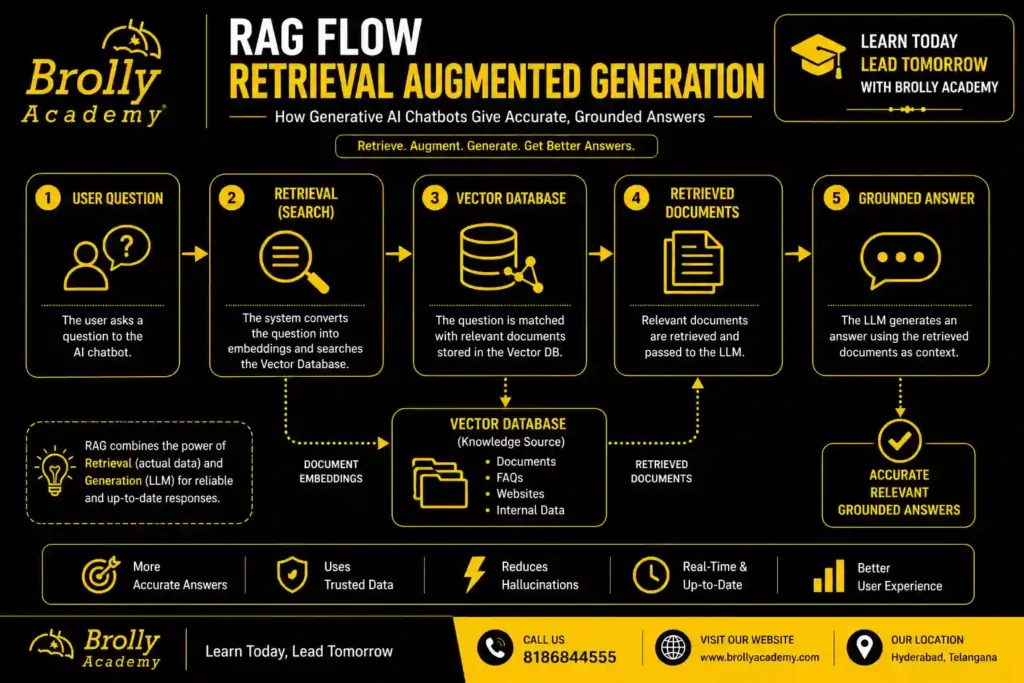
- The language model (the brain). This generates the answers. It can be a hosted model from a provider or an open model you run yourself.
- Retrieval Augmented Generation, or RAG (the notes). This is the key idea from the last section. RAG lets the chatbot pull relevant, up-to-date information from your own documents before it answers. It reduces wrong answers and keeps replies grounded in real content.
- A vector database (the filing system). Your documents are converted into embeddings and stored here. When a user asks something, the system finds the most relevant chunks fast.
- Memory (the short-term recall). This tracks the current conversation so follow-up questions make sense.
- Orchestration (the manager). A framework that decides the order of steps: search first, then answer, then check.
- Guardrails and monitoring (the safety net). These catch bad inputs and outputs and log what happens so teams can improve the system.
Why RAG matters so much: without it, a chatbot only knows what it learned during training. With RAG, it can answer questions about your latest price list, your policy document, or this week’s timetable. For most business chatbots, RAG is what makes them accurate and trustworthy.
How to Build a Generative AI Chatbot

- You build a generative AI chatbot by choosing a model, connecting your own data through retrieval, adding memory and guardrails, then testing and deploying it. You do not need to train a model from scratch. Most real projects start with an existing model and layer your data and rules on top.
Here is a realistic roadmap you can follow.
Step 1: Define the job. Decide exactly what the chatbot should do. “Answer student questions about our courses” is a good, narrow goal. Vague goals lead to weak bots.
Step 2: Pick your model. Choose a hosted model through an API for speed, or an open model you host for control and privacy. Beginners usually start with a hosted API.
Step 3: Gather and clean your data. Collect the documents the bot should answer from. Remove duplicates and outdated files. Clean data leads to clean answers.
Step 4: Set up retrieval (RAG). Split your documents into chunks, turn them into embeddings, and store them in a vector database. This lets the bot fetch the right context for each question.
Step 5: Write the system prompt. Tell the model who it is, what tone to use, what it can and cannot do, and how to handle questions it does not know.
Step 6: Add memory and guardrails. Give it short-term memory for follow-ups. Add filters for unsafe content and rules for when it should hand off to a human.
Step 7: Test with real questions. Try tricky, messy, and edge-case queries. Note where it fails. Fix the prompt, the data, or the retrieval.
Step 8: Deploy and monitor. Put it on your website, app, or messaging channel. Track conversations, measure accuracy, and improve it over time.
Common beginner mistake: trying to train your own model on day one. That is expensive and rarely needed. Start with an existing model and good retrieval. You can go deeper later.
Expert tip: spend more time on your data and your prompt than on the model choice. In most projects, those two decide whether users trust the bot.
Real-World Use Cases by Industry
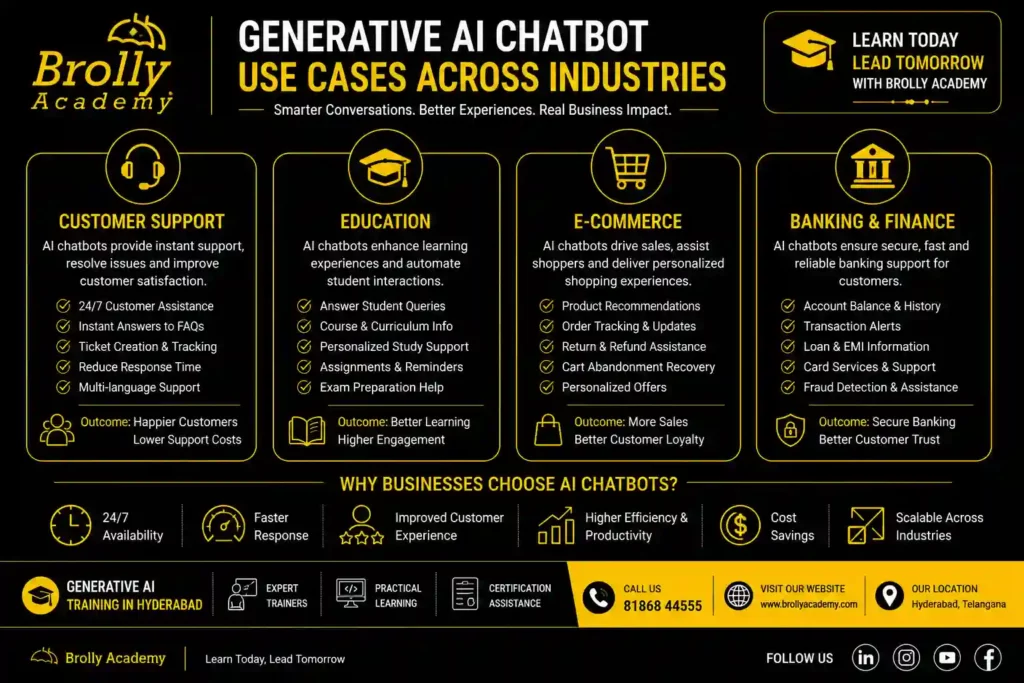
Generative AI chatbots are used across almost every industry to answer questions, speed up work, and support customers. The most common uses are customer support, sales help, internal knowledge assistants, education, and content creation. The value comes from turning slow, manual tasks into instant answers.
Here is how different sectors use them:
- Customer support: answer common questions instantly, handle multiple languages, and hand off hard cases to humans.
- E-commerce: help shoppers find products, compare options, and track orders.
- Education and training: act as a study buddy, explain concepts, and quiz learners.
- Healthcare (non-clinical): answer admin questions, book appointments, and share general information. Medical advice still needs qualified professionals.
- Banking and finance: answer account and policy questions and guide users through processes.
- HR and internal teams: answer staff questions about leave, policies, and tools from a company handbook.
- Marketing and content: draft posts, emails, and product descriptions for a human to review.
- Software development: explain code, suggest fixes, and write test cases.
Real-world scenario: a training institute builds a chatbot that answers questions about course fees, timings, and syllabus using RAG on its own brochures. A prospective student gets accurate answers at 11 pm, and the sales team wakes up to warmer leads. That is a small, high-value project a beginner can build after focused practice.
Benefits and Honest Limitations
Generative AI chatbots offer speed, scale, and round-the-clock availability, but they also carry real limits like occasional wrong answers and privacy risks. Using them well means enjoying the benefits while managing the weaknesses with the right design.
We believe honest content builds trust, so here is both sides.
Benefits
- Available 24 hours, every day.
- Handle many conversations at once.
- Support multiple languages.
- Reduce repetitive workload for teams.
- Give consistent answers when set up well.
- Turn documents into instant, searchable knowledge.
Limitations
- Hallucination: they can state wrong information confidently. Grounding with RAG and human review reduces this.
- Data privacy: sensitive data must be handled with care and clear rules.
- Cost at scale: heavy usage of hosted models adds up. Design matters.
- Bias: models can reflect biases in their training data.
- Not truly “understanding”: they predict patterns. They do not think like humans.
Best practice: never let a chatbot give final answers on high-stakes topics like medical, legal, or financial decisions without a human in the loop. Use it to assist, not to replace judgement.
Tools and Platforms to Build One
- You can build a generative AI chatbot using a model provider, an orchestration framework, and a vector database. Beginners often combine a hosted model API, a framework like LangChain or LlamaIndex, and a vector store. These tools handle the heavy lifting so you focus on data and design.
- Here is a simple map of the common building blocks. Tool choices change fast, so treat this as a starting point and verify current options.
| Layer | What It Does | Common Options |
|---|---|---|
| Model Provider | Generates responses by processing user questions and creating human-like answers. | OpenAI, Google Gemini, Anthropic Claude, Mistral AI, DeepSeek, Llama models. |
| Orchestration Framework | Connects AI models with external data, tools, APIs, and workflows. | LangChain, LlamaIndex, Semantic Kernel, CrewAI. |
| Vector Database | Stores embeddings and retrieves relevant information for AI applications. | Pinecone, ChromaDB, Weaviate, Milvus, Qdrant, FAISS. |
| Chat Interface | Provides the interface where users interact with the AI chatbot. | Website Chat Widget, WhatsApp, Mobile Apps, Slack, Microsoft Teams, Telegram. |
| Monitoring & Analytics | Tracks chatbot performance, response quality, usage, errors, and operating costs. | LangSmith, Helicone, OpenTelemetry, Grafana, Datadog, Azure Monitor. |
- Expert tip for beginners: you do not need all of this on day one. A first project can be a model API plus a small RAG setup on a few documents. Add complexity only when you need it.
Industry Trends and What Comes Next
- Generative AI chatbots are moving from simple question-answering toward agents that can take actions, use tools, and complete tasks.
- Three clear directions stand out: grounding answers in private data, multimodal input, and agentic behaviour. These trends shape the skills that will be in demand.
- We are being careful here, because exact market-size figures vary widely by source and year. Rather than quote numbers we cannot verify, we describe the direction the field is clearly moving.
Future Trends Shaping Generative Ai Chat bots
- Grounding is now standard. RAG has become the default way to make chatbots accurate for a specific business. Expect this to stay central.
- Multimodal is normal. Reading images, files, and audio is becoming common, not a special feature.
- Agents are rising. The next step is chatbots that do not just answer but complete tasks: book, search, update records, and chain steps together.
- Smaller, private models are growing. Not every use needs the largest model. Smaller, cheaper, self-hosted models handle many jobs and protect privacy.
- Roles are specialising. Job titles are splitting into prompt engineering, LLM development, retrieval design, and AI safety and evaluation.
What this means for you: learn the Python fundamentals well. Models will keep changing. The core skills of retrieval, prompting, evaluation, and clean data design will stay valuable.
Common Mistakes to Avoid
Most failed chatbot projects fail for the same reasons: unclear goals, messy data, no grounding, and no testing. Avoiding these mistakes matters more than picking a fancy model. A simple, well-grounded bot beats a complex, sloppy one every time.
Watch out for these:
- No clear purpose. A bot that tries to do everything usually does nothing well.
- Skipping RAG. Relying on the model’s memory alone leads to outdated or wrong answers.
- Dirty data. Duplicate and old documents confuse retrieval and produce bad replies.
- Weak system prompt. Without clear rules, the bot drifts off-tone or off-topic.
- No guardrails. Unfiltered bots can share unsafe or private content.
- No human handoff. Some questions must reach a person. Plan for it.
- No testing with real users. Lab tests miss the messy way real people type.
- Ignoring cost. Heavy usage without design can get expensive fast.
Quick checklist before you launch:
- Clear, narrow purpose defined
- Clean, current data prepared
- RAG set up and tested
- System prompt written and reviewed
- Guardrails and handoff rules in place
- Tested with real, messy questions
- Monitoring and cost limits active
Expert Tips for Building Better Chatbots
The strongest generative AI chatbots come from good data, sharp prompts, and constant testing, not from chasing the newest model. Focus your effort where it moves the needle: the content the bot reads and the instructions it follows.
Here are tips we would give any learner starting out:
- Start small. Build one narrow, useful bot before you attempt a big one.
- Invest in data. Clean, well-structured documents beat a bigger model.
- Write prompts like a manager. Be clear about role, tone, limits, and format.
- Ground everything. Use RAG so answers come from real sources.
- Measure quality. Track accuracy, not just conversation count.
- Plan for failure. Decide what the bot says when it does not know.
- Keep a human in the loop for anything sensitive.
- Iterate weekly. The first version is never the best version.
Interesting fact: many of the biggest quality gains in real chatbots come from improving the prompt and the retrieved documents, not from switching models. Small teams win by getting these basics right.
Skills You Need to Build Generative AI Chatbots
To build generative AI chatbots you need a mix of Python basics, an understanding of large language models, prompt engineering, retrieval design, and some deployment skills. You do not need a PhD. You need focused, practical skills and hands-on projects.
Here is a practical skill map:
- Python fundamentals: the most common language for AI work.
- How LLMs work: tokens, context, embeddings, and their limits.
- Prompt engineering: writing clear, reliable instructions.
- RAG and vector databases: grounding answers in real data.
- APIs and frameworks: connecting models, data, and interfaces.
- Evaluation: testing quality and catching errors.
- Basic deployment: putting the bot on a real channel.
- Responsible AI: privacy, safety, and bias awareness.
You can learn these in a structured order. Trying to learn everything at once slows most beginners down. A guided path with real projects is faster.
Learn Generative AI Chatbots
The fastest way to learn is a structured, project-based path that moves from LLM basics to building and deploying a real chatbot. Self-study works, but many learners move faster with hands-on guidance, mentor feedback, and real projects to show employers.
At Brolly Academy, our Generative AI training in Hyderabad is built around this exact idea: learn by building. We founded the academy in 2015 and have trained 20,000+ students across IT and professional courses. Our approach focuses on practical, job-ready skills rather than theory alone.
What learners get with us:
- Hands-on projects, including building chatbots grounded in real data.
- Classroom and online options to suit your schedule.
- A course duration of 3 Months.
- Certification guidance to help you validate your skills.
- 100% Placement Assistance, backed by 75+ hiring partners.
- Training rated 4.8 stars by 300+ Google reviews.
Our Generative AI course is led by trainers with real industry experience, and we keep class sizes practical so you get support. If you want to move from “I understand chatbots” to “I can build and deploy one,” a guided path shortens the journey.
Ready to start? Explore our Generative AI course, or talk to our team about the right fit for your goals.
Frequently Asked Questions
1. What are generative AI chatbots in simple words?
They are chat programs that use large language models to understand your question and write a fresh, human-like answer instead of picking from fixed replies.
2. How are generative AI chatbots different from normal chatbots?
Normal chatbots follow scripts and keywords. Generative AI chatbots understand meaning and generate original answers, so they handle unexpected questions much better.
3. Are ChatGPT and Gemini generative AI chatbots?
Yes. ChatGPT, Gemini, Claude, and Copilot are all generative AI chatbots built on large language models.
4. Do generative AI chatbots always give correct
No. They can sound confident but be wrong. This is called hallucination. Grounding answers with RAG and adding human review reduces errors.
5. What is RAG in a generative AI chatbot?
RAG stands for Retrieval Augmented Generation. It lets a chatbot pull relevant information from your own documents before answering, which improves accuracy.
6. Can I build a generative AI chatbot without coding?
You can build simple ones with no-code tools. For custom, data-grounded chatbots, some coding, usually Python, gives you far more control.
7. Do I need to train my own AI model to build a chatbot?
No. Most projects use an existing model and add your own data through retrieval. Training from scratch is expensive and rarely needed.
8. What is the difference between generative AI and conversational AI?
Conversational AI is the broad field of machines talking with humans. Generative AI is a capability that creates new content. A generative AI chatbot uses both.
9. Which programming language is best for building AI chatbots?
Python is the most common choice because of its libraries and community support.
10. What is a large language model?
It is an AI model trained on huge amounts of text that can understand and generate human-like language.
11. What is a context window in a chatbot?
It is the amount of recent text the model can consider at once. It is how the bot remembers earlier parts of your conversation.
12. Are generative AI chatbots safe for business use?
They can be, with the right design: grounding, guardrails, privacy rules, and human handoff for sensitive cases.
13. How much does it cost to build a generative AI chatbot?
Cost varies widely by scale, model choice, and usage. A small project can start cheap. Always design for cost to avoid surprises.
14. What is prompt engineering?
It is the skill of writing clear instructions that guide a model to behave the way you want.
15. Can generative AI chatbots speak multiple languages?
Yes. Many understand and reply in several languages, which makes them useful for diverse audiences.
16. What is a vector database used for?
It stores documents as embeddings so the chatbot can quickly find the most relevant content for each question.
17. Will generative AI chatbots replace human jobs?
They automate repetitive tasks, but they also create new roles in building, testing, and managing these systems. Learning the skills keeps you ahead.
18. What industries use generative AI chatbots the most?
Customer support, e-commerce, education, banking, healthcare admin, HR, and software development are among the biggest users.
19. What is the difference between a chatbot and an AI agent?
A chatbot answers questions. An AI agent can also take actions and complete multi-step tasks using tools. Agents are the next step beyond chatbots.
20. How long does it take to learn to build generative AI chatbots?
With a focused, project-based path, many learners build a working chatbot within a few months of consistent study.
21. Can students build generative AI chatbots as projects?
Yes. A grounded FAQ chatbot on a small set of documents is a great beginner project that teaches the full workflow.
22. Where can I learn generative AI chatbot development in Hyderabad?
Brolly Academy offers hands-on Generative AI training in Hyderabad, with real projects, certification guidance, and placement assistance.
Key Takeaways
- Generative AI chatbots use large language models to generate original, human-like answers.
- They differ from rule-based bots by understanding meaning instead of matching scripts.
- They work by turning text into tokens and embeddings, then predicting the answer word by word.
- RAG grounds their answers in your own data and is the key to accuracy.
- You build one by choosing a model, adding retrieval, memory, and guardrails, then testing.
- Popular examples include ChatGPT, Gemini, Claude, Copilot, and Perplexity.
- The field is moving toward agents, multimodal input, and private grounded models.
- The most valuable skills are prompting, retrieval, evaluation, and clean data design.
Conclusion
Generative AI chatbots are no longer a novelty. They are becoming a normal part of how businesses answer questions, how learners study, and how teams get work done. The technology behind them, language models, retrieval, and careful design, is learnable. You do not need to be a researcher to build something useful.
If you understand the basics in this guide, you already know more than most people using these tools every day. The next step is to build. Start small, ground your bot in real data, test it with real questions, and improve it week by week.
If you want a guided, hands-on path from beginner to builder, we are here to help. Brolly Academy offers practical Generative AI training in Hyderabad with real projects, certification guidance, and 100% Placement Assistance.
Talk to our team today. Call: +91 81868 44555 Email: brollyacademy@gmail.com Web: brollyacademy.com Visit: Metro Pillar No. A689, JNTU Metro Station, 3rd Floor, Hyderabad 500072

Brolly Academy Team
AI, Data Science & Software Training Experts | 20+ Years of Training Experience
Brolly Academy Team is a group of AI, Data Science, Cloud Computing, and Software Development professionals dedicated to helping learners gain practical skills and industry knowledge. Since 2015, Brolly Academy has supported thousands of students and professionals through technology training, certification guidance, and career-focused learning.