CyberArk Interview Questions
Introduction
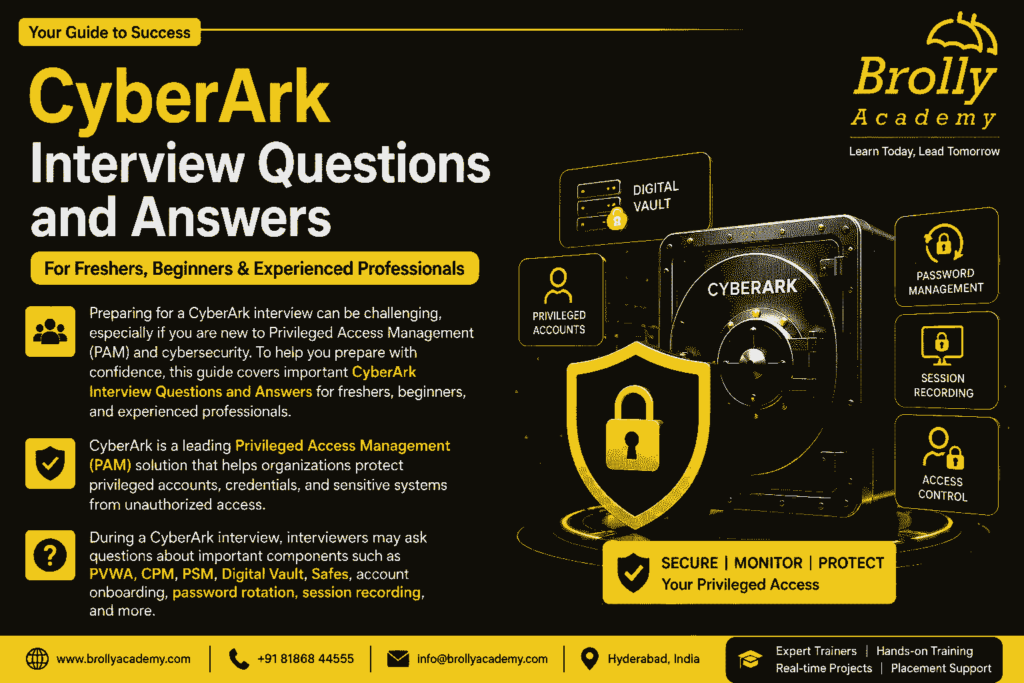
Preparing for a CyberArk interview can be challenging, especially if you are new to Privileged Access Management (PAM) and cybersecurity. To help you prepare with confidence, this guide covers important CyberArk Interview Questions and Answers for freshers, beginners, and experienced professionals.
CyberArk is a leading Privileged Access Management (PAM) solution that helps organizations protect privileged accounts, credentials, and sensitive systems from unauthorized access. During a CyberArk interview, interviewers may ask questions about important components such as the CyberArk Vault, PVWA, CPM, PSM, Safes, Platforms, password rotation, reconciliation, and privileged session management.

Share
Table of Contents
In this guide, you will find commonly asked CyberArk interview questions with simple and easy-to-understand answers. These questions are designed to help you understand the basic concepts of CyberArk and prepare for technical discussions during your interview.
Whether you are a fresher starting your career in cybersecurity, a CyberArk administrator, a PAM professional, or an experienced security engineer, this guide can help you revise important CyberArk concepts and improve your interview preparation.
CyberArk Interview Questions and Answers
for Beginners
1. What is CyberArk?
Answer:
CyberArk is a leading Privileged Access Management (PAM) solution that helps organizations protect privileged accounts from unauthorized access and cyber threats.
It securely stores privileged credentials in an encrypted Digital Vault, automatically manages passwords, and monitors privileged user activities. By controlling access to critical systems, CyberArk helps organizations reduce security risks and meet compliance requirements.
2. What is Privileged Access Management (PAM)?
Answer:
Privileged Access Management (PAM) is a cybersecurity approach used to control, monitor, and secure accounts that have elevated permissions.
PAM ensures that only authorized users can access sensitive systems, applications, and network devices. It also records privileged sessions and enforces password policies to improve overall security.
3. Why is CyberArk used?
Answer:
Organizations use CyberArk to protect privileged accounts, prevent unauthorized access, and secure critical business systems.
CyberArk helps automate password management, monitor privileged sessions, generate audit logs, and support compliance with industry security standards.
4. What are privileged accounts?
Answer:
Privileged accounts are user or service accounts that have higher permissions than regular users.
These accounts can access sensitive systems, modify configurations, install software, and manage critical infrastructure. Because they have powerful permissions, they are a common target for cyberattacks and must be protected carefully.
5. What is the CyberArk Digital Vault?
Answer:
The Digital Vault is the most secure component of CyberArk.
It stores privileged passwords, SSH keys, certificates, and other sensitive credentials in an encrypted repository. Only authorized CyberArk components and approved users can access the Vault based on defined security policies.
6. What is PVWA in CyberArk?
Answer:
PVWA stands for Password Vault Web Access.
It is the web-based interface that allows administrators and users to log in to CyberArk, retrieve passwords, manage Safes, onboard accounts, configure policies, and perform administrative tasks through a secure browser.
7. What is CPM?
Answer:
CPM stands for Central Policy Manager.
Its primary responsibility is to automatically change, verify, and reconcile passwords for privileged accounts according to the organization’s password management policies. This reduces manual effort and strengthens password security.
8. What is PSM?
Answer:
PSM stands for Privileged Session Manager.
It enables users to access privileged systems without exposing passwords. PSM also records user sessions, monitors privileged activities, and creates audit logs that help organizations investigate security incidents.
9. What is Safe in CyberArk?
Answer:
A Safe is a secure logical container used to store privileged accounts and their credentials.
Each Safe has its own access permissions, allowing administrators to control which users can view, manage, or retrieve passwords stored within it.
10. What is account onboarding in CyberArk?
Answer:
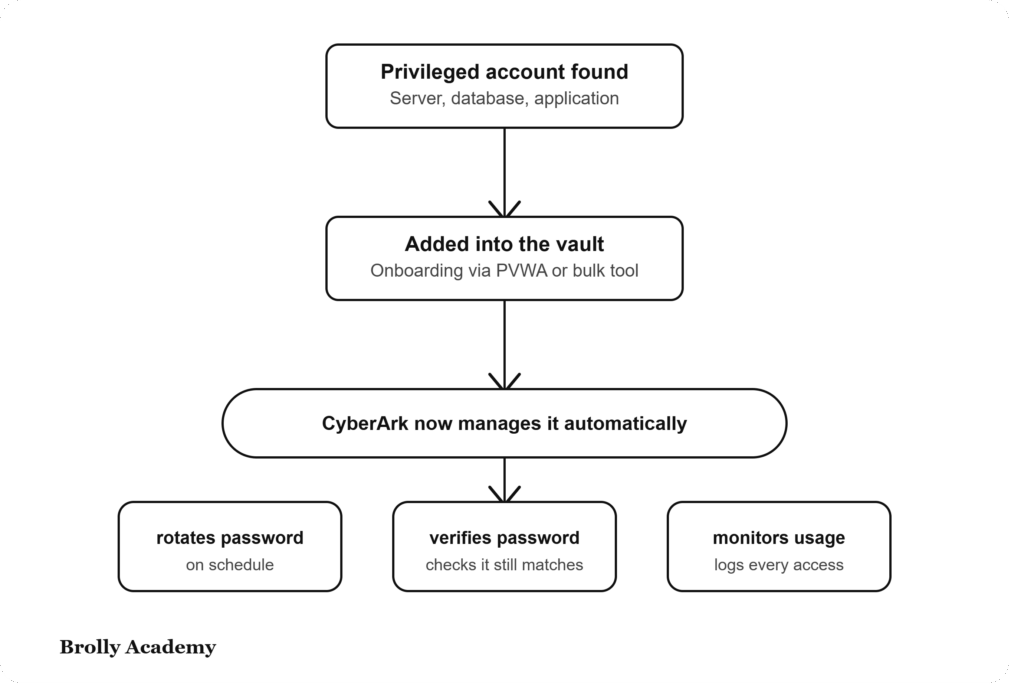
Account onboarding is the process of adding privileged accounts into the CyberArk Vault so they can be managed securely.
Once an account is onboarded, CyberArk can automatically rotate passwords, verify credentials, monitor usage, and enforce security policies without manual intervention.
11. What is password rotation?
Answer:
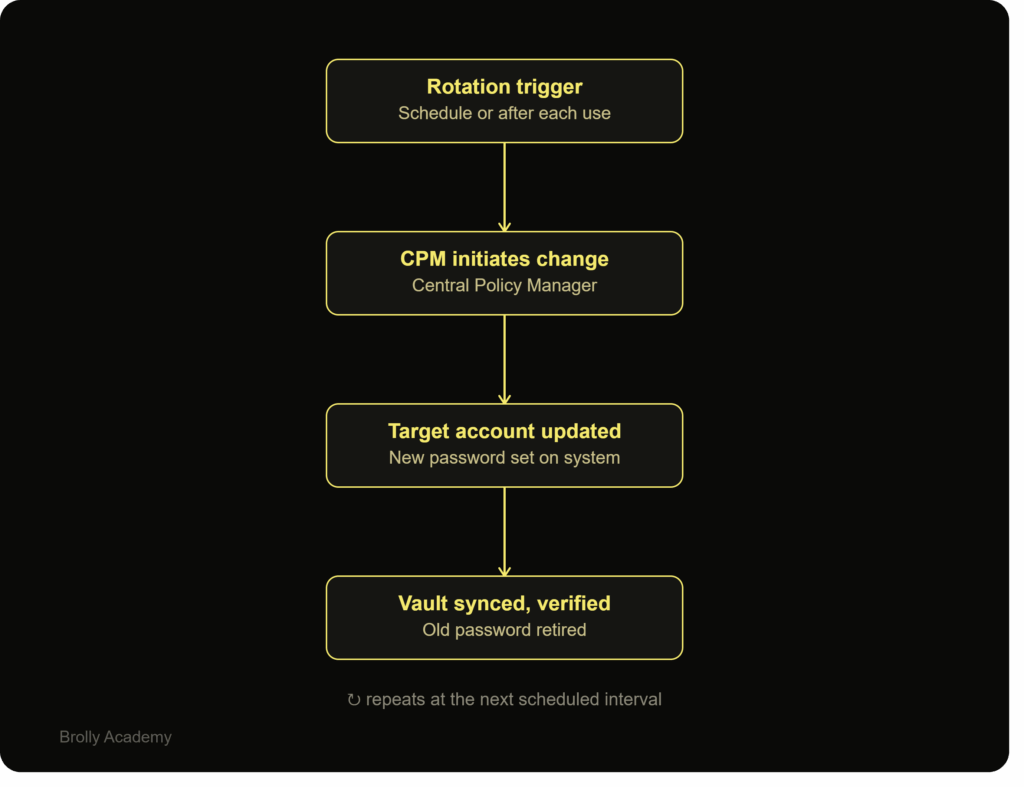
Password rotation is the automatic process of changing privileged account passwords at scheduled intervals or after each use.
CyberArk performs password rotation using CPM, helping organizations eliminate static passwords and reduce the risk of credential compromise.
12. What is password reconciliation?
Answer:
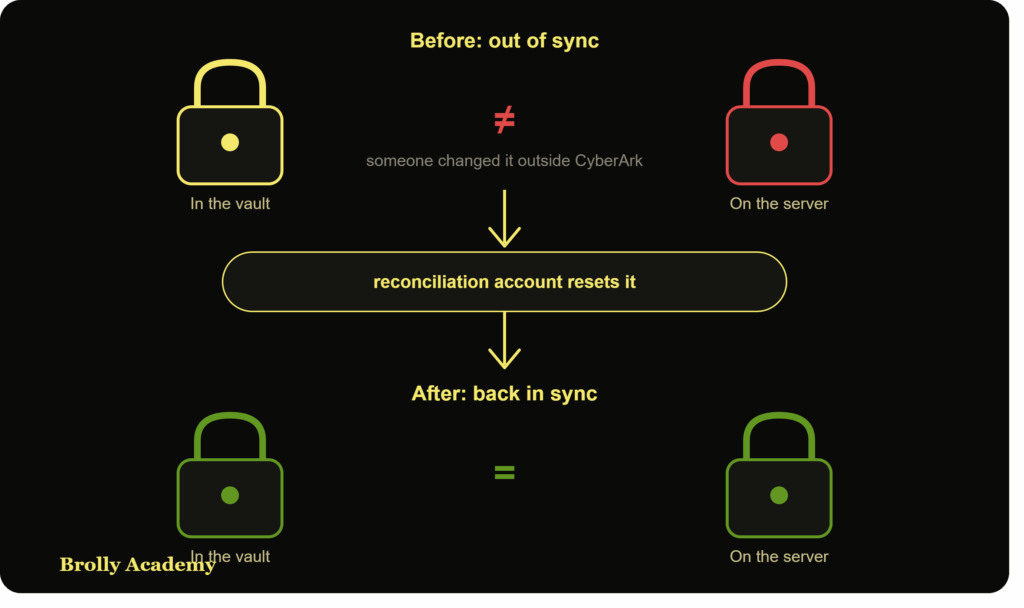
Password reconciliation is the process of restoring synchronization between the password stored in CyberArk and the actual password on the target system.
If a password is changed outside CyberArk, CPM uses a reconciliation account to reset the password and bring it back under CyberArk management.
13. What is the purpose of session recording?
Answer:
Session recording captures the activities performed by privileged users during a remote session.
It helps security teams review user actions, investigate suspicious behavior, support compliance audits, and improve accountability.
14. What is the difference between CyberArk and Active Directory?
Answer:
Active Directory is a directory service that manages users, computers, and authentication within a Windows environment.
CyberArk is a Privileged Access Management solution that secures privileged credentials, manages passwords, monitors privileged sessions, and protects high-risk accounts. CyberArk can integrate with Active Directory but serves a different purpose.
Feature | Active Directory (AD) | CyberArk |
Primary Purpose | Manages users, computers, and domains | Secures and manages privileged accounts |
Authentication | Authenticates domain users | Controls and secures privileged access |
Password Management | Manages user passwords | Automatically rotates and secures privileged passwords |
User Access | Provides access to network resources | Grants controlled access to privileged accounts |
Session Monitoring | Does not record user sessions | Records and monitors privileged sessions through PSM |
Credential Storage | Stores user account information | Stores privileged credentials in the Digital Vault |
Security Focus | Identity and directory management | Privileged Access Management (PAM) |
Administrative Control | Manages users, groups, and policies | Manages privileged accounts, Safes, and access policies |
Audit & Compliance | Basic event logging | Detailed audit logs and session recordings for compliance |
Integration | Integrates with Windows environments | Integrates with Active Directory, cloud platforms, databases, and enterprise applications |
Risk Reduction | Manages user identities | Protects privileged credentials from insider threats and cyberattacks |
Typical Users | IT administrators and employees | Security teams, CyberArk administrators, PAM engineers, and auditors |
Focuses on Identity and Access Management (IAM) by managing users, computers, and domains. | Focuses on Privileged Access Management (PAM) by protecting, monitoring, and controlling privileged accounts and credentials. |
15. Why is CyberArk important for organizations?
Answer:
CyberArk helps organizations secure privileged accounts, reduce insider threats, prevent unauthorized access, and comply with industry regulations.
By automating password management and monitoring privileged activities, CyberArk strengthens an organization’s cybersecurity posture and protects critical business assets.
CyberArk Interview Questions and Answers
for Intermediate
16. What is a Platform in CyberArk?
Answer:
A Platform in CyberArk is a collection of rules and settings that define how privileged accounts are managed. It controls password complexity, password rotation schedules, verification methods, reconciliation, and connection settings.
Different platforms can be created for Windows, Linux, Unix, databases, network devices, and cloud applications based on business requirements.
17. What is Password Verification in CyberArk?
Answer:
Password Verification is the process of checking whether the password stored in the CyberArk Vault matches the password on the target system.
The Central Policy Manager (CPM) performs this verification automatically according to the configured policy. If the passwords do not match, CyberArk reports the issue so administrators can investigate.
18. What is Password Reconciliation?
Answer:
Password Reconciliation is the process of resetting a privileged account password when it has been changed outside CyberArk.
A reconciliation account with the required permissions is used to reset the password and synchronize the target system with the password stored in the Vault.
19. What is Account Onboarding?
Answer:
Account onboarding is the process of adding privileged accounts into CyberArk so they can be managed securely.
Once onboarded, CyberArk can automatically rotate passwords, verify credentials, monitor account usage, and apply security policies.
20. What are Dependent Accounts in CyberArk?
Answer:
Dependent accounts are service or application accounts that rely on another privileged account for authentication.
Whenever the primary account password changes, CyberArk automatically updates the dependent accounts to ensure applications continue functioning without interruption.
21. What is Dual Control in CyberArk?
Answer:
Dual Control is a security feature that requires approval before users can access sensitive privileged accounts.
It ensures that critical credentials cannot be used without authorization, reducing the risk of insider threats and unauthorized access.
22. What is Exclusive Account Access?
Answer:
Exclusive Account Access allows only one user to use a privileged account at a time.
This feature prevents multiple users from sharing the same account simultaneously and helps maintain accountability during privileged sessions.
23. What is Automatic Password Management?
Answer:
Automatic Password Management is a CyberArk feature that changes, verifies, and reconciles privileged account passwords without manual intervention.
This improves security by ensuring passwords are updated regularly according to organizational policies.
24. How does CyberArk integrate with Active Directory?
Answer:
CyberArk integrates with Active Directory to authenticate users and manage access based on domain credentials.
This integration allows organizations to simplify user management, enforce centralized authentication, and apply existing security policies.
25. What is LDAP Integration in CyberArk?
Answer:
LDAP integration enables CyberArk to authenticate users using an organization’s directory service.
Instead of creating local user accounts, administrators can allow employees to log in with their existing corporate credentials.
26. What are Connection Components in PSM?
Answer:
Connection Components define how Privileged Session Manager connects to target systems.
They specify connection protocols such as RDP, SSH, SQL, or web applications and determine how sessions are launched, monitored, and recorded.
27. What is Session Recording?
Answer:
Session Recording captures every activity performed during a privileged session.
These recordings help security teams perform audits, investigate suspicious activities, and meet compliance requirements.
28. What is Session Monitoring?
Answer:
Session Monitoring is the continuous observation of privileged user activities during active sessions.
CyberArk records commands, screen activity, login information, and session details to improve visibility and security.
29. What is a Safe Member?
Answer:
A Safe Member is a user or group that has been granted permissions to access a specific Safe.
Administrators can assign different permission levels such as View Accounts, Retrieve Passwords, Add Accounts, Update Accounts, or Manage Safe Members.
30. How do you create a Safe in CyberArk?
Answer:
A Safe is created through Password Vault Web Access (PVWA).
The administrator provides a Safe name, assigns an owner, configures retention settings, and grants appropriate permissions to users or groups based on business requirements.
31. How do you onboard multiple accounts in CyberArk?
Answer:
CyberArk supports bulk account onboarding using CSV files, onboarding utilities, REST APIs, or automated discovery tools.
This approach saves time and ensures that large numbers of privileged accounts are added consistently.
32. What happens if CPM cannot change a password?
Answer:
If CPM cannot rotate a password, it records the failure in its logs and generates an error.
The administrator should review CPM logs, verify account credentials, check network connectivity, confirm platform settings, and ensure the target system is accessible before retrying the operation.
33. How do you troubleshoot account onboarding issues?
Answer:
To troubleshoot onboarding issues, administrators should:
- Verify account credentials.
- Check platform configuration.
- Confirm Safe permissions.
- Review PVWA and CPM logs.
- Ensure the target system is reachable.
- Validate firewall and network connectivity.
A systematic troubleshooting approach helps identify the root cause quickly.
34. What are the responsibilities of a CyberArk Administrator?
Answer:
A CyberArk Administrator is responsible for managing the CyberArk environment and ensuring privileged accounts remain secure.
Typical responsibilities include:
- Creating and managing Safes.
- Onboarding privileged accounts.
- Managing user permissions.
- Configuring platforms.
- Monitoring password rotation.
- Troubleshooting issues.
- Performing backups.
- Supporting audits.
- Maintaining CyberArk components.
35. What best practices should be followed while managing CyberArk?
Answer:
Some important CyberArk best practices include:
- Apply the Principle of Least Privilege.
- Rotate privileged passwords regularly.
- Enable session monitoring and recording.
- Review audit logs frequently.
- Use Multi-Factor Authentication (MFA).
- Remove unused privileged accounts.
- Perform regular Vault backups.
- Keep CyberArk components updated.
- Follow organizational security policies.
- Test password management policies before deploying them in production.
Following these practices improves security, reduces operational risks, and helps organizations maintain compliance with industry standards.
CyberArk Interview Questions and Answers
for Experienced & Professionals
36. Explain the CyberArk architecture.
Answer:
CyberArk architecture consists of multiple components that work together to secure privileged accounts.
The main components include:
- Digital Vault – Stores privileged credentials securely.
- PVWA (Password Vault Web Access) – Provides a web interface for users and administrators.
- CPM (Central Policy Manager) – Changes and verifies passwords automatically.
- PSM (Privileged Session Manager) – Monitors and records privileged sessions.
- PTA (Privileged Threat Analytics) – Detects abnormal privileged account activities.
Together, these components help organizations secure privileged access while maintaining compliance and auditability.
37. What is High Availability (HA) in CyberArk?
Answer:
High Availability (HA) ensures that the CyberArk environment continues to operate even if one server becomes unavailable.
Organizations configure redundant CyberArk components so users can continue accessing privileged accounts without interruption during hardware failures or maintenance activities.
38. What is Disaster Recovery (DR) in CyberArk?
Answer:
Disaster Recovery (DR) is a backup strategy that enables CyberArk services to be restored after a major failure, such as a server crash or data center outage.
A DR Vault continuously receives replicated data from the Primary Vault, allowing organizations to recover critical information and resume operations with minimal downtime.
39. How do you upgrade a CyberArk environment?
Answer:
Before upgrading CyberArk, administrators should:
- Review the release notes.
- Verify version compatibility.
- Perform a complete backup of the Vault and database.
- Test the upgrade in a non-production environment.
- Upgrade components in the recommended sequence.
- Validate services after completion.
- Monitor logs for any issues.
A planned upgrade minimizes risks and reduces service interruptions.
40. How do you perform CyberArk Vault backup?
Answer:
Vault backups are created regularly to protect privileged account information and configuration data.
Administrators verify backup completion, store backup files securely, and periodically test restoration procedures to ensure business continuity.
41. What is Vault Replication?
Answer:
Vault Replication copies data from the Primary Vault to a Disaster Recovery Vault.
This replication ensures that privileged credentials remain available if the primary environment experiences an unexpected failure.
42. What logs do you check while troubleshooting CyberArk issues?
Answer:
Depending on the issue, administrators review logs from:
- Vault
- CPM
- PVWA
- PSM
- PTA
- Windows Event Viewer
- IIS logs
These logs provide valuable information for identifying errors, authentication failures, connectivity problems, and configuration issues.
43. How do you troubleshoot a failed CPM password change?
Answer:
A structured troubleshooting approach includes:
- Checking CPM logs.
- Verifying target account credentials.
- Confirming platform configuration.
- Ensuring the reconciliation account has proper permissions.
- Testing network connectivity.
- Reviewing password policies.
- Retrying the password change after correcting the issue.
44. How do you troubleshoot PSM connection failures?
Answer:
Begin by verifying:
- PSM service status.
- Network connectivity.
- Firewall rules.
- Connection Component configuration.
- User permissions.
- Target server accessibility.
- Session logs.
These checks usually identify the root cause of connection problems.
45. What is the purpose of CyberArk REST API?
Answer:
CyberArk REST APIs allow administrators to automate administrative tasks.
Common uses include:
- Account onboarding.
- User management.
- Safe management.
- Password retrieval.
- Reporting.
- Integration with third-party applications.
Automation reduces manual effort and improves operational efficiency.
46. How do you integrate CyberArk with SIEM solutions?
Answer:
CyberArk sends audit logs and security events to SIEM platforms such as Splunk, QRadar, or Microsoft Sentinel.
Security teams use these logs for monitoring, alerting, incident investigation, and compliance reporting.
47. What are the common challenges during CyberArk implementation?
Answer:
Some common implementation challenges include:
- Identifying privileged accounts.
- Defining access policies.
- Application compatibility.
- Password dependency management.
- Network restrictions.
- User adoption.
- Integration with existing infrastructure.
Proper planning helps reduce these challenges.
48. What is a Reconciliation Account?
Answer:
A Reconciliation Account is a privileged account used by CPM to reset passwords when they have been modified outside CyberArk.
It restores synchronization between the Vault and the target system without requiring manual intervention.
49. How do you secure privileged sessions?
Answer:
Privileged sessions are secured by:
- Using PSM.
- Recording user activities.
- Restricting direct password access.
- Applying least privilege.
- Monitoring user behavior.
- Reviewing session recordings regularly.
These controls improve accountability and reduce security risks.
50. How do you monitor CyberArk health?
Answer:
Administrators monitor:
- Component services.
- Server performance.
- Vault availability.
- Password management status.
- Replication health.
- Session activity.
- Event logs.
Regular monitoring helps detect issues before they affect production users.
51. How do you handle CyberArk performance issues?
Answer:
Performance issues are investigated by checking server resources, database health, network latency, service status, Vault activity, and application logs.
Administrators may also optimize system resources, remove unnecessary data, and review scheduled tasks to improve overall performance.
52. What security best practices should be followed in CyberArk?
Answer:
Recommended best practices include:
- Enable Multi-Factor Authentication (MFA).
- Follow the Principle of Least Privilege.
- Rotate passwords automatically.
- Monitor privileged sessions.
- Review audit logs regularly.
- Remove inactive accounts.
- Keep CyberArk components updated.
- Perform regular backups.
These practices strengthen the organization’s security posture.
53. What are Access Policies in CyberArk?
Answer:
Access Policies determine who can access privileged accounts, when access is allowed, and under what conditions.
Policies help organizations enforce security standards and reduce unauthorized access.
54. How do you migrate a CyberArk environment?
Answer:
Migration typically involves:
- Planning the migration.
- Backing up existing data.
- Installing the new environment.
- Migrating Vault data.
- Validating configurations.
- Testing password management.
- Verifying user access.
- Performing production cutover.
Testing before migration is essential to reduce downtime.
55. What is Privileged Threat Analytics (PTA)?
Answer:
PTA is a CyberArk component that analyzes privileged user behavior and identifies suspicious activities.
It uses behavioral analysis to detect unusual login patterns, credential misuse, and potential insider threats.
56. How do you troubleshoot Vault connectivity issues?
Answer:
Troubleshooting steps include:
- Verifying Vault services.
- Checking network connectivity.
- Reviewing firewall rules.
- Confirming DNS resolution.
- Validating SSL certificates.
- Reviewing Vault logs.
- Testing communication between CyberArk components.
57. How do you prepare CyberArk for a security audit?
Answer:
Preparation includes:
- Reviewing user permissions.
- Verifying password policies.
- Checking session recordings.
- Exporting audit logs.
- Confirming policy compliance.
- Reviewing privileged account activity.
- Ensuring backup procedures are functioning properly.
These activities help organizations successfully complete compliance audits.
58. What are the responsibilities of a Senior CyberArk Engineer?
Answer:
A Senior CyberArk Engineer typically:
- Designs CyberArk architecture.
- Implements new environments.
- Performs upgrades and migrations.
- Troubleshoots complex issues.
- Automates administrative tasks.
- Supports disaster recovery.
- Integrates CyberArk with enterprise systems.
- Guides junior administrators.
- Maintains security best practices.
59. What would you do if the Primary Vault becomes unavailable?
Answer:
The first step is to identify the reason for the outage by reviewing system health and logs. If recovery is not immediate, administrators can activate the Disaster Recovery (DR) Vault according to the organization’s recovery plan. Once the primary environment is restored, data synchronization should be verified before returning to normal operations.
60. What qualities make a successful CyberArk professional?
Answer:
A successful CyberArk professional combines strong technical knowledge with practical experience and effective communication skills.
Important qualities include:
- Understanding of Privileged Access Management.
- Strong troubleshooting ability.
- Knowledge of cybersecurity best practices.
- Experience with enterprise environments.
- Attention to detail.
- Willingness to learn new technologies.
- Good documentation skills.
- Ability to work collaboratively with security and infrastructure teams.
Continuous learning and hands-on experience are key factors for long-term success in a CyberArk career.
CyberArk Scenario-Based Interview Questions and Answers
1. A privileged account password is not changing automatically. How would you identify the problem?
Answer:
I would begin by reviewing the CPM logs to understand why the password change failed. Then, I would verify that the target account is active, the platform configuration is correct, and the password management policy is enabled. I would also confirm that the target server is reachable and that the account has sufficient permissions. After correcting the issue, I would trigger another password change and verify that it completes successfully.
2. A user says they cannot retrieve a password from the Vault. What would you do?
Answer:
First, I would check whether the user has permission to access the Safe containing the account. Then, I would verify the user’s role, authentication status, and any Dual Control or approval policies that may be preventing access. Finally, I would review the audit logs to determine whether the request was denied due to a policy or permission issue.
3. A server is unreachable through PSM, but it is accessible through Remote Desktop. What could be the reason?
Answer:
I would verify that the PSM service is running correctly and check the connection component configuration. I would also review firewall rules, session policies, and network connectivity between the PSM server and the target machine. If required, I would examine the PSM logs to identify the exact cause of the connection failure.
4. During a CyberArk upgrade, one component fails to start after installation. How would you handle the situation?
Answer:
I would first review the installation logs and Windows Event Viewer to identify the error. Then, I would verify the service configuration, confirm that all required dependencies are installed, and check whether the component is compatible with the upgraded version. If necessary, I would restore the backup or reinstall the affected component following the recommended upgrade procedure.
5. An application stopped working after the password for its service account was changed. What steps would you take?
Answer:
I would verify whether the application is using the updated password stored in CyberArk. If the password is hardcoded in the application, I would coordinate with the application team to update it. I would also check whether dependent account management has been configured correctly and test the application after updating the credentials.
6. You discover that a privileged account has not rotated its password for several weeks. What would you investigate?
Answer:
I would check whether password management is enabled for the account and verify the CPM policy. Then, I would review CPM logs for failed password changes, confirm network connectivity, and ensure the account is not excluded from automatic rotation. After resolving the issue, I would perform a manual password change and verify that future rotations occur as scheduled.
7. A company wants to onboard 2,000 privileged accounts. How would you manage the task efficiently?
Answer:
I would first categorize the accounts based on operating systems, databases, and applications. Then, I would prepare the required platforms and Safe structures before using bulk onboarding tools or REST APIs to automate the onboarding process. After completion, I would validate that all accounts are onboarded correctly and that password management is functioning as expected.
8. A CyberArk user accidentally deleted an important account from a Safe. What would you do?
Answer:
I would first verify whether the account can be recovered using available backups or audit records. If recovery is possible, I would restore the account according to the organization’s recovery procedure. After restoration, I would review user permissions and recommend additional controls to reduce the risk of accidental deletions in the future.
9. You notice several failed login attempts for a privileged account during the night. How would you respond?
Answer:
I would immediately review the audit logs and session history to identify the source of the failed attempts. If the activity appears suspicious, I would inform the security operations team, investigate whether the account has been compromised, and recommend changing the password while reviewing access permissions and monitoring future activity.
10. The Disaster Recovery Vault is not synchronizing with the Primary Vault. What would you check?
Answer:
I would verify network connectivity between both Vault servers, review replication logs, confirm that the replication services are running, and check for storage or communication issues. Once the problem is identified, I would restore replication and verify that data synchronization resumes successfully.
11. An auditor asks for evidence of privileged user activity over the past month. How would you provide it?
Answer:
I would generate audit reports from CyberArk, collect session recordings, and export login history for the requested period. I would verify that the information is complete and provide it in accordance with the organization’s security and compliance procedures.
12. A privileged account is shared by multiple administrators. How can CyberArk improve security?
Answer:
I would recommend storing the account in CyberArk, enabling automatic password rotation, requiring users to retrieve credentials only when needed, and recording every privileged session through PSM. This improves accountability because every action can be linked to an individual user.
13. A business team requests emergency access to a production server. How would you process the request?
Answer:
I would follow the organization’s emergency access policy by verifying the request, obtaining the required approvals, and granting temporary access through CyberArk. I would ensure that the session is monitored and recorded, and once the work is completed, I would remove the temporary access and rotate the password if required.
14. Users report that CyberArk is running slowly during working hours. What would be your troubleshooting approach?
Answer:
I would begin by checking CPU, memory, and disk usage on CyberArk servers. Then, I would review network latency, Vault health, CPM activity, and active user sessions. I would also analyze application logs to identify any bottlenecks and recommend performance improvements based on the findings.
15. Your organization wants to strengthen privileged account security. What recommendations would you provide?
Answer:
I would recommend onboarding all privileged accounts into CyberArk, enabling automatic password rotation, implementing Multi-Factor Authentication (MFA), applying the Principle of Least Privilege, monitoring privileged sessions, reviewing audit logs regularly, removing unused accounts, and performing periodic security assessments. These measures help reduce security risks and improve compliance.
Common Mistakes in CyberArk Interviews
Even well-prepared candidates can make mistakes during a CyberArk interview. While technical knowledge is important, interviewers also evaluate your communication skills, problem-solving ability, and practical understanding of Privileged Access Management (PAM). Avoiding the following common mistakes can improve your chances of success.
1. Memorizing Answers Without Understanding the Concepts
Many candidates memorize definitions from online resources but struggle when interviewers ask follow-up questions. Instead of learning answers word for word, focus on understanding how CyberArk works and why each component is important.
2. Not Understanding CyberArk Architecture
Knowing the names of CyberArk components is not enough. Interviewers expect you to explain how the Digital Vault, PVWA, CPM, PSM, and other components work together to protect privileged accounts.
3. Ignoring Hands-On Practice
Reading documentation alone cannot replace practical experience. Candidates who have worked in a CyberArk lab or real project can explain tasks more confidently and answer scenario-based questions with ease.
4. Giving Very Short Answers
Providing one-line answers may give the impression that your knowledge is limited. Explain your answers clearly, include the purpose of the feature, and, when possible, support your explanation with a practical example.
5. Struggling with Scenario-Based Questions
Many interviews include real-world situations such as password rotation failures, Safe access issues, or PSM connection problems. Instead of guessing, explain your troubleshooting process step by step.
6. Overlooking Cybersecurity Basics
CyberArk is a Privileged Access Management solution, so interviewers expect you to understand security concepts such as the Principle of Least Privilege, Multi-Factor Authentication (MFA), password management, and audit logging.
7. Unable to Explain Previous Project Experience
Experienced candidates often mention projects but fail to explain their responsibilities. Be ready to discuss your role, the tasks you performed, the challenges you faced, and how you resolved them.
8. Forgetting to Mention Troubleshooting Steps
When asked about resolving an issue, avoid jumping directly to the solution. Explain how you would review logs, verify configurations, test connectivity, and identify the root cause before making changes.
9. Poor Communication Skills
Even if your technical knowledge is strong, unclear communication can affect your performance. Listen carefully to the question, organize your thoughts, and answer in a simple, structured manner.
10. Not Preparing for Basic Questions
Some candidates spend all their time studying advanced topics and forget to review basic concepts. Interviewers often begin with simple questions about CyberArk, PAM, Safes, PVWA, CPM, and PSM before moving to advanced topics.
11. Not Staying Updated
CyberArk regularly introduces new features and improvements. Candidates who are aware of the latest updates, integrations, and security trends often leave a stronger impression during interviews.
12. Lack of Confidence
Many candidates know the correct answer but hesitate while speaking. Practice answering common CyberArk interview questions, participate in mock interviews, and focus on explaining concepts confidently rather than trying to sound perfect.

Why Interviewers Ask CyberArk Questions
CyberArk professionals play an important role in protecting an organization’s most valuable systems and data. Since privileged accounts have access to critical servers, databases, applications, and network devices, companies need skilled professionals who can manage these accounts securely. During the hiring process, interviewers ask CyberArk questions to understand whether a candidate has the knowledge, technical skills, and practical experience required for the role.
The goal of these questions is not just to check if you know CyberArk terminology. Employers want to evaluate how well you understand Privileged Access Management (PAM), how you solve technical problems, and whether you can apply your knowledge in real-world environments. Depending on your experience level, the interviewer may focus on basic concepts, administration tasks, implementation, troubleshooting, or enterprise-level architecture.
To Assess Your Basic Knowledge
If you are a fresher or have limited experience, the interviewer will usually begin with fundamental questions. These questions help determine whether you understand the core concepts of CyberArk and the importance of privileged account security.
You should be prepared to explain topics such as:
- What is CyberArk?
- What is Privileged Access Management (PAM)?
- Why are privileged accounts important?
- What are the main CyberArk components?
- How does CyberArk improve organizational security?
A strong understanding of these concepts shows that you have built a solid foundation for learning more advanced topics.
To Evaluate Your Practical Skills
Many organizations prefer candidates who can perform everyday CyberArk administration tasks with confidence. Even if you are not highly experienced, interviewers want to know whether you understand the workflow involved in managing privileged accounts.
They may ask questions about:
- Creating and managing Safes.
- Onboarding privileged accounts.
- Managing users and permissions.
- Password rotation.
- Platform management.
- Session monitoring.
These questions help employers determine whether you can contribute to daily CyberArk operations.
To Test Your Problem-Solving Ability
Working with CyberArk involves identifying and resolving technical issues. Because of this, interviewers often ask troubleshooting questions to understand how you approach a problem.
For example, they may ask how you would respond if:
- Password rotation fails.
- A user cannot access a Safe.
- A PSM connection is unsuccessful.
- An account cannot be onboarded.
- A CyberArk component stops responding.
Instead of expecting a memorized answer, interviewers want to see your logical thinking, troubleshooting process, and ability to identify the root cause.
To Understand Your Knowledge of Security Best Practices
CyberArk is designed to strengthen an organization’s cybersecurity posture. Employers therefore expect candidates to understand the security principles behind the product.
During the interview, you may be asked about:
- Least privilege access.
- Secure password management.
- Multi-factor authentication (MFA).
- Credential protection.
- Audit logging.
- Compliance requirements.
Your answers should demonstrate that you understand why these practices are important for protecting sensitive systems.
To Verify Real-World Experience
For candidates with professional experience, interviews often focus on practical work rather than theory. Recruiters want to learn about the projects you have completed and the responsibilities you handled.
They may ask questions related to:
- CyberArk implementation.
- Infrastructure design.
- High Availability (HA).
- Disaster Recovery (DR).
- Upgrades and migrations.
- Active Directory integration.
- REST API automation.
- Performance optimization.
- Production support.
Sharing real examples from your experience helps interviewers understand your level of expertise and confidence.
To Evaluate Your Communication Skills
A CyberArk professional regularly interacts with security teams, system administrators, application owners, auditors, and business stakeholders. Because of this, communication is an important part of the interview process.
Interviewers look for candidates who can:
- Explain technical concepts clearly.
- Answer questions in a structured manner.
- Describe previous projects confidently.
- Discuss challenges and solutions logically.
- Communicate effectively with both technical and non-technical audiences.
Clear communication reflects professionalism and makes it easier for teams to work together during implementation and support activities.
To Find the Right Candidate
Every organization wants someone who can protect critical systems while following security standards and organizational policies. Interviewers use CyberArk questions to determine whether a candidate has the right combination of technical knowledge, practical experience, analytical thinking, and willingness to learn.
Candidates who demonstrate confidence, problem-solving skills, and a good understanding of CyberArk concepts are more likely to stand out during the interview process.
Summary
CyberArk interview questions are carefully designed to evaluate your overall ability as a cybersecurity professional. They help employers assess your understanding of Privileged Access Management, your practical experience with CyberArk components, your troubleshooting skills, and your knowledge of security best practices. Whether you are applying as a fresher, administrator, engineer, or experienced CyberArk professional, preparing these topics thoroughly will improve your confidence and increase your chances of success in the interview.
How to Prepare for a CyberArk Interview
Preparing for a CyberArk interview is not just about learning answers to common questions. It is about developing a clear understanding of how CyberArk protects privileged accounts and how its different components work together in an enterprise environment. Employers look for candidates who can explain concepts confidently, solve problems logically, and demonstrate an interest in cybersecurity.
Whether you are a fresher starting your career or an experienced professional looking for a better opportunity, following a structured preparation plan will help you perform well in your interview.
Start with the Basics
The first step is to understand the core concepts of CyberArk and Privileged Access Management (PAM). Before moving on to advanced topics, make sure you know why organizations use CyberArk, what privileged accounts are, and how CyberArk helps protect critical business systems.
A strong understanding of the basics makes it easier to answer technical questions and gives you the confidence to discuss more advanced topics during the interview.
Know the Important CyberArk Components
Interviewers often ask candidates to explain the purpose of different CyberArk components. Instead of memorizing definitions, learn how each component contributes to the overall security of the organization.
Make sure you understand:
- Digital Vault
- Password Vault Web Access (PVWA)
- Central Policy Manager (CPM)
- Privileged Session Manager (PSM)
- Privileged Threat Analytics (PTA)
Knowing how these components interact with one another will help you answer architecture-related and implementation-based questions.
Gain Practical Experience
Practical knowledge is one of the biggest advantages during a CyberArk interview. If you have access to a practice environment or training lab, spend time performing common administrative tasks.
Try working on activities such as:
- Creating Safes.
- Adding privileged accounts.
- Assigning user permissions.
- Configuring password management policies.
- Managing platforms.
- Reviewing audit logs.
- Monitoring privileged sessions.
Hands-on experience allows you to answer interview questions using real examples instead of theoretical explanations.
Prepare for Technical Discussions
As your interview progresses, technical questions may become more detailed. You should be ready to explain CyberArk architecture, password management workflows, authentication methods, and account onboarding processes.
Experienced candidates should also prepare topics such as:
- High Availability (HA)
- Disaster Recovery (DR)
- Platform upgrades
- Performance tuning
- Active Directory integration
- LDAP configuration
- REST API automation
- Production support activities
Understanding these areas demonstrates that you can work confidently in enterprise environments.
Practice Real-World Scenarios
Many companies include scenario-based questions to understand how candidates approach problems. Instead of asking only theoretical questions, interviewers may describe a situation and ask how you would resolve it.
For example, you may be asked how to investigate a password rotation failure, restore user access to a Safe, troubleshoot a PSM connection issue, or onboard privileged accounts for a new application.
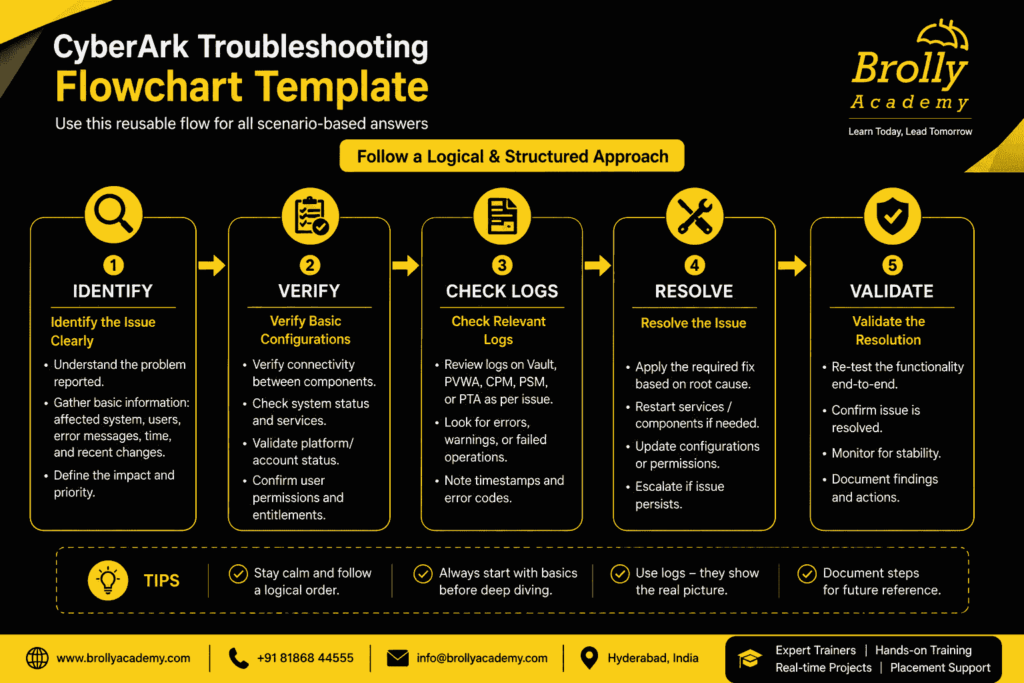
When answering these questions, explain your approach step by step. Describe how you would collect information, verify configurations, review logs, identify the root cause, and implement a solution while following security best practices.
Strengthen Your Cybersecurity Knowledge
CyberArk is only one part of an organization’s security strategy. Interviewers appreciate candidates who also understand general cybersecurity concepts.
Spend time reviewing topics such as:
- Principle of Least Privilege
- Identity and Access Management (IAM)
- Multi-Factor Authentication (MFA)
- Password security
- Session recording
- Compliance and auditing
- Risk management
- Access control
Connecting CyberArk features with these security principles shows that you understand the bigger picture.
Review Your Previous Work Experience
If you have professional experience, prepare to discuss the projects you have worked on. Interviewers often ask candidates to explain their daily responsibilities, implementation experience, challenges faced, and solutions delivered.
Try to describe your experience using practical examples rather than general statements. Sharing real project experiences demonstrates confidence and helps interviewers evaluate your technical expertise.
Improve Your Interview Skills
Good communication is just as important as technical knowledge. During the interview, listen carefully to each question before answering. Organize your thoughts, explain your answer clearly, and avoid rushing.
If you do not know the answer to a question, be honest. Explain how you would approach finding the solution instead of guessing. Interviewers value honesty, logical thinking, and a willingness to learn.
Continue Learning
CyberArk technology continues to evolve with new features, integrations, and security enhancements. Staying updated with product releases, documentation, and cybersecurity trends demonstrates your commitment to professional growth.
Employers often prefer candidates who show curiosity, continuously improve their skills, and keep themselves informed about the latest developments in the cybersecurity industry.
Tips to Crack the CyberArk Interview
Getting selected for a CyberArk role requires more than answering technical questions correctly. Employers want professionals who understand Privileged Access Management (PAM), can solve real-world security challenges, and communicate their ideas confidently. Whether you are a fresher or an experienced CyberArk professional, following the right preparation strategy can significantly improve your interview performance.
1. Build a Strong Understanding of CyberArk Basics
Before studying advanced topics, make sure you have a solid understanding of the fundamentals. Learn what CyberArk is, why organizations use it, and how it helps protect privileged accounts. A strong foundation will help you answer basic questions with confidence and make advanced concepts easier to understand.
2. Understand How CyberArk Components Work Together
Instead of learning each component separately, focus on how they interact within the CyberArk environment. Interviewers often ask candidates to explain the complete workflow rather than individual definitions.
Be familiar with:
- Digital Vault
- Password Vault Web Access (PVWA)
- Central Policy Manager (CPM)
- Privileged Session Manager (PSM)
- Privileged Threat Analytics (PTA)
Knowing the purpose of each component and how they work together demonstrates practical knowledge.
3. Practice Using a CyberArk Lab
Hands-on experience can make a significant difference during an interview. If you have access to a practice environment, spend time performing common administrative tasks. Practical experience helps you answer questions with confidence and provides real examples to discuss during the interview.
Practice activities such as:
- Creating Safes
- Onboarding privileged accounts
- Managing user permissions
- Configuring password management policies
- Monitoring privileged sessions
- Reviewing audit logs
4. Prepare for Real-World Scenarios
Many interviewers prefer asking scenario-based questions because they reveal how candidates approach problems. During your preparation, think about how you would respond to situations such as password rotation failures, account onboarding issues, or Safe permission problems.
When answering, explain the steps you would follow to identify the issue, investigate the cause, and implement a solution instead of simply stating the final answer.
5. Improve Your Troubleshooting Skills
CyberArk professionals are expected to resolve technical issues efficiently. Learn how to troubleshoot common problems by reviewing logs, verifying configurations, checking permissions, and confirming connectivity between CyberArk components and target systems.
A structured troubleshooting approach demonstrates both technical knowledge and analytical thinking.
6. Review Your Project Experience
If you have worked on CyberArk projects, take time to revisit your responsibilities before the interview. Be prepared to explain what you worked on, the challenges you faced, and how you resolved them.
Real project examples help interviewers understand your practical experience and problem-solving abilities.
7. Strengthen Your Cybersecurity Knowledge
CyberArk is an important part of an organization’s cybersecurity strategy. Along with learning the platform itself, review security concepts such as Privileged Access Management, Identity and Access Management, Multi-Factor Authentication, access control, password security, and compliance.
Understanding these topics shows that you recognize how CyberArk supports enterprise security.
8. Practice Explaining Your Answers Clearly
Knowing the correct answer is only part of the interview. You should also be able to explain it in a clear and organized way. Avoid rushing through your responses or using unnecessary technical jargon.
Take a moment to understand the question, answer it logically, and include practical examples whenever appropriate.
9. Stay Updated with CyberArk Developments
CyberArk continues to introduce new features, integrations, and security enhancements. Reading official documentation, product updates, and cybersecurity news helps you stay informed about the latest developments.
Interviewers often appreciate candidates who show an interest in continuous learning and professional growth
10. Stay Calm and Be Honest
It is completely normal not to know the answer to every question. If you are unsure, avoid guessing. Instead, explain how you would approach finding the solution or troubleshooting the issue. A calm, honest, and logical response often creates a better impression than an incorrect answer delivered with overconfidence.
Quick Interview Checklist
Before attending your CyberArk interview, make sure you can confidently:
- Explain the purpose of CyberArk and Privileged Access Management (PAM).
- Describe the functions of PVWA, CPM, PSM, Digital Vault, and PTA.
- Discuss common administrative tasks and troubleshooting steps.
- Answer scenario-based interview questions using a structured approach.
- Explain your previous projects and responsibilities.
- Demonstrate an understanding of cybersecurity best practices.
- Communicate technical concepts in a simple and professional manner.
Final Tip
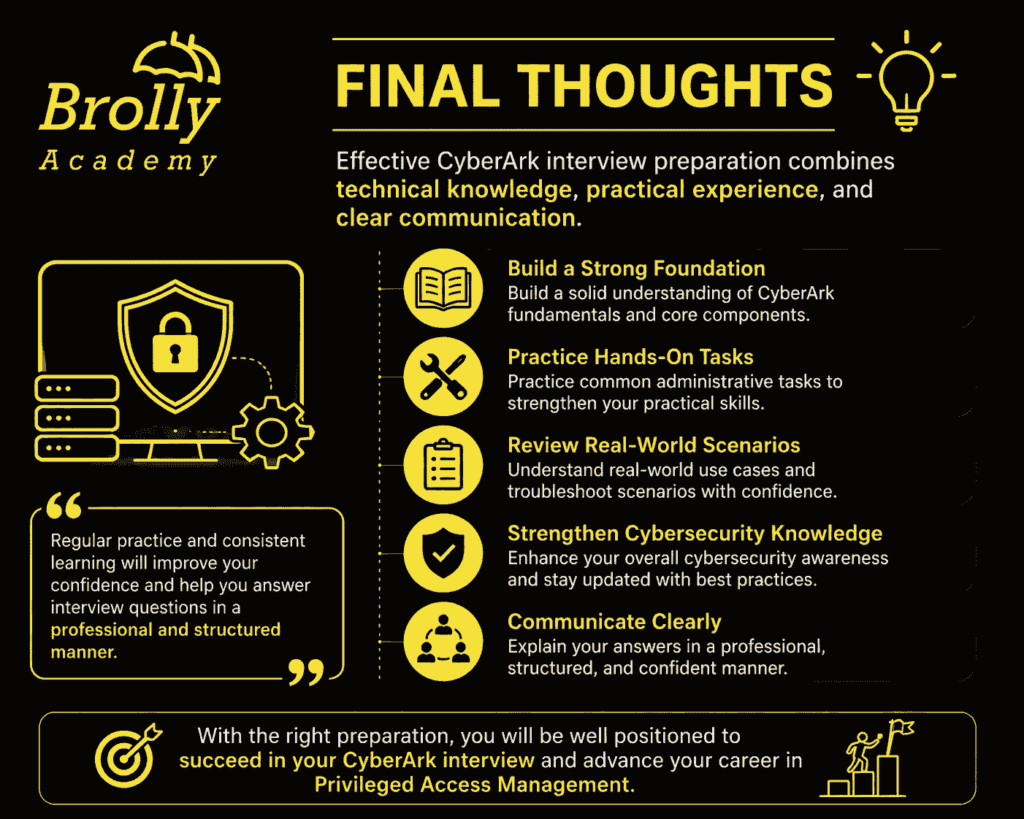
Success in a CyberArk interview comes from consistent preparation, practical knowledge, and confident communication. Focus on understanding the concepts rather than memorizing answers, practice common administrative tasks, and prepare for real-world scenarios. Employers value candidates who can explain their ideas clearly, solve problems logically, and demonstrate a genuine interest in cybersecurity. With regular practice and the right mindset, you can approach your CyberArk interview with confidence and improve your chances of securing your desired role.
Conclusion
- Preparing for a CyberArk interview is not just about memorizing questions and answers—it’s about developing a strong understanding of Privileged Access Management (PAM) and knowing how CyberArk protects an organization’s most critical systems. Interviewers look for candidates who can explain concepts clearly, solve real-world problems, and demonstrate practical knowledge of CyberArk components and security best practices.
- Whether you are a beginner starting your cybersecurity journey or an experienced professional aiming for a senior CyberArk role, consistent preparation is the key to success. Focus on learning the core components such as the Digital Vault, PVWA, CPM, PSM, and Safes, practice common administrative tasks, and prepare for troubleshooting and scenario-based questions. Hands-on experience, combined with a solid understanding of cybersecurity principles, will help you answer interview questions with confidence.
- The CyberArk Interview Questions and Answers covered in this guide are designed to help you build your knowledge step by step—from beginner concepts to advanced interview scenarios. Regular practice, continuous learning, and staying updated with the latest CyberArk features will not only improve your interview performance but also prepare you for real-world responsibilities in a CyberArk environment.
- If you’re looking to build practical CyberArk skills, working on live projects, lab exercises, and mock interviews can significantly improve your confidence. Learning from experienced trainers and gaining hands-on experience will help you understand how CyberArk is implemented in enterprise environments and prepare you for real job roles.
- Remember, every successful CyberArk professional started with the basics. Stay curious, keep practicing, and continue improving your technical and problem-solving skills. With the right preparation, dedication, and confidence, you can successfully crack your CyberArk interview and build a rewarding career in Privileged Access Management (PAM) and cybersecurity.
Frequently Asked Questions
How do I prepare for a CyberArk interview?
Start with the basics of Privileged Access Management and then learn the main CyberArk components such as the Digital Vault, PVWA, CPM, PSM and Safes. After that, practise common admin tasks, prepare for scenario-based questions and revise your own project work. Focus on understanding concepts rather than memorising answers, and practise explaining each topic clearly with a simple example.
Are CyberArk interview questions difficult for freshers?
CyberArk interview questions are manageable for freshers if the basics are clear. Most beginner rounds check whether you understand Privileged Access Management, privileged accounts, the Digital Vault and core components like PVWA, CPM and PSM. Difficulty rises for experienced roles, where interviewers ask about troubleshooting, upgrades, high availability and real scenarios. Steady revision and some hands-on practice make the beginner level much easier.
Can a fresher get a job with CyberArk skills?
Yes, a fresher can start a career in cybersecurity with CyberArk skills, especially when the basics of PAM and the core components are strong. Interviewers look for clear concepts, practical exposure and good communication. Doing lab exercises such as creating Safes and onboarding accounts gives you real examples to discuss. Pair CyberArk with general security knowledge to improve your chances.
What skills are needed to clear a CyberArk interview?
You need a clear understanding of Privileged Access Management, the CyberArk architecture and common admin tasks. Troubleshooting skills matter a lot, such as reviewing logs, checking permissions and confirming connectivity between components and target systems. Interviewers also value cybersecurity basics like IAM, MFA, access control and compliance. Finally, good communication helps you explain technical ideas in a simple and organised way.
What topics should I revise the day before a CyberArk interview?
Revise the purpose of CyberArk and PAM, and the functions of PVWA, CPM, PSM, the Digital Vault and PTA. Go through common admin tasks and troubleshooting steps, and practise one or two scenario answers using a structured approach. Also refresh your project responsibilities and core security best practices. This quick checklist covers what most interviewers expect you to explain confidently.
What CyberArk questions are asked for experienced candidates?
Experienced candidates usually get questions on high availability, disaster recovery, Vault backup and replication, upgrades and migrations. Interviewers also ask how you troubleshoot failed CPM password changes, PSM connection failures and Vault connectivity issues. Expect questions on REST API use, SIEM integration, audit preparation and health monitoring. They want to hear real project examples and the steps you followed, not only definitions.
What are CyberArk scenario-based interview questions?
Scenario-based questions describe a real problem and ask how you would handle it. Common examples include a password that is not rotating, a user who cannot retrieve a password, a server that is unreachable through PSM or a DR Vault that is not syncing. Interviewers want to see your thinking, so explain how you would identify the issue, investigate the cause and apply a fix.
How important is hands-on practice for a CyberArk interview?
Hands-on practice is very important because it lets you answer with confidence and real examples. If you have access to a practice environment, try creating Safes, onboarding privileged accounts, managing user permissions, configuring password policies, monitoring privileged sessions and reviewing audit logs. Ignoring hands-on practice is one of the common mistakes candidates make, since many questions test practical understanding.
What common mistakes should I avoid in a CyberArk interview?
Avoid memorising answers without understanding the concepts, giving very short answers and guessing on scenario questions. Many candidates also struggle because they do not understand the CyberArk architecture, skip hands-on practice or cannot explain their previous project work. Forgetting to mention troubleshooting steps and overlooking cybersecurity basics also hurt. Prepare basics well, stay updated and answer calmly with clear examples.
Why do interviewers ask CyberArk questions?
Interviewers ask CyberArk questions to check your basic knowledge, evaluate your practical skills and understand how well you know security best practices. They also want to verify real-world experience and see how clearly you communicate. Together, these questions help them find a candidate who can manage privileged access safely and solve problems in an enterprise environment.
What should I do if I do not know an answer in a CyberArk interview?
Stay calm and be honest instead of guessing. It is normal not to know every answer. Explain how you would approach the problem, such as which logs you would check or which configuration you would verify. A calm, logical response often creates a better impression than a wrong answer given with overconfidence, and it shows your troubleshooting mindset.
How do I explain my CyberArk project experience in an interview?
Revisit your responsibilities before the interview and be ready to describe what you worked on, the challenges you faced and how you resolved them. Use real tasks such as account onboarding, Safe design, password policy setup or troubleshooting rotation failures. Keep the explanation structured and honest. Real project examples help interviewers judge your practical experience and problem-solving ability.
Which cybersecurity basics should I know for a CyberArk interview?
Along with the CyberArk platform, review Privileged Access Management, Identity and Access Management, Multi-Factor Authentication, access control, password security and compliance. CyberArk is one part of an organisation’s security strategy, so these topics show that you understand how it supports enterprise security. Overlooking these basics is a common mistake, even for candidates who know the tool well.
Is CyberArk a good career option?
CyberArk can be a rewarding career path for people interested in Privileged Access Management and cybersecurity. Organisations use it to protect privileged accounts, credentials and sensitive systems, so they need people who can manage and troubleshoot it. Growth depends on strong concepts, hands-on practice and continuous learning, as CyberArk keeps adding new features, integrations and security enhancements.
Which job roles need CyberArk skills?
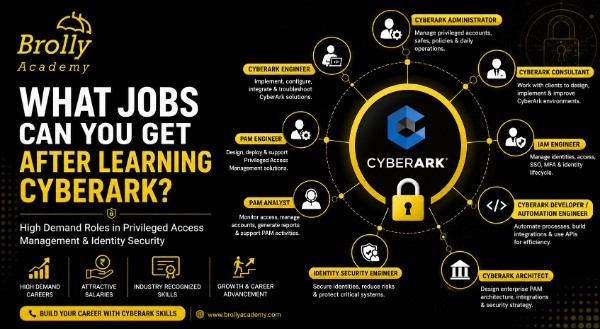
CyberArk skills are useful for roles such as CyberArk administrator, PAM professional, security engineer and senior CyberArk engineer. Freshers starting in cybersecurity can also use CyberArk knowledge to stand out. Responsibilities usually include onboarding accounts, managing Safes and permissions, monitoring sessions, troubleshooting components and supporting audits. Senior roles also cover architecture, upgrades and disaster recovery planning.
How should I answer CyberArk troubleshooting questions?
Explain your process step by step instead of jumping to a final answer. Start by identifying the issue, then review logs, verify configurations, check permissions and confirm connectivity between CyberArk components and the target systems. Finish by stating the fix and how you would confirm it worked. A structured approach shows both technical knowledge and analytical thinking.
Do I need coding knowledge for a CyberArk interview?
Coding is usually not the main focus of beginner CyberArk interviews, which test concepts and admin tasks. However, for experienced or integration roles, interviewers may ask about the CyberArk REST API and integrations with tools such as SIEM solutions. Basic scripting awareness helps you explain automation, bulk onboarding and integration tasks more clearly in those rounds.
How long does it take to prepare for a CyberArk interview?
Preparation time depends on your background. Someone with security or system administration experience may need less time, while a fresher should give more time to PAM basics and hands-on practice. Study step by step, from beginner concepts to intermediate topics and then scenarios. Consistent daily practice is more useful than last-minute memorising before the interview.
Is a CyberArk certification required to clear the interview?
A certification is not the only thing interviewers check. They mainly test your understanding of CyberArk components, practical admin skills, troubleshooting approach and communication. A certification can support your profile, but you still need to explain concepts clearly and handle scenario questions. Hands-on practice and real examples often make a stronger impression than a certificate alone.
What CyberArk architecture topics are asked in interviews?
Interviewers commonly ask how the Digital Vault, PVWA, CPM, PSM and PTA work together. Experienced candidates may also face questions on high availability, disaster recovery, Vault replication and backup. Not understanding the architecture is a common reason candidates struggle, so practise explaining how a user request flows through these components to reach a target system.
What is the CyberArk interview process usually like?
The exact process depends on the employer, but most rounds check basic knowledge, practical skills, security best practices, real-world experience and communication. You can expect concept questions, technical discussions on components, scenario-based questions and a discussion of your previous projects. Preparing for each of these areas helps you handle the full process with confidence.
How do I stay updated with CyberArk for interviews?
Read official documentation, product updates and cybersecurity news regularly. CyberArk continues to introduce new features, integrations and security enhancements, and interviewers often appreciate candidates who show interest in continuous learning. Mentioning a recent feature or change you studied can show that you keep your knowledge current, which is valued in senior and experienced roles.
Should I learn IAM along with CyberArk?
Yes, learning Identity and Access Management alongside CyberArk is helpful. CyberArk focuses on privileged access, but it works within a wider identity and security setup that includes Active Directory, LDAP, MFA and access control. Understanding IAM helps you explain how CyberArk fits into enterprise security and makes your answers stronger during technical discussions.
How can I give complete answers in a CyberArk interview?
Start with a short definition, then explain how the feature works and where it is used, and end with a practical example. For instance, when explaining password rotation, mention the component involved, the policy that controls it and what you would check if it fails. Giving very short answers is a common mistake, so add context without using unnecessary jargon.
Where can I learn CyberArk with hands-on practice in Hyderabad?
You can join a CyberArk training program that offers live projects, lab exercises and mock interviews. Brolly Academy in Hyderabad offers CyberArk Training that focuses on hands-on practice and career preparation. Learning from experienced trainers helps you understand how CyberArk is implemented in enterprise environments and prepares you to answer interview questions with real examples.