

A stream exposes change data relative to a tracked offset. A task runs SQL or a procedure on a schedule or trigger. Together they can support incremental processing, but correctness depends on how you consume changes, resolve duplicates and commit target updates.
This tutorial builds a customer-status feed from immutable change events. It includes a deterministic winner rule, deletion tombstones, an empty-rerun check and a recovery test. The aim is to explain what happens when the same customer changes twice, rather than presenting a MERGE statement without its input contract.
For general portfolio ideas, use our Snowflake projects guide. This article concentrates on change consumption and task execution.
Before you start
- Level: Intermediate SQL and transactions.
- Planning time: 75–105 minutes; account access and troubleshooting may take longer.
- Deliverable: A version-aware customer state pipeline with late-event, delete and rollback tests.
- Requirements: an approved practice database, the privileges described below and an existing lab warehouse.
- Cost: compute and storage are usage-based. Use synthetic data, keep the batch small and follow the cleanup steps.
1. Separate change tracking from execution
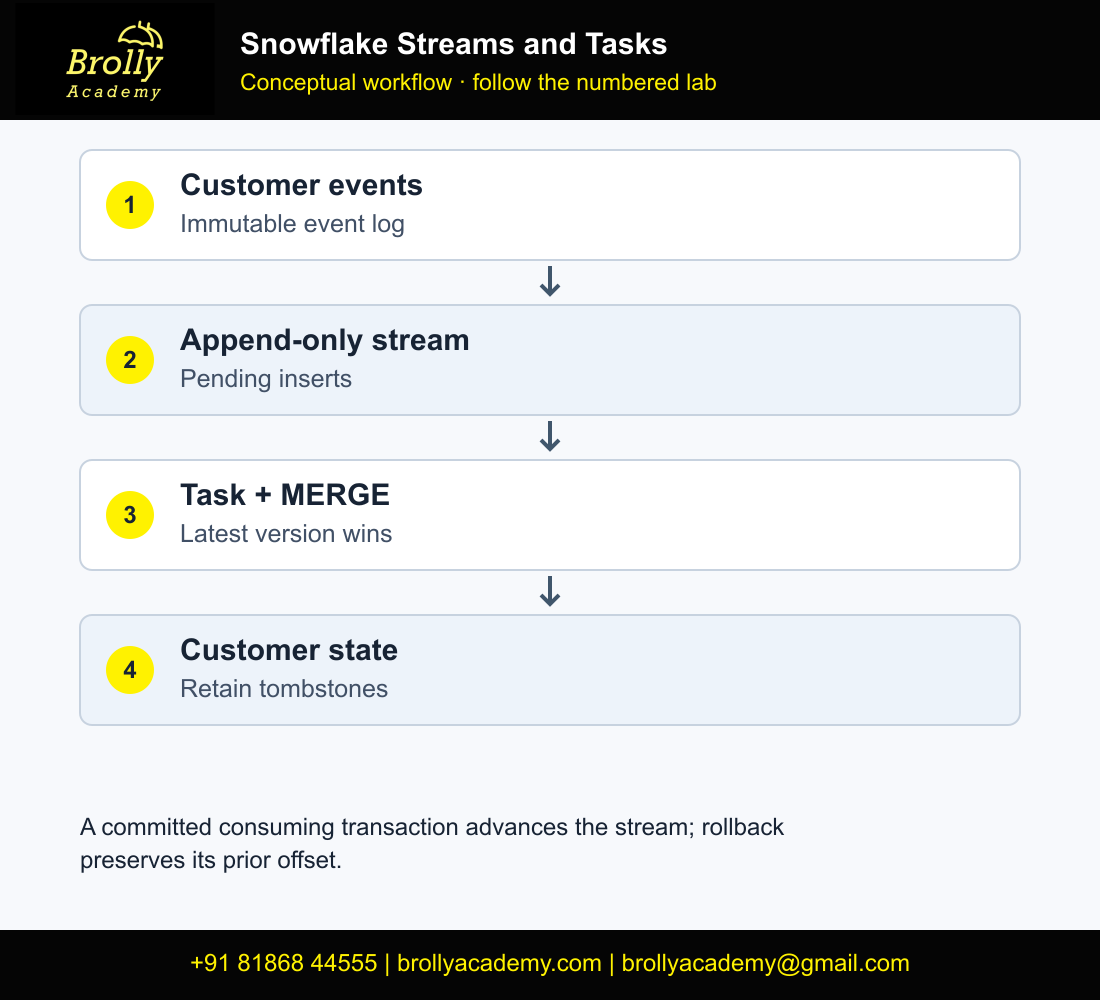
Think about two independent states: the stream’s consumption position and the target table’s business state. Reading a stream with SELECT does not move its offset. A committed DML statement that consumes the stream advances it; rollback preserves the prior position. This distinction is central to safe retry behavior. See the streams reference.
A task supplies execution. It does not invent a duplicate policy, validate event order or guarantee a business result merely because its status is SUCCEEDED. Keep task execution evidence and data reconciliation evidence beside each other.
| Object | Responsibility | What it does not prove |
|---|---|---|
| Event table | Retain received source events | That events are unique or correctly ordered |
| Append-only stream | Expose newly inserted events | That source-table updates are captured |
| MERGE | Apply the chosen latest version per customer | That an ambiguous tie has a valid business interpretation |
| Task | Execute processing | That the target matches the intended source contract |
2. Define an event contract that survives late arrival
- Events are immutable inserts. A correction arrives as a new event, not an UPDATE to the raw event table.
- Each event identifies one customer and has a source version number.
- A larger source version wins even if an older version arrives later.
- For equal versions, the example uses the largest event ID as a deterministic tie-breaker.
- A deletion is an event with operation D. The target retains the tombstone and its version so an older event cannot resurrect the customer.
The tie-breaker is an exercise assumption, not a universal CDC rule. Before production use, require a source contract that explains whether two different payloads may share a version and how conflicts are resolved. If a source supplies only arrival timestamps, determine whether they really represent business ordering before using them to choose a winner.
Architecture
Workflow: Customer events → append-only stream → winner selection → customer state
Customer state → active-customer view
Task history + key/version checks → run evidence
3. Create the lab before inserting events
Use a fresh schema in an approved practice database and a warehouse named BA_LAB_WH, or replace the warehouse consistently. The stream is created before the first insert so its initial offset precedes the data we want to process. Nothing here needs to run with an administrator role once the appropriate grants are in place.
USE WAREHOUSE BA_LAB_WH;
CREATE SCHEMA BA_CDC_LAB;
USE SCHEMA BA_CDC_LAB;

CREATE TABLE CUSTOMER_EVENTS (
  event_id NUMBER, customer_id VARCHAR, source_version NUMBER,
  operation VARCHAR, customer_name VARCHAR
);
CREATE STREAM CUSTOMER_EVENT_STREAM
  ON TABLE CUSTOMER_EVENTS APPEND_ONLY=TRUE;

CREATE TABLE CUSTOMER_STATE (
  customer_id VARCHAR, customer_name VARCHAR,
  source_version NUMBER, last_event_id NUMBER, is_deleted BOOLEAN
);
CREATE VIEW ACTIVE_CUSTOMERS AS
SELECT customer_id, customer_name, source_version
FROM CUSTOMER_STATE WHERE NOT is_deleted;

INSERT INTO CUSTOMER_EVENTS VALUES
 (101,'C01',1,'U','Asha'),
 (102,'C02',1,'U','Ravi'),
 (103,'C01',2,'U','Asha Rao');

SELECT event_id, customer_id, source_version, METADATA$ACTION
FROM CUSTOMER_EVENT_STREAM ORDER BY event_id;
The initial stream should expose three inserted events, assuming no other writes. Query it twice: the rows should remain because SELECT alone is not a consuming DML transaction. Do not recreate the stream between those reads. Recreating it would establish a new tracking position and invalidate the test.
3.1 Understand why this lab uses immutable events
CUSTOMER_EVENTS is an append-only business-event table. Operation U means a proposed customer state and D means a deletion marker. The stream sees newly inserted events; it is not reading updates and deletes directly from a mutable operational customer table. This distinction explains why APPEND_ONLY is appropriate here.
- Create the schema, source table, stream, target table and active view in section 3 before inserting the sample events.
- Confirm the stream starts at the intended point. A stream created after existing inserts does not retroactively represent those inserts under this baseline definition.
- Insert the three seed events exactly once.
- Query the stream twice. Both read-only queries should show the pending changes because SELECT does not consume the offset.
- Run the MERGE and then validate the target and remaining stream rows.
SELECT CURRENT_ROLE(),CURRENT_DATABASE(),CURRENT_SCHEMA(),CURRENT_WAREHOUSE();
SELECT COUNT(*) AS seed_events FROM CUSTOMER_EVENTS;
SELECT event_id,COUNT(*) AS copies FROM CUSTOMER_EVENTS
GROUP BY event_id HAVING COUNT(*)>1;
SELECT * FROM CUSTOMER_EVENTS
WHERE customer_id IS NULL OR source_version IS NULL OR event_id IS NULL
 OR operation IS NULL OR operation NOT IN ('U','D');
The baseline expects three events, no duplicate event IDs and no invalid contract rows. Primary/unique-key declarations on ordinary Snowflake tables should not replace the explicit uniqueness checks used in this tutorial. Resolve bad input before consuming it; filtering it out of a consuming statement without a quarantine policy can lose the opportunity to process that delta.
4. Apply one deterministic winner per customer
A MERGE source must not present several competing updates for the same target key. Choose the winning event first. Also compare its version with the target’s retained version; deduplicating only the current batch does not protect against a late older batch.
MERGE INTO CUSTOMER_STATE t
USING (
  SELECT event_id, customer_id, source_version, operation, customer_name
  FROM CUSTOMER_EVENT_STREAM
  WHERE METADATA$ACTION='INSERT'
  QUALIFY ROW_NUMBER() OVER (
    PARTITION BY customer_id
    ORDER BY source_version DESC, event_id DESC
  )=1
) s
ON t.customer_id=s.customer_id
WHEN MATCHED AND (
  s.source_version > t.source_version OR
  (s.source_version=t.source_version AND s.event_id > t.last_event_id)
) THEN UPDATE SET
  customer_name=s.customer_name,
  source_version=s.source_version,
  last_event_id=s.event_id,
  is_deleted=(s.operation='D')
WHEN NOT MATCHED THEN INSERT
  (customer_id,customer_name,source_version,last_event_id,is_deleted)
VALUES
  (s.customer_id,s.customer_name,s.source_version,s.event_id,s.operation='D');

SELECT * FROM CUSTOMER_STATE ORDER BY customer_id;
SELECT COUNT(*) AS remaining_stream_rows FROM CUSTOMER_EVENT_STREAM;
Run that MERGE only after confirming the supplied seed meets the event contract. The baseline implementation assumes non-NULL keys/versions, unique event IDs and operations restricted to U or D. It intentionally does not silently filter malformed business events out of a consuming DML statement. If your source can violate the contract, build a durable accepted/rejected staging transaction before using this simplified consumer.
| Customer | Name | Version | Event | Deleted |
|---|---|---|---|---|
| C01 | Asha Rao | 2 | 103 | FALSE |
| C02 | Ravi | 1 | 102 | FALSE |
After a successful committed MERGE, the stream should be empty for this batch. These expected rows are independently reconciled from the supplied input; they are not claimed execution results from a Snowflake account.
4.1 Read the MERGE in execution order
- The source subquery reads pending inserted events from the stream.
- ROW_NUMBER partitions by customer_id and selects the highest source_version, breaking ties by event_id.
- The join identifies whether the customer already has target state.
- The matched condition rejects an older version or a lower tie-break event.
- The UPDATE writes only a newer accepted event. The INSERT creates state for a previously unseen customer.
- A D event sets is_deleted, retaining its version so an older update cannot resurrect it.
Use the baseline result table above as the expected output for this explanation.
The three input events produce two current-state rows. Event 101 loses to event 103 for C01. This is a latest-state projection, not a full audit log of every transition. Keep the immutable event table when you need to explain the intermediate state.
The tie-break rule is deterministic only if event IDs establish a meaningful, agreed order within a version. If two records share both customer/version/event ID but disagree on content, the contract is broken. Reject or quarantine that conflict instead of claiming ROW_NUMBER has found business truth.
5. Check keys, reruns, late events and deletions
-- Expected: no duplicate target keys.
SELECT customer_id, COUNT(*) AS copies
FROM CUSTOMER_STATE GROUP BY customer_id HAVING COUNT(*)>1;

-- Save the state, rerun the same MERGE with an empty stream,
-- and compare against this snapshot.
CREATE TEMP TABLE STATE_BEFORE_EMPTY_RERUN AS
SELECT * FROM CUSTOMER_STATE;

MERGE INTO CUSTOMER_STATE t
USING (
  SELECT event_id, customer_id, source_version, operation, customer_name
  FROM CUSTOMER_EVENT_STREAM
  WHERE METADATA$ACTION='INSERT'
  QUALIFY ROW_NUMBER() OVER (
    PARTITION BY customer_id
    ORDER BY source_version DESC, event_id DESC
  )=1
) s
ON t.customer_id=s.customer_id
WHEN MATCHED AND (
  s.source_version > t.source_version OR
  (s.source_version=t.source_version AND s.event_id > t.last_event_id)
) THEN UPDATE SET
  customer_name=s.customer_name,
  source_version=s.source_version,
  last_event_id=s.event_id,
  is_deleted=(s.operation='D')
WHEN NOT MATCHED THEN INSERT
  (customer_id,customer_name,source_version,last_event_id,is_deleted)
VALUES
  (s.customer_id,s.customer_name,s.source_version,s.event_id,s.operation='D');
SELECT * FROM CUSTOMER_STATE
MINUS SELECT * FROM STATE_BEFORE_EMPTY_RERUN;
SELECT * FROM STATE_BEFORE_EMPTY_RERUN
MINUS SELECT * FROM CUSTOMER_STATE;
Both comparisons should return zero rows. An empty rerun tests the consumer’s no-change path. It does not prove that every duplicated or out-of-order source event is harmless; those require separate mutation tests.
INSERT INTO CUSTOMER_EVENTS VALUES
 (104,'C01',1,'U','Old Asha'),
 (105,'C02',2,'D',NULL),
 (106,'C03',1,'U','Mina');
MERGE INTO CUSTOMER_STATE t
USING (
  SELECT event_id, customer_id, source_version, operation, customer_name
  FROM CUSTOMER_EVENT_STREAM
  WHERE METADATA$ACTION='INSERT'
  QUALIFY ROW_NUMBER() OVER (
    PARTITION BY customer_id
    ORDER BY source_version DESC, event_id DESC
  )=1
) s
ON t.customer_id=s.customer_id
WHEN MATCHED AND (
  s.source_version > t.source_version OR
  (s.source_version=t.source_version AND s.event_id > t.last_event_id)
) THEN UPDATE SET
  customer_name=s.customer_name,
  source_version=s.source_version,
  last_event_id=s.event_id,
  is_deleted=(s.operation='D')
WHEN NOT MATCHED THEN INSERT
  (customer_id,customer_name,source_version,last_event_id,is_deleted)
VALUES
  (s.customer_id,s.customer_name,s.source_version,s.event_id,s.operation='D');
SELECT * FROM CUSTOMER_STATE ORDER BY customer_id;
SELECT * FROM ACTIVE_CUSTOMERS ORDER BY customer_id;
C01 should remain Asha Rao at version 2 because event 104 is older. C02 should remain in CUSTOMER_STATE at version 2 with is_deleted TRUE. C03 should be inserted at version 1. ACTIVE_CUSTOMERS should contain only C01 and C03. A later C02 version-1 update must not reactivate the deleted customer; a deliberate version-3 U event can reactivate it under this lab’s contract.
Keeping a tombstone avoids a common failure: physically deleting the target row and then allowing a delayed old update to insert it again. Retention and cleanup of those tombstones are separate production decisions. Choose a cleanup rule only after defining the maximum source replay horizon.
5.1 Turn the late-event example into an exact state assertion
After inserting events 104–106 and running the same MERGE again, compare all state columns. Run this before the recovery exercise adds event 107.
WITH expected(customer_id,customer_name,source_version,last_event_id,is_deleted) AS (
 SELECT * FROM VALUES ('C01','Asha Rao',2,103,FALSE),
 ('C02',NULL,2,105,TRUE),('C03','Mina',1,106,FALSE)
)
SELECT 'EXPECTED_NOT_FOUND' AS issue,* FROM (
 SELECT * FROM expected MINUS SELECT * FROM CUSTOMER_STATE
)
UNION ALL
SELECT 'UNEXPECTED_STATE' AS issue,* FROM (
 SELECT * FROM CUSTOMER_STATE MINUS SELECT * FROM expected
);
SELECT COUNT(*) AS state_rows,COUNT_IF(is_deleted) AS tombstones FROM CUSTOMER_STATE;
SELECT customer_id,customer_name,source_version FROM ACTIVE_CUSTOMERS ORDER BY customer_id;
Expect zero comparison rows, three state rows and one tombstone. ACTIVE_CUSTOMERS contains C01/Asha Rao/version 2 and C03/Mina/version 1. The late version-1 event for C01 must not overwrite version 2. The deletion removes C02 from the active view while preserving C02’s version in state.
5.2 Test stale resurrection deliberately
INSERT INTO CUSTOMER_EVENTS VALUES (108,'C02',1,'U','Old Ravi');
MERGE INTO CUSTOMER_STATE t
USING (
  SELECT event_id, customer_id, source_version, operation, customer_name
  FROM CUSTOMER_EVENT_STREAM
  WHERE METADATA$ACTION='INSERT'
  QUALIFY ROW_NUMBER() OVER (
    PARTITION BY customer_id
    ORDER BY source_version DESC, event_id DESC
  )=1
) s
ON t.customer_id=s.customer_id
WHEN MATCHED AND (
  s.source_version > t.source_version OR
  (s.source_version=t.source_version AND s.event_id > t.last_event_id)
) THEN UPDATE SET
  customer_name=s.customer_name,
  source_version=s.source_version,
  last_event_id=s.event_id,
  is_deleted=(s.operation='D')
WHEN NOT MATCHED THEN INSERT
  (customer_id,customer_name,source_version,last_event_id,is_deleted)
VALUES
  (s.customer_id,s.customer_name,s.source_version,s.event_id,s.operation='D');
SELECT customer_id,source_version,last_event_id,is_deleted
FROM CUSTOMER_STATE WHERE customer_id='C02';
C02 must remain version 2, last event 105, deleted TRUE. This drill can be completed before or after event 107 because it affects a different customer; keep the task suspended so only your intended consumer advances the stream. A newer legitimate restoration event would require an explicitly agreed higher version and business permission, not deletion of the tombstone.
6. Put the verified MERGE inside a task
First validate the SQL manually. Then create a task using that same statement, not a different simplified version. Snowflake supports user-managed warehouse tasks and serverless tasks; this example uses the existing practice warehouse. The task workflow documentation explains creation, one-time execution, resuming and monitoring.
CREATE TASK APPLY_CUSTOMER_EVENTS
  WAREHOUSE=BA_LAB_WH
  SCHEDULE='5 MINUTES'
  WHEN SYSTEM$STREAM_HAS_DATA('CUSTOMER_EVENT_STREAM')
AS
MERGE INTO CUSTOMER_STATE t
USING (
 SELECT event_id,customer_id,source_version,operation,customer_name
 FROM CUSTOMER_EVENT_STREAM
 WHERE METADATA$ACTION='INSERT'
 QUALIFY ROW_NUMBER() OVER (
   PARTITION BY customer_id ORDER BY source_version DESC,event_id DESC
 )=1
) s
ON t.customer_id=s.customer_id
WHEN MATCHED AND (
 s.source_version>t.source_version OR
 (s.source_version=t.source_version AND s.event_id>t.last_event_id)
) THEN UPDATE SET customer_name=s.customer_name,
 source_version=s.source_version,last_event_id=s.event_id,
 is_deleted=(s.operation='D')
WHEN NOT MATCHED THEN INSERT
 (customer_id,customer_name,source_version,last_event_id,is_deleted)
VALUES(s.customer_id,s.customer_name,s.source_version,s.event_id,s.operation='D');

EXECUTE TASK APPLY_CUSTOMER_EVENTS;
-- Execution is asynchronous; inspect history before checking its result.
-- Resume only when you want ongoing scheduled runs:
-- ALTER TASK APPLY_CUSTOMER_EVENTS RESUME;
Tasks are created suspended. EXECUTE TASK requests a one-time run; ALTER TASK … RESUME enables continuing operation. The scheduled condition checks whether processing may be necessary. SYSTEM$STREAM_HAS_DATA can return a false positive, so the MERGE must also behave correctly when it receives no rows. Consult the function reference rather than interpreting TRUE as an exact pending-row count.
Permissions to confirm
The owner role needs privileges to run the task, use its warehouse and read/write the referenced objects. Creating an object, operating it and monitoring it can involve different grants. Follow the task security documentation for your compute model. A task that works in an administrator worksheet can still fail under its actual owner role.
6.1 Validate task execution without mistaking scheduling for success
- First prove the standalone MERGE and assertions in the worksheet.
- Create the task once. A newly created task is suspended.
- Insert an eligible event or use the pending delta from the appropriate drill.
- Request one execution, then inspect TASK_HISTORY; EXECUTE TASK returns before the asynchronous task finishes.
- Check both the task outcome and the target state. A successful run can validly make no change when the available event is older.
- Resume only when you want ongoing runs. Suspend it again before manual rollback drills.
The WHEN predicate is a work-avoidance signal, not proof that a meaningful customer change must exist. SYSTEM$STREAM_HAS_DATA can return a positive result that does not lead to useful rows for your operation. Keep the consuming statement safe when there is no qualifying work. Use the task reference for the current scheduling and ownership rules.
7. Demonstrate rollback and recovery without losing the delta
Suspend automatic execution before a manual recovery exercise so the task does not consume the test batch while you inspect it. Insert one valid new event. Start a transaction, run the MERGE from step 4, inspect the target in that session and roll back. Then confirm that the event is still available to the stream and the committed target state is unchanged.
ALTER TASK APPLY_CUSTOMER_EVENTS SUSPEND;
INSERT INTO CUSTOMER_EVENTS VALUES (107,'C03',2,'U','Mina Das');

BEGIN;
MERGE INTO CUSTOMER_STATE t
USING (
  SELECT event_id, customer_id, source_version, operation, customer_name
  FROM CUSTOMER_EVENT_STREAM
  WHERE METADATA$ACTION='INSERT'
  QUALIFY ROW_NUMBER() OVER (
    PARTITION BY customer_id
    ORDER BY source_version DESC, event_id DESC
  )=1
) s
ON t.customer_id=s.customer_id
WHEN MATCHED AND (
  s.source_version > t.source_version OR
  (s.source_version=t.source_version AND s.event_id > t.last_event_id)
) THEN UPDATE SET
  customer_name=s.customer_name,
  source_version=s.source_version,
  last_event_id=s.event_id,
  is_deleted=(s.operation='D')
WHEN NOT MATCHED THEN INSERT
  (customer_id,customer_name,source_version,last_event_id,is_deleted)
VALUES
  (s.customer_id,s.customer_name,s.source_version,s.event_id,s.operation='D');
SELECT * FROM CUSTOMER_STATE WHERE customer_id='C03';
ROLLBACK;

SELECT * FROM CUSTOMER_STATE WHERE customer_id='C03';
SELECT event_id FROM CUSTOMER_EVENT_STREAM WHERE event_id=107;
-- Expected after rollback: target still at version 1; event 107 still visible.
MERGE INTO CUSTOMER_STATE t
USING (
  SELECT event_id, customer_id, source_version, operation, customer_name
  FROM CUSTOMER_EVENT_STREAM
  WHERE METADATA$ACTION='INSERT'
  QUALIFY ROW_NUMBER() OVER (
    PARTITION BY customer_id
    ORDER BY source_version DESC, event_id DESC
  )=1
) s
ON t.customer_id=s.customer_id
WHEN MATCHED AND (
  s.source_version > t.source_version OR
  (s.source_version=t.source_version AND s.event_id > t.last_event_id)
) THEN UPDATE SET
  customer_name=s.customer_name,
  source_version=s.source_version,
  last_event_id=s.event_id,
  is_deleted=(s.operation='D')
WHEN NOT MATCHED THEN INSERT
  (customer_id,customer_name,source_version,last_event_id,is_deleted)
VALUES
  (s.customer_id,s.customer_name,s.source_version,s.event_id,s.operation='D');
The example is deliberately a single target-changing statement. If you add rejected-event storage, audit rows or several target tables, put the relevant DML work in one explicit transaction or a suitably designed procedure. A filtered consuming statement can advance the stream across the delta even when it writes only some records. Preserve rejected records durably instead of assuming the stream will retain each skipped record for later.
7.1 Record all four checkpoints in the rollback drill
| Checkpoint for C03 | Expected target | Expected stream event 107 |
|---|---|---|
| Before BEGIN | Mina; version 1; event 106 | Visible |
| After MERGE inside transaction | Mina Das; version 2; event 107 | Offset change not yet committed |
| After ROLLBACK | Mina; version 1; event 106 | Visible again to the subsequent consuming transaction |
| After normal committed MERGE | Mina Das; version 2; event 107 | No longer pending |
The complete MERGE is included between BEGIN and the inspection SELECT. Run all commands in the same session. Do not run DDL inside this transaction: object creation can introduce commit behavior that invalidates the drill. If a task or second consumer runs concurrently, the observations no longer isolate rollback semantics.
This test proves the relationship between this target update and this stream offset in one controlled Snowflake transaction. It does not establish exactly-once delivery to an external API, email system or unrelated database. External side effects require their own idempotency and recovery design.
8. Monitor execution and data separately
SELECT name, state, scheduled_time, completed_time,
       query_id, error_code, error_message
FROM TABLE(INFORMATION_SCHEMA.TASK_HISTORY(
  TASK_NAME=>'APPLY_CUSTOMER_EVENTS',RESULT_LIMIT=>20
))
ORDER BY scheduled_time DESC;

SHOW STREAMS LIKE 'CUSTOMER_EVENT_STREAM';
SELECT customer_id, source_version, last_event_id, is_deleted
FROM CUSTOMER_STATE ORDER BY customer_id;
Use execution history to identify failed or skipped runs. Use the target checks to identify incorrect winners, duplicate keys and unwanted reactivations. Record both the task query ID and the batch/event range you inspected. One successful run does not establish that all later inputs are covered.
Monitor stream staleness and consume before its supported retention window expires. Do not treat a stream as indefinite message storage. If it becomes stale, investigate the missed interval and rebuild a trustworthy target from a retained source or replay feed. Recreating the stream alone resumes future tracking; it does not reconstruct missing business history.
8.1 Use a two-part operating checklist
Execution health: task suspended/running state, scheduled and completed times, failure message, owner-role privileges and available warehouse. Data health: pending-stream age, stream staleness risk, duplicate target keys, rejected input, unexpected version regressions and active-customer counts. Neither list substitutes for the other.
SHOW STREAMS exposes retention-related state that should be inspected before a long pause. If a stream becomes stale, rebuilding it from “now” is not a replay of the missed interval. Use the retained immutable event source and a documented replay boundary, or rebuild the target from the agreed event history. Consult the streams consumption and staleness guide.
8.2 Complete the lab and retain useful evidence
- Suspend APPLY_CUSTOMER_EVENTS.
- Save baseline, late-arrival, tombstone and rollback outputs with query IDs.
- Export the exact MERGE definition and task definition used.
- Document event ordering, tie-break rules and how rejected events would be retained.
- Keep the schema until review is complete, then remove only your disposable lab objects under your account’s cleanup process.
Recurring task execution can consume compute; retained event and state tables use storage. Do not infer monetary cost from the three-customer example or compare serverless and user-managed compute without actual account measurements.
9. Choose the right change-tracking pattern
This lab uses an append-only stream on an immutable event table. A standard stream on a mutable source table has different semantics, including update representations. Do not reuse the U/D event logic unchanged against that stream. Explain whether you are consuming application events or a table’s changes before choosing your MERGE.
For a transformation whose desired result is expressible as a supported query with a freshness goal, consider a dynamic-table design. For explicit change-processing rules like this lab’s event versions and tombstones, the manual consumer makes those responsibilities visible. Compare on requirements and measured behavior instead of assuming that fewer SQL objects always means a better pipeline.
10. Diagnose common failures
| Problem | Likely check | Correction |
|---|---|---|
| Stream empty at first run | Was it created after the seed? | Use a fresh lab with the stream before inserts |
| Changes disappear after a filtered INSERT | Committed stream consumption | Design durable accepted/rejected staging |
| MERGE has competing matches | Several source rows per key | Apply the explicit version/tie rule first |
| Deleted customer reappears | Missing retained deletion version | Keep and compare tombstones |
| Task never runs | Suspended state, condition and owner grants | Test once, inspect history, then resume deliberately |
| Task succeeds but output is wrong | Business contract and data assertions | Correct transformation logic; execution status is insufficient |
11. Package the evidence and explain the decisions
Save the initial seed, consumer SQL, task definition, expected target rows, actual query results and rollback evidence. Include the late-event and deletion tests in a README. Finish the practice session with the task suspended so it does not continue requesting work unnecessarily.
- Why did the initial SELECT not empty the stream?
- Why choose a winner before MERGE?
- How is a late older event prevented from overwriting current data?
- Why retain a deletion row rather than remove it completely?
- What would you do if the stream became stale?
- Which parts of the workflow must commit together?
After running the exercise, describe it as a customer-state CDC prototype with version checks, tombstones and transactional retry testing. Do not claim production exactly-once delivery merely because a task was scheduled. Our Snowflake interview guide supports the wider platform discussion.
12. Frequently asked questions
Does selecting a stream consume it?
A read-only SELECT does not advance the offset. A successfully committed consuming DML transaction is the important boundary.
Can two independent consumers share one stream?
They should not assume independent offsets. Give separate consumers their own streams when each needs to observe the changes independently.
Is an append-only stream suitable for an updated source table?
Not for capturing those source updates and deletes. This tutorial represents changes as new immutable events; choose the stream type to match the actual source behavior.
Are the scripts tested in a Snowflake account?
They are documentation-reviewed examples with reconciled expected state transitions. They have not been executed in a connected Snowflake account; preserve your own execution and recovery evidence.
Does a Snowflake stream store a second copy of every source row?
A stream tracks a change offset and exposes change records using the source table history. It is not a general-purpose independent event archive. Keep an immutable business-event source when the workflow needs durable replay evidence.
Why create the stream before the seed inserts?
The baseline stream starts tracking from its creation boundary. Creating it after the seed inserts would change which events are pending and the expected first MERGE result.
What do METADATA$ACTION and METADATA$ISUPDATE mean?
For standard streams they help distinguish change records, including update-related delete/insert pairs. This lab uses an append-only stream over immutable events, so the business operation column carries the customer update/delete meaning.
Can a deletion tombstone be removed immediately?
Doing so discards the remembered version that blocks a late older event. Define a retention and replay policy before removing tombstones; the tutorial retains them so stale events cannot resurrect deleted customers.
Does a task start automatically after CREATE TASK?
A newly created task starts suspended. Request a deliberate test execution and inspect history, then resume only when scheduled processing is intended.
Why does my task succeed without changing the target?
The stream may have no useful rows, or incoming events may be older than target state. Check the data predicate and version rules before treating a zero-row update as an execution failure.
Does rollback preserve the stream delta?
When the consuming DML and target modification belong to the rolled-back transaction, the offset is not committed. The lab verifies this by checking event 107 and C03 after rollback. Keep other consumers stopped during the drill.
How is this different from dynamic tables?
This workflow explicitly consumes events and applies versioned MERGE rules inside a task. Dynamic tables maintain a declarative query result around a freshness goal. Choose from the required transaction, output and recovery behavior.
Connect these concepts to the Snowflake architecture, then review the Snowflake course for the current practical syllabus.
Key Takeaways
- Create the stream before loading the baseline events.
- Choose one deterministic winner per customer and compare it with retained target version.
- Keep tombstones and test rollback with competing consumers stopped.
Conclusion
Snowflake Streams and Tasks becomes useful when you can explain the workflow, validate its outputs and recover from the failure cases. Complete the baseline before the optional drills, save your evidence and follow the cleanup guidance. The supplied examples use synthetic inputs; expected outputs are not presented as account execution screenshots.
Download the guided SQL workbook (.txt). Run one labelled phase at a time; do not execute the complete workbook as a single batch.
Related Snowflake Articles
Snowflake Projects
Choose a portfolio exercise with SQL, expected results and validation steps.
Snowflake Interview Questions
Practise explaining SQL, validation and project decisions.
Snowflake Certification
Explore the separate certification learning path and exam preparation.
Related Courses
Snowflake Training
Explore the syllabus, practical learning topics and available Snowflake training formats.
Azure Data Factory Training
Explore data integration, orchestration and cloud pipeline training.