
Snowflake Architecture Diagram
Storage, compute and cloud services explained
Read the three-layer diagram, follow a query through Snowflake and understand warehouse scaling, performance and cost decisions.
Connect the concepts with practical learning in Snowflake Training in Hyderabad.
Brolly Academy | Snowflake Architecture Diagram

Share

Table of Contents
Snowflake Architecture: At a Glance
- Snowflake architecture separates storage, compute and cloud services.
- Snowflake is a cloud-based data warehouse that is easy to set up, scalable, and flexible.
- It enables businesses to securely manage, process, and share data in real time.
- Snowflake integrates with popular analytics tools, supporting various data needs like data warehousing and data science.
- Governance features support access control and data management; compliance depends on configuration and organizational processes.
- Snowflake is ideal for efficient data management and seamless collaboration.
What is a Snowflake Architecture diagram?
- Snowflake Architecture refers to the unique design of the Snowflake Data Platform, a cloud-based data warehouse solution that is built for handling large-scale data storage, processing, and analysis.
- Unlike traditional data warehouses, which often have rigid and complex architectures, Snowflake’s architecture is designed to be simple, scalable, and highly flexible, making it ideal for modern data-driven businesses.
The platform is built on top of cloud infrastructure (available on AWS, Microsoft Azure, and Google Cloud), providing users with the ability to separate storage, compute, and services.
This separation enables users to scale each component independently based on their needs, which makes Snowflake an ideal choice for businesses that require both elasticity and performance at a cost-effective price.
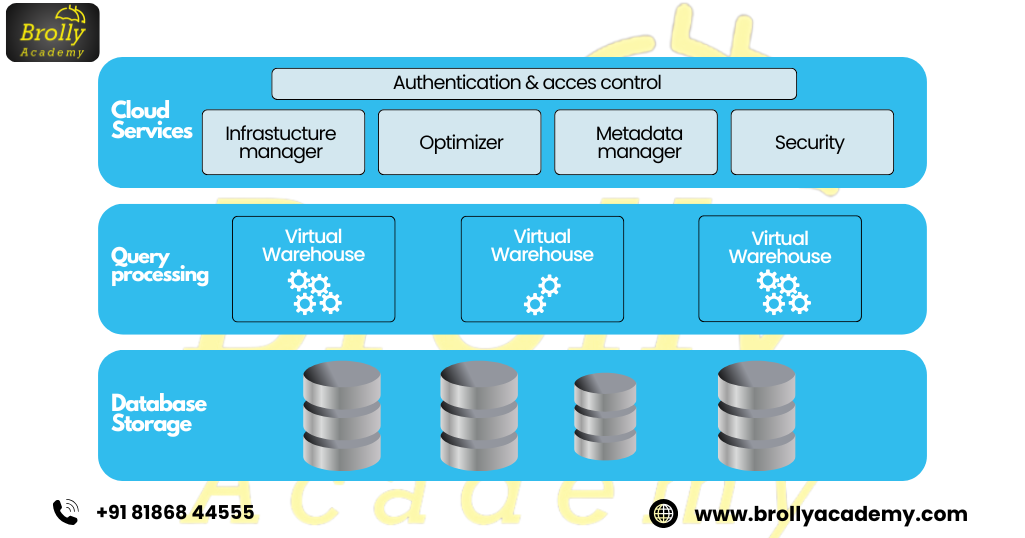
Snowflake's architecture Diagram is built around three core layers:
- Storage Layer: This is where all the data is stored. Snowflake uses a centralized storage model to store structured and semi-structured data (such as JSON, Avro, and Parquet) in a single location.
- Compute Layer: This layer consists of virtual warehouses that handle the computational workload. These warehouses can scale up or down based on demand, ensuring optimal performance.
- Cloud Services Layer: The cloud services layer manages everything else – including metadata, query optimization, security, and infrastructure management. It enables Snowflake’s ability to perform seamless data processing and supports multi-user collaboration.
- What sets Snowflake apart from other data platforms is its ability to provide multi-cluster shared data architecture.
- This allows users to scale compute resources dynamically, ensuring that different workloads (such as data loading, querying, and analytics) do not interfere with each other.
- Furthermore, Snowflake’s architecture supports both structured and semi-structured data, which makes it a versatile solution for organizations working with diverse datasets.
- Snowflake’s architecture is designed to offer high availability, elastic scalability, low maintenance, and cost efficiency, all while enabling seamless integration across the cloud and providing easy access to data for various analytics and business intelligence tools.
Discover the Snowflake Architecture and its multi-cluster, shared-data system for improved performance at Brolly Academy. Our advanced course, led by Dinesh Reddy, offers 45 days of hands-on training, SnowPro certification guidance, lifetime video access, and full placement support. Enroll now to advance your skills!
2. What is the Snowflake Architecture Diagram?
- The Snowflake Architecture Diagram is a visual representation of how the various components of Snowflake’s architecture interact with each other.
- It provides a clear, structured view of how data is managed, processed, and accessed within the Snowflake platform.
- Understanding the Snowflake architecture diagram helps businesses and technical teams grasp the full capabilities of Snowflake and optimize its use for their data needs.
The diagram typically breaks down the architecture into three main layers: Storage, Compute, and Cloud Services, and shows how each layer connects and communicates with others.
These components, although separate, work together seamlessly to deliver a highly scalable and efficient data platform.
- Storage Layer:
The Storage Layer is where all data resides in Snowflake. This includes both structured data (like relational tables) and semi-structured data (such as JSON, Parquet, or Avro). In the diagram, this layer typically appears as a central data repository that serves as the foundation for the data processing pipeline. - Compute Layer:
The Compute Layer consists of virtual warehouses, each responsible for performing compute-intensive tasks such as querying, data transformation, and analytics. These virtual warehouses are shown in the diagram as independent entities that scale dynamically depending on the workload. The Snowflake Architecture diagram highlights how compute resources can be elastically scaled to meet the demands of varying workloads, providing cost efficiency and performance optimization. - Cloud Services Layer:
The Cloud Services Layer acts as the brain of the Snowflake architecture. It includes key functionalities such as metadata management, query parsing, access control, security, and optimization. The cloud services layer is responsible for managing and orchestrating tasks across the compute and storage layers. In the Snowflake Architecture diagram, this layer often appears as a central service that connects and coordinates the other two layers, ensuring data is processed efficiently.
One of the defining features of the Snowflake architecture Diagram, which is often depicted in the diagram, is its multi-cluster shared data architecture. This allows Snowflake to separate compute resources from storage, enabling each component to scale independently. This flexibility is a key factor in Snowflake’s ability to handle large volumes of data while ensuring high performance and low costs.
A Snowflake architecture diagram may also include additional details such as:
- Data Sharing: Showing how data is securely shared between accounts and platforms.
- Services for Security and Governance: Illustrating Snowflake’s robust security framework, including data encryption, access control, and compliance mechanisms.
3. How Does Snowflake Architecture Work?
- Snowflake architecture is designed to address the challenges of modern data management by offering an optimized solution for data storage, processing, and analysis.
- The platform’s unique multi-cluster shared data architecture allows for easy scaling, high performance, and seamless data integration.
1. Storage Layer
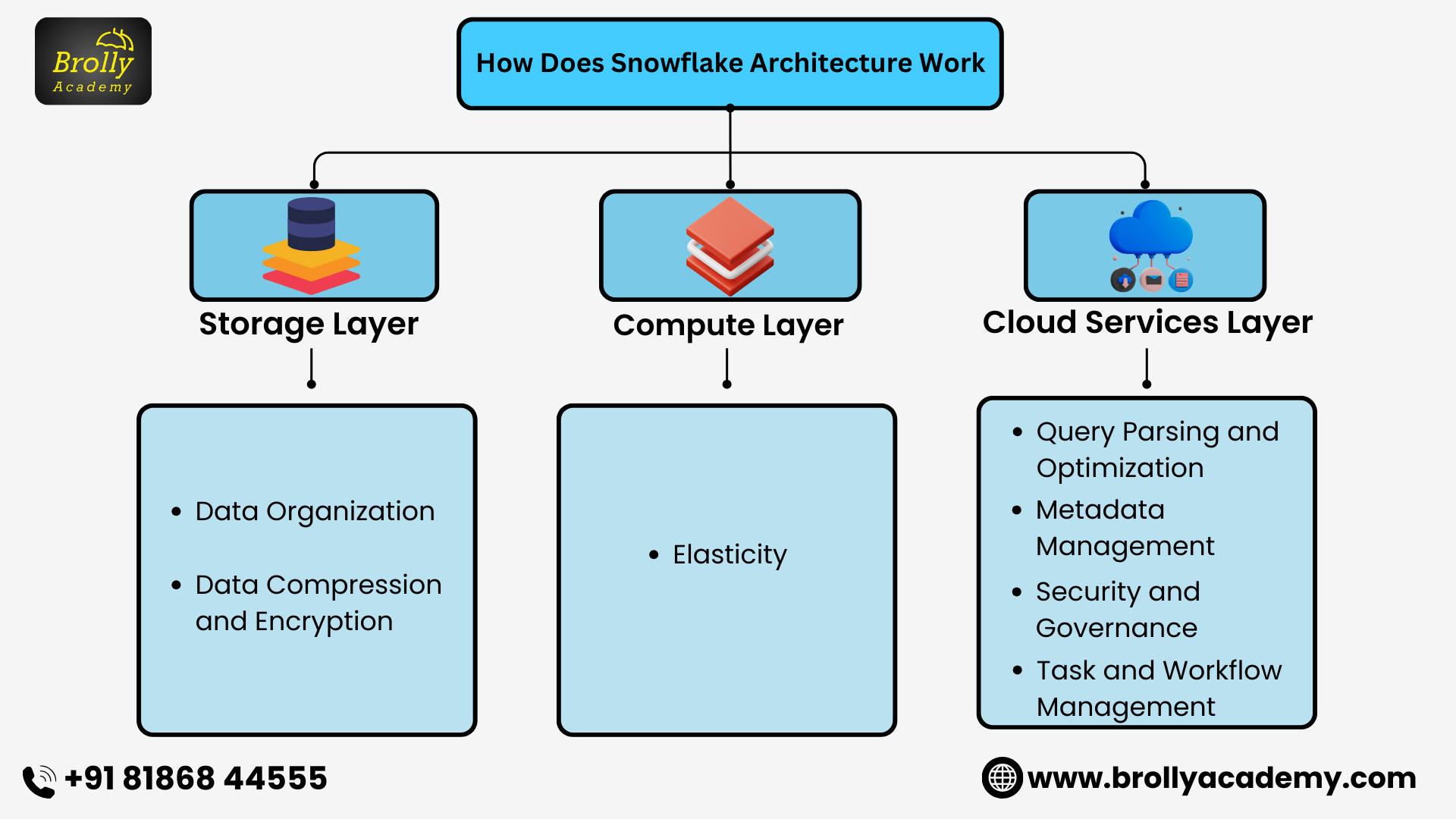
The Storage Layer is at the heart of Snowflake’s architecture. Data in Snowflake is stored in a central repository, which is designed to scale horizontally as the volume of data grows.
- Data Organization: Snowflake uses micro-partitions, a form of data segmentation that allows for highly efficient querying and storage. Each micro-partition is stored in columnar format, enabling fast read and write operations. This architecture is well-suited for structured, semi-structured, and unstructured data.
- Data Compression and Encryption: Snowflake automatically compresses and encrypts data as it is loaded, reducing storage costs and ensuring security. The data is stored in the cloud provider’s storage infrastructure (e.g., AWS S3, Azure Blob Storage, or Google Cloud Storage).
2. Compute Layer
The Compute Layer is where the processing of data takes place. In Snowflake, the compute layer is composed of virtual warehouses, which are independent compute clusters that can scale dynamically. Each virtual warehouse handles specific tasks like data querying, loading, or transformation. Separate warehouses isolate compute resources. Queries using the same warehouse still share its capacity and can queue.
- Scaling and Concurrency: The compute layer can scale up to meet high demand or scale down when not needed, optimizing performance and costs. Snowflake architecture Diagram supports multi-cluster virtual warehouses, which allows multiple clusters to handle heavy workloads without impacting other operations. This scalability ensures that users can perform tasks like querying or ETL (Extract, Transform, Load) without throttling other operations.
- Elasticity: For standard warehouses, resizing changes compute capacity per cluster. Configured multi-cluster auto-scale adds or removes clusters to handle concurrency; it requires Enterprise Edition or higher. Auto-suspend and auto-resume control idle warehouse activity. These are different mechanisms, not automatic resizing of every warehouse.
Official references: warehouse overview and multi-cluster scaling.
3. Cloud Services Layer
The Cloud Services Layer is the orchestration layer in Snowflake, responsible for managing the overall platform operations. It acts as the intermediary between the storage and computing layers, ensuring seamless data processing. This layer manages tasks such as:
- Query Parsing and Optimization: When a query is executed, the cloud services layer parses it and optimizes it for performance. Snowflake’s advanced query optimizer ensures that queries are processed quickly and efficiently.
- Metadata Management: All data structures, schemas, and other metadata are stored and managed in the cloud services layer. For standard Snowflake tables, metadata helps the optimizer identify relevant micro-partitions and prune unnecessary data; this is not the same as creating traditional indexes.
- Security and Governance: Snowflake’s cloud services layer also oversees security functions such as access control, data encryption, and compliance. It ensures that data is protected according to industry standards and user roles are properly defined.
- Task and Workflow Management: The cloud services layer also facilitates task scheduling, managing pipelines, and monitoring ongoing processes within the system.
Official reference: Snowflake architecture and cloud services.
How It All Comes Together
For a typical warehouse-backed query, the layers cooperate in the following order:
- Cloud services: authenticate the request, check access, parse SQL and plan execution using metadata.
- Compute: the selected virtual warehouse executes the plan when execution is needed. Eligible queries can reuse persisted results instead of repeating the work.
- Storage: execution reads the required table data, using metadata to avoid unnecessary scans. The result is returned to the client.
Storage capacity and warehouse compute are managed separately. This does not mean that every layer is resized by the customer or that all queries are automatically accelerated.
Official references: architecture and persisted query results.

4. Key Benefits of Snowflake Architecture
Snowflake architecture Diagram brings several key benefits that make it a standout solution for businesses. These advantages include:
Scalability: Snowflake’s architecture allows businesses to scale compute and storage resources independently. This means that as data needs increase or decrease, you can easily adjust resources without any disruption.
Flexibility: Snowflake is highly flexible, supporting a wide range of data types including structured, semi-structured (e.g., JSON, Avro), and unstructured data. This flexibility allows businesses to manage all their data in a unified platform. Additionally, Snowflake is cloud-agnostic, which means it works seamlessly with AWS, Google Cloud, and Microsoft Azure.
Cost Efficiency: Snowflake follows a pay-per-use pricing model, meaning businesses only pay for the computing and storage resources they use. This model allows for cost savings as companies can avoid paying for idle resources.
Performance Optimization: Snowflake automatically optimizes queries to ensure fast performance, even when processing large datasets. Separate warehouses isolate compute workloads, while configured multi-cluster warehouses help with concurrent query demand. Performance still depends on the workload and configuration.
Zero Maintenance: With Snowflake, users do not need to manage infrastructure. Snowflake manages its underlying infrastructure and software updates. Customers still manage warehouse settings, access, data models and workload performance. The platform is fully managed, so users can focus on data analysis rather than system management.
Security: Security is a priority with Snowflake, offering robust features like end-to-end encryption for data both at rest and in transit. Snowflake uses role-based access control (RBAC) to manage data access and ensure that only authorized users can view sensitive information.
Data Sharing: Snowflake simplifies data sharing by allowing businesses to securely share data in real-time with partners, clients, or other teams within the organization. This process does not require moving or replicating the data, making it more efficient and reducing the potential for errors or data duplication.
Support for Semi-Structured Data: Snowflake natively supports semi-structured data types like JSON, XML, and Avro. This allows businesses to work with semi-structured data without needing to transform it, saving time and simplifying the data pipeline.
5. Performance Optimization in Snowflake Architecture
Snowflake is designed to deliver high performance even as data grows in size and complexity. The architecture’s unique features allow businesses to optimize performance without compromising scalability or cost efficiency.
Below are key strategies Snowflake employs to ensure optimal performance:
Automatic Query Optimization: Snowflake uses automatic query optimization to ensure that queries run efficiently. When a query is executed, Snowflake automatically analyzes and optimizes it to determine the best execution plan.
Multi-Cluster Architecture: One of the standout features of Snowflake is its multi-cluster architecture, which allows multiple compute clusters to be spun up or down automatically based on workload demand.
Result Caching: Snowflake caches query results to speed up repeated queries. When a query is run, Snowflake stores the results in a cache. Snowflake can reuse an eligible persisted result when its reuse conditions are met, including relevant data and query conditions. Result reuse is not guaranteed simply because SQL text looks similar.
Automatic Scaling: Configured multi-cluster auto-scale adjusts the number of clusters to manage concurrency. Resizing a standard warehouse changes resources per cluster. Adding clusters does not necessarily make an individual slow query faster.
Separation of Compute and Storage: By separating compute and storage, Snowflake can allocate compute resources only when needed and can adjust them based on workload requirements. This not only improves performance but also ensures that compute resources aren’t tied to storage capacity, giving users greater flexibility and cost-efficiency.
Query Profiling and Execution History: Snowflake provides detailed query profiling and execution history, enabling users to analyze the performance of individual queries. By examining these reports, businesses can identify any bottlenecks or areas for improvement, allowing for targeted performance optimizations.
Partitioning and Clustering: Snowflake allows users to create clustering keys for tables to optimize how data is stored. These keys enable more efficient data retrieval by grouping related data. While Snowflake automatically manages partitioning behind the scenes, clustering keys can improve pruning for suitable access patterns, but their benefit and maintenance cost should be measured.
Materialized Views: Snowflake supports materialized views, which store the results of a query and update them automatically when the underlying data changes.
Snowflake’s Elastic Compute: There is no universal performance guarantee as data and concurrency grow. Compare query profiles, queueing, execution time and credit usage before changing warehouse size or cluster limits.
Official references: warehouse considerations, result reuse and Automatic Clustering.
Discover the Snowflake Architecture and its multi-cluster, shared-data system for improved performance at Brolly Academy. Our advanced course, led by Dinesh Reddy, offers 45 days of hands-on training, SnowPro certification guidance, lifetime video access, and full placement support. Enroll now to advance your skills!
6. Cost Efficiency of Snowflake Architecture
Pay-Per-Use Pricing: Snowflake costs include compute, storage and applicable data transfer. On-demand and capacity arrangements differ; use the terms and prices for your account and region.
Independent Scaling of Compute and Storage: You can scale compute and storage separately. If more storage is needed, you can increase it without adding more compute resources, and vice versa.
Automatic Scaling and Suspension: Configure warehouse size, cluster limits and auto-suspend for your workload. Suspending a warehouse stops its compute consumption, but storage and other billable services can continue.
Efficient Storage Management: Snowflake uses data compression techniques, reducing the amount of storage required. This helps lower storage costs, especially for large datasets.
Zero-Copy Cloning: You can create copies of your data (for development or backup) without duplicating storage costs. New or retained micro-partitions can add storage costs as the source or clone changes. Querying the clone also uses compute.
Managed Infrastructure: Snowflake manages the platform infrastructure. This reduces administration work; it does not remove Snowflake service charges or customer engineering costs.
Resource Optimization with Virtual Warehouses: Snowflake allows you to adjust the size of virtual warehouses based on workload. This helps match compute power to actual needs, preventing overspending.
Cost Savings for Semi-Structured Data: Snowflake can store semi-structured data (like JSON) without transformation, saving on the costs and time required for data preparation.
Data Sharing Costs: Same-region direct sharing avoids a separate consumer storage copy, but consumers pay for query compute. Cross-region or cross-cloud delivery can involve replication, storage and transfer costs.
Cost Monitoring and Control: Snowflake provides tools to monitor usage and set alerts to track costs. This helps you control your spending and avoid unexpected charges.
Official references: overall cost, clone and storage costs and Secure Data Sharing.
7. Security Features of Snowflake Architecture
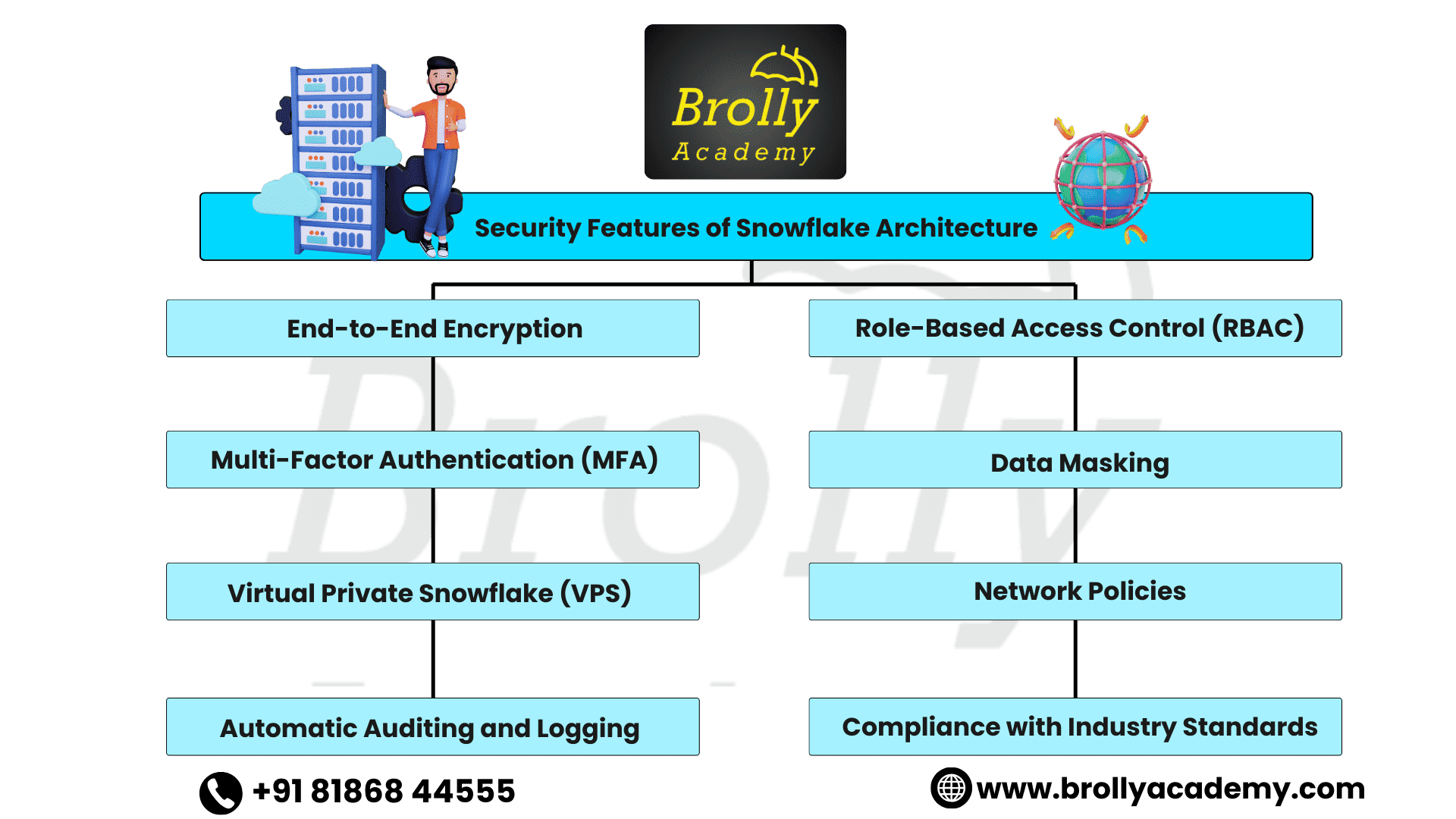
Snowflake provides security and governance controls. Compliance also depends on the customer’s configuration, processes and applicable agreements. Key security features include:
End-to-End Encryption: Snowflake encrypts data at rest and protects network connections with TLS. Encryption complements, rather than replaces, access controls and secure configuration.
Role-Based Access Control (RBAC): Snowflake uses RBAC to ensure that only authorized users can access specific data and resources. You can define roles and permissions at various levels (e.g., database, schema, table) to control access.
Multi-Factor Authentication (MFA): Snowflake supports MFA to add a layer of security. This requires users to provide two forms of identification (e.g., password and code from a mobile app) before accessing the system.
Data Masking: Snowflake allows you to implement dynamic data masking, which obscures sensitive data in real time based on the user’s role. For example, personal information can be hidden for users who don’t need to see it.
Virtual Private Snowflake (VPS): Snowflake offers VPS, which provides a dedicated virtual environment for customers. This adds a layer of isolation to protect data from other users and provides better control over security configurations.
Network Policies: Snowflake allows you to configure network policies that restrict access to your data based on IP addresses or IP ranges. This ensures that only users from trusted networks can access your Snowflake account.
Automatic Auditing and Logging: Snowflake provides detailed logs of all actions performed on the platform, including data access and modification. These logs are important for auditing purposes and help track any suspicious activity.
Compliance with Industry Standards: Check Snowflake’s current compliance documentation, supported edition and contractual requirements for your use case. Using the platform alone does not make an organization compliant.
Official reference: Snowflake encryption.
Discover the Snowflake Architecture and its multi-cluster, shared-data system for improved performance at Brolly Academy. Our advanced course, led by Dinesh Reddy, offers 45 days of hands-on training, SnowPro certification guidance, lifetime video access, and full placement support. Enroll now to advance your skills!
8. Industries That Benefit from Snowflake Architecture
Snowflake is a versatile platform that can benefit a wide range of industries by providing scalable, secure, and cost-effective solutions for managing and analyzing large volumes of data. Some of the industries that benefit the most from Snowflake include:
Finance and Banking: Snowflake’s security features and ability to handle large volumes of data make it an ideal choice for financial institutions. It helps with data analysis, fraud detection, and risk management while ensuring compliance with industry regulations.
Healthcare: Snowflake is used by healthcare providers to securely store and analyze patient data, clinical trials, and other medical records. Healthcare use requires appropriate access controls, governance, applicable agreements and a compliance review; platform features alone do not guarantee privacy compliance or patient outcomes.
Retail and E-Commerce: Retailers and e-commerce businesses leverage Snowflake to analyze customer behaviour, optimize inventory, and personalize marketing campaigns. Its ability to integrate with multiple data sources and perform advanced analytics in real-time helps businesses stay competitive.
Manufacturing: Manufacturing companies use Snowflake to monitor production processes, manage supply chains, and optimize inventory. Snowflake’s scalability allows it to handle large datasets, such as IoT sensor data, to improve operational efficiency.
Telecommunications: Telecom companies use Snowflake to analyze call data records, network performance metrics, and customer behaviour. Snowflake’s ability to handle real-time data and scale as needed helps telecom providers optimize service delivery.
Media and Entertainment: Snowflake is used in the media and entertainment industry for content personalization, audience analysis, and ad targeting. It can process large datasets, such as video streaming data and social media interactions, to improve user engagement.
Government: Government agencies use Snowflake to store and analyze public data, improve decision-making, and support initiatives like smart city planning. Its security and compliance features ensure that sensitive government data is protected.
Education: Educational institutions and e-learning platforms use Snowflake to manage student records, track academic performance, and enhance learning experiences through data-driven insights.
9. Platform Features Beyond the Core Architecture
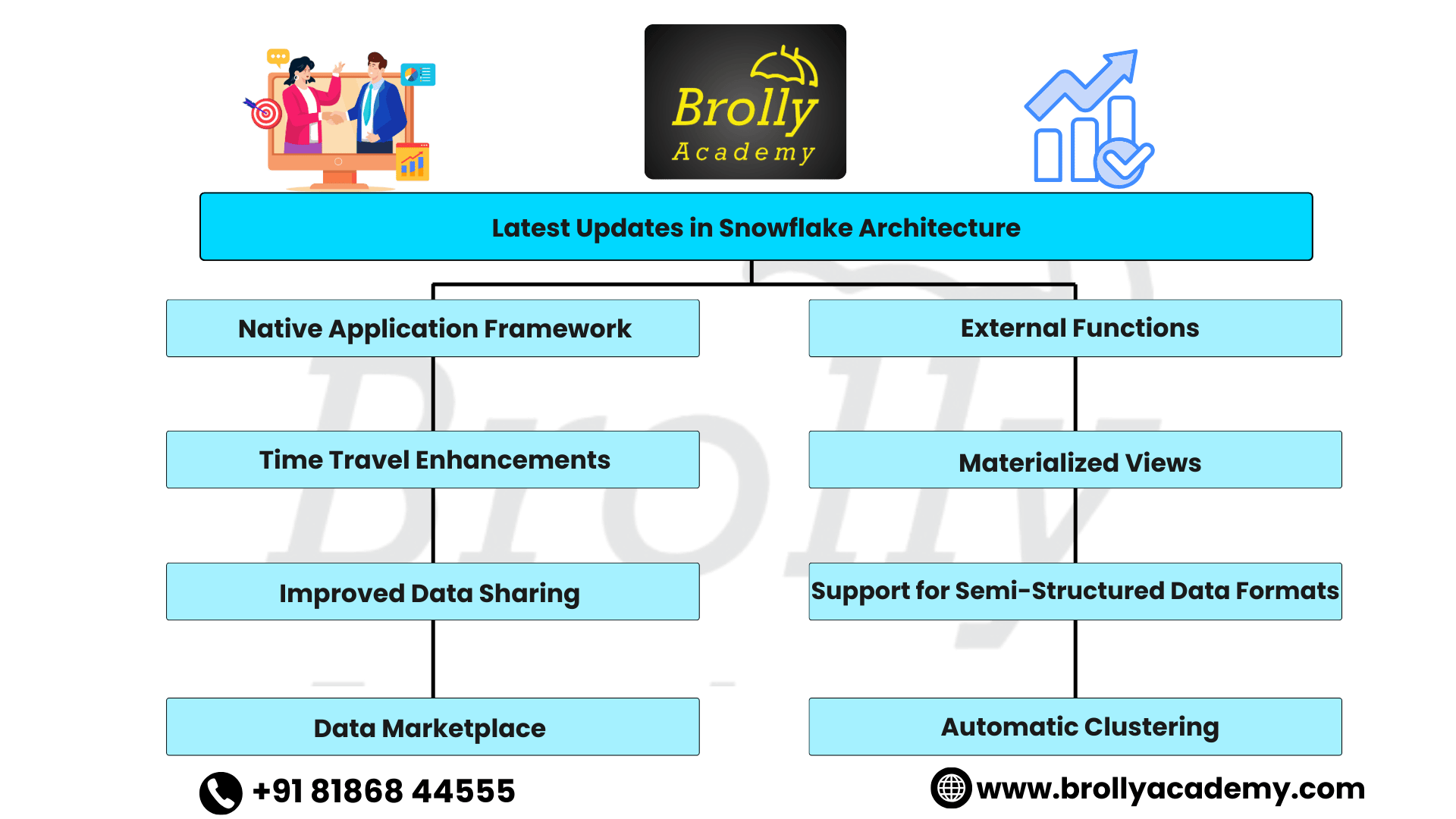
The following established capabilities extend the core three-layer architecture. This is not a list of new releases; check current documentation for availability, requirements and limitations.
Native Application Framework: Snowflake has introduced a Native Application Framework that allows users to build and deploy applications directly within the Snowflake platform. This enables businesses to create custom applications with integrated data processing, reducing the need for separate tools.
External Functions: Snowflake now supports external functions, which allow users to extend Snowflake’s capabilities by calling external services (e.g., APIs, machine learning models) directly from within their SQL queries. This enables greater flexibility in processing and analysis.
Time Travel: Time Travel provides access to historical data within the configured retention window. Retention depends on table type, edition and settings; it is not unlimited.
Materialized Views: Materialized views store results of supported query definitions and maintain them as source data changes. They have query restrictions and storage and maintenance costs, so assess their benefit for the workload.
Secure Data Sharing: Direct sharing exposes selected objects read-only without a separate consumer storage copy. Query compute is billable, and cross-region delivery has additional considerations.
Support for Semi-Structured Data Formats: Snowflake continues to expand its support for semi-structured data formats, such as JSON, Avro, and Parquet, making it even easier for businesses to work with data from various sources.
Data Marketplace: Snowflake’s Data Marketplace allows organizations to access and share third-party data. This enables users to integrate external data sources into their analytics, enhancing the value of their data-driven insights.
Automatic Clustering: Automatic Clustering maintains the clustering of eligible tables with clustering keys. It uses billable serverless compute and is not required for every table.
Official references: Time Travel, materialized views and Automatic Clustering.
Conclusion
Snowflake’s architecture offers a modern and flexible approach to data warehousing, combining scalability, security, and cost-efficiency.
With its ability to separate computing and storage, support for both structured and semi-structured data, and robust security features, Snowflake is well-suited for businesses across various industries, including finance, healthcare, retail, and more.
Features such as data sharing, external functions and Automatic Clustering extend the core architecture. Evaluate their requirements, limitations and costs rather than treating them as universally new or necessary. Whether you’re a small startup or a large enterprise, Snowflake provides a reliable and secure platform for managing and analyzing your data, enabling better decision-making and driving innovation.
Apply the storage and compute concepts in these Snowflake projects with SQL and validation checks. Start with sales reporting, then compare query performance and pipeline designs.
FAQ’s
Snowflake Architecture diagram
1. What is Snowflake Architecture diagram?
Snowflake architecture diagram is a cloud-based data warehousing model designed to separate computing, storage, and services for better scalability, flexibility, and performance. It enables businesses to store, analyze, and share data efficiently.
2. How does Snowflake differ from traditional data warehouses?
Unlike traditional data warehouses, Snowflake separates compute and storage, allowing them to scale independently. It also uses cloud-native features, making it more flexible, cost-effective, and easy to manage.
3. Is Snowflake easy to use?
Yes, Snowflake is designed to be user-friendly with a simple interface and SQL support. Snowflake manages its infrastructure and automates supported operations. Learners still need SQL, access-control knowledge and an understanding of warehouse settings and costs.
4. What are the benefits of Snowflake Architecture?
The main benefits include scalability, flexibility, cost-effectiveness, high performance, and robust security features. Snowflake can handle both structured and semi-structured data efficiently.
5. How does Snowflake improve security?
Snowflake offers features like end-to-end encryption, role-based access control, multi-factor authentication, and data masking to ensure data is secure both at rest and in transit.
6. Can Snowflake handle big data?
Yes, Snowflake is designed to scale horizontally and can efficiently manage and process large volumes of structured and semi-structured data, making it suitable for big data applications.
7. How does Snowflake save costs?
Separating storage and compute lets you select warehouse resources for a workload and suspend idle warehouses. Correct sizing, suitable auto-suspend settings and measured concurrency scaling can reduce unnecessary compute consumption. Storage, serverless features and applicable data transfer can still be billed, so monitor total cost rather than assuming automatic savings.
8. What industries use Snowflake?
Snowflake is used across various industries, including finance, healthcare, retail, telecommunications, media, government, and education, for data analytics, reporting, and business intelligence.
9. Is Snowflake compatible with other tools?
10. What is Time Travel in Snowflake?
Time Travel is a feature in Snowflake that allows users to access historical data from past periods. This helps in recovering deleted or modified data, improving data retention, and supporting auditing needs.
Discover the Snowflake Architecture and its multi-cluster, shared-data system for improved performance at Brolly Academy. Our advanced course, led by Dinesh Reddy, offers 45 days of hands-on training, SnowPro certification guidance, lifetime video access, and full placement support. Enroll now to advance your skills!

Related Articles
Snowflake Interview Questions
Practise SQL, architecture decisions and scenario-based interview questions.
Zero-Copy Cloning in Snowflake
Continue with Snowflake cloning and its role in development and testing.
Related Courses
Snowflake Training
Explore the Snowflake course, practical learning topics and available training formats.
Azure Data Factory Training
Explore data integration, orchestration and cloud pipeline training.