

Dynamic tables store the result of a SQL query and refresh that result automatically. You define the transformation and a freshness goal; Snowflake manages refresh work and dependencies. They are useful when a reporting dataset can be described as a query and readers can tolerate a defined delay.
A dashboard can return a correct total and still be operationally wrong because its input is stale. This tutorial builds a small inventory-availability pipeline and checks both the numbers and the refresh evidence. For SQL foundations and wider portfolio exercises, use our Snowflake projects guide.
Before you start
- Level: Intermediate SQL.
- Planning time: 60–90 minutes; account access and troubleshooting may take longer.
- Deliverable: An inventory availability report with accepted/rejected rows and refresh validation.
- Requirements: an approved practice database, the privileges described below and an existing lab warehouse.
- Cost: compute and storage are usage-based. Use synthetic data, keep the batch small and follow the cleanup steps.
1. Understand the four parts before writing SQL
- Base table: the source records your transformation reads.
- Dynamic table: the stored result readers query.
- Refresh warehouse: compute used to update that result.
- Target lag: a freshness objective relative to source data, rather than a promise to run at a fixed clock interval.
A regular view calculates its query when used. An ordinary table changes when a writer updates it. A dynamic table combines a stored result with managed refresh behavior. That convenience does not decide your business rules: you still define valid quantities, record grain and which statuses count as available inventory.
Snowflake explains the creation workflow in its dynamic table tutorial. The sample below is an original inventory exercise with its own expected results.
2. Define the inventory report and its acceptance criteria
A warehouse supervisor needs available units by product and location. Available units equal received units minus reserved units. The report should exclude invalid inventory records, retain an exception list and avoid silently treating unknown reservations as zero.
| Deliverable | Row meaning | Acceptance criterion |
|---|---|---|
| Validated stock | One source inventory record | Only nonnegative, complete quantities with reservations no greater than receipts |
| Exceptions | One rejected inventory record | Invalid input remains inspectable |
| Availability | One product-location pair | Totals agree with accepted source records |
| Refresh evidence | One refresh attempt | Latest successful refresh reflects the test change |
The lab assumes inventory records already represent current balances. It does not reconstruct stock from every historical movement. If a source sends snapshots repeatedly, resolve the latest snapshot per key before aggregating; adding several snapshots would inflate stock.
Architecture
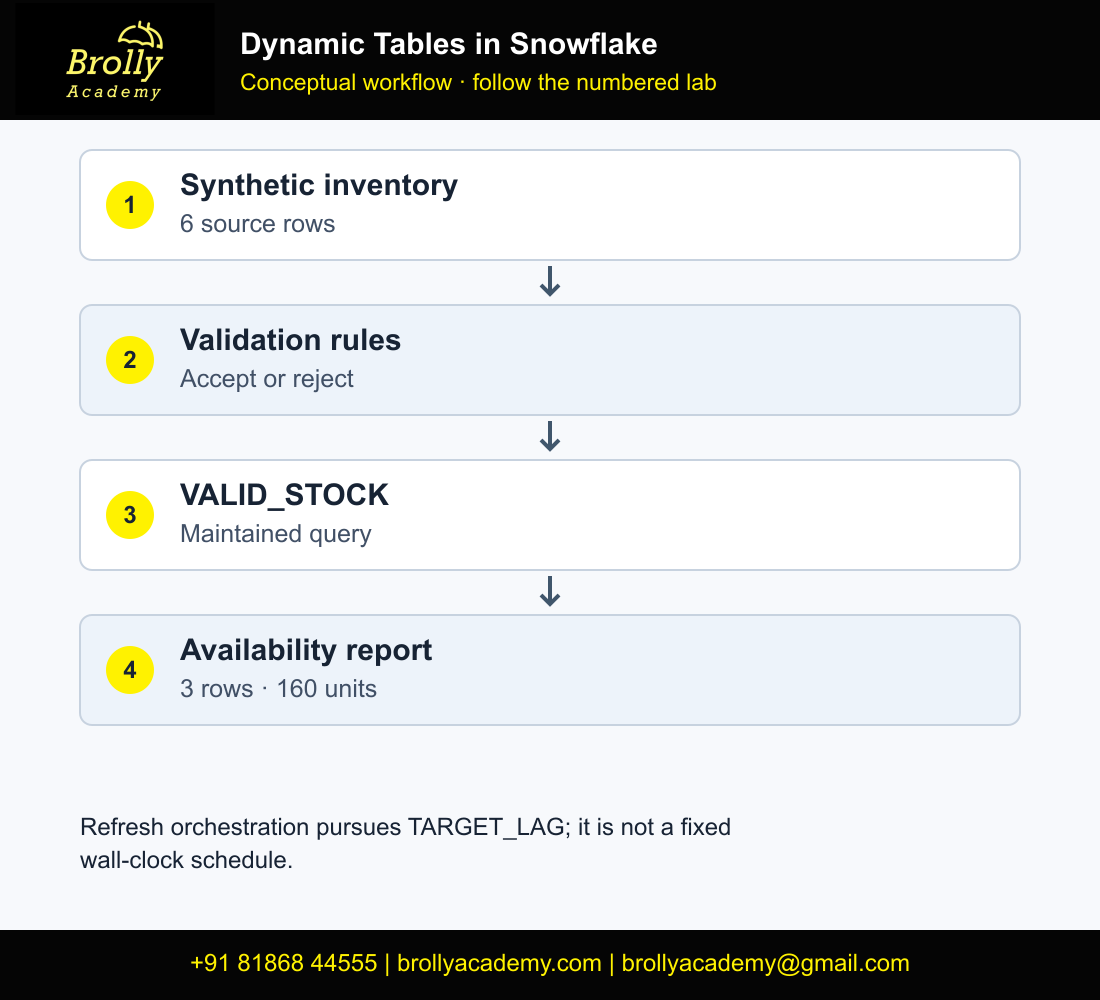
Workflow: Inventory source → valid stock → availability report
Inventory source → exception view
Refresh history → freshness check
3. Prepare a dedicated practice workspace
Select a practice database and an existing warehouse named BA_LAB_WH, or replace that name consistently with your approved warehouse. Run the exercise in a new, empty schema named BA_DT_LAB. The examples deliberately use CREATE without OR REPLACE so an accidental rerun does not silently overwrite an existing lab.
3.1 Confirm context, then create the empty lab
First choose your approved practice database and warehouse in Snowsight. Run this context check before the setup block.
SELECT CURRENT_ROLE(), CURRENT_DATABASE(), CURRENT_SCHEMA(), CURRENT_WAREHOUSE();If context is correct and BA_DT_LAB does not already contain useful work, run the setup below once.
-- Select an approved practice database in the worksheet first.
USE WAREHOUSE BA_LAB_WH;
CREATE SCHEMA BA_DT_LAB;
USE SCHEMA BA_DT_LAB;

CREATE TABLE INVENTORY_INPUT (
  record_id NUMBER, product_id VARCHAR, location_id VARCHAR,
  received_units NUMBER, reserved_units NUMBER
);
INSERT INTO INVENTORY_INPUT VALUES
  (1,'P10','HYD',100,25),
  (2,'P20','HYD',40,5),
  (3,'P10','BLR',60,10),
  (4,'P30','HYD',-5,0),
  (5,'P40','HYD',20,NULL),
  (6,'P50','BLR',10,12);
Your role needs access to the database, schema, source data and warehouse, plus permission to create the required objects. An administrator should grant only the missing privileges to the intended practice role. The dynamic table access-control reference covers owner-role and source-access requirements; using an administrator role for every worksheet is not a substitute for understanding them.
3.2 Verify the seeded source before transformation
Open a SQL worksheet in Snowsight. Choose the role, approved practice database and warehouse before running the creation block. A database is the container for the schema; a warehouse supplies query and refresh compute. The example does not create a warehouse or change account-wide settings. All seed records are synthetic and may be reused for this exercise.
SELECT COUNT(*) AS source_rows FROM INVENTORY_INPUT;
SELECT record_id, COUNT(*) AS copies FROM INVENTORY_INPUT
GROUP BY record_id HAVING COUNT(*)<>1;- If a required context value is missing, stop before setup and choose the approved context.
- After setup, run the two source checks directly above.
- Expect six source rows and zero duplicate-key rows. If the count is twelve, do not proceed: a repeated INSERT has doubled your input.
- Build the view and dynamic tables in sections 4 and 5. Keep the worksheet open so the object context remains consistent.
- Compare values only after the initialization or refresh has completed successfully.
Use the smallest approved warehouse appropriate to the lab. The six-row seed is intended to teach correctness; it cannot establish production sizing or a reliable cost estimate.
4. Create valid and rejected data paths
CREATE VIEW INVENTORY_EXCEPTIONS AS
SELECT *,
  CASE
    WHEN product_id IS NULL OR location_id IS NULL THEN 'MISSING_KEY'
    WHEN received_units IS NULL OR reserved_units IS NULL THEN 'MISSING_QUANTITY'
    WHEN received_units < 0 OR reserved_units < 0 THEN 'NEGATIVE_QUANTITY'
    WHEN reserved_units > received_units THEN 'OVER_RESERVED'
  END AS exception_reason
FROM INVENTORY_INPUT
WHERE product_id IS NULL OR location_id IS NULL
   OR received_units IS NULL OR reserved_units IS NULL
   OR received_units < 0 OR reserved_units < 0
   OR reserved_units > received_units;

CREATE DYNAMIC TABLE VALID_STOCK
  TARGET_LAG = '5 minutes'
  WAREHOUSE = BA_LAB_WH
  REFRESH_MODE = INCREMENTAL
AS
SELECT record_id, product_id, location_id,
       received_units, reserved_units,
       received_units-reserved_units AS available_units
FROM INVENTORY_INPUT
WHERE product_id IS NOT NULL AND location_id IS NOT NULL
  AND received_units IS NOT NULL AND reserved_units IS NOT NULL
  AND received_units >= 0 AND reserved_units >= 0
  AND reserved_units <= received_units;
The exception view is queried on demand; it is not another scheduled pipeline. This keeps the failure path simple. The three invalid records are intentionally different: a negative receipt, a missing reservation and an over-reservation. Replacing all three with zero would hide three separate source problems.
5. Add the downstream availability table
CREATE DYNAMIC TABLE PRODUCT_AVAILABILITY
  TARGET_LAG = '10 minutes'
  WAREHOUSE = BA_LAB_WH
  REFRESH_MODE = INCREMENTAL
AS
SELECT product_id, location_id,
       SUM(available_units) AS available_units
FROM VALID_STOCK
GROUP BY product_id, location_id;

SELECT * FROM PRODUCT_AVAILABILITY
ORDER BY product_id, location_id;
SELECT record_id, exception_reason
FROM INVENTORY_EXCEPTIONS ORDER BY record_id;
The downstream freshness goal is looser than the upstream goal. Dependencies matter: a report cannot become meaningfully fresher by repeatedly reading an upstream result that has not refreshed. Snowflake’s target-lag guide explains root-relative lag, dependency constraints and the DOWNSTREAM option. For this first lab, explicit durations make the intended behavior easier to inspect.
| Product | Location | Expected available units |
|---|---|---|
| P10 | BLR | 50 |
| P10 | HYD | 75 |
| P20 | HYD | 35 |
Expected exceptions are record 4 NEGATIVE_QUANTITY, record 5 MISSING_QUANTITY and record 6 OVER_RESERVED. Accepted availability totals 160 units. These are hand-reconciled expectations for the supplied seed, not screenshots from an executed Snowflake session.
5.1 Reconcile the complete result with executable assertions
A total of 160 can hide offsetting row errors. Test the exact product-location grain and every expected value as well as the total. Run the following after the initial successful refresh, before changing record 1.
WITH expected(product_id,location_id,available_units) AS (
 SELECT * FROM VALUES ('P10','BLR',50),('P10','HYD',75),('P20','HYD',35)
)
SELECT 'MISSING_OR_WRONG' AS issue, * FROM (
 SELECT * FROM expected MINUS SELECT * FROM PRODUCT_AVAILABILITY
)
UNION ALL
SELECT 'UNEXPECTED_OR_WRONG' AS issue, * FROM (
 SELECT * FROM PRODUCT_AVAILABILITY MINUS SELECT * FROM expected
);
SELECT COUNT(*) AS report_rows, SUM(available_units) AS total_available
FROM PRODUCT_AVAILABILITY;
SELECT product_id,location_id,COUNT(*) AS copies
FROM PRODUCT_AVAILABILITY GROUP BY product_id,location_id HAVING COUNT(*)>1;| Check | Expected baseline | If it fails |
|---|---|---|
| Two-way comparison | 0 rows | Inspect source rows, filter rules and refresh completion |
| Report count and sum | 3 rows; 160 units | Do not approve using the sum alone |
| Duplicate product/location pairs | 0 rows | Check the aggregation grain and projection |
| Exception view | Record IDs 4, 5 and 6 | Inspect each rejection reason separately |
MINUS compares sets, so the duplicate-key query remains a separate requirement. Save both comparisons with the refresh timestamp. The expected table is a specification calculated from the seed, not a record of a Snowflake execution.
6. Choose a refresh mode deliberately
For the conventional SELECT-based definitions used here, INCREMENTAL applies supported changes, FULL recomputes the result and AUTO resolves the mode when the object is created. A large dataset does not automatically make incremental refresh cheap: the shape of a change and the transformation can matter more than the source row count.
Start with an explicit mode for a learning exercise. If creation rejects INCREMENTAL, inspect the supported-query rules and simplify the offending expression. Switching to FULL may be an acceptable design choice after measuring it; hiding the change without recording it defeats the purpose of the experiment. Newer refresh options exist, so use the current refresh-mode reference before extending this baseline.
SHOW DYNAMIC TABLES IN SCHEMA BA_DT_LAB;

SELECT name, state, state_message, refresh_action,
       data_timestamp, refresh_start_time, refresh_end_time
FROM TABLE(INFORMATION_SCHEMA.DYNAMIC_TABLE_REFRESH_HISTORY())
WHERE name IN ('VALID_STOCK','PRODUCT_AVAILABILITY')
ORDER BY refresh_start_time DESC;
6.1 Test a duplicate without damaging the source
Run this isolated duplicate drill after section 5 baseline validation. The temporary copy is disposable; the live lab source remains unchanged.
CREATE TEMP TABLE INVENTORY_DUPLICATE_DRILL AS SELECT * FROM INVENTORY_INPUT;
INSERT INTO INVENTORY_DUPLICATE_DRILL SELECT * FROM INVENTORY_INPUT WHERE record_id=1;
SELECT record_id,COUNT(*) AS copies FROM INVENTORY_DUPLICATE_DRILL
GROUP BY record_id HAVING COUNT(*)>1;
-- Expected: record_id 1, copies 2.
-- Reset the disposable copy exactly to the original seed.
TRUNCATE TABLE INVENTORY_DUPLICATE_DRILL;
INSERT INTO INVENTORY_DUPLICATE_DRILL SELECT * FROM INVENTORY_INPUT;
SELECT COUNT(*) AS reset_rows FROM INVENTORY_DUPLICATE_DRILL;
-- Expected: 6.
DROP TABLE INVENTORY_DUPLICATE_DRILL;7. Prove that a source correction reaches the report
- Save the baseline query output and its successful refresh timestamp.
- Change the reservation for inventory record 1 from 25 to 40.
- Wait for successful refreshes, or request a manual refresh for the lab.
- Query the output again and compare every unaffected product-location pair.
- Record when the source changed and which refreshed snapshot you actually inspected.
UPDATE INVENTORY_INPUT
SET reserved_units=40 WHERE record_id=1;

ALTER DYNAMIC TABLE VALID_STOCK REFRESH;
ALTER DYNAMIC TABLE PRODUCT_AVAILABILITY REFRESH;

SELECT * FROM PRODUCT_AVAILABILITY
ORDER BY product_id, location_id;
After the refresh completes, P10/HYD should show 60 available units. P10/BLR remains 50 and P20/HYD remains 35. The new total is 145. A correct value in one cell is insufficient evidence: verify all three rows so an unrelated transformation error does not pass unnoticed.
Additional failure cases
- Unknown reservation: change record 2 reservation to NULL. It should leave the valid result and appear in exceptions.
- Duplicate source record: use the isolated copy-and-reset drill in section 6.1. Duplicating an accepted source row would inflate this aggregation because the baseline assumes unique records. Keep the live lab source intact, inspect the duplicate-key result and discuss the required source-key policy.
- Deletion: delete record 3 in a disposable rerun. P10/BLR should disappear after refresh, rather than remain as a stale total.
- Suspension: suspend refresh, change a source value and explain why the report remains behind until processing resumes.
7.1 Run a reversible missing-quantity drill
Complete the record-1 correction first: the report should now total 145. Then run this drill without running any other optional source changes at the same time. It demonstrates a row moving from the accepted path to the exception path and back.
UPDATE INVENTORY_INPUT SET reserved_units=NULL WHERE record_id=2;
ALTER DYNAMIC TABLE VALID_STOCK REFRESH;
ALTER DYNAMIC TABLE PRODUCT_AVAILABILITY REFRESH;
-- Wait for successful completion, then inspect both paths.
SELECT * FROM PRODUCT_AVAILABILITY ORDER BY product_id,location_id;
SELECT record_id,exception_reason FROM INVENTORY_EXCEPTIONS ORDER BY record_id;
-- Restore exactly the value changed in this drill.
UPDATE INVENTORY_INPUT SET reserved_units=5 WHERE record_id=2;
ALTER DYNAMIC TABLE VALID_STOCK REFRESH;
ALTER DYNAMIC TABLE PRODUCT_AVAILABILITY REFRESH;- With record 2 invalid, P20/HYD must be absent; P10/BLR remains 50 and P10/HYD remains 60.
- The report total becomes 110 and the exception list contains four records: 2, 4, 5 and 6.
- After restoring reservation 5 and completing refreshes, P20/HYD returns at 35 and the total returns to 145.
- If the exception view changes before the report, remember that the view reads current source data while the report is refreshed. Check the represented snapshot before comparing the two.
Repeat one failure at a time. For a deletion experiment, preserve the complete row before deleting it so you can reinsert that exact row. A lab log should distinguish the event that changed business data from the refresh that made that change visible.
8. Monitor freshness and control warehouse usage
Record four different observations: source-change time, latest successful refresh, the data timestamp represented by that refresh and query time. A report opened recently can still contain an old snapshot. Monitor failures and actual lag alongside the target rather than displaying the configured target as if it were measured freshness.
The monitoring guide explains refresh history and the pipeline graph. In a team runbook, attach the failing object name, last successful refresh, state message and affected consumer report. This gives the next operator a useful starting point.
For a small lab, reuse an approved warehouse, choose a freshness goal that matches the exercise and suspend the dynamic tables when finished. Auto-suspend on a warehouse alone does not prevent future scheduled refreshes from requesting compute. Do not promise a fixed lab cost without the account’s usage evidence.
ALTER DYNAMIC TABLE PRODUCT_AVAILABILITY SUSPEND;
ALTER DYNAMIC TABLE VALID_STOCK SUSPEND;
-- Resume upstream before downstream when continuing the exercise.
-- ALTER DYNAMIC TABLE VALID_STOCK RESUME;
-- ALTER DYNAMIC TABLE PRODUCT_AVAILABILITY RESUME;
8.1 Use a repeatable refresh investigation sequence
- Record the affected report and the last source-change time.
- Run the standalone source SELECT to establish whether the input actually changed.
- Inspect VALID_STOCK first, then PRODUCT_AVAILABILITY. A healthy downstream refresh cannot repair an invalid upstream filter.
- Use the refresh-history query in section 6 to identify successful and failed attempts, their messages and represented data timestamps.
- Compare the latest successful data timestamp with the source change. A recent query time alone proves nothing about freshness.
- Make one correction, request a refresh if appropriate, then repeat the exact reconciliation queries.
For an upstream table that should refresh only when a downstream consumer needs it, evaluate TARGET_LAG = DOWNSTREAM separately from this baseline. Keep a duration target on the leaf report. Setting every table to DOWNSTREAM with no timed consumer leaves no automatic refresh driver. See the target-lag and scheduling reference.
8.2 Finish with an evidence package
Keep 01_setup.sql, 02_transform.sql, 03_assertions.sql and 04_change_drills.sql in execution order. Store actual results separately from expected values. A README should state the source grain, the two freshness targets, exception policy, warehouse choice and which drills you completed. Suspend both dynamic tables when finished; retained table storage can still incur usage.
9. Troubleshoot the symptom, then change the design
| Symptom | First check | Useful correction |
|---|---|---|
| No rows | Standalone SELECT and initialization result | Check filters, source records and refresh completion |
| Source changed; report did not | Successful refresh after the source change | Inspect both upstream and downstream history |
| Creation rejects incremental mode | Unsupported query construct | Simplify the query or evaluate an explicit full-refresh alternative |
| Lag exceeds target | Runtime, failures, warehouse and upstream state | Resolve the bottleneck and measure again |
| Total doubled | Source grain and duplicate keys | Fix record selection before tuning compute |
| Refresh fails after grants change | Owner-role access | Restore the intended privileges without broadening every user’s access |
10. Decide when dynamic tables fit
Choose this approach when you can describe the desired dataset as a supported transformation and want freshness-driven orchestration. Choose explicit processing when you need a custom business transaction, a separate exception-routing sequence or tightly controlled side effects. A conventional stream/task pipeline gives you different responsibilities; neither approach removes the need for reconciliation.
Keep the decision practical: write the required output, permitted delay, recovery expectation and ownership model first. Then compare the candidate implementations against the same input changes. The Snowflake architecture guide helps connect the warehouse work with storage and platform services.
11. Present the work in interviews and a portfolio
- Why not a view? Explain the difference between recalculating on access and querying a maintained result.
- Is a five-minute target a five-minute schedule? Explain the freshness goal and show measured refresh evidence.
- How did you detect bad input? Show the exception view and the three distinct error reasons.
- How did you prove an update worked? Show 75 becoming 60, the unchanged rows and the new 145-unit total.
- What did the duplicate test reveal? Explain why this input contract needs unique source records.
Save SQL, baseline results, changed-input results, a dependency diagram and a short refresh-history extract. A résumé statement can say: “Built an inventory-availability practice pipeline using Snowflake dynamic tables, validated source exceptions and reconciled refresh results.” Add counts or cost claims only from your own completed run. Continue with the Snowflake interview questions for broader preparation.
12. Frequently asked questions
Can dynamic tables replace every stream and task?
No. Compare the specific transformation, transaction and orchestration requirements. Use this tutorial for freshness-driven reporting; a custom incremental workflow requires a separate design.
Do I need an external scheduler for this example?
No external scheduler is required for the demonstrated managed-refresh pipeline. You still need monitoring and an owner who responds to failures.
Will the result change immediately after INSERT or UPDATE?
Do not assume immediate visibility. Confirm a successful refresh that includes the source change before validating the new output.
Are these SQL results already tested in Snowflake?
The scripts have been reviewed against documentation and their small expected results reconciled independently. They have not been executed in a connected Snowflake account. Retain your own execution evidence before presenting the exercise as completed.
What is the minimum target lag for a Snowflake dynamic table?
The documented minimum is 60 seconds. A lower value is not a way to obtain streaming behavior. Choose the freshness requirement from the report use case, then confirm actual lag in operation.
Is TARGET_LAG the same as a task schedule?
No. Target lag describes desired staleness, while a task schedule defines an execution trigger. Snowflake schedules refresh work to pursue the freshness target; runtime and upstream failures can cause actual lag to exceed it.
Why use both a dynamic table and an exception view?
The dynamic table maintains accepted reporting data. The ordinary view exposes current rejected input on demand. They serve different readers and can represent different moments until refresh catches up.
Can users INSERT directly into this dynamic table?
Treat the SELECT-based dynamic table as a maintained result. Change the base table and let refresh apply the query definition; do not design this lab around direct writes to the maintained output.
Does incremental refresh guarantee lower cost?
No. Change volume, query operators, data locality and refresh frequency affect work. Compare actual refresh history and account usage for the workload instead of inferring savings from the mode name.
Why can COUNT and SUM pass while the report is wrong?
Different row errors can cancel in a sum, and duplicate or incorrect keys can preserve the row count. The lab combines totals, two-way set comparisons and uniqueness checks.
What happens when I suspend only the warehouse?
Future scheduled work may request compute again. Suspend the dynamic tables when you want their refresh activity to stop, then verify their state. Warehouse auto-suspend alone is not the lab stop procedure.
When should I choose streams and tasks instead?
Use explicit CDC processing when you need custom transactional changes, business side effects or deliberate execution steps. Compare the streams and tasks walkthrough against the same input and recovery requirements.
For structured learning, review the Snowflake course syllabus and practical training options. Confirm the current batch’s project support and mentoring directly with Brolly Academy.
Key Takeaways
- Separate rejected source rows from accepted stock before aggregation.
- Verify both the product/location grain and totals after successful refresh.
- Inspect refresh history and suspend lab refreshes when finished.
Conclusion
Dynamic Tables in Snowflake becomes useful when you can explain the workflow, validate its outputs and recover from the failure cases. Complete the baseline before the optional drills, save your evidence and follow the cleanup guidance. The supplied examples use synthetic inputs; expected outputs are not presented as account execution screenshots.
Download the guided SQL workbook (.txt). Run one labelled phase at a time; do not execute the complete workbook as a single batch.
Related Snowflake Articles
Snowflake Projects
Choose a portfolio exercise with SQL, expected results and validation steps.
Snowflake Interview Questions
Practise explaining SQL, validation and project decisions.
Snowflake Certification
Explore the separate certification learning path and exam preparation.
Related Courses
Snowflake Training
Explore the syllabus, practical learning topics and available Snowflake training formats.
Azure Data Factory Training
Explore data integration, orchestration and cloud pipeline training.