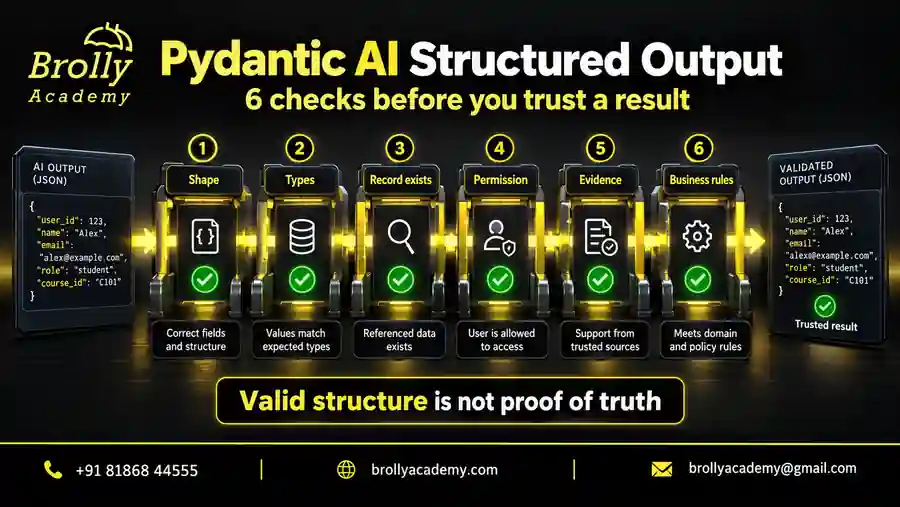
What does Pydantic AI structured output actually guarantee?
Imagine asking for one beginner Python lab. A conversational answer might suggest “the introductory exercise”, leaving your application to guess which record that means. A typed result can identify LAB-101 directly. That removes an interpretation step and makes ordinary programming techniques useful: assertions, comparisons, explicit branches and predictable rendering.
There are several different acceptance boundaries. Readable text can contain invalid JSON. Valid JSON can omit a required field. A schema-valid object can name an invented lab. Even an existing lab can be inaccessible to the current learner. Treating all of these as one success flag hides the exact decision that still needs evidence.
| Check | Question | Example failure |
|---|---|---|
| Shape | Is the agreed structure present? | Missing item_id |
| Allowed values | Do values satisfy the contract? | Quantity of zero |
| Conversion | Are input types acceptable? | A string used as a strict count |
| Existence | Does the referenced record exist? | Invented LAB-999 |
| Permission | May this learner access it? | Another account’s private lab |
| Evidence | Does the explanation follow its source? | An unsupported completion promise |
In Pydantic AI, output_type defines the requested result and result.output exposes the accepted value from a completed run. The official output guide describes the supported result forms. Throughout this article, “accepted” means accepted by the configured validation; your application may still have further checks before displaying a recommendation or taking action.
The examples assume you can read Python classes and type annotations. They were checked with Python 3.12.14, pydantic-ai-slim==2.54.0 and pydantic==2.13.5. Each runs independently without a provider key. Use the Pydantic AI tutorial for environment setup; here the focus is the output contract and what can go wrong around it.
Choose between ToolOutput, NativeOutput and PromptedOutput
The three modes describe different ways to request structured data. ToolOutput receives the answer through tool-call arguments. NativeOutput sends a schema through the provider’s native structured-response mechanism. PromptedOutput puts schema instructions in the prompt and parses the returned text. All three still require application validation.
| Mode | Required capability | What to verify |
|---|---|---|
| ToolOutput | Suitable tool calling | Output-tool arguments and combinations with ordinary tools |
| NativeOutput | Native schema-constrained responses | Accepted schema subset and tool/streaming combinations |
| PromptedOutput | Text generation following schema instructions | Parsing failures and useful repair behaviour |
For a normal structured type, tool output is the default. Use an explicit marker when the choice matters, such as output_type=ToolOutput(Selection, name="select_lab"), NativeOutput(Selection) or PromptedOutput(Selection). These are configuration fragments; Selection is defined in the first complete example below. The output marker API reference documents their arguments.
Prompted output can use a provider’s JSON mode when available. JSON mode concerns JSON syntax; it does not establish that every required field or rule was followed. Native support also needs checking against the exact model and endpoint: schema features, ordinary tools and streaming may have different restrictions. A provider name alone is insufficient evidence of compatibility.
Start your comparison with the same small contract and representative inputs. Include an empty result, a nested object and an invalid value. Record request rejection separately from a generated answer that fails validation. Choose the mode that satisfies your application’s needs under that tested combination. None of these mechanisms can check the current catalogue, authenticate a learner, or prove that a generated recommendation matches the learner’s request.
Check 1: Define the response shape your consumer needs
Begin at the consuming code. If it needs to display a lab and a requested count, define those fields first. Avoid asking for an elaborate object just because the model can generate one. Each additional field creates another obligation: someone must define its meaning, validate it, store it appropriately and handle it when absent.
A useful schema distinguishes identifiers from descriptions. An item_id points to a catalogue record; a reason explains why it was proposed. Neither should quietly double as an instruction to execute. A field called enrolled is misleading in a recommendation result because no enrolment has occurred. Prefer names that describe what the producer actually knows.
| Declaration or policy | Contract | Design consequence |
|---|---|---|
| item_id: str | A string must be supplied | Add rules for meaningful identifiers |
| note: str | None | A value is required, but may be null | Consumer must handle explicit unknown |
| note: str | None = None | Omission receives a default | Decide whether omission matters |
| extra=”forbid” | Unexpected properties fail validation | Contract changes become visible |
Pydantic’s field documentation explains these declaration rules. In particular, nullable does not mean omittable unless a default is supplied. For extraction work, a default can erase an important distinction: the source explicitly said “unknown”, or the producer never addressed the field. Model that distinction when your reader needs it.
Review defaults with the same care as required fields. A default quantity of one may be sensible for a shopping interface with that stated convention. It is a poor extraction default when the task is to report a count from a document that contains none. A convenient fallback can turn missing evidence into a seemingly authoritative number without ever raising an error.
Check 2: Constrain values and relationships deliberately
Types establish broad categories; constraints make them useful for your task. A quantity might need to be between one and five. An identifier might follow a stable catalogue format. A label might belong to a short Literal set. Make these restrictions reflect the application rather than an arbitrary preference for tightly specified schemas.
Descriptions and checks serve different purposes. A field description can explain that a quantity counts seats rather than minutes. It cannot enforce positivity by itself. Likewise, a description saying “use a real lab ID” provides guidance, but existence still needs a catalogue lookup. Put machine-checkable requirements in constraints or validators and use descriptions to remove ambiguity.
Relationships deserve their own rules. Two valid dates can describe a period whose end precedes its start. Individually valid list entries can contain duplicate identifiers. A proposed set of labs might exceed a learner’s time budget even when every duration is positive. Use a model validator for relationships available within the object; keep changing external conditions in an application check.
The Pydantic validator guide distinguishes field and model validation. A field validator suits a blank explanation; a model validator suits an inconsistent interval. Give failures messages that identify the correctable rule. “End must follow start” is more useful than “bad output”, especially when the error will be returned to a model for repair.
Test the edges, including combinations that look individually reasonable. With a one-to-five count, test zero, one, five and six. With a list of unique labs, test repeated IDs with different explanations. Also decide whether a rule belongs permanently in the schema: today’s remaining seats should not become a hard-coded limit in a class reused tomorrow.
Check 3: Decide whether type conversions are acceptable
A value can look correct after validation because it was converted. For example, a permissive integer field can accept a numeric string. That behaviour may be convenient when handling form input, but it may conceal a broken producer contract when your generated JSON is expected to contain actual numbers. Choose the policy intentionally at each boundary.
The first example uses ConfigDict(strict=True, extra="forbid"). For its integer field, a numeric string and a boolean are rejected. This makes mistakes visible in the exercise. It does not mean every application must reject every conversion. A service accepting dates encoded as JSON strings has different needs from a service accepting counts.
| Candidate | Expected outcome | Reason |
|---|---|---|
| quantity: 1 | Accept | Correct type and range |
| quantity: “1” | Reject | Strict integer required |
| quantity: true | Reject | A boolean is not an accepted count |
| quantity: 0 or 6 | Reject | Outside the exercise limit |
| reason: spaces only | Reject | No meaningful explanation |
Pydantic strict mode can behave differently for Python objects and JSON, particularly for types that have no direct JSON representation. Verify the path you actually use. A passing constructor call is not a complete test of JSON validation, and an error observed with a Python dictionary may not predict every JSON case.
Provider schema strictness is a separate setting. A marker’s strict option concerns provider-side schema enforcement where supported; Pydantic’s strict configuration controls local validation. Neither setting verifies facts. Also avoid silently normalising identifiers unless that is your catalogue’s explicit policy. Changing case or stripping characters can accidentally turn one meaningful identifier into another while making the input appear clean.
Run a strict output contract offline
This complete example tests both a successful agent result and rejected local payloads. TestModel supplies predetermined output arguments, so the model does not infer an answer from the prompt. Disabling real model requests makes the intended execution boundary explicit. There are no external tools or network lookups in the example.
from pydantic import BaseModel, ConfigDict, Field, ValidationError, field_validator
from pydantic_ai import Agent, ToolOutput, models
from pydantic_ai.models.test import TestModel

models.ALLOW_MODEL_REQUESTS = False

class Selection(BaseModel):
    model_config = ConfigDict(strict=True, extra="forbid")
    item_id: str = Field(pattern=r"^LAB-[0-9]{3}$")
    quantity: int = Field(ge=1, le=5)
    reason: str = Field(min_length=1, max_length=160)

    @field_validator("reason")
    @classmethod
    def require_meaningful_reason(cls, value: str) -> str:
        if not value.strip():
            raise ValueError("Reason must contain non-whitespace text.")
        return value

good = {
    "item_id": "LAB-101",
    "quantity": 1,
    "reason": "The catalogue describes introductory Python practice.",
}
agent = Agent(
    TestModel(custom_output_args=good),
    output_type=ToolOutput(Selection, name="select_lab"),
    retries={"output": 0},
)
result = agent.run_sync("Choose one introductory Python lab.")
assert isinstance(result.output, Selection)
assert result.output.model_dump() == good
assert Selection.model_validate_json(result.output.model_dump_json()) == result.output

bad_payloads = [{**good, "quantity": value} for value in ("1", True, 0, 6)]
bad_payloads += [
    {key: value for key, value in good.items() if key != "item_id"},
    {**good, "approved": True},
    {**good, "reason": "   "},
]
for payload in bad_payloads:
    try:
        Selection.model_validate(payload)
    except ValidationError:
        pass
    else:
        raise AssertionError(f"Unexpected acceptance: {payload!r}")

unknown = Selection.model_validate({**good, "item_id": "LAB-999"})
catalogue = {"LAB-101": "Introductory Python practice"}
assert unknown.item_id not in catalogue
print("Accepted LAB-101; rejected 7 invalid payloads.")
print("LAB-999 passes the schema but fails the catalogue check.")
Run the block as a Python script in the stated environment. It prints two lines: confirmation that seven invalid payloads were rejected, followed by confirmation that an unknown identifier still passes the schema. If any invalid payload is accepted, the script raises an assertion instead of printing a misleading success message.
Notice what the checks establish. The fixture reaches the typed output path, local validation rejects specific contract violations, and the result survives a JSON round trip. The catalogue assertion demonstrates the missing factual boundary. None of this measures whether a live model chooses an appropriate lab, follows the prompt consistently, or supports the same schema through a particular provider.
The distinction between local validation and agent retry behaviour is deliberate. The seven bad dictionaries are passed directly to Pydantic, where they raise ValidationError. They are not seven failed model requests. Later, the FunctionModel example drives invalid output through the agent loop and verifies the different failure behaviour at that level.
Change one input at a time when exploring the example. A badly formatted identifier tests the pattern. A correctly formatted unknown identifier tests the catalogue boundary. An empty reason tests text validity. Keeping those experiments separate makes the output easier to understand than introducing several failures into every payload and guessing which rule mattered.
Put this into practice with guided training
Explore the Pydantic AI course for the syllabus, guided projects and training options.
Model success, no match and uncertainty explicitly
A required item ID creates a problem when nothing suitable exists. Returning an empty string or a fabricated placeholder merely transfers that problem to the consumer. Give the producer a legitimate alternative. In our selector, a result can contain either a selection or a no-match explanation, and the consuming code must handle both.
A top-level output union, such as Selection | NoMatch, is supported; in tool mode its members become separate output tools. Another design uses one envelope with a discriminated union inside it. The following example chooses the envelope so both outcomes share one outer contract and a named status field determines the inner branch.
| Outcome | Meaning | Consumer response |
|---|---|---|
| Selected | A candidate meets the selection contract | Continue application acceptance checks |
| No eligible lab | The available options contain no suitable choice | Explain the limited result |
| Insufficient evidence | A reliable choice cannot be established | Request relevant missing information |
| Run failed | No acceptable output was produced | Show an execution failure, not a catalogue conclusion |
from typing import Annotated, Literal
from pydantic import BaseModel, ConfigDict, Field, ValidationError
from pydantic_ai import Agent, models
from pydantic_ai.models.test import TestModel

models.ALLOW_MODEL_REQUESTS = False

class Contract(BaseModel):
    model_config = ConfigDict(strict=True, extra="forbid")

class Selected(Contract):
    status: Literal["selected"]
    item_id: str = Field(pattern=r"^LAB-[0-9]{3}$")
    quantity: int = Field(ge=1, le=5)

class NoMatch(Contract):
    status: Literal["no_match"]
    reason_code: Literal["no_eligible_lab", "insufficient_evidence"]
    explanation: str = Field(min_length=1, max_length=160)

class Decision(Contract):
    outcome: Annotated[Selected | NoMatch, Field(discriminator="status")]

payloads = [
    {"outcome": {"status": "selected", "item_id": "LAB-101", "quantity": 1}},
    {"outcome": {
        "status": "no_match",
        "reason_code": "no_eligible_lab",
        "explanation": "The supplied eligible catalogue is empty.",
    }},
]
agent = Agent(TestModel(), output_type=Decision, retries={"output": 0})
for payload in payloads:
    with agent.override(model=TestModel(custom_output_args=payload)):
        outcome = agent.run_sync("Return the fixture outcome.").output.outcome
    if isinstance(outcome, Selected):
        assert outcome.item_id == "LAB-101"
        print(f"Selected: {outcome.item_id}")
    else:
        assert isinstance(outcome, NoMatch)
        assert outcome.reason_code == "no_eligible_lab"
        print(f"No match: {outcome.reason_code}")

mixed = {"outcome": {**payloads[0]["outcome"], "reason_code": "no_eligible_lab"}}
try:
    Decision.model_validate(mixed)
except ValidationError:
    print("Rejected fields mixed across outcome branches.")
else:
    raise AssertionError("Mixed branches were accepted.")
The script prints a selected ID, a no-match reason code, and confirmation that mixed branch fields were rejected. The Pydantic unions guide explains discriminators. This envelope is an offline contract demonstration; a provider may impose restrictions on the JSON Schema generated for nested alternatives.
Do not add plain str as an alternative merely to stop failures. Allowing it also permits a text answer instead of the structured result your consumer expects. Use that choice when conversational output is part of the product contract. For an API requiring a stable response, named outcomes are usually easier to consume and monitor.
A well-typed no-match result still needs truthful reasoning. An empty eligible catalogue supports “no eligible lab”; a database timeout does not. Similarly, a missing learner preference may support a clarification request, while an unsupported generated preference does not. The schema represents these distinctions so your application can enforce them; it cannot discover their truth by inspecting the status string.
Check 4: Verify that referenced records exist
The identifier pattern in our first example accepts LAB-999 because its shape is correct. Only the catalogue can tell us whether it names a record. Resolve identifiers against the authoritative source before using them to display titles, retrieve content or prepare a later action. Keep the generated identifier separate from the record returned by that lookup.
For a small catalogue, the application can supply eligible IDs and short descriptions in the prompt. For a larger one, a lookup may return a limited set of candidates. In either case, validate the final ID. Seeing a list of choices does not prevent a model from emitting a different string, confusing similar records or reusing an old identifier.
Dependencies are application context; putting a dictionary in deps does not automatically show it to the model. The retry example below therefore includes the permitted ID in its synthetic prompt and separately supplies the authoritative mapping to the validator. These have different jobs: one communicates the task, while the other checks the proposed answer.
Decide what to do when a known record changes. A recommendation generated against yesterday’s catalogue may refer to a retired lab today. Record the catalogue revision or lookup time when that matters, and refresh the lookup at the point of use. Preserve the distinction between “does not exist”, “no longer available” and “could not be checked” in internal diagnostics.
A failed lookup is not always repairable by asking the model again. A misspelled ID may be corrected from permitted choices. An unavailable catalogue service needs an operational response. A request with no eligible records needs a no-match outcome. Choosing the response from the lookup result prevents retries from becoming a way to manufacture plausible but unverified alternatives.
Check 5: Keep permission outside generated approval fields
A real identifier is not permission to access its record. Suppose LAB-202 belongs to another organisation. A schema check and an unrestricted existence lookup could both pass while the recommendation still reveals private information. Build the candidate set from the authenticated learner’s permitted records and enforce access again wherever the application actually reads or changes protected data.
Identity should come from trusted application context. A generated user_id, role or approval boolean is merely another proposed value. It cannot establish who made the request or what they may do. Even a schema restricting a role to a known label would only validate the spelling of that role, not the learner’s entitlement to it.
Use permission-aware error messages. If the model proposes an unavailable item, a repair message can say to choose from the supplied eligible options. It should not disclose hidden titles, owner names or private alternatives. Detailed access diagnostics belong with authorised operators, while the model and end user receive only information appropriate to their access.
Validation also has a timing boundary. Access can change between recommendation and enrolment. A user may lose membership, a shared link may expire, or an administrator may restrict a lab. The service performing the later action should check current permissions within its own workflow. An earlier validated recommendation is useful input, not a permanent authorisation token.
Test a known but protected record as well as an unknown record. They exercise different rules and may require different internal handling. For the surrounding agent design, the Pydantic AI agents guide explains where tools and dependencies fit. Here, the essential output rule is that generated data must never become the authority that approves its own use.
Check 6: Separate schema validation from factual truth
A reason can be a nonempty string of an acceptable length while saying something unsupported. Suppose the catalogue describes introductory Python practice with a typical duration of fifteen minutes. That supports a topic match and an approximate duration. It does not establish that this learner will finish within fifteen minutes or receive a certificate afterward.
| Claim | Supplied evidence | Assessment |
|---|---|---|
| The lab introduces Python | Catalogue description says so | Supported |
| You will finish in fifteen minutes | Typical duration only | Overstated certainty |
| You can start immediately | No current availability check | Unsupported current-state claim |
| The lab awards a certificate | No certificate information | Unsupported addition |
Where possible, reduce the number of facts the model has to reproduce. Let it propose an ID, then display the title, duration and availability from the resolved catalogue record. This avoids asking a language model to transcribe data your application already possesses. Reserve generated explanation for the part that actually requires interpretation.
If explanations need traceability, attach source IDs to claims and inspect the supporting content. A real source ID does not establish entailment: its passage may describe a different lab, an earlier policy or a condition omitted from the answer. A quotation can also be accurate while its interpretation is wrong. Test those cases explicitly.
Numerical confidence is not a substitute for evidence. A generated value such as 0.98 can satisfy a zero-to-one constraint without being calibrated against outcomes. Unless you have evaluated what the score means, avoid presenting it as a probability of correctness. A specific missing fact is usually more useful to a reader than an unexplained confidence number.
For this selector, create a small reviewed collection of source descriptions and acceptable claims. Include missing duration, conflicting eligibility statements and descriptions that mention advanced prerequisites. Judge unsupported claims independently of schema errors. That lets you see whether a change improves factual usefulness or merely makes malformed responses less frequent.
Put each validator at the right boundary
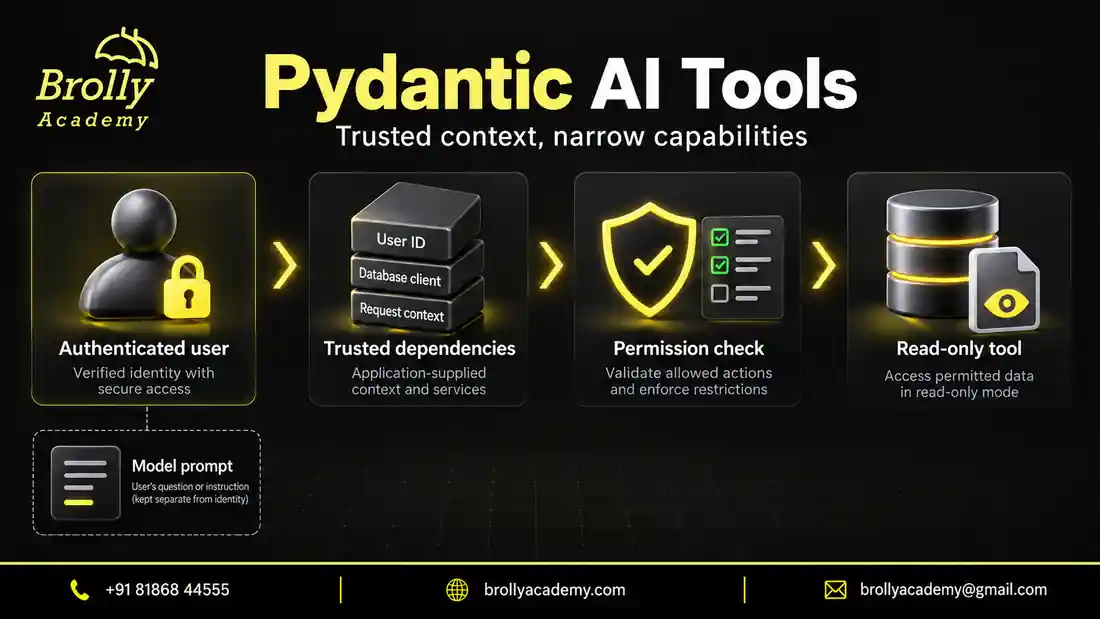
Validation is easier to maintain when each rule has an obvious owner. A blank reason depends on one field. A contradictory pair of dates depends on one object. An unknown ID depends on a catalogue. A denied enrolment depends on the authenticated user and current service state. Combining these into one large validator makes failures harder to interpret.
| Rule | Suitable location | Typical response |
|---|---|---|
| Required field or allowed range | Pydantic field definition | Validation error |
| Blank text or identifier convention | Pydantic field validator | Specific value error |
| Cross-field consistency | Pydantic model validator | Relationship error |
| Candidate checked against run context | Agent output validator | Accept or request bounded repair |
| Permission for an actual operation | Owning application service | Allow or deny the operation |
An @agent.output_validator receives the parsed output and can use RunContext dependencies. It is useful when validation needs current application information or asynchronous I/O. Raising ModelRetry asks for another model response. Returning the output accepts it at that boundary. The Agent API reference documents the decorator and retry configuration.
Make a repair message actionable and narrow. “Choose an ID from the supplied eligible catalogue” tells the model how to correct a candidate without changing the learner’s request. “Find something that passes” is too vague. Do not expose private database errors or tell the model to change identity, invent evidence or lower the acceptance standard.
Keep validators free of business side effects. A validator may run again during repair or streaming; sending a confirmation email there can produce duplicate messages before a final result exists. Lookups should also have deliberate failure handling. If the lookup service is unavailable, avoid presenting that as a model mistake that can be solved by changing a field.
Do not hide programming errors behind retry requests. A missing attribute, a malformed dependency or a bug in your validator needs developer attention. Catch only failures whose meaning you understand. Otherwise a broad exception handler can spend repeated model calls trying to repair data when the actual defect is in your application.
Test a successful repair and exhausted retries offline
A repair test needs changing responses. This example uses FunctionModel to produce a deliberate sequence: an invalid quantity, an unknown ID, then a permitted selection. It also runs a second sequence with too little repair budget to succeed. Both paths inspect retry feedback, so the test exercises the agent loop rather than just a final object.
from pydantic import BaseModel, ConfigDict, Field
from pydantic_ai import Agent, ModelRetry, RunContext, ToolOutput, models
from pydantic_ai.exceptions import UnexpectedModelBehavior
from pydantic_ai.messages import (
    ModelMessage, ModelResponse, RetryPromptPart, ToolCallPart,
)
from pydantic_ai.models.function import AgentInfo, FunctionModel

models.ALLOW_MODEL_REQUESTS = False

class Choice(BaseModel):
    model_config = ConfigDict(strict=True, extra="forbid")
    item_id: str
    quantity: int = Field(ge=1, le=5)

def make_agent(repair: bool, budget: int):
    state = {"requests": 0, "feedback": 0, "checked_ids": []}

    def respond(messages: list[ModelMessage], info: AgentInfo) -> ModelResponse:
        state["requests"] += 1
        attempt = state["requests"]
        if attempt > 1:
            feedback = [
                part for part in messages[-1].parts
                if isinstance(part, RetryPromptPart)
            ]
            assert len(feedback) == 1
            state["feedback"] += 1
        if attempt == 1:
            args = {"item_id": "LAB-101", "quantity": 0}
        elif attempt == 2 or not repair:
            args = {"item_id": "LAB-999", "quantity": 1}
        else:
            args = {"item_id": "LAB-101", "quantity": 1}
        tool_name = info.output_tools[0].name
        return ModelResponse(parts=[
            ToolCallPart(tool_name, args, tool_call_id=f"choice-{attempt}")
        ])

    agent = Agent(
        FunctionModel(respond),
        deps_type=dict[str, str],
        output_type=ToolOutput(Choice, name="select_lab"),
        retries={"output": budget},
    )

    @agent.output_validator
    def verify(ctx: RunContext[dict[str, str]], output: Choice) -> Choice:
        state["checked_ids"].append(output.item_id)
        if output.item_id not in ctx.deps:
            raise ModelRetry("Choose an ID from the supplied eligible catalogue.")
        return output

    return agent, state

eligible = {"LAB-101": "Introductory Python practice"}
prompt = "Choose one lab. Eligible catalogue: LAB-101, introductory Python practice."
agent, repaired = make_agent(repair=True, budget=2)
result = agent.run_sync(prompt, deps=eligible)
assert result.output.item_id == "LAB-101"
assert result.output.quantity == 1
assert repaired == {
    "requests": 3, "feedback": 2, "checked_ids": ["LAB-999", "LAB-101"]
}
print("Repaired: 3 requests, 2 retry messages, accepted LAB-101.")

agent, exhausted = make_agent(repair=False, budget=1)
try:
    agent.run_sync(prompt, deps=eligible)
except UnexpectedModelBehavior:
    assert exhausted == {
        "requests": 2, "feedback": 1, "checked_ids": ["LAB-999"]
    }
    print("Stopped: 2 requests, retry budget exhausted, no accepted result.")
else:
    raise AssertionError("The invalid output unexpectedly succeeded.")
The first candidate fails Pydantic validation before the output validator receives it. The second reaches the catalogue check and raises ModelRetry. The third passes. That is why the checked-ID list contains two entries even though the repaired run made three requests. The failed run raises UnexpectedModelBehavior instead of returning a usable result.
Here there is one output tool: two retries permit up to three attempts at its answer. In version 2.54.0, the output budget is the default per-tool limit on the tool-output path; ToolOutput(max_retries=...) can override it. Native and prompted output use the text-output path’s shared budget. Multiple output tools therefore need more careful accounting than multiplying one simple limit.
The official retry guide also distinguishes output repair from transport and provider-client retries. Set request and time limits appropriate to the whole operation. A repair budget alone does not bound every network attempt, tool call or delay that a larger application may perform.
The fixture proves the configured correction and stopping behaviour, not a model’s ability to repair itself. Its sequence is intentionally scripted. Keep that controlled test alongside later evaluation of real responses, where some failures may remain uncorrected or change into a different error. Increasing the budget should follow evidence that another attempt is useful.
Put this into practice with guided training
Explore the Pydantic AI course for the syllabus, guided projects and training options.
Handle failed output without disguising it as success
A failed run and an honest no-match result are different outcomes. No match says something about the task and its evidence. Retry exhaustion says the application could not obtain acceptable output within its configured limits. Returning an empty list for both prevents the user and your monitoring from knowing whether the catalogue was empty or the operation broke.
At the application boundary, handle expected execution failures explicitly. The previous example catches UnexpectedModelBehavior for a known exhausted-retry scenario. That exception can describe other unexpected model behaviour too, so production diagnostics should retain its category and relevant cause. Do not classify every instance as “no suitable lab”. The exception reference lists the available error types.
A provider rejection, interrupted response, content refusal and unavailable catalogue may each need a different recovery path. Some justify another attempt; some need different input; others should end the operation. Translate the failure into a clear user-facing state without inventing a domain explanation. “A recommendation could not be completed” is honest when you have no evidence about suitable alternatives.
Keep failed candidates away from successful-action paths. A diagnostic object containing the last proposed ID is useful for investigation, but it should not accidentally satisfy the same interface as an accepted recommendation. Avoid catching an exception and returning a default Selection. That makes downstream code believe validation succeeded when the fallback merely bypassed it.
Log enough to reproduce the boundary: schema version, selected output mode, request identifier, failed rule and number of attempts. Include private source content only where your data policy permits it. A validator’s error details can contain rejected input, so a convenient dump of the entire error is not automatically appropriate for every log or user-facing response.
Design nested records and lists for completeness
A valid list is not necessarily a complete list. If the task asks for every eligible lab, returning two valid records when five qualify is still wrong. Decide whether your result promises all matches, a ranked shortlist or at most a stated number. Make that promise visible in the contract and evaluate it against the task.
Use nested models when a group of fields belongs to one concept. A source reference might contain a document ID and passage ID; a candidate might contain an item ID and a reason. Prefer a list of candidate objects over parallel lists of IDs and explanations. Parallel lists can have equal lengths while pairing each reason with the wrong lab.
Bounds should protect the consumer without distorting the answer. A maximum list size helps control rendering and payload size. If a request legitimately has more matches, return an explicit limited-result state or let the application paginate authoritative records. Silently truncating an extraction and presenting it as complete makes a tidy response misleading.
Check repetition and relationships across entries. A model can propose the same lab twice with different wording. A bundle can contain two individually valid labs whose combined prerequisites are unsuitable. Decide whether repeated items should be rejected, merged or retained as separate occurrences. That decision depends on whether you are recommending unique options or extracting repeated mentions.
Inspect the generated schema when integration becomes difficult. Pydantic’s JSON Schema documentation explains schema generation, but a provider may support a narrower subset. Keep a representative nested payload in your compatibility checks. A successful request with one flat string field does not establish support for the richer contract you will actually deploy.
Keep streamed output provisional until completion
Streaming changes when a reader sees data, not when the application should trust a decision. An early fragment may contain a title before its identifier or supporting explanation is complete. Displaying that fragment as progress can be useful. Treating it as an accepted recommendation can produce a visible contradiction when later validation rejects or repairs the result.
Choose interface states that reflect this difference. While generating, show provisional content without enabling an enrolment action. After final validation and application checks, make the accepted recommendation actionable. If the stream fails, replace the provisional state with a clear failure or retained draft state; do not leave the last visible fragment looking confirmed.
In the documented streaming path, output validators can run on partial values and again on complete output. ctx.partial_output identifies that distinction. Use it when a check only makes sense after completion, such as comparing a finished set of evidence references. The RunContext reference describes the flag. Ensure the final path actually performs the deferred checks.
Repeated validation also affects cost and side effects. Looking up every growing fragment can produce redundant database traffic. Sending notifications from a validator can repeat an action. Keep streaming presentation separate from committing accepted data, and arrange lookups so provisional updates do not cause unnecessary work. Final acceptance still needs current information where state may change.
Test interruption near completion, not only at the start. A response containing nearly all fields may be the most tempting one to accept accidentally. Simulate a late validation failure and verify that no accepted record or action is created. Also test cancellation by the user: stopping generation should not quietly convert the latest preview into a completed recommendation.
Serialize results and evolve the contract carefully
Once you have a Pydantic result, use its serialization methods deliberately. model_dump() produces Python data, model_dump(mode="json") produces JSON-compatible data, and model_dump_json() produces JSON text. The serialization guide documents these differences. Choose the form expected by the receiving API or storage layer instead of serializing twice.
A JSON string sent into a field that expects an object becomes double-encoded data: the receiver sees a string containing braces, not the original structure. The first example’s round-trip assertion catches one class of serialization mistake. Add checks for your actual transport, especially when nested objects, null values or nontrivial field types enter the contract.
Decide how to preserve unknown values. Excluding null fields can erase the distinction between “explicitly unknown” and “not supplied”. Renaming fields or using aliases can also create discrepancies between Python attributes, generated schema and external keys. Keep the external field names stable where consumers rely on them and test the representation that leaves your service.
Schema changes affect stored results as well as new requests. Adding a required evidence field can make yesterday’s accepted objects invalid under today’s class. Store an application-assigned contract version with persisted records and define migrations or version-specific readers. Do not ask a model to invent historical evidence solely to make old records satisfy a new definition.
Separate generated content from operational metadata. Your application knows when the result was accepted, which catalogue revision it checked and whether a later action succeeded. Record those facts in an application-owned envelope. Asking the model to emit an acceptance timestamp or schema version adds an unnecessary source of error to information the application already controls.
Build tests that distinguish correctness from model quality
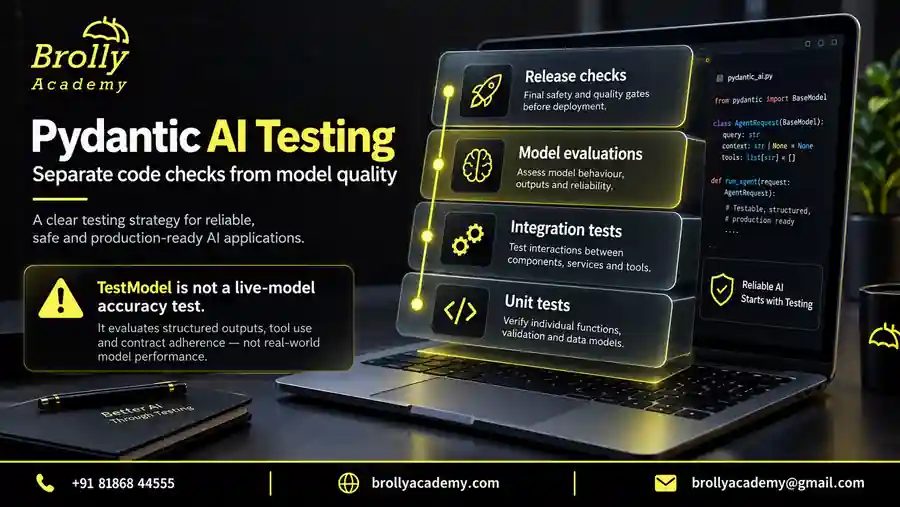
Test the contract before measuring a model. Local payload tests are quick and precise: they establish how your schema treats missing fields, ranges and conversions. Agent fixtures then exercise the framework path, including output parsing, custom validation and retry exhaustion. Live evaluations answer a different question: whether generated answers are useful and supported on representative tasks.
| Case | Boundary under test | Expected result |
|---|---|---|
| Missing item ID | Schema | Reject |
| Strict count supplied as text | Conversion | Reject |
| Known and permitted lab | Acceptance path | Accept if evidence also supports it |
| Unknown but well-formed ID | Catalogue | Repair or end without acceptance |
| Known protected lab | Permission | Deny access without disclosure |
| Unsupported certificate claim | Evidence | Reject or correct the claim |
| Repeated invalid output | Retry control | Stop at the configured limit |
| Late stream failure | Consumer state | No committed recommendation |
The official testing guide describes TestModel, FunctionModel and model overrides. A predetermined fixture is valuable precisely because you control it. Use explicit values for cases that matter rather than assuming automatically generated test values represent your domain. Block real model requests during these offline tests to catch accidental integration calls.
Inspect negative outcomes as carefully as successful ones. A test that merely expects some exception can pass because of an unrelated import or coding error. Assert the exception category and surrounding state, as the retry example does with request counts and checked IDs. Also assert that the consumer did not create a successful action after failure.
For later provider evaluation, keep schema validity, factual support, appropriate abstention and task completion as separate measures. A system returning no-match every time might avoid malformed selections while being useless. A system always selecting a lab might appear productive while ignoring missing prerequisites. Review both false acceptance and unnecessary refusal against clearly labelled examples.
When changing the schema or model, replay the same reviewed cases and inspect meaningful differences. Record the package versions and exact provider configuration so results are interpretable. The offline examples here establish local behaviour only; they are not a benchmark, a ranking of providers or evidence of a particular live accuracy rate.
Troubleshoot the boundary that actually failed
Start with the earliest point where observed behaviour differs from the contract. Did the provider reject the request before generating anything? Did text fail parsing? Did a parsed object fail a field rule? Did an accepted schema fail the catalogue check? Those failures require different fixes, even if the interface presents all of them as an unsuccessful recommendation.
| Symptom | Likely boundary | Next check |
|---|---|---|
| Schema rejected before generation | Provider capability | Reduce to a minimal schema on the same endpoint |
| Plain text where an object was expected | Output configuration | Inspect mode and whether str is an allowed result |
| A numeric value unexpectedly fails | Type or range validation | Inspect original type and applicable constraints |
| No-match payload chooses the wrong shape | Union design | Check discriminator and branch-specific fields |
| Correct-looking ID fails | Authoritative lookup | Check catalogue revision and eligible scope |
| Retries repeat the same failure | Repairability or fixture | Inspect feedback and supplied response sequence |
| Preview remains after failure | Consumer completion state | Check final error handling and commit timing |
For provider incompatibility, remove one schema feature at a time while preserving the same model, endpoint and output mode. A minimal working request gives you a useful comparison. Switching provider, simplifying the schema and changing retries simultaneously may make the symptom disappear without revealing which change mattered.
For validation failures, capture the original value before automatic conversions or display formatting obscure it. The string “1”, integer 1 and boolean true can look similar in a loosely formatted log. Record the failing field and error category. Redact sensitive payload content while retaining enough structure to build a synthetic reproduction.
For repeated retries, read the feedback the model actually receives. The required information may never have been supplied, two constraints may contradict one another, or the fixture may deliberately return the same bad arguments. More attempts will not resolve an impossible contract. Correct the input or design, then rerun the smallest test that demonstrated the problem.
Finally, check the consumer. A correct object can still be mishandled by code expecting a dictionary, assuming only the success branch exists, or serializing JSON twice. Reproduce with the already validated object before blaming generation. That isolates ordinary application defects from model behaviour and makes the repair easier to verify.
Frequently asked questions
Is valid JSON the same as Pydantic AI structured output?
No. JSON syntax only establishes that the text can be parsed as JSON. A typed output contract adds requirements such as fields, types, allowed values and custom checks. An object can pass those requirements while still referring to an unknown record or making an unsupported claim, so factual and permission checks remain separate.
Which output mode should I choose first?
For a supported tool-calling model, start with the default tool-output path and a small contract. Consider native output when the exact integration supports your schema and required features. Prompted output is useful where the necessary tool or native capability is absent. Compare them on representative inputs; none is universally best for every task.
Does strict validation stop hallucinations?
No. Strict validation controls which input types are accepted locally, and provider strictness concerns schema enforcement. Neither proves that an identifier exists, a source supports a claim, or a user has permission. In the first example, LAB-999 passes the strict schema while failing the catalogue check. That is an intentional demonstration of the boundary.
How do I return no result without inventing placeholder values?
Define an explicit alternative such as NoMatch, with a reason code your consumer understands. A discriminated union can keep its fields separate from a successful selection. Validate that the reason follows the available evidence: an empty eligible catalogue and an unavailable catalogue service are different situations and should not be reported as the same outcome.
Why does a failed agent run not raise the ValidationError I expected?
Directly validating a dictionary with Pydantic can raise ValidationError. Inside an agent run, output validation can trigger feedback and another model request. In the exhausted-retry example, the run ultimately raises UnexpectedModelBehavior. Test the boundary you actually call and inspect the failure context rather than assuming direct validation and agent execution expose identical exceptions.
What do these offline examples prove?
They verify the local contract, outcome branching, validation sequence and bounded repair behaviour in the stated package versions. They do not exercise a live provider or establish model accuracy. Use separate provider checks for compatibility and reviewed task cases for answer quality. For continued practice, explore the published Pydantic AI course alongside your own tested selector.
Download the Pydantic AI practice pack
Get nine offline Python examples, a project-review checklist and an evaluation case sheet. The examples use simulated model responses and do not need an API key. Submit this form to open the ZIP download.
Brolly Academy will store your request and use your details to handle it. Course follow-up is optional; the checkbox is not selected automatically.
Read our Privacy Policy for information about handling your details.
Put this into practice with guided training
Explore the Pydantic AI course for the syllabus, guided projects and training options.