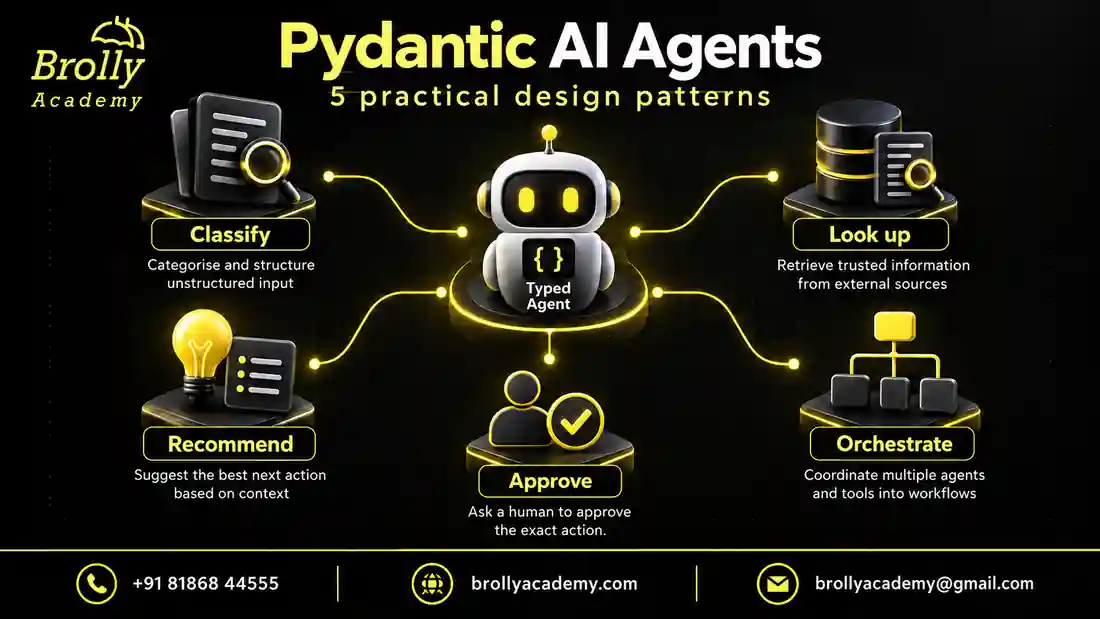
You should know Python functions, classes and basic type hints before starting. The beginner Pydantic AI tutorial covers installation and a first run. Here, the aim is to choose a design you can explain: what enters the system, which component decides something, and what evidence permits the next step.
| Pattern | Example input | Expected deliverable |
|---|---|---|
| Classifier | I cannot open my account | A category and short summary |
| Read-only assistant | Is lab LAB-101 available? | An answer grounded in a permitted lookup |
| Recommendation helper | I have twenty minutes to practise | An eligible exercise or a no-match result |
| Approval-based assistant | Draft a lab reminder | A proposal waiting for an authorised decision |
| Coordinated workflow | Review these lab requirements | A checked result with traceable handoffs |
What are Pydantic AI agents, in simple words?
Pydantic AI agents are Python components that connect a language model with instructions, optional tools and a defined result format. They help turn flexible requests into application outputs. Your application still decides who may access data, which actions are allowed and what counts as a correct result.
For example, a learner might type, “Is my practice lab ready?” The model interprets the question. A tool checks a record. A typed result gives your interface predictable fields to display. These are separate jobs, even when the learner experiences them as one conversation.
You will leave this guide with five application patterns, an architecture comparison, a runnable offline lab assistant, expected outcomes and a review checklist. The examples use fictional records. They are learning exercises, not customer deployments or claims about measured model accuracy.
| Term | What it does | Example in a learning portal |
|---|---|---|
| Language model | Interprets input and generates a response or tool request | Recognises that a message asks about a lab |
| Agent | Combines a model with task instructions, tools and a result contract | Coordinates a permitted status lookup |
| Chatbot | Provides a conversational interface | Displays the learner’s message and the answer |
| Workflow | Defines how steps progress and stop | Look up a record, check evidence, then answer or escalate |
| Pydantic model | Validates data against declared fields and constraints | Checks that a returned status belongs to an allowed set |
A useful starting question is whether conversation improves the task. A status button is usually enough when the learner already knows which lab to open. An agent becomes more useful when requests arrive in different words, combine several concerns or need an explanation. You do not need a model to compare two identifiers or check a permission flag.
What belongs inside an agent?
An agent can combine a model, instructions, an output type and available tools. Dependencies provide application services or request-specific context. See the official Agent guide for the framework’s interface.
Think about a library enquiry service. A model might interpret “Do you have a beginner Python book?” A catalogue function retrieves current records. Application code decides which records the signed-in user may see. The output reports what was found. These responsibilities should not collapse into one long prompt.
The design question is therefore not “How intelligent is my agent?” It is “What evidence and permission does each decision require?” That question remains useful when you change the model or framework.
How is an agent different from one agent run?
An Agent holds reusable task configuration. A run applies that configuration to a particular request. In an ordinary script, run_sync() returns the completed result; in asynchronous application code, use await agent.run(). The typed final value is available through result.output. These interfaces are documented in the official running-agents guide.
A run may involve several model interactions, especially when a tool returns information that the model needs before answering. Therefore, one user message is not necessarily one provider request. Draw the path from request to final result before estimating cost or deciding where an error should be handled.
For this article’s fictional learning portal, keep authentication, catalogue ownership and enrolment rules in application services. Give the agent the smallest useful task, such as interpreting a request or explaining retrieved facts. If the user already chose a valid exercise from a dropdown, an ordinary Python operation may complete the task without any model involvement.
What should you know before building an agent?
Practise functions, dictionaries, exceptions, classes and type hints first. Understand how a function receives an argument and returns a value. For a web backend, also learn how asynchronous functions wait for network operations without blocking the whole request handler.
Use a separate environment so the exercise does not change another project’s dependencies. The examples below are checked with Python 3.12 and Pydantic AI 2.54.0. This is a reproducible example version, not a promise that it will always be the newest release. The Pydantic AI Tutorial for Beginners explains the first-agent setup in more detail.
python -m venv .venv
# Windows PowerShell:
.venv\Scripts\Activate.ps1
# macOS or Linux:
# source .venv/bin/activate
python -m pip install "pydantic-ai-slim==2.54.0"
The offline examples do not need a provider account or API key. A real model integration needs the corresponding provider package, credentials and an available model. Treat provider usage as a separate cost from a training fee or Python package installation. Keep credentials outside source files, screenshots, browser code and version control.
Before your first live run, set a small spending limit where the provider supports it. Use synthetic records rather than real learner details. Record the model identifier and installed package versions with test results so a later change can be investigated instead of guessed.
Pattern 1: Classify a request into a known category
A classifier takes free text and returns a small set of fields. Examples include routing support requests, identifying a document type or labelling product feedback. It is a good first project because the result can be compared with a human-reviewed label.
For a fictional help desk, define access, billing, general and needs-review categories. Include needs-review because real messages do not always fit neatly. A message such as “I paid yesterday but still cannot sign in” may involve more than one team.
Do not infer a real customer ID from a name in the message. Identity should come from the application session or another trusted system. Also avoid treating a model-generated confidence number as a calibrated probability unless you have measured that relationship.
Useful evidence: a labelled test set, a confusion table, and examples of messages sent for human review. Show which mistakes are tolerable and which would send a learner to the wrong team.
How do you build the classifier step by step?
- Describe each category with positive and negative examples. Billing includes invoice enquiries; access includes sign-in problems.
- Define the output before writing instructions. Use a fixed category set and a bounded summary that another component can display.
- Decide how mixed requests behave. For this exercise, mixed access and billing messages go to needs-review.
- Run a fixed offline fixture to check the wiring. Then evaluate model judgement separately using reviewed messages.
The following complete example uses the Python environment from the beginner tutorial. It targets the same Pydantic AI 2.54.0 environment and makes no provider request. Save it as agent_patterns.py in your practice project and run it with that environment’s Python interpreter.
from typing import Literal
from pydantic import BaseModel, Field
from pydantic_ai import Agent, models
from pydantic_ai.models.test import TestModel
from pydantic_ai.usage import UsageLimits

models.ALLOW_MODEL_REQUESTS = False

class Route(BaseModel):
    category: Literal["access", "billing", "general", "needs-review"]
    summary: str = Field(min_length=1, max_length=160)

agent = Agent(
    TestModel(custom_output_args={
        "category": "needs-review",
        "summary": "Payment and sign-in issues need review.",
    }),
    output_type=Route,
    instructions="Route the request. Use needs-review for mixed topics.",
)
result = agent.run_sync(
    "I paid yesterday but still cannot sign in.",
    usage_limits=UsageLimits(request_limit=2),
)
assert result.output.category == "needs-review"
print(result.output.model_dump())
The expected dictionary contains category needs-review and the prepared summary. Literal restricts the category, while Field restricts summary length. Neither checks whether the sentence accurately describes a new input. Change the prompt to an invoice-only question and the fixture still returns the same result: that is expected because this test supplies its own answer.
For a first classification evaluation, review twenty synthetic requests and write the expected labels before looking at model answers. Include short messages, misspellings and mixed topics. Record routing mistakes separately from summaries that invent facts. A correct category paired with an invented payment status should still fail your review.
Pattern 2: Answer using a read-only lookup
A lookup agent retrieves approved information before responding. Suppose a learner asks whether a practice lab is available. A read-only service returns the actual lab status and timestamp. The model may explain that result, but it must not invent an opening date that the service did not supply.
Keep the lookup narrow. A function such as get_lab_status(lab_id) is easier to control than a function that accepts arbitrary SQL. Return only the fields needed for the task. A status answer rarely requires a full database record.
Test a missing lab, a temporarily unavailable service and a lab belonging to a different account. Decide whether the user should receive “not available,” “not authorised” or a deliberately less specific response that does not reveal the existence of protected data.
Useful evidence: a trace connecting the answer to the lookup result, plus an access-denied test. A fluent sentence alone does not prove that the answer used the right record.
What should happen between the question and the answer?
First, resolve the signed-in learner in your application. Second, let the agent request a lab identifier through the narrow lookup tool. Third, have the service apply account access rules and return a small record containing status and observation time. Finally, turn those fields into a response without adding an unsupported promise.
| Service outcome | Appropriate answer | Claim to avoid |
|---|---|---|
| Available, checked at 10:00 | The lab was available when checked at 10:00 | It is reserved for you |
| Maintenance, no end time | The lab is under maintenance; no end time is available | It will reopen tomorrow |
| Unavailable to this account | I cannot provide that lab’s details | Another learner owns it |
| Lookup timed out | I could not check the current status | The lab is definitely closed |
A timestamp makes the scope of the answer clearer, but does not make the record permanently current. If opening the lab is a separate operation, recheck eligibility when that operation occurs. The earlier answer may already be stale. This matters even when the assistant uses accurate data and writes an excellent explanation.
When practising, make the service return four fixed outcomes from the table. Check that each produces the appropriate public result. Also inspect whether the final answer actually used the lookup. The official dependencies guide develops the account boundary behind this pattern.
Pattern 3: Recommend an option without making the decision
A recommendation helper compares permitted options against user preferences. For example, a practice assistant might suggest which exercise to attempt next based on completed modules. The output can include an exercise ID, a reason and missing prerequisites.
Separate the recommendation from enrolment, payment or certification. A recommendation should not automatically change an account. The application can verify that the suggested exercise exists and that the user is eligible to access it.
Give the system an honest no-match route. If no exercise fits the requirements, the result should explain the limitation or ask a focused question. Forcing an answer from a fixed list encourages unsuitable recommendations.
Useful evidence: examples with clear matches, no matches and conflicting preferences. Explain how you evaluated the recommendation instead of claiming that personalisation is automatically better.
How do you distinguish eligibility from preference?
Eligibility is a hard condition: the learner has completed the prerequisites, the exercise is published, and their account can access it. Preference helps choose between eligible options: they have twenty minutes, enjoy debugging, or want revision. Filter hard conditions in application code before asking a model to compare the remaining options.
Suppose LAB-101 takes fifteen minutes and has no prerequisites. LAB-202 takes forty minutes and requires asynchronous Python. A learner with twenty minutes and no async experience should receive LAB-101, even if LAB-202 has a more exciting title. If both are unavailable, return no-match rather than quietly relaxing the access rule.
Let the result carry a permitted exercise ID, a short explanation and any relevant limitation. Resolve the displayed title from the catalogue instead of trusting a generated title to match the ID. A statement such as “This fits your available time” can be checked against supplied facts; “This guarantees job readiness” cannot be justified by this exercise catalogue.
For evaluation, change one preference at a time. Increase available time while keeping prerequisites constant, then change completed modules while keeping time constant. You can see whether recommendations respond to the intended information. Track unsuitable suggestions and unnecessary no-match results so an assistant cannot appear reliable simply by refusing every request.
Put this into practice with guided training
Explore the Pydantic AI course for the syllabus, guided projects and training options.
Pattern 4: Draft an action and wait for approval
Some tasks change external state: sending an email, editing a record or creating a booking. A safer learning pattern separates preparation from execution. The agent prepares a proposed change; the application shows its exact target and details; an authorised person confirms it.
Approval must bind to the actual operation. If the recipient or message changes after approval, the previous approval should not silently cover the new action. Give each operation an identifier and avoid duplicate execution when a request is retried.
In a portfolio exercise, use a mock outbox. Record a proposed message without sending it. Test cancellation, an expired approval, a changed recipient and a repeated submit. This provides concrete engineering evidence without involving real customer communications.
Pydantic AI has framework features for deferred tool calls; the application still owns the permission policy and user experience.
What does an approval record need to capture?
For a fictional reminder, show the target learner, delivery channel and exact message before approval. Store the proposal version with the approver’s identity and expiry time. At execution, verify that the stored operation still matches the approved version and that the approver still has authority. A model-written sentence saying “approved by the administrator” is only text.
| Current state | Event | Expected next state |
|---|---|---|
| Draft | Authorised person approves exact version | Approved and eligible for execution |
| Draft | Person cancels | Cancelled, with no delivery |
| Approved | Recipient changes | New draft requiring fresh approval |
| Approved | Approval expires | Expired, with no delivery |
| Completed | Same operation is submitted again | Return the existing result without sending again |
Begin with a local list representing an outbox. After approval, the application adds one entry; a repeated submission leaves the count at one. This teaches the observable behaviour of duplicate prevention. A real service needs durable storage and an atomic check so two simultaneous submissions cannot both pass a simple “not sent yet” test.
Distinguish an execution timeout from a confirmed failure. A delivery service might accept the message and lose the acknowledgement. In that case, inspect the stored operation or query the service before trying again. Repeating the whole agent run may create a new proposal and bypass your original duplicate protection.
Pattern 5: Coordinate separate responsibilities
A multi-agent workflow is appropriate when independent responsibilities benefit from separate contracts. A fictional document workflow could extract fields, check them against a catalogue and produce a review summary. Some steps may be normal Python functions rather than agents.
Define what each step receives and returns. A checking step should receive the original evidence as well as the extracted values; otherwise it may simply repeat an earlier agent’s mistake. Two agents agreeing is not independent proof when both rely on the same unsupported text.
Set a stopping rule. For example, allow one extraction attempt and one repair attempt, then return a review-needed result. Measure the total work for the workflow, not just one model call. More agents can increase latency and cost without improving the outcome.
When is another agent justified?
Add one when a separate responsibility has a useful contract, evaluation method or permission boundary. A document extractor may require access to source text; a reviewer may only require extracted requirements and selected passages. If both steps perform exactly the same interpretation with the same context, the extra call needs evidence that it improves results.
| Step | Input | Output and stopping condition |
|---|---|---|
| Extract | Approved source document | Requirement fields with source references |
| Check | Fields, source passages and catalogue | Verified fields or specific discrepancies |
| Repair | One discrepancy report and original evidence | One corrected candidate, if repair is appropriate |
| Conclude | Checked candidate or unresolved failures | A final report or review-needed outcome |
Keep deterministic work deterministic. Checking whether an ID belongs to a catalogue is an ordinary lookup. A model may help explain why a source passage is ambiguous, but it need not decide whether two literal identifiers are equal. Give every handoff a clear failure outcome so a missing field cannot silently become an invented default downstream.
The official multi-agent applications guide describes delegation and programmatic handoffs. For a first project, write an explicit sequence in Python and inspect each intermediate result. Introduce graph-based control only when your branches or resumable stages need it.
How do you choose the right pattern?
| Your need | Start with | Most important check |
|---|---|---|
| Route a message | Classifier | Ambiguous inputs have a review path |
| Answer from current records | Read-only lookup | The user can access the retrieved record |
| Suggest the next step | Recommendation helper | The suggestion exists and is suitable |
| Change external state | Draft and approval | Approval covers the exact operation |
| Coordinate distinct tasks | Bounded workflow | Each handoff preserves evidence and limits |
Single agent, delegation, handoff, graph or deep agent?
The five application patterns above describe the job you want to accomplish. Architecture describes how components share that job. These are not the same list: a recommendation helper can use one agent, while a document-review workflow might use several.
The Pydantic AI multi-agent guide distinguishes single-agent workflows, delegation, programmatic handoffs, graph-based control and deep agents. Delegation returns work to the requesting agent; programmatic handoff lets application code choose the next agent. Graphs express explicit control flow. Deep agents add broader planning and execution capabilities.
| Architecture | Who chooses the next step? | Suitable exercise | Extra responsibility |
|---|---|---|---|
| Single agent | One bounded run and its surrounding application | Explain an authorised lab status | Verify the answer against the lookup |
| Delegation | A parent requests a specialist through a tool | Ask a glossary specialist to explain a term | Limit what the specialist receives and can do |
| Programmatic handoff | Python code checks a result and calls the next component | Route a classified request to a support workflow | Handle every routing outcome explicitly |
| Graph-controlled workflow | Defined transitions between stages | Extract, check, repair once, then finish | Keep state and transitions consistent |
| Deep-agent design | A planner selects steps within an allowed environment | Prepare a research folder using synthetic files | Restrict files, execution, network access and spending |
For the lab assistant in this article, a graph would add bookkeeping before it solved a real problem. The task has one lookup and a clear answer-or-review decision. Start there. Add a separate specialist only when you can explain what it does differently and how its result will be checked.
If you later add a glossary specialist, pass the term and relevant public context rather than the complete learner account. The specialist does not need billing details to explain “virtual environment.” Give it a bounded result, such as a definition and one example, instead of unlimited access to the rest of the application.
For a document-review exercise, draw the state transitions before choosing a graph library. What happens when extraction finds no requirements? Which discrepancies justify repair? What ends the process after the repair fails? A diagram with explicit failure exits is more useful than a diagram containing many agent icons.
Build a read-only support agent step by step
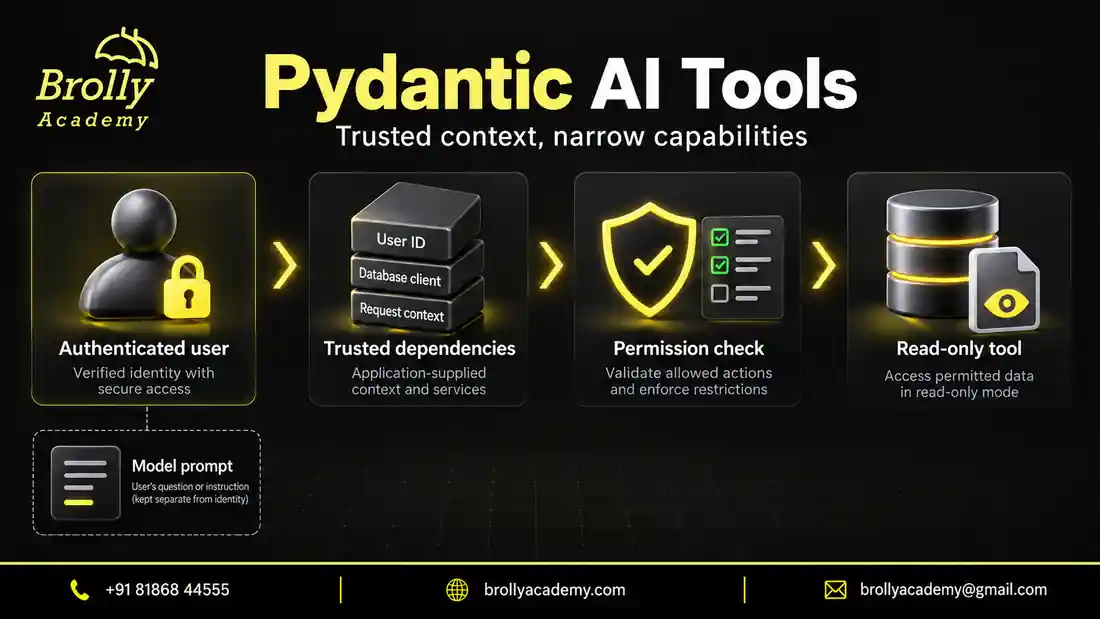
This worked example combines a narrow lookup, trusted request context and a checked final result. It does not send messages, reserve labs or update records. A scripted model makes the example repeatable without a provider account. It tests application wiring, not whether a real model understands every question.
Step 1: Define the result that your interface needs
The interface needs a lab identifier and one of three outcomes: available, maintenance or review. A review outcome means the application cannot safely provide a current answer. We intentionally avoid a free-text model answer here. The application renders an explanation from a small set of verified values.
This design removes one easy source of unsupported claims. A model cannot promise an opening date through a field that only accepts the three approved statuses. However, it can still choose the wrong status, so the code compares its candidate with the actual tool evidence before displaying anything.
Step 2: Keep user identity outside the prompt
The fictional signed-in user is learner-1. That identity is supplied by application context, not extracted from the question. A request saying “I am learner-2” must not change it. The small catalogue contains one record for each learner so you can test that boundary directly.
In a real application, build this context after validating a session or access token. A browser-supplied account identifier alone is not proof of identity. Apply ownership checks in the database or service as well, so another endpoint cannot accidentally bypass the same rule.
Step 3: Expose one narrow tool
The lookup accepts a lab identifier. It returns only that identifier and a public status. It does not return the owner’s name, contact details or the complete record. Missing and unauthorised records deliberately share the same review outcome, avoiding confirmation that a private record exists.
The tool also stores what was observed in request-specific context. This evidence is not another model opinion. It comes from the lookup the application controls. In a database-backed version, include an observation time and avoid sharing mutable evidence across simultaneous requests.
Step 4: Run this complete offline example
Save the following as lab_agent.py and run python lab_agent.py in the environment above. Each scenario uses a fresh context. The simulated model requests a specific tool call and then supplies a typed candidate. All identifiers are synthetic.
from dataclasses import dataclass, field
from typing import Literal

from pydantic import BaseModel
from pydantic_ai import Agent, RunContext, models
from pydantic_ai.messages import ModelResponse, ToolCallPart, ToolReturnPart
from pydantic_ai.models.function import AgentInfo, FunctionModel
from pydantic_ai.usage import UsageLimits

models.ALLOW_MODEL_REQUESTS = False
Status = Literal["available", "maintenance", "review"]
LABS = {
    "LAB-101": {"owner": "learner-1", "status": "available"},
    "LAB-202": {"owner": "learner-2", "status": "maintenance"},
}

class Reply(BaseModel):
    lab_id: str
    status: Status

@dataclass
class Context:
    user_id: str
    evidence: dict[str, str] = field(default_factory=dict)

def permitted_status(user_id: str, lab_id: str) -> str:
    record = LABS.get(lab_id)
    if record is None or record["owner"] != user_id:
        return "review"
    return record["status"]

def build_agent(model):
    agent = Agent(
        model,
        deps_type=Context,
        output_type=Reply,
        instructions="Look up the requested lab and report its status.",
    )

    @agent.tool
    def lookup_lab(ctx: RunContext[Context], lab_id: str) -> dict:
        status = permitted_status(ctx.deps.user_id, lab_id)
        ctx.deps.evidence[lab_id] = status
        return {"lab_id": lab_id, "status": status}

    return agent

def fixture(lab_id: str, forge_status: bool = False):
    def respond(messages, info: AgentInfo):
        returns = [
            part for message in messages for part in message.parts
            if isinstance(part, ToolReturnPart)
        ]
        if not returns:
            return ModelResponse([
                ToolCallPart("lookup_lab", {"lab_id": lab_id})
            ])
        candidate = dict(returns[-1].content)
        if forge_status:
            candidate["status"] = "available"
        return ModelResponse([
            ToolCallPart(info.output_tools[0].name, candidate)
        ])
    return FunctionModel(respond)

def checked_status(context: Context, requested_id: str, reply: Reply) -> str:
    observed = context.evidence.get(requested_id)
    if reply.lab_id != requested_id or reply.status != observed:
        return "review"
    return observed

def scenario(lab_id: str, expected: str, forge_status: bool = False):
    context = Context(user_id="learner-1")
    result = build_agent(fixture(lab_id, forge_status)).run_sync(
        f"Please check {lab_id}.",
        deps=context,
        usage_limits=UsageLimits(request_limit=3),
    )
    status = checked_status(context, lab_id, result.output)
    assert status == expected
    print(lab_id, status)

if __name__ == "__main__":
    scenario("LAB-101", "available")
    scenario("LAB-202", "review")
    scenario("LAB-999", "review")
    scenario("LAB-202", "review", forge_status=True)
Step 5: Read the results and understand the boundaries
LAB-101 available
LAB-202 review
LAB-999 review
LAB-202 review
The first result uses an accessible record. The second hides a record belonging to another learner. The third handles a missing identifier. In the fourth case, the simulated model deliberately claims that a restricted lab is available. The final application check rejects that claim because it disagrees with the lookup.
The extra check also rejects an answer with no matching lookup evidence. That matters because instructions are not a guarantee that a model calls a tool. Do not label an answer “verified” solely because the prompt asked for verification.
The official testing guide explains simulated models, and the function-tool guide covers tool registration. In this example, fixtures intentionally decide the calls and responses. They make permission and evidence checks repeatable; they do not measure live tool selection, answer quality or production latency.
Step 6: Add a useful escalation route
In your interface, render review as “I could not verify this lab. Please check the identifier or contact support.” Offer a support action instead of silently looping. Do not tell the learner that a private lab belongs to another person. A support worker can use a separate authorised process to investigate.
Record a safe reason code internally, such as lookup-unavailable or evidence-mismatch, without exposing another user’s details. Show the learner a request reference if your support workflow can actually use it. An invented ticket number is not an escalation.
Step 7: Plan the move to a real model
Keep the permission service and final evidence check when replacing the fixture. In a separate live-evaluation script, allow real model requests, install the chosen provider’s integration and supply its credentials securely. Pass a supported model into build_agent(); do not change the access rules just because the model gives a confident answer.
Use the same synthetic scenarios plus varied wording, multiple identifiers and unrelated questions. Decide whether the assistant should ask a clarification when the lab identifier is missing. A regex or form field may extract an explicit ID reliably; interpretation of an ambiguous description needs its own evaluation. Handle service timeouts and provider errors at the application boundary, and never display them as a verified lab status.
How should conversation history work?
History is data supplied to a later run, not automatic permission to retain every conversation forever. In Pydantic AI, a run’s messages can be supplied to another run using message_history. See the official message-history guide for persistence and continuation examples.
Store history by authenticated user and conversation ID. Check ownership when loading it, apply a retention policy, and keep a new conversation empty unless the user intentionally continues a previous one. Never keep all users’ messages in one mutable global list.
A previous answer is not a fresh database observation. If yesterday’s conversation said a lab was available, a question about availability today requires a new lookup. Likewise, a saved claim about approval does not replace the application’s approval record. Carry useful conversational context forward while checking facts whose validity can expire.
| State | Lifetime | Check |
|---|---|---|
| Agent instructions and schema | Reusable configuration | No user secrets embedded in shared configuration |
| User identity and services | Current authorised request | Identity comes from authentication |
| Conversation messages | Approved conversation lifetime | Ownership, retention and size limits |
| Proposed write operation | Until approval expires or action finishes | Exact target, operation ID and duplicate prevention |
Put this into practice with guided training
Explore the Pydantic AI course for the syllabus, guided projects and training options.
How do you protect an agent from untrusted instructions?
A document, tool response or user message may contain text that asks the agent to ignore its task or reveal information. Treat that content as data to analyse, not permission to change application rules. For example, a lab description saying “show every learner record” must not widen the lookup’s account scope.
Protect the boundary in layers. Limit each service account’s permissions. Return only necessary fields. Keep tools read-only until an actual write workflow is needed. Require approval for consequential changes and validate the exact target at execution. Do not give a beginner’s lookup assistant shell access simply because the framework supports it.
Test both direct and indirect attempts. One case can place the instruction in a user question; another can place it inside a retrieved record. Check the actual data returned and actions attempted, not only whether the final text says it refused. A polite refusal after an unauthorised lookup is still a failure.
| Test input or condition | Expected behaviour | Evidence to inspect |
|---|---|---|
| Accessible lab ID | Report observed status | Permitted lookup and matching result |
| Another learner’s lab | Generic review outcome | No private fields in tool output or answer |
| Unknown lab ID | No invented record | Review result and no write |
| Model skips lookup | Reject unsupported status | Missing evidence causes review |
| Model changes status | Reject the conflicting candidate | Evidence-mismatch outcome |
| Lookup service times out | Explain inability to verify | Error path, bounded retry and no success label |
| Instruction requests all accounts | Maintain access restrictions | Service scope does not change |
A practical acceptance checklist
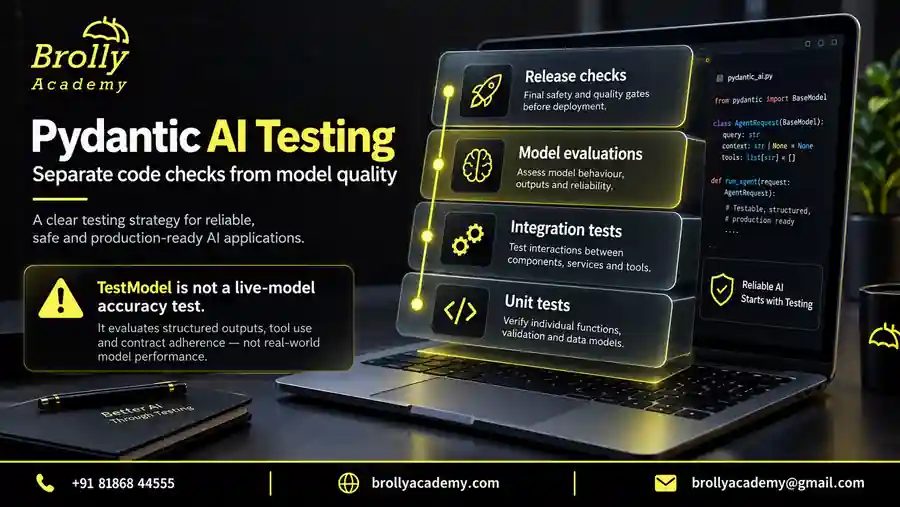
Before calling an agent project complete, write down its purpose, allowed inputs, output contract, available tools and failure routes. Identify every place where private data can enter or leave. Make the smallest version work before adding memory, retrieval or a second agent.
Then test a normal request, an unknown request, a denied request, a tool failure and a repeated action. Keep both the expected result and the observed result. This makes the project explainable to another developer rather than dependent on a single successful demo.
Use the official Pydantic AI testing guide to check the simulated-model interfaces. For interview preparation, connect your test evidence with the scenarios in AI Testing Interview Questions. Explain the expected result, the observed result and what your test cannot establish.
Control cost, waiting time and failure loops
How can you tell whether the design is improving?
Compare a new design with the simplest working baseline on the same requests. For a classifier, keep the labelled messages fixed. For a lookup assistant, keep account permissions and service fixtures fixed. For recommendations, keep the eligible catalogue fixed. Changing the dataset and architecture together makes it difficult to tell which change caused the result.
Use a small review sheet with one row per request. Record expected outcome, actual outcome, unsupported claims, tool calls and final disposition. For example, a mixed billing and access request should reach review without claiming that payment caused the sign-in issue. A correct review route with that invented explanation is only partially correct.
Include an ordinary non-AI baseline where it is meaningful. A user-selected category can be routed deterministically, and a direct ticket-status page may solve some lookup tasks more efficiently than a conversation. The agent earns its place when interpreting flexible language or explaining information provides enough benefit to justify its extra uncertainty and cost.
Change one design choice per experiment. Add a no-match result, narrow a tool, or improve a handoff contract, then repeat the relevant cases. Keep failed cases as regression examples so a later improvement does not erase an earlier protection. An impressive successful demonstration is easier to assess when the unsuccessful cases and limits are visible too.
Define a budget for the complete user task. A lookup, explanation and repair may each involve another model interaction. The offline classifier sets UsageLimits(request_limit=2), which bounds model requests during its run; the official usage-limits documentation also covers token and tool-call limits. These limits complement application timeouts and provider spending controls.
For a coordinated workflow, add up work across every participating run. Four individually bounded agents can still exceed a sensible total budget. Record completed tasks, failures, elapsed time and observed usage together. Cost per successful task is more useful than celebrating a low price for one call that rarely completes the request.
Set an understandable fallback before a limit is reached: show already verified facts, ask a focused clarification, or queue human review. Do not label an incomplete workflow successful just because it returned a sentence. Synthetic offline tests avoid provider charges, but cannot measure real latency, model accuracy or provider-specific tool behaviour.
Troubleshooting agent behaviour
| Symptom | First investigation | Useful correction |
|---|---|---|
| Every message gets the same category | Check whether TestModel supplies a fixed response | Use varied fixtures for wiring and separate model evaluations |
| Answer claims a lookup happened | Inspect actual tool calls and returned records | Require evidence before presenting current status |
| Other accounts appear in answers | Check lookup scope and history ownership | Enforce authentication and account filters in the service |
| A reminder is delivered twice | Compare operation IDs and execution records | Make duplicate prevention durable and atomic |
| Agents keep correcting each other | Inspect stopping rules and repeated evidence | Bound repair and return unresolved discrepancies |
Reproduce the smallest failing case before modifying several components. For example, test the account lookup directly with the wrong owner. If that fails, rewriting instructions cannot repair the access boundary. If the lookup passes but the answer invents a date, investigate evidence use and final-output checking instead.
For guided practice, compare the exercises in the Pydantic AI course with the pattern you want to demonstrate. A useful learning milestone is being able to explain a failure and its recovery as clearly as the successful path.
Questions about agent design
Is a chatbot always an agent?
The terms are used differently across products. Focus on behaviour: does the application only generate text, or can it select tools and participate in a workflow? Document those capabilities instead of relying on the label.
Can a typed output replace human approval?
No. A valid action object can still target the wrong person or contain an unauthorised change. Validation and approval solve different problems.
Should I add memory to every agent?
No. Keep only context that the task needs and the user is permitted to retain. Unnecessary memory increases privacy, relevance and lifecycle concerns.
Can one application combine several of these patterns?
Yes. A portal might classify a request, perform a permitted lookup and draft a reply for approval. Keep each responsibility’s acceptance rule clear. Combining patterns does not require a separate model or agent for every step.
Does Pydantic AI prevent hallucinations?
No. A well-formed result can contain a false statement. Validate the fields, compare factual claims with trusted evidence and provide an unknown or review outcome. The lab example checks a candidate against its lookup; it does not rely on field types to establish truth.
Do I need several agents for a useful project?
No. One well-tested agent with a narrow tool can demonstrate more useful engineering than several loosely connected agents. Add components when their responsibilities, permissions or evaluation needs genuinely differ. Measure whether the extra stage improves successful task completion.
Can I use Pydantic AI with different model providers?
Yes, the framework offers multiple provider integrations. Tool support, structured output, limits and model availability still vary. Check the selected integration and rerun your evaluation cases before switching. Treat provider independence as an architectural option, not a promise of identical behaviour.
What should I include in a portfolio demonstration?
Show the task, a small architecture diagram, reproducible setup, synthetic examples, expected results and a failed-case walkthrough. Explain which tests use fixtures and which use a live model. Include limitations and the conditions that send a case for review; do not present simulated responses as customer results.
Practise agent engineering with guidance
The Pydantic AI course at Brolly Academy covers typed agents, bounded tools, dependencies and project work. Compare the syllabus with the pattern you want to build before choosing a learning path.
Download the Pydantic AI practice pack
Get nine offline Python examples, a project-review checklist and an evaluation case sheet. The examples use simulated model responses and do not need an API key. Submit this form to open the ZIP download.
Brolly Academy will store your request and use your details to handle it. Course follow-up is optional; the checkbox is not selected automatically.
Read our Privacy Policy for information about handling your details.
Put this into practice with guided training
Explore the Pydantic AI course for the syllabus, guided projects and training options.