Brolly Academy | Snowflake Guides
What Does Snowflake Do?
Data storage, analytics, engineering and sharing
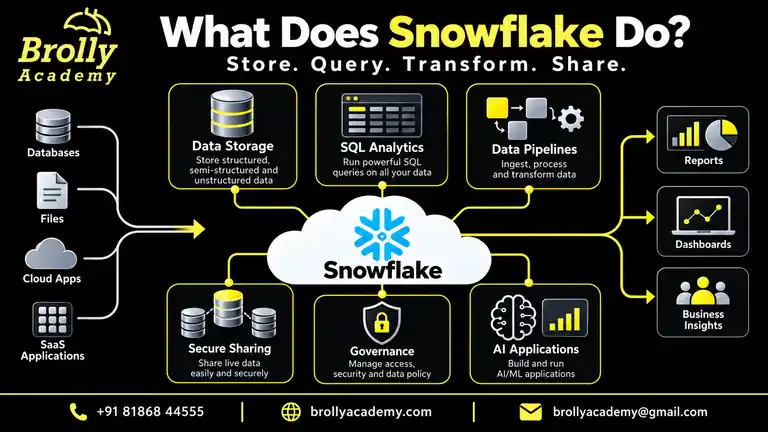
Snowflake brings data storage, SQL queries and data workflows together in a managed cloud platform. Teams use it for reporting, pipelines, data sharing and supported AI applications.
This guide explains its capabilities, architecture, use cases and the decisions your team still needs to make.
To apply these concepts, work through our 20 Snowflake projects with SQL, datasets and validation checks, from loading data to reporting and pipeline practice.
Overview
- Snowflake is a managed cloud data platform for storing, querying, transforming and sharing data.
- Teams use SQL and related development tools for analytics, pipelines and data applications.
- Storage and virtual-warehouse compute are separate, so teams can choose compute capacity independently of stored data.
- Snowpipe loads staged files; Snowpipe Streaming supports continuous row ingestion. Time Travel, cloning and Snowpark support recovery, development and programming workflows.
- It reduces infrastructure maintenance, but teams still configure permissions, pipelines, warehouse settings and cost controls.
Official Snowflake concepts and architecture.
Introduction
- Understanding what Snowflake does has become essential for organizations transitioning to cloud-based analytics, artificial intelligence, and large-scale data engineering.
- Snowflake is not simply a data warehouse. It is a modern cloud-native data platform engineered to store, process, secure, manage, and mobilize data at any scale with exceptional speed and efficiency.
- As digital transformation expands globally, organizations face overwhelming challenges in data storage, data governance, data integration, real-time processing, operational cost reductions, and AI readiness.
- Snowflake aims to address all these challenges through its unique architecture and specialized cloud features.
- This comprehensive article explores in detail what Snowflake does, why enterprises rely on it, how it works, its ecosystem, its technical characteristics, and its conservation advantages in terms of cost optimization and resource efficiency.
What Does Snowflake Do Actually?
Snowflake stores and processes data for analytics, engineering and applications. Snowflake manages the platform infrastructure and software, while customers remain responsible for their data models, SQL, access policies, workload configuration and spending.
It supports more than warehouse reporting, but that does not mean every workload has automatic, unlimited performance.
Key Functions of Snowflake
Below are the primary functions Snowflake performs inside modern data-driven organizations:
1. Acts as a Cloud Data Warehouse
Snowflake stores and manages massive datasets and executes analytical queries at high performance, making it a preferred cloud warehouse choice across industries.
2. Provides a Unified Platform for Data Engineering, Analytics, AI, and Applications
Snowflake’s ecosystem supports data workflows from ingestion to transformation, advanced analytics, machine learning, and even application development with Snowpark.
3. Manages Platform Infrastructure and Storage
Snowflake manages the service infrastructure and database storage. Customers configure warehouse size, auto-suspend, auto-resume and, where available, multi-cluster settings. Query performance still depends on SQL, data organization and workload design.
4. Allows Secure and Real-Time Data Sharing Across Organizations
Organizations can share live datasets internally or with partners without copying, exporting, or transferring files.
5. Processes Diverse Data Formats Efficiently
Snowflake supports: • Structured data • Semi-structured data such as JSON, XML, AVRO • Unstructured data including images, logs, videos, and files This makes Snowflake versatile for real-world enterprise workloads.
6. Enables Data Governance, Privacy, and Compliance
Snowflake includes enterprise-level controls for security, access policies, encryption, masking, compliance certifications, and regulatory protections.
7. Creates Development Copies with Zero-Copy Cloning
A zero-copy clone initially references the same underlying data as its source rather than duplicating it. Later changes and retained historical data can add storage charges; a clone is not a permanently free copy.
Snowflake cloning considerations.
8. Offers Elastic Scaling for Workloads of Any Size
Compute and storage scale independently, allowing Snowflake to handle both small workloads and petabyte-scale enterprise operations
9. Integrates with BI Tools, Data Lakes, ETL Pipelines, and AI Frameworks
Snowflake works seamlessly with platforms such as Power BI, Tableau, Databricks, Python, AWS, GCP, Azure, and various ETL tools.
10. Reduces Routine Infrastructure Maintenance
Snowflake reduces hardware, patching and storage-maintenance work. Teams still review slow SQL, choose compute sizes, manage permissions and control retention. Optional optimization features can improve selected workloads and may add compute or storage costs.
Official query-performance options.
Why Snowflake Was Created: The Problem It Solves
Snowflake was designed to overcome the long-standing challenges faced by traditional on-premise and legacy database systems. Enterprises struggled with infrastructure limitations, performance bottlenecks, data integration issues, and rising operational costs. The digital-first era required a faster, more scalable, and more flexible platform capable of handling huge data volumes and complex workloads.
Below is a detailed overview of the problems Snowflake solves.
1. Limited Scalability for Large Data Workloads
Traditional systems were unable to scale seamlessly, often requiring manual hardware upgrades, downtime, or performance compromises
2. High Cost of Hardware Upgrades and License Management
Physical infrastructure purchases, server maintenance, and license renewals increased costs significantly.
3. Heavy Maintenance Due to Tuning, Indexing, Backups, and Replication
Legacy databases required continuous attention from database administrators to maintain performance, handle replication, manage indexing, and optimize queries.
4. Poor Performance for Semi-Structured Data
Data formats like JSON and XML slowed down older systems and required complex preprocessing.
5. Difficult Data Sharing Across Departments or External Partners
Organizations often relied on file transfers, duplication, exports, or APIs to share data, which created delays and data inconsistencies.
6. Limited Concurrency for Multiple Users Accessing the Same System
When too many users worked simultaneously, traditional systems experienced bottlenecks, reduced performance, and long processing times.
7. Lack of Integrated AI, Machine Learning, and Real-Time Analytics Capabilities
Older databases were not designed to support AI workloads or real-time insight generation.
Snowflake Architecture (Technical Breakdown)
Snowflake separates database storage, virtual-warehouse compute and cloud services. This lets teams use independent warehouses against shared data. It is an architectural choice, not a guarantee that every query will be faster than every alternative.
The Three-Layer Architecture of Snowflake
Snowflake uses a distributed, cloud-native architecture designed specifically to address modern data challenges, including diverse data formats, concurrency demands, advanced analytics, AI workloads, and cost-efficient scaling.
The three layers operate independently yet cohesively, ensuring high performance, strong security, and reduced operational overhead.
Storage Layer
Snowflake manages compressed columnar storage and micro-partitions for standard Snowflake tables. Structured and semi-structured data can be queried, and unstructured files have supported storage and processing workflows.
Time Travel provides historical access within the configured retention period. Zero-copy cloning reuses existing data initially. Disaster recovery across accounts, regions or clouds requires the appropriate replication and failover setup; it is not automatically configured for every customer.
Growing data volume can still change scan costs and query performance. Data organization and query design remain important.
Replication and failover documentation.
Compute Layer
Virtual warehouses supply compute for SQL queries, loading and supported Snowpark work. Independent warehouses provide compute isolation for separate teams or workloads.
Resizing a warehouse changes resources per cluster. Multi-cluster auto-scaling changes the number of clusters within configured limits to handle concurrency; it is an Enterprise Edition feature. It does not make concurrency unlimited or automatically solve a slow individual query.
Auto-suspend and auto-resume help control idle running time. Teams must choose and monitor these settings.
Warehouse overview and multi-cluster scaling.
Cloud Services Layer
Cloud services coordinate authentication, metadata, query parsing, optimization and query dispatch. Snowflake maintains the platform, but customers still design roles and policies, allocate warehouses and inspect workload performance.
For standard analytical tables, Snowflake handles micro-partitioning rather than requiring conventional index management. Other table types and optional optimization features have their own configuration requirements.
Core Capabilities Explained in Detail
What Snowflake Does for Data Storage
Snowflake functions as a highly scalable and cloud-native storage platform designed to manage structured, semi-structured, and unstructured datasets at enterprise scale.
Key Technical Functions of Snowflake Storage
Snowflake manages storage organization and compression for its standard tables. Micro-partition metadata supports pruning when queries can exclude irrelevant data.
Storage and compute can scale independently, but larger datasets and inefficient SQL may still increase work and cost. Time Travel retention and Fail-safe behavior depend on the object type and configuration. Clones share existing storage initially; changed data and retention can create additional charges.
These features reduce routine storage administration. They do not remove the need for data-quality checks, retention planning or workload review.
What Snowflake Does for Data Engineering
Snowflake provides a complete environment for building, transforming, and orchestrating data pipelines.
Core Data Engineering Capabilities
- Load and transform data: load files with COPY INTO or Snowpipe, then use SQL or Snowpark for transformations.
- Capture changes: streams expose change information for supported objects; tasks run scheduled or triggered SQL and procedures.
- Choose task compute: tasks can use a user-managed warehouse or a serverless compute model. They are not all serverless.
- Choose ingestion latency: file-based Snowpipe and Snowpipe Streaming are different paths. End-to-end freshness also depends on transformations and downstream reporting.
- Run container workloads: Snowpark Container Services uses compute pools, with node and resource configuration. It should not be described as a generic serverless service.
Task compute models, Snowpipe, and compute pools.
What Snowflake Does for Analytics
Analytics is a core area where Snowflake excels. Its architecture supports high concurrency and fast execution for analytical workloads.
Analytical Functions of Snowflake
SQL joins, aggregations and window functions support analytical reporting. BI tools can connect to Snowflake for dashboards and exploration.
Separate warehouses isolate compute, and configured multi-cluster warehouses can help handle concurrent users. Capacity still has limits and additional clusters consume credits. Dashboard freshness depends on ingestion, transformations, queries and the BI tool’s refresh configuration.
Centralized data helps consistency only when teams also agree on metric definitions and validate the underlying data.
What Snowflake Does for AI and Machine Learning
Snowflake is increasingly used for large-scale AI and ML workloads due to its integration with modern frameworks.
AI and ML Support Features
Snowflake offers tools for data preparation, model development and AI applications. Snowpark supports programming near the data; Snowflake ML supports model-development workflows, while Cortex provides supported AI features.
External ML tools can connect through appropriate integrations, but connecting a framework does not mean every workload or model runs natively inside Snowflake. Feature availability, permissions, region support and cost should be checked for the chosen service.
For an AI use case, evaluate data access, model quality, latency and failure cases before deployment.
What Snowflake Does for Data Sharing
Data sharing is one of Snowflake’s most transformative capabilities
Types of Data Sharing
Secure Data Sharing lets a provider grant access to supported database objects. Within the supported sharing scope, consumers access shared data without a separate copied dataset.
Providers decide which objects are available and consumers use their own compute to query them. Cross-region or cross-cloud delivery can involve replication or listing fulfillment, with separate freshness and cost considerations.
Marketplace listings can be public, private, free or paid. Shared data does not eliminate access controls, governance or commercial terms.
Secure Data Sharing documentation.
Security and Governance Capabilities
Snowflake delivers enterprise-grade security and governance needed for sensitive and regulated industries.
Core Security Functions
- Access control: roles and privileges define who can use data and administer objects.
- Encryption: Snowflake documents encryption for data at rest and in transit. This should not be described as a universal guarantee that all processing is encrypted in memory.
- Network controls: supported policies and private-connectivity options can restrict access.
- Data policies: masking and other governance controls can restrict exposure where supported.
- Compliance: platform certifications and controls can support an organization’s requirements, but do not automatically make a customer’s implementation legally compliant.
Snowflake encryption documentation.
Conservation Aspect of Snowflake
Conservation Through Cloud Efficiency
Using a managed cloud service changes where infrastructure is operated; it does not eliminate servers, electricity use or cooling. Any sustainability comparison must account for the cloud provider, region, workload, resource utilization and the previous system.
For practical resource efficiency, reduce unnecessary scans, idle compute and duplicate data. Environmental benefits should be measured rather than assumed from the platform name.
Conservation Benefits of Snowflake
- Infrastructure ownership: customers can reduce their own hardware-management responsibilities, while cloud infrastructure still consumes physical resources.
- Workload efficiency: efficient SQL and appropriate warehouse sizes can reduce wasted work.
- Idle compute: configured auto-suspend helps limit warehouse running time.
- Data duplication: cloning and supported sharing can avoid some initial full copies, but changes, retention and cross-region delivery can still add storage or transfer work.
- Evidence: assess sustainability with measured usage and provider-specific reporting; this article does not claim a verified carbon-reduction percentage.
Cost Conservation and Optimization
Understanding what Snowflake does for cost conservation reveals how the platform reduces operational, infrastructure, and maintenance expenses. Its architecture is designed to control costs while maintaining high performance.
Cost Saving Features of Snowflake
- Monitor compute: warehouse consumption depends on size and running time. Billing has minimums and other services have separate charging models.
- Manage storage: compression helps, while retention, historical data and changed clone data can add storage consumption.
- Control concurrency: additional warehouse clusters consume credits. Set boundaries and inspect load.
- Configure auto-suspend: choose a suitable idle threshold and review repeated suspend/resume behavior.
- Review total cost: include storage, compute, relevant services, transfer and operational work. Snowflake is not automatically cheaper for every workload.
Warehouse usage and billing considerations.
Why Companies Use Snowflake
Industries Benefiting from Snowflake
Different industries use cloud data platforms for reporting, data integration and application workflows. The examples below describe possible use cases, not verified outcomes or a promise that Snowflake alone provides regulatory compliance.
Healthcare
Healthcare teams can bring clinical and operational datasets together for authorized reporting and analysis. Patient-data use requires appropriate agreements, permissions, security controls and legal review; the platform alone does not guarantee HIPAA compliance.
Finance
Financial teams can use governed data pipelines for risk analysis, reconciliation and regulatory reporting. They must validate data quality, auditability, permissions and applicable legal requirements. Real-time decision latency depends on the full system design.
Retail
Retailers use Snowflake to understand customer behavior, forecast demand, and optimize operations. Benefits include:
● Customer 360 profiles
● Real-time inventory analysis
● Dynamic pricing and demand forecasting
● Sales, discount, and store performance analytics
● Integration with marketing and loyalty platforms
Manufacturing
Manufacturers leverage Snowflake for IoT analytics, supply chain optimization, and predictive maintenance. Snowflake helps enable:
● Real-time machine performance monitoring
● Defect detection and quality analytics
● Production forecasting
● Supply chain visibility
● Sensor data ingestion at scale
Telecom
Telecom companies handle extremely high data volumes from network operations. Snowflake enables:
● Network traffic analysis
● Customer churn prediction
● Usage pattern monitoring
● Real-time service optimization
● Cross-partner data sharing
Government
Government departments require secure, compliant data systems. Snowflake supports:
● National-scale data aggregation
● Citizen service analytics
● Public safety and crime analytics
● Inter-agency data sharing
● Regulatory compliance
Education
Educational institutions adopt Snowflake for advanced analytics around student records, performance, and operational data. Benefits include:
● Centralized student data repository
● Learning analytics
● Predictive modeling for student outcomes
● Secure data exchange with research partners
Technology
Technology companies rely heavily on scalable analytics, AI pipelines, and operational dashboards. Snowflake delivers:
● Application telemetry analysis
● Software usage analytics
● API performance insights
● AI-ready data pipelines
● Unified storage for engineering and product teams
Logistics
Logistics firms benefit from Snowflake’s ability to manage high-volume, real-time supply chain data. Capabilities include:
● Route optimization
● Shipment tracking
● Fleet performance analytics
● Inventory planning
● Real-time data sharing with partners
Entertainment
Media and entertainment companies use Snowflake for audience analysis, content performance, and operational insights. Snowflake supports:
● Viewer analytics and streaming insights
● Advertising revenue optimization
● Content recommendation systems
● Real-time usage monitoring
● Secure collaboration with advertisers and partners
Use Cases of Snowflake
To understand exactly what Snowflake does, it is important to examine the most common use cases across enterprises. Snowflake is used in analytics, AI, data engineering, operations, application development, and data sharing.
Below are the expanded use cases.
Customer 360 Analytics
Snowflake consolidates customer data from all systems to create a unified customer profile. This enables:
● Personalization
● Lifetime value calculation
● Behavioral segmentation
● Marketing funnel optimization
Fraud Detection in Real Time
Snowflake supports real-time event ingestion combined with machine learning for fraud analysis. Helps detect:
● Suspicious transactions
● Account compromise
● Anomalous financial activity
● E-commerce fraud behavior
Marketing Analytics Optimization
Marketers use Snowflake to unify campaign, audience, and attribution data. Capabilities include:
● Campaign performance analysis
● ROI measurement
● Attribution modeling
● Marketing mix optimization
IoT Data Management
Snowflake can ingest and process billions of IoT sensor events. Supports:
● Predictive maintenance
● Real-time equipment monitoring
● Operational efficiency analysis
● Environmental and safety monitoring
Inventory and Supply Chain Optimization
Snowflake enables near-real-time visibility into stock levels, demand, and fulfillment. Applications include:
● Supply chain forecasting
● Inventory accuracy improvement
● Vendor performance tracking
● Multi-location logistics insights
AI Model Training and Inference
Snowflake supports AI workloads through Snowpark, Cortex, and integration with ML frameworks. AI use cases include:
● Feature engineering
● Model scoring
● Recommendation systems
● Predictive analytics
Financial Reporting and Compliance
Finance teams use Snowflake for auditability, automation, and regulatory reporting. Benefits include:
● Automated financial workflows
● Accurate revenue and expense analytics
● Compliance dashboards
● Historical data reconciliation
Application Backend Storage
Snowflake can support data applications and analytical backends. Standard warehouses should not be assumed to suit every low-latency transactional workload. Hybrid tables have a different design for supported transactional use cases; evaluate latency, throughput, table capabilities and current availability.
Official hybrid-table documentation.
Real-Time Dashboards and Insights
BI tools use Snowflake queries for dashboards, exploration and reporting. A dashboard is not automatically real-time: ingestion delays, transformations, query execution, caching and refresh settings all affect the result.
Enterprise-Level Data Sharing
Snowflake excels at secure and real-time data sharing across organizations. Use cases include:
● Partner collaboration
● Vendor insights
● Market data distribution
● Private and public data marketplaces
Comparison and Technical Strengths
Snowflake vs Traditional Databases
Compare Snowflake with a specific alternative and deployment model. Oracle, SQL Server, MySQL and other platforms also have modern cloud or managed options, so a blanket cloud-versus-on-premise comparison is misleading.
Key Differences
- Operations: Snowflake manages its service infrastructure; customer data design, permissions and workload choices remain.
- Scaling: storage and compute are separate, and warehouses can be resized or configured for multiple clusters. Alternatives may also provide elastic or distributed options.
- Data formats: Snowflake supports semi-structured querying, but other databases also support JSON and related formats. Compare the actual feature set.
- Performance: test representative queries, concurrency and data volumes rather than assuming an architectural label guarantees speed.
- Cost: compare total compute, storage, retention, movement and operational costs for the same workload.
Snowflake vs Other Cloud Data Platforms
Snowflake, Amazon Redshift, Google BigQuery and Databricks all offer cloud data capabilities. The appropriate choice depends on workload, integration requirements, governance, team skills and total cost. No universal winner is claimed here.
How to Compare Cloud Data Platforms
- Independent warehouses: assess how separate compute serves your team’s workload and cost boundaries.
- Cloud and region availability: verify the services and regions needed for your deployment. Multiple supported clouds do not eliminate migration effort or vendor dependencies.
- Sharing: compare access controls, cross-region delivery, freshness and charges for the specific collaboration workflow.
- Operations: compare infrastructure management alongside the SQL, governance and cost work your team still performs.
- AI and ML: test the relevant model-development and inference tools against your data, quality requirements and latency targets.
Use a representative proof of concept and documented requirements instead of unsupported claims about competitors.
What to Evaluate Next
Choose a representative use case, then test data loading, SQL results, access permissions, query performance and cost. Keep a record of the settings and limitations rather than assuming a platform feature is sufficient by itself.
For guided practice, explore Snowflake Training in Hyderabad at Brolly Academy.
Brolly Academy Team
About the Author | Snowflake Guides
Brolly Academy creates practical learning resources in AI, data science, cloud computing and software development. Founded in 2021, the academy helps learners connect concepts with hands-on practice, project work and career preparation.
Related Articles
Snowflake Architecture Diagram
Explore the storage, compute and cloud services behind Snowflake workloads.
Zero-Copy Cloning in Snowflake
Continue with Snowflake cloning and its role in development and testing.
Snowflake Certification
Explore Snowflake certification and plan your preparation.
Related Courses
Snowflake Training
Explore the Snowflake course, practical learning topics and available training formats.
dbt Course
Explore analytics engineering and SQL transformation workflows with dbt.
Azure Data Factory Training
Explore data integration, orchestration and cloud pipeline training.

Share