
Brolly Academy | Azure Data Engineering
Microsoft Fabric Tutorial
What Is Microsoft Fabric and How to Use It (2026)
What Microsoft Fabric is, explained simply, followed by a hands-on tutorial. You start a free trial and build a complete MetroMart sales solution step by step: lakehouse, pipelines, Dataflow Gen2, notebooks, warehouse, a Direct Lake Power BI report and real-time data. Pricing, security, CI/CD, comparisons and interview questions are covered too.
What Microsoft Fabric is, plus a hands-on tutorial: free trial, lakehouse, pipelines, notebooks, warehouse, Direct Lake reports, real-time data, pricing and interview questions.
By Dinesh, Azure Data Engineering Trainer (9+ years) · Brolly Academy · Updated 21 October 2026

Table of Contents
1. What you will build in this tutorial
3. Microsoft Fabric architecture and key concepts
4. Set up Microsoft Fabric for free
5. Tutorial 1: Create a lakehouse and load your first data
6. Tutorial 2: Ingest data with a pipeline and Dataflow Gen2
7. Tutorial 3: Transform data with notebooks (PySpark)
8. Tutorial 4: Build a warehouse with T-SQL
9. Tutorial 5: Create a Direct Lake semantic model and Power BI report
10. Tutorial 6: Real-time data with Eventstream and Eventhouse
11. Tutorial 7: Orchestrate, schedule and monitor
12. Shortcuts, mirroring and OneLake integration
13. Security and governance in Fabric
14. Fabric capacity and pricing explained
15. Git integration and deployment pipelines (CI/CD)
16. Best practices and common mistakes
17. Microsoft Fabric vs Databricks vs Azure Synapse vs Azure Data Factory
18. Practice exercises, 30-day plan and certifications
Quick answer
Microsoft Fabric is Microsoft's all-in-one SaaS analytics platform: data integration, data engineering, data warehousing, real-time analytics, data science and Power BI all run in one place on a single data lake called OneLake, paid for with one Fabric capacity. Instead of wiring together Azure Data Factory, Synapse, a data lake and Power BI yourself, you create items such as a lakehouse, a pipeline, a notebook and a report inside one workspace, and they all read the same Delta tables in OneLake. In this Microsoft Fabric tutorial you start a free trial and build one end-to-end solution for an example grocery chain, MetroMart: load sales files into a lakehouse, clean them with a notebook, model them in a warehouse, build a Direct Lake Power BI report, add real-time data and schedule everything. To learn it with a trainer and real-time projects, see our Microsoft Fabric training in Hyderabad.
Key takeaways
- Fabric is one platform, not one tool. Data Factory, Data Engineering, Data Warehouse, Real-Time Intelligence, Data Science and Power BI share one workspace, one security model and one copy of data.
- OneLake is the heart of Fabric. Every lakehouse and warehouse stores Delta tables in OneLake, so other engines read them without copying.
- You pay for capacity, not per tool. A Fabric capacity (F SKU) powers every workload, and the free trial is enough to learn.
- Data engineers mostly use lakehouses, pipelines and notebooks; Power BI developers add Direct Lake semantic models on top.
- Fabric skills map to DP-700 and DP-600, and ADF, Databricks and Power BI experience carries over directly.
1. What you will build in this tutorial
Short answer: You build one MetroMart sales solution in seven tutorials, from raw CSV files to a scheduled, monitored pipeline and a Power BI report.
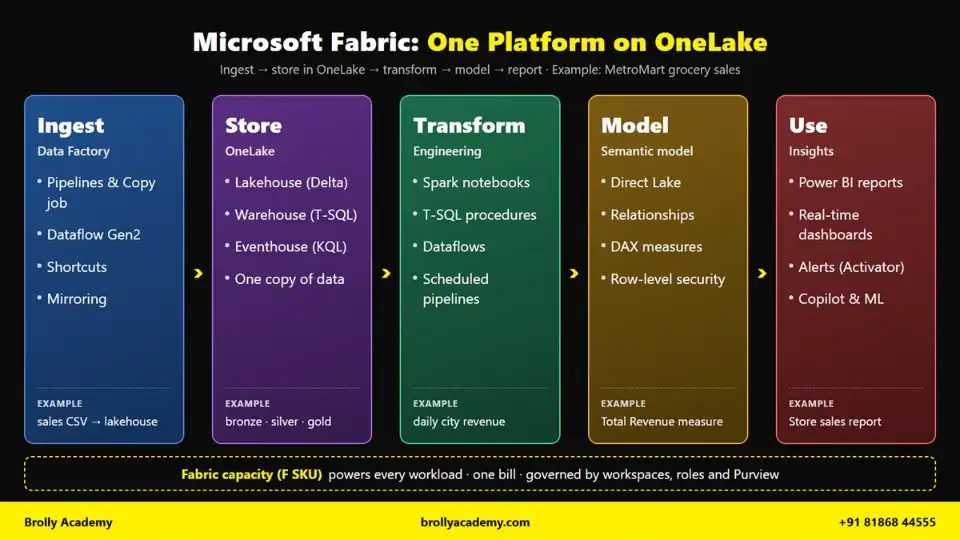
Microsoft Fabric architecture: ingest with Data Factory, store data once in OneLake, transform with notebooks and T-SQL, model with a Direct Lake semantic model and use it in Power BI, all powered by one Fabric capacity.
2. What is Microsoft Fabric?
Short answer: Microsoft Fabric is Microsoft's all-in-one, software-as-a-service (SaaS) analytics platform. It puts data integration, data engineering, data warehousing, data science, real-time analytics and Power BI in one browser-based product, and every workload stores its data in one shared lake called OneLake. You do not create servers or storage accounts. You create a workspace, add items such as a lakehouse or a notebook, and Fabric runs them on a shared pool of compute called a capacity.
Before Fabric, an Azure data project stitched together Data Factory, ADLS Gen2, Synapse or Databricks and Power BI, each with its own security, billing and copy of the data. Fabric joins them into one product. Three ideas make it different:
- SaaS, not PaaS. You never pick virtual machines, storage tiers or resource groups. You sign in at app.fabric.microsoft.com and start building.
- One copy of data. Spark, T-SQL, Power BI and KQL all read the same Delta Parquet files in OneLake.
- One capacity. A single capacity (for example an F64) powers every workload in the workspaces assigned to it.
What is Microsoft Fabric used for?
Five real jobs Fabric does in Indian companies today:
- Building a lakehouse for daily sales data. A retail or grocery chain lands store sales files every night, cleans them with Spark notebooks and builds bronze, silver and gold tables in OneLake.
- Replacing a patchwork of Azure services. A team running Azure Data Factory, ADLS Gen2, Synapse and Power BI moves to one Fabric workspace, so security, monitoring and cost sit in one place.
- Power BI on large data without imports. A Direct Lake semantic model reads Delta tables straight from OneLake. Reports stay fast without scheduled import refreshes of the full data.
- Real-time dashboards. A logistics or payments company streams events into an eventhouse, queries them with KQL and raises alerts within seconds.
- Bringing operational databases into analytics. Mirroring keeps a near real-time copy of an Azure SQL Database or Snowflake table in OneLake, so analysts query fresh data without writing a pipeline.
Who uses Microsoft Fabric?
For Power BI developers, Fabric is the most natural step into data engineering: you already know Power Query, DAX and workspaces.
Is Microsoft Fabric free?
Not fully, but you can learn it for free. You have three options:
- Fabric trial capacity. Free for 60 days. Microsoft's trial page says the trial is configured as either an F4 capacity (4 capacity units) or an F64 capacity (64 capacity units), and an eligible capacity admin can switch a 4-unit trial up to 64. It includes up to 1 TB of OneLake storage. Copilot, Fabric data agents and AI functions are not available on a trial capacity.
- Fabric (Free) license. A no-cost per-user license that lets you sign in and use items in workspaces on a trial or paid capacity. It gives you no compute by itself.
- Paid capacity (F SKUs). You buy a capacity in the Azure portal, from F2 (the smallest) upwards. Pay-as-you-go capacities can be paused when idle. Prices, CUs and throttling are covered later in this tutorial.
The trial is enough for every step in Tutorials 1 to 3.
Is Fabric replacing Synapse, Azure Data Factory or Power BI?
The balanced answer, based on what Microsoft has said:
- Azure Synapse Analytics. Microsoft has not announced a retirement date, and Synapse is still supported. But new investment goes into Fabric, and Microsoft provides a migration assistant for moving Synapse dedicated SQL pools to Fabric Data Warehouse. New projects usually start on Fabric; existing Synapse projects keep running.
- Azure Data Factory (ADF). ADF is not deprecated. Microsoft calls Data Factory in Fabric the next generation of ADF, and pipelines, parameters and expressions work almost the same, so ADF skills carry over.
- Power BI. Fabric does not replace Power BI. Power BI is a workload inside Fabric, and Fabric adds the data engineering layer underneath.
Is Microsoft Fabric easy to learn, and how long does it take?
The first steps are easy: you can load a CSV into a lakehouse in ten minutes with no code. The hard part is real-project engineering: incremental loads, Delta MERGE, capacity sizing, security and CI/CD.
Here is a reasoned estimate, not a statistic, for someone who knows basic SQL and studies 1 to 2 hours a day:
The estimate reflects how many new concepts each group must learn: Power BI developers need PySpark and pipelines, Azure engineers need Fabric's workspaces, capacity and Direct Lake, and freshers need all of it. If you plan to take the DP-700 exam later, our DP-700 syllabus guide maps each skill area to the topics in this tutorial.
3. Microsoft Fabric architecture and key concepts
Short answer: Fabric is organised as tenant → capacity → workspace → items. Your tenant gets one OneLake, which stores every table as Delta Parquet. Capacities provide the compute, workspaces group your work, and items (lakehouse, warehouse, pipeline, notebook, semantic model, report) are the things you build. Shortcuts and mirroring bring outside data into OneLake without classic ETL.
Tenant, capacity, workspace and items
- Tenant. Your organisation's Microsoft Entra ID directory. One tenant has exactly one OneLake.
- Capacity. A pool of compute measured in capacity units (CUs): a trial or a paid F SKU such as F2, F8 or F64. Every pipeline run, Spark session, SQL query and report refresh uses CUs.
- Workspace. A folder-like container where a team builds things, assigned to one capacity. Here you create ws-metromart-dev.
- Items. What you build: lakehouses, warehouses, pipelines, Dataflow Gen2, notebooks, eventhouses, semantic models, reports and more.
Think of it as company, power supply, project folder and files.
OneLake: the "OneDrive for data"
OneLake is one logical data lake for the whole tenant. It is built on Azure Data Lake Storage Gen2, but you never create a storage account; it comes automatically, like OneDrive with Microsoft 365. Each workspace is a top-level folder, and each lakehouse or warehouse is a folder inside it. Tools that speak ADLS, such as Azure Databricks or Azure Storage Explorer, can read OneLake paths too.
The OneLake catalog is where you discover and govern items across the tenant. Its Govern view is also where admins manage capacities and trials.
Delta Parquet: one format for every engine
Fabric stores tables in the open Delta Lake format: Parquet files plus a transaction log. A Spark notebook writes a Delta table, the SQL analytics endpoint reads it with T-SQL, a Direct Lake semantic model reads it for Power BI, and a warehouse joins to it with a cross-database query. No export, no import, no second copy. Fabric can also apply V-Order, a write-time Parquet optimisation that speeds up reads.
Shortcuts and mirroring
- Shortcuts are zero-copy pointers. A shortcut in your lakehouse points to another lakehouse, ADLS Gen2, Amazon S3, Google Cloud Storage or other supported locations, and Fabric reads the data in place.
- Mirroring is managed, continuous replication. You connect a supported database, such as Azure SQL Database, Azure Cosmos DB, Snowflake, Azure Databricks or SQL database in Fabric, and Fabric keeps a near real-time Delta copy in OneLake.
Use a shortcut when data is already in a lake. Use mirroring when it lives in an operational database.
Fabric workloads in 2026
These are the workload names Microsoft Learn uses in 2026:
A Fabric data engineer works mainly in the first three and knows enough of the rest to hand data over cleanly.
Lakehouse vs warehouse vs eventhouse vs SQL database
All four keep their data in OneLake, but they are built for different jobs:
Rule of thumb: Spark people start with a lakehouse, SQL people with a warehouse, streaming goes to an eventhouse, and apps go to a SQL database.
How the pieces fit together
Here is the full flow you build for MetroMart, an assumed Indian grocery chain:
SOURCES INGEST ONELAKE (one copy, Delta Parquet)
------- ------ ---------------------------------
Store CSV files ----> Pipeline (Copy activity) ----> lh_bronze (raw: bronze_sales, bronze_stores)
ADLS Gen2 / S3 ----> Shortcut (no copy) ----> |
Azure SQL / Snowflake --> Mirroring ----> v Notebooks (PySpark) + Dataflow Gen2
POS events ----> Eventstream ----> lh_silver (clean: silver_sales, silver_stores)
|
v Notebook (aggregate)
lh_gold (gold_daily_city_sales)
|
v wh_metromart (T-SQL star schema)
Semantic model sm_metromart_sales (Direct Lake)
|
v
Power BI reports and dashboards
Fabric capacity (trial or F SKU) provides the compute for every step above.
Data enters through pipelines, shortcuts, mirroring or eventstreams, lands in OneLake, gets cleaned by notebooks and dataflows, and reaches Power BI through a Direct Lake semantic model.
4. Set up Microsoft Fabric for free
Short answer: Sign in to app.fabric.microsoft.com with a work or school account, open the Account manager (your profile picture) and select Start trial to get a free 60-day Fabric trial capacity. Then create a workspace called ws-metromart-dev and set its workspace type to Fabric Trial. Personal Gmail or Outlook addresses can't sign up directly; Microsoft documents a route through a free Azure account and a Microsoft Entra ID user instead.
Account rules: which email works?
Fabric signs you in with Microsoft Entra ID, so it needs an organisational identity:
- Work or school account (recommended). If your company or college uses Microsoft 365, sign in with that email.
- No work account? Use the documented personal-email route. Create a free Azure account with your Gmail or Outlook address, create a new user in Microsoft Entra ID, then sign in to Fabric as that user and activate the trial. Azure may ask for a phone number and card for verification; Microsoft states you are not charged unless you upgrade. Follow Microsoft's guide to start a Fabric free trial with a personal email.
- No Start trial button? Your admin may have turned trials off, or your tenant has used up its trial limit. Ask the admin, or ask a colleague with a trial to add your workspace to it.
Start the Fabric trial
- Open app.fabric.microsoft.com and sign in.
- If this is your first visit, accept the prompt to get a Fabric (Free) license.
- Select your profile picture in the top-right corner to open the Account manager.
- Select Start trial (on some accounts it shows as Free trial).
- In Activate your 60-day free Fabric trial, check the Trial capacity region. Pick the region closest to your other Azure resources, for example Central India if offered. Moving workspaces between regions later is painful.
- Accept the terms and select Activate.
- When the confirmation appears, select Fabric Home Page. You are now the capacity administrator of your trial.
To check how many days you have left, open the Account manager again and look at Trial status, or go to OneLake catalog > Govern > Capacities > Trial. Microsoft's Fabric trial capacity page lists the full rules.
What happens when the trial ends?
- After 60 days, trial workspaces switch back to Power BI Pro, and non-Power BI items (lakehouses, notebooks, pipelines) become inactive.
- You get 7 days to assign the workspace to a paid F (or Power BI Premium P) capacity and keep everything. After that, Fabric items can be removed.
- A second trial is not guaranteed.
So export notebooks or connect the workspace to Git before day 60.
Create the ws-metromart-dev workspace
- In the left navigation pane, select Workspaces.
- At the bottom of the pane, select + New workspace.
- In Create a workspace, enter the name ws-metromart-dev and an optional description such as "MetroMart Fabric tutorial (dev)".
- Expand Advanced.
- Under Workspace type, select Fabric Trial. If you have a paid capacity, select the Fabric capacity type and pick your capacity instead.
- Select Apply.
If you leave the type on Pro, Lakehouse and Notebook won't appear in + New item. To fix an existing workspace, open Workspace settings > Workspace type > Edit.
Workspace roles
Every workspace has four roles. Add people through Manage access > Add people or groups at the top of the workspace.
Assign roles to Microsoft Entra security groups, not individuals, and keep separate dev, test and prod workspaces. Item permissions and OneLake security come later.
A quick tour of the Fabric portal
- Navigation pane (left). Home, Workspaces, OneLake (the OneLake catalog), Monitor, Real-Time (the Real-Time hub), Workloads and Create.
- Fabric and Power BI switcher (bottom-left). Switches between the Fabric view and the Power BI view. Stay in Fabric; tabbed multitasking only works there.
- + New item (inside a workspace). The main way to create a lakehouse, pipeline, notebook, Dataflow Gen2 or warehouse. You can search the list.
- Workloads. The Workload hub, with a landing page, samples and learning links per workload.
- OneLake catalog. Browse every item you can access. The Govern tab shows capacities and trials.
- Monitor. One place for pipeline runs, notebook runs and Dataflow Gen2 refreshes, with status and duration.
- Tabs and object explorer. Open items appear as tabs across the top (up to 20), and the object explorer shows all open workspaces as a tree.
Cost safety notes before you build
- Keep test data small. The MetroMart sample is a few kilobytes.
- Stop Spark sessions with Stop session when you finish; idle sessions hold compute until they time out.
- Schedule daily, not every 15 minutes, while practising.
- Pause a pay-as-you-go capacity in the Azure portal when you stop for the day. Storage is billed separately.
- Watch the Microsoft Fabric Capacity Metrics app on a paid capacity to see which items use the most CUs.
5. Tutorial 1: Create a lakehouse and load your first data
Short answer: In your workspace select + New item > Lakehouse, upload a CSV into the Files area, then right-click the file and choose Load to Tables to turn it into a Delta table. The table immediately appears under Tables and in the lakehouse's SQL analytics endpoint, where you can query it with T-SQL. In this tutorial you build the MetroMart bronze layer.
The MetroMart layout used in every tutorial
MetroMart uses three lakehouses, one per medallion layer, all in ws-metromart-dev:
Why not one lakehouse with bronze, silver and gold schemas? Separate lakehouses let you give each layer different permissions (analysts see only gold) and make every name self-explaining, for example lh_silver.dbo.silver_sales. Each lakehouse keeps Lakehouse schemas turned on (the 2026 default), so tables live in the dbo schema. For the theory behind the layers, read our guide to medallion architecture.
Step 1: Create the three lakehouses
- Open the workspace ws-metromart-dev.
- Select + New item, search for Lakehouse and select it.
- Enter the name lh_bronze. Names must start with a letter and use only letters, numbers and underscores, so lh-bronze will be rejected.
- Leave the Lakehouse schemas checkbox selected.
- Select Create. The lakehouse opens in the Explorer.
- Go back to the workspace and repeat for lh_silver and lh_gold.
Each lakehouse automatically gets a SQL analytics endpoint with the same name. Since September 2025, Fabric no longer creates a default semantic model with a lakehouse, so you create one yourself later.
Files vs Tables: the two areas of a lakehouse
- Tables is the managed area. Everything here is a Delta table, visible to Spark, the SQL analytics endpoint and Power BI. With schemas enabled, you see a dbo schema under it.
- Files is the unmanaged area for anything: CSV, JSON, Parquet, images. Files are not tables until you convert them, and the SQL analytics endpoint can't query them.
Raw files land in Files; anything you want to query lands in Tables.
Step 2: Create the sample CSV files
Create two files with Notepad or VS Code. The first is sales_2026-10-01.csv, deliberately dirty like real store data: a duplicate order, extra spaces, a lowercase city and a missing payment mode.
order_id,order_date,store_id,store_city,product_id,category,quantity,unit_price_inr,total_inr,payment_mode
MM100001,2026-10-01,S001,Hyderabad,P1001,Staples,2,95.00,190.00,UPI
MM100002,2026-10-01,S001,hyderabad ,P2003,Dairy,3,32.00,96.00,Cash
MM100003,2026-10-01,S002,Bengaluru,P3007,Snacks,5,20.00,100.00,Card
MM100004,2026-10-01,S003,Chennai,P1001,Staples,1,95.00,95.00,UPI
MM100005,2026-10-01,S002, Bengaluru,P4002,Beverages,2,45.00,90.00,
MM100006,2026-10-01,S004,Pune,P2003,Dairy,4,32.00,128.00,UPI
MM100006,2026-10-01,S004,Pune,P2003,Dairy,4,32.00,128.00,UPI
MM100007,2026-10-01,S003,Chennai,P5010,Personal Care,1,149.00,149.00,Card
The second file is stores.csv, the store master list:
store_id,store_name,city,state,opened_on
S001,MetroMart Kukatpally,Hyderabad,Telangana,2021-06-15
S002,MetroMart Whitefield,bengaluru,Karnataka,2022-01-10
S003,MetroMart Velachery,Chennai ,Tamil Nadu,2022-08-01
S004,MetroMart Hinjewadi,Pune,Maharashtra,2023-03-20
S004,MetroMart Hinjewadi,Pune,Maharashtra,2023-03-20
It also has a lowercase city, a trailing space and a duplicate store, which Dataflow Gen2 fixes in Tutorial 2.
Step 3: Upload the files into lh_bronze
- In lh_bronze, hover over Files, select the ... menu and choose New subfolder. Name it raw.
- Inside raw, create two more subfolders: sales and stores.
- Select the sales folder, select ... > Upload > Upload files, choose sales_2026-10-01.csv and select Upload.
- Upload stores.csv into the stores folder the same way.
- Create one more folder at Files/landing/sales and leave it empty. Tutorial 2's pipeline reads new daily files from here.
Step 4: Load to Tables
- Under Files > raw > sales, select ... next to sales_2026-10-01.csv.
- Select Load to Tables > New table.
- In Load file to new table, check the Schema dropdown shows dbo.
- Enter bronze_sales as the New table name. Use lowercase letters, numbers and underscores only.
- Keep Column header selected so the first row becomes column names.
- Keep Separator as a comma.
- Select Load.
- Repeat for stores.csv, with the new table name bronze_stores.
After a few seconds, Tables > dbo shows bronze_sales and bronze_stores. Preview bronze_sales: eight rows, including the duplicate MM100006. That is correct, because bronze keeps data as received.
Load to Tables writes Delta with V-Order applied, and it can also load a whole folder of CSV or Parquet files. But you can't set column names or data types in the dialog, so you cast every column properly in Tutorial 3.
Step 5: Query the table with the SQL analytics endpoint
1. In the lakehouse ribbon, use the dropdown at the top right (it shows Lakehouse) and switch to SQL analytics endpoint.
2. Select New SQL query.
3. Paste this query and select Run:
SELECT store_city,
COUNT(*) AS order_rows,
SUM(total_inr) AS revenue_inr
FROM dbo.bronze_sales
GROUP BY store_city
ORDER BY revenue_inr DESC;
You see "Hyderabad" and "hyderabad " as two cities, " Bengaluru" with a leading space, and two Pune rows because of the duplicate. This is why you need a silver layer.
The SQL analytics endpoint is read-only for table data. You can create views, functions and stored procedures in it, but you can't INSERT, UPDATE or DELETE rows; writes go through Spark, pipelines or dataflows.
Step 6 (optional): Add a shortcut to ADLS Gen2
If your company already keeps files in ADLS Gen2, point to them instead of copying. Skip this if you have no Azure storage account.
- In lh_bronze, select ... next to Files and choose New shortcut.
- Under External sources, select Azure Data Lake Storage Gen2.
- Enter the URL of the DFS endpoint, in the form https://<storage-account>.dfs.core.windows.net. The account must have hierarchical namespace enabled.
- Create a new connection. For practice, choose Organizational account as the Authentication kind. Your account needs a role such as Storage Blob Data Reader on the storage account.
- Select Next, tick the folder you want (for example metromart/archive), select Next, then Create.
The folder appears under Files with a shortcut icon, and no data was copied. For a folder of Delta tables, create the shortcut under Tables so they also appear in the SQL analytics endpoint.
Common errors
- "Lakehouse" is missing from + New item. The workspace is not on a Fabric capacity. Open Workspace settings > Workspace type, select Fabric Trial or your F capacity and apply.
- "Invalid table name" in Load to Tables. Use only lowercase letters, numbers and underscores. Bronze-Sales fails; bronze_sales works.
- Columns are named _c0, _c1, _c2. Column header was cleared. Delete the table and load again with it selected.
- The whole row lands in one column. The file uses a semicolon or tab. Set the correct Separator.
- The table doesn't appear in the SQL analytics endpoint. Metadata sync takes a few seconds, so refresh. If it is still missing, check the data is a Delta table under Tables; nothing under Files is visible to the endpoint.
6. Tutorial 2: Ingest data with a pipeline and Dataflow Gen2
Short answer: Use a pipeline with a Copy data activity to move files from a source into your lakehouse on a schedule, and use Dataflow Gen2 when you want to clean data visually with Power Query. In this tutorial a parameterised pipeline appends a new day's sales file into bronze_sales, and a Dataflow Gen2 cleans bronze_stores into silver_stores in lh_silver.
If you know Azure Data Factory, pipelines work almost the same: the same activities, parameters and expression language, but connections replace linked services and datasets. Our Azure Data Factory tutorial covers Lookup, ForEach and watermark patterns you can reuse here.
Part A: Prepare the next day's file
Create sales_2026-10-02.csv with these rows and upload it into lh_bronze > Files > landing > sales:
order_id,order_date,store_id,store_city,product_id,category,quantity,unit_price_inr,total_inr,payment_mode
MM100008,2026-10-02,S001,Hyderabad,P3007,Snacks,4,20.00,80.00,UPI
MM100009,2026-10-02,S002,Bengaluru,P1001,Staples,3,95.00,285.00,Card
MM100010,2026-10-02,S004,Pune,P4002,Beverages,6,45.00,270.00,UPI
MM100011,2026-10-02,S003,chennai,P2003,Dairy,2,32.00,64.00,Cash
MM100004,2026-10-02,S003,Chennai,P1001,Staples,2,95.00,190.00,UPI
The last row is a correction to yesterday's order MM100004. Your silver MERGE in Tutorial 3 updates it instead of duplicating it. In a real company the file would arrive in ADLS Gen2, SFTP or S3; only the source connection changes.
Part B: Build a parameterised Copy pipeline
- In ws-metromart-dev, select + New item, search for Pipeline and select it.
- Name it pl_ingest_sales and select Create.
- Select the empty canvas. In the properties pane below, open the Parameters tab and select + New. Name the parameter p_file_date, set Type to String and Default value to 2026-10-02.
- On the Home tab, select Pipeline activity > Copy data. A Copy data activity appears on the canvas.
- On the General tab, rename it Copy sales file. Set Retry to 1 so a short network glitch doesn't fail the run.
- On the Source tab, choose lh_bronze as the Connection (pick it from the OneLake list), then set Root folder to Files.
- Set File path type to File path. In the directory box enter landing/sales. Click in the file name box, select Add dynamic content and enter the expression shown below.
- Set File format to DelimitedText. Select Settings next to it and tick First row as header.
- On the Destination tab, choose lh_bronze again, set Root folder to Tables, select the existing table dbo.bronze_sales and set Table action to Append.
- On the Mapping tab, select Import schemas. Check that each source column maps to the same-named column in bronze_sales, and set the destination types to match the existing table.
- Select Save on the Home tab.
The file name expression:
@concat('sales_', pipeline().parameters.p_file_date, '.csv')
It resolves to sales_2026-10-02.csv. Pass 2026-10-03 tomorrow and the same pipeline loads the next file.
Part C: Run and monitor the pipeline
- On the Home tab, select Run. If prompted, select Save and run.
- The Pipeline run dialog shows p_file_date. Keep 2026-10-02 and select OK.
- Watch the Output tab under the canvas. The status moves from Queued to In progress to Succeeded.
- Open the run details for the activity to see rows read, rows written and duration.
- Open Monitor from the left pane. The run appears there too; this is where you look when a scheduled run fails at night.
Check the result in the lh_bronze SQL analytics endpoint:
SELECT order_date, COUNT(*) AS order_rows
FROM dbo.bronze_sales
GROUP BY order_date
ORDER BY order_date;
You should see 8 rows for 2026-10-01 and 5 for 2026-10-02: 13 rows, still dirty, which is fine for bronze.
To run it daily, select Schedule on the Home tab, choose Daily, set the time zone to (UTC+05:30) Chennai, Kolkata, Mumbai, New Delhi and pick 05:30. Tutorial 7 replaces this with one orchestration pipeline that passes today's date automatically.
Production notes: for on-premises sources such as SQL Server, install the on-premises data gateway and select it in the connection. Manage credentials once under Settings > Manage connections and gateways. And move processed files to an archive folder after a successful copy so they are never loaded twice.
Part D: Clean the stores table with Dataflow Gen2
Dataflow Gen2 is Power Query in the browser, writing results into a lakehouse or warehouse. Since April 2026, every new Dataflow Gen2 is created with Git and CI/CD support by default.
- In ws-metromart-dev, select + New item > Dataflow Gen2. Name it df_clean_stores and select Create.
- In the editor, select Get data > More, search for Lakehouse and select it. Sign in with your organisational account if asked.
- Browse to ws-metromart-dev > lh_bronze > Tables, tick bronze_stores and select Create.
- Rename the query to silver_stores in the Query settings pane on the right.
Apply the cleaning steps. Each one is added to Applied steps, as in Power BI Desktop:
- Select city. On the Transform tab, select Format > Trim, then Format > Capitalize Each Word.
- Apply Trim to store_name and state too.
- Select store_id, then on the Home tab select Remove rows > Remove duplicates.
- Set opened_on to Date with the type icon in the column header, and the other columns to Text.
- Check the preview: 4 clean rows.
Set the destination:
- At the bottom of Query settings, select Choose data destination > Lakehouse.
- Select ws-metromart-dev > lh_silver, choose New table and keep the name silver_stores in the dbo schema.
- Set the update method to Replace, because the small store master should be fully refreshed. Use Append for growing data such as transactions.
- Review the column mapping and select Save settings.
- Select Publish (bottom-right). When the spinner next to the dataflow disappears in the workspace, select Refresh now if the table hasn't loaded yet.
lh_silver now shows dbo.silver_stores with four clean rows. To refresh daily, select the Schedule refresh icon next to df_clean_stores in the workspace and set an IST time. Don't delete the hidden DataflowStaging items that the first dataflow creates; the engine needs them.
Pipeline vs Copy job vs Dataflow Gen2 vs notebook: which to use
Rule of thumb: copy with a pipeline or Copy job, clean small reference data with Dataflow Gen2, transform big or complex data with notebooks, and orchestrate everything with one pipeline. Copy job is the easiest for incremental loads, because it tracks the last successful run for you.
7. Tutorial 3: Transform data with notebooks (PySpark)
Short answer: Create a notebook, add your lakehouses in the Explorer and pin the one you write to as the default. Read bronze with spark.read.table, clean and join the data with PySpark, then write Delta tables with saveAsTable and keep them up to date with a Delta MERGE. In this tutorial nb_silver_sales builds silver_sales, and nb_gold_city_sales builds the daily city revenue table gold_daily_city_sales.
Step 1: Create the silver notebook and attach lakehouses
- In ws-metromart-dev, select + New item > Notebook.
- Rename it nb_silver_sales by selecting the name at the top left.
- Check the language at the top shows PySpark (Python).
- In the Explorer on the left, select Add data items (or Add lakehouse) > Existing data source, and add lh_silver. Then add lh_bronze too.
- Make lh_silver the default lakehouse. Hover over it and select Set as default lakehouse (the pin). If you change the default later, restart the session.
The default lakehouse decides where a short name like dbo.silver_sales resolves, and your writes go there. Reads from other lakehouses use lakehouse.schema.table, for example lh_bronze.dbo.bronze_sales.
Your first cell starts a Spark session on the starter pool. With default settings it usually starts in 5 to 10 seconds; extra libraries or a custom pool can add minutes.
Step 2: Read bronze and look at the data
Paste this into the first cell and select Run (or press Shift+Enter):
from pyspark.sql import functions as F
bronze_df = spark.read.table("lh_bronze.dbo.bronze_sales")
stores_df = spark.read.table("dbo.silver_stores") # lh_silver is the default lakehouse
print("Bronze rows:", bronze_df.count())
bronze_df.printSchema()
display(bronze_df)
You should see 13 rows. Check printSchema(): depending on how each file was loaded, columns may be strings, numbers or dates. Never trust bronze types; silver casts every column.
Step 3: Clean the sales data
This cell fixes types, trims and capitalises cities, fills missing payment modes and drops rows without keys:
clean_df = (
bronze_df
.withColumn("order_id", F.trim(F.col("order_id")))
.withColumn("order_date", F.to_date(F.col("order_date").cast("string"), "yyyy-MM-dd"))
.withColumn("store_city", F.initcap(F.trim(F.col("store_city"))))
.withColumn("quantity", F.col("quantity").cast("int"))
.withColumn("unit_price_inr", F.col("unit_price_inr").cast("decimal(10,2)"))
.withColumn("total_inr", F.col("total_inr").cast("decimal(12,2)"))
.withColumn("payment_mode", F.expr("coalesce(nullif(trim(payment_mode), ''), 'Unknown')"))
.filter(F.col("order_id").isNotNull() & F.col("order_date").isNotNull())
)
print("After cleaning:", clean_df.count())
Now remove duplicates. MM100006 is an exact duplicate, and MM100004 appears on two days because it was corrected. Keep only the latest version of each order with a window function:
from pyspark.sql.window import Window
w = Window.partitionBy("order_id").orderBy(F.col("order_date").desc())
dedup_df = (
clean_df
.withColumn("rn", F.row_number().over(w))
.filter(F.col("rn") == 1)
.drop("rn")
)
print("After dedup:", dedup_df.count()) # expect 11
You should get 11 orders, MM100001 to MM100011, each exactly once. The duplicate Pune row is gone, and MM100004 keeps only its corrected 2 October version.
Step 4: Join stores and shape the silver table
Add the store name and state from silver_stores, the table your Dataflow Gen2 created:
silver_df = (
dedup_df
.join(stores_df.select("store_id", "store_name", "state"), on="store_id", how="left")
.withColumn("ingested_at", F.current_timestamp())
.select("order_id", "order_date", "store_id", "store_name", "store_city", "state",
"product_id", "category", "quantity", "unit_price_inr", "total_inr",
"payment_mode", "ingested_at")
)
display(silver_df)
A left join means an order is never dropped just because a new store is missing from the master list; Step 8 checks for that.
Step 5: Write silver with saveAsTable, then MERGE on later runs
The first run creates the table. Later runs upsert: update changed orders and insert new ones in one atomic Delta MERGE. This cell handles both cases:
from delta.tables import DeltaTable
target_name = "dbo.silver_sales"
if not spark.catalog.tableExists(target_name):
silver_df.write.format("delta").mode("overwrite").saveAsTable(target_name)
print("Created", target_name)
else:
target = DeltaTable.forName(spark, target_name)
(target.alias("t")
.merge(silver_df.alias("s"), "t.order_id = s.order_id")
.whenMatchedUpdateAll()
.whenNotMatchedInsertAll()
.execute())
print("Merged into", target_name)
Run it and refresh lh_silver: dbo.silver_sales has 11 rows. Run it again and it still has 11, because MERGE matches on order_id. Running twice and getting the same result is called idempotency, a favourite interview topic. In a real daily job, read only new bronze rows (for example today's order_date) before the MERGE instead of all of bronze.
Step 6: Check silver with a Spark SQL cell
Start a cell with the %%sql magic to write Spark SQL in the same notebook:
%%sql
SELECT store_city,
state,
COUNT(*) AS orders,
SUM(total_inr) AS revenue_inr
FROM dbo.silver_sales
GROUP BY store_city, state
ORDER BY revenue_inr DESC;
Every city now appears once, with its state, unlike the bronze query in Tutorial 1. Run DESCRIBE HISTORY dbo.silver_sales in another %%sql cell to see the CREATE and MERGE operations Delta recorded.
Step 7: Build the gold table in a second notebook
MetroMart's managers want daily revenue by city. Keep gold in its own notebook so its default lakehouse is lh_gold.
1. Create a new notebook named nb_gold_city_sales.
2. Add lh_gold and lh_silver in the Explorer, and set lh_gold as the default lakehouse.
3. Paste and run this cell:
from pyspark.sql import functions as F
# Gold is read-heavy (Power BI), so write it with V-Order
spark.conf.set("spark.sql.parquet.vorder.default", "true")
silver = spark.read.table("lh_silver.dbo.silver_sales")
gold_df = (
silver
.groupBy("order_date", "store_city", "state")
.agg(F.countDistinct("order_id").alias("orders"),
F.sum("quantity").alias("items_sold"),
F.sum("total_inr").alias("revenue_inr"))
)
gold_df.write.format("delta").mode("overwrite").saveAsTable("dbo.gold_daily_city_sales")
display(gold_df.orderBy("order_date", F.desc("revenue_inr")))
For 1 October you should see Hyderabad 2 orders and 286.00, Bengaluru 2 orders and 190.00, Chennai 1 order and 149.00 (MM100004 now belongs to 2 October) and Pune 1 order and 128.00. Check small samples by hand; it is a habit that saves you in real projects.
Why the V-Order line? New Fabric workspaces turn V-Order off by default for Spark writes, because it slows writes slightly. That suits write-heavy bronze and silver. Gold is read by Power BI all day, so V-Order is worth it there. Overwriting gold is fine because it is small and fully derived from silver; for very large gold tables, overwrite only affected dates or MERGE.
Step 8: Add a quality check and return a result with notebookutils
notebookutils is Fabric's built-in helper library (the renamed mssparkutils, which still works but will be retired). Add two final cells to nb_silver_sales. The first fails the run if any order has no matching store:
silver = spark.read.table("dbo.silver_sales")
silver_rows = silver.count()
missing_store = silver.filter("store_name IS NULL").count()
if missing_store > 0:
raise ValueError(f"{missing_store} orders have no matching store in silver_stores")
print("Silver rows:", silver_rows)
The second cell returns the row count to whoever called the notebook:
notebookutils.notebook.exit(str(silver_rows))
Keep exit in its own last cell and never inside a try/except block. When a pipeline runs this notebook in Tutorial 7, it can read the exit value and decide what to do next. Two more helpers worth knowing: notebookutils.fs.ls() lists files, and notebookutils.credentials.getSecret() reads a secret from Azure Key Vault instead of hard-coding passwords.
Why not call the gold notebook from here with notebookutils.notebook.run? A referenced notebook must use the same default lakehouse as its parent, and nb_gold_city_sales deliberately uses lh_gold. So you chain the two notebooks with a pipeline instead.
Step 9: Schedule the notebook
- Open nb_silver_sales.
- On the Run tab of the ribbon, select Schedule.
- Turn the schedule on, choose Daily, set the time zone to (UTC+05:30) Chennai, Kolkata, Mumbai, New Delhi and pick 06:00, after the pipeline's 05:30 run.
- Select Apply.
Schedule nb_gold_city_sales the same way at 06:30. Scheduled runs appear in Monitor and run under the identity of whoever last updated the schedule, so that person needs access to every lakehouse involved. Separate time-based schedules can collide if one step runs late, so Tutorial 7 replaces them with one orchestration pipeline where each step starts only after the previous one succeeds.
Spark settings basics
- Starter pool. The default pool of warm, medium-size nodes, so sessions start in seconds. You are billed only while your session is active.
- Custom Spark pool. A workspace admin can set node size (Small to XX-Large) and autoscale limits. It takes a few minutes to start. X-Large and XX-Large aren't available on trial capacities.
- Environment. An item that holds Spark settings and libraries, shared by many notebooks so every run uses the same versions.
- High concurrency mode. Lets several notebooks share one Spark session, saving start-up time and capacity.
- Session timeout. Idle sessions expire after 20 minutes by default; select Stop session sooner.
- Capacity link. One capacity unit equals two Spark vCores, so a small capacity queues or throttles many heavy notebooks at once.
Most of these live under Workspace settings > Data Engineering/Science > Spark settings. Keep the defaults while you learn.
What you have built so far
This is the shape of real Fabric projects, only smaller. For more resume-worthy ideas, see our Azure data engineer projects. Next, you load this data into a warehouse with T-SQL and build a Direct Lake report on top.
8. Tutorial 4: Build a warehouse with T-SQL
Short answer: A Fabric warehouse is a SQL data store where you create tables and load, update and delete data with normal T-SQL. In this tutorial you create wh_metromart, build a dim_store and fact_sales star schema, load it from your lakehouse with cross-database queries and COPY INTO, and wrap the daily load in a stored procedure.
SQL developers like the warehouse for the gold layer because it gives full T-SQL: INSERT, UPDATE, DELETE, MERGE, stored procedures and transactions. Its tables are also stored as Delta Parquet in OneLake. You read from the lh_silver lakehouse built in Tutorial 3 (schemas enabled, tables under dbo).
Step 1: Create the warehouse
- Open Workspaces in the left navigation and select ws-metromart-dev.
- Select + New item, search for Warehouse and select it.
- Name it wh_metromart and select Create.
- When the warehouse opens, select New SQL query on the Home ribbon. You run every script below from a query tab.
Step 2: Create the dimension and fact tables
dim_store describes each store, and fact_sales holds one row per order line.
CREATE TABLE dbo.dim_store (
store_id VARCHAR(10) NOT NULL,
store_name VARCHAR(100) NULL,
city VARCHAR(50) NULL,
state VARCHAR(50) NULL,
opened_on DATE NULL
);
CREATE TABLE dbo.fact_sales (
order_id VARCHAR(20) NOT NULL,
order_date DATE NOT NULL,
store_id VARCHAR(10) NOT NULL,
product_id VARCHAR(20) NULL,
category VARCHAR(50) NULL,
quantity INT NULL,
unit_price_inr DECIMAL(10,2) NULL,
total_inr DECIMAL(12,2) NULL,
payment_mode VARCHAR(20) NULL
);
store_city is not in the fact table: in a star schema, descriptive columns live in the dimension. Fabric Warehouse allows primary, unique and foreign keys only with NOT ENFORCED. They are hints for the engine and do not block duplicates, so your load logic must prevent them.
-- Primary keys are metadata only in Fabric Warehouse: NOT ENFORCED is required
ALTER TABLE dbo.dim_store
ADD CONSTRAINT pk_dim_store
PRIMARY KEY NONCLUSTERED (store_id) NOT ENFORCED;
Step 3: Load from the lakehouse with cross-database queries
A warehouse can query other warehouses, lakehouse SQL analytics endpoints and mirrored databases in the same workspace with three-part names: item.schema.table. In the Explorer, select + Warehouses and add the SQL analytics endpoint of lh_silver, then run this script.
INSERT INTO dbo.dim_store (store_id, store_name, city, state, opened_on)
SELECT store_id, store_name, city, state, opened_on
FROM lh_silver.dbo.silver_stores;
INSERT INTO dbo.fact_sales
SELECT order_id, order_date, store_id, product_id, category,
quantity, unit_price_inr, total_inr, payment_mode
FROM lh_silver.dbo.silver_sales;
SELECT COUNT(*) AS store_rows FROM dbo.dim_store;
SELECT COUNT(*) AS sales_rows FROM dbo.fact_sales;
The counts should match the silver tables. If a count is low, the SQL analytics endpoint may not have picked up the latest Spark write yet; wait a minute or refresh the endpoint (Tutorial 7 does this inside a pipeline).
Step 4: Load raw files with COPY INTO
COPY INTO is the recommended T-SQL statement for fast file loads. In Fabric Warehouse it reads CSV, JSONL and Parquet from ADLS Gen2, Azure Blob Storage and OneLake. Here you load the raw CSVs from the Files area of lh_bronze into a staging table. For OneLake, the path must use IDs, not names: open lh_bronze and the browser URL shows the workspace ID after /groups/ and the lakehouse ID after /lakehouses/. Change Files/raw/sales to the folder where your sales files landed in Tutorial 2.
CREATE TABLE dbo.stg_sales (
order_id VARCHAR(20), order_date DATE, store_id VARCHAR(10),
store_city VARCHAR(50), product_id VARCHAR(20), category VARCHAR(50),
quantity INT, unit_price_inr DECIMAL(10,2), total_inr DECIMAL(12,2),
payment_mode VARCHAR(20)
);
COPY INTO dbo.stg_sales
FROM 'https://onelake.dfs.fabric.microsoft.com/<workspaceId>/<lakehouseId>/Files/raw/sales/*.csv'
WITH (FILE_TYPE = 'CSV', FIRSTROW = 2);
SELECT TOP 10 * FROM dbo.stg_sales;
FIRSTROW = 2 skips the header, and the file columns must be in table order. With your own identity, you need at least Contributor on both the source and the warehouse workspace. Use COPY INTO for big file loads, and INSERT…SELECT when the data is already a Delta table.
Step 5: Wrap the daily load in a stored procedure
A good load is idempotent: running it twice for the same day gives the same result. This procedure upserts stores with MERGE (generally available in Fabric Warehouse), then deletes and reloads one day of sales.
CREATE PROCEDURE dbo.usp_load_daily_sales @load_date DATE
AS
BEGIN
-- 1. Refresh the store dimension (small table, full upsert)
MERGE dbo.dim_store AS t
USING lh_silver.dbo.silver_stores AS s
ON t.store_id = s.store_id
WHEN MATCHED THEN UPDATE SET t.store_name = s.store_name, t.city = s.city,
t.state = s.state, t.opened_on = s.opened_on
WHEN NOT MATCHED THEN INSERT (store_id, store_name, city, state, opened_on)
VALUES (s.store_id, s.store_name, s.city, s.state, s.opened_on);
-- 2. Reload one day of sales so reruns never create duplicates
DELETE FROM dbo.fact_sales WHERE order_date = @load_date;
INSERT INTO dbo.fact_sales
SELECT order_id, order_date, store_id, product_id, category,
quantity, unit_price_inr, total_inr, payment_mode
FROM lh_silver.dbo.silver_sales WHERE order_date = @load_date;
END;
Test it for one day, then check the totals:
EXEC dbo.usp_load_daily_sales @load_date = '2026-10-20';
SELECT order_date, COUNT(*) AS orders, SUM(total_inr) AS revenue_inr
FROM dbo.fact_sales GROUP BY order_date ORDER BY order_date;
Run the EXEC twice. If the 20 October totals do not change, the load is safe to retry.
Step 6: Create a view for analysts
CREATE VIEW dbo.vw_city_daily_revenue
AS
SELECT f.order_date, d.city, d.state,
COUNT(DISTINCT f.order_id) AS orders,
SUM(f.total_inr) AS revenue_inr
FROM dbo.fact_sales AS f
JOIN dbo.dim_store AS d ON d.store_id = f.store_id
GROUP BY f.order_date, d.city, d.state;
Keep views for ad hoc SQL. For the Direct Lake model in Tutorial 5, use tables: Direct Lake on OneLake cannot use a non-materialized view, and Direct Lake on SQL falls back to slower DirectQuery on one.
Warehouse or lakehouse: which should you choose?
Most real projects use both: a lakehouse for bronze and silver, and a warehouse or gold lakehouse for serving.
9. Tutorial 5: Create a Direct Lake semantic model and Power BI report
Short answer: A Direct Lake semantic model reads Delta tables from OneLake straight into the Power BI engine, so you get Import-like speed without copying data on a refresh schedule. In this tutorial you create sm_metromart_sales on top of wh_metromart, add a relationship and three DAX measures, and build a report in the browser.
Import copies data into the model, DirectQuery sends every query to the source, and Direct Lake loads only the columns a visual needs from Parquet files in OneLake. Direct Lake needs a Fabric capacity (F SKU or trial).
Step 1: Create the semantic model
- Open wh_metromart from your workspace.
- Select New semantic model on the ribbon.
- In Direct Lake semantic model name, enter sm_metromart_sales.
- Expand dbo, then Tables, and tick dim_store and fact_sales. Do not tick the staging table or the view.
- If the dialog asks which Direct Lake type to use, choose Direct Lake on OneLake. Microsoft recommends it for new models.
- Select Confirm. The model appears in your workspace.
Step 2: Add the relationship
- Open sm_metromart_sales from the workspace and select Open data model. This opens web modeling in the browser.
- On the Home ribbon, select Manage relationships, then + New relationship.
- Set From table to dim_store (column store_id) and To table to fact_sales (column store_id).
- Set Cardinality to One to many (1:*) and Cross-filter direction to Single.
- Select Save, then Close.
The one side must have unique values; a duplicate store_id in dim_store makes Direct Lake queries fail.
Step 3: Add DAX measures
Select fact_sales, select New measure on the Home ribbon, type a formula and press Enter. Repeat for each measure.
Total Revenue = SUM ( fact_sales[total_inr] )
Orders = DISTINCTCOUNT ( fact_sales[order_id] )
Avg Order Value = DIVIDE ( [Total Revenue], [Orders] )
Revenue per Store = DIVIDE ( [Total Revenue], DISTINCTCOUNT ( fact_sales[store_id] ) )
DIVIDE returns blank instead of an error when there are no orders. In Properties, format the revenue measures as currency with the ₹ symbol.
Step 4: Build the report in the browser
- On the Home ribbon of the data model, select New report.
- Add a Card visual with Total Revenue, and a second card with Orders.
- Add a Clustered column chart: dim_store[city] on the axis and Total Revenue as the value.
- Add a Line chart: fact_sales[order_date] on the axis and Orders as the value.
- Add a Slicer on fact_sales[payment_mode] so managers can compare UPI, card and cash.
- Select File > Save and name the report rpt_metromart_sales.
To create Power BI items outside My workspace you need a Power BI Pro or PPU licence, or a Power BI individual trial. The Fabric trial includes a complementary individual trial if you have no PPU licence.
How Direct Lake refresh and framing work
A Direct Lake refresh does not copy data. It performs framing: the model reads the latest Delta log and points to the newest Parquet files, usually in seconds. Columns then load into memory only when a visual asks for them.
The setting Keep your Direct Lake data up to date is on by default, so the model reframes whenever the Delta tables change. Turn it off if users must not see half-loaded data while the nightly pipeline reloads a day, and refresh the model once at the end of the load instead.
DirectQuery fallback: Direct Lake on OneLake vs Direct Lake on SQL
- Direct Lake on OneLake reads Delta tables through OneLake and can combine tables from more than one Fabric item. It never falls back to DirectQuery. If a table breaks a capacity guardrail, the refresh fails until you optimise the table.
- Direct Lake on SQL discovers tables and checks permissions through the SQL analytics endpoint of one item. It falls back to DirectQuery when it cannot read a Delta table directly: for example, when the table is a SQL view, when the endpoint has SQL row-level security, object-level security or dynamic data masking, when the model has not been framed, or when a table exceeds the guardrails. The model property Direct Lake behavior controls this: Automatic (default, falls back silently), Direct Lake Only (queries fail instead) and DirectQuery Only.
Guardrails depend on the SKU: on F2 to F32 a table can have up to 300 million rows and 1,000 Parquet files; on F64, 1,500 million rows and 5,000 files. To see which tables fall back and why, run EVALUATE TABLETRAITS() in DAX query view. Microsoft's Direct Lake overview has the full comparison.
Can Copilot build the report for you?
Copilot in Power BI can draft report pages and summaries, and it consumes capacity units. It needs a paid F2 or higher (or P) capacity and does not run on trial capacities. For capacities in India, a Fabric admin must also allow cross-geo processing, because the Azure OpenAI service behind it runs in US and EU datacentres.
10. Tutorial 6: Real-time data with Eventstream and Eventhouse
Short answer: Real-Time Intelligence in Fabric captures streaming events with an eventstream, stores them in an eventhouse (a KQL database built for time-based data), and lets you query them with KQL in seconds. In this tutorial you stream simulated MetroMart point-of-sale (POS) events, run three KQL queries, build a Real-Time Dashboard and set an Activator alert.
Batch pipelines tell MetroMart what happened yesterday. Store operations also want to know what is happening now: which city is busy, and when a store suddenly goes quiet (often a billing-counter problem).
The eventstream Use sample data option offers Bicycles, Yellow Taxi, Stock Market, Buses, S&P 500 companies stocks and Semantic Model Logs, but no retail data. So you use a Custom endpoint source and a short Python script. For a zero-code warm-up, try the Stock Market sample in a test eventstream first.
Step 1: Create an eventhouse
- In ws-metromart-dev, select + New item and choose Eventhouse.
- Name it eh_metromart and select Create.
- Fabric creates a KQL database with the same name inside the eventhouse. Your streaming table will live there.
Step 2: Create an eventstream with a custom endpoint
- Select + New item > Eventstream, name it es_metromart_pos and select Create.
- On the get-started page, select Use custom endpoint.
- Enter a Source name such as pos-app and select Add.
- Select Publish.
- In Live view, select the source. In the Details pane, open the Event Hub tab, then SAS Key Authentication, and copy Connection string-primary key. Treat it like a password.
Step 3: Send simulated POS events
On your laptop, run pip install azure-eventhub, paste the connection string into this script and run it. It sends one event per second for about ten minutes. Use the store IDs from your stores.csv.
import json, random, time
from datetime import datetime, timezone
from azure.eventhub import EventHubProducerClient, EventData
CONN = "<paste Connection string-primary key here>"
cities = {"S001": "Hyderabad", "S002": "Bengaluru", "S003": "Chennai", "S004": "Pune"}
products = [("P101", "Staples", 450), ("P205", "Dairy", 60), ("P310", "Snacks", 30), ("P412", "Beverages", 95)]
producer = EventHubProducerClient.from_connection_string(CONN)
for i in range(600):
store_id = random.choice(list(cities))
pid, cat, price = random.choice(products)
qty = random.randint(1, 5)
event = {"event_time": datetime.now(timezone.utc).isoformat(), "order_id": f"POS{i:05d}",
"store_id": store_id, "store_city": cities[store_id], "product_id": pid,
"category": cat, "quantity": qty, "total_inr": qty * price,
"payment_mode": random.choice(["UPI", "Card", "Cash"])}
producer.send_batch([EventData(json.dumps(event))])
time.sleep(1)
producer.close()
Step 4: Route events into the eventhouse
- Switch the eventstream to Edit mode. Select Add destination (or the Transform events or add destination card) and choose Eventhouse.
- Select Direct ingestion. Enter a Destination name, pick ws-metromart-dev as Workspace and eh_metromart as Eventhouse, then select Save.
- Connect the destination to the stream if it is not connected, and select Publish.
- In Live view, select Configure on the eventhouse destination. The Get data screen opens.
- Select New table, name it pos_events and select Next.
- On Inspect the data, choose JSON as the format. Select Edit columns and make sure event_time is a datetime and total_inr and quantity are numbers. Select Apply, then Finish and Close.
Choose Event processing before ingestion instead if you want to filter or aggregate events in the eventstream first.
Step 5: Query the stream with KQL
Create a KQL Queryset with + New item, name it qs_metromart and connect it to the eh_metromart database. KQL starts with the table and pipes (|) it through filters and aggregations.
// Orders and revenue per city in the last hour
pos_events
| where event_time > ago(1h)
| summarize orders = count(), revenue_inr = sum(total_inr) by store_city
| order by orders desc
// Revenue per minute for the last 30 minutes
pos_events
| where event_time > ago(30m)
| summarize revenue_inr = sum(total_inr) by bin(event_time, 1m)
| render timechart
// Top 5 products by revenue in the last hour
pos_events
| where event_time > ago(1h)
| summarize units = sum(quantity), revenue_inr = sum(total_inr) by product_id, category
| top 5 by revenue_inr desc
bin() groups timestamps into fixed windows; you will use it in almost every real-time query.
Step 6: Build a Real-Time Dashboard and an Activator alert
1. Select + New item > Real-Time Dashboard and name it rtd_metromart_live.
2. Add a tile, choose eh_metromart as the data source and paste the revenue-per-minute query. Set the dashboard to auto refresh.
3. Add a second tile with the query below. It shows a column chart of orders per city in the last ten minutes.
pos_events
| where event_time > ago(10m)
| summarize orders = count() by store_city
| render columnchart
4. On the second tile, select Set alert from the tile toolbar or the More menu (...).
5. Give the rule a name. Under Monitor, keep the default check every 5 minutes.
6. Under Condition, choose On each event grouped by store_city, pick orders in When, and set the condition to less than 3.
7. Under Action, choose Send email or a Teams message to the store operations group.
8. Pick a save location and select Create. Fabric saves the rule in an Activator item.
Alerts are not supported on tables, maps or time charts, which is why the alert sits on the column chart. Activator can also run a pipeline, notebook or dataflow when a rule fires. When you finish, stop the script and deactivate or delete the eventstream, because a running eventstream keeps using capacity units.
11. Tutorial 7: Orchestrate, schedule and monitor
Short answer: In Fabric, a pipeline is the orchestrator: it runs your ingestion, dataflow, notebooks and stored procedure in order, retries failures and sends alerts. In this tutorial you replace the separate schedules from Tutorials 2 and 3 with one pipeline, pl_metromart_daily, schedule it at 6:00 AM IST, send failure alerts through Office 365 Outlook or Teams, and track runs in the Monitor hub and the Capacity Metrics app.
Separate schedules at 05:30, 06:00 and 06:30 only work while every job finishes on time. If ingestion runs late, the notebook processes yesterday's half-loaded data. One orchestration pipeline starts each step only when the previous step succeeds.
Step 1: Chain ingestion, dataflow, notebooks and stored procedure
1. In ws-metromart-dev, select + New item > Pipeline and name it pl_metromart_daily.
2. From the Activities tab, add an Invoke pipeline activity that calls pl_ingest_sales from Tutorial 2. Pass its p_file_date parameter with the date expression below.
3. Add a Dataflow activity that runs df_clean_stores, and connect the green On success handle from the ingestion step to it.
4. Add a Notebook activity for nb_silver_sales, then another for nb_gold_city_sales, each connected On success.
5. Add a Refresh SQL analytics endpoint activity pointed at lh_silver, so the warehouse sees the Delta rows Spark has just written.
6. Add a Stored procedure activity at the end. In Settings, choose wh_metromart, select dbo.usp_load_daily_sales, select Import to load its parameter, and set load_date with the same date expression.
p_file_date and load_date (yesterday in IST):
@formatDateTime(addDays(convertFromUtc(utcNow(), 'India Standard Time'), -1), 'yyyy-MM-dd')
Email subject (Outlook activity):
MetroMart daily load failed: @{pipeline().PipelineName} (run @{pipeline().RunId})
The date expression returns yesterday's date in IST, so a 6:00 AM run on 21 October loads 20 October. If pl_ingest_sales expects another date format, change the format string. Select Save, then Run to test the chain, and then turn off the old schedules on pl_ingest_sales, df_clean_stores and the two notebooks so nothing runs twice.
Step 2: Add retries and timeouts
On the General tab of the notebook and stored procedure activities, set Retry to 2 and Retry interval (sec) to 120. Lower Timeout from the default 12 hours to something realistic, such as 0.01:00:00 (one hour), so a stuck job fails loudly instead of burning capacity all night. Retries are safe here because every step is idempotent.
Step 3: Send failure alerts to Outlook or Teams
- From Activities, search for Office 365 Outlook and add it to the canvas.
- Drag the red On fail handle from the nb_silver_sales activity to the Outlook activity.
- In Settings, create or pick a connection, then fill in To, Subject and Body. Use the subject expression shown above, and add @{activity('nb_silver_sales').error.message} to the body (use your activity's exact name).
- For a channel message instead of an email, add the Teams activity, which posts to a Teams channel or group chat.
If several activities connect to one Outlook activity with "on fail", all of them must fail before it fires, so use one alert per step you watch. Email connections are personal by default, so many teams build one small "send email" pipeline and call it from others with the Invoke pipeline activity.
Step 4: Schedule the pipeline in IST
- On the Home tab, select Schedule, then Add Schedule.
- Choose a fixed daily schedule at 06:00.
- Set the time zone to (UTC+05:30) Chennai, Kolkata, Mumbai, New Delhi.
- Set a start date and an end date. Fabric needs both; for a long-running job, pick an end date far in the future.
- Under Failure notifications, add yourself or a group. Fabric then emails them when a scheduled run fails (on-demand runs do not send these).
- Select Save.
To start the load when a file lands instead, use Trigger on the Home ribbon to create an event-based trigger on OneLake or Azure Blob Storage events.
Step 5: Watch runs in the Monitor hub
Select Monitor in the left navigation to see runs of pipelines, notebooks, dataflows and other jobs you have permission to see. Microsoft labels the redesigned Monitor hub as preview in October 2026.
- Filter by item type and status to find failed runs quickly.
- Open a pipeline run to see each activity's duration, input, output and error.
- For a failed pipeline run, you can start a read-only Operations agent (preview) investigation that suggests likely root causes.
Step 6: Read the Capacity Metrics app
Your capacity admin can install the Microsoft Fabric Capacity Metrics app. On its Compute page, check Utilization (which items use the most capacity units, split into interactive and background work), Throttling (whether usage crossed the limits explained in the pricing section) and Overages (how much future capacity you have borrowed). "I found one notebook using most of our CUs" is a far stronger interview answer than "the capacity was slow".
12. Shortcuts, mirroring and OneLake integration
Short answer: Shortcuts let OneLake point to data in another place (another lakehouse, ADLS Gen2, Amazon S3, Google Cloud Storage and more) without copying it. Mirroring continuously replicates an operational database such as Azure SQL Database, SQL Server, Snowflake or Oracle into Delta tables in OneLake. Use a shortcut when the data is already in a lake format, mirroring when it lives in a database, and a copy only when you must reshape or freeze it.
OneLake shortcuts
A shortcut behaves like a symbolic link: it appears as a folder, and Spark, SQL, Real-Time Intelligence and Power BI read through it. Deleting the shortcut leaves the target untouched, but deleting a file inside it (with write permission) deletes it at the source too. Targets include:
- Internal OneLake items: lakehouses, warehouses, KQL databases, mirrored databases, SQL databases and semantic models, in the same or another workspace.
- External sources: Azure Data Lake Storage Gen2, Azure Blob Storage, Amazon S3, S3-compatible storage, Google Cloud Storage, Dataverse, OneDrive and SharePoint, and Iceberg tables.
- On-premises or network-restricted storage, through the on-premises data gateway.
To create one for MetroMart's loyalty team, who keep member data in ADLS Gen2:
- Open lh_bronze, select the ... next to Tables (for Delta data) or Files (for any format), and choose New shortcut.
- Select Azure Data Lake Storage Gen2, enter the dfs URL of the storage account and create or choose a connection.
- Browse to the folder, select it and select Create.
In Tables, shortcuts sit only at the top level and Delta folders are recognised as tables; in Files, they can go anywhere. For S3, Google Cloud Storage and gateway shortcuts, turn on caching in Workspace settings > OneLake to cut cross-cloud egress cost.
Mirroring
Mirroring creates a mirrored database item that keeps a near real-time Delta copy of your source in OneLake, plus a SQL analytics endpoint you can query or use in a semantic model. Fabric offers three types: database mirroring (replicates data), metadata mirroring (syncs catalog metadata and reads the data through shortcuts, as with Azure Databricks Unity Catalog) and open mirroring (your own app writes change data into a landing zone through public APIs).
Sources listed by Microsoft in October 2026 include Azure SQL Database, Azure SQL Managed Instance, SQL Server, Azure Cosmos DB, Azure Database for PostgreSQL, Oracle, SAP, Snowflake, Google BigQuery and Azure Databricks (metadata). Azure Database for MySQL, SharePoint List and Dremio are in preview. SQL database in Fabric mirrors itself automatically.
Replication compute is free and does not use your CUs, and mirroring storage is free up to 1 TB per CU you buy (64 TB on an F64). Querying mirrored data with SQL, Spark or Power BI uses CUs as normal, and replication stops while the capacity is paused.
OneLake file explorer
OneLake file explorer is a Windows app that shows your workspaces and items as folders in Windows File Explorer. Drag a new sales_2026-10-21.csv into the Files folder of lh_bronze, and it syncs to OneLake.
Copy, shortcut or mirror: how to decide
13. Security and governance in Fabric
Short answer: Fabric security works on two planes. Workspace roles and item permissions control what people can do (create, edit, share), while OneLake security, SQL row-level security and semantic model roles control which data they can see. Governance features such as domains, endorsement, lineage and Microsoft Purview sensitivity labels help large teams find, trust and protect data.
Workspace roles
Assign roles to Microsoft Entra security groups, not individuals, so joiners and leavers change one group.
Item permissions
Sharing a single warehouse, lakehouse or semantic model gives access to that item only. Item permissions include Read (see metadata and connect), ReadData (query through SQL), ReadAll (read files through OneLake and Spark), Write, and Build on semantic models (create reports). For example, give regional analysts Build on sm_metromart_sales so they can make their own reports.
OneLake security (data access roles)
OneLake security lets workspace Admins and Members define roles on an item that grant Read or ReadWrite access to specific schemas, tables or folders, with optional row-level and column-level rules. Fabric enforces them across its engines. They affect Viewers and users with item Read permission; Admins, Members and Contributors already see all data. Every lakehouse starts with a DefaultReader role that lets anyone with ReadAll read everything, so edit or remove it before you add narrower roles.
Row-level security in the warehouse and the semantic model
In the warehouse, row-level security uses a predicate function and a security policy. This example assumes a small table dbo.store_access (user_email, store_id) that maps managers to stores.
CREATE SCHEMA sec;
GO
CREATE FUNCTION sec.fn_store_filter(@store_id AS VARCHAR(10))
RETURNS TABLE
WITH SCHEMABINDING
AS
RETURN SELECT 1 AS allowed
FROM dbo.store_access AS a
WHERE a.store_id = @store_id AND a.user_email = USER_NAME();
GO
CREATE SECURITY POLICY sec.store_policy
ADD FILTER PREDICATE sec.fn_store_filter(store_id) ON dbo.fact_sales,
ADD FILTER PREDICATE sec.fn_store_filter(store_id) ON dbo.dim_store
WITH (STATE = ON);
Security policies apply to everyone, including workspace admins. Add rows to store_access for the identity that runs your nightly load, or the stored procedure will see and reload only part of the data.
There is a Power BI catch. SQL row-level security pushes a Direct Lake on SQL model into slower DirectQuery fallback, and a Direct Lake on OneLake model does not apply SQL row-level security at all. For Power BI users, define roles in the semantic model too: open the data model, select Manage roles, and add a DAX filter.
Role name: Hyderabad managers
Table: dim_store
DAX filter: [city] = "Hyderabad"
Members: the Hyderabad managers security group
Sensitivity labels, Purview and domains
- Sensitivity labels from Microsoft Purview Information Protection mark items as Public, Confidential and so on, and the label can travel with data exported to Excel or PDF. Information protection needs Purview licensing in addition to Fabric.
- Microsoft Purview adds audit logs, data loss prevention policies and estate-wide cataloguing; Purview Audit records user activity on Fabric items.
- Domains group workspaces by business area, such as Sales, Supply Chain and Finance at MetroMart. Users can filter the OneLake catalog by domain, and Fabric admins can delegate some settings to domain admins.
- Endorsement (Promoted or Certified) tells users which semantic models and tables they can trust.
- Lineage view and impact analysis show what breaks downstream before you change a table.
Admins find most of these under OneLake catalog > Govern in the Fabric portal.
14. Fabric capacity and pricing explained
Short answer: You pay for Fabric mainly through a capacity, measured in capacity units (CUs), that every workload in the attached workspaces shares. F SKUs range from F2 (2 CUs) upwards, are billed per second on pay-as-you-go or at about 41% less with a one-year reservation, and can be paused when not in use. OneLake storage is billed separately.
What a capacity unit means
A capacity is a pool of compute. Pipelines, notebooks, warehouse queries, eventstreams and Power BI reports all draw CUs from it. The SKU name gives its size: F2 has 2 CUs, F64 has 64.
F SKU prices (Central India, October 2026)
The prices below come from the Azure Retail Prices API for the Central India region in October 2026: $0.20 per CU-hour on pay-as-you-go and $1,042 per CU per year on a one-year reservation. Monthly figures assume 730 hours. INR values are approximate, at about ₹88 to the US dollar; your Azure invoice in INR may differ.
Prices vary by region (East US is $0.18 per CU-hour). OneLake hot storage in Central India is about $0.025 per GB per month. Confirm current numbers on the Azure pricing calculator before quoting them.
Pay-as-you-go vs reservation
- Pay-as-you-go bills per second with a one-minute minimum and no commitment, and you can pause or resize it. It suits learning, development and spiky workloads.
- Reservation commits you for one or three years and saves about 41%. It suits an always-on production capacity. The discount does not apply to capacity overage or Autoscale Billing for Spark.
Power BI licensing with F SKUs
On F SKUs smaller than F64, every user who views Power BI content needs a Power BI Pro or PPU licence (or an individual trial). On F64 and larger, users with only a free Fabric licence and the Viewer role can view it. Report creators still need Pro or PPU on any SKU. See Microsoft's Fabric licences and capacity guide. So for 400 store managers, compare F64 against a smaller SKU plus 400 Pro licences before you choose.
Bursting, smoothing and throttling
Fabric lets a job burst above your SKU size so it finishes fast, then smooths the cost over time. Interactive operations (like report queries) are smoothed over at least 5 minutes, and background operations (pipelines, notebooks, warehouse loads) over 24 hours. Throttling starts only when you have used up future capacity:
Real-Time Intelligence skips the 20-second delay stage, and jobs that are already running are never stopped by throttling.
Pause and resume
Pause and resume an F SKU from its resource in the Azure portal. While paused, compute billing stops, content is unavailable and mirroring stops. Pausing bills any smoothed usage still pending, and a resumed capacity starts with zero carry-forward, so it can also clear throttling in an emergency.
Cost tips that work
- Learn on the trial, practise on a pay-as-you-go F2, and pause it when you log off.
- Keep dev and production on separate capacities.
- Load incrementally and run OPTIMIZE on busy Delta tables.
- Stop eventstreams when you are not testing.
- Fix the top consumers in the Capacity Metrics app before buying a bigger SKU.
15. Git integration and deployment pipelines (CI/CD)
Short answer: Fabric CI/CD has two built-in parts. Git integration connects a workspace to a branch in Azure DevOps or GitHub so every item definition is version-controlled, and deployment pipelines promote content from a dev workspace to test and production with rules for each stage. For automation, you use the Fabric REST APIs, the Fabric CLI or the open-source fabric-cicd Python library.
Connect your workspace to Git
- Create an empty repository in Azure DevOps or GitHub (cloud-hosted; GitHub Enterprise cloud also works).
- In ws-metromart-dev, open Workspace settings > Git integration. Only a workspace Admin can do this.
- Choose the provider, sign in, and select the organisation or account, repository, branch (for example main) and an optional folder.
- Select Connect and sync. Fabric writes each supported item as a folder of text files.
- From now on, the Source control panel shows changed items. Select Commit to push your changes, and Update to pull changes others have merged.
Git stores item definitions, not data: notebooks, pipelines, dataflows, lakehouse and warehouse definitions, reports and semantic models go in as code and metadata, but the rows in your Delta tables do not. Reports and semantic models are still marked preview for Git integration.
Work in feature branches
Do not let five engineers edit one dev workspace at once. Use Branch out in the Source control panel to create a branch and a matching personal workspace, build there, raise a pull request into main, and let the shared dev workspace update after review.
Deployment pipelines: dev to test to production
- Select Deployment pipelines (from Workspaces or the Fabric home) and create dp-metromart.
- Keep the default three stages, Development, Test and Production. You can have between two and ten stages.
- Assign ws-metromart-dev, ws-metromart-test and ws-metromart-prod to the stages.
- Compare stages, select the items that changed and select Deploy.
- Add deployment rules so items in test and production point to the right data sources, for example a different database connection or parameter value per stage.
Fabric pairs items across stages; paired items are overwritten on deploy, and unpaired items are copied as new. One Direct Lake detail worth remembering: deployment rules can rebind the data source of a Direct Lake on SQL model, but not of a Direct Lake on OneLake model.
Variable libraries
A Variable library item stores values such as a lakehouse ID, a connection or a file path, with a different value set per deployment stage. Items read the variable instead of a hard-coded value, which removes many "change it after deploy" steps.
Automate with REST APIs, the Fabric CLI and fabric-cicd
Everything in the portal is backed by the Fabric REST APIs. On top of them sit the open-source Fabric CLI (fab), a Terraform provider for workspaces and capacities, and fabric-cicd, a Python library that deploys item definitions from a repository. A common pattern: Git integration for development, then Azure DevOps or GitHub Actions running fabric-cicd with a service principal to deploy to test and production.
16. Best practices and common mistakes
Short answer: Good Fabric projects keep one copy of data in OneLake, separate dev from production, load incrementally, put security in the right layer and watch capacity usage from day one. Most beginner problems come from skipping these habits, not from missing features.
Twelve habits that make Fabric projects easier to run:
- Name things consistently: lh_, wh_, pl_, nb_, sm_ prefixes.
- Use medallion layers on purpose: raw in bronze, clean in silver, business-ready in gold.
- Load incrementally with watermarks, MERGE or day-level delete-and-insert.
- Make every step idempotent so a retry never duplicates rows.
- Try shortcuts and mirroring before copying data.
- Keep Delta tables healthy with OPTIMIZE and VACUUM; avoid thousands of tiny files.
- Prefer Direct Lake on OneLake for new semantic models, built on tables, not views.
- Separate workspaces and capacities for dev, test and production.
- Connect dev to Git from day one and never edit production by hand.
- Assign roles to security groups and put data-level rules in the right layer.
- Add retries, timeouts and failure alerts to every scheduled pipeline.
- Review the Capacity Metrics app weekly.
8 mistakes beginners make
- Leaving a pay-as-you-go capacity running all weekend. Pause it.
- Expecting the lakehouse SQL analytics endpoint to accept INSERT or UPDATE. It is read-only.
- Querying the endpoint right after a Spark write and getting old results. Refresh the endpoint in the pipeline.
- Building semantic model tables on SQL views, causing DirectQuery fallback or failed Direct Lake on OneLake models.
- Treating NOT ENFORCED primary keys as real constraints. They do not stop duplicates.
- Forgetting the DefaultReader role, so everyone with ReadAll still sees all data.
- Choosing F32 for 300 report viewers without counting the Pro licences they now need.
- Committing secrets such as connection strings to Git. Use connections, workspace identity and Azure Key Vault.
17. Microsoft Fabric vs Databricks vs Azure Synapse vs Azure Data Factory
Short answer: Microsoft Fabric is an all-in-one SaaS analytics platform built on OneLake and billed by capacity. Azure Databricks is a Spark-first data and AI platform with deeper engineering and ML control. Azure Synapse Analytics is the older PaaS analytics service that Microsoft now steers new work away from in favour of Fabric. Azure Data Factory remains a supported PaaS integration service whose next generation is Data Factory in Fabric.
Fabric vs Databricks
Both store Delta tables and run Spark. Fabric is one SaaS experience with Power BI, warehouse, real-time analytics and OneLake built in, priced as a shared capacity. Databricks gives finer cluster control, Unity Catalog governance, strong ML tooling and a mature engineering workflow, priced per compute usage. Many companies use both, with Fabric reading Databricks data through mirrored Azure Databricks catalogs or shortcuts. Our Databricks tutorial builds the same medallion ideas there.
Fabric vs Azure Synapse
Synapse combines dedicated SQL pools, serverless SQL, Spark pools and pipelines in an Azure workspace you size and manage. Fabric takes these ideas to SaaS on one lake and one capacity. Microsoft has not announced a retirement date for Synapse as a whole, but its product page now leads with migration to Fabric, and the Fabric Migration Assistant moves dedicated SQL pool workloads into a Fabric warehouse. New projects should start on Fabric; existing estates usually migrate gradually.
Fabric vs Azure Data Factory
ADF is still supported and widely used. Fabric Data Factory reuses its pipeline model, activities and expression language, adds Dataflow Gen2 and Copy job, and bills through your capacity. Our Azure Data Factory tutorial shows how your ADF skills carry over.
18. Practice exercises, 30-day plan and certifications
Short answer: Practise by extending the MetroMart project with eight small exercises, follow a four-week plan of about an hour a day, and then decide between DP-700 (Fabric Data Engineer) and DP-600 (Fabric Analytics Engineer) based on whether you prefer pipelines and Spark or semantic models and DAX.
8 practice exercises
- Add a product dimension. Create products.csv, load it to the lakehouse, build dim_product in wh_metromart and relate it in sm_metromart_sales.
- Make the load incremental. Store the last loaded order_date in a control table and load only newer days.
- Handle late data. Send a sales file for an older date and prove the stored procedure reloads that day correctly.
- Add a data quality check. Fail the pipeline with a Fail activity if any total_inr is negative or store_id is missing.
- Create an ADLS Gen2 shortcut to a folder of promotions and join it to sales in a notebook.
- Secure the report. Add semantic model roles for two cities and test them with View as.
- Extend the real-time demo. Add a KQL query that flags any store with zero orders in the last 15 minutes, and alert on it.
- Set up CI/CD. Connect the dev workspace to Git, create a test workspace and deploy with a deployment pipeline.
30-day learning plan
Write down every error you hit and how you fixed it; that list becomes your interview preparation.
DP-700: Fabric Data Engineer Associate
Exam DP-700, "Implementing Data Engineering Solutions Using Microsoft Fabric", leads to the Microsoft Certified: Fabric Data Engineer Associate credential. Its skills measured (updated 19 October 2026) have three equal areas of 30 to 35% each: implement and manage an analytics solution, ingest and transform data, and monitor and optimize an analytics solution. It expects SQL, PySpark and KQL. Start with our DP-700 syllabus guide, then test yourself with our DP-700 practice questions.
DP-600: Fabric Analytics Engineer Associate
Exam DP-600, "Implementing Analytics Solutions Using Microsoft Fabric", leads to the Microsoft Certified: Fabric Analytics Engineer Associate credential. It weights prepare data at 45 to 50%, with maintain a data analytics solution and implement and manage semantic models at 25 to 30% each, and it expects SQL, KQL and DAX. Tutorials 4 and 5 are your core practice for it. If you are unsure which exam fits your role, read our comparison of DP-600 vs DP-700.
Both exams have 100 minutes, need a score of 700 to pass, and are renewed every year with a free online assessment on Microsoft Learn.
19. Microsoft Fabric interview questions from this tutorial
Short answer: Fabric interviews in 2026 are scenario-based. Expect questions on choosing between lakehouse and warehouse, shortcuts vs copies, Direct Lake fallback, capacity throttling, medallion design, incremental loads, CI/CD and security, each answered with a reason and a trade-off.
Q1. A SQL-heavy team and a PySpark-heavy team share one project. Lakehouse or warehouse?
Use both. The PySpark team lands and cleans data in lakehouses (bronze and silver), and the SQL team builds the gold star schema in a warehouse with stored procedures and MERGE, reading silver through cross-database three-part names instead of extra pipelines.
Q2. Your partner team already keeps Delta tables in ADLS Gen2. Do you copy them into Fabric?
No, create a OneLake shortcut in the Tables area of the lakehouse. The data stays where it is, is always current, and Spark, SQL and Direct Lake can read it. I would copy only if I needed to reshape the data, keep point-in-time snapshots, or if the source was not in a lake format.
Q3. A Direct Lake report suddenly became slow after someone added row-level security in the warehouse. Why?
The model is probably Direct Lake on SQL. SQL row-level security forces its queries to fall back to DirectQuery, which is slower. I would confirm with EVALUATE TABLETRAITS(), then move the security into semantic model roles (or OneLake security) and consider Direct Lake on OneLake, which never falls back. Setting Direct Lake behavior to Direct Lake Only in development catches this early.
Q4. Users get "capacity limit exceeded" errors every morning at 9 AM. What do you check?
I open the Capacity Metrics app, check the throttling and overage charts around 9 AM and find the heaviest operations, often a badly designed notebook or refresh whose smoothed usage overlaps with morning report traffic. Short term, I scale up temporarily or pause and resume to clear carry-forward; long term, I optimise the job or move dev work to a separate capacity.
Q5. How do you implement medallion architecture in Fabric?
Bronze keeps raw data as received, silver holds cleaned, deduplicated and typed tables, and gold holds business-ready aggregates or a star schema. In this tutorial that is lh_bronze, lh_silver and lh_gold plus wh_metromart, feeding a Direct Lake model, with one pipeline running the layers in order.
Q6. How do you make the daily sales load incremental and safe to rerun?
I track a watermark, such as the last loaded order_date, and process only newer data. In the warehouse I delete and reload the affected day inside a stored procedure, or use MERGE on a business key, so a rerun gives the same result. In the lakehouse I use Delta MERGE. Late-arriving rows simply cause their day to be reloaded.
Q7. How would you move MetroMart's Fabric work from dev to production?
I connect the dev workspace to a Git branch in Azure DevOps or GitHub, use feature branches and pull requests, and promote reviewed content through a deployment pipeline with Development, Test and Production stages. Deployment rules and a variable library switch connections and IDs per stage. For full automation, I run fabric-cicd or the Fabric CLI from Azure Pipelines or GitHub Actions with a service principal.
Q8. A regional manager should see only Hyderabad sales in the report and in SQL. How do you secure it?
I give the manager the Viewer role or item access only, never Contributor, because Contributors bypass OneLake security roles. For Power BI I add a semantic model role that filters dim_store to Hyderabad. For direct SQL access I add warehouse row-level security with a predicate function and security policy, or OneLake security roles with row filters on the lakehouse. I also apply a Confidential sensitivity label and assign access through security groups.
20. How Brolly Academy helps
Short answer: We teach Microsoft Fabric hands-on, from your first lakehouse to production pipelines and Power BI reports, with real-time projects and DP-700 preparation.
- Microsoft Fabric Training in Hyderabad: lakehouse, warehouse, Data Factory, notebooks and Power BI on Microsoft Fabric with hands-on projects.
- Azure Data Engineer Training in Hyderabad: ADF, Databricks, PySpark, SQL, Synapse and Fabric in 2–2.5 months, from ₹9,999.
- Databricks Course: Spark, Delta Lake and Unity Catalog, the skills that sit right next to Fabric in most Azure teams.
- DP-700 exam preparation with practice questions, mock interviews and resume reviews.
- Classroom, online and hybrid batches in English and Telugu, with a free demo.
- Explore all courses at Brolly Academy.
Learn Microsoft Fabric hands-on with a trainer
Our Microsoft Fabric course in Hyderabad takes you from your first lakehouse to pipelines, notebooks, warehouses and Direct Lake reports, with real-time projects, DP-700 preparation, mock interviews and resume reviews, taught by Dinesh (9+ years). Book a free demo and see the syllabus.
Frequently asked questions
What is Microsoft Fabric in simple words?
Microsoft Fabric is one cloud platform where you can bring in data, store it, clean it, analyse it and build Power BI reports. All the tools share one data lake, OneLake, so you do not need to copy data between separate services.
What is Microsoft Fabric used for?
Companies use Fabric to build data lakehouses and warehouses, run data pipelines, clean data with Spark notebooks, analyse streaming data, train machine learning models and publish Power BI reports, all from one workspace.
Is Microsoft Fabric free?
Fabric is a paid service, but Microsoft offers a free trial capacity so you can learn and build without paying. After the trial, organisations buy a Fabric capacity (F SKU) on pay-as-you-go or reserved pricing.
Is Microsoft Fabric replacing Azure Synapse Analytics?
Synapse is still supported, so existing projects keep running. But Microsoft is focusing new analytics features on Fabric, so new projects increasingly start there, and Fabric can upgrade or connect to existing Synapse work.
Is Microsoft Fabric the same as Power BI?
No. Power BI is one workload inside Microsoft Fabric. Fabric adds data integration, data engineering, warehousing, real-time analytics and data science on top of Power BI, all sharing OneLake and one capacity.
What is OneLake in Microsoft Fabric?
OneLake is the single, organisation-wide data lake that comes with Fabric. Lakehouses, warehouses and other items store their data in OneLake as Delta tables, and shortcuts let you see data from ADLS Gen2, Amazon S3 and other sources without copying it.
Is Microsoft Fabric good for data engineers?
Yes. Data engineers use Fabric pipelines, Dataflow Gen2, Spark notebooks, lakehouses and warehouses every day, and the DP-700 Fabric Data Engineer Associate certification is built around these skills. Experience with ADF, Databricks and SQL transfers easily.
How long does it take to learn Microsoft Fabric?
If you know SQL and some Power BI or Python, you can build a basic end-to-end Fabric solution in three to four weeks of regular practice. Production skills such as capacity management, security and CI/CD come with real projects.
Sources and further reading
- Microsoft Learn — What is Microsoft Fabric?
- Microsoft Learn — End-to-end tutorials in Microsoft Fabric
- Microsoft Learn — What is OneLake?
- Microsoft Learn — Fabric trial capacity
- Microsoft Learn — Fabric Data Engineering documentation
Learn with Brolly Academy
Review the syllabus, practical projects and batch timings, and book a free demo before you enrol.
Related Articles
DP-700 Exam Syllabus & Study Guide 2026 (Weightage + Plan)
Every DP-700 skill area with weightage, what to study and a study plan.
Read ArticleDatabricks Tutorial for Beginners: Learn Step by Step (2026)
Six hands-on Databricks tutorials: notebooks, PySpark, Delta Lake, Auto Loader, pipelines and jobs.
Read ArticleMedallion Architecture: Bronze, Silver and Gold Layers Explained (2026)
Bronze, silver and gold layers with code for Azure Databricks and Microsoft Fabric.
Read ArticleContinue Your Learning
Microsoft Fabric Training in Hyderabad
Lakehouse, Warehouse, Data Factory, notebooks and Power BI on Microsoft Fabric with hands-on projects.
View CourseAzure Data Engineer Training in Hyderabad
Azure Data Factory, Synapse, Databricks, PySpark, SQL and Python with real-time projects. Taught by Dinesh (9+ years). Fees from ₹9,999.
View CourseDatabricks Course
8 practical modules on SQL, Spark, Delta Lake, Unity Catalog and data pipelines, with data engineering projects.
View Course