
Brolly Academy | Azure Data Engineering
Medallion Architecture
2026: Bronze, Silver and Gold Layers Explained
Medallion architecture is a data design pattern that organises a lakehouse into bronze (raw), silver (cleaned) and gold (business-ready) layers. This guide explains each layer with PySpark and SQL code, shows how to build it on Azure Databricks and Microsoft Fabric, and covers naming, data quality, comparisons and interview questions.
Medallion architecture explained with PySpark and SQL code for each layer, step-by-step Azure Databricks and Microsoft Fabric builds, naming conventions, data quality, comparisons and interview questions.
By Dinesh, Azure Data Engineering Trainer (9+ years) · Brolly Academy · Updated 20 October 2026
Table of Contents
1. Medallion architecture at a glance
2. What is medallion architecture?
4. Silver layer: cleaned and conformed data
5. Gold layer: business-ready data
6. Bronze vs silver vs gold: full comparison
7. Benefits, drawbacks and when not to use medallion architecture
8. How to implement medallion architecture on Azure Databricks (step by step)
9. Medallion architecture in Microsoft Fabric
10. Medallion architecture with Azure Data Factory and Synapse
11. Naming conventions, folder structure and best practices
12. Data quality and governance across the layers
13. Medallion architecture vs other architectures
14. Real-world example: retail sales medallion pipeline
Quick answer
Medallion architecture is a way to organise data in a lakehouse into three layers of rising quality: bronze stores raw data exactly as it arrives, silver stores cleaned, deduplicated and validated data, and gold stores business-ready tables such as facts, dimensions and KPIs for reports and machine learning. It was popularised by Databricks and is also Microsoft's recommended design for Microsoft Fabric lakehouses. Each layer is usually a set of Delta tables, often one schema or lakehouse per layer, so you can trace every number back to its source, reprocess history and control who sees what. It is a pattern, not a product, so you can build it with Azure Databricks, Fabric, Azure Data Factory, Snowflake or open-source Spark. To learn to build it hands-on, see our Azure Data Engineer training in Hyderabad.
Key takeaways
- Bronze = raw, silver = clean, gold = business-ready. Quality and structure improve at every hop.
- Bronze is append-only history, so you can rebuild silver and gold any time without going back to the source.
- Silver is where most engineering happens: type fixes, deduplication, MERGE, SCD Type 2 and data quality checks.
- Gold is modelled for users: star schemas, aggregates and data products for Power BI, SQL and ML.
- It is a pattern, not a rule: some sources need two layers, some need four. Don't add layers for their own sake.
1. Medallion architecture at a glance
Short answer: Use this table as a one-page summary of what goes into each layer, who uses it and which Azure tools usually build it.
2. What is medallion architecture?
Short answer: Medallion architecture is a data design pattern that organises a lakehouse into three layers called bronze, silver and gold. Bronze keeps raw data exactly as it arrives, silver holds cleaned and validated data, and gold holds business-ready tables for reports, dashboards and machine learning. Each layer improves the quality and structure of the data a little more than the one before it.
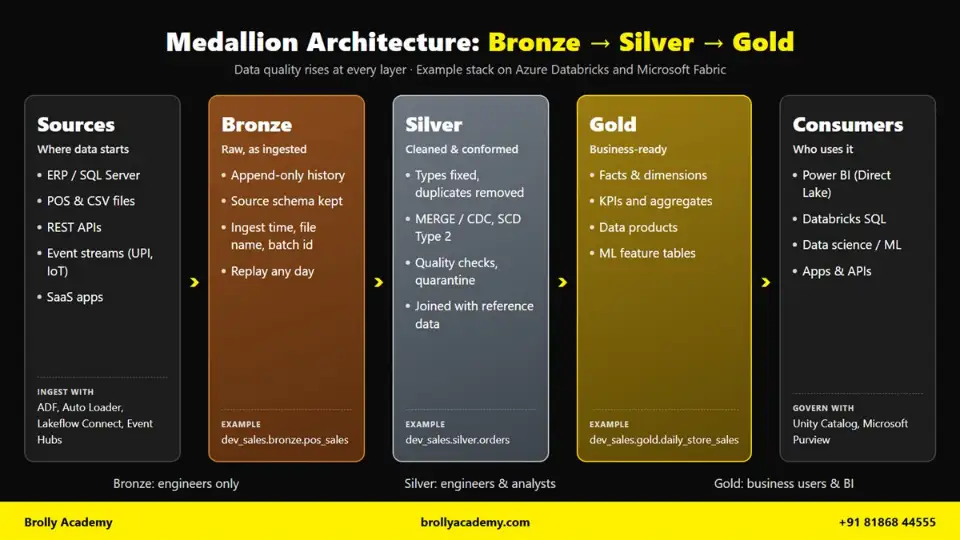
Medallion architecture diagram: data moves from sources to bronze (raw), silver (cleaned) and gold (business-ready) layers before reaching Power BI, SQL and ML users.
Think of it as a step-by-step cleaning process. Data never jumps straight from a source system into a Power BI report. It first lands safely in bronze, then gets fixed in silver, and only then is shaped for business users in gold.
Databricks popularised the name, and Microsoft Learn describes it as "a data design pattern used to organize data logically". You will also hear it called a multi-hop architecture, because data hops from one layer to the next. Databricks calls it a recommended best practice, not a strict requirement. You can read the official description on the Azure Databricks medallion architecture page.
Why the names bronze, silver and gold?
The names come from Olympic medals. Bronze is the lowest medal, silver is better and gold is the best. In the same way:
The naming is easy to remember and easy to explain to managers. When a business user asks "can I trust this table?", the answer is often "use gold, not bronze".
The lakehouse context
Medallion architecture lives inside a lakehouse. A lakehouse combines two older ideas:
- A data lake stores huge amounts of data cheaply in files (for example, Azure Data Lake Storage Gen2 or OneLake), in any format.
- A data warehouse gives you tables, SQL, transactions, security and fast queries.
An open table format such as Delta Lake joins the two. Delta Lake stores data as Parquet files plus a transaction log. That log gives you ACID transactions, MERGE (upsert), schema enforcement, time travel and table history on top of cheap lake storage. Because every layer is a set of Delta tables, you can safely append, update and roll back data in bronze, silver and gold.
On Azure Databricks, the three layers are usually three schemas inside a Unity Catalog catalog, so a table name looks like dev_sales.bronze.pos_orders or prod_sales.gold.daily_store_sales. In Microsoft Fabric, Microsoft's guidance is to keep each layer in its own lakehouse (or warehouse) in OneLake.
Why medallion architecture exists: avoiding a data swamp
Before lakehouses, many companies dumped every file into a data lake with no rules. After a year, nobody knew which folder had the correct data, which files were duplicates or who had changed what. This mess is called a data swamp.
A data swamp causes real problems:
- Two reports show two different revenue numbers for the same day.
- A bad source file overwrites good data, and there is no copy of the original.
- Every analyst writes their own cleaning logic, so the same bug is fixed ten times in ten ways.
- Nobody can say where a number in a dashboard came from.
- When the business logic changes, the team cannot rebuild history because raw data was never kept.
Medallion architecture fixes this with simple rules. Raw data is always kept in bronze, so you can reprocess. Cleaning happens once, in silver, so every team uses the same clean data. Business logic sits in gold, close to the people who use it. And because each layer reads only from the layer before it, you can trace any gold number back to the exact source file.
Is medallion architecture ETL or ELT?
Medallion architecture follows an ELT style: Extract, Load, then Transform.
In classic ETL, a tool extracts data from the source, transforms it on a separate server and loads only the final, clean result into a warehouse. The raw data is often thrown away.
In medallion architecture, you extract data from the source and load it into bronze almost unchanged. All transformation then happens inside the lakehouse, using Spark or SQL, as data moves from bronze to silver to gold. The raw copy stays in bronze.
This ELT approach has three clear advantages:
- You keep the original data, so you can re-run transformations when logic changes.
- You use the scalable compute of the lakehouse (Spark clusters, SQL warehouses) instead of a separate ETL server.
- Loading is fast and simple, because bronze ingestion does very little work.
In practice, people still say "ETL pipeline" for the whole flow. In an interview, the correct answer is: "Medallion is ELT-style, because we load raw data first and transform inside the lakehouse, but each hop between layers is itself a small transform step."
Is medallion architecture specific to Databricks?
No. Databricks made the term popular, but medallion is a design pattern, not a product or a feature you switch on. You can build it on any platform that stores tables:
Microsoft calls medallion the recommended design approach for Fabric, which shows how widely the pattern has spread beyond Databricks. If you are planning your learning path, our Azure data engineer roadmap shows where lakehouse design fits in.
Medallion architecture in one example
Let us follow one order from a retail chain with stores across India. A customer in Hyderabad buys groceries worth ₹1,249.50 and pays by UPI. The store's point-of-sale (POS) system sends a JSON file to the cloud every 15 minutes.
Step 1: the source file. The POS system writes this record. Notice the problems: amount is text, the date is in a local format, the city has extra spaces and the same order was sent twice because of a network retry.
{"order_id":"HYD-104-778812","store":"104","cust_mobile":"98XXXXXX21",
"amt":"1249.50","pay_mode":"upi","order_time":"20/10/2026 18:42:05",
"city":" hyderabad ","status":"PAID","updated_at":"2026-10-20T18:42:05"}
{"order_id":"HYD-104-778812","store":"104","cust_mobile":"98XXXXXX21",
"amt":"1249.50","pay_mode":"upi","order_time":"20/10/2026 18:42:05",
"city":" hyderabad ","status":"PAID","updated_at":"2026-10-20T18:42:05"}
Step 2: bronze. Both rows are loaded as they are, with three extra metadata columns. Nothing is fixed yet. If the POS vendor later says "that file was wrong", you can find it by _source_file.
dev_sales.bronze.pos_orders
order_id | amt | order_time | city | status | _ingest_ts | _source_file | _batch_id
HYD-104-778812 | 1249.50 | 20/10/2026 18:42:05 | hyderabad | PAID | 2026-10-20 18:45:11 | .../pos/2026/10/20/104_1842.json | 5521
HYD-104-778812 | 1249.50 | 20/10/2026 18:42:05 | hyderabad | PAID | 2026-10-20 18:45:11 | .../pos/2026/10/20/104_1842.json | 5521
Step 3: silver. The duplicate is removed. The amount becomes a decimal, the time becomes a real timestamp, the city is trimmed and capitalised, the payment mode is standardised and the store is joined to the store master to add the region.
dev_sales.silver.orders
order_id | store_id | region | order_ts | order_amount | payment_mode | city | status
HYD-104-778812 | 104 | South | 2026-10-20 18:42:05 | 1249.50 | UPI | Hyderabad | PAID
Step 4: gold. This order is now one of many rows rolled up into a daily store summary that the sales head opens in Power BI every morning.
dev_sales.gold.daily_store_sales
sales_date | store_id | city | total_orders | revenue_inr | upi_share_pct | avg_order_value_inr
2026-10-20 | 104 | Hyderabad | 1,842 | 9,87,450.00 | 71.4 | 536.08
The numbers in the gold row are only an illustration. The point is the journey: raw and messy in bronze, clean and trustworthy in silver, small and meaningful in gold.
3. Bronze layer: raw data
Short answer: The bronze layer stores raw data exactly as it arrives from source systems, with only a few metadata columns added. It is append-only, keeps full history and acts as the single source of truth for reprocessing and audits. Analysts normally do not query bronze; data pipelines read it to build silver.
Purpose of the bronze layer
Bronze has one job: capture source data safely and completely. It is your insurance policy. If a silver job has a bug, if business rules change or if an auditor asks what the source system sent on a given day, you go back to bronze.
Microsoft Learn describes bronze data as raw and unvalidated, appended incrementally, and kept so that you can reprocess and audit using historical data. It also says bronze is meant for workloads that build silver tables, not for analysts and data scientists.
What to store in bronze
Bronze can receive data from many kinds of sources:
- Files dropped into cloud storage, such as CSV, JSON, Parquet or XML exports from ERP, POS or CRM systems.
- Change data capture (CDC) feeds from databases such as SQL Server, Oracle or PostgreSQL.
- Event streams from Kafka, Azure Event Hubs or IoT devices.
- API responses, for example daily UPI settlement reports from a payment gateway.
- SaaS data brought in with connectors such as Lakeflow Connect or Azure Data Factory.
Store every record you receive, including ones that look wrong. Bronze is not the place to decide what is "bad". That decision belongs to silver.
Rules for the bronze layer
Follow these rules and bronze will stay useful for years:
- Append only. Add new data; do not update or delete existing rows in normal runs. Each file or event becomes new rows.
- Keep the source shape. Keep column names and values close to the source. Many teams store bronze as Delta tables with most fields as strings, or keep the original files and register them as tables.
- Add metadata columns. At minimum add an ingestion timestamp, the source file path or topic, and a batch or job run ID. These let you trace and replay data.
- Do minimal validation. Only check what is needed to land the data, such as "the file could be parsed". Do not filter out rows.
- Keep full history. Do not overwrite yesterday's data with today's snapshot. Keep both, so you can rebuild any past day.
- Make loads idempotent. If a job runs twice, the same file must not be loaded twice. Auto Loader and streaming checkpoints handle this for you.
Common metadata columns look like this:
Schema handling and rescued data
Source systems change without warning. A vendor adds a column, renames a field or sends text where a number used to be. If bronze rejects these records, you lose data.
Databricks Auto Loader is built for this. For formats that do not carry types, such as JSON, CSV and XML, Auto Loader infers every column as a string by default, which avoids type-mismatch failures. Databricks also recommends storing most bronze fields as string, VARIANT or binary to protect against unexpected schema changes.
When a new column appears, the default schema evolution mode (addNewColumns) updates the stored schema and stops the stream with an error. When the stream restarts, it continues with the new column. That is why Databricks recommends running Auto Loader in a Lakeflow Job with automatic retries.
When Auto Loader infers the schema, it also adds a rescued data column called _rescued_data. Any value that does not match the schema (a missing column, a type mismatch or a case mismatch) goes into this column as a JSON blob along with the source file path, instead of being dropped. You can see all the modes in the Auto Loader schema inference and evolution guide.
A simple rule for silver: always check how many rows have a non-null _rescued_data. A sudden jump means the source changed.
Code: Auto Loader from ADLS Gen2 into bronze
This PySpark notebook reads new POS order JSON files from an ADLS Gen2 container and appends them to a bronze Delta table. It assumes a Unity Catalog external location for the storage account and a volume named checkpoints in the bronze schema.
from pyspark.sql import functions as F
dbutils.widgets.text("run_id", "manual")
run_id = dbutils.widgets.get("run_id")
source_path = "abfss://landing@stbrollyretail.dfs.core.windows.net/pos/orders/"
checkpoint = "/Volumes/dev_sales/bronze/checkpoints/pos_orders"
(spark.readStream.format("cloudFiles")
.option("cloudFiles.format", "json")
.option("cloudFiles.schemaLocation", checkpoint)
.load(source_path)
.withColumn("_ingest_ts", F.current_timestamp())
.withColumn("_source_file", F.col("_metadata.file_path"))
.withColumn("_batch_id", F.lit(run_id))
.writeStream
.option("checkpointLocation", checkpoint)
.trigger(availableNow=True)
.toTable("dev_sales.bronze.pos_orders"))
What each part does:
- format("cloudFiles") turns on Auto Loader, which tracks which files it has already processed.
- cloudFiles.schemaLocation stores the inferred schema so it can evolve over time.
- _metadata.file_path is a hidden file metadata column that gives the full path of each source file.
- trigger(availableNow=True) processes all new files and then stops, so you can run it as a scheduled job instead of a 24x7 stream.
- The checkpoint makes the load idempotent: re-running the job does not load the same file twice.
In a Lakeflow Job, pass the job run ID into the run_id parameter so every row is linked to the run that loaded it.
Retention in bronze
Bronze grows forever if you let it. Decide retention with the business and compliance team, not by guess:
- Keep bronze long enough to rebuild silver and gold if logic changes. Many teams keep it for months or years, depending on cost and regulation.
- Remove old data with a scheduled DELETE on a date column, then run VACUUM so the underlying files are cleaned up.
- Remember that Delta keeps old file versions for time travel. By default, VACUUM keeps deleted files for 7 days, so storage does not drop immediately.
- Personal data (mobile numbers, emails, addresses) needs extra care. Laws such as India's Digital Personal Data Protection Act may require you to delete or mask it, even in bronze.
Who can access bronze?
Bronze contains raw, unclean and often sensitive data, so keep access tight:
- Data engineers and pipeline service principals get read and write access.
- Data operations and audit teams may get read access for investigations.
- Analysts, report developers and business users usually get no access. They use silver or gold.
In Unity Catalog, this is simple: grant USE SCHEMA and SELECT on the bronze schema only to the engineering group, and grant MODIFY only to the pipeline's service principal.
Common bronze mistakes
- Cleaning data in bronze. Filtering out "bad" rows here means you lose them forever. Load everything; clean in silver.
- Overwriting instead of appending. Running mode("overwrite") on bronze destroys history and makes reprocessing impossible.
- No metadata columns. Without _ingest_ts and _source_file, you cannot trace a wrong number back to its file.
- Casting types too early. Turning amt into a decimal in bronze makes the load fail when the source sends "NA". Keep strings and cast in silver.
- Letting analysts query bronze. People build reports on raw data, get duplicate counts and lose trust in the platform.
- No retention plan. Bronze storage cost grows silently until someone notices the bill.
4. Silver layer: cleaned and conformed data
Short answer: The silver layer holds cleaned, validated, deduplicated and conformed data built from bronze. It fixes data types, removes duplicates, handles nulls, standardises codes, joins reference data and applies change data. Silver is the trusted, detailed "enterprise view" that data engineers, analysts and data scientists build on.
Purpose of the silver layer
Silver turns raw records into reliable records. After silver, every downstream user should be able to trust that:
- Each business entity (an order, a customer, a payment) appears once, with the latest correct values.
- Columns have proper data types, names and formats.
- Codes mean the same thing across all source systems.
- Records that failed quality checks are not mixed with good data.
Microsoft Learn says silver should always include at least one validated, non-aggregated representation of each record. Aggregated tables can sometimes live in silver if many downstream jobs use them, but they typically belong in gold. Silver keeps the detail so that analysts and data scientists can still do deep analysis.
Databricks also recommends that you do not write to silver directly from ingestion. Always read from bronze. If you skip bronze, a schema change or corrupt record in the source will break your silver table.
Typical silver operations
Conformed data and the "enterprise view"
Conformed means the same thing is described the same way everywhere. If the POS system calls a store 104, the ERP calls it STR-0104 and the payment gateway calls it HYD104, silver maps all three to one store_id. After this, any team can join orders, payments and inventory without writing their own mapping.
This is why silver is often called the enterprise view of data. It is not built for one report. It is built so that many reports, models and data products can reuse the same clean entities.
Incremental processing
Silver jobs should process only new or changed bronze data, not the whole bronze table every time. There are three common ways:
- Structured Streaming from bronze. Read bronze with spark.readStream, so Spark tracks what it has already processed. Databricks recommends streaming reads from append-only bronze tables.
- Watermark column. Store the last processed _ingest_ts and filter bronze rows newer than that.
- Change data feed. Turn on Delta change data feed on a table and read only the rows that changed.
Then write to silver with MERGE, so re-running a batch updates rows instead of duplicating them.
Code (a): deduplicate with row_number and MERGE into silver
First, clean and deduplicate the new bronze rows. The window keeps the most recent version of each order.
from pyspark.sql import functions as F
from pyspark.sql.window import Window
w = Window.partitionBy("order_id").orderBy(F.col("updated_at").desc(), F.col("_ingest_ts").desc())
latest = (spark.read.table("dev_sales.bronze.pos_orders")
.filter(F.col("_ingest_ts") >= F.date_sub(F.current_date(), 1))
.select(
F.col("order_id"),
F.col("store").cast("int").alias("store_id"),
F.col("amt").cast("decimal(12,2)").alias("order_amount"),
F.upper(F.trim("pay_mode")).alias("payment_mode"),
F.initcap(F.trim("city")).alias("city"),
F.to_timestamp("order_time", "dd/MM/yyyy HH:mm:ss").alias("order_ts"),
F.upper("status").alias("status"),
F.to_timestamp("updated_at").alias("updated_at"),
F.col("_ingest_ts"))
.withColumn("rn", F.row_number().over(w))
.filter("rn = 1").drop("rn", "_ingest_ts"))
Then upsert into the silver table. Only newer versions overwrite existing rows, so late or repeated files cannot roll an order back to an older status.
from delta.tables import DeltaTable
silver = DeltaTable.forName(spark, "dev_sales.silver.orders")
(silver.alias("t")
.merge(latest.alias("s"), "t.order_id = s.order_id")
.whenMatchedUpdateAll(condition="s.updated_at > t.updated_at")
.whenNotMatchedInsertAll()
.execute())
Two notes for real projects. First, the one-day filter is only a simple watermark for this example; in production use a stored watermark or a streaming read. Second, updateAll and insertAll need the silver table to have the same column names as latest. For more practice on window functions and MERGE, see our PySpark and Databricks interview questions.
Code (b): data quality filter with a quarantine table
Never silently drop bad rows. Send them to a quarantine table with the reason and time, so the data team can fix the source and replay them.
from pyspark.sql import functions as F
valid_status = ["PLACED", "PAID", "SHIPPED", "DELIVERED", "CANCELLED"]
rule = (F.col("order_id").isNotNull()
& F.col("order_ts").isNotNull()
& (F.col("order_amount") > 0)
& F.col("status").isin(valid_status))
checked = latest.withColumn("is_valid", F.coalesce(rule, F.lit(False)))
good = checked.filter("is_valid").drop("is_valid")
(checked.filter("NOT is_valid")
.withColumn("_dq_reason", F.lit("null key, bad timestamp, non-positive amount or unknown status"))
.withColumn("_quarantined_at", F.current_timestamp())
.write.mode("append").saveAsTable("dev_sales.silver.orders_quarantine"))
Then run the MERGE from code (a) with good instead of latest. The coalesce matters: if order_amount is null, the rule returns null instead of false, and coalesce turns that into false so the row is quarantined instead of lost.
In Lakeflow Spark Declarative Pipelines you can express the same idea with expectations such as expect_or_drop, and the pipeline records how many rows passed or failed each rule.
Silver vs bronze
5. Gold layer: business-ready data
Short answer: The gold layer holds business-ready data modelled for a specific use, such as star schema facts and dimensions, daily aggregates, KPIs and machine learning feature tables. It applies business logic and is optimised for fast queries. Power BI, Databricks SQL dashboards, Fabric Direct Lake models and applications read from gold.
Purpose of the gold layer
Gold answers business questions. Silver says "here is every clean order". Gold says "here is revenue by store by day", "here is each customer's lifetime value" or "here is the monthly UPI share by city".
Microsoft Learn describes gold as aggregated data tailored for analytics and reporting, aligned with business logic and optimised for query and dashboard performance. Gold is also where you do dimensional modelling: you define facts, dimensions, relationships and measures.
Gold usually has fewer tables than silver, and each one has a clear owner and a clear consumer. Because each business domain has its own needs, some companies create separate gold areas for finance, HR, sales or supply chain.
What goes into gold
- Star schema facts and dimensions. Fact tables hold measurable events (sales, payments, returns) at a fixed grain. Dimension tables hold descriptive attributes (store, product, customer, date). This is classic Kimball modelling, and it is what Power BI works best with.
- Aggregates. Pre-computed summaries like daily store sales or weekly category revenue, so dashboards do not scan billions of rows every time.
- KPIs. Business metrics with agreed definitions, such as average order value, repeat purchase rate or UPI share of payments. Defining them once in gold stops the "two reports, two numbers" problem.
- Data products. Curated, documented, governed tables that a domain team publishes for others to use.
- Feature tables for ML. One row per customer or store with model inputs such as "orders in last 30 days" or "average basket value", used for churn or demand forecasting models.
How gold is served
In Fabric, Direct Lake lets a Power BI semantic model read Delta tables in OneLake directly, without a scheduled import. That makes well-designed gold tables even more important, because report performance depends on their size and layout.
Code: a daily sales gold table
This Spark SQL builds a daily store sales table from silver. It excludes cancelled orders and calculates revenue, order count, UPI share and average order value in INR.
CREATE OR REPLACE TABLE dev_sales.gold.daily_store_sales AS
SELECT
CAST(o.order_ts AS DATE) AS sales_date,
o.store_id,
s.city,
s.region,
COUNT(DISTINCT o.order_id) AS total_orders,
SUM(o.order_amount) AS revenue_inr,
ROUND(100.0 * SUM(CASE WHEN o.payment_mode = 'UPI' THEN o.order_amount ELSE 0 END)
/ SUM(o.order_amount), 1) AS upi_share_pct,
ROUND(SUM(o.order_amount) / COUNT(DISTINCT o.order_id), 2) AS avg_order_value_inr
FROM dev_sales.silver.orders AS o
JOIN dev_sales.silver.stores AS s
ON o.store_id = s.store_id
WHERE o.status <> 'CANCELLED'
GROUP BY CAST(o.order_ts AS DATE), o.store_id, s.city, s.region;
CREATE OR REPLACE TABLE ... AS SELECT rebuilds the whole table each run. That is fine for small gold tables. For large ones, use a MERGE on the last few days only, or define it as a materialized view, which Databricks can refresh incrementally when possible:
CREATE OR REPLACE MATERIALIZED VIEW dev_sales.gold.monthly_city_sales AS
SELECT
date_trunc('MONTH', sales_date) AS sales_month,
city,
SUM(revenue_inr) AS revenue_inr,
SUM(total_orders) AS total_orders
FROM dev_sales.gold.daily_store_sales
GROUP BY ALL;
Code: a store dimension
Dimensions in gold give business-friendly names and only the attributes report users need. Here the silver store table keeps SCD Type 2 history, and the gold dimension exposes the current version of each store.
CREATE OR REPLACE TABLE dev_sales.gold.dim_store AS
SELECT
store_id,
store_name,
store_format, -- e.g. Hypermarket, Express
city,
state,
region,
opened_on,
CASE WHEN closed_on IS NULL THEN 'Active' ELSE 'Closed' END AS store_status
FROM dev_sales.silver.stores_history
WHERE is_current = true;
With dim_store, daily_store_sales and a date dimension, a Power BI developer can build a store performance report without writing any joins or cleaning logic. If you want to build this end to end for your portfolio, our Azure data engineer projects list has several medallion pipelines with datasets and validation checks.
Gold design tips
- Fix the grain first. Write down "one row per store per day" before writing SQL. Most gold bugs come from an unclear grain.
- Use business names. revenue_inr is better than sum_amt. Gold users are not engineers.
- Document every KPI. Add table and column comments that say exactly how a metric is calculated.
- Optimise for reads. Use liquid clustering on common filter columns such as sales_date and store_id, and keep file sizes healthy.
- Do not copy silver. A gold table that is just silver.orders renamed adds cost and no value. Give business users a view or grant on silver instead.
Silver vs gold
6. Bronze vs silver vs gold: full comparison
Short answer: Bronze stores raw data for safety and replay, silver stores clean and conformed detail for reuse, and gold stores modelled business data for consumption. Quality, structure and business value rise from bronze to gold, while the number of users who can access the data also rises. The table below compares all three side by side.
A simple way to remember the difference in interviews: bronze is "what we received", silver is "what is true", gold is "what the business needs".
Optional extra layers
Three layers are a guideline, not a law. Real projects often add or remove a layer.
Landing zone or raw zone (before bronze). Many teams keep a landing area in ADLS Gen2 or OneLake where source systems or Azure Data Factory drop files. Auto Loader then reads from landing into bronze Delta tables. The landing zone is just files; bronze is the first set of governed tables. Some teams keep landing files only for a few days, because bronze already holds the data with metadata. In Fabric, Microsoft suggests creating a shortcut in the bronze lakehouse when data already sits in ADLS Gen2, S3 or Google Cloud Storage, instead of copying it.
Platinum or semantic layer (after gold). "Platinum" is not an official Databricks or Microsoft layer name, but some teams use it for a final consumption layer. It might hold a Power BI semantic model, highly aggregated executive tables, data shared with partners through Delta Sharing, or tables pushed into apps. If your gold tables already serve these needs, you do not need platinum.
Staging or intermediate tables. Complex silver logic sometimes needs helper tables, for example a table of parsed nested JSON before joining. Keep these inside the silver schema with a clear prefix such as stg_, rather than inventing a new layer.
When to use two or four layers
The right number of layers is the smallest number that keeps data traceable, clean and easy to use. Microsoft Learn also notes that some organisations build several gold layers for different domains such as finance or HR. That is still medallion: one shared silver, many purpose-built golds.
7. Benefits, drawbacks and when not to use medallion architecture
Short answer: Medallion architecture gives you traceability, easy reprocessing, clear quality stages and a clean split of responsibilities. Its costs are extra storage, extra pipelines and added latency, and it can become over-engineering for small or simple use cases. Use it for multi-source analytics platforms; skip or simplify it for tiny datasets, single reports and millisecond-level real-time serving.
Benefits
- Traceability and lineage. Every gold number can be traced through silver to the exact bronze row and source file. Unity Catalog lineage shows table-to-table and column-level flow automatically for workloads that run on Unity Catalog.
- Reprocessing without going back to the source. Business logic changes all the time. Because bronze keeps raw history, you can rebuild silver and gold for the last two years without asking the ERP team to re-export anything.
- Quality in stages. Each layer has its own checks. Bronze checks "did it arrive?", silver checks "is it correct?", gold checks "does it match the business?". Problems are caught early and in the right place.
- Separation of concerns. Ingestion engineers own bronze, platform or domain engineers own silver, and analytics engineers own gold. Teams can change one layer without breaking the others.
- Incremental processing. Each hop can process only new data using Auto Loader, streaming tables, change data feed or MERGE. This keeps compute cost under control as data grows.
- Reuse. One clean silver.orders table feeds finance, marketing, supply chain and data science. Cleaning logic is written once.
- Security by layer. You can restrict raw sensitive data in bronze, mask personal data in silver and give wide access to gold.
- Easy to explain. Managers and business users understand "raw, clean, ready" in one sentence. That shared language helps with planning and support.
Drawbacks
- Storage and duplication cost. The same data exists in three or more forms. Cloud storage is cheap, but at large volumes the extra copies and their time-travel history add up.
- More pipelines to run. Three layers mean at least three sets of jobs, tests, alerts and runbooks. Small teams can struggle to maintain them.
- Latency. Each hop adds time. If bronze runs every 15 minutes, silver every 30 and gold every hour, a sale may take well over an hour to appear in the dashboard.
- Over-engineering for small data. A 50 MB CSV file used for one report does not need three layers, three schemas and three jobs.
- "Layers for the sake of layers". Teams sometimes copy tables from silver to gold with no change, just to say they "have gold". This adds cost and confusion without value.
- Unclear silver and gold boundary. Where does a customer-level summary go? Is SCD Type 2 silver or gold? Without written rules, every engineer decides differently and the layers lose meaning.
- Not a modelling method. Medallion tells you where data lives, not how to model it. You still need Kimball, data vault or another method inside the layers.
A practical fix for drawbacks 5 and 6 is a one-page layer contract for your team. It should say what each layer may contain, who owns it, what checks run there and how tables are named. If you are preparing for Fabric data engineering work, the DP-700 syllabus covers how these design decisions are tested in the exam.
When not to use medallion architecture
- Tiny datasets. If your total data fits comfortably in a single small database and changes rarely, a simple load into one clean table and a view is enough.
- Pure real-time, low-latency serving. If an app needs a fraud score or stock count within milliseconds, multiple batch hops are too slow. Use a streaming engine and an operational store for that path, and feed the same events into a medallion lakehouse for analytics later.
- A single-report use case. If one team needs one dashboard from one clean source, building bronze, silver and gold is more work than the report itself.
- Already-curated sources. If you receive a clean, modelled extract from a trusted system, you may only need bronze (for history) and gold (for the report).
- Short-lived experiments. Proofs of concept and one-time analyses rarely need full layers. Add them only if the work becomes a production pipeline.
In all these cases, the idea behind medallion still helps: keep a raw copy, clean before you serve and do not let users query messy data. You just do not need every layer as a separate set of tables.
Is medallion architecture outdated in 2026?
No, but the way teams build it has changed.
Why it is still relevant. Databricks and Microsoft both still recommend the pattern in their current documentation. Microsoft calls it the recommended design approach for Fabric. Newer features make it easier to build: Lakeflow Spark Declarative Pipelines with expectations, streaming tables and materialized views on Databricks, and materialized lake views in Fabric let you define the layers as declarative SQL or Python instead of hand-written jobs. Lineage, access control and data quality monitoring in Unity Catalog and Fabric are designed around this kind of layered flow.
Why some people call it outdated. The criticism usually targets bad implementations, not the idea. Common complaints are rigid "always three layers" rules, gold tables that copy silver, high latency from too many batch hops and confusion about where data modelling belongs. Some teams also prefer to describe their platform as "raw, curated and product" or "staging, core and marts" instead of metals. Those are different labels for the same layered thinking.
The balanced answer. Medallion architecture is a sensible default for most analytics lakehouses in 2026, especially when you have many sources, changing business rules and several consumer teams. Treat it as a guideline:
- Use the layers you need and skip the ones that add nothing.
- Decide the silver and gold boundary in writing.
- Use incremental and declarative tools so extra layers do not mean extra manual work.
- Combine it with a real modelling approach (Kimball in gold, possibly data vault in silver).
- Keep a separate low-latency path for true real-time use cases.
If you can explain both the benefits and these limits clearly, you will stand out in data engineering interviews, because most candidates only recite "bronze is raw, silver is clean, gold is aggregated".
8. How to implement medallion architecture on Azure Databricks (step by step)
Short answer: To implement medallion architecture on Azure Databricks, create a Unity Catalog catalog per environment with bronze, silver and gold schemas on ADLS Gen2, load raw files into bronze with Auto Loader, clean and merge them into silver with PySpark, and build gold tables with SQL. Then run the steps with Lakeflow Jobs, or define the whole flow as a Lakeflow Spark Declarative Pipeline with expectations, and let liquid clustering and predictive optimization handle performance.
We will build one small pipeline for a retail chain. Point-of-sale (POS) systems drop order files as JSON into ADLS Gen2. We want three things: a raw copy of every file (bronze), one clean row per order (silver), and daily sales per store in INR (gold). The same names are used in every step, so you can follow along in a free trial or a company sandbox workspace. New to Databricks? Start with our Databricks tutorial.
The examples use the dev_sales catalog. In production you run the same code against prod_sales. Only the catalog name changes, never the code.
Step 1: Set up storage and Unity Catalog
Medallion architecture on Databricks starts with Unity Catalog, because every table gets a three-level name: catalog.schema.table. The most common layout is one catalog per environment (dev_sales, test_sales, prod_sales) and one schema per layer (bronze, silver, gold). This is the same pattern Microsoft shows in its medallion lakehouse architecture page for Azure Databricks, where each layer is a schema in one catalog.
What you need first:
- An ADLS Gen2 storage account with hierarchical namespace turned on (for example stsalesdev).
- An Access Connector for Azure Databricks (a managed identity) with the Storage Blob Data Contributor role on that account.
- A storage credential in Unity Catalog that uses the access connector (an admin creates it once).
Then run this SQL as a metastore admin or a user with the right privileges:
CREATE EXTERNAL LOCATION IF NOT EXISTS sales_dev_lake
URL 'abfss://lake@stsalesdev.dfs.core.windows.net/'
WITH (STORAGE CREDENTIAL sales_dev_mi);
CREATE CATALOG IF NOT EXISTS dev_sales
MANAGED LOCATION 'abfss://lake@stsalesdev.dfs.core.windows.net/dev_sales';
CREATE SCHEMA IF NOT EXISTS dev_sales.bronze;
CREATE SCHEMA IF NOT EXISTS dev_sales.silver;
CREATE SCHEMA IF NOT EXISTS dev_sales.gold;
CREATE EXTERNAL VOLUME IF NOT EXISTS dev_sales.bronze.landing
LOCATION 'abfss://lake@stsalesdev.dfs.core.windows.net/landing';
CREATE VOLUME IF NOT EXISTS dev_sales.bronze.checkpoints;
CREATE VOLUME IF NOT EXISTS dev_sales.silver.checkpoints;
Here is what each part does:
- External location: tells Unity Catalog that this storage path is allowed and which identity reads it.
- Managed location on the catalog: every managed table in dev_sales is stored under the dev_sales folder. Databricks manages the files for you.
- External volume landing: the folder where source systems and Azure Data Factory drop raw files. You read it with a simple path like /Volumes/dev_sales/bronze/landing/.
- Managed volumes for checkpoints: streaming jobs store their progress here.
Now give each team only what it needs. Engineers write to all layers. Analysts read gold only.
GRANT USE CATALOG ON CATALOG dev_sales TO `sales_engineers`;
GRANT USE SCHEMA, CREATE TABLE, MODIFY, SELECT ON SCHEMA dev_sales.bronze TO `sales_engineers`;
GRANT USE SCHEMA, CREATE TABLE, MODIFY, SELECT ON SCHEMA dev_sales.silver TO `sales_engineers`;
GRANT USE SCHEMA, CREATE TABLE, MODIFY, SELECT ON SCHEMA dev_sales.gold TO `sales_engineers`;
GRANT READ VOLUME, WRITE VOLUME ON VOLUME dev_sales.bronze.landing TO `sales_engineers`;
GRANT USE CATALOG ON CATALOG prod_sales TO `bi_analysts`;
GRANT USE SCHEMA, SELECT ON SCHEMA prod_sales.gold TO `bi_analysts`;
Use Microsoft Entra ID groups (synced to Databricks), never single users. In production, run jobs as a service principal, not as your own login.
Step 2: Load raw files into bronze with Auto Loader
Auto Loader (the cloudFiles source) finds new files in a folder and loads each file exactly once. It remembers what it has already read in the checkpoint, so a rerun never loads the same file twice. For bronze we keep the data close to the source and add two metadata columns: the source file path and the load time.
from pyspark.sql import functions as F
src = "/Volumes/dev_sales/bronze/landing/pos_orders/"
chk = "/Volumes/dev_sales/bronze/checkpoints/pos_orders/"
(spark.readStream.format("cloudFiles")
.option("cloudFiles.format", "json")
.option("cloudFiles.schemaLocation", chk)
.load(src)
.select("*",
F.col("_metadata.file_path").alias("_source_file"),
F.current_timestamp().alias("_ingested_at"))
.writeStream
.option("checkpointLocation", chk)
.trigger(availableNow=True)
.toTable("dev_sales.bronze.pos_orders"))
Points to remember:
- cloudFiles.schemaLocation is where Auto Loader stores the inferred schema. It is required when you let Auto Loader infer the schema.
- Strings by default: for JSON and CSV, Auto Loader infers every column as a string unless you set cloudFiles.inferColumnTypes to true. For bronze, strings are a good thing, because a bad value never breaks the load.
- Schema changes: the default cloudFiles.schemaEvolutionMode is addNewColumns. When a new column arrives, the stream stops once, updates the schema, and works again on the next run. Values that do not match the schema go into the _rescued_data column instead of being lost.
- trigger(availableNow=True) processes all new files and then stops. This gives you batch-style cost with streaming-style "only new files" logic. Remove it for an always-on stream.
- _metadata.file_path is a hidden column for file-based sources. Saving it in bronze lets you trace any bad row back to the exact file.
Step 3: Build silver with PySpark and MERGE
Silver needs one correct row per order. POS systems often resend an order when its status changes, so the same order_id can arrive many times. We fix types, clean codes, keep the latest version of each order and upsert it into silver with a Delta MERGE.
First create the silver table once, with explicit types:
CREATE TABLE IF NOT EXISTS dev_sales.silver.orders (
order_id BIGINT,
store_id INT,
payment_mode STRING,
amount_inr DECIMAL(12,2),
order_ts TIMESTAMP,
updated_at TIMESTAMP,
_source_file STRING,
_ingested_at TIMESTAMP
)
CLUSTER BY (store_id, order_ts);
Next, write the merge function. It removes duplicates inside each micro-batch with row_number, then merges into silver. The condition s.updated_at > t.updated_at makes sure an old version never overwrites a newer one.
from pyspark.sql import functions as F, Window
from delta.tables import DeltaTable
def upsert_orders(batch_df, batch_id):
w = Window.partitionBy("order_id").orderBy(F.col("updated_at").desc())
latest = (batch_df.withColumn("rn", F.row_number().over(w))
.filter("rn = 1").drop("rn"))
target = DeltaTable.forName(batch_df.sparkSession, "dev_sales.silver.orders")
(target.alias("t")
.merge(latest.alias("s"), "t.order_id = s.order_id")
.whenMatchedUpdateAll(condition="s.updated_at > t.updated_at")
.whenNotMatchedInsertAll()
.execute())
Finally, read bronze as a stream, clean it, and call the function for each micro-batch with foreachBatch:
clean = (spark.readStream.table("dev_sales.bronze.pos_orders")
.select(F.col("order_id").cast("bigint").alias("order_id"),
F.col("store_id").cast("int").alias("store_id"),
F.upper(F.trim("payment_mode")).alias("payment_mode"),
F.col("amount").cast("decimal(12,2)").alias("amount_inr"),
F.to_timestamp("order_ts").alias("order_ts"),
F.to_timestamp("updated_at").alias("updated_at"),
"_source_file", "_ingested_at")
.filter("order_id IS NOT NULL AND amount_inr > 0"))
(clean.writeStream.foreachBatch(upsert_orders)
.option("checkpointLocation", "/Volumes/dev_sales/silver/checkpoints/orders/")
.trigger(availableNow=True)
.start())
Reading bronze as a stream is the pattern Databricks recommends: each run picks up only the rows added since the last run. Rows that fail the filter are dropped here to keep the example short. In a real project, write them to a quarantine table (see the data quality section below).
Step 4: Build gold tables
Gold is what Power BI and business users query. It answers one business question well. Here we build a daily sales fact table per store, with UPI revenue shown separately, by joining silver orders with a silver store dimension.
CREATE OR REPLACE TABLE dev_sales.gold.fact_daily_store_sales
CLUSTER BY (sales_date, store_id)
AS
SELECT CAST(o.order_ts AS DATE) AS sales_date,
o.store_id,
s.city,
COUNT(1) AS total_orders,
SUM(o.amount_inr) AS revenue_inr,
SUM(CASE WHEN o.payment_mode = 'UPI' THEN o.amount_inr ELSE 0 END) AS upi_revenue_inr
FROM dev_sales.silver.orders o
JOIN dev_sales.silver.stores s ON o.store_id = s.store_id
GROUP BY ALL;
CREATE OR REPLACE TABLE ... AS SELECT rebuilds the full table on every run. That is fine for small and medium gold tables. For large ones, use a materialized view instead (CREATE MATERIALIZED VIEW). On serverless compute, Databricks can refresh a materialized view incrementally when the query allows it, so you do not rescan all of silver every day.
Good gold tables follow three rules: business-friendly column names (revenue_inr, not amt), one clear grain (here, one row per store per day), and no raw technical columns like _rescued_data.
Step 5: Orchestrate with Lakeflow Jobs
Lakeflow Jobs (earlier called Databricks Workflows) runs your notebooks in the right order. Make one task per layer, with dependencies, retries and a trigger. You can build the job in the UI under Jobs & Pipelines, but teams usually keep it as code in a Declarative Automation Bundle (earlier Databricks Asset Bundles) so it moves from dev to prod through CI/CD. A short bundle snippet:
resources:
jobs:
sales_medallion:
name: sales_medallion_${bundle.target}
trigger:
file_arrival:
url: /Volumes/prod_sales/bronze/landing/pos_orders/
tasks:
- task_key: bronze_orders
notebook_task: { notebook_path: ../src/01_bronze_orders.py }
max_retries: 2
- task_key: silver_orders
depends_on: [{ task_key: bronze_orders }]
notebook_task: { notebook_path: ../src/02_silver_orders.py }
- task_key: gold_sales
depends_on: [{ task_key: silver_orders }]
notebook_task: { notebook_path: ../src/03_gold_sales.py }
How to choose a trigger:
- Scheduled (cron): best when files arrive at a fixed time, for example "every day at 2 AM IST". Remember to set the time zone to Asia/Kolkata in the schedule.
- File arrival: starts the job when new files land in a Unity Catalog volume or external location. It checks roughly every minute. Use the "wait after last change" option when a source sends many files in a burst.
- Continuous: keeps the job always running. Use it only when the business needs low latency, because it costs more.
Also add failure email or Teams notifications, a timeout per task, and job parameters such as catalog so the same notebooks run in dev and prod.
Step 6: The same pipeline as a Lakeflow Spark Declarative Pipeline
Steps 2 to 5 are "imperative": you write the reads, writes, checkpoints and order of tasks yourself. Lakeflow Spark Declarative Pipelines (earlier Delta Live Tables, called "Lakeflow pipelines" in the latest docs) let you just declare each table. Databricks works out the order, manages checkpoints and schema locations, retries failures and records data quality metrics.
The current Python API is the pyspark.pipelines module, imported as dp. The old import dlt still works, but Databricks recommends the new module. Use @dp.table for streaming tables and @dp.materialized_view for materialized views.
Bronze streaming table. No checkpoint or schema location is needed. The pipeline manages both.
from pyspark import pipelines as dp
from pyspark.sql import functions as F
@dp.table(name="dev_sales.bronze.pos_orders_raw",
comment="Raw POS order files, append-only")
def pos_orders_raw():
return (spark.readStream.format("cloudFiles")
.option("cloudFiles.format", "json")
.load("/Volumes/dev_sales/bronze/landing/pos_orders/")
.select("*",
F.col("_metadata.file_path").alias("_source_file"),
F.current_timestamp().alias("_ingested_at")))
Silver with expectations. A temporary view cleans the data and applies expectations. expect_or_drop removes bad rows and logs how many were dropped. Plain expect only records violations and keeps the row. Then create_auto_cdc_flow upserts the latest version of each order into the silver streaming table. This replaces the whole foreachBatch + MERGE code from Step 3.
@dp.temporary_view()
@dp.expect_or_drop("valid_order_id", "order_id IS NOT NULL")
@dp.expect_or_drop("positive_amount", "amount_inr > 0")
@dp.expect("known_payment_mode", "payment_mode IN ('UPI', 'CARD', 'CASH')")
def orders_clean():
return (spark.readStream.table("dev_sales.bronze.pos_orders_raw")
.select(F.col("order_id").cast("bigint").alias("order_id"),
F.col("store_id").cast("int").alias("store_id"),
F.upper(F.trim("payment_mode")).alias("payment_mode"),
F.col("amount").cast("decimal(12,2)").alias("amount_inr"),
F.to_timestamp("order_ts").alias("order_ts"),
F.to_timestamp("updated_at").alias("updated_at")))
dp.create_streaming_table("dev_sales.silver.orders")
dp.create_auto_cdc_flow(target="dev_sales.silver.orders", source="orders_clean",
keys=["order_id"], sequence_by="updated_at",
stored_as_scd_type=1)
Gold materialized view. It reads silver as a batch source. The pipeline refreshes it after silver changes, incrementally where possible.
@dp.materialized_view(name="dev_sales.gold.daily_store_sales",
cluster_by_auto=True)
def daily_store_sales():
return (spark.read.table("dev_sales.silver.orders")
.groupBy(F.to_date("order_ts").alias("sales_date"), "store_id")
.agg(F.count("order_id").alias("total_orders"),
F.sum("amount_inr").alias("revenue_inr")))
Rules that trip up beginners:
- A dataset function must only return a DataFrame. Never call collect(), count(), toPandas(), saveAsTable() or start() inside it.
- Expectation decorators go after @dp.table, @dp.materialized_view or @dp.temporary_view and before the function.
- For SCD Type 2 history (for example store or customer changes), set stored_as_scd_type=2. The table then gets __START_AT and __END_AT columns automatically.
- Run the pipeline from a Lakeflow Job, on a schedule or a file arrival trigger, just like a notebook task.
Which one should you use? Notebooks + Jobs give full control and are common in older projects. Declarative pipelines need less code and give built-in quality metrics. Many new projects in 2026 use pipelines for bronze and silver and plain SQL or materialized views for gold. Interviewers often ask you to explain both.
Step 7: Optimise and monitor
Once the data flows, keep it fast and cheap.
-- Liquid clustering on an existing table: pick keys used in filters and joins
ALTER TABLE dev_sales.silver.orders CLUSTER BY (store_id, order_ts);
-- Or let Databricks choose the keys from query patterns
ALTER TABLE dev_sales.gold.fact_daily_store_sales CLUSTER BY AUTO;
-- Predictive optimization runs OPTIMIZE, VACUUM and ANALYZE for you
ALTER CATALOG prod_sales ENABLE PREDICTIVE OPTIMIZATION;
DESCRIBE CATALOG EXTENDED prod_sales;
- Liquid clustering replaces old-style partitioning and Z-ordering for new tables. You can change the keys later without rewriting the table.
- Predictive optimization works only on Unity Catalog managed tables. It is on by default for accounts created on or after 11 November 2024, and Databricks has been rolling it out to older accounts. Check the status with DESCRIBE CATALOG EXTENDED. It runs on serverless compute, which is billed separately.
- Retention: VACUUM removes old files after 7 days by default. If auditors need longer time travel on silver, set delta.deletedFileRetentionDuration (for example '30 days') before predictive optimization runs.
To monitor the pipeline, use:
- Job run history and alerts for failures, duration and retries.
- The pipeline event log for expectation results: how many rows passed, failed or were dropped for each rule.
- System tables such as system.lakeflow.job_run_timeline for run trends and system.storage.predictive_optimization_operations_history for maintenance cost.
- A small reconciliation query after every run that compares bronze, silver and quarantine counts (shown later in the data quality section).
9. Medallion architecture in Microsoft Fabric
Short answer: In Microsoft Fabric you build medallion architecture with lakehouses in OneLake: usually one lakehouse per layer (bronze, silver, gold), or bronze and silver as lakehouses and gold as a Fabric Warehouse. Data Factory pipelines, Dataflow Gen2 or OneLake shortcuts bring data into bronze, Spark notebooks or materialized lake views transform it, and a Direct Lake semantic model serves gold to Power BI.
Microsoft calls medallion "the recommended design approach for Fabric". The ideas are the same as on Databricks, but the building blocks have different names. Read the official Implement medallion lakehouse architecture in Fabric page once. Below is the practical version.
Option 1, 2 or 3: how to lay out the layers
Microsoft's guidance is that you can put all lakehouses in one workspace, but it recommends a separate workspace for each layer for better control and governance. A common enterprise layout is:
- ws_sales_bronze workspace with lh_bronze, owned by data engineers only.
- ws_sales_silver workspace with lh_silver, data engineers and data scientists.
- ws_sales_gold workspace with lh_gold or wh_gold, plus the semantic model and reports; analysts get Viewer access here.
- Separate dev, test and prod copies of these workspaces, connected through Git integration and deployment pipelines.
Lakehouse schemas are on by default for new lakehouses created in the portal. With schemas you can use names like lh_silver.sales.orders, and you can query across workspaces with four-part names (workspace.lakehouse.schema.table).
Getting data into bronze
Fabric gives you several ingestion options. Pick by source:
- Data Factory pipelines (Copy activity, Copy job): bulk and incremental copies from databases, files and SaaS sources into the bronze lakehouse Files area or tables.
- Dataflow Gen2: low-code Power Query ingestion. Good for Excel, SharePoint and small business sources.
- OneLake shortcuts: if the data already sits in ADLS Gen2, Amazon S3, Google Cloud Storage or another lakehouse, create a shortcut in bronze instead of copying it. Microsoft recommends this for bronze, because there is no second copy to pay for.
- Mirroring: keeps a near-real-time replica of supported databases (for example Azure SQL Database) in OneLake as Delta tables.
- Eventstreams: for real-time events such as UPI payment notifications.
Microsoft also recommends keeping bronze data in its original format when possible, and using Delta tables for silver and gold.
Transforming bronze to silver with a notebook
Attach lh_silver as the notebook's default lakehouse, then read bronze from the other workspace by its full name. This example cleans POS orders and writes a silver table:
from pyspark.sql import functions as F
bronze = spark.read.table("ws_sales_bronze.lh_bronze.pos.orders_raw")
silver = (bronze
.withColumn("order_id", F.col("order_id").cast("bigint"))
.withColumn("amount_inr", F.col("amount").cast("decimal(12,2)"))
.withColumn("order_ts", F.to_timestamp("order_ts"))
.withColumn("payment_mode", F.upper(F.trim("payment_mode")))
.filter("order_id IS NOT NULL AND amount_inr > 0")
.dropDuplicates(["order_id"])
.drop("amount"))
silver.write.mode("overwrite").saveAsTable("sales.orders")
This full overwrite keeps the example simple. For daily loads, use a Delta MERGE (the same DeltaTable code from the Databricks section works in Fabric Spark) so you process only new rows. Note that dropDuplicates keeps any one copy of an order; use the row_number method when you must keep the latest version.
Fabric also has materialized lake views. You define silver and gold as Spark SQL views with data quality constraints, and Fabric works out the refresh order and whether to refresh incrementally. They need a schema-enabled lakehouse. For SQL-first teams, this is the closest Fabric match to Databricks declarative pipelines.
Serving gold with Direct Lake
Gold tables in a lakehouse or warehouse feed a Direct Lake semantic model. Power BI reads the Delta (Parquet) files in OneLake directly, without importing a copy and without sending every query to a SQL engine. So reports stay fast and you do not need scheduled imports. Two tips:
- Keep gold tables in a clean star schema (facts and dimensions) with business-friendly column names.
- Fabric writes Delta files with V-Order, a write-time optimisation that helps Power BI and SQL read faster. Microsoft's guidance is to aim for larger files in gold and to use liquid clustering rather than partitions for silver and gold.
Security layout
- Workspace roles (Admin, Member, Contributor, Viewer) give coarse access per layer.
- OneLake security lets you set folder, table, row and column level access inside a lakehouse.
- Sensitivity labels from Microsoft Purview flow from gold tables to Power BI reports.
- Keep PII out of gold, or mask it, before analysts see it.
The DP-700 (Fabric Data Engineer Associate) exam tests exactly these skills: lakehouse vs warehouse choice, ingestion options, notebooks, shortcuts and security. See our DP-700 syllabus guide for the full topic list.
10. Medallion architecture with Azure Data Factory and Synapse
Short answer: Many Azure teams use Azure Data Factory to copy source data into the bronze area of ADLS Gen2 and to start the Databricks job that builds silver and gold. Synapse serverless SQL can then expose gold Delta tables as SQL views for reporting, though newer projects usually serve gold through Databricks SQL or Fabric instead.
Medallion architecture is a pattern, so you can build it with older Azure services too. You will still meet this setup in many Indian service companies and banking projects.
Azure Data Factory as the ingestion and orchestration layer
A typical ADF-based medallion flow looks like this:
Sources (SQL Server, SAP, SFTP, REST APIs)
|
| ADF Copy activity (self-hosted IR for on-premises)
v
ADLS Gen2 /landing/<source>/<entity>/load_date=YYYY-MM-DD/
|
| ADF "Azure Databricks Job" activity (or Notebook activity)
v
Databricks job: bronze -> silver -> gold (Unity Catalog tables)
|
v
Power BI / Databricks SQL / Synapse serverless views
How ADF fits each part:
- Copy to bronze: a metadata-driven pipeline reads a control table (source, entity, watermark column) and runs a parameterised Copy activity inside a ForEach loop. It writes raw files to dated folders in the landing zone.
- Incremental loads: use a watermark (last modified date or CDC) so each run copies only new or changed rows.
- Call Databricks: the Azure Databricks Job activity runs an existing Lakeflow Job (including serverless jobs) and passes parameters such as load_date. This is cleaner than running single notebooks, because the job keeps its own task order, retries and history.
- Alerts: add a failure path that calls a Logic App or sends a Teams message.
A common design rule: let ADF do movement (copy and trigger) and let Databricks do transformation. Do not build silver logic in ADF Mapping Data Flows and also in Databricks; pick one place. Our Azure Data Factory interview questions guide covers metadata-driven pipelines, triggers and integration runtimes in detail.
Synapse serverless SQL over gold
Synapse serverless SQL pools can read Delta folders directly with OPENROWSET, so you can give SQL users views over gold without loading the data again:
CREATE VIEW gold.vw_daily_store_sales AS
SELECT *
FROM OPENROWSET(
BULK 'gold/fact_daily_store_sales/',
DATA_SOURCE = 'SalesLake',
FORMAT = 'DELTA'
) AS rows;
Be careful before you choose this in 2026. Microsoft's documentation says serverless SQL pools support only older Delta Lake features (Delta 1.0). Tables that use newer features, such as deletion vectors or v2 checkpoints, may not be readable. Unity Catalog managed tables also live at system-generated paths. So if Synapse must read a gold table, write it as an external table at a fixed path and keep its table features simple. For new projects, Microsoft itself points users to Fabric (the SQL analytics endpoint or Warehouse) instead.
How the layers map on other platforms
The names change ("raw, staging, marts" in dbt projects, "raw, curated, consumption" in some AWS designs), but the idea of improving data step by step is the same.
11. Naming conventions, folder structure and best practices
Short answer: Use a predictable three-level name for every table: an environment-and-domain catalog, a layer schema and a source-plus-entity table name, for example prod_sales.bronze.erp_orders. Keep a matching folder layout in ADLS Gen2, and follow a short list of rules: append-only bronze, idempotent silver, business-named gold, one catalog per environment and code-based deployment.
Unity Catalog naming convention
Why this works:
- Bronze names keep the source, because two systems can send a "customers" feed and you must not mix them before cleaning.
- Silver names drop the source, because silver is the conformed, enterprise view. silver.customers combines CRM and e-commerce customers into one clean table.
- Gold names describe the business use. A Power BI developer should guess what gold.fact_sales holds without asking.
- Use lower case and underscores only. Avoid spaces, hyphens and camelCase; they cause quoting problems in SQL.
- Some teams prefer a catalog per layer (prod_bronze, prod_silver, prod_gold) for stronger isolation. That is also valid. Pick one style and write it down.
Column naming tips: prefix technical columns with an underscore (_ingested_at, _source_file, _batch_id), put the unit in money columns (amount_inr), and use _ts for timestamps and _date for dates.
ADLS Gen2 folder structure
When you use Unity Catalog managed tables, Databricks controls the folders under the managed location. You still design the landing area and any external tables:
abfss://lake@stsalesprod.dfs.core.windows.net/
landing/ <- external volume, raw drops
erp/orders/load_date=2026-10-20/orders_0001.parquet
pos/orders/2026/10/20/store_0417_0600.json
upi/payments/2026/10/20/
prod_sales/ <- catalog managed location (Databricks owns it)
archive/ <- processed raw files after N days
checkpoints/ <- only if not using volumes
Keep landing separate from the managed location. Never let people write files by hand inside a managed location.
12 best practices for medallion architecture
- Keep bronze append-only. Never update or delete bronze rows in normal runs; it is your record of what the source sent and lets you rebuild silver at any time.
- Add metadata columns at ingestion. Always store the load time, source file or source system and, if you use batches, a batch ID.
- Store bronze columns as strings or VARIANT. Databricks recommends this so an unexpected type change in the source never breaks ingestion.
- Never write to silver straight from the source. Databricks advises against it because schema changes and corrupt records will then break your clean tables.
- Make every load idempotent. Use MERGE with keys, checkpoints and availableNow so rerunning a failed job gives the same result, not duplicates.
- Read bronze incrementally. Use streaming reads, Auto Loader or Change Data Feed instead of rescanning all of bronze every day.
- Keep at least one detailed, non-aggregated version of each record in silver. Aggregates belong mostly in gold, so analysts can still drill down.
- Model gold for a business question. Use star schemas, clear grain and business names; do not copy silver into gold "just because".
- Use one catalog per environment and deploy with code. Keep notebooks, pipelines and jobs in Git and move them with Declarative Automation Bundles and CI/CD, not by copying.
- Put data quality rules in each layer. Light checks in bronze, strict checks and quarantine in silver, business reconciliation in gold.
- Let the platform maintain tables. Turn on predictive optimization and use liquid clustering instead of hand-written OPTIMIZE jobs.
- Do not create layers you do not need. If a gold table is just a copy of silver, let users read silver directly, or use a view.
12. Data quality and governance across the layers
Short answer: Each layer gets different checks: bronze checks that files arrived and parsed, silver enforces strict rules (keys, types, ranges, duplicates) and quarantines bad rows, and gold reconciles totals against the source. Governance runs across all layers with Unity Catalog or Microsoft Purview for lineage, layer-based access control and PII masking in silver and gold.
What to check in each layer
Expectations and quarantine
In declarative pipelines, expectations are SQL conditions on each row with three actions: keep and record (expect), drop (expect_or_drop) or stop the update (expect_or_fail). Their pass and fail counts go into the pipeline event log, so you get quality metrics without writing extra code.
Dropping rows hides problems from the business. Most teams prefer a quarantine table: good rows go to silver, bad rows go to a quarantine table with the reason. In a notebook it looks like this:
from pyspark.sql import functions as F
# clean_batch = the typed DataFrame for one batch (as in Step 3)
rules = "order_id IS NOT NULL AND amount_inr > 0 AND payment_mode IN ('UPI','CARD','CASH')"
checked = clean_batch.withColumn("_is_valid", F.expr(rules))
checked.filter("_is_valid").drop("_is_valid") \
.write.mode("append").saveAsTable("dev_sales.silver.orders_staged")
checked.filter("NOT _is_valid").drop("_is_valid") \
.withColumn("_failed_rule", F.lit("order_basic_rules")) \
.withColumn("_quarantined_at", F.current_timestamp()) \
.write.mode("append").saveAsTable("dev_sales.silver.orders_quarantine")
One caution: if a rule column is NULL, the expression returns NULL, and the row falls in neither branch. Wrap the rule with coalesce(..., false) in real code so NULLs go to quarantine. Someone should review the quarantine table every day, fix the source or the rule, and replay the fixed rows.
Reconciliation counts
After each run, compare counts across layers for the same load. A simple daily check:
SELECT
(SELECT COUNT(DISTINCT order_id) FROM dev_sales.bronze.pos_orders
WHERE CAST(_ingested_at AS DATE) = current_date()) AS bronze_orders,
(SELECT COUNT(1) FROM dev_sales.silver.orders
WHERE CAST(_ingested_at AS DATE) = current_date()) AS silver_orders,
(SELECT COUNT(DISTINCT order_id) FROM dev_sales.silver.orders_quarantine
WHERE CAST(_quarantined_at AS DATE) = current_date()) AS quarantined_orders;
Bronze distinct orders should equal silver plus quarantine. For gold, compare SUM(revenue_inr) with the finance team's daily total from the source ERP. If it does not match within an agreed tolerance, do not refresh the dashboard. Store each check result in an audit table so you can show a history of passed checks.
Lineage
- Unity Catalog captures table and column lineage automatically for queries run on Databricks. You can open any gold table in Catalog Explorer and see which silver and bronze tables feed it, plus the notebooks, jobs and dashboards involved.
- Microsoft Purview can scan Azure Databricks Unity Catalog and Fabric, so a company-wide catalog shows lineage across ADF, Databricks and Power BI.
- Fabric shows lineage between items (pipelines, lakehouses, notebooks, semantic models, reports) in the workspace lineage view.
Access control per layer
PII masking at silver and gold
Indian companies must plan for the Digital Personal Data Protection (DPDP) Act, 2023, and global clients bring GDPR rules. Personal data such as phone numbers, emails, PAN and Aadhaar-linked IDs must be controlled. Common practice:
- Keep raw PII only in bronze, with very tight access.
- In silver, hash, tokenise or mask PII columns, or move them to a separate restricted table.
- In gold, expose only what the use case needs, and use column masks and row filters for the rest.
In Unity Catalog, a column mask is a SQL function attached to a column:
CREATE OR REPLACE FUNCTION dev_sales.silver.mask_phone(phone STRING)
RETURN CASE WHEN is_account_group_member('pii_readers') THEN phone
ELSE concat('XXXXXX', right(phone, 4)) END;
ALTER TABLE dev_sales.silver.customers
ALTER COLUMN phone SET MASK dev_sales.silver.mask_phone;
Now only members of pii_readers see full phone numbers. Everyone else sees the last four digits.
13. Medallion architecture vs other architectures
Short answer: Medallion architecture is not a competitor to most other architectures; it is a way to organise data inside a lakehouse by quality level. Gold is often a Kimball star schema, silver can hold a data vault, each data mesh domain can run its own medallion layers, and it works with both batch and streaming, unlike the classic lambda split.
Medallion vs lakehouse
A lakehouse is the platform: cheap data lake storage plus warehouse features such as ACID tables, schemas and SQL, made possible by open table formats like Delta Lake. Medallion is a design pattern you use inside a lakehouse to organise its tables. So the question is never "lakehouse or medallion?" You build a lakehouse and usually organise it with medallion layers.
Medallion vs Kimball and star schema
Kimball dimensional modelling (facts, dimensions, star schemas) is a modelling method for analytics. Medallion says where data sits by quality; Kimball says how the reporting tables are shaped. In most projects, the gold layer is a Kimball star schema, for example fact_sales with dim_store, dim_product and dim_date. They work together, not against each other.
Medallion vs data vault
Data Vault 2.0 models enterprise data as hubs (business keys), links (relationships) and satellites (history of attributes). It is designed to integrate many sources and keep full history. In a lakehouse, the data vault usually lives in the silver layer ("raw vault" and "business vault"), and gold is built from it as star schemas. Data vault adds many tables and joins, so use it only when you have many changing sources and strong audit needs.
Medallion vs data mesh
Data mesh is an organisational approach: each business domain (sales, finance, supply chain) owns its data and publishes it as a data product. It does not say how to store data. In practice each domain can run its own medallion layers, and the domain's gold tables become its data products. Microsoft's Fabric guidance describes exactly this: create Fabric domains and set up medallion layers within each one.
Medallion vs lambda and kappa
Lambda architecture runs two separate paths, a batch layer and a speed (streaming) layer, and merges results for serving. Kappa uses only a streaming path and replays the stream to reprocess. Medallion is neither, but it fits the kappa idea well: on Delta Lake the same tables can be fed by streaming or batch, so you do not need two separate code paths. Bronze, silver and gold can all be streaming tables if latency demands it.
Medallion vs traditional ETL and data warehouse
A classic data warehouse uses ETL: data is transformed in a staging area and only clean data is loaded into the warehouse, often throwing the raw data away. Medallion is ELT-style: you first load raw data into bronze and keep it, then transform inside the lakehouse. This lets you reprocess history when rules change, supports semi-structured and unstructured data, and serves both BI and machine learning from the same copy.
Summary table
14. Real-world example: retail sales medallion pipeline
Short answer: Here is a realistic design for a retail chain with 900 stores: POS files, ERP master data and UPI payment events land in bronze, silver cleans and matches orders with payments, and gold provides daily store sales, payment mix and stock KPIs for Power BI by early morning. It shows the tables, schedule, validation and the mistakes teams often make.
The scenario
A grocery and fashion retail chain (an assumed example) runs 900 stores across India. It has three main sources:
- POS systems in each store send order files (JSON) every 15 minutes to ADLS Gen2.
- SAP ERP holds products, stores, prices and stock; ADF copies changed rows every night.
- UPI payment gateway sends payment status events (success, failed, refunded) to Azure Event Hubs in near real time.
The business wants three things: daily sales and margin per store by 7 AM, UPI vs card vs cash mix for the finance team, and an alert when a store's payments do not match its orders.
Architecture flow
POS JSON files (900 stores) --> ADLS landing volume --+
SAP ERP (ADF Copy, nightly) --> ADLS landing volume --+--> BRONZE (Auto Loader / Event Hubs streaming)
UPI events --> Azure Event Hubs ----------------------+ prod_retail.bronze.*
|
Lakeflow pipeline: clean, dedupe, AUTO CDC, expectations
v
SILVER prod_retail.silver.*
|
SQL / materialized views: star schema and aggregates
v
GOLD prod_retail.gold.*
|
Databricks SQL warehouse --> Power BI dashboards, alerts
Tables in each layer
Runtime and schedule
- POS bronze and silver: a triggered Lakeflow pipeline runs every 15 minutes through a file arrival trigger, with a minimum time between runs so bursts of files are grouped.
- UPI payments: a streaming table reads Event Hubs continuously during store hours, because finance wants mismatches flagged quickly.
- ERP: ADF copies changed rows at 1 AM IST and then calls the Databricks job for the ERP silver tables.
- Gold: materialized views refresh at 5 AM IST after the ERP load completes, so dashboards are ready well before the 7 AM target.
Actual run times depend on data volume and compute size, so measure them in your own environment and set alerts when a run takes much longer than usual.
How the pipeline is validated
- File completeness: an audit table lists which stores sent files for each 15-minute slot; missing stores trigger an alert to store IT.
- Expectations in silver: non-null order_id and store_id, positive amounts, valid payment modes, and every store_id present in silver.stores.
- Reconciliation: bronze distinct orders = silver orders + quarantined orders, for each day.
- Business check: gold daily revenue per store matches the store's end-of-day POS summary within an agreed tolerance.
- Payments check: successful UPI payments in silver.payments match UPI orders in silver.orders; differences go to gold.payment_mismatch_alerts.
- Dev and test first: every change runs in dev_retail and test_retail with sample data before the bundle is deployed to prod_retail.
If you want to build a smaller version of this for your portfolio, our Azure data engineer projects page has step-by-step project ideas with datasets and validation checks.
6 common mistakes teams make
- Cleaning data in bronze. Teams drop "bad" rows during ingestion and later cannot prove what the source actually sent.
- No deduplication key. POS systems resend orders; without a key and a sequence_by or updated_at column, revenue gets double-counted.
- Full reloads every run. Rebuilding silver from all of bronze daily works in the first month and becomes slow and costly within a year.
- Gold tables for every single report. Fifty near-identical gold tables are hard to maintain; build a shared star schema and a few aggregates instead.
- Time zone confusion. Files carry UTC timestamps but business days are in IST; convert once in silver and name the column clearly (order_ts_ist).
- No ownership of quarantine. Bad rows pile up in the quarantine table for months because no one is assigned to review them.
15. Medallion architecture interview questions
Short answer: Interviewers ask medallion architecture questions to check whether you understand why the layers exist, not just their names. Expect questions on what goes in each layer, deduplication, SCD Type 2, late data, schema changes, reprocessing and deleting personal data across layers.
These 12 questions mix fresher and experienced levels. Practise saying each answer in under a minute. For more Spark and Databricks questions, see our PySpark and Databricks interview questions and the wider Azure data engineer interview questions list.
Q1. What is medallion architecture, in one line?
It is a data design pattern that organises lakehouse data into layers of increasing quality: bronze for raw data, silver for cleaned and conformed data, and gold for business-ready data. Databricks popularised the name, but the pattern works on any platform, including Fabric, Snowflake, AWS and GCP. It is also called a multi-hop architecture.
Q2. Why not do everything in one layer?
If you clean and aggregate in one step, you lose the raw data and cannot reprocess when a business rule changes or a bug is found. Separate layers give you a replayable raw copy, a single trusted detailed copy, and fast business tables. They also make debugging easier, because you can check exactly which layer a wrong value first appeared in.
Q3. What exactly goes into the bronze layer?
Raw data exactly as the source sent it, appended over time, plus metadata columns such as ingestion time, source file and batch ID. Databricks recommends keeping most fields as strings, VARIANT or binary so unexpected schema changes do not break ingestion. Analysts normally do not query bronze.
Q4. Where do SCD Type 2 and aggregations go?
SCD Type 2 history (for example, a product's price history or a customer's address history) usually lives in silver, because it is cleaned, conformed history that many gold tables reuse. Gold dimensions are then built from it. Aggregations usually go in gold; Databricks guidance says silver should keep at least one non-aggregated version of each record.
Q5. How do you remove duplicates in silver?
Pick a business key (such as order_id) and a column that tells you which version is latest (such as updated_at). Inside each batch, keep the latest row with row_number() over a window partitioned by the key, then MERGE into silver with an "only update if newer" condition. In Lakeflow pipelines, create_auto_cdc_flow with keys and sequence_by does the same thing for you.
Q6. How do you handle late-arriving data?
Because bronze is append-only and silver uses MERGE on keys with a sequence column, a late record simply updates or inserts the right row when it arrives, and an older version never overwrites a newer one. Gold tables that aggregate by date must then be refreshed for the affected dates, not just "today". Materialized views handle this automatically; with plain tables you recompute a rolling window, such as the last 7 days.
Q7. How do you handle a schema change in the source?
Auto Loader detects new columns and, in the default addNewColumns mode, updates the schema and continues on the next run, while values that do not fit go to _rescued_data. Bronze therefore keeps loading. You then decide deliberately whether silver and gold should use the new column, update the code, and deploy through dev and test first.
Q8. A business rule was wrong for three months. How do you reprocess?
Fix the rule in the silver code, then rebuild the affected silver data from bronze, which still holds the original raw records. In a Lakeflow pipeline you can run a full refresh of the silver table; in notebooks you restart the stream with a new checkpoint or rerun the batch for those dates. Gold then rebuilds from the corrected silver. This is the main reason we keep bronze.
Q9. How do you delete a customer's personal data across all layers (GDPR or DPDP request)?
Find every table holding that customer's data using lineage, then run DELETE on the key in bronze, silver and gold, in that order, so the data is not rebuilt from an earlier layer. Deleted data stays in older Delta file versions until VACUUM removes them after the retention period, so make sure VACUUM (or predictive optimization) runs. Many teams reduce this work by keeping PII in a separate restricted table, joined by a surrogate key.
DELETE FROM prod_sales.bronze.crm_customers WHERE customer_id = 'C1029';
DELETE FROM prod_sales.silver.customers WHERE customer_id = 'C1029';
DELETE FROM prod_sales.gold.dim_customer WHERE customer_id = 'C1029';
Q10. Streaming table or materialized view: which for which layer?
Streaming tables suit append-only, incremental data, so they fit bronze and most silver tables. Materialized views suit aggregations and joins whose results must be recomputed when inputs change, so they fit gold. Databricks' own examples follow this split.
Q11. How do you organise medallion layers in Unity Catalog?
The common pattern is one catalog per environment (dev_sales, prod_sales) with bronze, silver and gold schemas, giving names like prod_sales.silver.orders. Some companies use one catalog per layer instead for stricter separation. Either way, grant analysts access to gold only and run pipelines as service principals.
Q12. When would you not use medallion architecture?
For a small dataset feeding one report, three layers add cost and work without real benefit; a single clean table can be enough. For very low-latency use cases, such as fraud scoring in milliseconds, extra hops add delay, so you serve from a streaming system and still keep medallion layers for analytics. The pattern is a recommended practice, not a rule, so use as many layers as the problem needs.
16. How Brolly Academy helps
Short answer: We teach you to build medallion pipelines end to end on Azure, with real-time projects you can show in interviews.
- Azure Data Engineer Training in Hyderabad: ADF, Databricks, PySpark, SQL, Synapse and Fabric in 2–2.5 months, from ₹9,999.
- Databricks Course: Delta Lake, Unity Catalog, Auto Loader and Lakeflow pipelines with a full bronze-silver-gold project.
- Microsoft Fabric Training in Hyderabad: Lakehouse, Warehouse, Data Factory and Power BI Direct Lake.
- Mock interviews with medallion design and scenario questions, plus resume reviews.
- Classroom, online and hybrid batches in English and Telugu, with a free demo.
- Explore all courses at Brolly Academy.
Build a real medallion lakehouse with a trainer
Our Azure Data Engineer course in Hyderabad walks you through bronze, silver and gold pipelines on Azure Databricks and Microsoft Fabric with real-time projects, mock interviews and resume reviews, taught by Dinesh (9+ years). Book a free demo and see the syllabus.
Frequently asked questions
What is medallion architecture in simple words?
It is a way to store data in three steps of quality. Bronze keeps the raw data, silver keeps the cleaned version, and gold keeps the final business tables that reports and dashboards use.
What are the bronze, silver and gold layers?
Bronze holds raw data exactly as it arrived, with load details such as file name and load time. Silver holds cleaned, deduplicated and validated data. Gold holds business-ready tables such as daily sales, customer dimensions and KPIs.
Is medallion architecture only for Databricks?
No. Databricks popularised the name, but it is a design pattern. You can build it on Microsoft Fabric, Azure Synapse, Snowflake, AWS or Google Cloud, or with open-source Spark and Delta Lake.
Is medallion architecture ETL or ELT?
It follows an ELT style. Data is first loaded into bronze as it is, and then transformed inside the lakehouse into silver and gold.
How do you implement medallion architecture in Azure Databricks?
Create schemas or catalogs for bronze, silver and gold in Unity Catalog, load files into bronze with Auto Loader, clean and MERGE them into silver with PySpark, build gold tables with SQL, and schedule the steps with Lakeflow Jobs or a Lakeflow pipeline.
How is medallion architecture used in Microsoft Fabric?
Microsoft recommends a lakehouse (or warehouse) per layer, often in separate workspaces. Data lands in a bronze lakehouse, notebooks or Dataflow Gen2 build silver, and gold is served to Power BI through Direct Lake.
What is the difference between medallion architecture and data vault?
Medallion describes quality layers, while data vault is a modelling method with hubs, links and satellites. They can work together: many teams model the silver layer as a data vault and the gold layer as a star schema.
Is medallion architecture outdated?
No. It is still Microsoft's recommended design for Fabric and a Databricks best practice in 2026. What has changed is that teams apply it flexibly, using fewer or more layers depending on the data.
Sources and further reading
- Microsoft Learn — What is the medallion lakehouse architecture? (Azure Databricks)
- Microsoft Learn — Implement medallion lakehouse architecture in Microsoft Fabric
- Databricks — What is a medallion architecture?
- Delta Lake — Delta Lake documentation
- Microsoft Learn — What is Auto Loader?
Learn with Brolly Academy
Review the syllabus, practical projects and batch timings, and book a free demo before you enrol.
Related Articles
PySpark and Databricks Interview Questions 2026: 150 Q&A
150 questions with answers, runnable code and scenario answers for freshers to 10+ years.
Read ArticleAzure Data Engineer Projects 2026: 90 Ideas, Beginner to Advanced
90 projects with datasets, steps, code, validation checks and resume lines.
Read ArticleAzure Data Engineer Roadmap 2026: 6-Month Step-by-Step Plan
A 6-month, step-by-step plan from beginner to job-ready Azure data engineer.
Read ArticleContinue Your Learning
Azure Data Engineer Training in Hyderabad
Azure Data Factory, Synapse, Databricks, PySpark, SQL and Python with real-time projects. Taught by Dinesh (9+ years). Fees from ₹9,999.
View CourseDatabricks Course
8 practical modules on SQL, Spark, Delta Lake, Unity Catalog and data pipelines, with data engineering projects.
View CourseMicrosoft Fabric Training in Hyderabad
Lakehouse, Warehouse, Data Factory, notebooks and Power BI on Microsoft Fabric with hands-on projects.
View Course