

Snowflake Time Travel lets you inspect retained historical data and restore eligible dropped objects within their retention period. Use historical queries to identify a known-good state, validate it and choose a controlled recovery action. The correct recovery point matters as much as the recovery command.
This guide works through an accidental inventory-price update, a selective row repair and a dropped-table recovery. For a separate development copy, use the zero-copy cloning guide. The focus here is incident evidence, historical query boundaries and recovery validation.
Before you start
- Level: Beginner to intermediate SQL.
- Planning time: 45–75 minutes; account access and troubleshooting may take longer.
- Deliverable: A validated price repair that preserves a later valid name change, plus an UNDROP drill.
- Requirements: an approved practice database, the privileges described below and an existing lab warehouse.
- Cost: compute and storage are usage-based. Use synthetic data, keep the batch small and follow the cleanup steps.
1. Match the command to what actually went wrong
| Situation | Starting action | Question before repair |
|---|---|---|
| A committed UPDATE changed values | Query the retained state around the statement | Which rows were wrong, and what valid changes followed? |
| A committed DELETE removed records | Inspect historical rows | Should those records still exist under today’s business rules? |
| A table was dropped | Check eligibility for UNDROP TABLE | Is the dropped object retained, and is its name available? |
| Analyst needs an earlier report | Use an appropriate historical query point | Which data version and timestamp define that report? |
| History has expired | Use the established recovery/replay plan | What evidence and retained sources remain available? |
Do not assume that every incident should restore an entire table. A full rollback can remove valid later updates. First determine whether the repair unit is one attribute, selected rows, an entire table or a larger group of related objects.
The Time Travel guide explains the feature and retention. The workflow below adds an original, small repair exercise whose before/after values can be checked manually.
2. Check retention, table type and account edition
For ordinary Snowflake tables, the standard Time Travel retention is one day. Standard Edition supports the ordinary zero/one-day configuration; eligible permanent objects on Enterprise Edition or higher can have longer retention, up to 90 days. Transient and temporary objects do not receive that same extended permanent-table range. Zero effective retention disables the historical recovery behavior you would expect from this exercise.
Check the effective settings on the actual object, not a remembered account default. Account-level minimums and inheritance can affect the final behavior. This tutorial sets one day on a new permanent lab table without changing any account-wide setting.
-- Select an approved practice database first.
USE WAREHOUSE BA_LAB_WH;
CREATE SCHEMA BA_TT_LAB;
USE SCHEMA BA_TT_LAB;

CREATE TABLE PRODUCT_PRICES (
 product_id NUMBER, product_name VARCHAR, unit_price NUMBER(10,2)
) DATA_RETENTION_TIME_IN_DAYS=1;

INSERT INTO PRODUCT_PRICES VALUES
 (1,'Notebook',100.00),
 (2,'Backpack',500.00),
 (3,'Pen set',50.00);

SHOW PARAMETERS LIKE 'DATA_RETENTION_TIME_IN_DAYS'
  IN TABLE PRODUCT_PRICES;
SELECT * FROM PRODUCT_PRICES ORDER BY product_id;
Use a new empty lab schema. The script avoids CREATE OR REPLACE so a rerun does not erase or replace the very object identity whose history you are trying to understand. Keep all later commands in the same worksheet session unless you explicitly re-establish variables and object context.
2.1 Establish a clear incident-drill starting point
- Use a new empty BA_TT_LAB schema in an approved practice database.
- Create PRODUCT_PRICES with positive retention and insert the three synthetic rows once.
- Record the database, schema, role, warehouse and table-level retention output.
- Keep the worksheet session open for the incident query-ID variable.
- Confirm the initial values before simulating a mistake. Stop if the source is not the supplied three-row seed.
SELECT CURRENT_DATABASE(),CURRENT_SCHEMA(),CURRENT_ROLE(),CURRENT_WAREHOUSE();
SELECT COUNT(*) AS baseline_rows,SUM(unit_price) AS baseline_total FROM PRODUCT_PRICES;
SELECT product_id,COUNT(*) AS copies FROM PRODUCT_PRICES
GROUP BY product_id HAVING COUNT(*)>1;
SHOW TABLES LIKE 'PRODUCT_PRICES' IN SCHEMA BA_TT_LAB;
Expected baseline: three rows, total 650.00 and no duplicate IDs. Positive retention enables this time-bounded historical drill; it does not create an unlimited backup. Check both effective settings and the actual history available before attempting a recovery.
3. Understand AT, BEFORE, timestamps and offsets
- AT: request the state at the specified point, with inclusive boundary behavior.
- BEFORE: request the state immediately preceding the specified statement boundary.
- TIMESTAMP: identify a fixed time with an explicit timestamp type and time-zone interpretation.
- OFFSET: identify a time relative to the present, in seconds.
- STATEMENT: identify a supported statement through its actual query ID.
A relative offset moves as time passes. It can be convenient during exploration, but “five minutes ago” is a poor permanent incident record. Save a real query ID or an explicit fixed timestamp when documenting a repair. Statement-ID lookup also has its own supported age limit; a longer object-retention period does not remove that lookup constraint.
Read the AT / BEFORE reference for boundary and timestamp details. BEFORE identifies the point just before the referenced statement completes, not a universal guarantee that no concurrent transaction had committed since it started. Investigate concurrency when the source was being actively written.
3.1 Choose the right historical reference
| Reference | Useful for | Common mistake |
|---|---|---|
| BEFORE(STATEMENT => query_id) | Inspecting the state preceding the known bad statement boundary | Capturing a different statement ID after extra worksheet queries |
| AT(TIMESTAMP => typed timestamp) | Reproducing an explicitly recorded time | Using a time-zone interpretation different from the incident log |
| AT(OFFSET => negative seconds) | Short exploratory checks | Treating a moving relative time as a permanent recovery reference |
For this drill, use the captured bad-update ID. If LAST_QUERY_ID was captured too late, inspect the worksheet query history and identify the real UPDATE before continuing. Do not repeatedly guess offsets until one appears to produce a plausible total. Match object identity, affected keys and the incident timeline.
A timestamp can identify a retained point even when statement-ID lookup limits are relevant, but it must be chosen from actual incident evidence. Historical queries cannot reach before the object existed, and replacement or recreation changes the identity assumptions. See the AT / BEFORE boundary reference.
4. Simulate a bad update and capture its query ID
In this isolated example, someone intended to discount one product but forgot the WHERE clause. All three prices are multiplied by ten. Run the SET statement immediately after the UPDATE in the same session so LAST_QUERY_ID identifies the intended statement.
UPDATE PRODUCT_PRICES SET unit_price=unit_price*10;
SET bad_update_qid = LAST_QUERY_ID();

SELECT $bad_update_qid AS incident_query_id;
SELECT * FROM PRODUCT_PRICES ORDER BY product_id;

SELECT * FROM PRODUCT_PRICES
BEFORE(STATEMENT => $bad_update_qid)
ORDER BY product_id;
| Product ID | Before bad update | Current after bad update |
|---|---|---|
| 1 | 100.00 | 1000.00 |
| 2 | 500.00 | 5000.00 |
| 3 | 50.00 | 500.00 |
The known-good price total is 650.00; the bad-state total is 6500.00. Summing prices is only a compact lab reconciliation, not a meaningful revenue metric. Keep the three row-level comparisons because equal totals alone could hide one price increasing while another decreases.
5. Create an inspectable recovery snapshot
CREATE TABLE PRICES_BEFORE_BAD_UPDATE AS
SELECT * FROM PRODUCT_PRICES
BEFORE(STATEMENT => $bad_update_qid);

SELECT COUNT(*) AS rows, SUM(unit_price) AS price_total
FROM PRICES_BEFORE_BAD_UPDATE;

SELECT product_id, COUNT(*) AS copies
FROM PRICES_BEFORE_BAD_UPDATE
GROUP BY product_id HAVING COUNT(*)>1;
This is a new table populated by a historical query, rather than an in-place change to the live data. It provides a stable comparison artifact while you decide what to repair. Expected snapshot checks are three rows, total price 650.00 and no duplicate product IDs.
Before a real repair, record who approved the chosen recovery point, the affected keys and the columns that may be overwritten. Preserve the current damaged state when it contains evidence needed for investigation. In this small lab, the price error is already visible and reproducible from the saved query ID.
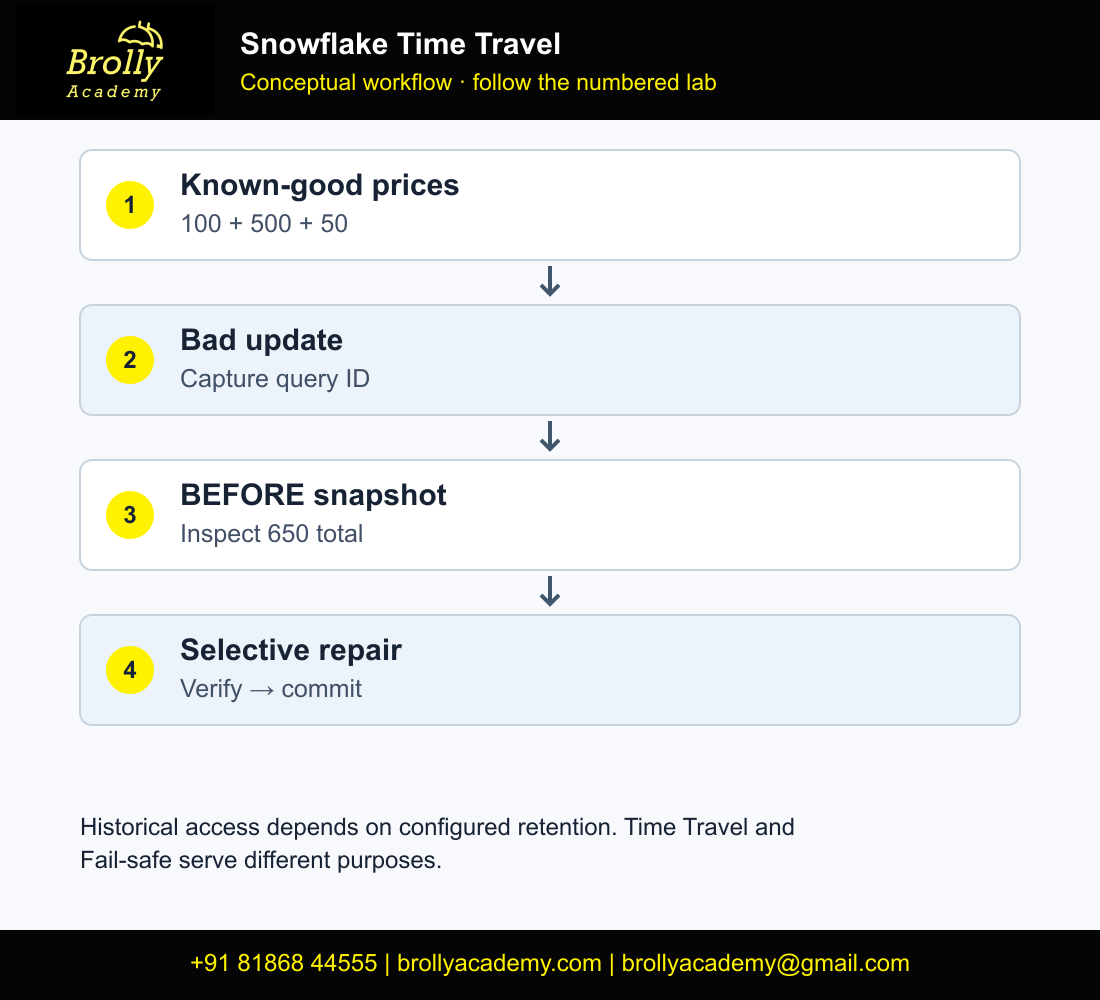
Workflow: Incident query ID → historical snapshot → row comparison
Approved repair scope → transactional update → before/after validation
5.1 Build a row-level incident difference report
Run this after creating PRICES_BEFORE_BAD_UPDATE and before repairing the current values. It shows why the change is considered wrong instead of relying on the total alone.
SELECT t.product_id,t.product_name,
 r.unit_price AS known_good_price,t.unit_price AS current_price,
 t.unit_price-r.unit_price AS price_difference
FROM PRODUCT_PRICES t
JOIN PRICES_BEFORE_BAD_UPDATE r USING(product_id)
WHERE t.unit_price IS DISTINCT FROM r.unit_price
ORDER BY t.product_id;| Product ID | Known-good price | Bad current price | Difference |
|---|---|---|---|
| 1 | 100.00 | 1000.00 | 900.00 |
| 2 | 500.00 | 5000.00 | 4500.00 |
| 3 | 50.00 | 500.00 | 450.00 |
IS DISTINCT FROM also detects a NULL-versus-value mismatch. Save the historical extract, incident query ID and this difference report before changing current data. In a real incident, add an approved affected-key list; historical data alone does not authorize changing every row.
6. Repair selected attributes while preserving a valid later change
Now simulate a legitimate update after the mistake: the product team corrects the backpack’s display name. Restoring every old column would undo that valid correction. We will repair only unit_price and leave the current name intact.
UPDATE PRODUCT_PRICES
SET product_name='Travel backpack' WHERE product_id=2;

BEGIN;
UPDATE PRODUCT_PRICES t
SET unit_price=r.unit_price
FROM PRICES_BEFORE_BAD_UPDATE r
WHERE t.product_id=r.product_id;

SELECT * FROM PRODUCT_PRICES ORDER BY product_id;
SELECT COUNT(*) AS mismatched_prices
FROM PRODUCT_PRICES t
JOIN PRICES_BEFORE_BAD_UPDATE r USING(product_id)
WHERE t.unit_price <> r.unit_price;
-- STOP: keep this transaction open and inspect both result sets.
Stop and choose one transaction action before continuing. Inspect the preceding output in the same session: three rows, 650.00 total, expected prices and the valid Travel backpack name. If correct, execute the following COMMIT block separately. If not, execute ROLLBACK instead. Do not run both, and do not begin the next drill with this transaction open.
COMMIT;Alternative only if validation fails:
ROLLBACK;For the supplied lab, mismatched_prices should be zero. Product 2 should now be named Travel backpack with a price of 500.00. The other products should be Notebook/100.00 and Pen set/50.00. Before COMMIT in an exploratory run, choose ROLLBACK if the results do not match the intended repair.
In a real incident, a later valid price update complicates this repair too. A historical price must not overwrite a newer approved price simply because it predates the incident. Establish a write pause, an approved affected-key set or a change-aware repair rule as appropriate to the system. Time Travel supplies evidence; it does not decide which later business changes to preserve.
Check missing and unexpected keys as well
SELECT COALESCE(t.product_id,r.product_id) AS product_id,
 CASE WHEN t.product_id IS NULL THEN 'MISSING_CURRENT'
      WHEN r.product_id IS NULL THEN 'NOT_IN_SNAPSHOT'
 END AS key_exception
FROM PRODUCT_PRICES t
FULL OUTER JOIN PRICES_BEFORE_BAD_UPDATE r USING(product_id)
WHERE t.product_id IS NULL OR r.product_id IS NULL;
The seed should produce no key exceptions. Outside this lab, an exception may be a valid later insert rather than an error. Investigate it using the incident scope. Do not make the recovery snapshot’s key set automatically authoritative for all later business activity.
6.1 Verify the repaired business state with a full comparison
Run this after the selective repair and legitimate name update. The correct output combines historical prices with the current approved product name; it is deliberately not identical to the entire historical snapshot.
WITH expected(product_id,product_name,unit_price) AS (
 SELECT * FROM VALUES (1,'Notebook',100.00),
 (2,'Travel backpack',500.00),(3,'Pen set',50.00)
)
SELECT 'MISSING_OR_WRONG' AS issue,* FROM (
 SELECT * FROM expected MINUS SELECT * FROM PRODUCT_PRICES
)
UNION ALL
SELECT 'UNEXPECTED_OR_WRONG' AS issue,* FROM (
 SELECT * FROM PRODUCT_PRICES MINUS SELECT * FROM expected
);
SELECT COUNT(*) AS rows_after_repair,SUM(unit_price) AS total_after_repair
FROM PRODUCT_PRICES;
SELECT product_id,COUNT(*) AS copies FROM PRODUCT_PRICES
GROUP BY product_id HAVING COUNT(*)>1;
Expect zero difference rows, three current rows, total 650.00 and zero duplicate IDs. A whole-table restoration could pass the price-total check while silently reverting Travel backpack to Backpack. This is why the acceptance specification includes a later valid change.
6.2 Practise a missing-row repair on a disposable copy
This is a separate extension. Create a scratch copy from the repaired table, delete product 3 there and restore only that row from the retained pre-delete state. Do not run the DELETE against PRODUCT_PRICES.
CREATE TABLE PRICE_DELETE_DRILL DATA_RETENTION_TIME_IN_DAYS=1 AS SELECT * FROM PRODUCT_PRICES;
DELETE FROM PRICE_DELETE_DRILL WHERE product_id=3;
SET delete_qid=LAST_QUERY_ID();
SELECT * FROM PRICE_DELETE_DRILL BEFORE(STATEMENT => $delete_qid)
WHERE product_id=3;
BEGIN;
INSERT INTO PRICE_DELETE_DRILL(product_id,product_name,unit_price)
SELECT h.product_id,h.product_name,h.unit_price
FROM PRICE_DELETE_DRILL BEFORE(STATEMENT => $delete_qid) h
WHERE h.product_id=3
 AND NOT EXISTS(SELECT 1 FROM PRICE_DELETE_DRILL c WHERE c.product_id=h.product_id);
SELECT COUNT(*) AS restored_rows,SUM(unit_price) AS restored_total FROM PRICE_DELETE_DRILL;
-- STOP: expected three rows and 650.00. Inspect before choosing an action.
Stop and choose one transaction action before continuing. Inspect the preceding output in the same session: three rows, 650.00 total, expected prices and the valid Travel backpack name. If correct, execute the following COMMIT block separately. If not, execute ROLLBACK instead. Do not run both, and do not begin the next drill with this transaction open.
COMMIT;Alternative only if validation fails:
ROLLBACK;The anti-join prevents a second sequential run from adding the already restored key. It is not a concurrency guarantee: coordinate writers and validate uniqueness before a real repair. If validation fails inside the transaction, choose ROLLBACK instead of COMMIT. Keep DDL outside the repair transaction.
7. Practise dropped-table recovery separately
A dropped-table incident needs object recovery rather than an UPDATE. Create a dedicated scratch copy, drop it, then restore it while it is eligible. This exercise avoids dropping the repaired PRODUCT_PRICES table.
CREATE TABLE DROP_RECOVERY_DEMO AS
SELECT * FROM PRODUCT_PRICES;
SHOW PARAMETERS LIKE 'DATA_RETENTION_TIME_IN_DAYS'
  IN TABLE DROP_RECOVERY_DEMO;
-- Confirm a positive effective retention setting before proceeding.
DROP TABLE DROP_RECOVERY_DEMO;
UNDROP TABLE DROP_RECOVERY_DEMO;

SELECT COUNT(*) AS rows, SUM(unit_price) AS price_total
FROM DROP_RECOVERY_DEMO;
Expected restored values are three rows and a price total of 650.00. The current Travel backpack name should also remain. Use the UNDROP TABLE reference for object eligibility and name-conflict rules. If an active table already uses the name, inspect it before considering a rename; do not drop that active object as a reflex.
If the database or schema containing an object was dropped, recovery involves the container context too. The point of the small table-only exercise is to learn one boundary cleanly before attempting a broader incident. A production runbook should identify the affected object hierarchy and confirm grants and downstream behavior after recovery.
7.1 Verify values and names after UNDROP
After the section-7 scratch-table UNDROP, compare both directions against PRODUCT_PRICES, then check uniqueness separately.
SELECT * FROM DROP_RECOVERY_DEMO MINUS SELECT * FROM PRODUCT_PRICES;
SELECT * FROM PRODUCT_PRICES MINUS SELECT * FROM DROP_RECOVERY_DEMO;
SELECT product_id,COUNT(*) AS copies FROM DROP_RECOVERY_DEMO
GROUP BY product_id HAVING COUNT(*)>1;
All three queries should return no rows for this seed. Also confirm the restored object is usable by the intended reader role and that the expected downstream queries work. A successful UNDROP message is an object-recovery result, not complete business validation.
- If the name is occupied, identify the active and dropped objects first.
- Preserve the active object and agree a controlled rename plan where necessary.
- Restore only an eligible retained object using the correct database/schema context.
- Recheck values, grants and consumers before declaring the incident resolved.
The UNDROP TABLE reference explains eligibility and name conflicts. Do not drop a current table just to clear a name without first understanding its data and dependencies.
8. Build a recovery validation record
- Identity: record database, schema, object name and relevant object version or incident query ID.
- Scope: record affected keys and attributes, plus later changes intentionally preserved.
- Baseline: retain the historical row extract or a suitable controlled snapshot.
- Checks: compare row counts, keys, important values and downstream business metrics.
- Execution: retain repair query IDs, transaction outcome and actual validation output.
- Follow-through: identify downstream jobs, reports or consumers that need a consistency check.
For this lab, a complete evidence sheet shows 650.00 before the error, 6500.00 after it, 650.00 after repair and the preserved product-name correction. Add a short statement explaining why a whole-table replacement would have been a worse repair for that specific sequence of changes.
8.1 Use an incident evidence sheet with measurable acceptance criteria
| Evidence field | This drill | What to record in a real run |
|---|---|---|
| Recovery point | Before saved bad UPDATE | Actual query ID or fixed typed timestamp |
| Repair scope | unit_price for three seeded keys | Approved keys/columns and excluded later changes |
| Known-good state | 3 rows; 650.00 | Retained extract and row-level business checks |
| Damaged state | 3 rows; 6500.00 | Observed values and affected consumers |
| Recovered state | 3 rows; 650.00; Travel backpack preserved | Actual assertions and transaction outcome |
| Follow-up | Separate UNDROP and DELETE drills | Dependent refreshes, reader access and incident timeline |
Measure elapsed recovery time only during an actual run with a defined start and completion condition. A tiny training example cannot substantiate an enterprise recovery-time objective. Save SQL, approvals where applicable, query IDs and observed results in the same evidence package.
9. Distinguish Time Travel, cloning and Fail-safe
Time Travel provides retained historical access within its supported window. Cloning creates another object and can be combined with a historical point where supported; our cloning tutorial explains that implementation step by step. Fail-safe is a separate recovery mechanism rather than a historical table you can browse with SELECT. Consult its official reference when planning beyond user-accessible retention.
Neither an attractive retention setting nor a successful UNDROP test is a complete continuity plan. Think about source replay, permissions, object dependencies, replication requirements and how the business will recognize a recovered dataset as correct. Keep an incident drill small enough that you can explain every restored value.
10. Balance retention with storage and recovery needs
Longer retention can keep more historical changed data and affect storage usage. The amount depends on change patterns, table types and account settings. Use Snowflake’s storage considerations and actual account usage before proposing a monetary estimate.
For a training exercise, keep the one-day table-level configuration and finish promptly. Do not change an account-wide retention policy simply to make a sample work. For a business workload, define the recovery objective first: how quickly must an error be noticed, and how far back must an operator be able to inspect the data?
10.1 Retention is a policy decision, not a reset button
Retention must be long enough to cover how quickly the organization discovers errors and chooses a repair. Longer retained history can increase storage usage, but table size alone is not a bill: changed-data volume and table type matter. Never reduce retention on a live table simply to clean up this tutorial.
After review, remove only the disposable drill objects using your normal account process. Keep the evidence export if it is needed for your portfolio. For a wider recovery design, distinguish user-accessible Time Travel, historical zero-copy cloning, source replay and the separate Fail-safe mechanism.
11. Troubleshoot historical access and recovery
| Symptom | Check first | Next action |
|---|---|---|
| Time Travel data unavailable | Retention and object creation time | Confirm the requested history belongs to this object and still exists |
| Wrong historical rows | Boundary, time zone and incident statement | Use the actual query ID or an explicitly typed fixed timestamp |
| Statement not found | ID accuracy and supported lookup age | Use an appropriate timestamp if retained history is still available |
| UNDROP name conflict | Current active object with the same name | Inspect both object identities before a controlled rename plan |
| Prices fixed; another column reverted | Whole-row overwrite | Repair only approved attributes and preserve valid later changes |
| Counts match; report is wrong | Values, keys and downstream refresh | Reconcile the business output and its refresh state |
12. Explain the recovery rather than reciting commands
Include the SQL, incident query ID, expected values, actual comparisons and a short repair rationale in your portfolio. Explain that the recovery snapshot supplied historical evidence while the repair policy preserved a later valid name change.
- When would you use BEFORE rather than AT for a bad statement?
- Why is a relative offset unsuitable as the only long-term incident reference?
- How can a complete table restoration lose valid changes?
- What happens if the requested history is no longer retained?
- Why check the effective object setting instead of relying only on an edition’s maximum?
- How would you validate the downstream report after recovery?
After completing the drill, a résumé point can describe a Snowflake recovery exercise using statement-based historical queries, selective attribute repair and dropped-table validation. Avoid claiming a recovery-time objective until it has been measured under the relevant conditions. See the Snowflake interview guide for additional questions.
13. Frequently asked questions
Does Time Travel automatically undo a committed mistake?
No. Query the historical evidence, choose a repair and verify the resulting state. Reading an older version does not change the current table.
Can I recover any table from 90 days ago?
No. Eligibility depends on table type, account edition, effective retention and whether the specific history is still available. Ninety days is a supported maximum for eligible permanent objects, not an account-wide guarantee.
Should I use CREATE OR REPLACE to reset this exercise?
Use a new lab schema for a fresh run. Replacing the source object changes the history and identity assumptions the recovery drill is designed to teach.
Were these recovery commands executed?
No connected Snowflake execution was performed. The expected row values and totals are independently reconciled, and the command patterns were checked against official documentation. Record your own results and transaction decisions.
What is the difference between AT and BEFORE in Snowflake Time Travel?
AT requests the state at its supported boundary; BEFORE requests the state preceding the referenced statement boundary. Use the actual incident statement and documented concurrency semantics rather than treating the keywords as interchangeable.
Why save LAST_QUERY_ID immediately after the bad UPDATE?
Additional worksheet statements can change which query is last. Capturing immediately in the same session makes the incident reference explicit. If you capture the wrong one, identify the correct UPDATE in query history.
Can Time Travel restore only a deleted row?
Yes, query the retained historical row and design an INSERT that restores only the approved missing key. The disposable DELETE drill includes a sequential rerun guard, transaction inspection and value validation.
Why does a recovered total of 650 not prove success?
Incorrect rows can produce the same total, and a whole-row restore can lose a legitimate name correction. Compare keys, values, duplicates and intentionally preserved later changes.
Can I use UNDROP when the same table name already exists?
An active name conflict must be resolved through a deliberate object-identity and rename plan. Do not discard the active table as an automatic troubleshooting step.
Is Time Travel the same as Fail-safe?
No. Time Travel supports user-accessible retained historical operations. Fail-safe is a separate recovery mechanism and is not a period you browse with ordinary historical SELECT queries.
Does changing retention restore history that has already expired?
Do not assume a later setting can recreate unavailable history. Check the actual retained data and use the established replay or recovery plan when the desired point is unavailable.
How do I prevent a repair from undoing valid later changes?
Define affected keys and columns, examine later writes and coordinate concurrent writers. The main lab restores only unit_price while retaining Travel backpack. A real system may also need a change-aware rule or write pause.
For broader hands-on work, continue with Snowflake projects. For guided learning, review the Snowflake course syllabus and confirm the recovery exercises covered in the current batch.
Key Takeaways
- Capture the incident statement boundary before running unrelated statements.
- Recover only the damaged attributes when later valid changes must survive.
- Validate exact rows and keys before choosing COMMIT or ROLLBACK.
Conclusion
Snowflake Time Travel becomes useful when you can explain the workflow, validate its outputs and recover from the failure cases. Complete the baseline before the optional drills, save your evidence and follow the cleanup guidance. The supplied examples use synthetic inputs; expected outputs are not presented as account execution screenshots.
Download the guided SQL workbook (.txt). Run one labelled phase at a time; do not execute the complete workbook as a single batch.
Related Snowflake Articles
Snowflake Projects
Choose a portfolio exercise with SQL, expected results and validation steps.
Snowflake Interview Questions
Practise explaining SQL, validation and project decisions.
Snowflake Certification
Explore the separate certification learning path and exam preparation.
Related Courses
Snowflake Training
Explore the syllabus, practical learning topics and available Snowflake training formats.
Azure Data Factory Training
Explore data integration, orchestration and cloud pipeline training.