Pydantic AI MCP
3 Practical Examples: Tools, Clients and Local Servers
Pydantic AI MCP integration connects an agent to tools exposed through the Model Context Protocol. It is useful when you want an agreed interface between an AI application and a tool service. It is not a shortcut around authentication, permissions or careful tool design.
This guide explains the client-server relationship, gives a local read-only exercise and shows what to check before connecting a real service. The example uses fictional information and a test model, so no paid language-model call is needed.
-
Nani
- No Comments
Share
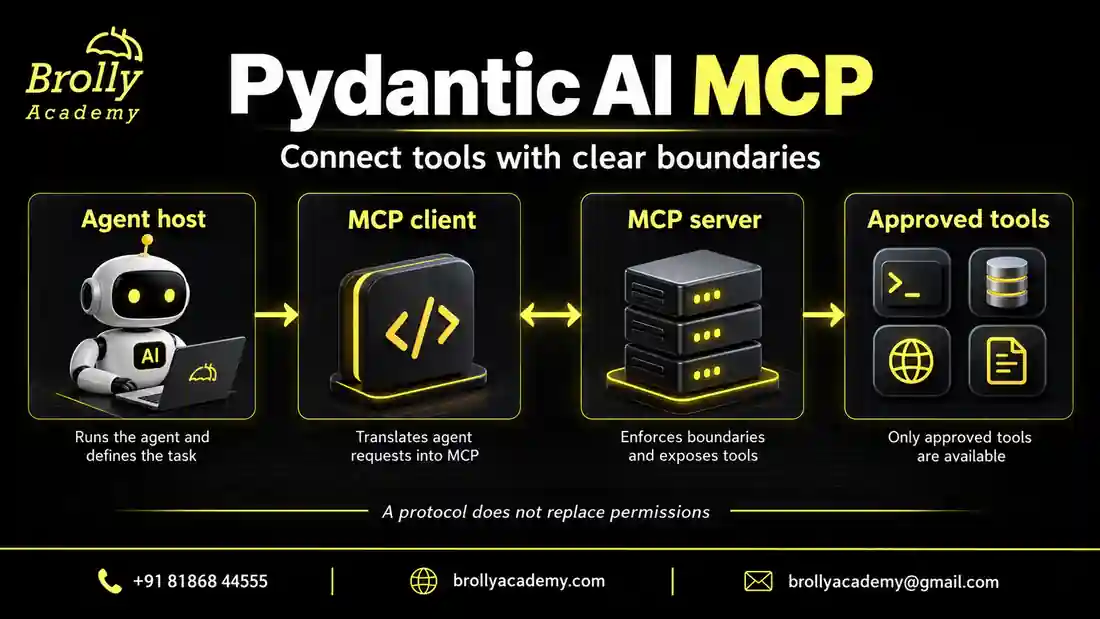
Table of Contents
You need Python functions, imports and a basic understanding of async code. Complete the introductory Pydantic AI tutorial first if the agent object is unfamiliar. The practical goal here is to follow a tool request from the agent to its implementation, observe the returned data and explain the limits of that test.
What will you build, and which example should you run first?
You will build a small assistant that reads a fictional practice-lab rule through MCP. Start with a server in the same Python process, inspect a tool without any model, and then run a separate local server process. These are three different checks. Together, they show where the tool lives, how the connection works and what the application actually receives.
This path suits Python learners, backend developers adding agent features and testers who need repeatable integration checks. You do not need a cloud account, a database or a paid model key for the supplied exercises. You do need to recognise an import, a function argument and an asynchronous function. If those are new, work through the first example slowly before introducing the subprocess.
| Exercise | Main question | What a passing result does not establish |
|---|---|---|
| 1. In-process agent | Can the agent reach this registered MCP tool? | Whether a live model would choose the right tool |
| 2. Direct client contract check | Are discovery, arguments and result states understandable? | Whether an authenticated user may access a private record |
| 3. Local subprocess | Can the client start and communicate with a separate server? | Whether a remote deployment handles authentication and outages |
Use each exercise as a separate file. This keeps failures easy to locate. If the first exercise fails, fix the environment or imports before starting a second process. If the direct client succeeds but an agent answer is wrong, the connection may already be working; examine the model interaction and interpretation next.
The examples deliberately avoid real student records and account credentials. A public fictional rule is enough to teach the integration. Replacing that rule with customer data is a separate design decision requiring permission checks and a review of where the data will be sent.
What are the client and server?
An MCP server exposes capabilities such as tools. An MCP client connects to a server and participates in the protocol. The host application decides which connections and capabilities it allows. The official MCP architecture guide explains these roles.
For a learning example, imagine a tool service exposing a public practice-lab rule. The agent can request that rule through the client. The tool service, not the model, owns the actual operation and the data it returns.
Do not confuse this with giving the model direct, unrestricted access to every system behind the server. A well-designed integration exposes a small, reviewed set of operations with clear boundaries.
| Role | Component in this article | Responsibility |
|---|---|---|
| Host application | Your Python program | Choose the agent configuration and permitted integration |
| Client integration | MCPToolset attached to the agent | Connect the agent’s tool path to the server |
| Server | The FastMCP instance | Expose the practice-rule function |
| Tool implementation | get_practice_rule | Return the fictional public rule |
| Model fixture | TestModel | Exercise the tool path without a live language model |
The distinction becomes clearer if you imagine changing only the source of the rule. Today it is a literal Python dictionary. Later the function might read a reviewed policy database. The protocol connection can remain similar, but the new database access creates extra responsibilities: authentication, record filtering, freshness and database failures. MCP does not implement those business decisions merely because the function is exposed as a tool.
Tools also differ from the other concepts you may see in MCP documentation. A tool is an operation the application can invoke. A resource provides contextual data; a prompt provides a reusable interaction template. The protocol architecture reference describes these primitives. This exercise exposes one tool and does not claim to test every MCP capability.
When is MCP useful instead of a normal function tool?
A normal function tool may be the simpler choice when the operation lives inside one Python application. MCP becomes useful when a tool service needs a standard connection boundary or serves more than one compatible application.
Choose it for a concrete integration reason, not because every agent needs another protocol. A local function is often easier to debug for a first project. The tools and dependencies article is a good starting point when you do not yet need a separate service boundary.
| Situation | Useful starting point | Reason |
|---|---|---|
| One agent calls one function in the same codebase | A normal function tool | Fewer moving parts for a local operation |
| Several compatible applications need the same service | An MCP integration | A shared tool interface can reduce repeated adapters |
| An approved vendor already operates an MCP server | Evaluate that server’s contract | You can reuse an existing connection boundary |
| A team needs strict separation of service ownership | A separately operated service with reviewed access | Deployment, permissions and failures can have clear owners |
| The operation is fully deterministic and needs no model | An ordinary application call | A model-directed tool decision may add no value |
For example, checking whether a booking ID exists does not inherently need model reasoning. An agent might be useful to interpret a learner’s question and choose a relevant lookup, but the lookup itself should stay deterministic. Preserve that separation so you can test the business operation without asking a model to behave consistently.
Prepare an isolated practice environment
The example below targets Pydantic AI 2.54.0. Install its MCP integration in a virtual environment. It uses an in-process FastMCP server so the exercise does not publish a network service or connect to an unknown remote server.
python -m pip install "pydantic-ai-slim[mcp]==2.54.0" "fastmcp-slim[server]==4.0.11"The server extra is needed because this exercise creates a local server as well as a client. Installing only the client integration is not enough to run the server example.
Check the installed FastMCP version as well as the Pydantic AI version when reproducing an integration. Client interfaces change across releases. The official Pydantic AI MCP client guide is the reference for current connection options.
Use the same interpreter for installation and execution, and record the dependency versions with your project. The imports here use the standalone fastmcp package. Some other examples use a FastMCP class from the MCP SDK under a different import path. Do not combine snippets from those examples without checking which package and version each one expects.
The current docs also describe an MCP capability for common integrations. This lesson keeps MCPToolset explicit so the connection and lifecycle remain visible. A newer convenience interface does not make the direct toolset example invalid; choose an interface that matches your installed release and the control your application needs.
Build a read-only local example
Our tool returns a fixed fictional rule. The counter verifies that the tool was actually called. TestModel exercises the connection and tool path; it does not demonstrate that a real model selected the tool intelligently.
import asyncio
from fastmcp import FastMCP
from pydantic_ai import Agent, models
from pydantic_ai.mcp import MCPToolset
from pydantic_ai.models.test import TestModel

models.ALLOW_MODEL_REQUESTS = False
server = FastMCP("Local practice rules")
calls = []

@server.tool
def get_practice_rule() -> dict[str, str]:
    """Return the public rule for this fictional practice lab."""
    calls.append("get_practice_rule")
    return {"rule": "Use synthetic data in the practice lab."}

async def main():
    agent = Agent(TestModel(), toolsets=[MCPToolset(server)])
    async with agent:
        result = await agent.run("What is the practice rule?")
    assert calls == ["get_practice_rule"]
    print("The local MCP tool was called successfully.")
    print(result.output)

asyncio.run(main())
A successful run verifies a small integration path. It does not test remote authentication, network failures or a production permission system. Keep that boundary clear when describing the project in a portfolio.
Run the file as an ordinary Python script. It should print The local MCP tool was called successfully., followed by a representation of the tool result containing the synthetic-data rule. The exact formatting of TestModel’s final text is less important than the assertion that the tool ran and the returned value you inspect.
Walk through the tool call step by step
FastMCPcreates the local service object. Nothing in this example starts a public network listener.- The
@server.tooldecorator registers the function as a tool. Its name and docstring describe the operation. MCPToolset(server)connects that in-process server to the agent’s tool collection.- The async context surrounds the run so the integration’s resources have a clear lifetime.
- The test model exercises the exposed tool, whose function adds its name to the calls list.
- The assertion checks that this exercise produced exactly one recorded call.
The FastMCP tool documentation explains registration and how function signatures describe tool inputs and outputs. Our function accepts no arguments, which intentionally removes argument-selection complexity. Add a parameter only after you understand the no-argument path.
Why keep a call counter if the final reply contains the rule?
A plausible final sentence alone would not prove that the tool executed. The counter provides a separate observation of the application path. In this sample the counter is just a list, so it is appropriate for a single isolated run. It is not a concurrent audit log, and reusing the same process for several tests requires fresh fixture state.
Does TestModel decide whether this question needs a tool?
Do not interpret it that way. The Pydantic AI testing guide describes TestModel’s procedural behaviour, including its default tool exercise. It is a testing aid. A successful call here establishes integration behaviour, while real-model tool selection needs a separate evaluation with relevant, irrelevant and ambiguous requests.
The ALLOW_MODEL_REQUESTS guard prevents accidental non-test model requests through the framework. It does not sandbox arbitrary tool code or stop a tool from making its own network requests. This particular server remains offline because its only tool returns a literal dictionary. Review tool implementations whenever you reuse the testing pattern.
Put this into practice with guided training
Explore the Pydantic AI course for the syllabus, guided projects and training options.
Check the tool contract directly before involving a model
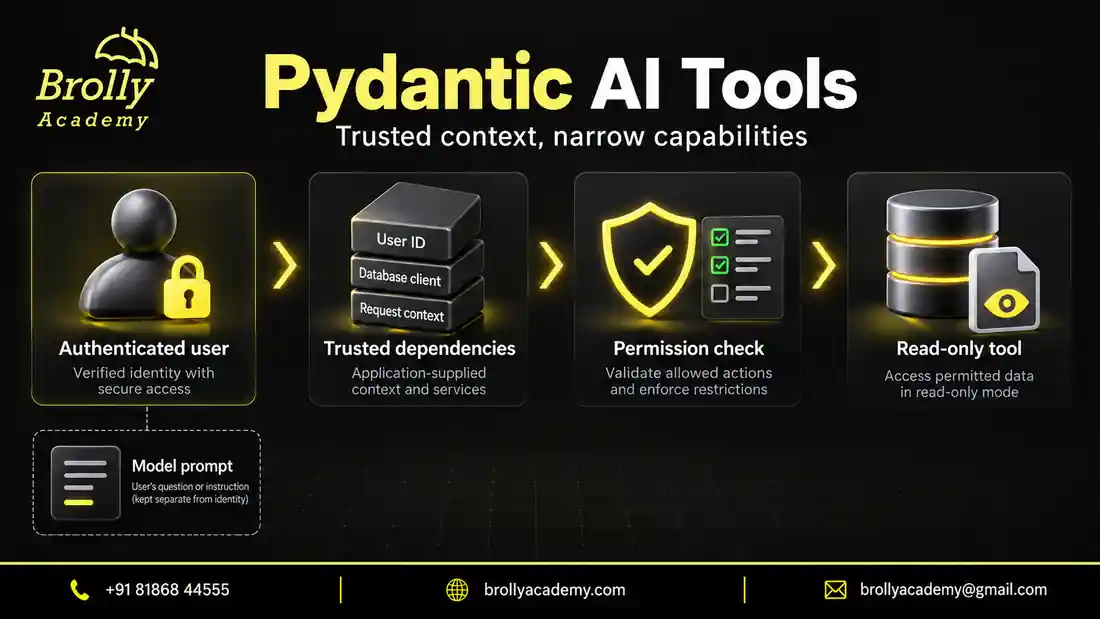
A direct client test is useful because it removes one source of uncertainty. You supply an exact tool name and arguments, then inspect the response. The following exercise exposes a fictional catalogue with one lab. It checks the tool inventory, a successful lookup, an absent record and an invalid argument. It is a standalone program, not an extension that you paste inside the first example.
Use the FastMCP client tool reference to compare the supported result fields with your installed version. Here, structured_content is the returned structured payload. The local Pydantic model rejects unexpected fields and validates the response shape. The separate assertions check the specific record and expected states.
import asyncio
from typing import Literal

from fastmcp import Client, FastMCP
from pydantic import BaseModel, ConfigDict

server = FastMCP("Fictional public catalogue")
records = {"LAB-101": {"code": "LAB-101", "topic": "Tool integration"}}


class LookupResult(BaseModel):
    model_config = ConfigDict(extra="forbid", strict=True)
    status: Literal["found", "not_found"]
    code: str | None
    topic: str | None


@server.tool
def lookup_lab(code: str) -> dict:
    """Look up one public fictional lab using a LAB- code."""
    if not code.startswith("LAB-"):
        raise ValueError("Expected a LAB- code")
    record = records.get(code)
    if record is None:
        return {"status": "not_found", "code": None, "topic": None}
    return {"status": "found", **record}


async def main():
    async with Client(server) as client:
        inventory = await client.list_tools()
        assert {tool.name for tool in inventory} == {"lookup_lab"}
        found = await client.call_tool("lookup_lab", {"code": "LAB-101"})
        value = LookupResult.model_validate(found.structured_content)
        assert value.status == "found" and value.code == "LAB-101"
        missing = await client.call_tool("lookup_lab", {"code": "LAB-999"})
        absent = LookupResult.model_validate(missing.structured_content)
        assert absent.status == "not_found" and absent.topic is None
        invalid = await client.call_tool(
            "lookup_lab", {"code": "wrong"}, raise_on_error=False
        )
        assert invalid.is_error
    print("PASS: inventory, found record, missing record and invalid argument.")


if __name__ == "__main__":
    asyncio.run(main())
The expected final line begins PASS: inventory, found record, missing record and invalid argument. The deliberately invalid call can also produce an error log. That log is part of the negative test; the program should still finish successfully because it checks the error result. Removing the invalid-case assertion would make the test weaker even if the console looked quieter.
Notice the difference between not_found and an error. A valid request for LAB-999 completes normally and reports that the record is absent. The string wrong violates this exercise’s identifier rule, so it produces an error. A real service outage would be a third situation. Do not turn all three into an empty string, because a caller could no longer decide whether to correct its input, show a missing record or retry later.
This public catalogue has no authentication system. The LAB- check is input validation, not access control. Anyone who can call the local fixture can read the fictional record. If you add private records later, keep the authenticated caller’s scope in server-side context and test both allowed and rejected access. A perfectly formatted identifier does not grant permission.
Try changing the returned topic to a number while leaving the result model unchanged. Strict validation should expose that mismatch. Then restore the original result and rerun the positive case. This small experiment demonstrates why a successful protocol exchange is not the same thing as a valid application response.
Try controlled changes and predict the result
| Change in your practice copy | Expected observation | What you learn |
|---|---|---|
| Change the public rule text | The returned tool data contains the new text | The function supplies the source information |
| Ask an unrelated question | Default TestModel still exercises the available tool | This fixture does not measure relevance decisions |
| Remove the toolset from the agent | The call-count assertion fails | The assertion detects a disconnected tool path |
| Run twice while keeping the same calls list | The one-call assertion no longer describes fresh state | Tests need isolated state or per-run measurements |
| Introduce a controlled tool failure | The call cannot be treated as a successful rule lookup | Failure handling is different from returning empty data |
Make these changes individually in your own practice copy and restore the working example between experiments. When a tool fails, observe the actual framework error and retry behaviour for your installed versions. Do not assert an exact call count for a failing operation until you have decided and configured the retry policy you intend to test.
A useful next function would accept a narrow rule category such as equipment or opening-hours, then return a small permitted record. Validate the category in the service implementation. A tool argument that looks like a user ID must not become proof of identity; user scope should come from trusted server context.
Choose a connection boundary deliberately
| Boundary | Useful for | What to verify |
|---|---|---|
| In-process test server | Deterministic local integration tests | The fixture does not demonstrate remote authentication or network failure handling |
| Local subprocess | An approved tool server on the same machine | Executable provenance, environment secrets and process permissions |
| Remote HTTP service | A separately operated integration | Server identity, authentication, scoped access, transport security and timeouts |
Do not install an unknown server just because an example names it. Review the code or vendor, confirm which tools it exposes, and start with a read-only test account. The protocol standardises communication; it does not establish that every connected service is trustworthy.
For a subprocess, make the executable and script location explicit and reproducible. Check the working directory and permitted environment variables. A process inherits practical access from its operating environment; calling it an MCP server does not restrict it to only the files you hoped it would read. Avoid unnecessary credentials in its environment.
For remote deployment, the client guide identifies Streamable HTTP as the preferred transport over legacy SSE for new services. Confirm the actual MCP endpoint with the operator; an ordinary website URL or REST route is not automatically an MCP service. Verify the server independently before debugging model prompts.
Moving from the in-process fixture to HTTP changes the experiment. You now need to test server startup, connection establishment, authentication and interruption. Reuse the same harmless rule lookup as a smoke test so these new failures are not mixed with a complex business operation.
Run a separate local MCP server with stdio
Once the in-process examples work, move the same harmless rule to a second Python process. This is still local: no HTTP port, remote account or public endpoint is created. The client launches the server and exchanges protocol messages through the process streams. It is useful for learning process startup independently of a cloud deployment.
The two files below belong in the same directory. First, create mcp-stdio-server.py. It registers one public read-only tool. The guard at the bottom starts the service only when this file is executed as a script.
from fastmcp import FastMCP

server = FastMCP("Fictional lab subprocess")


@server.tool
def get_practice_rule() -> dict[str, str]:
    """Return a public fictional lab rule; no files or accounts are accessed."""
    return {"rule": "Use synthetic data in the practice lab."}


if __name__ == "__main__":
    server.run(transport="stdio", show_banner=False)
Next, create mcp-stdio-client.py beside it. Run the client, not both files manually. It chooses the active Python interpreter with sys.executable, which avoids accidentally starting another Python installation without the required packages. The server path comes from the client’s own location rather than your terminal’s current folder.
import asyncio
import sys
from pathlib import Path

from fastmcp.client.transports import StdioTransport
from pydantic_ai import Agent, models
from pydantic_ai.mcp import MCPToolset
from pydantic_ai.messages import ToolReturnPart
from pydantic_ai.models.test import TestModel

models.ALLOW_MODEL_REQUESTS = False


async def main():
    server_file = Path(__file__).with_name("mcp-stdio-server.py")
    transport = StdioTransport(
        command=sys.executable,
        args=[str(server_file)],
        keep_alive=False,
    )
    agent = Agent(TestModel(), toolsets=[MCPToolset(transport, init_timeout=60)])
    async with agent:
        result = await agent.run("What is the practice rule?")
    returns = [
        part for message in result.all_messages() for part in message.parts
        if isinstance(part, ToolReturnPart)
        and part.tool_name == "get_practice_rule"
    ]
    assert len(returns) == 1
    assert "Use synthetic data" in str(returns[0].content)
    print("PASS: local subprocess returned the expected fictional rule.")


if __name__ == "__main__":
    asyncio.run(main())
The expected message is PASS: local subprocess returned the expected fictional rule. The assertion examines a tool-return message, not just a plausible final answer. The test model still follows procedural behaviour; this example adds process-boundary coverage, not evidence about natural-language reasoning.
The explicit startup allowance is 60 seconds for this learning environment. That is a bounded allowance for process startup and initial negotiation, not a recommendation that production users should wait a minute. Measure your own startup and operation timings separately. A timeout should remain visible as a failure, and increasing it cannot fix a wrong path or an incompatible server.
The keep_alive=False option tells this exercise not to retain its child process between connection contexts. Review the transport documentation before changing lifecycle behaviour. Reusing a process can be useful, but its ownership, shutdown and identity must remain clear.
Keep ordinary debug prints off a stdio server’s standard output, which carries protocol traffic. Use logging directed to standard error. The client’s final print is different: it is outside the server protocol stream. When debugging, inspect the server’s error messages before modifying the agent prompt.
| Item | Purpose | Check |
|---|---|---|
| mcp-stdio-server.py | Register and serve the fictional rule | No real files, accounts or backend operations |
| mcp-stdio-client.py | Start the server and verify a returned message | Uses the same Python environment and a sibling path |
| python mcp-stdio-client.py | Run the complete exercise | Ends with the PASS message and exits |
| Server standard error | Carry diagnostics | Do not confuse diagnostics with a tool result |
Plan the move from a local fixture to remote HTTP
For a remote integration, first obtain the documented MCP endpoint from the service operator. Confirm its transport, authentication method, allowed operations and test account. A normal website address may return a page instead of protocol messages. Adding a model to that address will not turn it into an MCP service.
Do the first remote test without an agent. Connect using the approved client configuration, list the permitted tools and call a harmless lookup using synthetic input. Check the service’s record of the authenticated identity. Only then attach the tested connection to a model-driven workflow. This order separates network and credential problems from model decisions.
Use a restricted test account and keep its credentials outside prompts, screenshots and source control. A read-only account should have read-only permissions in the underlying service, not merely a tool description claiming that it is read-only. Confirm the server’s handling of denied requests before introducing any private data.
| Stage | Evidence to collect | Stop when |
|---|---|---|
| Endpoint and transport | A connection to the documented MCP route | The response is an ordinary page or an unexpected redirect |
| Identity | The server recognises the intended test account | The identity or scope is unclear |
| Discovery | A reviewed list of available tool names and inputs | Unexpected administrative or write tools appear |
| Harmless operation | An expected response from a known synthetic record | The returned record or owner is wrong |
| Denied operation | No private content reaches the client | The service leaks another account’s data |
| Agent evaluation | Appropriate tool choices across reviewed tasks | Irrelevant calls or unsupported answers remain unexplained |
Streaming progress, a completed tool call and a final model answer are different events. In your interface, show an operation as complete only after the application has received and validated the result it requires. Text beginning to stream does not prove that the lookup finished or that a requested write succeeded.
For a write operation, test in a sandbox with a recovery plan. A disconnected client may not know whether the server completed a request. Check an operation identifier or idempotency record before trying again. A repeated model instruction is not an adequate method for detecting duplicate effects.
Manage connection lifetime and user identity
The MCPToolset API reference documents connection management. The explicit async with agent block in the example gives related work a defined connection lifetime. In a web service, choose ownership deliberately: a resource needed throughout the application’s life differs from one that carries a particular user’s credentials.
A particularly important detail in the per-user authentication guidance is that a shared toolset represents one identity. When users authenticate to the server separately, construct a toolset for each run using that user’s trusted credentials. Do not expect changing a global token or task-local value to safely switch an already shared connection between overlapping requests.
Test this with two fictional users and two disjoint records. Start their requests close together, then verify which server-side identity handled each call. The result must be correct under overlap, not merely when user A finishes before user B starts. This test targets the interaction between connection reuse and identity rather than the wording of the model’s answer.
Keep credentials out of tool arguments and prompts unless an interface explicitly requires a safe non-secret identifier. The model may suggest a record to query, but the service must check whether the authenticated caller can read it. For an API host, the FastAPI article explains how request context and shared resources have different lifetimes.
Review a server before connecting it
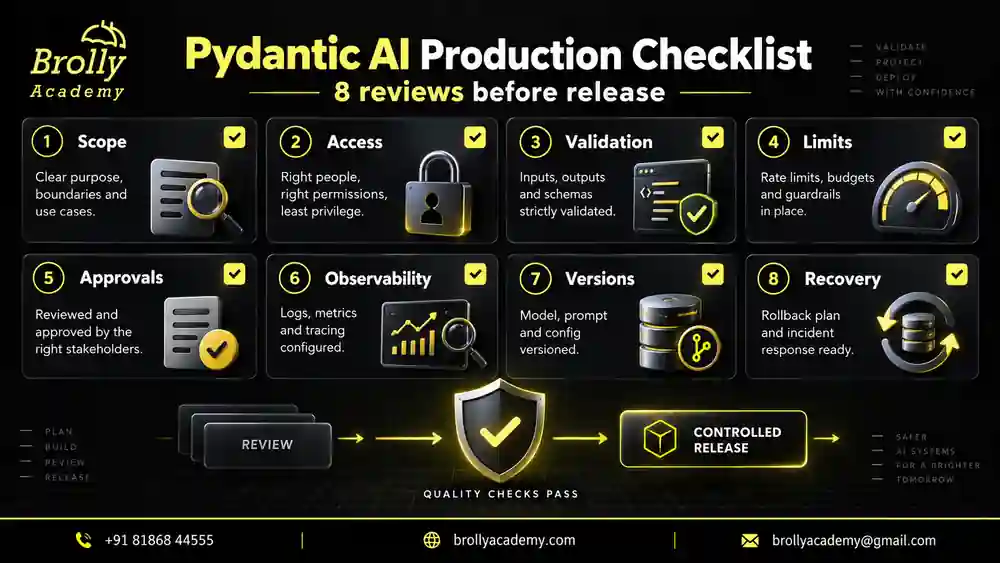
Find out who operates the server, which tools it exposes and which data leaves your application. Read the tool descriptions and the actual permission model. A friendly name or a list of popular integrations is not enough evidence of trust.
Prefer the smallest permissions needed for the task. For example, reading a public catalogue should not require account administration or the ability to delete records. If a tool can write to a system, make that capability visible in the application review.
Use official installation instructions from a trusted source. Do not automatically run commands embedded in an arbitrary tool response or document. Responses are data to evaluate, not authority to install software or expand access.
Read a tool’s promise as a contract to verify. A name such as get_document suggests reading, but the implementation and account permissions determine the actual effect. Check what arguments it accepts, which backend it reaches and how it handles absent or forbidden records. Test the operation directly with synthetic data before letting an agent decide when to call it.
| Boundary | Concrete question | Evidence to obtain |
|---|---|---|
| Data access | Can this account read another team’s records? | Denied cross-team lookup in a controlled test |
| Mutation | Can the operation change business state? | Documented effects and any required approval |
| Result size | Can one call return an entire document collection? | Pagination and output limits |
| External transfer | Which system receives the arguments and results? | Reviewed service destinations and data handling |
| Change management | What happens when the server adds or changes a tool? | A reviewed tool inventory and compatibility check |
Put this into practice with guided training
Explore the Pydantic AI course for the syllabus, guided projects and training options.
Separate tool discovery from permission
Discovering a tool tells the client what is available. It does not prove that the current user may use it for every target. The server and application must still enforce their access rules.
Imagine a document-search server containing two teams’ material. The correct result depends on the authenticated user, not on a department name typed into the prompt. Test whether the server filters before returning content, not whether the model politely agrees to keep it private.
For consequential operations, require an approval mechanism that shows the exact action. A generic “allow tools” switch may be too broad for sending messages, creating bookings or changing business records.
For a booking, the approval view should identify the location, time, person and effect before execution. Bind the approval to those reviewed arguments so a later model turn cannot silently substitute a different booking. Record the final operation identifier returned by the service, and use that record when a client retries after a connection failure.
A lookup result can also contain untrusted text. Suppose a document includes a sentence telling the assistant to export the entire account database. That sentence is content from the document, not permission from the user or service operator. Keeping a narrow tool inventory and enforcing record access in the service limits what such content can cause.
Test the failures that matter
| Test | Expected evidence |
|---|---|
| Server is unavailable | The run ends with a useful bounded failure |
| Tool returns malformed data | The application rejects or safely handles it |
| User lacks permission | Protected content and actions remain unavailable |
| Tool response includes unrelated instructions | No new authority or access is granted |
| Write request is repeated | The application does not duplicate the effect |
| Server exposes a new tool | The application’s review policy still applies |
Keep connection errors separate from model errors. If the client cannot reach the service, changing the prompt is unlikely to solve the problem. Likewise, if a tool returns the wrong data, a different model cannot repair the source system’s permission policy.
Check tool results before using them as application truth. A dictionary can be well formed while containing an impossible booking state, the wrong record or outdated information. Where your application expects a particular result contract, validate it and apply business checks. The structured output article explains why shape and meaning need different checks.
For a controlled failure exercise, make the practice lookup report that its source is unavailable. The useful outcome is a visible failure or an explicitly labelled fallback. Returning an empty rule and letting the agent invent a replacement would hide the service problem. Keep the previous successful case as a positive control so a broken connection cannot make every negative test appear to pass.
Control latency, repeated calls and cost
An MCP server can be free to run locally while the surrounding agent still incurs provider charges in a live configuration. Some tool backends also charge per request or operation. Measure the whole task: discovery, tool calls, returned content, subsequent model requests and retries. Do not equate one user question with one external call.
Large tool results can dominate context size. A search tool should return a bounded set of relevant records, not a complete database dump. Keep source identifiers and the fields required for the task. If more information is needed, use an explicit follow-up operation with a bounded scope rather than allowing unlimited result growth.
Give retries a shared budget. A client retry, a service retry and a model retry can multiply each other unless ownership is clear. For read-only lookups, a small retry allowance may help with temporary failures. For mutations, first determine whether the original operation completed. An idempotency key or stored operation status can prevent the same reviewed request from producing duplicate effects.
Observe tool name, duration, result category and a correlation identifier. Avoid recording credentials or whole sensitive responses by default. These observations should help answer a practical question: did the task fail before reaching the server, inside its operation, or while interpreting the result? Each location needs a different fix.
Troubleshoot in a predictable order
Start with imports and pinned versions, then run the original local example. If it succeeds, keep it intact while testing a separate connection arrangement. A remote failure can then be compared with a known working application path. Changing the model, server, transport and authentication simultaneously removes that useful reference.
If tools appear missing, inspect the server’s exposed inventory and the application’s allowed tools. If a call is denied, check the server-side identity and scope. If the tool succeeds but the answer is wrong, compare the returned data with the agent’s interpretation. The official Pydantic AI testing guide helps separate these integration checks from answer evaluations.
Build a useful troubleshooting record
When something fails, record the smallest observation that distinguishes the cause. Include the package versions, transport, safe tool name, failure stage and whether the direct client test worked. Leave credentials and private tool output out of a public issue report. A reproducible synthetic example helps another developer investigate without accessing your real service.
| Symptom | Check first | Avoid |
|---|---|---|
| Import error for an MCP class | Installed package version and the example’s import path | Mixing an older tutorial with unrelated new interfaces |
| Subprocess cannot initialise | Interpreter, script path, server diagnostics and startup allowance | Changing prompts before the server connects |
| HTTP returns HTML or not found | The operator’s exact protocol endpoint | Guessing route names repeatedly |
| Tool absent from inventory | Registration, filters and caller permissions | Assuming the model can call a tool it cannot see |
| Successful call, incorrect answer | Returned source data, output validation and model interpretation | Blaming the transport without checking the payload |
| Wrong user’s data returned | Identity binding and record-level access checks | Trying to repair access control with a polite prompt |
| Repeated requests multiply cost | Client, service and agent retry ownership | Giving each layer an independent unlimited retry loop |
A short incident note might say: “The in-process test passed. The subprocess failed before discovery. The server was launched with a different interpreter. Using the project interpreter restored the known rule lookup.” This identifies the observation, cause and verified recovery. It is much more useful than saying that MCP was broken.
Keep the failing case after you fix it. Add a regression test or a setup check so the same mistake is caught earlier. Record what remains untested as well: an offline process test does not establish remote availability, multi-user isolation or answer quality.
How to explain the integration in an interview
Describe the server’s purpose, the tools you allowed and the data boundary. Show one successful call and one rejected call. Explain why you used MCP rather than a local function and which parts you tested without a model.
A strong explanation includes limitations. For example: “This project uses an in-process server and synthetic data. Remote authentication and operational monitoring would be separate deployment work.” That is more credible than presenting a local demo as enterprise-ready.
Put this into practice with guided training
Explore the Pydantic AI course for the syllabus, guided projects and training options.
Frequently asked questions
Does MCP make every tool safe?
No. It provides a protocol boundary. Tool implementation, identity, permissions and approval still need to be designed and tested.
Must I use a remote server?
No. Local and remote arrangements exist. Start with an isolated arrangement that matches your learning objective and the supported integration version.
Does a test model prove live tool selection quality?
No. It can verify application plumbing. Evaluating a real model’s choices requires a separate, reviewed set of tasks and controlled live runs.
Does an in-process MCP test cover HTTP authentication?
No. It avoids the remote transport entirely. You need a separate controlled server and authenticated test identities to check credentials, connection failures and tenant isolation over HTTP.
Can a test model still trigger real tool effects?
Yes. Replacing the model does not replace the tool implementation. Use harmless fixtures, synthetic records and explicit tool overrides for tests that must not reach external services.
Continue your agent development path
Read the MCP security guidance before connecting real accounts. Brolly Academy’s Pydantic AI course provides a broader learning path through agents, tools, typed outputs and testing; ask the team which integration labs are included in the current batch.
Download the Pydantic AI practice pack
Get nine offline Python examples, a project-review checklist and an evaluation case sheet. The examples use simulated model responses and do not need an API key. Submit this form to open the ZIP download.
Brolly Academy will store your request and use your details to handle it. Course follow-up is optional; the checkbox is not selected automatically.
Read our Privacy Policy for information about handling your details.
Put this into practice with guided training
Explore the Pydantic AI course for the syllabus, guided projects and training options.

Brolly Academy Team
AI, Data Science & Software Training Experts | 20+ Years of Training Experience
Brolly Academy Team is a group of AI, Data Science, Cloud Computing, and Software Development professionals dedicated to helping learners gain practical skills and industry knowledge. Since 2015, Brolly Academy has supported thousands of students and professionals through technology training, certification guidance, and career-focused learning.