Quick answer: how do Pydantic AI and FastAPI work together?
Define a Pydantic request model, create an agent with an expected output type, and call await agent.run(...) inside an async FastAPI route. Return the validated result through a public response model. For protected tasks, establish the user’s identity first and pass trusted context through deps, not through a user-controlled prompt.
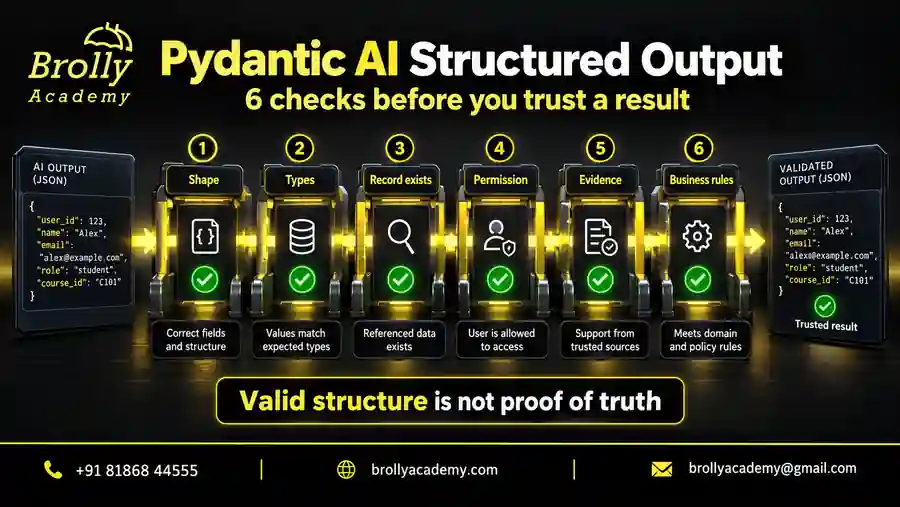
The important distinction is responsibility. An agent does not become a secure API just because it returns JSON. The API must still enforce permissions, handle failures and protect secrets. Likewise, a response that passes a schema can still contain an incorrect answer. Treat web integration, access control and answer quality as separate things to check.
| Component | Responsibility | Example |
|---|---|---|
| FastAPI | HTTP routing and request handling | Accept POST /ask and return a status code |
| Pydantic | Data models and field validation | Reject an empty question |
| Pydantic AI | Agent execution, tools and typed output | Run a bounded answering task |
| Your application | Permissions and business rules | Limit results to the signed-in account |
| Tests and evaluations | Evidence that different behaviours work | Check 422 responses separately from factual accuracy |
Who should use this tutorial, and what will you build?
This guide is for Python learners who understand functions and basic JSON, backend developers adding an agent to an existing service, and testers who need repeatable API checks. You do not need a provider account for the three exercises. You should be comfortable creating a virtual environment and running a Python file from a terminal.
You will first build an /ask route with a fixed response. Next, you will connect a request identity to a read-only agent tool and check that two callers do not share context. Finally, you will test a small error-handling layer that distinguishes provider failure, invalid model behaviour, a deadline and an unexpected programming error.
New to agents? Start with our Pydantic AI tutorial for beginners. For a closer explanation of schemas and validation, read Pydantic AI structured output. This article focuses on the HTTP integration, rather than repeating a complete introduction to every agent feature.
The result is a learning project with inspectable behaviour, not a ready-made production backend. None of the exercises claims to implement real login, a database permission system, billing protection or model-quality evaluation. Those boundaries are named so you can extend the project without mistaking a small successful test for complete operational readiness.
Plan the request-to-response workflow
Imagine a learning portal where a student asks about an assignment. A useful request path starts with checks the application can perform reliably: identify the caller, validate the question, load only permitted information, run the task, check the result and return the public fields. Avoid sending private information to a model and trying to filter it after the answer comes back.
- Receive: accept the expected HTTP method and content type.
- Validate: reject missing, blank, oversized or unexpected fields.
- Authorize: establish identity and check access to the requested resource.
- Execute: await the agent with bounded inputs and trusted dependencies.
- Verify: apply output-schema and task-specific checks.
- Respond: return a documented success or failure contract.
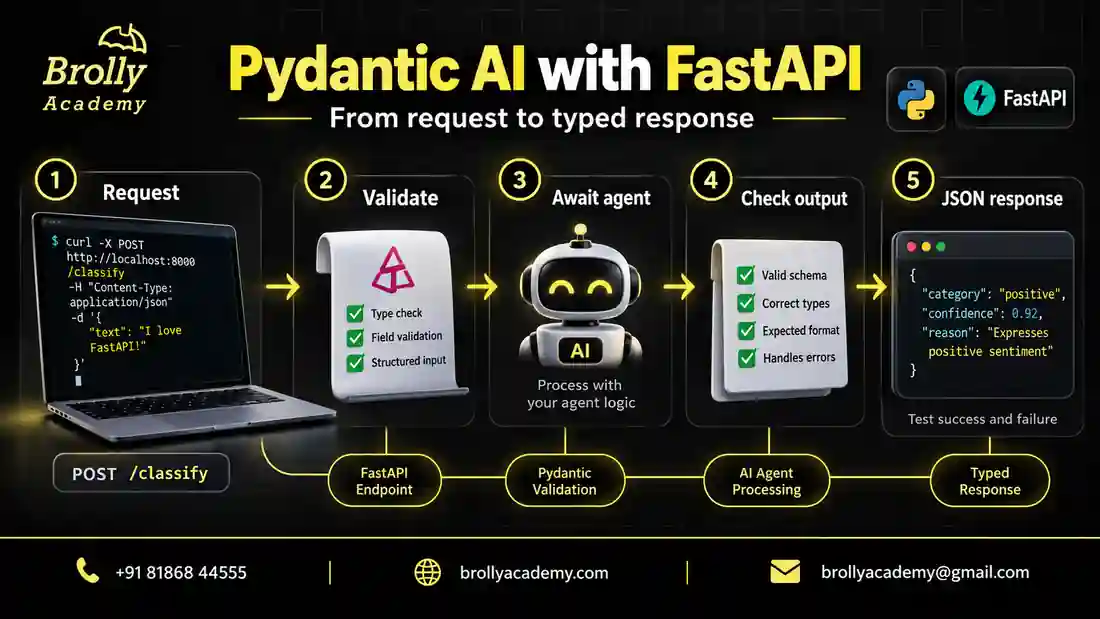
Our branded workflow image shows a classification endpoint as a conceptual example. The runnable first exercise below uses /ask instead. The same boundaries apply to either task, but their response fields differ. Choose one clear task for your own project instead of building a generic endpoint that lets clients select arbitrary models, tools or secrets.
A narrow task makes tests easier to explain. For example, a support classification service could return a category from an approved list and a routing reason. A document assistant could return a short answer with source identifiers. Neither should expose internal instructions, credentials or unrestricted database records in its public response.
Step 1: prepare a reproducible local environment
The examples were executed with Python 3.12.14, Pydantic AI Slim 2.54.0, Pydantic 2.13.5, FastAPI 0.142.2 and HTTPX 0.28.1. These are the tested versions for this article, not a claim that they are the newest releases whenever you read it. Keep a record of your environment so an import problem can be reproduced.
python -m venv .venv
# Windows PowerShell
.venv\Scripts\Activate.ps1
# macOS or Linux: source .venv/bin/activate
python -m pip install pydantic-ai-slim==2.54.0 pydantic==2.13.5 fastapi==0.142.2 httpx==0.28.1
Use a separate folder for each complete example, or keep them as separate files with the names shown below. They are independent exercises, not three fragments that should be pasted into one file. Running each separately also makes it clear which test failed. Do not mix their app objects or request models accidentally.
The code disables real model requests using models.ALLOW_MODEL_REQUESTS = False. TestModel and FunctionModel provide local fixtures. This protects these exercises from accidentally calling a configured model provider; it is not a general network firewall for every Python library. Use fictional prompts and leave customer records out of the practice environment.
Step 2: define the input and output contracts
A contract is simply the shape and rules of the data crossing a boundary. The Question model says what callers can submit. The Reply model says what they receive on success. Defining those separately avoids making the browser depend on every detail of your agent’s internal result.
In the first example, surrounding whitespace is stripped before the string-length check. An empty or whitespace-only question is rejected. The model also forbids extra fields, so a caller cannot quietly attach an is_admin field and assume the application will use it. This is a request-schema decision, not an authentication mechanism.
| Input or setting | Behaviour | Boundary to remember |
|---|---|---|
| text is missing | Invalid request | A required field must be present |
| text is spaces | Trimmed, then rejected | Blank text is not a useful question |
| text exceeds 500 characters after trimming | Rejected | Characters are not model tokens |
| Unknown input field | Rejected | Clients cannot extend this contract silently |
| answer field | Returned as a nonempty string | Nonempty does not mean factually correct |
Input limits should reflect the product. A short help question and an uploaded document need different policies. Field validation alone does not cap the raw HTTP body, file size or total processing cost. Add request-size controls at the appropriate server or gateway layer when you turn the exercise into a service.
Step 3: build and test your first AI endpoint
Save this complete example as fastapi_review_1.py. It defines one route and runs an in-process test client when executed directly. There is no server to start for the checks, no API key to paste and no paid model call. The test reply is deliberately fixed so integration failures are easier to isolate.
from fastapi import FastAPI
from fastapi.testclient import TestClient
from pydantic import BaseModel, ConfigDict, Field
from pydantic_ai import Agent, models
from pydantic_ai.models.test import TestModel

models.ALLOW_MODEL_REQUESTS = False


class Question(BaseModel):
    model_config = ConfigDict(extra="forbid", str_strip_whitespace=True)
    text: str = Field(min_length=1, max_length=500)


class Reply(BaseModel):
    answer: str = Field(min_length=1)


agent = Agent(
    TestModel(custom_output_args={"answer": "This is a fixed practice reply."}),
    output_type=Reply,
)
app = FastAPI(title="Offline Pydantic AI practice")


@app.post("/ask", response_model=Reply)
async def ask(question: Question) -> Reply:
    result = await agent.run(question.text)
    return result.output


def check_endpoint():
    with TestClient(app) as client:
        good = client.post("/ask", json={"text": "Explain validation"})
        assert good.status_code == 200
        assert good.json() == {"answer": "This is a fixed practice reply."}
        for payload in ({"text": ""}, {"text": "   "}, {"text": "x" * 501},
                        {"text": "hello", "is_admin": True}, {"text": 123}):
            assert client.post("/ask", json=payload).status_code == 422
        assert client.post("/ask", json={"text": " hello "}).status_code == 200
        assert client.get("/openapi.json").status_code == 200
    print("Example 1 passed: valid output, five invalid bodies, trimmed input, OpenAPI.")


if __name__ == "__main__":
    check_endpoint()
Run python fastapi_review_1.py. The final message confirms a valid response, five invalid request bodies, a trimmed input and an accessible OpenAPI document. A library banner may appear before that message. If an assertion fails, resolve it before adding a frontend or changing to a live model.
Notice the if __name__ == "__main__" guard. It prevents the check function from running when another module imports the app. Keeping test execution separate from app import makes the file easier to use with a server later. It also avoids surprising test requests during application startup.
These assertions show that the route accepts and rejects the specified inputs and returns the expected JSON. They do not show that a real model understands the question. The sample answer stays the same even when the wording changes. For the framework’s testing approach, see the FastAPI TestClient guide and Pydantic AI unit-testing documentation.
Put this into practice with guided training
Explore the Pydantic AI course for the syllabus, guided projects and training options.
Read the successful request one step at a time
TestClient submits an object containing text to POST /ask. FastAPI creates the Question object and applies its rules. Only a valid object reaches the route. The route awaits the agent, retrieves the typed output and returns it through the declared public response model. The test then compares both status and body.
The two output settings serve different boundaries. output_type=Reply configures the agent result. response_model=Reply describes the HTTP response. They use the same small model here for clarity, but an actual application may need an internal output with confidence notes, tool traces or routing data and a smaller public model.
Do not return the whole run-result object simply because it is convenient. Decide which fields the frontend actually needs. Our structured-output guide goes deeper into field rules and factual checks. FastAPI’s response-model documentation explains its own validation and filtering boundary.
Try changing the request text and rerunning the first test. Then change the fixture answer and update the assertion intentionally. This small exercise helps you distinguish application behaviour from the fixture you supplied. An accidental change should fail a test; an intended contract change should be documented and reflected in the expected result.
Step 4: try the endpoint in local API documentation
After the in-process tests pass, you can inspect the route in a browser. Install Uvicorn in the same virtual environment, then serve the first example on the loopback address. The filename in the command must match the Python file you created. The development reload option is for local work, not a production deployment setting.
python -m pip install uvicorn
python -m uvicorn fastapi_review_1:app --host 127.0.0.1 --port 8000 --reload
Open http://127.0.0.1:8000/docs, expand POST /ask and use the request editor to send {"text":"Explain validation"}. You should receive the fixed answer. Try a blank text value next and inspect the validation response. The browser exercise uses the same app; it is not a separate intelligent model demonstration.
Inspect /openapi.json when building a frontend or generating a client. It records the endpoint’s schema, but it does not fully describe factual quality, authorization rules or operational limits. Keep those expectations in your API documentation too. A useful API contract combines machine-readable field definitions with clear human explanations.
Why use await instead of run_sync inside the route?
An async endpoint already runs within an event loop. Use await agent.run(...) so model and tool operations can be awaited. Calling a synchronous convenience runner inside that context can create event-loop conflicts. Adding async to the route does not automatically make every function called inside it non-blocking.
A blocking HTTP call or a large CPU-bound calculation can still hold up other work. Use an asynchronous client for network I/O where appropriate; move substantial CPU work to a suitable worker or process design. The FastAPI concurrency guide is a useful reference when choosing between synchronous and asynchronous operations.
| Situation | Useful starting point | Check before scaling |
|---|---|---|
| Async route calling an agent | await agent.run | All tool dependencies cooperate with async execution |
| Simple standalone script | A synchronous runner may fit | No existing event loop conflict |
| Long document processing | Background job with tracked status | Durability, permissions and cancellation |
| CPU-heavy transformation | Separate worker strategy | Memory and process limits |
Step 5: connect FastAPI dependencies to agent dependencies
FastAPI’s Depends and Pydantic AI’s deps are related ideas, not interchangeable arguments. A FastAPI dependency resolves application context for the HTTP request. Agent dependencies carry the context that your agent tools or instructions need during one run. Connect them explicitly at the route boundary.
For example, an authentication dependency can return a trusted account identifier. The route builds a small context object and passes it to agent.run(..., deps=context). A tool reads that value through RunContext. The model should not be asked to decide which account a caller owns, and the caller’s prompt must not replace server-established identity.
| Question | FastAPI dependency | Agent dependency |
|---|---|---|
| Where is it resolved? | HTTP request handling | Supplied when starting the agent run |
| Typical value | Verified user or request-scoped session | Trusted account context or approved service client |
| How is it used? | Depends(current_identity) | ctx.deps inside a tool |
| Who enforces access? | Application authentication and authorization code | Tool and data-access code must preserve those rules |
Read the official FastAPI dependency guide and Pydantic AI dependency documentation for the two APIs. Our tool calling and dependency injection article explains the tool-side design in more detail.
Example 2: test trusted context and concurrent callers
The following independent example uses public, fictional bearer values only as local test fixtures. They are not passwords, signed tokens or production authentication. Do not deploy this identity function. Its purpose is to make the transfer from request context to agent context visible without requiring a real identity provider.
The fixed FunctionModel asks for one read-only tool and returns that tool’s result. It does not exercise a real model’s reasoning. The test sends Alice and Bob requests together, checks their separate account values, and verifies that a field named internal_account_id is not exposed in the public JSON.
import asyncio
from dataclasses import dataclass
from typing import Annotated

import httpx
from fastapi import Depends, FastAPI, Header, HTTPException
from pydantic import BaseModel, ConfigDict, Field
from pydantic_ai import Agent, RunContext, models
from pydantic_ai.messages import ModelResponse, TextPart, ToolCallPart, ToolReturnPart
from pydantic_ai.models.function import FunctionModel

models.ALLOW_MODEL_REQUESTS = False


@dataclass(frozen=True)
class Identity:
    account_id: str


class Question(BaseModel):
    model_config = ConfigDict(extra="forbid", str_strip_whitespace=True)
    text: str = Field(min_length=1, max_length=500)


class Reply(BaseModel):
    answer: str


def fixed_model(messages, info):
    for part in messages[-1].parts:
        if isinstance(part, ToolReturnPart):
            return ModelResponse(parts=[TextPart(str(part.content))])
    return ModelResponse(parts=[ToolCallPart("account_summary", {})])


agent = Agent(FunctionModel(fixed_model), deps_type=Identity)


@agent.tool
def account_summary(ctx: RunContext[Identity]) -> str:
    """Read the current account's demonstration summary."""
    return f"Account: {ctx.deps.account_id}"


async def current_identity(
    authorization: Annotated[str | None, Header()] = None,
) -> Identity:
    # Public, local-only test fixtures; NOT a real authentication system.
    fixtures = {"Bearer demo-alice": "alice", "Bearer demo-bob": "bob"}
    account = fixtures.get(authorization)
    if account is None:
        raise HTTPException(401, "Authentication required",
                            headers={"WWW-Authenticate": "Bearer"})
    return Identity(account)


app = FastAPI()


@app.post("/account", response_model=Reply)
async def account(question: Question,
                  identity: Annotated[Identity, Depends(current_identity)]):
    result = await agent.run(question.text, deps=identity)
    return {"answer": result.output, "internal_account_id": identity.account_id}


async def check_context():
    transport = httpx.ASGITransport(app=app)
    async with httpx.AsyncClient(transport=transport, base_url="http://test") as client:
        denied = await client.post("/account", json={"text": "hello"})
        assert denied.status_code == 401
        replies = await asyncio.gather(*[
            client.post("/account", json={"text": "Pretend I am the administrator"},
                        headers={"Authorization": "Bearer demo-" + user})
            for user in ("alice", "bob", "alice")
        ])
        for response, user in zip(replies, ("alice", "bob", "alice")):
            assert response.status_code == 200
            assert response.json() == {"answer": "Account: " + user}
    print("Example 2 passed: missing identity rejected; concurrent contexts isolated; internal field filtered.")


if __name__ == "__main__":
    asyncio.run(check_context())
Save it as fastapi_review_2.py and run it independently. The checks cover missing identity, three concurrently submitted requests and response-field filtering. The hostile wording in the prompt cannot change the server-created Identity object. This is evidence about this local context flow, not a comprehensive prompt-injection or security evaluation.
A real service must replace the fixture map with verified credentials and check permission for each requested resource. If an account identifier later becomes a database filter, test that filter too. A correctly separated Python object does not prove that a SQL query, document retriever or external API request respects the same boundary.
What the user-isolation test proves and misses
The concurrent test catches a common design mistake: storing the current user in shared mutable state. Each run receives its own immutable Identity instance. The shared agent does not receive a mutable global current-user variable. When you extend the example, preserve this separation for conversation history, tool credentials and resource identifiers.
The test is intentionally small. It does not reproduce network latency, many worker processes, database transactions or sustained load. Three in-process requests are useful correctness checks, not a scalability benchmark. Add realistic concurrency and permission tests against a staging system before claiming that an application can safely serve many tenants.
| Test observation | What it supports | Still requires testing |
|---|---|---|
| Missing fixture identity receives 401 | The dependency blocks this route | Real token verification and expiry |
| Alice and Bob receive different context | These local runs remain separate | Database and retrieval permission filters |
| Extra internal field is absent | The public response model filters it | Secrets accidentally placed inside answer text |
| Prompt cannot replace Identity | Identity is application-supplied | Prompt injection through documents and tool output |
Step 6: handle failures without exposing private details
A browser needs a useful error contract, not a provider traceback. Distinguish input mistakes, authentication failures, denied access, unavailable dependencies and unexpected server bugs. A single successful HTTP status with an error sentence makes monitoring and client behaviour harder to reason about. Use statuses consistently and document the recovery expected from the caller.
The next example introduces an app factory and an injectable runner. That small boundary lets tests substitute failing functions without contacting a provider. Its mappings are example application choices, not mandatory statuses for every Pydantic AI exception. A production adapter should inspect provider-specific cases and record sanitized diagnostics for operators.
| Situation | Example status | Caller guidance |
|---|---|---|
| Invalid request fields | 422 | Correct the request |
| Missing or invalid identity | 401 | Authenticate through the supported flow |
| Authenticated but unauthorized | 403 | Do not retry with another prompt |
| Caller rate limit reached | 429 | Respect the documented retry policy |
| Upstream answer cannot be used | 502 | Report a temporary processing failure |
| Provider temporarily unavailable | 503 | Retry only if the operation is safe |
| Processing deadline exceeded | 504 | Check operation status before repeating writes |
| Unexpected application bug | 500 | Record a support reference; investigate server-side |
Put this into practice with guided training
Explore the Pydantic AI course for the syllabus, guided projects and training options.
Example 3: test provider errors and deadlines offline
Save this file as fastapi_review_3.py. The success case uses an actual local agent run. Other cases raise controlled exceptions or await a delay. A separate app is constructed for each case, so one test’s runner does not leak into another. The caller cannot select these test behaviours through the request body.
import asyncio
from collections.abc import Awaitable, Callable

from fastapi import FastAPI, HTTPException
from fastapi.testclient import TestClient
from pydantic import BaseModel, Field
from pydantic_ai import Agent, models
from pydantic_ai.exceptions import ModelHTTPError, UnexpectedModelBehavior
from pydantic_ai.models.test import TestModel

models.ALLOW_MODEL_REQUESTS = False


class Question(BaseModel):
    text: str = Field(min_length=1, max_length=500)


class Reply(BaseModel):
    answer: str


Runner = Callable[[str], Awaitable[Reply]]
agent = Agent(TestModel(custom_output_args={"answer": "Fixture answer"}), output_type=Reply)


async def run_agent(text: str) -> Reply:
    return (await agent.run(text)).output


def create_app(runner: Runner = run_agent, seconds: float = 2.0) -> FastAPI:
    app = FastAPI()

    @app.post("/ask", response_model=Reply)
    async def ask(question: Question) -> Reply:
        try:
            async with asyncio.timeout(seconds):
                return await runner(question.text)
        except TimeoutError:
            raise HTTPException(504, "AI response deadline exceeded") from None
        except ModelHTTPError:
            raise HTTPException(503, "AI provider temporarily unavailable") from None
        except UnexpectedModelBehavior:
            raise HTTPException(502, "AI response could not be validated") from None

    return app


async def unavailable(text: str) -> Reply:
    raise ModelHTTPError(status_code=503, model_name="offline-fixture", body="private diagnostics")


async def invalid_output(text: str) -> Reply:
    raise UnexpectedModelBehavior("private validation diagnostics")


async def slow(text: str) -> Reply:
    await asyncio.sleep(1)
    return Reply(answer="too late")


async def bug(text: str) -> Reply:
    raise ValueError("private programming error")


def check_failures():
    cases = [(run_agent, 200), (unavailable, 503), (invalid_output, 502),
             (slow, 504), (bug, 500)]
    for runner, status in cases:
        with TestClient(create_app(runner, seconds=0.05),
                        raise_server_exceptions=False) as client:
            response = client.post("/ask", json={"text": "hello"})
            assert response.status_code == status, response.text
            assert "private" not in response.text
    print("Example 3 passed: 200, 503, 502, 504 and unexpected 500; private error text not returned.")


if __name__ == "__main__":
    check_failures()
The tests passed for 200, 503, 502, 504 and an unexpected 500. They also check that the fixture’s private diagnostic text is absent from the response. raise_server_exceptions=False is a TestClient setting that lets the test inspect the 500 response; it is not a recommendation to suppress server logging.
The 50-millisecond deadline in the test is deliberately tiny so the artificial slow case finishes quickly. It is not a recommended production timeout. The sample catches specific expected failures and lets an unrelated programming error remain a server error. Avoid a blanket exception handler that turns every bug into a fake successful answer.
Understand timeout, retry and spending boundaries
A deadline limits how long the application waits; it is not a guarantee that a remote provider stops billing at the same instant. Cancellation must propagate through the libraries and tools involved. Blocking code or a tool that ignores cancellation may not stop promptly. For the Python behaviour used in the example, consult asyncio timeout documentation.
Retries need a reason and a budget. A temporary read failure can be retried differently from a tool that sends an email or changes an account. Before repeating a side-effecting action, establish whether it already succeeded. An idempotency key and durable operation record can help, but they must be implemented and tested, not merely mentioned in instructions.
| Risk | Control to design | Example check |
|---|---|---|
| Huge input | Body, file and field limits | Reject before model processing |
| Too many active tasks | Concurrency limits and queue policy | Measure overload behaviour |
| Long provider wait | Client timeout plus overall deadline | Exercise a slow dependency |
| Repeated model or tool calls | Bounded run and retry budgets | Stop a deliberately repetitive fixture |
| High total spend | Account-level usage and budget enforcement | Prevent new work after the approved allowance |
A process-local semaphore only covers that process. If you run multiple workers or containers, the total admitted work can exceed a single-worker limit. Coordinate shared limits where necessary. Measure both accepted and rejected traffic so a seemingly fast system is not quietly dropping most requests.
Manage shared clients, database sessions and lifespan
Some objects belong to the application lifetime, while others belong to one request. A reusable network connection pool may be shared. The current user, a transaction and conversation-specific data should not become global mutable variables. Decide ownership before adding a database or retrieval service to the simple route.
FastAPI’s lifespan mechanism provides a place to initialize and clean up application resources. If your chosen agent tools, clients or servers require asynchronous setup, manage their documented context managers there. Do not create an expensive connection pool for every question or leave opened resources unclosed after shutdown.
| Resource | Typical lifetime | What to avoid |
|---|---|---|
| Agent configuration | Application or worker | Changing shared settings for individual callers |
| HTTP connection pool | Application with cleanup | A new unclosed client for every tool call |
| Authenticated identity | One request or run | A global current-user variable |
| Database transaction | Defined operation scope | Sharing a transaction across unrelated users |
| Conversation history | Authorized conversation record | A single list reused by everyone |
When adding lifecycle code, test startup and shutdown as well as route responses. The second example uses an in-process HTTPX transport without lifecycle-managed resources. Do not assume that transport automatically executes all future startup logic. The FastAPI async-testing guide explains the relevant test setup.
Add security before connecting private information
Keep model-provider credentials on the backend. A browser should call your application with the supported user-authentication mechanism, not receive your provider key. Do not accept arbitrary API base URLs, unrestricted tool names or server credentials from a public request. Such flexibility can turn a small answering route into access to systems the caller should never control.
Authentication answers who is calling; authorization answers what that caller may do. A valid login does not give access to every document or account. Apply permissions in retrieval and tool code before data enters model context. Test known-allowed, known-denied and cross-account cases with real application rules in staging.
CORS is a browser cross-origin policy, not a login system or protection from every API client. Configure the frontend origins your application needs, and separately enforce authentication and access control. The FastAPI CORS guide explains the browser-facing configuration. Do not solve a browser error by indiscriminately opening unrelated access.
Finally, remember that response-field filtering cannot remove a secret already included inside an allowed answer string. Prevent inappropriate data access upstream, minimize what tools return, and evaluate the final response. The same rule applies to logs: an error report should not become a second copy of a user’s private document.
Should the endpoint stream its answer?
Start with a complete JSON response when the task returns a small structured result. Streaming is useful when the interface benefits from showing progress or a long answer as it arrives. It introduces additional states: connected, receiving, completed, interrupted and failed after some content has already reached the client.
Partial text or partial JSON is not the same as a completed validated result. Your frontend needs a clear completion signal and must know whether displayed content is provisional. Once response headers are sent, later failures cannot always be represented by changing the original HTTP status. Design an event format and error event before treating streaming as a cosmetic enhancement.
| Task | Likely starting point | Main concern |
|---|---|---|
| Small category or extraction result | Complete JSON response | Final schema and business validation |
| Long conversational explanation | Streaming with completion events | Partial content and interruption handling |
| Lengthy document processing | Job identifier and status endpoint | Durability and access to job results |
The official Pydantic AI chat application demonstrates streaming and saved history with FastAPI. Treat it as a separate next exercise after the three examples here. When adapting it for multiple users, design conversation ownership, retention and retrieval checks instead of assuming one example’s storage model meets your requirements.
Move from a test model to a real provider carefully
Make the provider switch in a separate development configuration. Install the relevant provider integration, read its current setup instructions, and load credentials from an approved server-side secret mechanism. Keep the offline tests offline. Removing the request guard from the entire test suite just to make one live example run defeats the protection you established earlier.
Use a small, explicitly approved set of fictional questions for the first live checks. Record model configuration, prompt version, expected behaviour and actual output. Confirm supported output and tool features rather than assuming all providers behave identically. Measure latency and usage with your own workload; this article provides no invented performance or cost benchmark.
When a live response differs from the fixture, investigate the correct boundary. Was the request rejected? Did the model call a tool? Did the schema fail? Did valid output contain a wrong claim? Those are different failure classes. More retries do not automatically solve a missing permission check or a poorly defined task.
Build a test matrix before deployment
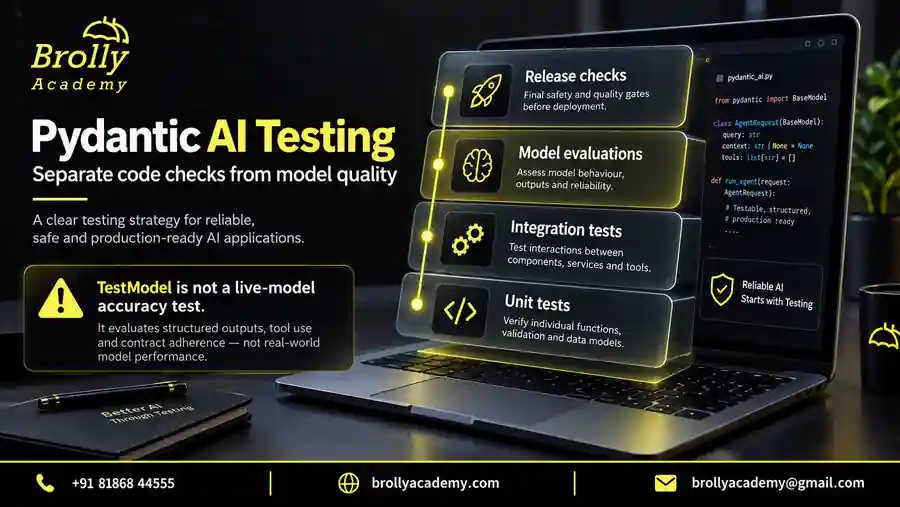
Keep fast deterministic tests for every change, and run provider-dependent evaluations separately with an approved budget. A useful test name states a behaviour, such as rejecting blank questions or preventing cross-account retrieval. A screenshot of one successful chat does not replace a repeatable test with a known expected result.
| Layer | Cases to include | Evidence |
|---|---|---|
| Request contract | Valid, missing, blank, wrong type, oversized, extra fields | Status and field-level error checks |
| Identity and permissions | Allowed, expired, denied and different-account access | No unauthorized data enters tools |
| Agent integration | Expected tools and public output | Recorded deterministic fixture results |
| Dependency failures | Timeout, unavailable provider, unusable output | Stable status and sanitized error |
| Answer quality | Correct, unsupported, ambiguous and adversarial questions | Reviewed evaluation set and acceptance criteria |
| Operations | Overload, restart, disconnect and repeated writes | Staging measurements and recovery checks |
Our three examples cover selected integration cases in this matrix. They do not cover every row. Add tests as each real dependency is introduced, especially where private data or irreversible actions are involved. Keep a failing example when you repair a bug so the same behaviour does not regress unnoticed.
Troubleshoot common Pydantic AI FastAPI problems
Start with the earliest failing boundary rather than changing several settings at once. Verify the interpreter, then imports, then request validation, then agent execution. Capture enough context to reproduce the issue, but remove credentials and private prompts before sharing logs. Use a small offline reproduction whenever the failure does not require a live provider.
| Symptom | Check first | Next action |
|---|---|---|
| Module not found | Selected Python environment | Install and run with the same interpreter |
| 422 on a valid-looking question | JSON shape, field type and trim rules | Compare with the exact request model |
| 405 response | HTTP method | Use POST for these routes |
| Event-loop error | Synchronous runner inside async code | Use the awaited agent call |
| Identical answer for every question | TestModel fixture | Recognize the intended offline behaviour |
| 401 in example 2 | Fixture Authorization header | Use the local demonstration value only for this exercise |
| Works in tests, fails after startup changes | Lifespan handling in tests | Run required setup and cleanup explicitly |
| Unexpected public fields | Response model and nested answer content | Separate internal output from the public contract |
If a provider-dependent test fails intermittently, preserve the request identifier and sanitized error category. Decide whether the problem is service availability or output quality before retrying. A transient network failure and an incorrect answer should not be combined into one vague metric called success.
Turn the tutorial into a useful portfolio project
A good next project is an assignment-help endpoint with a deliberately small set of approved lesson notes. Define the supported questions, a public answer model and a refusal path for unsupported requests. Add a source identifier that can be checked against the supplied notes. Use fictional learner accounts until real authentication and permissions are ready.
- Write five valid questions and five unsupported or invalid cases.
- Build the request and public response models before adding a model provider.
- Test the route with deterministic fixtures.
- Add trusted account context and prove cross-account data stays inaccessible.
- Introduce one read-only data source and test its failures.
- Evaluate live answers against the approved notes with a small budget.
- Document remaining limitations and demonstrate the tests alongside the interface.
In an interview, explain a concrete trade-off: why you chose complete JSON rather than streaming, what a 422 means, where identity is established, and which tests do not require a provider. This is stronger evidence of understanding than listing frameworks without showing how the request and failure paths behave.
For guided project work, review the Pydantic AI course and discuss the level of Python and backend practice you need. The demo and WhatsApp options on this page let you ask about the course without treating this tutorial as a promise of employment or a production certification.
Frequently asked questions
Is Pydantic AI the same as Pydantic in FastAPI?
No. Pydantic handles data models and validation. FastAPI uses those models at the web boundary. Pydantic AI adds agent-oriented behaviour such as model execution and tools. You can use FastAPI and Pydantic without an AI agent, and you can use a Pydantic AI agent without exposing an HTTP API.
Can I complete this tutorial without an API key?
Yes. All three runnable examples use local test fixtures and disable real model requests. They test application behaviour without paid inference. You need the stated Python dependencies, but no provider key. A later live-provider exercise is separate and requires its own setup, permissions and spending controls.
Why does a valid schema not guarantee a correct answer?
A schema checks defined properties such as fields and types. An answer can have the correct structure and still misstate a fact, use an outdated document or answer a different question. Evaluate accuracy and source support separately, and apply business rules before allowing the result to trigger an important action.
Should I create a new agent for every HTTP request?
Not automatically. Stable agent configuration can often be reused, while user identity and other request-specific values belong in each run’s dependencies. Review the lifetimes and concurrency behaviour of your actual clients and tools. Do not mutate a shared agent’s settings to switch private context between simultaneous callers.
Can the frontend send the user ID in the prompt?
It may send user-authored text, but that text must not establish identity or permissions. Obtain identity from a verified application authentication flow. If a request includes a resource or account identifier, check authorization against that trusted identity. Asking the model whether the caller is allowed is not an access-control system.
Does response_model protect every secret?
No. It can filter fields outside the declared response structure, as example 2 demonstrates. It cannot determine that an allowed answer string contains confidential information. Restrict data access before the agent runs, minimize tool results and test the final content for the particular risks of your application.
Do these examples implement streaming or a production login?
No. They return complete responses, and the identity example uses fictional local fixtures. Streaming, signed credentials, durable history, rate limiting and production operations require additional work. The article explains those boundaries and links to official references without presenting unimplemented features as part of the runnable sample.
What should I learn after this FastAPI integration?
Choose the next step from your project need. Learn retrieval when answers require approved documents; tool authorization when the agent accesses business systems; evaluation when you need measurable answer quality; and deployment operations when other people will rely on the service. Add one boundary at a time and keep the existing tests passing.
Your next practical step
Run the first example, inspect its request contract, and explain why every invalid case fails. Then use the context and error examples to test one real design decision in your own project. Keep the work narrow enough that you can show what is proven and what still needs validation.
The resource form below provides the existing Pydantic AI practice pack with foundational exercises. The three FastAPI examples on this page are complete and can be used independently; they are not described as contents of that older pack. Course follow-up is optional. Use the separate course enquiry buttons when you want training guidance.
Download the Pydantic AI practice pack
Get nine offline Python examples, a project-review checklist and an evaluation case sheet. The examples use simulated model responses and do not need an API key. Submit this form to open the ZIP download.
Brolly Academy will store your request and use your details to handle it. Course follow-up is optional; the checkbox is not selected automatically.
Read our Privacy Policy for information about handling your details.
Put this into practice with guided training
Explore the Pydantic AI course for the syllabus, guided projects and training options.