

Table of Contents
What is Vibe Coding and Why Vibe coding tools are used?
Vibe Coding is a modern software development approach where developers use AI powered tools and natural language prompts to create websites, applications, and software faster. Instead of writing every line of code manually, users can describe what they want in simple language, and AI generates the required code, design, and functionality. This makes coding more accessible for students, beginners, and professionals while improving productivity and accelerating project development.
Vibe Coding tools are used to simplify and speed up the software development process. These tools help users generate code, fix errors, explain programming concepts, create applications, and automate repetitive tasks using AI. Students use them to learn coding faster and build projects easily, while developers use them to improve productivity and reduce development time. Vibe Coding tools make it possible to turn ideas into working applications with minimal coding effort.
Best Vibe Coding Tools in 2026
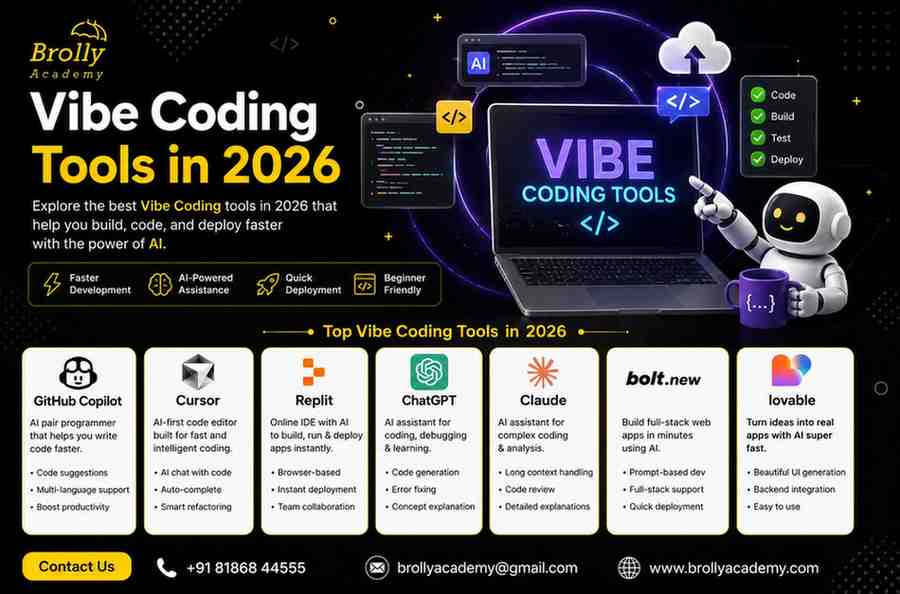
| Tool | Best For | Free Plan | Coding Knowledge Required | Ease of Use | AI Code Generation |
|---|---|---|---|---|---|
| GitHub Copilot | Developers | Limited | Medium | Easy | Excellent |
| Cursor AI | Students | Yes | Low | Very Easy | Excellent |
| Replit AI | Beginners | Yes | Low | Easy | Very Good |
| ChatGPT | Learning & Coding | Yes | Low | Very Easy | Excellent |
| Claude AI | Large Projects | Yes | Medium | Easy | Excellent |
| Bolt.new | Web Apps | Limited | Low | Very Easy | Excellent |
| Lovable | Startup MVPs | Limited | Low | Very Easy | Excellent |
GitHub Copilot
GitHub Copilot doesn’t build full apps — instead, it suggests the next lines of code as you type, inside whichever code editor you already use. Think of it as a very smart autocomplete.
For students learning to code, it’s the gentlest AI introduction available: it shows you how code should be written without doing everything for you. And crucially, it’s completely free for students via the GitHub Student Developer Pack.
- Suggests code completions in real-time as you type — like a very smart autocomplete
- Available free for students via the GitHub Student Developer Pack
- Works across dozens of programming languages (Python, JavaScript, Java, C++ and more)
- Helps you understand unfamiliar syntax by writing it for you, then you can read and learn it
- Integrates into the tools you already use — no new workflow to learn
Key Features
- Real-time code suggestions.
- Auto-complete functions.
- Generates documentation.
- Supports multiple programming languages.
Benefits
- Easy project creation
- Faster debugging
- Simple user interface
Cursor – The most popular AI-powered code editor
Cursor is built as the world’s most popular code editor and adds deep AI capabilities on top. If you already know some coding, Cursor feels completely natural.
An AI-powered code editor that allows users to build applications using natural language prompts.
- Understands your entire codebase context — AI suggestions are project-aware, not just line-by-line
- Edit code using natural language commands (“refactor this to use async/await”)
- Lets you switch between Claude, GPT-4, and other AI models depending on your task
- Ideal for students who want to supercharge an existing coding workflow
- Company reached a $9.9 billion valuation by June 2025 — industry has strong confidence in it
Key Features
- Chat with your code.
- Generate complete applications.
- Debug errors automatically.
- Refactor existing code.
Benefits for Students
Students can build projects by simply describing their requirements in natural language.
Example Prompt
“Create a library management system using Python and MySQL.”
-> Cursor can generate the project structure and code automatically.
Replit – The all-in-one browser IDE with AI Agent
Replit is a full development environment that lives entirely in your browser — no downloads, no installation. A cloud-based coding platform where users can code, run, and deploy projects directly from a browser.
For students who want to learn while building, Replit exposes more of the technical details than Lovable.
- Complete browser-based — go from idea to deployed app without leaving the browser
- AI Agent handles full-stack development including back-end and databases
- Built-in hosting: no external service needed to share your project with the world
- Great for Python-heavy projects, data apps, and collaborative coding
- Built-in spending controls prevent accidental costs going over budget
Key Features
- Browser-based development.
- AI code generation.
- Instant hosting.
- Team collaboration.
Benefits
- No software installation required
- Quick project deployment
Example Use Case
Build and deploy a personal portfolio website directly from a web browser.
Bolt.new – Fastest at generating the first version
Bolt.new is even faster than Lovable at the initial build, often around 3 minutes. It gives you more control over the generated code and lets you choose from multiple frameworks.
An AI platform that builds complete web applications using prompts.
- Generates full-stack apps in the browser — no installation, no setup required
- Supports multiple frameworks (not locked into one stack like Lovable)
- Great for rapid UI experiments and quick front-end prototyping
- You can read and edit the generated code directly in the browser
Key Features
- Prompt-based development.
- Front-end and backend generation.
- Quick deployment.
- Modern UI creation.
Benefits
- Rapid MVP development
- Beginner-friendly
Example Prompt
“Create a student course registration portal with login and dashboard.”
Lovable – Best overall for non-coders & students
Lovable is widely recommended as the best starting point for people who can’t code. You type a description of your app idea and, in about 4 minutes, a fully working app appears — with a login screen, dashboard, forms, and tables. The interface is the most beginner-friendly of any tool in this list.
An AI-powered platform that converts ideas into fully functional applications.
- Generates complete full-stack apps (React front-end + Supabase) from a plain English description
- Real-time visual preview updates as you iterate in chat — you can see changes instantly
- Built-in hosting means no need to set up servers or deployment pipelines
- Produces polished, professional-looking interfaces — not rough prototypes
- Ideal for prototypes, college projects, MVPs, and portfolio pieces
Key Features
- Natural language development.
- Attractive UI generation.
- Database integration.
- Fast prototyping.
Benefits
- Fast application building
- Attractive user interfaces
Example Project
Create an event management website for college activities.
Claude Code
An AI assistant designed to help with coding, project planning, debugging, and documentation. Claude Code is a command-line AI coding agent built by Anthropic. Instead of helping with one file at a time, it connects to your entire codebase. It shows you its reasoning before doing anything, so you can review the plan and approve before any changes are made. This makes it one of the most transparent and controllable tools available.
- Works from high-level instructions — just say “Build me a user dashboard with dark mode” and it starts
- Shows its reasoning as text first, so you understand what it’s about to do before it does it
- Can read files, run commands, make multi-file edits, and propose fixes autonomously
- Also available as a VS Code extension for students who prefer a visual editor
- Recommended for back-end and architecture work (pair it with Cursor for front-end)
Key Features
- Code generation.
- Bug fixing.
- Code explanation.
- Project planning.
Benefits
- Better project understanding
- Detailed explanations
Benefits of Vibe Coding for Students
Benefit | Description |
Faster Learning | Understand coding concepts quickly |
Project Building | Create projects in less time |
Portfolio Development | Showcase AI-powered projects |
Interview Preparation | Learn real-world coding workflows |
Freelancing Opportunities | Deliver projects faster |
Career Growth | Gain future-ready AI skills |
How to Get Started - Vibe Coding
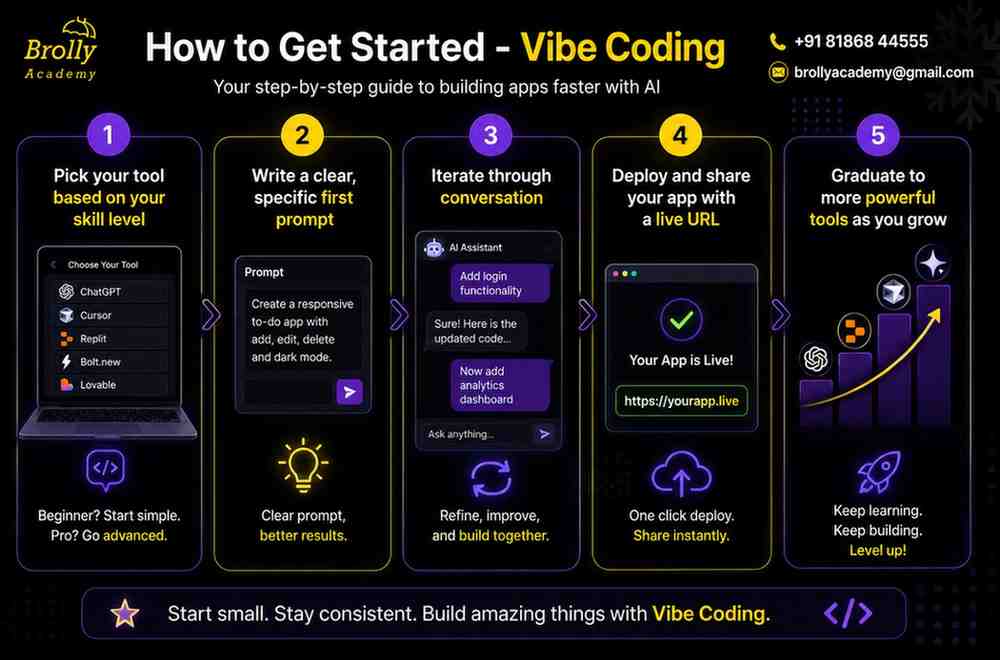
1.Pick your tool based on your skill level
The most important decision is choosing the right starting tool — not the most powerful one, the right one for where you are today. The wrong tool will slow you down and frustrate you even before you build anything.
- Never coded before?→ Start with Lovable (most polished output) or Bolt.new (fastest first build)
- Learning to code / some Python or JS?→ Start with Replit or GitHub Copilot
- Comfortable with coding?→ Try Cursor or Claude Code for maximum productivity
- Don’t try multiple tools at once — pick one, get comfortable, then explore others
2.Write a clear, specific first prompt
Your prompt is everything. A vague prompt gives a vague app. A specific, detailed prompt gives a working, useful app. Before you type anything, decide: what does this app do, who uses it, and what should it look like?
- State the purpose: what problem does this solve?
- Name the key features: what can users do in this app?
- Describe the look: dark theme? minimal? colourful?
- Mention the user: “for a student”, “for a small team”, “for me personally”
Example prompt – “Build a student expense tracker where I can add expenses with a category, amount, and date. Show a monthly total at the top. Let me filter by category. Use a clean dark theme with a sidebar. No login required.”
3.Iterate through conversation: refine, don’t restart
Vibe coding is a conversation, not a one-shot command. After the first version appears, describe what you want changed. You should expect 5–15 follow-up messages before you have something you’re happy with. That’s completely normal — it’s not failing, it’s the process.
- “Move the summary to the sidebar and make the font larger”
- “Add a delete button to each expense row”
- “The colour scheme feels too dark — lighten the background to a warm grey”
- “Add a simple chart showing spending by category at the bottom”
Example prompt – “The monthly total is too small and easy to miss. Make it a large card at the top of the page with the amount in big bold text and a label below it.”
4.Deploy and share your app with a live URL
All three Category A tools include one-click deployment — you get a real public URL you can share with anyone, no server knowledge required. This is how you add it to your resume, submit it for a college project, or show it to a friend.
- Lovable→ Click “Deploy” button → gets a lovable.app URL instantly
- Bolt.new→ Click “Deploy to Netlify” → live in under a minute
- Replit→ Click “Deploy” → gets a replit.app URL with your project name
- Copy the URL and paste it anywhere — it works on any device without any installation
5.Graduate to more powerful tools as you grow
Once you’ve built 2–3 projects with a beginner tool, you’ll naturally hit its limits. That’s the right moment to explore the next tier. This progression is how most people end up as capable developers — they started vibe coding without knowing how to code, and gradually learned while building.
- Beginner journey:Lovable → Replit → GitHub Copilot → Cursor
- Developer journey:Cursor → Claude Code → Cursor + Claude Code in combination
- The recommended 2026 expert setup: Lovable or Bolt to prototype quickly, then Cursor for front-end + Claude Code for back-end architecture
- Before deploying anything serious: ask the AI to review your code for security issues — takes 30 seconds and prevents major problems
Quick Comparison
Tool | Free Tier | No Coding Needed | Full App Builder | Works in Browser | Best For |
✓ | ✓ | ✓ | ✓ | Total beginners, polished apps | |
Bolt.new | ✓ | ✓ | ✓ | ✓ | Speed + some code control |
Replit | ✓ | ~ | ✓ | ✓ | Learning + Python projects |
Cursor | ✓ | ✗ | ~ | ✗ | CS students, faster coding |
Claude Code | ✓ | ✗ | ✓ | ✗ | Advanced: full codebase control |
GitHub Copilot | ✓ (students) | ✗ | ✗ | ✗ | Learning to code with AI help |
✓ Yes ✗ No ~ Partial – depends on usage
Challenges of Vibe Coding
Challenge | Description | Solution |
Overdependence on AI | Users stop learning coding fundamentals | Learn the generated code |
Incorrect Code | AI can make mistakes | Test all outputs |
Security Issues | Some generated code may be insecure | Review before deployment |
Prompt Quality | Poor prompts produce poor results | Write detailed prompts |
Future of Vibe Coding in 2026 and Beyond
AI-powered development is becoming a standard part of software engineering. Companies increasingly expect developers to work alongside AI tools to improve productivity and innovation.
Students who learn Vibe Coding today will be better prepared for future careers in
- Software Development
- Web Development
- Mobile App Development
- AI Engineering
- Automation Development
- Freelancing
- Startup Building
Conclusion
Vibe Coding is transforming the way software is built in 2026. Tools like GitHub Copilot, Cursor AI, Replit AI, Bolt.new, Lovable, Claude AI, and ChatGPT make development faster and more accessible for students and beginners.
By learning how to communicate effectively with AI and understanding the generated code, students can create impressive projects, build strong portfolios, and prepare for the future of technology. Vibe Coding is not about replacing learning—it’s about making learning and development smarter, faster, and more enjoyable.
FAQ'S(Frequently Asked Questions)
1. What is the Digital Brolly Vibe Coding Course?
The Digital Brolly Vibe Coding Course is a practical training program that teaches students how to build websites, applications, and AI-powered projects using modern Vibe Coding tools.
2.Who can join the Vibe Coding Training at Digital Brolly?
The course is suitable for
- Students
- Freshers
- Job seekers
- Software professionals
- Entrepreneurs
- Freelancers
- Anyone interested in AI-powered development
3.Which are the best Vibe Coding tools in 2026?
Some popular Vibe Coding tools in 2026 include:
- ChatGPT
- Cursor AI
- GitHub Copilot
- Replit AI
- Claude AI
- Bolt.new
- Lovable
Each tool has unique features for coding, debugging, and application development.
4. Do I need a programming background to join the course?
No. The course starts with fundamentals and gradually teaches how to use AI tools effectively for software development.
5. Will I work on live projects during the training?
Yes. Students work on practical projects to gain real-world experience and build a strong portfolio.
6.Will I receive a certification after completing the course?
Yes. Digital Brolly provides a certification upon successful completion of the Vibe Coding training program.
7. What career opportunities are available after learning Vibe Coding?
- AI-Assisted Developer
- Web Developer
- Software Engineer
- Freelance Developer
- Product Builder
- Startup Founder
- Automation Specialist
8. How long does it take to learn Vibe Coding?
Most students can learn the basics within a few weeks and start building projects immediately with consistent practice.
9. Can I build my own startup idea using Vibe Coding?
Yes. Vibe Coding helps entrepreneurs quickly build Minimum Viable Products (MVPs), test ideas, and launch applications faster.
10. Why should I choose Digital Brolly for Vibe Coding Training?
Digital Brolly offers industry-focused training, hands-on projects, expert mentorship, AI tool exposure, certification, and practical learning that prepares students for modern software development careers.