
ACTIVE DIRECTORY · DNS · DHCP
Windows Server Administration Training in Hyderabad
Learn Windows Server 2016, 2019 and 2022, Active Directory, DNS, DHCP, Group Policy, PowerShell automation, Hyper-V and Azure hybrid setups in a 30-day program with real-time labs, capstone projects and placement assistance. Classroom and live online batches, easy EMI and a free demo class.
★ 4+ Google rating from 100+ reviews · 9,000+ students trained · 523+ batches completed · Teaching since 2021
Trainer: Mr. Pavan, Windows Server Administration Trainer (15+ years) · Updated September 2026
TrainerMr. Pavan · 15+ years
Duration30 days
FeesFrom ₹9,999 · EMI
ModesClassroom + online
Windows Server Administration Course in Hyderabad
Brolly Academy's Windows Server Administration Training in Hyderabad is a 30-day, hands-on program in Windows Server installation and configuration, Active Directory, DNS, DHCP, Group Policy, PowerShell automation, Hyper-V virtualisation and Azure hybrid integration, taught by Mr. Pavan (15+ years in Windows Server administration). Plans start at ₹9,999, classes run in the classroom or live online, and every student gets a course completion certificate and placement assistance.
The course is built for IT graduates, freshers, support and networking professionals and career switchers who want server administration roles. You work in real-time lab environments on Windows Server 2019 and 2022, build capstone projects on Active Directory, DNS, DHCP and PowerShell, and finish with a polished resume and mock interviews for system administrator and infrastructure jobs in Hitech City, Madhapur, Gachibowli and Kukatpally.
Why choose Brolly Academy for Windows Server training?
Training and support✓ Curriculum built for server and IT infrastructure jobs
✓ Trainer with 15+ years in Windows Server
✓ Hands-on practice on Windows Server 2016, 2019 and 2022
✓ Active Directory, DNS, DHCP, PowerShell and security
✓ Capstone projects on configuration and automation
✓ One-to-one placement mentorship
✓ Resume building and mock interviews
✓ Placement assistance for IT companies in Hyderabad
Flexibility and value✓ Classroom and live online batches
✓ Weekday and weekend batch options
✓ Free demo class before you enrol
✓ Affordable fees with easy EMI
✓ Real-time lab environments
✓ Learning groups on WhatsApp and Discord
✓ Brolly Academy course completion certificate
✓ 4+ Google rating from 100+ reviews
Windows Server Administration Course Syllabus (18 Modules)
Our Windows Server Administration course in Hyderabad follows an 18-module syllabus that takes you from operating system basics and installation through users, permissions, security policy and firewalls to DHCP, DNS, domain controllers, folder security, drive mappings and IIS, finishing with a real-time infrastructure test.
Module 1: Introduction to Windows Administration
Windows operating systems and how to install them, post-installation configuration, local and domain user administration, server roles, folder permissions, domain trees and forests, backup processes, FSMO roles, performance optimisation and Windows updates.
Module 2: Introduction to Windows OS
What an operating system is, OS vendors, the difference between client and server operating systems, editions, installation prerequisites and hardware requirements.
Module 3: Installing Windows
Pre-requirements for installing Windows, hard disk partitioning, file systems and their types, client and server editions, licensing types and remote installation.
Module 4: Windows Client Features
Client operating system features such as the taskbar, jump lists, pinning applications and folders, and themes.
Module 5: Post-Installation Configuration
Configuring virtual machines for different volumes, minimum VM sizes for each OS, application paths, hostnames and IP addresses.
Module 6: Disk Partitions
Types of disks, partitions and volumes.
Module 7: Licensing of Windows Server and Clients
What a licence is and the types of Windows licences.
Module 8: Local User Administration
Creating local users and local groups, and assigning permissions to them.
Module 9: User Profiles & Quotas
Types of local user profiles, managing profiles and setting quotas for users.
Module 10: Local Security Policy & Firewall
Types of policies, implementing a security policy, configuring policy settings and configuring Windows Firewall.
Module 11: DHCP Infrastructure
Adding the DHCP server role, creating scopes and superscopes, and DHCP option classes.
Module 12: DNS Zone Infrastructure
Types of lookup zones, creating zones and records, and testing lookups.
Module 13: Installing Domain Controllers
What a domain is and why it is created, installing a domain controller, installing a new forest and configuring domain settings.
Module 14: Domain User Administration
Creating and managing domain users and domain groups.
Module 15: Folder Security
File system types and setting ACL permissions.
Module 16: Home Folders & Drive Mappings
What drive mapping is and configuring drives to map automatically for users.
Module 17: Configuring IIS Server
Adding the IIS server role, configuring and managing websites, and assigning alias names to sites.
Module 18: Real-Time Infrastructure Test
A real-time network and infrastructure exercise where you build and configure a setup from given scenarios.
Get the full Windows Server syllabus and fee details on WhatsApp
Send us a message and we will share the complete module list, fee plans, EMI options and the next batch dates. New batches start every week, and a free demo class is available.
Windows Server Administration Training Roadmap – Beginner to Advanced in 30 Days
Our Windows Server Administration course is structured as a 4-week roadmap that blends theory with real-time labs on Windows Server 2019 and 2022, Active Directory, PowerShell and core infrastructure management.
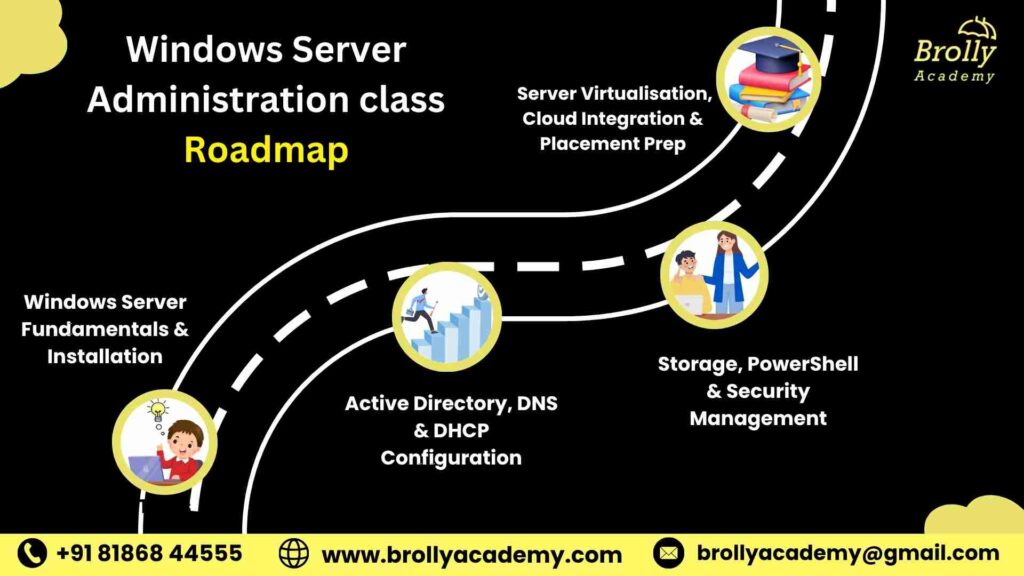
Week 1Server fundamentals & installationWindows Server 2016, 2019 and 2022, GUI and Core installation, Windows Admin Center and initial configuration, server roles and features, and basic troubleshooting.
Week 2Active Directory, DNS & DHCPActive Directory Domain Services, DNS and DHCP servers, users, groups and organisational units, Group Policy Objects, and domain controllers and trust relationships.
Week 3Storage, PowerShell & securityDisks, partitions and RAID, PowerShell automation, file sharing and NTFS permissions, backup and restore, and securing servers with Windows Defender and firewall rules.
Week 4Virtualisation, cloud & placement prepHyper-V, connecting Windows Server with Azure in hybrid setups, Performance Monitor and Event Viewer, a capstone deployment project, and resume and interview preparation.
What is Windows Server Administration and Why Is It Important?
Windows Server administration is the work of installing, configuring and managing Windows Server environments that run an organisation’s IT infrastructure. Administrators manage Active Directory, DNS, DHCP and Group Policy, control user access, automate tasks with PowerShell, run virtual machines on Hyper-V, secure and monitor servers, and connect on-premises systems with Microsoft Azure.
Core of IT infrastructureInstalling, configuring and managing the servers businesses run on.
Network managementActive Directory, DNS, DHCP and Group Policy for stable networks.
User access controlManages user roles, permissions and authentication.
AutomationPowerShell speeds up routine tasks and monitoring.
VirtualisationHyper-V and Windows Admin Center for managing virtual machines.
SecurityWindows Defender, firewalls and updates protect servers and data.
Cloud integrationConnects on-premises servers with Microsoft Azure.
MonitoringEvent Viewer and Performance Monitor track health and performance.
Used across industriesIT, banking, healthcare, education, retail, telecom and government.
Benefits of the Windows Server Administration Course in Hyderabad
Choose classroom or live online training at Brolly Academy and get the same experienced trainer, real-world labs, infrastructure projects and placement support in either mode.
01Server infrastructure skillsInstall, configure and manage Windows Server environments used in enterprise networks.
02Active Directory administrationManage users, roles and permissions with AD DS.
03DNS and DHCP hands-onName resolution and dynamic IP allocation in real labs.
04PowerShell automationStreamline administrative workflows with scripts.
05Secure serversSecurity policies, firewall configuration and patch management.
06Hyper-V virtualisationRun and manage multiple virtual machines efficiently.
07Hybrid cloud scenariosIntegrate on-premises servers with Microsoft Azure.
08Storage, backup and monitoringRAID, Windows Server Backup, Event Viewer and Performance Monitor.
09Learn your wayClassroom or online, weekday or weekend batches, with easy EMI.
Thinking of a Windows Server Administration Course in Hyderabad?
Here is how hands-on training at Brolly Academy compares with a traditional class.
Traditional training✗ You sit through theory-heavy sessions
✗ Outdated materials and limited practice
✗ Trainers with only general IT experience
✗ Occasional lab work, not practical
✗ No post-course support or guidance
✗ Small, unrelated assignments
✗ Minimal job placement help
✗ Generic training for all learners
Brolly Academy training✓ You configure Windows Servers from day one
✓ Windows Server 2019 and 2022 with live labs
✓ Trainer with 15+ years in Windows Server
✓ Daily labs on Active Directory, DNS, DHCP and PowerShell
✓ Placement support and mentorship after the course
✓ Server configuration projects for your portfolio
✓ Resume building, mock interviews and job referrals
✓ Learning paths for beginners and IT professionals
Meet Your Windows Server Administration Trainer
INSTRUCTOR
Mr. Pavan
Windows Server Administration Trainer · 15+ years of experience
Mr. Pavan is the Windows Server Administration trainer at Brolly Academy and brings 15+ years of experience. His expertise covers Windows Server 2016, 2019 and 2022, Active Directory, DNS, DHCP, Group Policy, PowerShell and Azure integration, and his project work includes server migrations, virtualisation setups and hybrid cloud configurations. He simplifies complex administration concepts with real-time practical labs and role-based learning focused on enterprise environments, so freshers and working professionals become job-ready.
Skills You’ll Gain from the Windows Server Administration Course
Server installationInstall, configure and manage Windows Server 2016, 2019 and 2022.
Directory servicesAdminister Active Directory, DNS, DHCP and Group Policy.
Roles and storageManage server roles, features and storage for business operations.
PowerShell automationAutomate configuration and routine administrative tasks.
Hyper-VBuild and manage virtual machines with high availability.
Server securityFirewall setup, patch management and backup policies.
Monitoring & troubleshootingDiagnose performance with Event Viewer and Performance Monitor.
Hybrid identityIntegrate on-premises environments with Azure Active Directory.
Migration & recoveryServer migration, updates and disaster recovery techniques.
Windows Server Administration Capstone Projects
You build portfolio-ready projects on real Windows Server scenarios that show employers you can deploy, secure and automate enterprise infrastructure.
Project 1Active Directory & Group PolicyA multi-domain AD structure with authentication, OU management and GPOs across departments.
Project 2DNS and DHCP setupDNS zones, DHCP scopes and IP management on Windows Server 2022, with troubleshooting.
Project 3PowerShell automationScripts that automate user creation, system backup and log management.
Project 4Hyper-V deploymentVirtual machines, snapshots and virtual switches for performance and scalability.
Project 5Security and compliance auditWindows Defender, firewall rules and patch management against IT security policies.
Project 6Hybrid identity with Azure ADIntegrate on-premises Windows Server with Azure AD for single sign-on.
Tools you use: Windows Server 2019 and 2022 · Windows Admin Center · Server Manager · Active Directory Users and Computers · DNS Manager · DHCP console · Hyper-V Manager · PowerShell · Event Viewer · Performance Monitor · File Server Resource Manager
Windows Server Administration Course Fee & Offerings in Hyderabad
Choose the plan that suits how you learn. Every plan covers Windows Server configuration with Active Directory, DNS, DHCP and Group Policy plus resume and interview support, and easy EMI options are available.
Video Recording₹9,999Was ₹15,000
Lifetime video access
Windows Server 2016, 2019 and 2022 fundamentals
Active Directory, DNS, DHCP and Group Policy
10+ recorded labs with real-time server demos
Resume and interview preparation
Placement assistance
WhatsApp group access
Most popularClassroom Training₹29,999Was ₹35,000
30-day structured classroom program with hands-on practice
Server roles, features and PowerShell automation
Hyper-V virtualisation and Azure integration
Real-time project with guided mentorship
Monthly mock interviews and performance reviews
Resume building and career assistance
Dedicated placement coordinator
Community and technical support groups
Online Course₹24,999Was ₹30,000
Live interactive classes, flexible timings
Daily session recordings for revision
Instructor-led Windows Server demonstrations
Real-time project and troubleshooting practice
Weekly evaluation tests and mock interviews
Resume and LinkedIn support
WhatsApp access for learning help
Easy EMI options are available. Ask about the current batch offer when you book your free demo class.
Placement Program for Windows Server Administration Training in Hyderabad
Our placement program helps you build job-ready skills and get interviews with IT companies and data centres hiring server and infrastructure professionals in Hyderabad.
Resume buildingATS-friendly resumes for Windows Server administrator and infrastructure roles.
Placement trainingHow to apply, target openings and prepare for server and cloud infrastructure interviews.
Interview question bankCommon Windows Server, Active Directory and PowerShell questions.
Internships under expertsGuided internships on server configuration, DNS and network setup.
Real-time projectsWindows Server 2019 and 2022 deployment and troubleshooting.
Aptitude preparationLogical reasoning, problem-solving and technical troubleshooting tests.
Personality developmentCommunication, confidence and teamwork for IT support and admin roles.
Mock interviewsPractice rounds with system administrators and hiring managers.
Interview schedulingSupport in scheduling interviews with IT infrastructure companies.
What Our Students Say About Windows Server Administration Training in Hyderabad
"I would like to personally thank Brolly Academy for the excellent training in Windows Server Administration. I was very impressed with the trainer’s expertise. They were extremely patient, explained everything thoroughly and adjusted their teaching style to our different levels of understanding."Archita
"Brolly Academy’s Windows Server Administration online training is a very good course in Hyderabad. The classes are conducted well, and the trainers have a thorough understanding of what they teach. They also offer doubt-clarification sessions with the teachers. I’m glad I took part."Anitesh
"The Windows Server Administration placement assistance program at Brolly Academy in Hyderabad is very useful for students like me, because they train you thoroughly in the subject so that you perform well in interviews."Sohani
"The Windows Server Administration video course is a valuable resource for anyone who wants to learn Windows Server Administration. It has videos on all the topics, which makes the concepts easier to learn."Jashmin
Student community
Learning & collaborationWork with peers on Windows Server projects and share configuration techniques.
Resources and toolsServer management tools, PowerShell scripts and recorded labs for practice.
NetworkingConnect with instructors, system administrators and recruiters from Hyderabad’s IT firms.
MentorshipGuidance on real-world infrastructure management from Windows Server experts.
Career developmentJob openings, internships and placement leads in IT and cloud infrastructure.
Pre-requisites & Eligibility
You need basic computer knowledge: how operating systems, hardware and general IT concepts work. Familiarity with IP addressing, DNS and TCP/IP, or prior use of Windows or Linux, makes learning easier but is not mandatory. Beginners from non-IT backgrounds can join, and coding is not required, though a willingness to learn PowerShell helps.
Basic computer knowledgeOperating systems, hardware and general IT concepts.
Networking basics helpIP addressing, DNS and TCP/IP make server networking easier.
OS experience helpsPrior use of Windows or Linux speeds up learning.
IT or engineering backgroundIdeal for CS and IT graduates and diploma holders; others can join too.
Interest in administrationA keen interest in server management and troubleshooting.
No coding requiredWillingness to learn PowerShell scripting is enough to start.
Who Should Join the Windows Server Administration Course in Hyderabad?
IT graduates & freshersComputer science, IT or networking students starting in system administration.
Support & network professionalsTechnical support and networking staff moving up to server management.
Aspiring system administratorsBuild a career as a Windows Server administrator or infrastructure engineer.
Cloud & DevOps learnersStrengthen server and virtualisation foundations for AWS, Azure or DevOps.
Business owners & freelancersDeploy and secure servers for small IT setups.
Career switchersProfessionals from non-IT fields entering system administration or IT operations.
Windows Server Administration Career Opportunities in Hyderabad
Windows server administratorInstall, configure and maintain Windows Server environments.
System administratorOversee server performance, user accounts and security policies.
Network administratorHandle DNS, DHCP, routing and connectivity issues.
IT infrastructure engineerDesign, deploy and monitor on-premises and cloud infrastructure.
Cloud system administratorManage Windows Server integration with Azure and other clouds.
Technical support engineerServer troubleshooting, performance tuning and end-user support.
Automation engineerUse PowerShell and automation tools to streamline deployments.
Security administratorFirewalls, patching and access control to protect infrastructure.
Server support specialistKeep servers, backups and services running day to day.
Windows Server administrator salary in Hyderabad – 2026
Windows server administrator₹3.5–10 LPAFreshers ₹3.5–5 LPA · 2–5 years ₹6–10 LPA
Experienced administrator₹10–16 LPA5–8 years · virtualisation and hybrid server environments
Senior administrator₹16–22 LPA8–12 years · server migrations and infrastructure upgrades
Architect / IT manager₹22 LPA+12+ years · enterprise-wide automation and server strategy
Hiring companiesWhere students applyGoogle · Microsoft · TCS · Infosys · Wipro · HCLTech · Tech Mahindra · Capgemini · Accenture · Deloitte · IBM · Cognizant
Windows Server Administration Certification You Will Receive
After completing the course you receive a Brolly Academy Windows Server Administration course completion certificate that highlights your skills in Windows Server installation, Active Directory, DNS, DHCP, Group Policy, PowerShell and Hyper-V. Online and classroom students receive the same certificate, and together with your capstone projects it strengthens your resume for system administration and IT infrastructure roles.
Vendor certifications to aim for next: the course gives you a foundation for exams such as Microsoft Certified: Windows Server Hybrid Administrator Associate, issued by Microsoft, and CompTIA Server+, issued by CompTIA. These are examined by the vendors, and exam fees are separate from the course fee.
Market trends for Windows Server administration in Hyderabad
Cloud-integrated skillsHybrid cloud adoption raises demand for Azure integration and PowerShell skills.
Windows Server 2022 upgradesOrganisations moving to 2022 need admins who know its features.
Automation and DevOpsTools like Ansible and Terraform are reshaping Windows infrastructure management.
Security-driven administrationHardening, identity control and compliance are top priorities.
Remote infrastructureHybrid work needs experts for VPNs, remote servers and cloud systems.
Certification-aware hiringVendor certifications help prove practical Windows Server expertise.
Windows Server Administration Training in Kukatpally, Hyderabad
Our centre is at Metro Pillar No. A689, Dr Atmaram Estates, 3rd Floor, Nizampet X Roads, near JNTU Metro Station, Hyderabad 500072. Students join from Kukatpally, KPHB Colony, JNTU, Nizampet, Miyapur, Hitech City, Madhapur and Ameerpet (a short metro ride). Can’t make it to class? Join the same course live online.
Other relevant courses
Linux System AdministratorInstall, configure and manage Linux servers.
Windows PowerShellScripting and automation for Windows administration.
Azure DevOpsCI/CD pipelines and DevOps practices on Microsoft Azure.
AWSCloud computing on Amazon Web Services.
Google Cloud (GCP)Google Cloud Platform fundamentals and services.
Cyber SecurityProtect systems, networks and data from attacks.
Windows Server Administration Training in Hyderabad – FAQs
1. What is the fee for Windows Server Administration training in Hyderabad?
Brolly Academy offers three plans: Video Recording at ₹9,999 (was ₹15,000), Online Course at ₹24,999 (was ₹30,000) and Classroom Training at ₹29,999 (was ₹35,000). The live plans include real-time projects, mock interviews and placement support, and easy EMI options are available. Ask about the current batch offer when you book your free demo class.
2. How long is the Windows Server Administration course?
The course runs for 30 days as a 4-week roadmap: server fundamentals and installation, then Active Directory, DNS and DHCP, then storage, PowerShell and security, and finally Hyper-V, Azure integration, a capstone project and placement preparation. Weekday, weekend and evening batches run in the classroom and online for working professionals.
3. Which is the best Windows Server training institute in Hyderabad?
Brolly Academy is a strong choice for Windows Server Administration training in Hyderabad. You learn from Mr. Pavan, who has 15+ years of experience, practise in real-time labs on Windows Server 2019 and 2022, build capstone projects on Active Directory, DNS, DHCP and PowerShell, and get placement support, in the classroom near JNTU or online.
4. What topics are covered in the Windows Server course?
The syllabus covers Windows installation and licensing, disks and partitions, local and domain users, profiles and quotas, security policy and Windows Firewall, DHCP, DNS zones, domain controllers, folder security, drive mappings and IIS. The roadmap adds Active Directory Domain Services, Group Policy, PowerShell, RAID, backups, Hyper-V and Azure hybrid integration.
5. Can a non-technical person learn Windows Server Administration?
Yes. Beginners can start with basic computer knowledge, and the course builds up from operating system fundamentals and installation. Familiarity with networking basics such as IP addressing and DNS makes learning easier but is not mandatory. Coding is not required, although a willingness to learn PowerShell scripting helps with automation tasks.
6. Is Windows Server Administration good for freshers?
Yes. It is a practical entry point for freshers who want to work in IT infrastructure and system management. Graduates in computer science, IT or networking, as well as career switchers, can start as system administrators or technical support engineers and grow into infrastructure engineer, cloud administrator and security administrator roles.
7. What salary can a Windows Server administrator earn in Hyderabad?
Freshers typically earn around ₹3.5–5 LPA, mid-level administrators with 2–5 years earn about ₹6–10 LPA, and experienced administrators with 5–8 years earn about ₹10–16 LPA. Senior administrators, architects and IT managers can earn ₹16–22 LPA and more. Actual pay depends on skills, certifications and the employer.
8. Does Brolly Academy provide placement support for Windows Server students?
Yes. Placement assistance includes ATS-friendly resumes, placement training, Windows Server, Active Directory and PowerShell interview questions, guided internships, real-time projects, aptitude preparation, personality development, mock interviews and interview scheduling with IT infrastructure companies. Classroom students also get a dedicated placement coordinator for job support.
9. Will I get a certificate after the Windows Server course?
Yes. You receive a Brolly Academy Windows Server Administration course completion certificate. The course also gives you a foundation for vendor exams such as Microsoft Certified: Windows Server Hybrid Administrator Associate, issued by Microsoft, and CompTIA Server+, issued by CompTIA. Those exams are taken separately, and their fees are not part of the course fee.
10. Is Windows Server Administration training available online?
Yes. Brolly Academy offers live, interactive online classes with flexible timings, daily session recordings and instructor-led demonstrations, as well as classroom training with practical labs at our centre near JNTU Metro Station. A Video Recording plan with recorded labs is also available. The syllabus, projects and placement support are the same in every mode.
11. What tools are used in Windows Server Administration training?
You work with Windows Server 2019 and 2022, Windows Admin Center, Server Manager, Active Directory Users and Computers, DNS Manager, the DHCP console, Hyper-V Manager, PowerShell, Event Viewer, Performance Monitor and File Server Resource Manager, along with IIS for hosting and managing websites on Windows Server.
12. Should I learn Windows Server or Linux administration?
Both are valuable. Windows Server is widely used where organisations run Active Directory, Microsoft applications and Azure hybrid setups, while Linux runs many web and cloud workloads. Our Windows Server course gives you strong directory, networking and automation skills, and you can add Linux administration later to become a cross-platform system administrator.
13. Are there real-time projects in the Windows Server course?
Yes. You build six capstone projects: an Active Directory and Group Policy structure, a DNS and DHCP setup on Windows Server 2022, PowerShell automation scripts, a Hyper-V virtualisation deployment, a server security and compliance audit, and hybrid identity integration with Azure Active Directory for single sign-on across on-premises and cloud.
14. What is the career scope of Windows Server skills?
Demand is rising as organisations run hybrid and cloud-based infrastructure. Windows Server skills are used in IT, banking, healthcare, education, retail, telecom and government. You can start as a system or server administrator and grow into cloud engineer, DevOps engineer or IT infrastructure manager roles as you gain experience.
15. Is there Windows Server training near me in Kukatpally or JNTU?
Yes. Brolly Academy is at Metro Pillar No. A689, Dr Atmaram Estates, 3rd Floor, Nizampet X Roads, near JNTU Metro Station, Hyderabad 500072. Students join from Kukatpally, KPHB Colony, Nizampet, Miyapur, Hitech City, Madhapur and Ameerpet. If travel is difficult, you can join the same course live online.
Got more questions? Talk to our team directly
Contact us and our academic counsellor will get in touch with you shortly. A free demo class is available before you enrol.