Playwright with AI Testing
Simple Guide, Syllabus, Projects, Tools & Career Roadmap
Playwright with AI Testing is useful because many AI products are web applications. This guide explains how Playwright can help QA learners test AI chatbots, prompt forms, dashboards and regression flows.
This blog is written in simple words for 15-year-old learners, freshers, manual testers and QA professionals who want a clear AI Testing learning path.
-
Nani
- No Comments
Table of Contents
Quick Answer
Playwright helps testers automate browser actions. In AI Testing, it can be used to test AI web apps, chatbot screens, prompt forms, answer pages, dashboards and regression flows.
Key Takeaways
- Playwright is useful because many AI products are web applications.
- AI can help create test ideas, but testers must review them.
- Playwright traces and screenshots help explain failures clearly.
- API checks can be combined with UI checks.
- A Playwright AI Testing project is strong for interviews.
What Is Playwright in Simple Words?
Playwright is an automation tool that controls a browser like a real user. It can click buttons, fill forms, open pages, check text, capture screenshots and produce test reports.
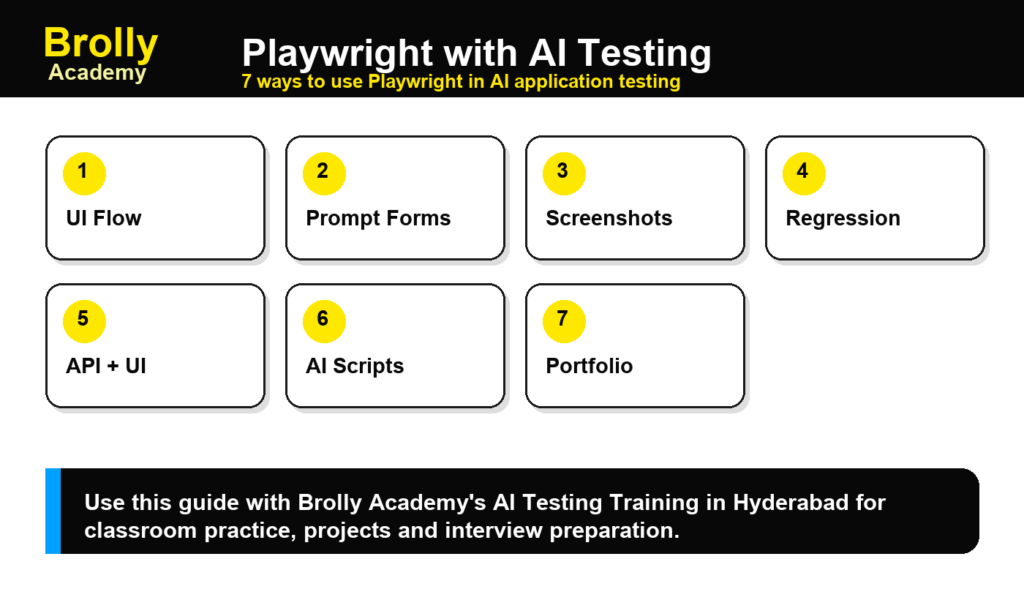
7 Practical Use Cases
1. Test AI Chatbot UI
You can use Playwright to open a chatbot page, send questions, wait for answers and check if the response area is working correctly.
2. Test Prompt Forms
Many AI apps have prompt input boxes. Playwright can test empty prompts, long prompts, invalid prompts and normal prompts.
3. Capture Screenshots for Defect Reports
Screenshots help prove what happened. They are useful when an AI answer is wrong, missing or displayed incorrectly.
4. Run Regression Tests
When developers change the AI app, Playwright can rerun important flows to check whether existing features still work.
5. Combine API and UI Testing
A tester can verify API response first and then check whether the UI displays the same result correctly.
6. Review AI-Generated Test Scripts
AI can draft Playwright tests, but testers must review locators, assertions, waits, data and expected results.
7. Build a Portfolio Project
A good project can test login, prompt submission, chatbot answer display, error handling and reporting.
Playwright with AI Testing Checklist
- Does the chatbot input accept valid text?
- Does it handle empty input?
- Does it show loading state?
- Does the answer appear correctly?
- Does the page handle API failure?
- Are screenshots and traces captured?
- Are unsafe prompts handled correctly?
Playwright vs Selenium vs Cypress for AI Testing
| Tool | Best Use | Simple Note |
|---|---|---|
| Playwright | Modern web automation | Strong for traces, screenshots and multi-browser checks. |
| Selenium | Widely used automation | Good for teams with existing Selenium frameworks. |
| Cypress | Frontend testing | Useful for developer-friendly web app testing. |
Official References
Frequently Asked Questions
1. Is Playwright useful for AI Testing?
Yes. It helps test the web interface of AI applications and chatbot workflows.
2. Can AI write Playwright tests?
AI can draft tests, but a tester must review and correct them.
3. Is Playwright better than Selenium?
Both are useful. Playwright is modern and strong for many web testing workflows, while Selenium is widely used in existing companies.
4. Do I need coding for Playwright?
Yes, basic coding is needed. Beginners can start with simple test scripts.
5. Where can I learn Playwright with AI Testing?
It is covered as part of AI Testing Training in Hyderabad.
Final Thoughts
Playwright is a practical skill for AI Testing because AI apps still need reliable UI testing. When combined with prompt, API and answer-quality checks, it becomes a strong project skill.

Brolly Academy Team
AI, Data Science & Software Training Experts | 20+ Years of Training Experience
Brolly Academy Team is a group of AI, Data Science, Cloud Computing, and Software Development professionals dedicated to helping learners gain practical skills and industry knowledge. Since 2015, Brolly Academy has supported thousands of students and professionals through technology training, certification guidance, and career-focused learning.