
DAX · POWER QUERY · DASHBOARDS
Power BI Training in Hyderabad
Learn Power BI Desktop, Power Query, DAX, data modelling, reports, dashboards and Power BI Service in a 1-month program with capstone projects, PL-300 exam guidance and placement assistance. Classroom and live online batches, easy EMI and a free demo class before you enrol.
★ 4+ Google rating from 100+ reviews · 9,000+ students trained · 523+ batches completed · Teaching since 2021
Trainer: Mr. Srikanth, Microsoft Power BI Specialist (10+ years) · Updated September 2026
TrainerMr. Srikanth · 10+ years
Duration1 month
FeesFrom ₹7,000 · EMI
ModesClassroom + online
Power BI Course in Hyderabad
Brolly Academy's Power BI Training in Hyderabad is a 1-month, hands-on program in Power BI Desktop, Power Query, DAX, data modelling, reports and dashboards, Power BI Service and Power Apps basics, taught by Mr. Srikanth (10+ years in Power BI and business intelligence). Plans start at ₹7,000, classes run in the classroom or live online, and every student gets a course completion certificate and placement assistance.
The course is built for students, graduates, working professionals and business owners who want careers in business intelligence and data analytics. You learn on live projects and real-time dashboards, prepare for the Microsoft PL-300 exam, and finish with a portfolio, a polished resume and interview practice for Power BI developer, BI analyst and data analyst roles.
Why choose Brolly Academy for Power BI training?
Training and support✓ Industry-focused Power BI training for analyst roles
✓ Trainer with 10+ years in Power BI and SQL
✓ Hands-on sessions with Power BI, DAX and Power Query
✓ Real-time projects based on business use cases
✓ One-on-one mentorship and placement guidance
✓ Resume building and LinkedIn profile support
✓ Placement assistance program
Flexibility and value✓ Classroom and live online batches
✓ Flexible weekday and weekend timings
✓ Free demo classes before you enrol
✓ Affordable fees with easy EMI
✓ Updated for 2026 Power BI features
✓ Community on WhatsApp and Discord
✓ Brolly Academy course completion certificate
Power BI Course Syllabus (11 Modules)
Our Power BI training in Hyderabad follows an 11-module syllabus that takes you from business intelligence basics and Power BI Desktop through the Query Editor, data modelling and DAX, reports and visuals, Power BI Service and Mobile, data sources, Power Apps, Premium features and dataset refresh.
Module 1: Introduction to Microsoft Power BI
Introduction to business intelligence and its stages, installing Power BI and connecting to data, refreshing Power BI Service data, interacting with and sharing dashboards and reports, and the building blocks of Power BI.
Module 2: Getting Started with Power BI
Understanding the Power BI tools, installing Power BI and connecting to data, working with the Query Editor, and working with the data model to create a visualisation.
Module 3: Introduction to Power BI Desktop
The Power BI Desktop workflow, the different views of the data model, a closer look at the Query Editor interface, and required Power BI settings.
Module 4: Query Editor
Connecting to data, append queries, pivoting and unpivoting columns, grouping, duplicating and referencing queries, entering data manually, merging queries, index, duplicate and conditional columns, basic maths operations, and loading data efficiently into the model.
Module 5: Data & Relationship View
The Query Editor and the data model, creating and editing relationships, cardinality, cross-filter direction and many-to-many relationships, M language vs DAX, measures and calculated values, DAX functions such as CALCULATE, SUM, SUMX, RELATED, ALLEXCEPT, LOOKUPVALUE, IF and SEARCH, and categorising data.
Module 6: Report View & Visualisation
The report view interface, creating visuals, tooltips and interactions, data colours, hierarchies and drill-down, formatting and sorting, slicers, treemaps and tables, filter types, multi-row cards, and combined and waterfall visuals.
Module 7: Power BI Service & Power BI Mobile
Publishing from Desktop to Service, datasets, reports and dashboards, workspaces and gateways (personal and on-premises), collaborating in app workspaces, sharing results, publishing apps, content packs, Power BI Mobile, and excluding datasets from sharing.
Module 8: Data Sources
Working with JSON data, importing data from REST APIs, setting up SQL Server and importing data from SQL Server.
Module 9: Power Apps
Power Apps overview and basic concepts, canvas apps, navigation and customisation, galleries, data cards, forms, triggers, functions and formulas, edit forms and text boxes.
Module 10: Power BI Advanced & Premium
Power BI Premium and Premium Per User features, creating dataflows, deployment pipelines, sensitivity labels, the Goals feature, and incremental data load.
Module 11: Refreshing Datasets
Understanding data refresh, the personal gateway, replacing a dataset, and troubleshooting refresh issues.
Get the full Power BI syllabus and fee details on WhatsApp
Send us a message and we will share the complete module list, fee plans, EMI options and the next batch dates. New batches start every week, and a free demo class is available.
Power BI Training Roadmap – Beginner to Advanced in 1 Month
Our Power BI course follows a practical roadmap over 1 month, in the classroom or live online. Each week brings new skills, hands-on labs and real projects, so you finish job-ready with applied Power BI experience.
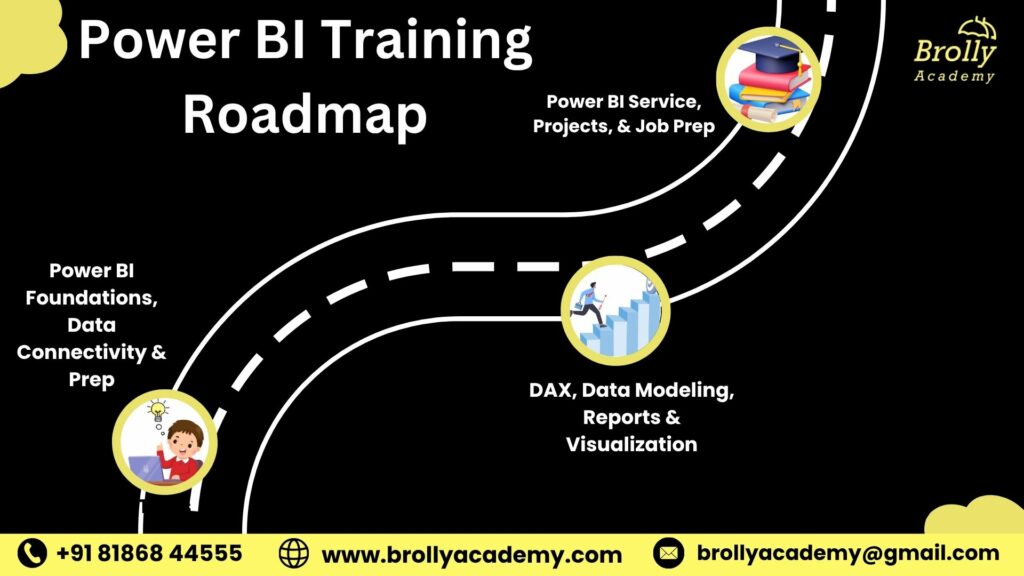
Week 1Foundations, data connectivity & prepBI concepts, installing Power BI Desktop, connecting to data, cleansing with Power Query, and building data models and relationships.
Week 2DAX, modelling, reports & visualisationDAX for business logic, calculated columns, measures and KPIs, interactive reports and dashboards on sales, finance and marketing cases.
Weeks 3–4Power BI Service & capstone projectPublishing and sharing, workspaces and apps, row-level security, mobile dashboards and an end-to-end capstone project.
Career prepPlacement & PL-300 guidanceResume workshops, mock interviews, LinkedIn optimisation, placement support and Microsoft PL-300 exam guidance.
What is Power BI and Why Is It Important?
Microsoft Power BI is a business intelligence tool for building interactive dashboards and reports that visualise and analyse data. It connects to Excel, SQL and Azure, cleans and models data, and turns it into insights that help teams in finance, healthcare, retail, manufacturing, marketing and supply chain make better decisions.
Data transformationClean and prepare data for analysis with Power Query.
VisualisationDesign clear charts, reports and interactive dashboards.
DAX functionsFormulas for measures, KPIs and complex data models.
Data modellingRelationships, hierarchies and calculated columns.
Power BI ServicePublish, share and collaborate on reports.
IntegrationConnect Power BI with Excel, SQL Server and Azure.
SecurityRow-level security and governance for sensitive data.
Real-time analysisLive data, scheduled refresh and monitoring dashboards.
Power BI MobileReports designed for phones and tablets.
Benefits of the Power BI Course in Hyderabad
Choose classroom or live online training at Brolly Academy and get the same expert trainer, real-time projects and placement support in either mode.
01Learn from an expert trainerStep-by-step, practical training from an experienced Power BI professional.
02Master BI toolsPower BI Desktop, Service, DAX and Power Query.
03Work on real projectsDynamic dashboards and business reports on industry datasets.
04Get job supportResume building, interview prep and placement opportunities.
05Earn a course certificateA Brolly Academy certificate that shows your Power BI skills.
06Strong Excel and SQL baseExcel and SQL skills alongside Power BI for deeper analysis.
07Understand data modelsRelationships, measures and calculations for BI.
08Data security skillsRow-level security, user access and compliance practices.
09Learn your wayOnline or classroom, weekday or weekend, with easy EMI.
Thinking of Power BI Training in Hyderabad?
Here is how hands-on training at Brolly Academy compares with a traditional class.
Traditional training✗ You listen, with limited hands-on interaction
✗ Outdated materials and theory-heavy notes
✗ Trainers with basic BI knowledge
✗ Occasional labs, low practical exposure
✗ Basic exercises not linked to real scenarios
✗ Support stops after the course ends
✗ No or minimal placement support
✗ Same course for everyone
Brolly Academy training✓ You build Power BI dashboards from week one
✓ Live, industry-relevant Power BI tools
✓ Trainer with 10+ years in Power BI
✓ Daily practice with real business datasets
✓ Hands-on projects based on business use cases
✓ Resume building, LinkedIn prep and mock interviews
✓ Ongoing placement support after the course
✓ Personalised learning based on your career goals
Meet Your Power BI Trainer
INSTRUCTOR
Mr. Srikanth
Microsoft Power BI Specialist · 10+ years in Power BI and business intelligence
Mr. Srikanth is a Microsoft Power BI specialist with 10+ years in Power BI and business intelligence. His expertise covers Power BI Desktop, Service and Mobile, data modelling, DAX, visualisation and dashboard creation, and integration with Excel, SQL and Azure. He has implemented BI solutions for Hyderabad companies, designed dashboards for business operations and led real-time analytics projects across finance, sales and HR. His lessons are interactive and practice-oriented, built on hands-on labs and real business cases.
Skills You’ll Gain from the Power BI Course
Data preparationClean and transform data with Power Query for accurate analysis.
Dashboards & reportsDesign interactive dashboards and custom reports for business insights.
Data connectivityConnect Power BI to Excel, SQL and cloud data sources.
DAXCalculated columns, measures, KPIs and time intelligence.
Data modellingRelationships, hierarchies and normalisation for large datasets.
Row-level securityAccess control and security best practices in Power BI.
Automated refreshScheduled updates for live reporting dashboards.
Power BI ServicePublishing, sharing, collaboration and secure distribution.
Presenting insightsExplain BI results clearly to technical and business audiences.
Power BI Capstone Projects
You work on business datasets that mirror Hyderabad use cases, from retail inventory to e-commerce analytics, and build a portfolio for careers in analytics, data visualisation and BI.
Project 1Sales performance dashboardTrack sales, revenue and targets with an interactive dashboard.
Project 2HR analytics dashboardAnalyse employee data, monitor recruitment and visualise HR metrics.
Project 3Financial data visualisationReports for financial KPIs, budgeting and profit analysis.
Project 4Customer insights & marketingSegment customers, map behaviour trends and track campaigns.
Project 5SQL and BI integrationImport, clean and join large datasets from multiple sources, then visualise outcomes.
Project 6Cloud reporting & data securityPublish dashboards to Power BI Service and set up row-level security.
Tools you use: Power BI Desktop · Power BI Service · Power Query · Dataflows · DAX · Power BI Mobile · Power BI Embedded · Excel · SQL Server · Azure · Power Apps
Power BI Course Fee & Offerings in Hyderabad
Choose the plan that suits how you learn. Every plan covers basic to advanced Power BI with projects, and the Classroom and Online plans come with easy EMI.
Video Recording₹7,000Was ₹14,999
Basic to advanced Power BI modules
80+ recorded classes
Lifetime video access
1 capstone project
Resume and interview support
Placement assistance
WhatsApp group access
Most popularClassroom Training₹19,999Was ₹24,999
1-month structured training
Expert Power BI trainer (industry professional)
Real-time projects: dashboards, reports, data models
One-on-one mentorship
Monthly mock interviews
Soft skills and aptitude training
Dedicated placement officer
Commute support for offline batches
Online Course₹14,999Was ₹19,999
Live interactive classes, flexible timings
1-month duration
Daily recorded sessions for revision
Project environment from day 1
Weekly mock interviews
Doubt-clearing sessions
50+ sample resumes
WhatsApp group access
Easy EMI is available on the Classroom and Online plans. Ask about the current batch offer when you book your free demo class.
Placement Program for Power BI Training in Hyderabad
Our placement support helps you build business intelligence skills and get interviews with companies in Hyderabad and across India.
Resume buildingATS-friendly resumes for Power BI and business analytics roles.
Placement trainingHow to apply, target openings and crack BI hiring processes.
Interview questionsFrequently asked Power BI and data analyst interview questions.
Internships under expertsHands-on Power BI project experience supervised by professionals.
Real-time live projectsDashboards, reports and advanced data models for your portfolio.
Aptitude preparationLogical reasoning, problem-solving and technical test skills.
Personality developmentCommunication, presentation and confidence for client and team work.
Mock interviewsPower BI interview rounds with expert feedback.
Interview schedulingWe connect you with hiring partners and support you through to an offer.
What Our Students Say About Power BI Training in Hyderabad
"The Power BI training at Brolly Academy was fantastic. The course covered everything from data modelling to creating dashboards. I gained hands-on experience and now feel confident working with real-world data. The instructors were knowledgeable and made learning easy and enjoyable."Vijay P
"I had an amazing experience with the Power BI training at Brolly Academy. The real-time projects and practical examples helped me understand how to analyse and visualise data. The trainers were always available to answer questions and gave excellent guidance."Dinesh A
"Taking the Power BI course at Brolly Academy was a great decision. The lessons were clear and easy to follow, and the hands-on projects helped me apply Power BI to business problems. I now feel ready to work on real-time data analysis projects at work."Satya B
"The Power BI course at Brolly Academy was exactly what I needed. As someone new to data analysis, I found the topics on data modelling and report creation extremely helpful. I learned how to build interactive dashboards that are useful in real-world scenarios."Praveen K
"I thoroughly enjoyed the Power BI training at Brolly Academy, especially the focus on building interactive reports and integrating data from multiple sources. The instructors shared real-world insights, and the hands-on projects gave me practical experience I can apply in my role."Vikram J
"The Power BI training at Brolly Academy exceeded my expectations. The course covered both beginner and advanced topics, and I worked on live data projects. Thanks to the training, I feel more confident using Power BI for reporting and data analysis in my job."Naveen
Student community
Learning & collaborationWork on Power BI projects, share report ideas and solve dashboard challenges together.
Resources and toolsPower BI datasets, templates, project files and recorded sessions.
NetworkingConnect with fellow students, BI trainers and recruiters in Hyderabad.
MentorshipCareer advice and project insights from experienced Power BI specialists.
Career developmentJob alerts, internship leads, freelance reporting work and placement assistance.
Pre-requisites & Eligibility
Our Power BI course is designed for students, graduates, working professionals and business owners who want to start or grow a career in business intelligence and data analytics. It is open to beginners as well as those with technical skills, and no prior coding is required.
StudentsGraduates and undergraduates with an interest in data analysis and visualisation.
Working professionalsIT and non-IT professionals moving into Power BI roles.
Basic ExcelHelpful but not mandatory; we teach the essentials for Power BI.
Data fundamentalsBasic data concepts and statistics make learning easier.
A Windows PCBasic computer skills and access to a Windows PC are recommended.
Curiosity about dataA strong desire to explore data and build useful reports.
Who Should Learn the Power BI Course?
Fresh graduates & studentsBuild a career in data analytics and business intelligence.
Working professionalsIT, finance, marketing, sales and HR staff moving into analytics.
Business owners & entrepreneursAnalyse business data and decide with BI dashboards.
Data analysts & aspiring BI developersHands-on dashboards, data modelling and advanced analytics.
Career switchersMove into business intelligence and data visualisation.
Beginners with basic computer skillsNo coding needed; Excel familiarity helps.
Power BI Career Opportunities in Hyderabad
Power BI developerDesign and develop interactive dashboards and reports.
Business intelligence analystAnalyse data trends to support business decisions.
Business analystCreate reports that improve operations and strategic planning.
Data analystGather, clean and analyse data from multiple sources.
Data visualisation specialistPresent complex data as clear, effective visuals.
BI consultantAdvise organisations on BI strategy and Power BI solutions.
Reporting analystGenerate business reports and track KPIs for management.
ETL developerManage extraction, transformation and loading for BI systems.
Data governance analystMaintain data quality, security and role-based access.
Power BI developer salary in Hyderabad – 2026
Power BI developer₹3–10 LPAFreshers ₹3–6 LPA · 3–5 years ₹6–10 LPA · senior ₹10–25 LPA
BI analyst₹5–15 LPAAll levels · analyses data trends and supports decisions
Data analyst₹4–12 LPAFreshers to experienced · cleans data, builds reports and dashboards
Data visualisation specialist₹5–14 LPAAll levels · designs interactive visuals
BI consultant₹8–20 LPAMid to senior · BI strategy and enterprise solutions
Hiring companiesWhere students applyMicrosoft · Google · Amazon · Deloitte · Accenture · IBM · TCS · Infosys · Wipro · Capgemini · Tech Mahindra · Cognizant · HCLTech · GlobalLogic · McDonald’s
Power BI Certification You Will Receive
After completing the course you receive a Brolly Academy Power BI course completion certificate that shows your ability to connect multiple data sources, model data, build interactive dashboards and visualise complex business information. Together with your capstone projects, it strengthens your resume for Power BI developer, BI analyst and data analyst roles.
Microsoft certification to aim for next: the course prepares you for the Microsoft PL-300 exam (Microsoft Certified: Power BI Data Analyst Associate), which covers data preparation, data modelling, visual reports and dashboards. The certification is issued and examined by Microsoft, and the exam fee is separate.
Market trends for Power BI in Hyderabad
Strong hiring demandBanking, healthcare and retail firms in Hyderabad keep adding analyst and developer roles.
Growing analytics marketIndia’s analytics growth supports steady hiring and salary growth.
Cloud and hybrid BICompanies are moving BI workloads to the cloud for scale and real-time access.
AI and CopilotCopilot, predictive analytics and natural-language queries widen Power BI use.
Real-time and mobile BIStreaming data and mobile dashboards support distributed decisions.
Governance and collaborationSecurity, governance and Teams integration help scale BI responsibly.
Power BI Training in Kukatpally, Hyderabad
Our centre is at Metro Pillar No. A689, Dr Atmaram Estates, 3rd Floor, Nizampet X Roads, near JNTU Metro Station, Hyderabad 500072. Students join from Kukatpally, KPHB Colony, JNTU, Nizampet, Miyapur, Hitech City, Madhapur and Ameerpet (a short metro ride). Can’t make it to class? Join the same course live online.
Other relevant courses
TableauBuild dashboards and visual analytics with Tableau.
Data SciencePython, statistics, machine learning and Power BI in one program.
Azure Data EngineerData pipelines and analytics on Microsoft Azure.
InformaticaETL and data integration for BI systems.
Oracle DeveloperSQL and PL/SQL development on Oracle databases.
MicroStrategyEnterprise BI reporting and analytics.
Power BI Training in Hyderabad – FAQs
1. What is the Power BI course fee in Hyderabad?
The Power BI course fee at Brolly Academy starts at ₹7,000 for the Video Recording plan. Live online training costs ₹14,999 and Classroom Training costs ₹19,999, which is our most popular plan. Easy EMI is available on the Classroom and Online plans, and you can attend a free demo class before you enrol.
2. How long is the Power BI course in Hyderabad?
The Power BI course at Brolly Academy runs for 1 month. Week 1 covers foundations, data connectivity and Power Query, week 2 covers DAX, data modelling, reports and visualisation, and weeks 3 and 4 cover Power BI Service, row-level security, a capstone project and job preparation. Weekday and weekend batches are available.
3. Which is the best Power BI training institute in Hyderabad?
Brolly Academy is a strong choice for Power BI training in Hyderabad. You learn from Mr. Srikanth, a Microsoft Power BI specialist with 10+ years of experience, build dashboards on real business datasets from week one, complete capstone projects, and get resume, mock interview and placement support in the classroom or live online.
4. What is covered in the Power BI syllabus?
The 11-module syllabus covers business intelligence basics, Power BI Desktop, the Query Editor (append, merge, pivot and conditional columns), data and relationship views, DAX functions such as CALCULATE, SUMX and RELATED, report visuals, Power BI Service and Mobile, data sources including SQL Server and APIs, Power Apps, Premium features and dataset refresh.
5. Do I need coding or Excel skills to learn Power BI?
No prior coding is required. Basic computer skills, an understanding of data concepts and access to a Windows PC are recommended. Excel skills help, but no advanced expertise is needed because we teach the essentials. Basic statistics and awareness of reports and dashboards simply give you a head start in the course.
6. Can non-IT professionals and freshers learn Power BI?
Yes. The course is open to students, graduates, freshers and working professionals from IT and non-IT backgrounds such as finance, marketing, sales and HR, as well as business owners and entrepreneurs. It starts from basic concepts, so a strong interest in exploring data and building reports is the main requirement.
7. What is the salary of a Power BI developer in Hyderabad?
Power BI developers in Hyderabad earn approximately ₹3–6 LPA as freshers, ₹6–10 LPA with 3–5 years of experience and ₹10–25 LPA in senior roles. BI analysts earn around ₹5–15 LPA, data analysts ₹4–12 LPA and BI consultants ₹8–20 LPA, depending on skills, projects and the employer.
8. Does Power BI training come with placement assistance?
Yes. Brolly Academy provides placement assistance that includes ATS-friendly resumes for Power BI and analytics roles, placement training, Power BI and data analyst interview questions, aptitude preparation, personality development, mock interviews and interview scheduling with hiring partners. Classroom students also get a dedicated placement officer and soft skills training.
9. Will I get a certificate, and does the course prepare me for PL-300?
Yes. After completing the course you receive a Brolly Academy Power BI course completion certificate. The training also prepares you for Microsoft's PL-300 Power BI Data Analyst exam, which is conducted and certified by Microsoft, and the exam fee is paid separately. Together with your projects, both strengthen your analytics resume.
10. Is online or classroom Power BI training better?
Both options cover the same syllabus, projects and placement support. Online training offers live interactive classes with flexible timings and daily recordings, while classroom training at our Kukatpally centre gives direct interaction, hands-on labs and one-on-one mentorship. Choose the mode that fits your schedule, or start with the self-paced Video Recording plan.
11. Which tools are covered in the Power BI course?
You work with Power BI Desktop, Power BI Service, Power Query, dataflows, DAX, Power BI Mobile and Power BI Embedded, along with Excel, SQL Server, Azure and Power Apps. You also learn data modelling, row-level security, gateways and scheduled refresh, all practised through hands-on labs and capstone projects.
12. Which is better, Power BI or Tableau?
Both have strong job markets. Power BI integrates deeply with Microsoft tools such as Excel, Azure, Teams and SQL Server, which many enterprises prefer. Start with Power BI if your target employers use the Microsoft stack, and add Tableau later through Brolly Academy's separate Tableau course if you want both skills on your resume.
13. What projects will I build in the Power BI course?
You build a sales performance dashboard, an HR analytics dashboard, financial KPI and budgeting reports, a customer insights and marketing dashboard, a SQL and Power BI integration project, and a cloud reporting project with Power BI Service and row-level security, all using business datasets that mirror Hyderabad use cases.
14. Is Power BI a good career in Hyderabad?
Yes. Demand for Power BI talent in Hyderabad continues to rise as banking, healthcare, retail and IT firms adopt data-driven decision-making, move BI to the cloud and use AI features such as Copilot. Roles include Power BI developer, BI analyst, data analyst, reporting analyst, BI consultant and ETL developer.
15. Where can I find Power BI training near me in Hyderabad?
Brolly Academy's centre is at Nizampet X Roads, near JNTU Metro Station, Hyderabad 500072, and is easy to reach from Kukatpally, KPHB Colony, Nizampet, Miyapur, Hitech City, Madhapur and Ameerpet. If travelling is difficult, you can join the same Power BI training live online from anywhere in India.
Got more questions? Talk to our team directly
Contact us and our academic counsellor will get in touch with you shortly. A free demo class is available before you enrol.