SOC Analyst Jobs in Hyderabad
SOC Analyst jobs in Hyderabad have become one of the most sought-after career opportunities in the cybersecurity industry. As businesses rely more on digital systems, cloud platforms, online transactions, and connected devices, the need for cybersecurity professionals continues to increase. Organizations are investing heavily in security operations teams to detect threats, respond to incidents, and protect valuable business data.
Whether you are a student, fresher, career switcher, or IT professional interested in cybersecurity, understanding SOC Analyst jobs can help you make informed career decisions.

Table of Contents
Don’t have time to read? Listen to this quick audio summary to learn what a SOC Analyst does, the skills required, salary expectations, career growth opportunities, and how to start a cybersecurity career in Hyderabad.
Quick Overview of SOC Analyst Jobs in Hyderabad
| Job Role | Typical Experience | Main Responsibilities | Key Skills Required | Suitable For | Expected Salary (Hyderabad) |
|---|---|---|---|---|---|
| SOC Analyst L1 | Fresher – 2 Years | Monitor security alerts, review logs, identify suspicious activities, and escalate incidents. | Networking Fundamentals, SIEM Tools, Log Analysis, Basic Cybersecurity | Freshers, Graduates, Career Starters | ₹3 LPA – ₹6 LPA |
| SOC Analyst L2 | 2 – 5 Years | Investigate security incidents, perform threat analysis, handle escalations, and support incident response. | SIEM, Incident Response, Threat Analysis, Windows/Linux Security | SOC Analysts seeking career growth | ₹6 LPA – ₹12 LPA |
| SOC Analyst L3 | 5+ Years | Lead incident investigations, coordinate response activities, mentor junior analysts, and improve security monitoring. | Threat Hunting, Malware Analysis, Digital Forensics, Advanced Incident Response | Experienced Cybersecurity Professionals | ₹12 LPA – ₹20+ LPA |
| Threat Hunter | 4 – 8 Years | Proactively search for hidden threats, analyze attack patterns, and strengthen detection capabilities. | Threat Hunting, MITRE ATT&CK, Threat Intelligence, EDR Tools | SOC Analysts moving into advanced security roles | ₹10 LPA – ₹22+ LPA |
| Security Engineer | 3 – 8 Years | Design, implement, and maintain security solutions and monitoring systems. | Security Tools, SIEM Administration, Cloud Security, Network Security | SOC Analysts interested in engineering roles | ₹8 LPA – ₹20+ LPA |
| Incident Response Analyst | 3 – 7 Years | Contain and remediate cyber incidents, conduct root-cause analysis, and prepare reports. | Incident Response, Forensics, Malware Analysis, Communication Skills | Professionals interested in cyber defense operations | ₹8 LPA – ₹18+ LPA |
What Are SOC Analyst Jobs?
A SOC Analyst is a cybersecurity professional responsible for monitoring, identifying, analyzing, and responding to security threats affecting an organization’s systems and networks.
These professionals work within a Security Operations Center (SOC), which serves as the central hub for cybersecurity monitoring and incident management. Their goal is to detect threats early, reduce security risks, and help organizations maintain a secure environment.
SOC Analysts use various security tools to monitor alerts, review logs, investigate incidents, and support response activities. They act as the first line of defense against cyberattacks.

Why SOC Analysts Are Important
Cybercriminals continuously target organizations through phishing attacks, malware, ransomware, insider threats, credential theft, and network attacks.
SOC Analysts help organizations:
- Detect suspicious activities quickly
- Investigate security alerts
- Reduce the impact of cyber incidents
- Improve security visibility
- Protect customer and business data
- Maintain compliance requirements
- Strengthen overall cybersecurity posture
Without SOC teams, organizations may struggle to identify threats before significant damage occurs.
SOC Analyst Job Responsibilities
| Responsibility | Description |
|---|---|
| Monitor Security Alerts | Review alerts generated by security tools and platforms. |
| Analyze Security Events | Investigate suspicious activities and unusual behaviors. |
| Incident Investigation | Determine the source, impact, and severity of incidents. |
| Threat Detection | Identify malicious activities and security threats. |
| Incident Escalation | Escalate serious incidents to senior security teams. |
| Log Monitoring | Review logs from servers, applications, and network devices. |
| Documentation | Record findings and maintain incident reports. |
| Security Improvement | Recommend improvements to security controls and processes. |
Hiring Trends
Current hiring trends indicate:
- Increased demand for entry-level analysts.
- Growth in managed security services.
- More opportunities in cloud security.
- Expansion of threat intelligence teams.
- Growing investment in security operations centers.
Skills Required for SOC Analyst Jobs
Developing the right technical skills is essential for building a successful cybersecurity career.
Networking Fundamentals
Networking knowledge forms the foundation of cybersecurity.
Important concepts include:
- TCP/IP
- DNS
- HTTP
- HTTPS
- VPN
- Routing
- Switching
- Network Protocols
Understanding how data travels across networks helps analysts identify suspicious activities.
Cybersecurity Fundamentals
Candidates should understand:
- Malware
- Ransomware
- Phishing
- Social Engineering
- Security Controls
- Vulnerabilities
- Threat Actors
- Attack Techniques
A strong cybersecurity foundation helps analysts investigate incidents effectively.
Log Analysis
Logs provide valuable information during investigations.
Common log sources include:
- Windows Event Logs
- Linux Logs
- Firewall Logs
- Proxy Logs
- Application Logs
- Authentication Logs
Log analysis helps identify malicious activities and security incidents.
SIEM Tools
Security Information and Event Management (SIEM) platforms play a major role in SOC operations.
Popular SIEM tools include:
- Splunk
- Microsoft Sentinel
- IBM QRadar
- ArcSight
- LogRhythm
These platforms collect and analyze security events from multiple sources.
Incident Response
Incident response skills help analysts:
- Detect incidents
- Investigate threats
- Contain attacks
- Recover systems
- Document findings
Effective incident response reduces business impact.
This is a titleWindows Security
Most organizations use Windows environments.
Important topics include:
- Active Directory
- User Management
- Event Logs
- Group Policies
- Endpoint Security
Linux Fundamentals
Linux knowledge is valuable because many servers and security tools run on Linux systems.
Topics include:
- Linux Commands
- File Permissions
- User Management
- Process Monitoring
- Log Analysis
Threat Detection and Threat Hunting
Threat detection involves identifying malicious behavior.
Threat hunting focuses on proactively searching for hidden threats that automated tools may miss.
Vulnerability Assessment

Organizations regularly identify weaknesses in systems before attackers exploit them.
Skills include:
- Vulnerability Scanning
- Risk Assessment
- Remediation Tracking
- Security Validation
Career Path for SOC Analysts
Beginner Level
| Skills Learned | Possible Roles |
|---|---|
| Networking + Cybersecurity Basics + Log Analysis | SOC Analyst L1, Security Operations Associate, Junior Security Analyst |
Intermediate Level
| Skills Learned | Possible Roles |
|---|---|
| SIEM + Incident Response + Windows Security + Linux | SOC Analyst, Security Analyst, Incident Response Analyst |
Advanced Level
| Skills Learned | Possible Roles |
|---|---|
| Threat Hunting + Threat Intelligence + Vulnerability Management | Threat Hunter, SOC Analyst L2, Threat Intelligence Analyst |
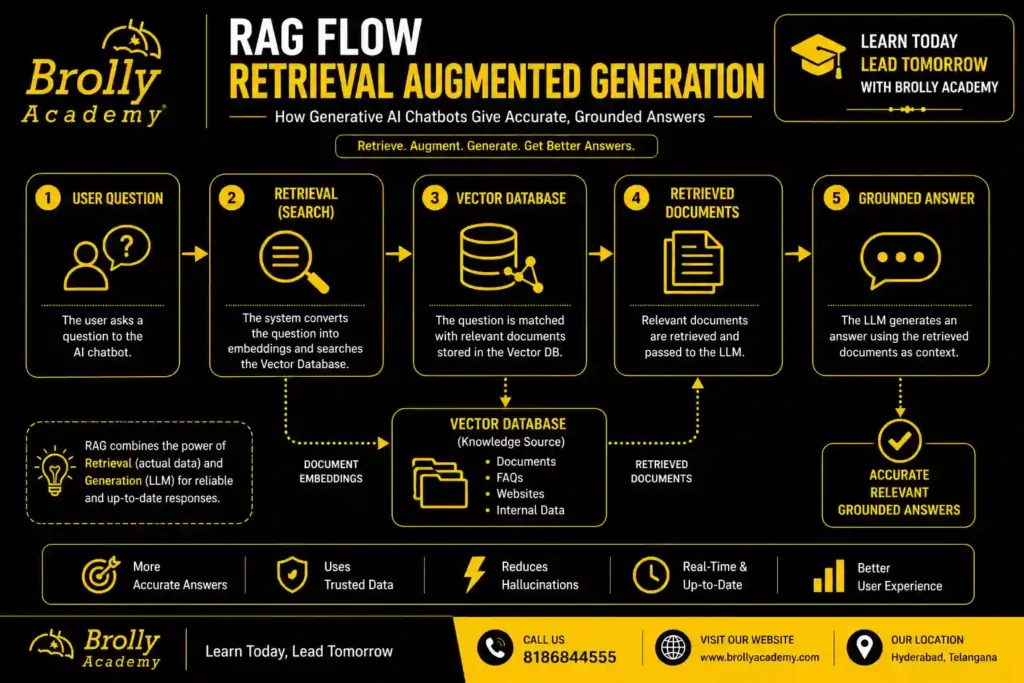
Here are the main building blocks in plain terms:
SOC Analyst Levels Explained
SOC Analyst L1
Entry-level analysts typically:
- Monitor alerts
- Review dashboards
- Perform basic investigations
- Escalate incidents
Real-World Use Cases by Industry
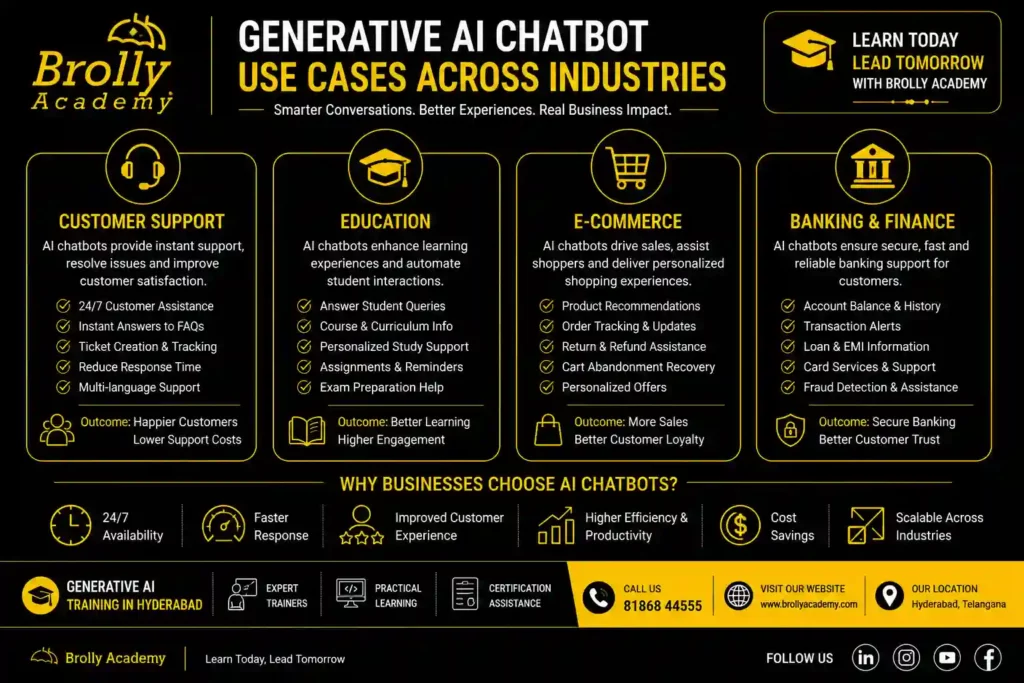
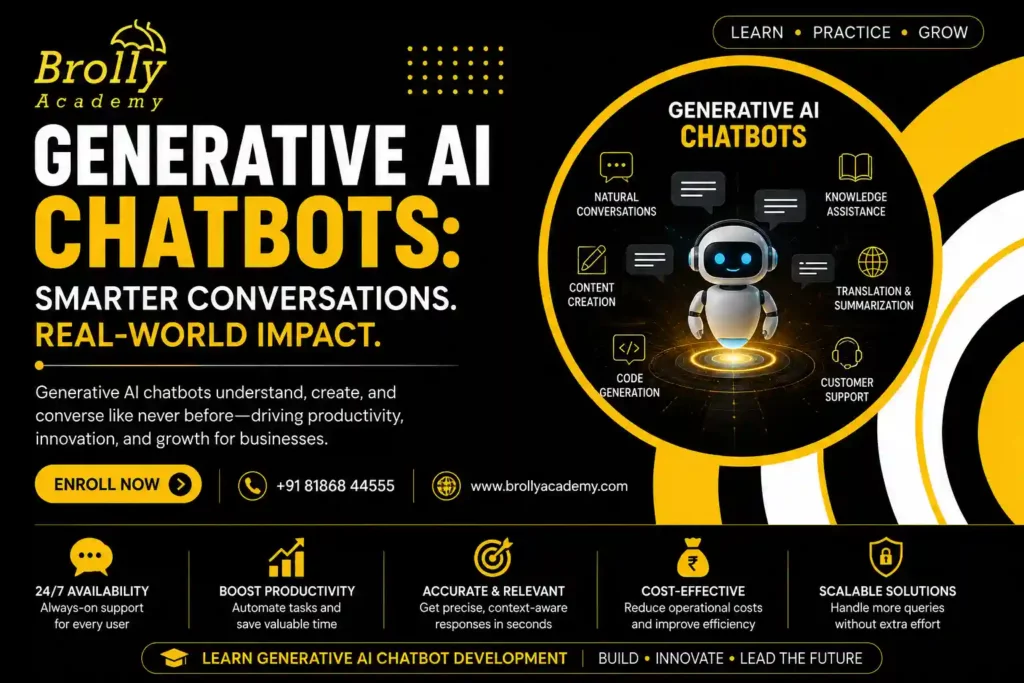
Generative AI chatbots are used across almost every industry to answer questions, speed up work, and support customers. The most common uses are customer support, sales help, internal knowledge assistants, education, and content creation. The value comes from turning slow, manual tasks into instant answers.
Here is how different sectors use them:
- Customer support: answer common questions instantly, handle multiple languages, and hand off hard cases to humans.
- E-commerce: help shoppers find products, compare options, and track orders.
- Education and training: act as a study buddy, explain concepts, and quiz learners.
- Healthcare (non-clinical): answer admin questions, book appointments, and share general information. Medical advice still needs qualified professionals.
- Banking and finance: answer account and policy questions and guide users through processes.
- HR and internal teams: answer staff questions about leave, policies, and tools from a company handbook.
- Marketing and content: draft posts, emails, and product descriptions for a human to review.
- Software development: explain code, suggest fixes, and write test cases.
Real-world scenario: a training institute builds a chatbot that answers questions about course fees, timings, and syllabus using RAG on its own brochures. A prospective student gets accurate answers at 11 pm, and the sales team wakes up to warmer leads. That is a small, high-value project a beginner can build after focused practice.
Benefits and Honest Limitations
Generative AI chatbots offer speed, scale, and round-the-clock availability, but they also carry real limits like occasional wrong answers and privacy risks. Using them well means enjoying the benefits while managing the weaknesses with the right design.
We believe honest content builds trust, so here is both sides.
Benefits
- Available 24 hours, every day.
- Handle many conversations at once.
- Support multiple languages.
- Reduce repetitive workload for teams.
- Give consistent answers when set up well.
- Turn documents into instant, searchable knowledge.
Limitations
- Hallucination: they can state wrong information confidently. Grounding with RAG and human review reduces this.
- Data privacy: sensitive data must be handled with care and clear rules.
- Cost at scale: heavy usage of hosted models adds up. Design matters.
- Bias: models can reflect biases in their training data.
- Not truly “understanding”: they predict patterns. They do not think like humans.
Best practice: never let a chatbot give final answers on high-stakes topics like medical, legal, or financial decisions without a human in the loop. Use it to assist, not to replace judgement.
Tools and Platforms to Build One
- You can build a generative AI chatbot using a model provider, an orchestration framework, and a vector database. Beginners often combine a hosted model API, a framework like LangChain or LlamaIndex, and a vector store. These tools handle the heavy lifting so you focus on data and design.
- Here is a simple map of the common building blocks. Tool choices change fast, so treat this as a starting point and verify current options.
| Layer | What It Does | Common Options |
|---|---|---|
| Model Provider | Generates responses by processing user questions and creating human-like answers. | OpenAI, Google Gemini, Anthropic Claude, Mistral AI, DeepSeek, Llama models. |
| Orchestration Framework | Connects AI models with external data, tools, APIs, and workflows. | LangChain, LlamaIndex, Semantic Kernel, CrewAI. |
| Vector Database | Stores embeddings and retrieves relevant information for AI applications. | Pinecone, ChromaDB, Weaviate, Milvus, Qdrant, FAISS. |
| Chat Interface | Provides the interface where users interact with the AI chatbot. | Website Chat Widget, WhatsApp, Mobile Apps, Slack, Microsoft Teams, Telegram. |
| Monitoring & Analytics | Tracks chatbot performance, response quality, usage, errors, and operating costs. | LangSmith, Helicone, OpenTelemetry, Grafana, Datadog, Azure Monitor. |
- Expert tip for beginners: you do not need all of this on day one. A first project can be a model API plus a small RAG setup on a few documents. Add complexity only when you need it.
Industry Trends and What Comes Next
- Generative AI chatbots are moving from simple question-answering toward agents that can take actions, use tools, and complete tasks.
- Three clear directions stand out: grounding answers in private data, multimodal input, and agentic behaviour. These trends shape the skills that will be in demand.
- We are being careful here, because exact market-size figures vary widely by source and year. Rather than quote numbers we cannot verify, we describe the direction the field is clearly moving.
Future Trends Shaping Generative Ai Chat bots
- Grounding is now standard. RAG has become the default way to make chatbots accurate for a specific business. Expect this to stay central.
- Multimodal is normal. Reading images, files, and audio is becoming common, not a special feature.
- Agents are rising. The next step is chatbots that do not just answer but complete tasks: book, search, update records, and chain steps together.
- Smaller, private models are growing. Not every use needs the largest model. Smaller, cheaper, self-hosted models handle many jobs and protect privacy.
- Roles are specialising. Job titles are splitting into prompt engineering, LLM development, retrieval design, and AI safety and evaluation.
What this means for you: learn the Python fundamentals well. Models will keep changing. The core skills of retrieval, prompting, evaluation, and clean data design will stay valuable.
Common Mistakes to Avoid
Most failed chatbot projects fail for the same reasons: unclear goals, messy data, no grounding, and no testing. Avoiding these mistakes matters more than picking a fancy model. A simple, well-grounded bot beats a complex, sloppy one every time.
Watch out for these:
- No clear purpose. A bot that tries to do everything usually does nothing well.
- Skipping RAG. Relying on the model’s memory alone leads to outdated or wrong answers.
- Dirty data. Duplicate and old documents confuse retrieval and produce bad replies.
- Weak system prompt. Without clear rules, the bot drifts off-tone or off-topic.
- No guardrails. Unfiltered bots can share unsafe or private content.
- No human handoff. Some questions must reach a person. Plan for it.
- No testing with real users. Lab tests miss the messy way real people type.
- Ignoring cost. Heavy usage without design can get expensive fast.
Quick checklist before you launch:
- Clear, narrow purpose defined
- Clean, current data prepared
- RAG set up and tested
- System prompt written and reviewed
- Guardrails and handoff rules in place
- Tested with real, messy questions
- Monitoring and cost limits active
Expert Tips for Building Better Chatbots
The strongest generative AI chatbots come from good data, sharp prompts, and constant testing, not from chasing the newest model. Focus your effort where it moves the needle: the content the bot reads and the instructions it follows.
Here are tips we would give any learner starting out:
- Start small. Build one narrow, useful bot before you attempt a big one.
- Invest in data. Clean, well-structured documents beat a bigger model.
- Write prompts like a manager. Be clear about role, tone, limits, and format.
- Ground everything. Use RAG so answers come from real sources.
- Measure quality. Track accuracy, not just conversation count.
- Plan for failure. Decide what the bot says when it does not know.
- Keep a human in the loop for anything sensitive.
- Iterate weekly. The first version is never the best version.
Interesting fact: many of the biggest quality gains in real chatbots come from improving the prompt and the retrieved documents, not from switching models. Small teams win by getting these basics right.
Skills You Need to Build Generative AI Chatbots
To build generative AI chatbots you need a mix of Python basics, an understanding of large language models, prompt engineering, retrieval design, and some deployment skills. You do not need a PhD. You need focused, practical skills and hands-on projects.
Here is a practical skill map:
- Python fundamentals: the most common language for AI work.
- How LLMs work: tokens, context, embeddings, and their limits.
- Prompt engineering: writing clear, reliable instructions.
- RAG and vector databases: grounding answers in real data.
- APIs and frameworks: connecting models, data, and interfaces.
- Evaluation: testing quality and catching errors.
- Basic deployment: putting the bot on a real channel.
- Responsible AI: privacy, safety, and bias awareness.
You can learn these in a structured order. Trying to learn everything at once slows most beginners down. A guided path with real projects is faster.
Learn Generative AI Chatbots
The fastest way to learn is a structured, project-based path that moves from LLM basics to building and deploying a real chatbot. Self-study works, but many learners move faster with hands-on guidance, mentor feedback, and real projects to show employers.
At Brolly Academy, our Generative AI training in Hyderabad is built around this exact idea: learn by building. We founded the academy in 2015 and have trained 20,000+ students across IT and professional courses. Our approach focuses on practical, job-ready skills rather than theory alone.
What learners get with us:
- Hands-on projects, including building chatbots grounded in real data.
- Classroom and online options to suit your schedule.
- A course duration of 3 Months.
- Certification guidance to help you validate your skills.
- 100% Placement Assistance, backed by 75+ hiring partners.
- Training rated 4.8 stars by 300+ Google reviews.
Our Generative AI course is led by trainers with real industry experience, and we keep class sizes practical so you get support. If you want to move from “I understand chatbots” to “I can build and deploy one,” a guided path shortens the journey.
Ready to start? Explore our Generative AI course, or talk to our team about the right fit for your goals.
Frequently Asked Questions
1. What are generative AI chatbots in simple words?
They are chat programs that use large language models to understand your question and write a fresh, human-like answer instead of picking from fixed replies.
2. How are generative AI chatbots different from normal chatbots?
Normal chatbots follow scripts and keywords. Generative AI chatbots understand meaning and generate original answers, so they handle unexpected questions much better.
3. Are ChatGPT and Gemini generative AI chatbots?
Yes. ChatGPT, Gemini, Claude, and Copilot are all generative AI chatbots built on large language models.
4. Do generative AI chatbots always give correct
No. They can sound confident but be wrong. This is called hallucination. Grounding answers with RAG and adding human review reduces errors.
5. What is RAG in a generative AI chatbot?
RAG stands for Retrieval Augmented Generation. It lets a chatbot pull relevant information from your own documents before answering, which improves accuracy.
6. Can I build a generative AI chatbot without coding?
You can build simple ones with no-code tools. For custom, data-grounded chatbots, some coding, usually Python, gives you far more control.
7. Do I need to train my own AI model to build a chatbot?
No. Most projects use an existing model and add your own data through retrieval. Training from scratch is expensive and rarely needed.
8. What is the difference between generative AI and conversational AI?
Conversational AI is the broad field of machines talking with humans. Generative AI is a capability that creates new content. A generative AI chatbot uses both.
9. Which programming language is best for building AI chatbots?
Python is the most common choice because of its libraries and community support.
10. What is a large language model?
It is an AI model trained on huge amounts of text that can understand and generate human-like language.
11. What is a context window in a chatbot?
It is the amount of recent text the model can consider at once. It is how the bot remembers earlier parts of your conversation.
12. Are generative AI chatbots safe for business use?
They can be, with the right design: grounding, guardrails, privacy rules, and human handoff for sensitive cases.
13. How much does it cost to build a generative AI chatbot?
Cost varies widely by scale, model choice, and usage. A small project can start cheap. Always design for cost to avoid surprises.
14. What is prompt engineering?
It is the skill of writing clear instructions that guide a model to behave the way you want.
15. Can generative AI chatbots speak multiple languages?
Yes. Many understand and reply in several languages, which makes them useful for diverse audiences.
16. What is a vector database used for?
It stores documents as embeddings so the chatbot can quickly find the most relevant content for each question.
17. Will generative AI chatbots replace human jobs?
They automate repetitive tasks, but they also create new roles in building, testing, and managing these systems. Learning the skills keeps you ahead.
18. What industries use generative AI chatbots the most?
Customer support, e-commerce, education, banking, healthcare admin, HR, and software development are among the biggest users.
19. What is the difference between a chatbot and an AI agent?
A chatbot answers questions. An AI agent can also take actions and complete multi-step tasks using tools. Agents are the next step beyond chatbots.
20. How long does it take to learn to build generative AI chatbots?
With a focused, project-based path, many learners build a working chatbot within a few months of consistent study.
21. Can students build generative AI chatbots as projects?
Yes. A grounded FAQ chatbot on a small set of documents is a great beginner project that teaches the full workflow.
22. Where can I learn generative AI chatbot development in Hyderabad?
Brolly Academy offers hands-on Generative AI training in Hyderabad, with real projects, certification guidance, and placement assistance.
Key Takeaways
- Generative AI chatbots use large language models to generate original, human-like answers.
- They differ from rule-based bots by understanding meaning instead of matching scripts.
- They work by turning text into tokens and embeddings, then predicting the answer word by word.
- RAG grounds their answers in your own data and is the key to accuracy.
- You build one by choosing a model, adding retrieval, memory, and guardrails, then testing.
- Popular examples include ChatGPT, Gemini, Claude, Copilot, and Perplexity.
- The field is moving toward agents, multimodal input, and private grounded models.
- The most valuable skills are prompting, retrieval, evaluation, and clean data design.
Conclusion
Generative AI chatbots are no longer a novelty. They are becoming a normal part of how businesses answer questions, how learners study, and how teams get work done. The technology behind them, language models, retrieval, and careful design, is learnable. You do not need to be a researcher to build something useful.
If you understand the basics in this guide, you already know more than most people using these tools every day. The next step is to build. Start small, ground your bot in real data, test it with real questions, and improve it week by week.
If you want a guided, hands-on path from beginner to builder, we are here to help. Brolly Academy offers practical Generative AI training in Hyderabad with real projects, certification guidance, and 100% Placement Assistance.
Talk to our team today. Call: +91 81868 44555 Email: brollyacademy@gmail.com Web: brollyacademy.com Visit: Metro Pillar No. A689, JNTU Metro Station, 3rd Floor, Hyderabad 500072

Brolly Academy Team
AI, Data Science & Software Training Experts | 20+ Years of Training Experience
Brolly Academy Team is a group of AI, Data Science, Cloud Computing, and Software Development professionals dedicated to helping learners gain practical skills and industry knowledge. Since 2015, Brolly Academy has supported thousands of students and professionals through technology training, certification guidance, and career-focused learning.